Launching Sep 27–Oct 3, 2027
This launch is approved and scheduled. The page and its dofollow backlink are live now - it joins the weekly drop in its launch week.

3D House Planner
Free 3D Home Design Software on the Web.
50points
Recent Supporters
Details
Launched
October 23, 2026
Category
Design Tools
Pricing
Free
Tags
About 3D House Planner
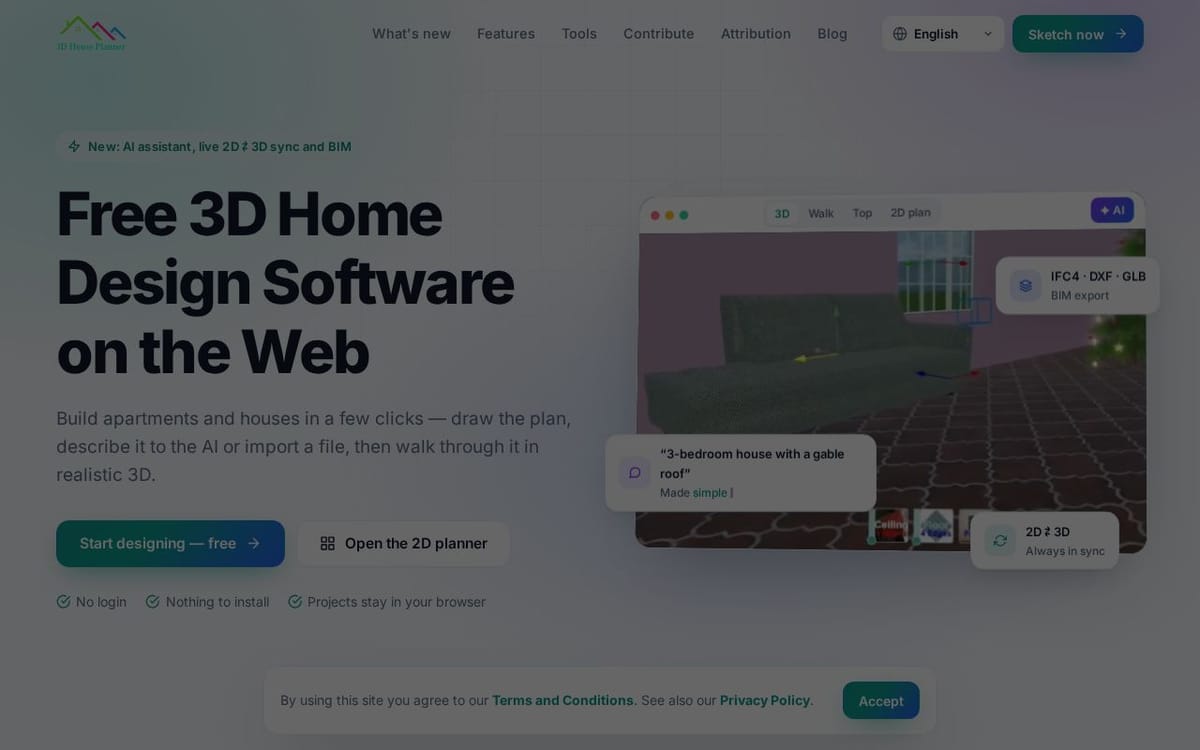
3D House Planner is a browser-based tool for designing houses and apartments. Users can sketch floor plans in 2D or 3D, describe a layout to the AI assistant, or import plans and models. The editor includes furniture and materials, terrain modeling, visualization modes, and live synchronization between 2D plans and 3D models.
It is aimed at people designing homes and apartments, as well as users working with BIM and CAD files. Projects are saved in the browser with autosave and recovery; the site says no login or installation is required and designs are not uploaded. It supports IFC4 and other import and export formats, and is free for personal and commercial use.
What 3D House Planner does
3D House Planner is a browser-based application for designing houses and apartments. Users can create floor plans and 3D models, furnish spaces, and visualize designs. It supports BIM data and file exchange with BIM and CAD tools, including quantities, cost estimates, and model checks. The page presents it as a way to move from an idea, draft, or imported plan to an editable model, without installing software or creating an account.
Users start by sketching walls in 2D or 3D, describing a design to the AI assistant, or importing a floor plan image, DXF, IFC, or supported 3D model. The editor creates or updates editable elements such as walls, doors, windows, floors, roofs, and furniture. Changes in the 2D plan and 3D model stay synchronized. Users can furnish and texture designs, choose visualization modes, walk through models, capture images or videos, and export files.
The page describes the application for people designing houses and apartments, and for users who need to work with plans, 3D models, or BIM and CAD files. It supports projects of up to 50 floors and offers visualization modes from Draft for laptops to Ultra for more capable GPUs. Projects remain in the user's browser, with no login or cloud upload, and the app is free for personal and commercial use.
Based on 3dhouseplanner.com, read on Oct 23, 2026.
Key features
- AI-generated layouts from descriptions or images
- Synchronized 2D plans and 3D models
- IFC4 import and export
- Browser-based project saving with autosave and recovery
- D visualization, snapshots, and video recording
- Import and export across model and drawing formats
What people use 3D House Planner for
- 01Design house and apartment layouts
- 02Furnish rooms with catalog objects and textures
- 03Create and visualize BIM models
- 04Import plans and models for editing
- 05Export designs for BIM, CAD, or 3D printing
More in Design Tools
Browse all Design Tools Ai Logo Generator
AI Logo Generator Describe your brand and generate professional, custom logo designs in seconds
 ColoringStore
Create printable coloring pages from text prompts or photos with ColoringStore.
 Printery - Print for Figma
Printery is a Figma print plugin that exports print-ready PDFs with CMYK conversion, ICC profiles
 GROAR
GROARMake your social metrics Roaaar
 Vidregen
Create Images and Videos With the World's Best AI Models
 ArchOne AI
All-in-one AI spatial design visualization platform for interior, exterior and landscape design.