Launch & Growth
How to Submit Your SaaS to Directories, Step by Step
Most of the work of a directory submission happens before the first form, on your homepage and in the copy you will paste a hundred times. This is the process step by step, written by a team that reviews the submissions to its own directory and submits founders' products to others.

Contents (9)
- Step 1: Get your homepage ready
- Step 2: Write the listing kit once
- Step 3: Choose directories your buyers use
- Step 4: Set up an inbox and a tracker
- Step 5: Submit one form at a time
- Step 6: Follow up and check each live listing
- Step 7: Measure what the listings did
- How long it takes, and the part you can hand off
- FAQ
To submit a SaaS to directories, prepare two things before the first form: a homepage that holds up when a directory's form or reviewer reads it, and a listing kit you write once and paste everywhere. Then pick directories your buyers browse, submit from a dedicated inbox and log each submission until it is live or declined.
We see this from both sides. SaaSCity is a directory, so we review every product submitted to it by hand, and we also run a service that submits founders' products to other directories. Below is the process we would follow for a new product today. The section on how long it all takes says where our own service fits.
The process has seven steps:
- Get your homepage ready.
- Write the listing kit once.
- Choose directories your buyers use.
- Set up an inbox and a tracker.
- Submit one form at a time.
- Follow up and check each live listing.
- Measure what the listings did.
Step 1: Get your homepage ready
Your homepage is read twice before anyone reads your listing. The form reads it first: many directories ask for your URL and draft the listing from your page, and the submit form on SaaSCity starts exactly that way. Then a reviewer opens it to see whether a real product sits behind the link.
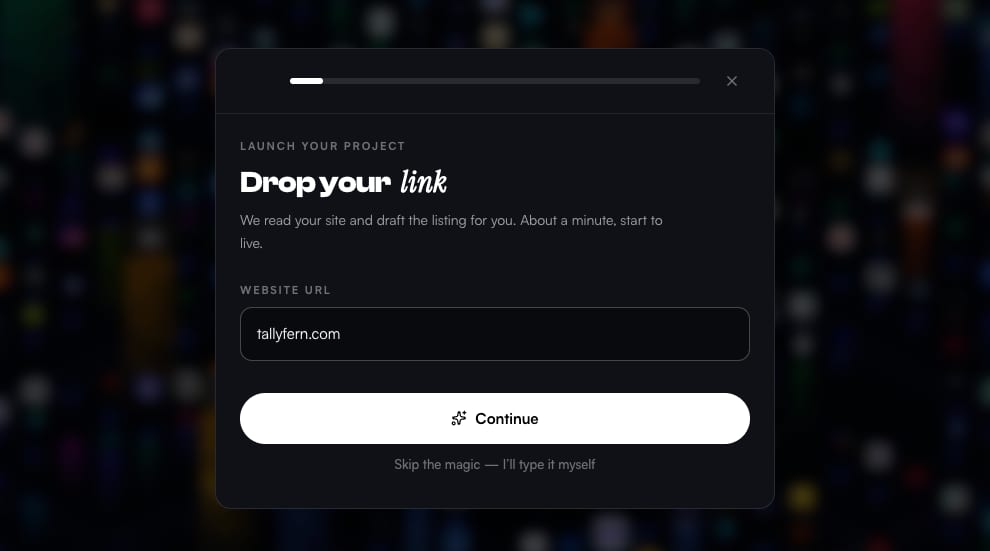
A form that drafts from your URL fills its fields from a few tags in your page's head, so check these first:
- The title tag often becomes the listing name or tagline. Put the product name and what it does in under 60 characters.
- The meta description often becomes the short description. Give it 70 to 160 characters on who the product is for and what it does.
- The og:image is the preview card on launch platforms and social posts. Make it 1200 × 630 pixels.
- Forms that fetch a logo take your favicon or apple-touch-icon, so point them at a square image that still reads at small sizes.
- Scrapers, link previews and many AI crawlers do not run JavaScript. If your homepage only renders in the browser, they read it as an empty page.
The reviewer looks for other things. Whether a directory reviews by hand or with a script, these are the checks a submission meets first, on SaaSCity as elsewhere:
- The site is on your own domain, over HTTPS. Many directories refuse products hosted on a free subdomain because the domain is not yours, and we do too.
- The page shows a product. Parked domains and error pages are declined on sight, and a "coming soon" page with no way to sign up gives a reviewer nothing to approve.
- Someone can try or buy it: the sign-up or download works, and there is a pricing page, a privacy policy and terms.
- Nothing tells search engines to stay away. With a noindex tag on the homepage, or a robots.txt that blocks every crawler, each link you earn points at a page Google will not show.
- The canonical tag points at your own domain.
If you work with an AI agent, the free SaaSCity MCP server has a check_launch_readiness tool that runs most of these checks against any URL.
Step 2: Write the listing kit once
Every form asks for roughly the same dozen fields, in a different order and with different limits. Write them once, in one document, and paste from there. A typical form asks for these:
| Field | What to write |
|---|---|
| Name | The exact product name, capitalized the same way everywhere, with no keywords added. |
| Tagline | What it does and for whom, under 60 characters so no form cuts it. |
| Short description | One or two sentences, around 160 characters. Your meta description is a good start. |
| Medium description | 400 to 600 characters, for forms that cap the long description: what it does, for whom and how it differs. |
| Long description | 150 to 300 words for directories that give you a full page: the problem, who the product is for, its main features, the pricing model and how it differs from the usual way of doing the job. |
| Category and tags | One main category and three to five tags, in the words your buyers search with. |
| Pricing | The model (free, freemium, free trial or paid) and the lowest price, matching your pricing page. |
| Links | Website, pricing page, docs, a demo video and the social profiles you keep up to date. |
| Company | Founding year, country, the founder's name and role, and a contact address on your domain. |
| Alternatives | Two or three products people compare you with. Alternatives sites ask for them. |
Write the description for a reader
A tagline that could describe a hundred products gets skipped on a directory page. "All-in-one AI platform to supercharge your finances" tells a reader nothing about what happens after they sign up. "Turns Stripe payouts into bookkeeping entries for freelancers" names the input, the output and the customer.
Length also affects whether the listing page gets indexed. On SaaSCity, a free listing with fewer than 80 words written by the maker is usually kept out of Google's index, and a description that only repeats the tagline does not count toward it. Our form shows the count as you type:
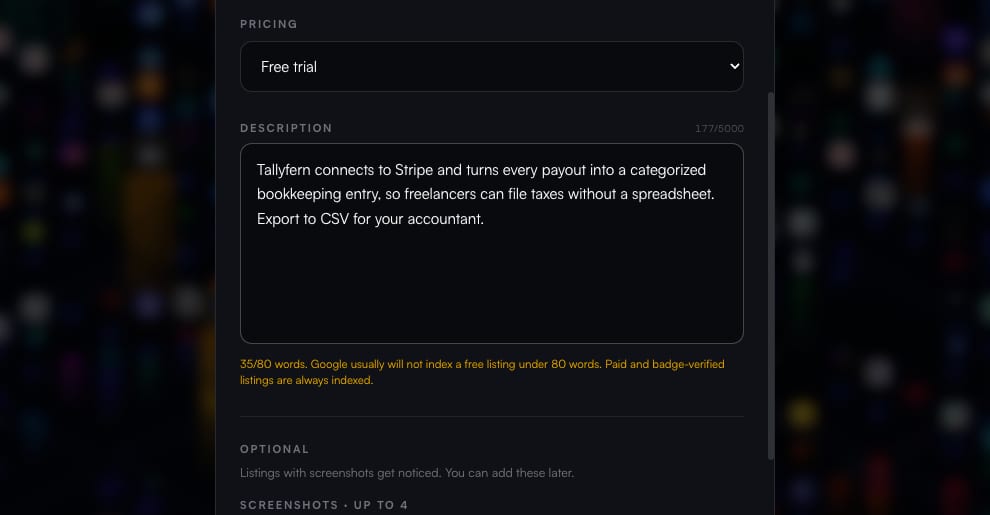
Other directories make their own call on thin listings, and a page with two sentences on it gives any search engine little reason to index it. Write the long description so it could stand on its own as a page.
Then write two or three versions of it and rotate them. When the same paragraph sits on fifty directory pages, Google tends to show one of them for a search and filter out the rest, so variants give more of your listings a chance to appear.
Prepare the images once
Make a square logo of at least 512 × 512 pixels as a PNG with a transparent background, and a second version on a solid background for directories that show logos on dark cards. Keep an SVG for the forms that accept one.
Take three to five screenshots at 16:9, either 1920 × 1080 or 1280 × 720. Put the screen that explains the product first, since many directories use the first image as the thumbnail. Crop out the browser bars and keep each file under about 2 MB. A 60 to 90 second demo on YouTube or Loom covers the forms that ask for video, and they almost always ask for a link.
Name the files the way forms ask for them (logo-512.png, screenshot-1.png) and keep them in one folder next to the kit.
Step 3: Choose directories your buyers use
A directory is worth a form when people browse it for products like yours and its listing pages show up in Google. Four kinds of directory are worth knowing:
- Launch platforms put you on a launch day, with votes and a burst of visitors. Time them for your launch week. Our Product Hunt alternatives guide compares them.
- Software and alternatives directories are where people land when they compare tools. Their reviews can take weeks, so submit to them first.
- Software review sites matter when you sell to teams and have customers who can write reviews.
- Niche directories cover one kind of product, such as AI tools, developer tools or a single industry. They are smaller and closer to your buyer.
Our list of SaaS and startup directories shows the link type, price and live Domain Rating of each one, so you can shortlist without opening every site.
Check a directory before you fill in its form
These checks take a couple of minutes and spare you the forms that would do nothing for you:
- It is alive: products were added in the last few weeks and the submit page works.
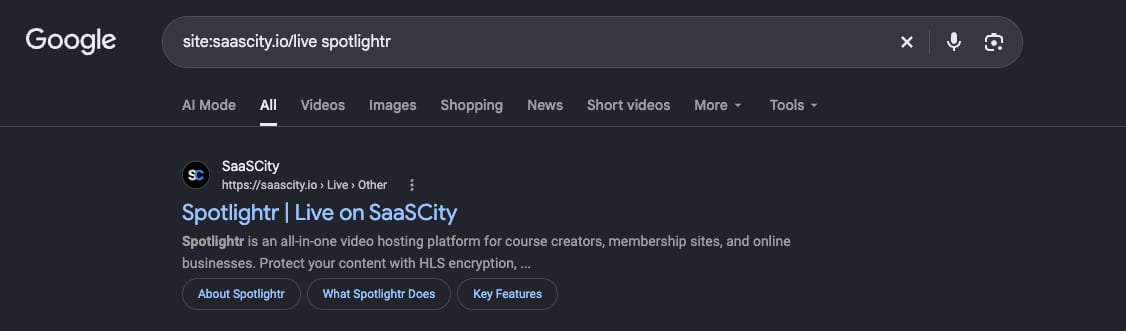
- Its listing pages are indexed. Search Google for
site:followed by the directory's domain and the name of a product listed there. If nothing comes back, a listing there will not help you in search. - You know whether the link is followed. Open a listing and inspect its link to the product's website. A rel value of nofollow, ugc or sponsored asks Google not to count the link for ranking, which leaves you the visitors and a page that can rank for your name. Google's guide to rel values explains each one.
- You know what it costs: free, free with a badge, a paid review or a paid fast-track.
- It sells nothing but listings. A directory that also sells guest posts, link insertions or "DR boosts", or lists casinos next to software, is selling links. Google's spam policies name "low-quality directory or bookmark site links" as an example of link spam.
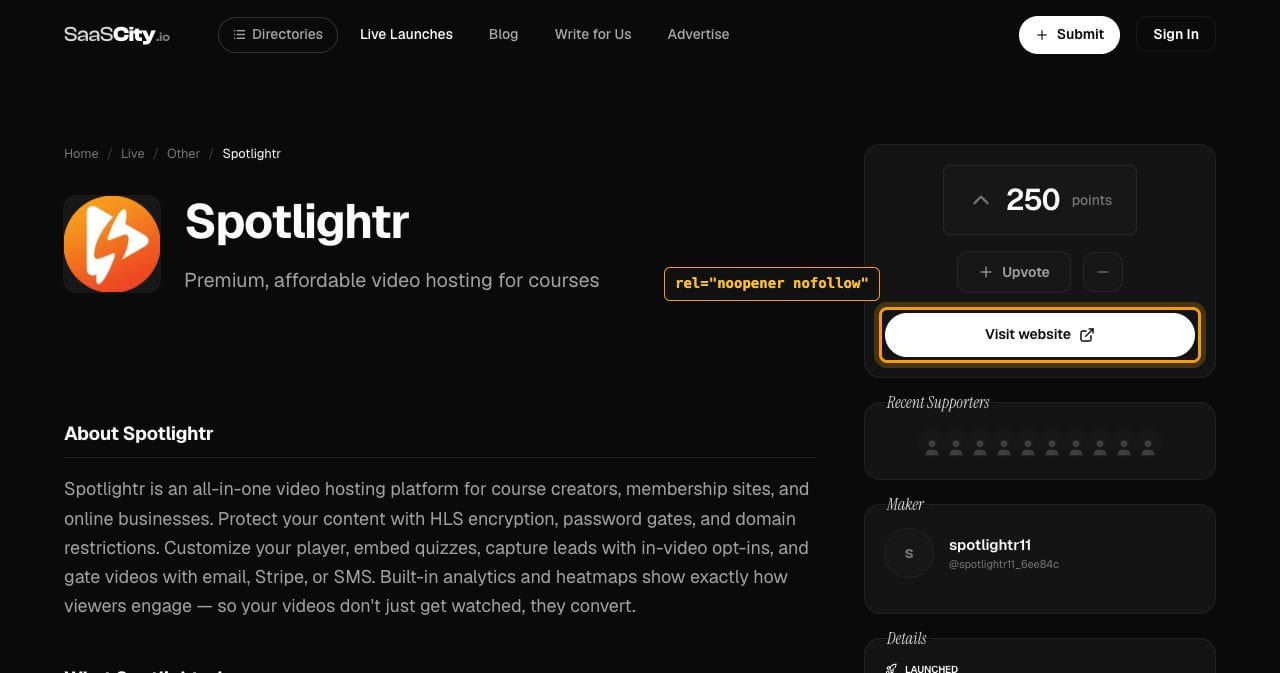
Here are checks 2 and 3 on a free listing in our own directory. Google has indexed the listing page:
The listing's website button carries rel="noopener nofollow", which is what a free SaaSCity listing gets until our badge is on the maker's homepage. Step 5 covers badges.
When to submit where
Submit to directories with slow reviews two to four weeks before you need the listings live. Keep launch platforms for your launch week, at most one a day, so you can answer every comment. Leave review sites until you have customers who can write a review. If you have not launched yet, a few directories list upcoming products with a waitlist, while most want something people can sign up for today: submit to the first group now and hold the rest.
Step 4: Set up an inbox and a tracker
Use one address on your own domain for every directory, such as [email protected]. Confirmation links, approval notices and the newsletters that follow land in one place, and the accounts stay with the company if the person who created them leaves. Keep the logins in a password manager. When a directory only offers sign-in with Google, use a company Google account.
Log each submission the day you make it: the directory, the date, the status, the listing URL once it is live, the link's rel value and the login you used. A handful of statuses covers almost every case: submitted, waiting for email confirmation, in review, live, declined, needs payment and needs badge. The directory submission entry in our glossary lists more fields worth recording, such as indexing and referral visits.
Take a screenshot of each confirmation page as you go. When a directory has said nothing for six weeks, that screenshot is your proof the submission happened, and it tells you which inbox to search.
If a form keeps query strings, add UTM parameters to your URL, for example ?utm_source=directory-name&utm_medium=directory, so your analytics can tell the listings apart. A canonical tag on your homepage keeps search engines on the clean URL.
Step 5: Submit one form at a time
Paste from the kit, then fit it to each form. Shorten the tagline yourself instead of letting a field cut it mid-word. Pick the closest category, because a listing filed under Other is one nobody browses to. Check the logo preview, since a dark logo on a transparent background disappears on a dark card. Keep the pricing identical to your pricing page; reviewers compare the two.
Confirm verification emails the same day. Some links expire, and an unconfirmed submission rarely reaches a reviewer. Some directories also put you on a launch calendar. Pick a day you can spend answering comments, and don't stack several launches on one morning.
Badges and links in return
Many directories give a followed link, or list a free product at all, only when their badge is on your site. SaaSCity works this way too: a free listing ships with a dofollow link once our badge is on your homepage.
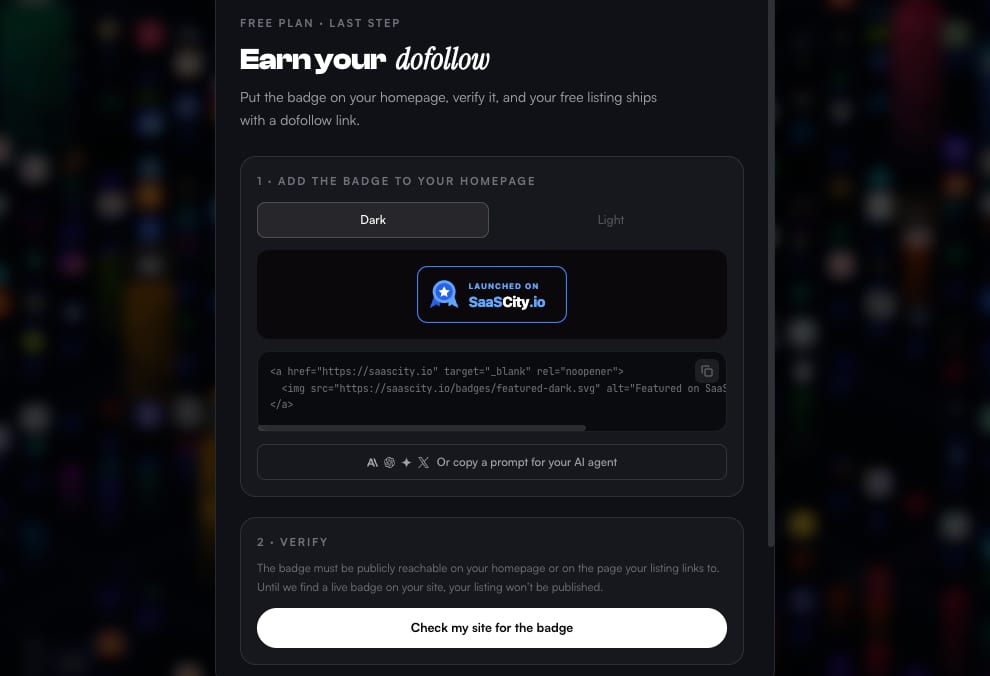
Decide how you handle badges before the first form asks. Choose where they go (a footer strip or a "Featured on" page) and which directories you are glad to be associated with. Then keep each badge where its directory looks for it, usually your homepage. We recheck SaaSCity badges every night, and a listing whose badge disappears is flagged for review.
Paid options are the other thing to decide in advance. Fast-tracks, featured slots and review fees appear on many forms. Pick your rule before you start, for example to pay only where the audience matches your buyers and you need the date. Deciding it form by form, forty forms in, is how the costs add up.
The form in these screenshots is ours. If you want a first listing to try your kit on, submit your product to SaaSCity; every listing is reviewed by a person.
If an AI agent does the typing
An agent with a browser can fill most forms from your kit. It stops at CAPTCHAs, logins and email confirmations, and those need you. Give it the kit as a file, have it write each submission to your tracker and read what it is about to submit: agents pick the wrong category, and to fill a required field they sometimes invent a feature you don't have.
Step 6: Follow up and check each live listing
Approval takes anywhere from minutes to months, and some directories never answer. Look at the tracker once a week. After a month without news, send one short message through the directory's contact form, then move on.
When a listing goes live, open it and check that:
- the link goes to your homepage over HTTPS, with no typo and no redirect chain;
- the rel value on the link is what the directory promised;
- the logo, screenshots and category came through;
- the description was not cut off.
Then run the site: search from step 3 on your own listing. You can't ask Google to index a page on someone else's site, but a link to the listing from a page Google crawls often, such as a "Featured on" page on your own site, helps it find the listing.
When your pricing or positioning changes, update the listings. Directory pages are among the third-party descriptions AI assistants read when someone asks for a tool, and a stale listing is how an answer about your product ends up wrong.
Step 7: Measure what the listings did
Start with visits. In Google Analytics 4, the Traffic acquisition report (under Reports > Acquisition) shows which directories send people once you set session source as the dimension, and the UTM tags from step 4 make that list cleaner.
Search your product's name as well. Listing pages that rank for it take up more of the first page of results, which helps when a buyer looks you up before signing up.
For links, the Links report in Google Search Console shows a sample of the sites that link to you, though it does not say whether a link is nofollow. Ahrefs' Domain Rating "shows the strength of a website's backlink profile compared to the others in our database," as Ahrefs defines it, and our free DR checker looks yours up. It moves once Ahrefs' crawler finds the new links, so expect a lag, and remember it is Ahrefs' metric and not Google's. Our post on Domain Rating covers what it does and does not tell you.
How long it takes, and the part you can hand off
Each form takes a few minutes. The time goes into everything around it: finding the real submit page, creating the account, confirming the email, fitting your copy to the limits and resizing the logo once more. By our estimate that is about 12 minutes per directory by hand, so a hundred directories is around 20 hours of forms before any follow-up.
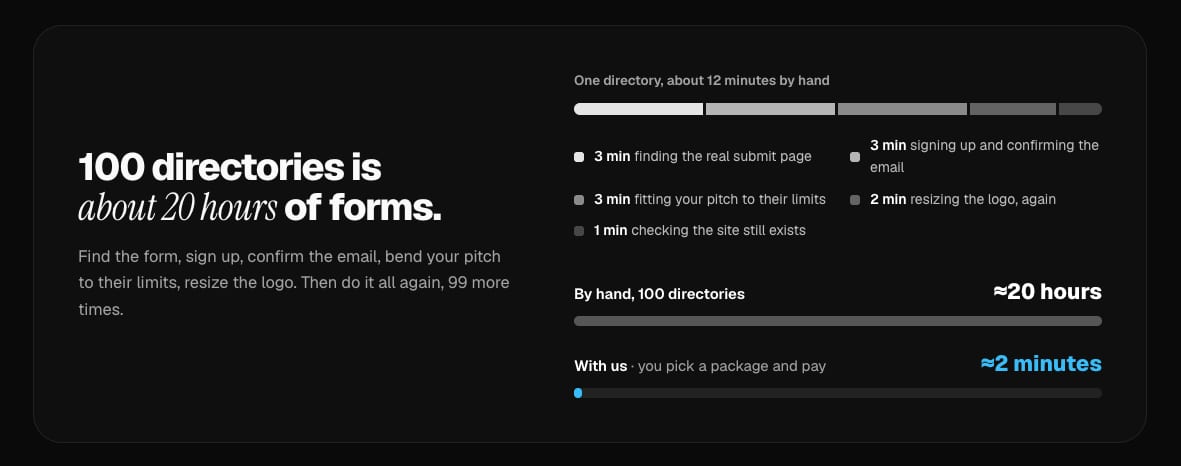
If you would rather spend those hours on the product, our directory submission service does the choosing and the submitting for you. You pick a package, give us the product's name and site (it does not need a SaaSCity listing) and pay once. We work from what your site says, so step 1 still pays off. We submit it to as many directories as the package holds, one submission per directory written for its fields, and email you a report of every submission with its status and a screenshot, as PDF, Excel and CSV files. The optional badge component is one snippet for your footer that holds the badges of many directories, and every badge we find on your site adds a directory to your package.
Each package guarantees an increase in your site's Domain Rating as Ahrefs measures it. If Ahrefs does not show it higher once the submissions are done, we keep submitting to more directories at no extra cost until it does. We don't promise rankings or traffic, and each directory still decides whether to list your product and whether its link is followed. You can get a full refund until work starts. To weigh us against the alternatives first, read our comparison of directory submission services.
FAQ
How do I submit my SaaS to directories?
Prepare before the first form. Fix the homepage tags directory forms read (title, meta description, og:image and icon), write one listing kit with the name, a tagline, short and long descriptions, category, pricing, logo and screenshots, and pick directories your buyers browse. Then submit from a dedicated inbox and log each submission until it is live or declined.
What do I need before submitting my startup to directories?
A live product on your own domain over HTTPS, with a working sign-up or download, a pricing page, a privacy policy and a contact address. Then a listing kit: the exact name, a tagline under 60 characters, a short and a long description, a category and tags, a square logo of at least 512 × 512 pixels and three to five screenshots.
How long does it take to submit to directories?
The form itself takes minutes. Finding the real submit page, creating an account, confirming the email and resizing images take the rest. By our estimate one directory takes about 12 minutes by hand once your copy is ready, so 100 directories is about 20 hours. Approval on the directory's side can take anywhere from minutes to months.
Should I write a different description for every directory?
Write two or three versions and rotate them. Google tends to show one of several near-identical pages and filter out the rest, and some directories keep thin listings out of the index. On SaaSCity, a free listing needs at least 80 words written by the maker before Google is likely to index it.
Will submitting to many directories at once hurt my SEO?
Google has not published any limit on how fast a site may gain links. Its spam policies look at where links come from, and they name low-quality directory or bookmark site links as an example of link spam. Choose directories that people use and the pace matters little.
Are directory backlinks dofollow?
Some are. Each directory decides, and many give a followed link only for a paid listing or for their badge on your site. Check the rel attribute of the link on a live listing: nofollow, ugc or sponsored asks Google not to count the link for ranking, although the listing can still send visitors.
Can someone submit my SaaS to directories for me?
Yes. Directory submission services fill in the forms for you. Ours at SaaSCity submits your product to the directories in the package you pick, for a one-time price, and emails a report of every submission with its status and a screenshot. Each package guarantees an increase in your site's Ahrefs Domain Rating, and each directory still decides what it lists.
Get your SaaS in front of founders
List your product on the SaaSCity live city map - a permanent listing, real discovery, and a backlink from a high-DR directory. Free to start; upgrade for a dofollow link and a building on the map.