Launching Jan 4–10, 2027
This launch is approved and scheduled. The page is shareable now and goes fully live in its launch week.
BytesPDF
Every PDF tool you need. None of the uploads.
50points
Recent Supporters
Details
Launched
November 16, 2026
Category
Productivity
Pricing
Free
Tags
About BytesPDF
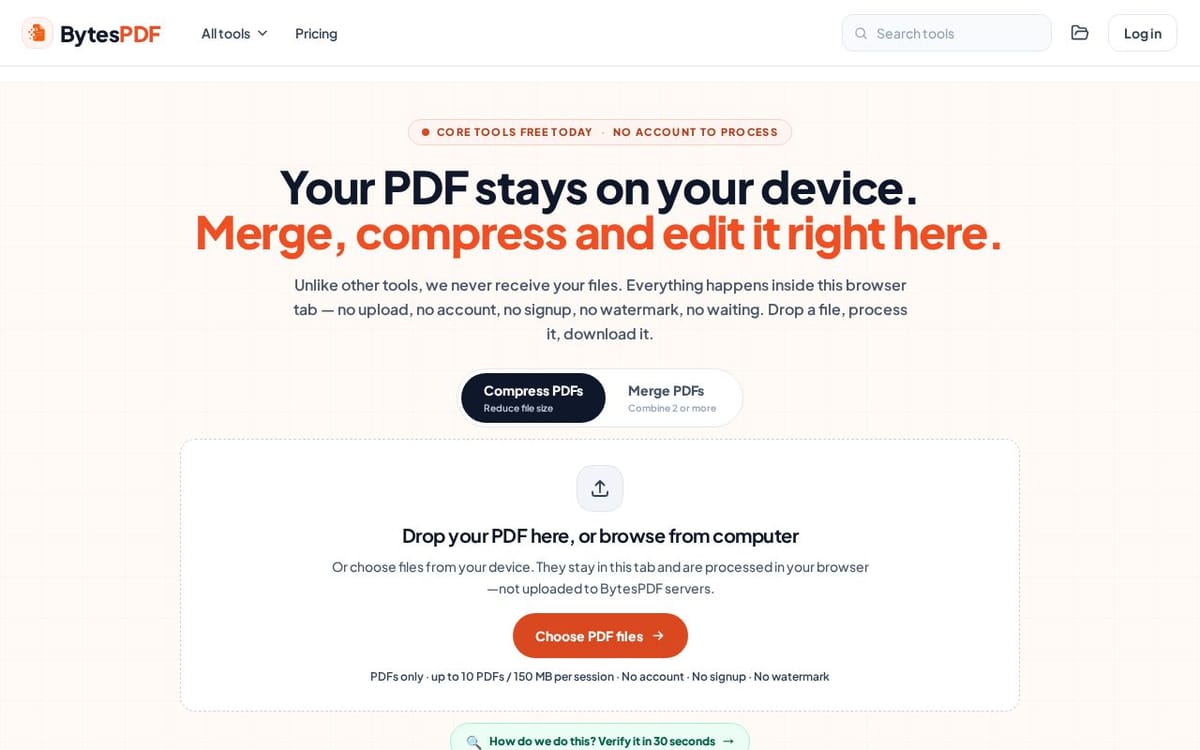
BytesPDF offers 17 free PDF tools — compress, merge, convert (PDF↔Word/Excel), sign with real PKCS#7 signatures, password-protect (AES-256), redact, OCR scans, rotate, remove metadata and more. Selected PDF content is processed locally in your browser and is never uploaded to BytesPDF servers. No account or watermark for core tools.
What BytesPDF does
BytesPDF provides browser-based tools for compressing, merging, editing, converting, securing, and checking PDF files. Its core compression and merge tools are free, and selected PDF content is processed locally in the browser rather than uploaded to BytesPDF servers. The service helps users prepare documents for tasks such as portal submissions, email attachments, job applications, and sharing. Specialist workflows, including OCR and digital signatures, are listed as Pro features.
A user chooses a PDF tool, selects files from their device, configures available options, and downloads the result. For core workflows, the selected PDF is read and processed inside the browser tab, with working data kept in tab memory rather than a BytesPDF document queue. Compression offers presets, while merging lets users arrange file order. The page also describes conversion, OCR, signing, and other tools; supported processed copies can optionally be saved in My files in the browser.
BytesPDF describes its tools for people preparing everyday documents, including students, freelancers, small businesses, legal and finance teams, accountants, and developers. Example workflows cover visa applications, resumes, email attachments, scanned documents, contracts, and bank statements. Its stated distinction is browser-local processing: selected PDF content is not uploaded to BytesPDF servers. Core tools require no account or signup, and published desktop and mobile file limits apply.
Based on bytespdf.com, read on Nov 17, 2026.
Key features
- Compress PDFs in the browser
- Merge PDF files
- Convert between PDF and Office formats
- Add digital signatures
- Run OCR on scans locally
- Password-protect and redact PDFs
What people use BytesPDF for
- 01Compress PDFs to meet portal file-size limits
- 02Merge documents into a single PDF
- 03Convert Word documents to PDF
- 04Make scanned PDFs searchable with OCR
- 05Prepare and check documents before sharing
More in Productivity
Browse all Productivity Mumble AI
 is a voice-first productivity app for Mac that combines meeting recording, dictation
 PixPin
An all-in-one productivity tool featuring smart screenshots, scrolling capture, screen recording
 DuoPlus Cloud Phone
 helps you run unlimited accounts on independent Android environments.
 VidBG Remover
 is an AI-powered online tool that allows users to remove video backgrounds quickly
 PDFtoMD
Convert any PDF into clean, structured Markdown in seconds with PDFtoMD
 MikeSullyTools
Fix blurry photos and improve short videos in your browser.