SaaSCity.io
DirectoriesLive LaunchesBlogWrite for UsAdvertise
Submit

Launching Nov 29–Dec 5, 2027

This launch is approved and scheduled. The page and its dofollow backlink are live now - it joins the weekly drop in its launch week.

Home
/Live
/Productivity
/Chronoid
Chronoid

Chronoid

Automatic time tracking for Mac. No timers, no cloud account, pay once.
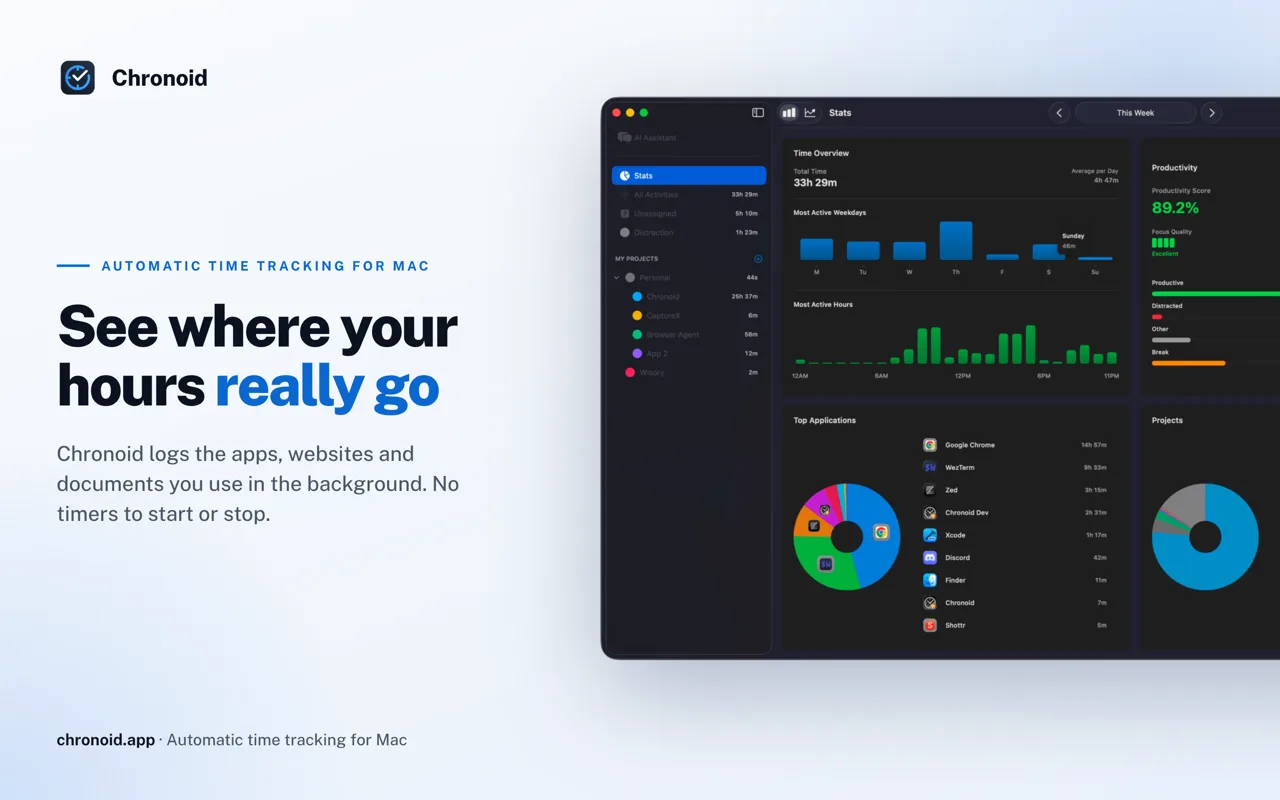
Product screenshot
50points
Visit website
Recent Supporters

Maker

t
tuanvu.vn007
@tuanvuvn007_1a14cd
Details

Launched

November 2, 2026

Category

Productivity

Pricing

Free trial

Tags

About Chronoid

See where your hours really go. Chronoid is an automatic time tracker for Mac. It runs quietly in the menu bar and records the apps, websites, window titles and documents you work in. There's no timer to start, so you never lose an afternoon because you forgot to press a button. Sort it without the busywork. Group time into clients, projects and sub-projects. Rules assign activity for you by app, website, file path, window title or keyword. Drag anything onto a project to file it, and optional AI suggestions handle the leftovers. Catch the hours that slip away. Chronoid notices when you step away, asks what you were doing when you come back, and offers to log a meeting the moment a Zoom, Teams or Meet call ends. Calendar events show up on the timeline too. Turn time into money. Mark projects billable, set rates in any currency, and create PDF invoices from tracked hours. Send time to ClickUp, monday.com or Linear if your team lives there. Understand your focus. A day timeline, Deep Work time, productivity trends and a daily AI recap show what you actually did. A website blocker and Pomodoro timer help when you drift. Yours, on your Mac. Your history is stored on your Mac, with no account needed. Sync between your own Macs uses your private iCloud. Bring your own AI, including local models and Apple Intelligence. Native, universal app for macOS 14 or later. Free 7-day trial, then pay once from $59.

What Chronoid does

Chronoid is a Mac app for automatically tracking work across apps, websites, and documents, assigning activity to client projects, and turning recorded hours into invoice-ready reports. It helps consultants and other hourly workers avoid forgetting to start timers or reconstructing billable time from memory. The app also provides time analytics, AI queries about tracked activity, and focus tools such as a Pomodoro timer and website blocker. Chronoid runs on a Mac and captures activity across apps, websites, and documents, with idle detection and project assignment. Users can filter recorded hours by client, project, or date range, review the breakdown, set hourly rates, and export PDF reports. They can ask questions about their time data in the app or through its local MCP server, using local AI options including Ollama, LM Studio, or Apple Intelligence, with cloud AI optional. The page describes Chronoid as built for freelancers, consultants, creatives, agencies, and remote workers, especially people who bill by the hour. It is intended for users who want to track time across Mac apps, organize activity by client and project, and prepare invoices from recorded work. The page emphasizes automatic tracking, local data privacy, and an option to buy the software outright alongside subscriptions.

Based on chronoid.app, read on Nov 2, 2026.

Key features

  • Automatically tracks apps, websites, and documents
  • Assigns activity to client projects
  • Exports time reports as PDFs
  • Shows time breakdowns by client, project, and day
  • Provides AI queries through a local MCP server
  • Blocks distracting websites and runs Pomodoro sessions

What people use Chronoid for

  1. 01Track billable hours across client projects
  2. 02Prepare invoices from recorded hours
  3. 03Review time spent across apps and projects
  4. 04Ask questions about past work sessions
  5. 05Block distracting websites during focus sessions

More in Productivity

Browse all Productivity

  • Mumble AI

    Mumble AI is a voice-first productivity app for Mac that combines meeting recording, dictation

  • PixPin

    An all-in-one productivity tool featuring smart screenshots, scrolling capture, screen recording

  • DuoPlus Cloud Phone

    DuoPlus Cloud Phone helps you run unlimited accounts on independent Android environments.

  • VidBG Remover

    VidBG Remover is an AI-powered online tool that allows users to remove video backgrounds quickly

  • PDFtoMD

    Convert any PDF into clean, structured Markdown in seconds with PDFtoMD

  • MikeSullyTools

    Fix blurry photos and improve short videos in your browser.

SaaSCity.io

Directories are boring. We built a city instead. First isometric SaaS directory on the planet.

Platform
Submit SaaSLive LaunchesPricingBlogWrite for UsMCP for AgentsAdvertiseAboutghosty
Directories
Best SaaS DirectoriesBest AI DirectoriesDirectory ReviewsBest Indie Hacker CommunitiesBest Subreddits for FoundersHow to Get SaaS BacklinksSEO GlossaryHow to Submit to DirectoriesDirectory Submission ServiceDirectory Submission Services Compared
SaaSCity Alternatives
All ComparisonsSaaSCity vs Nick LaunchesSaaSCity vs BetterLaunchSaaSCity vs PeerPushProduct Hunt AlternativesSaaSHub Alternatives
Legal
Terms of ServicePrivacy PolicyRefund PolicyCookie PolicyCopyright & DMCASecurityContact
Free Tools
ARR calculatorSaaS valuationChurn calculatorMargin calculatorTAM SAM SOMLLM API pricingDR checkerRobots.txt generatorPNG to ICOAll 35 tools β†’

Β© 2026 SaaSCity.io

llms.txt