Launching Dec 21–27, 2026
This launch is approved and scheduled. The page is shareable now and goes fully live in its launch week.
DisplayLatch
Control external monitor brightness on your Mac, for free
50points
Recent Supporters
Details
Launched
November 19, 2026
Category
Productivity
Pricing
Free
Tags
About DisplayLatch
DisplayLatch is a free, open-source menu-bar app for Macs with external monitors.
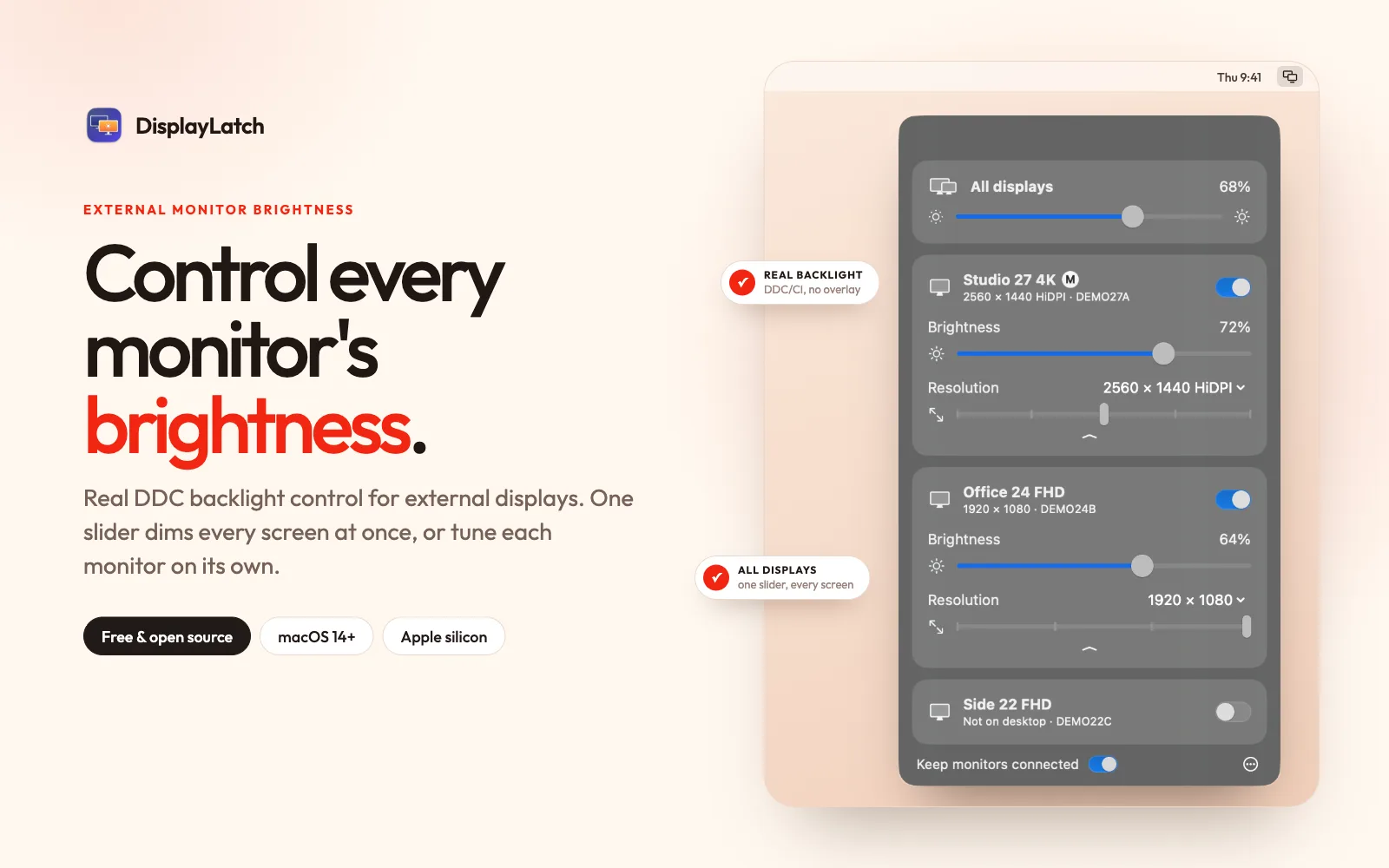
macOS only changes brightness on Apple displays. DisplayLatch talks to other monitors over DDC/CI, the same channel their own buttons use, so the backlight really changes instead of a dark overlay being drawn on top. Drag a slider per monitor, or use one All displays slider to dim the MacBook screen and every monitor together.
It also fixes a common multi-monitor problem: after sleep, wake or a restart, macOS sometimes still detects a monitor but keeps it off the desktop, and saves that state. DisplayLatch notices the monitor that is attached but missing and puts it back, in the same place in your arrangement, usually within a second.
More: disconnect a display without unplugging it, switch resolution including HiDPI modes, and a command-line tool for scripts, Shortcuts and cron. Native Swift and SwiftUI, about 1.5 MB, no account and no tracking. MIT licensed. Requires macOS 14 or later on Apple silicon.
What DisplayLatch does
DisplayLatch is a free menu-bar app for controlling external monitor brightness on a Mac. It changes a compatible monitor’s real backlight over DDC/CI rather than dimming the picture with an overlay. It also helps when a monitor remains attached but disappears from the desktop after sleep, restoring it to its saved position. The app includes controls for disconnecting displays and changing resolution, addressing common display adjustments without requiring a trip to System Settings.
The app lists the Mac’s built-in display and connected monitors, with sliders to adjust displays individually or together. For external monitor brightness, it sends commands over DDC/CI. It checks displays after changes and wake, and every 20 seconds, to detect attached monitors missing from the desktop and restore their arrangement. Users can switch resolution or disconnect a display from the app, or use the command-line tool to list displays and script brightness, resolution, connections, and display fixes.
DisplayLatch is for Mac users with Apple silicon running macOS 14 or later who want controls for external monitors that support DDC/CI. The page describes it as a small native Swift and SwiftUI app, about 1.5 MB, with menu-bar and command-line controls. It is free and MIT licensed, with no account, telemetry, analytics, or helper daemons. An optional daily network check looks for a new GitHub release.
Based on displaylatch.sisara.in, read on Nov 19, 2026.
Key features
- DDC/CI external monitor brightness control
- Per-monitor and all-display brightness sliders
- Automatic monitor reconnection after sleep
- Display disconnection without unplugging
- Display resolution switching
- Command-line controls for displays
What people use DisplayLatch for
- 01Adjust external monitor backlight brightness
- 02Dim a MacBook and connected monitors together
- 03Restore monitors that stay dark after sleep
- 04Disconnect a display without unplugging it
- 05Script brightness, resolution, and connection changes
More in Productivity
Browse all Productivity Mumble AI
 is a voice-first productivity app for Mac that combines meeting recording, dictation
 PixPin
An all-in-one productivity tool featuring smart screenshots, scrolling capture, screen recording
 DuoPlus Cloud Phone
 helps you run unlimited accounts on independent Android environments.
 VidBG Remover
 is an AI-powered online tool that allows users to remove video backgrounds quickly
 PDFtoMD
Convert any PDF into clean, structured Markdown in seconds with PDFtoMD
 MikeSullyTools
Fix blurry photos and improve short videos in your browser.