
DisplaySwitcher
Switch monitor inputs and transfer text and files between computers.
725points
Recent Supporters
Details
Launched
October 27, 2026
Category
Productivity
Pricing
Paid
Tags
About DisplaySwitcher
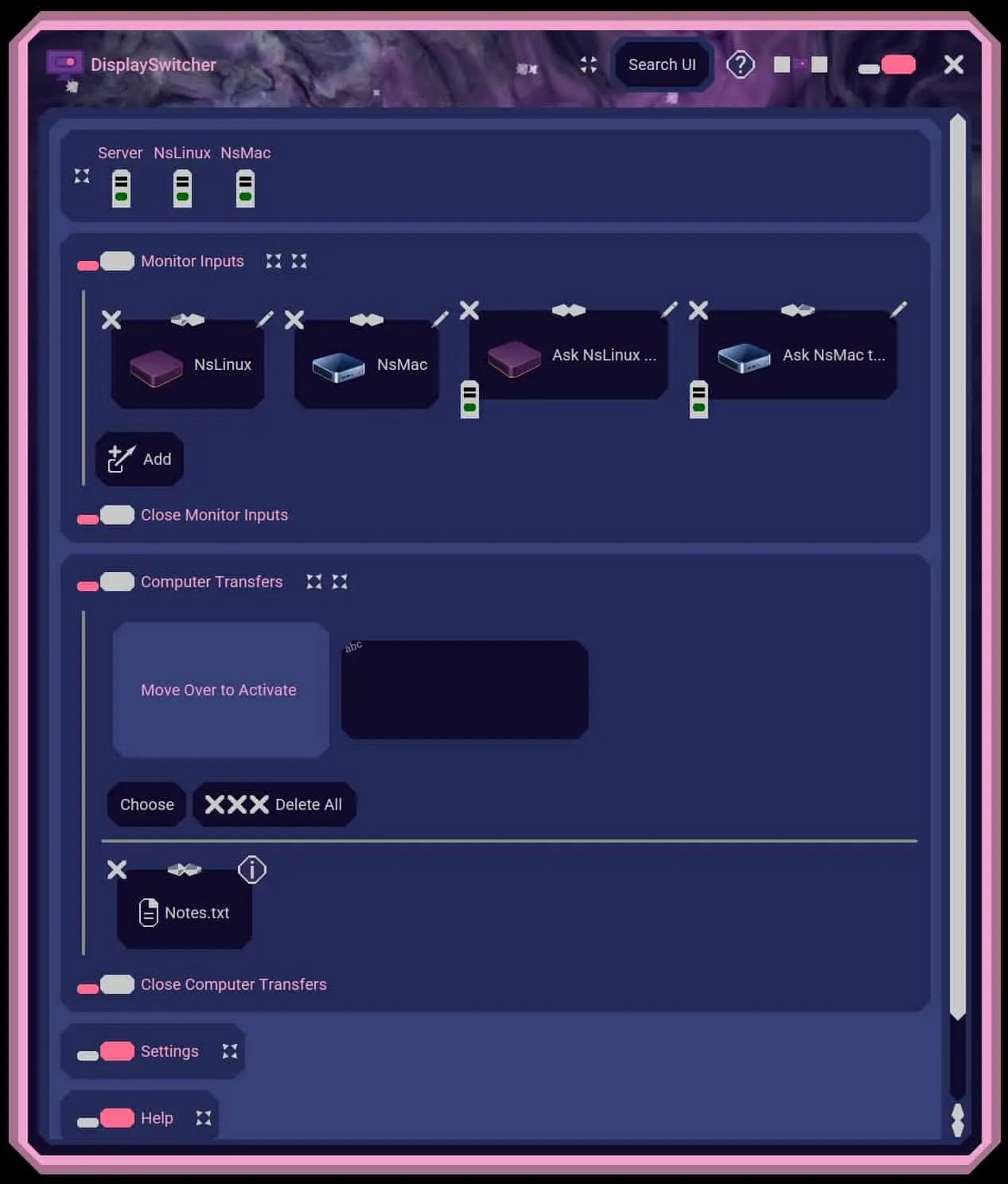
DisplaySwitcher is a desktop application for Linux, macOS, and Windows that combines monitor input switching with text and file transfers between computers.
Switch a monitor’s video input with a software button instead of reaching for its physical controls. If one computer cannot switch the monitor directly, another connected computer capable of switching it can perform the action.
Transfer text and files between computers using cut-and-paste, drag-and-drop, or file browsing, including across different operating systems. No network or firewall configuration necessary.
DisplaySwitcher is designed for people working with multiple computers, including developers, IT professionals, and home office users.
DisplaySwitcher costs $5.95 per month and includes a one-month free trial.
What DisplaySwitcher does
DisplaySwitcher is a desktop application for switching a monitor’s video input and transferring text and files between computers. It sends a video-input switching command from a computer to a monitor over its cable, avoiding the need to use the monitor’s physical buttons. It works with monitors that support the DDC/CI standard. When a monitor is KVM-enabled, switching its source also moves the keyboard and mouse to the selected computer.
DisplaySwitcher runs on Linux, macOS, and Windows computers. A user clicks a software button to send a video-input command to a connected DDC/CI-compatible monitor. If that monitor is KVM-enabled, the keyboard and mouse move with the selected video source. With DisplaySwitcher running on multiple computers, users can transfer text by cut-and-paste and transfer files by drag-and-drop or file browsing. A computer that cannot switch the monitor can also ask one that can to do so.
DisplaySwitcher is for people using Linux, macOS, or Windows computers with monitors that support DDC/CI. It is useful when monitor switching through physical buttons is inconvenient or a monitor manufacturer does not provide software for a user’s operating system. People using multiple computers can also use it to transfer text and files between them. KVM-enabled monitors can move the keyboard and mouse along with the switched video source.
Based on nebulasoftware.com, read on Oct 27, 2026.
Key features
- Switches monitor video input through software
- Transfers text between computers
- Transfers files by drag-and-drop or browsing
- Works with DDC/CI-compatible monitors
- Runs on Linux, macOS, and Windows
What people use DisplaySwitcher for
- 01Switch a monitor’s video source from a computer
- 02Transfer text between computers using cut-and-paste
- 03Transfer files using drag-and-drop or file browsing
- 04Ask another computer to switch a monitor input
More in Productivity
Browse all Productivity Mumble AI
Mumble AI is a voice-first productivity app for Mac that combines meeting recording, dictation
 PixPin
An all-in-one productivity tool featuring smart screenshots, scrolling capture, screen recording
 DuoPlus Cloud Phone
DuoPlus Cloud Phone helps you run unlimited accounts on independent Android environments.
 VidBG Remover
VidBG Remover is an AI-powered online tool that allows users to remove video backgrounds quickly
 PDFtoMD
Convert any PDF into clean, structured Markdown in seconds with PDFtoMD
 MikeSullyTools
Fix blurry photos and improve short videos in your browser.