Launching Nov 30–Dec 6, 2026
This launch is approved and scheduled. The page is shareable now and goes fully live in its launch week.

DockMagic
A second Dock for your Mac with live widgets
50points
Recent Supporters
Details
Launched
November 18, 2026
Category
Productivity
Pricing
Freemium
Tags
About DockMagic
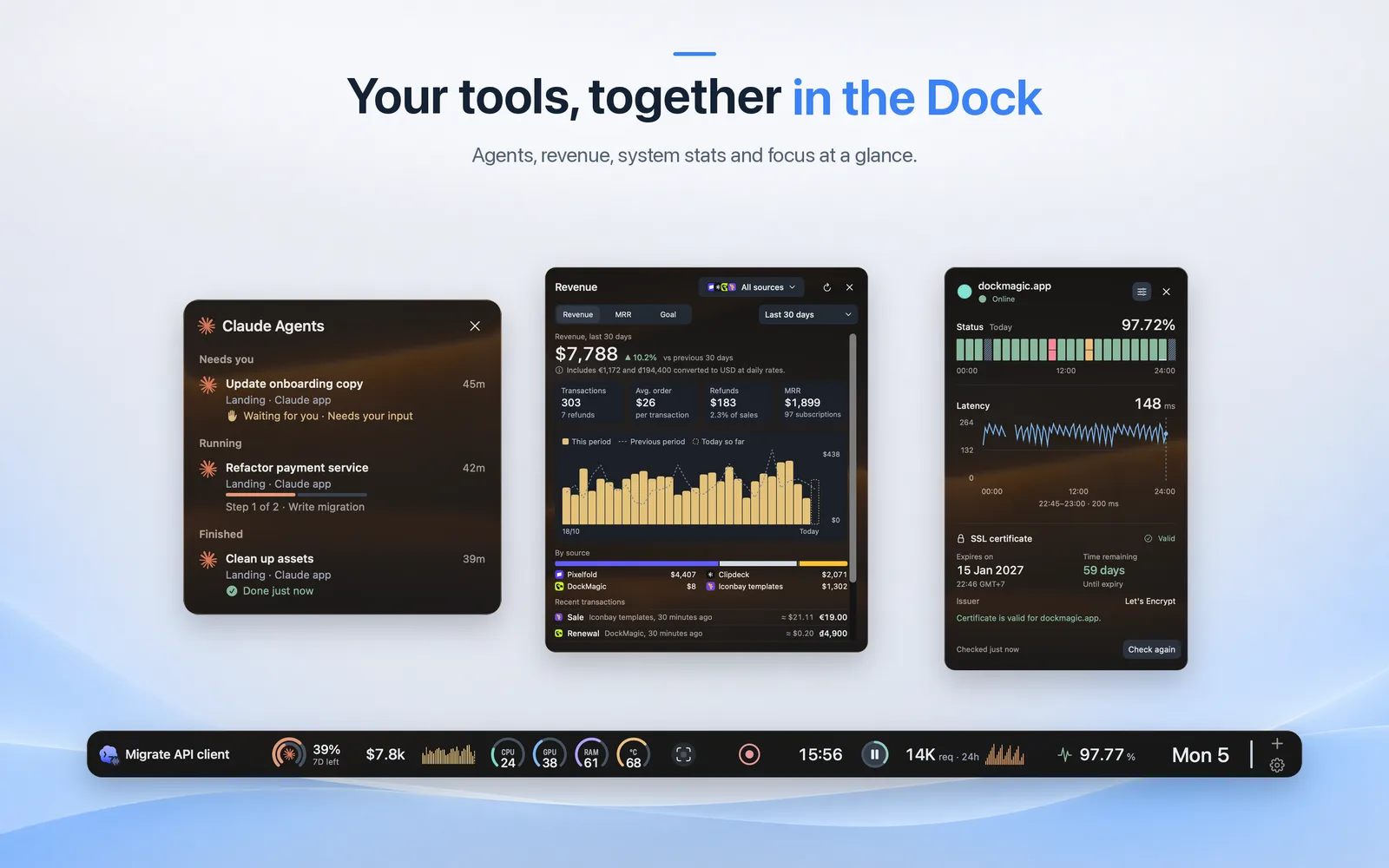
DockMagic adds a second, independent Dock to your Mac. It sits at the bottom, left or right edge of a display you choose, beside the Apple Dock, and holds live widgets you arrange yourself. It does not replace or control the Apple Dock.
Keep an eye on local Claude and Codex agent sessions, grouped by what needs you, what is running and what is finished, and on those tools' usage limits. The widgets only monitor sessions; they do not control the agents. Track revenue from Stripe, Polar, Dodo Payments and Lemon Squeezy in one view. System widgets show CPU, memory and related activity. A website monitor checks uptime from your Mac, and Cloudflare analytics widgets show traffic and security for your zones.
Capture an area screenshot and annotate it with blur, arrows, text and highlights. Record a display, window or area, then refine the video in a timeline editor with auto zoom that follows your clicks. A Pomodoro timer helps you stay focused and can pause when you step away.
Switch between Dock profiles for different kinds of work, pin Mac apps next to your widgets, and arrange the frontmost window into halves, thirds, quarters and more (Accessibility permission required). Everyday tools include clipboard history, calendar views, an emoji picker, reminders and wallpaper controls. Some widgets are free; a one-time lifetime license unlocks the rest, including future updates, for 1, 2 or 3 Macs. Requires macOS 14 or later, on Apple silicon or Intel.
What DockMagic does
DockMagic is a customizable widget Dock for macOS that sits alongside the Apple Dock. It brings selected essentials together in widgets, including system activity, calendar information, battery and storage details, and connected service data. Users can open a widget for a closer look at information such as CPU and memory activity. The page presents DockMagic as a way to keep useful information accessible from the Dock without replacing the Apple Dock.
Users choose which widgets to include, add or remove them, and arrange their order by dragging widgets into the Dock or using the keyboard. Widgets can be opened for more detail, and the Dock can be positioned at the left, right, or bottom of the screen. The page says side-positioned Docks hide when idle and return when the pointer reaches the edge. Users install DockMagic from a downloaded disk image or with Homebrew; it requires macOS 14.0 or later.
DockMagic is for Mac users who want selected information and tools available in a customizable widget Dock alongside Apple's Dock. The page shows examples spanning system monitoring, calendar and time, power controls, storage, recording, screenshots, and service metrics. Users can choose and arrange widgets to suit their needs. DockMagic requires macOS 14.0 or later, and the page describes one-time licenses for one, two, or three Macs, with a seven-day trial for one Mac.
Based on dockmagic.app, read on Nov 18, 2026.
Key features
- Displays CPU and memory activity
- Shows system and app usage
- Provides calendar and date widgets
- Displays battery and storage information
- Shows connected service status and metrics
- Customizes widget selection, order, and Dock position
What people use DockMagic for
- 01Monitor CPU and memory activity from the Dock
- 02Check calendar events and world clocks
- 03View battery, storage, and connection details
- 04Monitor connected services and usage metrics
- 05Arrange widgets for everyday essentials
More in Productivity
Browse all Productivity Mumble AI
 is a voice-first productivity app for Mac that combines meeting recording, dictation
 PixPin
An all-in-one productivity tool featuring smart screenshots, scrolling capture, screen recording
 DuoPlus Cloud Phone
 helps you run unlimited accounts on independent Android environments.
 VidBG Remover
 is an AI-powered online tool that allows users to remove video backgrounds quickly
 PDFtoMD
Convert any PDF into clean, structured Markdown in seconds with PDFtoMD
 MikeSullyTools
Fix blurry photos and improve short videos in your browser.