Launching Jul 26–Aug 1, 2027
This launch is approved and scheduled. The page and its dofollow backlink are live now - it joins the weekly drop in its launch week.

HomepageTab
Your homepage, every new tab
50points
Recent Supporters
Details
Launched
October 15, 2026
Category
Productivity
Pricing
Free
Tags
About HomepageTab
HomepageTab replaces the default new tab with your own homepage. Works in Chrome, Edge, and Firefox. Free, no account needed.
Favorite sites, bookmarks and to-dos at a glance. Customize widgets to make your browser homepage your own.
When you open a new tab, you usually want to do one thing: open a website, look something up, or write something down. HomepageTab keeps these entry points on one page, so the next step is easier to find while the page stays calm.
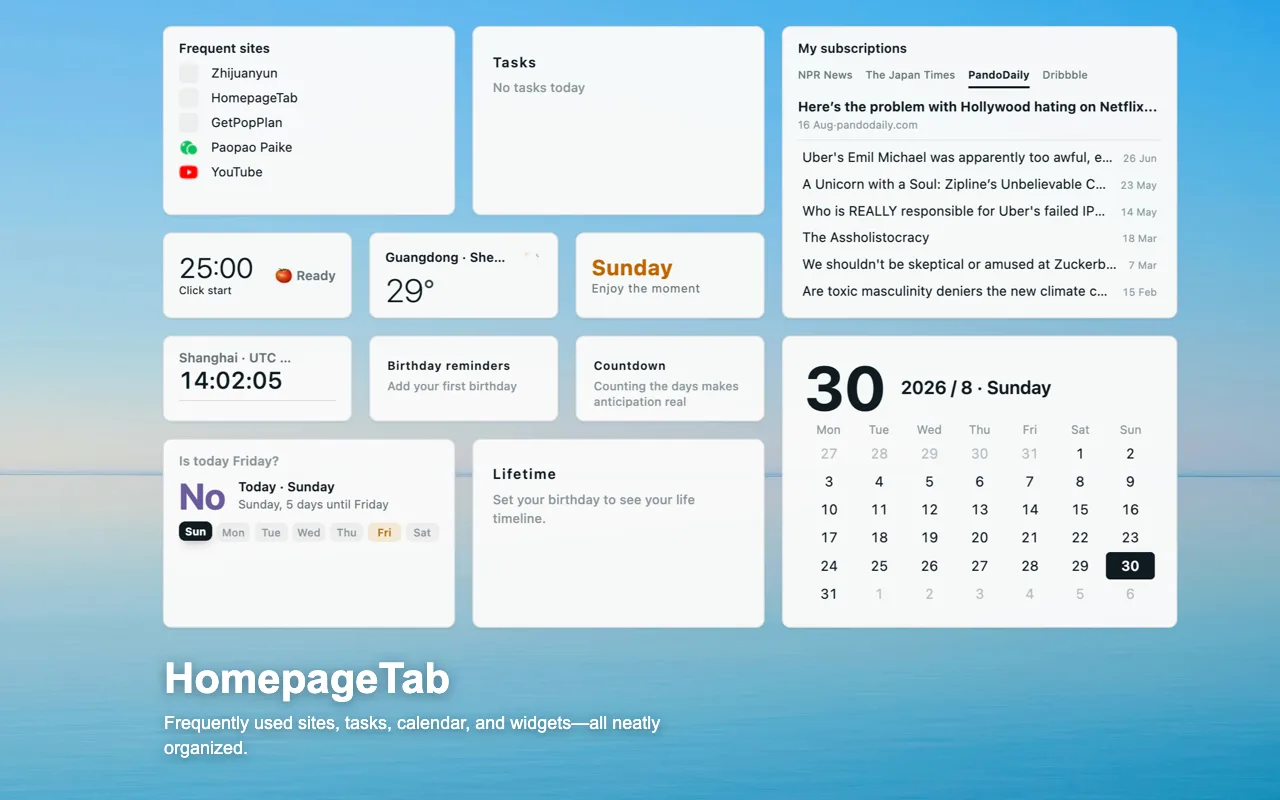
Place frequently used websites and saved links where they are easy to reach. Add widgets for the clock, weather, calendar, countdowns, notes, to-dos, and world clocks when you need them. You can adjust the widget positions and page layout, or keep only the few things you use most so the page stays clear.
Search continues to use your browser's current default search service, so your search habits stay the same. When needed, you can switch to other available search engines or AI assistants. Wallpapers and light or dark page looks let you make the page feel more like your own.
After signing in, you can sync your layout and common settings across supported devices. Without signing in, the web version and browser extension still support local use.
HomepageTab is for people who want a new tab that stays simple and convenient while keeping the things they use most within reach. Install it, open a new tab, and get started.
What You Can Do
- Keep frequently used websites and saved links easy to find.
- Use widgets to check the time, weather, calendar, countdowns, and world clocks.
- Write down notes and to-dos without moving between different pages.
- Arrange widgets, page layout, and wallpapers around the way you browse.
- Use your browser's default search, or switch to an available search engine or AI assistant.
- Sync your layout and common settings after signing in, or use local features without an account.
HomepageTab replaces only the new tab page. It does not change your browser's default search service.
HomepageTab
Your homepage, in every new tab
Let the open space speak for itself
HomepageTab web app: https://web.homepagetab.com/
HomepageTab website: https://www.homepagetab.com/
Feedback: https://github.com/gaoyong06/HomepageTab/issues
What HomepageTab does
HomepageTab is a browser extension that turns each new tab into a customizable homepage. It brings frequently used sites, widgets, and tools together so users can see useful information and open what they need without extra tabs. The page describes a clean, uncluttered starting point, with shortcuts and more than 30 widgets that users can add. Core features are free to use, with no subscription required.
Users open a new browser tab to see their HomepageTab layout. They add shortcuts to frequently used sites, group them, drag to reorder them, and open them with one click. They can add widgets such as weather, to-do items, a calendar, countdowns, and a Pomodoro timer, as well as on-demand tools including an RSS reader, calculator, notes, and developer toolbox. Signing in enables layouts and notes to sync across devices.
HomepageTab is for people who want their frequently used sites and useful information available when they open a new tab. The page describes examples including people who switch devices, developers who use search, GitHub, docs, and productivity tools, designers who arrange sites and widgets, and students who keep course links close. It combines customizable shortcuts with optional widgets and tools, while aiming to keep the first screen uncluttered.
Based on homepagetab.com, read on Oct 15, 2026.
Key features
- Groups and reorders website shortcuts
- Offers 30+ addable widgets
- Includes weather, to-do, and calendar widgets
- Provides RSS reader and developer tools
- Syncs layouts and notes across devices
What people use HomepageTab for
- 01Open frequently used websites from a new tab
- 02View weather, to-dos, and calendar information
- 03Use a Pomodoro timer while working
- 04Read RSS feeds and access developer tools
- 05Sync layouts and notes across devices
More in Productivity
Browse all Productivity Mumble AI
Mumble AI is a voice-first productivity app for Mac that combines meeting recording, dictation
 PixPin
An all-in-one productivity tool featuring smart screenshots, scrolling capture, screen recording
 DuoPlus Cloud Phone
DuoPlus Cloud Phone helps you run unlimited accounts on independent Android environments.
 VidBG Remover
VidBG Remover is an AI-powered online tool that allows users to remove video backgrounds quickly
 PDFtoMD
Convert any PDF into clean, structured Markdown in seconds with PDFtoMD
 MikeSullyTools
Fix blurry photos and improve short videos in your browser.