Launching Aug 23–29, 2027
This launch is approved and scheduled. The page and its dofollow backlink are live now - it joins the weekly drop in its launch week.
iHatePDF
Edit, convert and manage PDF with professional PDF Tools.
50points
Recent Supporters
Details
Launched
October 19, 2026
Category
Productivity
Pricing
Free
Tags
About iHatePDF
iHatePDF is the only PDF suite that lets you choose where your files are processed. Twenty five of its 35+ tools run entirely inside your browser, while the rest use the server, and a single switch decides which. That makes it a practical fit for teams handling contracts, invoices and client paperwork without another desktop licence or an IT approval queue.
Features:
A processing switch. Browser mode blocks uploads entirely and runs the work on your device. Server mode handles the heavier jobs. You decide, per session.
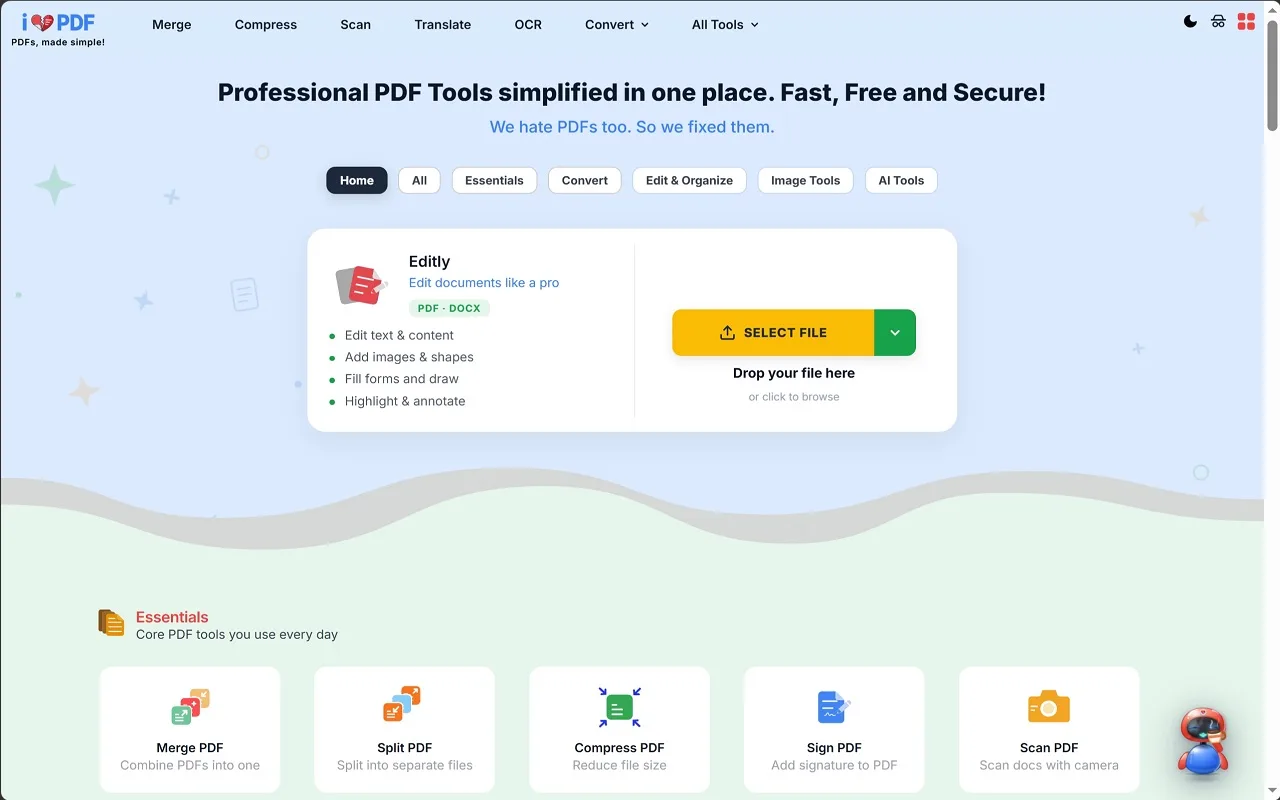
The full toolkit. Text editing, images and annotations, page reorganisation, conversion to and from Word, Excel and PowerPoint, compression, merging, splitting, OCR and e signatures.
Editly. Full document editing that preserves the original embedded fonts, so edited text still matches the page.
Buddy. Describe what you need in plain words and it runs the right tool for you, no menu hunting.
Privacy by default. Files sent to the server are encrypted and removed automatically within one hour. Nothing is stored, analyzed or shared. There is a toggle button to decide whether the files are to be processed on browser or on server.
Built for volume. Batch processing, cloud import from Drive, Dropbox and OneDrive, and 10+ languages.
No account required. No signup, no credit card, no watermarks on your output.
What iHatePDF does
iHatePDF is a free online PDF editor and converter that brings more than 35 document and image tools together. It lets users edit, merge, split, compress, sign, scan, translate, and organize PDFs, as well as convert files between PDF and formats such as Word, Excel, PowerPoint, and JPG. Additional tools include OCR, PDF chat, image utilities, and an AI CV optimizer. The service aims to make PDF editing, conversion, and sharing accessible without paid software.
A user selects a file by browsing, tapping to add it, or dragging and dropping it into the page. They then choose a tool to edit, merge, split, compress, convert, or otherwise process the document, and download the result. The site says no signup is required. Files are sent over HTTPS and deleted automatically within one hour; supported tools in Browser mode process files on the user's device. A free account enables processing several files at once on most tools.
iHatePDF is for people who need to edit, convert, organize, or otherwise work with PDFs and images in a browser. The site says it works across modern browsers on computers, tablets, and phones, without requiring installation or an account. Its distinguishing approach is to offer a broad set of free tools in one place, with optional Browser mode for on-device processing and stated file deletion and privacy practices.
Based on ihatepdf.com, read on Oct 19, 2026.
Key features
- Edit PDF text, images, forms, and annotations
- Merge, split, compress, and organize PDFs
- Convert PDFs to and from common formats
- Scan and OCR PDFs
- Chat with PDFs and optimize CVs using AI
- Process supported files in browser mode
What people use iHatePDF for
- 01Edit text and add images or signatures to PDFs
- 02Combine, split, or reorder PDF pages
- 03Convert documents and images to or from PDF
- 04Make scanned PDFs searchable with OCR
- 05Ask questions about a PDF or optimize a CV
More in Productivity
Browse all Productivity Mumble AI
Mumble AI is a voice-first productivity app for Mac that combines meeting recording, dictation
 PixPin
An all-in-one productivity tool featuring smart screenshots, scrolling capture, screen recording
 DuoPlus Cloud Phone
DuoPlus Cloud Phone helps you run unlimited accounts on independent Android environments.
 VidBG Remover
VidBG Remover is an AI-powered online tool that allows users to remove video backgrounds quickly
 PDFtoMD
Convert any PDF into clean, structured Markdown in seconds with PDFtoMD
 MikeSullyTools
Fix blurry photos and improve short videos in your browser.