Launching Dec 14–20, 2026
This launch is approved and scheduled. The page and its dofollow backlink are live now - it joins the weekly drop in its launch week.

NestMaxx
Free online true-shape nesting for laser, plasma and CNC cutting
50points
Recent Supporters
Details
Launched
November 5, 2026
Category
Design Tools
Pricing
Free
Tags
About NestMaxx
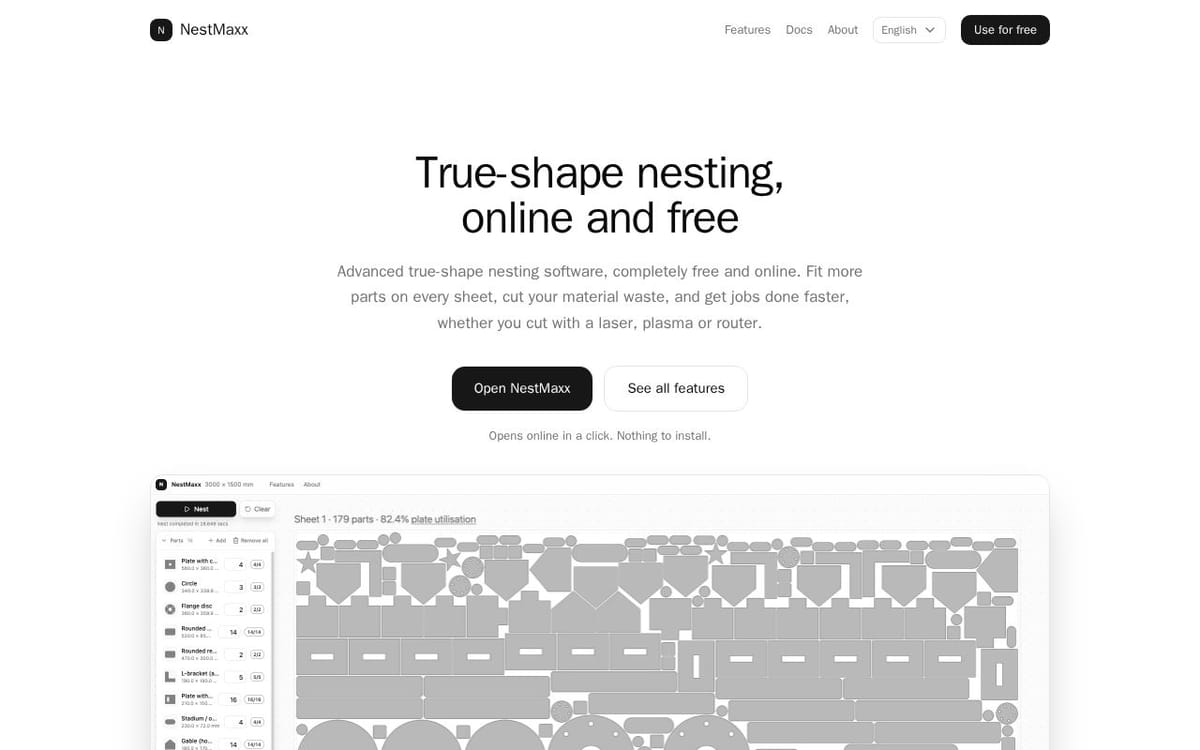
NestMaxx is free, online true-shape nesting software for laser, plasma and CNC router cutting. It packs parts by their real outlines using the No Fit Polygon method, so curved and irregular parts interlock instead of sitting in bounding boxes. Import DXF or SVG files, pick from over 40 parametric shapes, or draw a part in the built-in CAD editor. Nest across multiple sheets, drop small parts into holes, then export the layout as DXF or SVG. It runs entirely on your device, with no sign-up.
What NestMaxx does
NestMaxx arranges 2D parts on sheets of material using their real outlines, rather than their bounding boxes. Its No Fit Polygon method finds placements where parts can sit against their neighbours without overlapping. The software is designed to help users fit more parts on each sheet, reduce scrap, and create layouts for cut-to-shape work such as sheet metal, woodworking, and laser cutting. It runs online and is completely free to use.
Users add parts by importing DXF or SVG files, choosing from more than 40 parametric shapes, or drawing in the built-in 2D editor. They set sheet size and spacing, then press Nest to generate a layout. Parts can rotate freely, follow a locked grain axis, or use fixed angles. NestMaxx can fill multiple sheets, flag parts that do not fit, and crop a reusable offcut. Users can export the nested layout as DXF R12 or SVG.
NestMaxx is for shops and makers that cut flat material into parts, including sheet-metal fabricators, woodworking shops, and laser-cutting users. The page describes use with plasma, laser, waterjet, CNC routers, and panel saws. It runs online on Windows, macOS, Linux, and Android tablets, with nothing to install. Its free use includes unlimited nesting, a 2D editor, and a library of more than 40 parametric shapes.
Based on nestmaxx.com, read on Nov 5, 2026.
Key features
- True-shape nesting using the No Fit Polygon method
- Imports DXF and SVG files
- Exports nested layouts as DXF or SVG
- Built-in 2D CAD editor
- Over 40 parametric ready-made shapes
- Multi-sheet nesting with reusable offcuts
What people use NestMaxx for
- 01Nest sheet-metal parts for plasma, laser, or waterjet cutting
- 02Arrange woodworking cut lists on plywood, MDF, or melamine
- 03Nest parts for laser cutting acrylic, leather, or fabric
- 04Draw parts in the editor and nest them on a sheet
- 05Export layouts for another CAD/CAM package
More in Design Tools
Browse all Design Tools Ai Logo Generator
AI Logo Generator Describe your brand and generate professional, custom logo designs in seconds
 ColoringStore
Create printable coloring pages from text prompts or photos with ColoringStore.
 Printery - Print for Figma
Printery is a Figma print plugin that exports print-ready PDFs with CMYK conversion, ICC profiles
 GROAR
Make your social metrics Roaaar
 Vidregen
Create Images and Videos With the World's Best AI Models
 ArchOne AI
All-in-one AI spatial design visualization platform for interior, exterior and landscape design.