
Omniviu
Notion alternative as a self-hosted WordPress plugin: pages, relational databases, real-time editing
650points
Recent Supporters
Details
Launched
November 20, 2026
Category
Productivity
Pricing
Paid
Tags
About Omniviu
omniviu – the self-hosted Notion alternative for WordPress
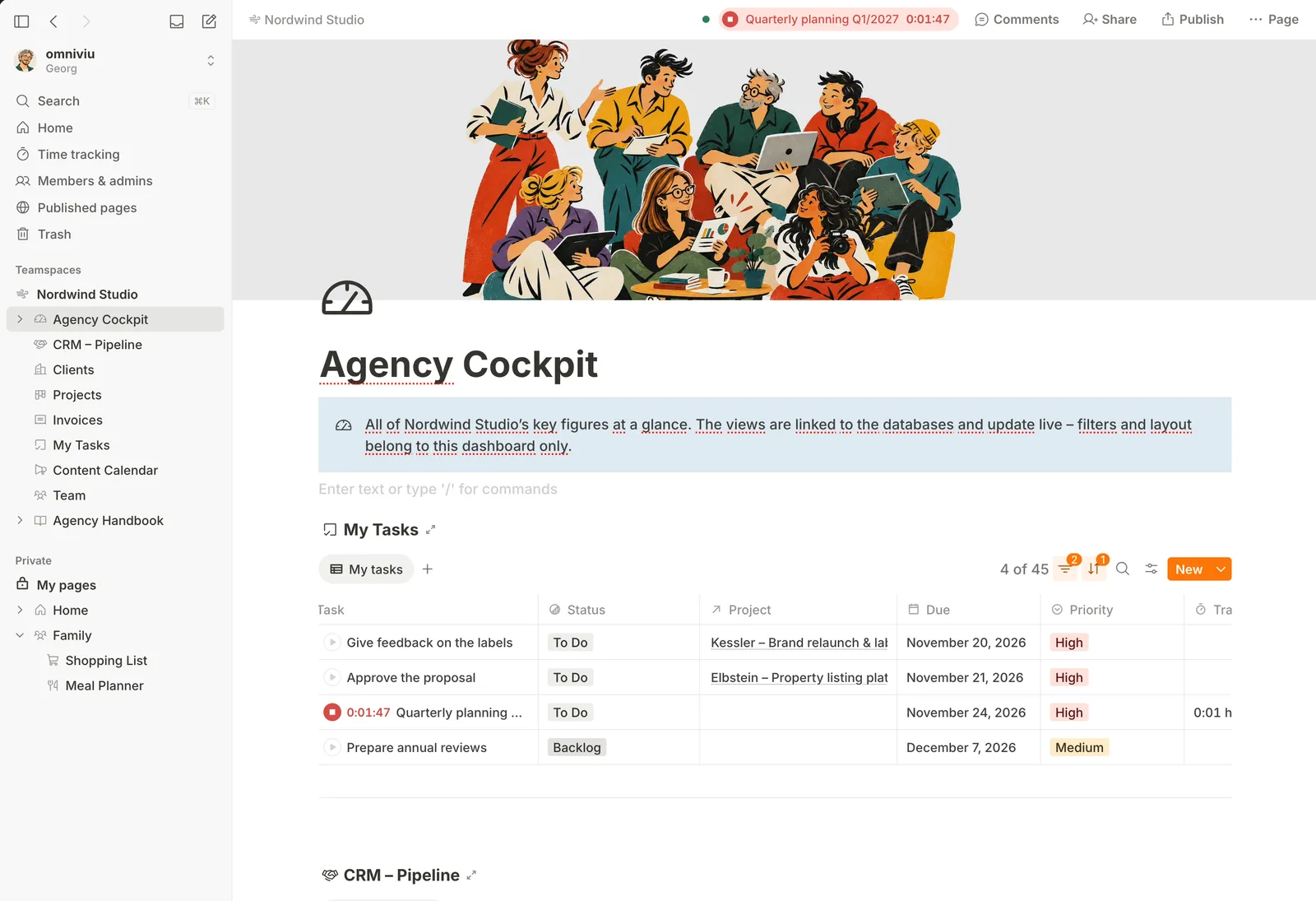
omniviu turns your WordPress site into a private workspace for notes, wikis, projects and databases. Everything lives in your own WordPress database, on your own server. No Docker, no Node.js, no WebSockets: regular shared hosting with PHP and MySQL is enough. People sign in with their existing WordPress accounts. One license per site, unlimited users.
Pages & editor
- Block editor with slash menu: to-dos, toggles, callouts, code, tables, images, video, files, bookmarks, table of contents
- Multi-column layouts, nested sub-pages, @-links and mentions, covers and icons
- Templates for pages and entries, plus a template gallery (projects, CRM, to-dos and more)
- Version history, trash, undo, full-text search, dark mode, mobile-friendly
Relational databases
- Seven views: table, rows, board, calendar, gallery, timeline and chart
- Every entry is a full page with content, comments and sub-pages
- Relations, rollups and formulas (90+ functions, editor with autocomplete)
- Group by any property, totals in footers and group headers, sub-items, progress bars
- Personal views, and inline or linked databases filtered to the current page
Collaboration
- Real-time co-editing with live updates
- Comments on text, images and files, mentions, notifications and a daily email digest
Permissions & privacy
- Teamspaces with roles, a private space for everyone, sharing per page, private entries in shared databases
- Publish pages read-only via a link (off by default)
- Private file storage; no trackers, no external fonts, no Gravatar, no cloud services
Time tracking & budgets, built in
- One-click timer that keeps running on the server, with inactivity detection
- Project budgets in hours and euros, one-off or recurring, with hourly rates per client, project or task
- Overview of all time entries and projects, CSV export
Move from Notion
- Direct import via the Notion API or from an export ZIP: pages, databases, views, relations, formulas, images, files, icons, covers, comments, original dates and authors
- Pre-check, progress with pause and resume, final report and re-import
No lock-in
- Export pages, entries and views as PDF
- Export any database as a lossless archive and import it again, also on another site
- Requirements: WordPress 7.0+, PHP 8.1+, MySQL/MariaDB. Single sites only.
Interface in English and German.
Notion is a trademark of Notion Labs, Inc. omniviu is not affiliated with or endorsed by Notion Labs.
What Omniviu does
Omniviu brings notes, knowledge, tasks, projects, appointments, client records, and other work into one place inside WordPress. It provides tools for managing work and sharing information, from to-do lists and project tracking to a company wiki. The product is self-hosted, keeping its data in the WordPress database and protected file storage on the user’s server rather than relying on cloud services during operation.
Users install Omniviu as a WordPress plugin and access it at /app/ using their existing WordPress accounts and roles. They can organize content in teamspaces, create pages and databases, and work with tasks and projects in different views. Multiple people can edit pages together in real time without WebSockets. Users can import Notion content by connecting a workspace with an access token or using an export ZIP, then select content and follow the import progress and final report.
The page names agencies and freelancers, law firms, practices and trades, clubs, associations, education organizations, and WordPress professionals. It is shaped for individuals or teams and runs on ordinary shared hosting using PHP and MySQL, without Node.js, Docker, or an extra server. Omniviu uses one price per website rather than per person, and supports unlimited people on a website.
Based on omniviu.app, read on Nov 20, 2026.
Key features
- Task lists, boards, and calendar views
- Project timelines, progress, and time tracking
- Wiki pages with version history and search
- Client records linked to projects and tasks
- Real-time collaborative editing and comments
- Direct import from Notion
What people use Omniviu for
- 01Manage tasks with subtasks, statuses, due dates, and assignees
- 02Schedule projects and track their progress and time
- 03Maintain team wiki pages and meeting notes
- 04Manage client records linked to projects and tasks
- 05Import Notion pages and databases into a teamspace
More in Productivity
Browse all Productivity Mumble AI
 is a voice-first productivity app for Mac that combines meeting recording, dictation
 PixPin
An all-in-one productivity tool featuring smart screenshots, scrolling capture, screen recording
 DuoPlus Cloud Phone
 helps you run unlimited accounts on independent Android environments.
 VidBG Remover
 is an AI-powered online tool that allows users to remove video backgrounds quickly
 PDFtoMD
Convert any PDF into clean, structured Markdown in seconds with PDFtoMD
 MikeSullyTools
Fix blurry photos and improve short videos in your browser.