Launching Jan 4–10, 2027
This launch is approved and scheduled. The page is shareable now and goes fully live in its launch week.

Refrain
A Mac menu bar app for the text you type over and over
50points
Recent Supporters
Maker
h
hello
@hello_b1142d
Details
Launched
November 19, 2026
Category
Productivity
Pricing
Paid
Tags
About Refrain
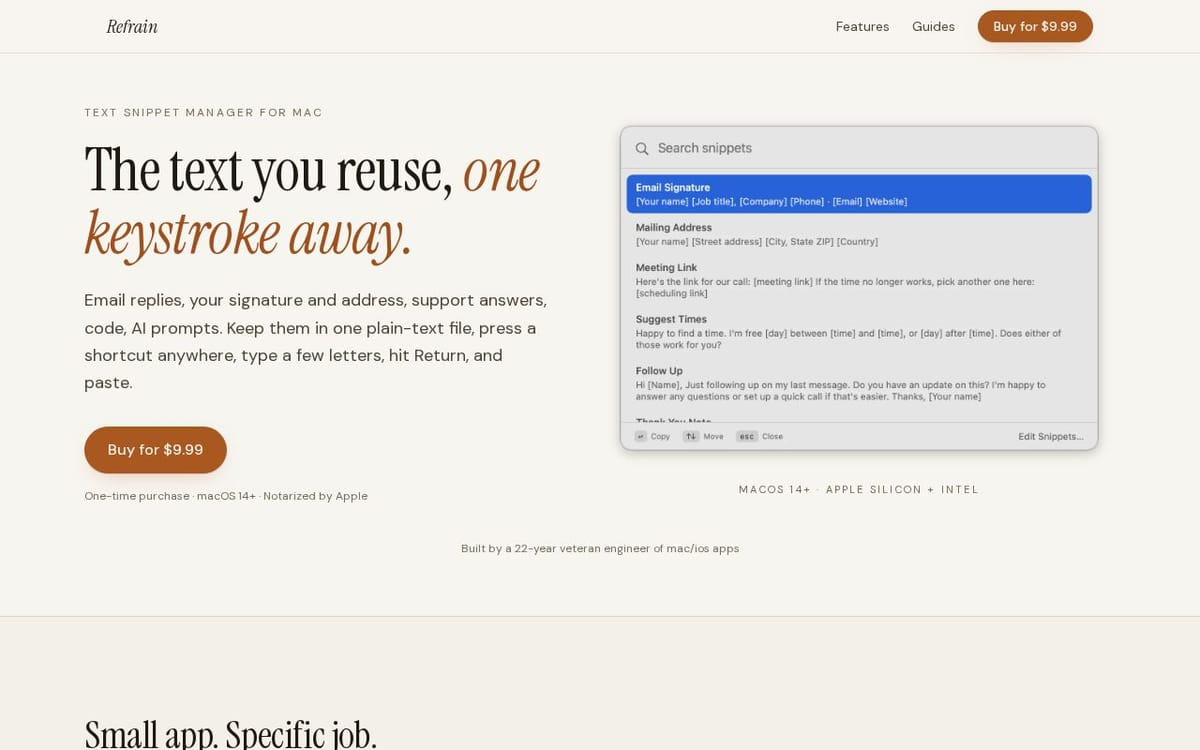
Refrain is a small Mac menu bar app for reusable text: the email replies you send every week, your signature and mailing address, support answers, meeting links, a terminal command you always look up, long prompts. Snippets live in one plain markdown file in a folder you choose (iCloud Drive, Dropbox, git). Press Control-Option-Space anywhere, type part of a title, press Return, and paste. No abbreviations to memorize. $9.99 one-time, no subscription, macOS 14+.
What Refrain does
Refrain is a text snippet manager for Mac that puts frequently reused text on the clipboard. It helps users retrieve and paste email replies, signatures, addresses, support answers, code, and AI prompts without retyping them or remembering abbreviations. Users search snippets by title or by a phrase in their text, including long or rarely used entries. Snippets can contain multiple paragraphs and line breaks, and are stored in a plain Markdown file the user controls.
The user presses a keyboard shortcut in any app to open a search box, types part of a snippet title or text, selects a result, and pastes it. Alternatively, they can click a snippet in the menu bar to copy it. Snippets are edited, duplicated, deleted, or reordered in Refrain, or changed in another editor such as VS Code, Vim, or TextEdit; Refrain reloads external edits. The Markdown file can be placed in a chosen location, including an iCloud Drive, Dropbox, or Syncthing folder.
Refrain is for Mac users who reuse text and want to find and paste it without adopting a launcher or memorizing abbreviations. The page describes it as a standalone app for macOS 14 or later, on Apple Silicon or Intel Macs. Its notable distinction is that snippets live in a plain Markdown file the user owns and can edit with any text editor, keep locally, sync, or share. The app and starter snippets are available in 14 languages.
Based on refrainformac.com, read on Nov 19, 2026.
Key features
- Search snippets with a global keyboard shortcut
- Browse and copy snippets from the menu bar
- Store snippets in an editable Markdown file
- Reload changes made in other text editors
- Keep multi-paragraph text and line breaks
- Includes 13 starter snippets in 14 languages
What people use Refrain for
- 01Paste saved email replies and signatures
- 02Insert addresses, meeting links, and support answers
- 03Copy code blocks and AI prompts
- 04Share or sync snippets through a text file
More in Productivity
Browse all Productivity Mumble AI
 is a voice-first productivity app for Mac that combines meeting recording, dictation
 PixPin
An all-in-one productivity tool featuring smart screenshots, scrolling capture, screen recording
 DuoPlus Cloud Phone
 helps you run unlimited accounts on independent Android environments.
 VidBG Remover
 is an AI-powered online tool that allows users to remove video backgrounds quickly
 PDFtoMD
Convert any PDF into clean, structured Markdown in seconds with PDFtoMD
 MikeSullyTools
Fix blurry photos and improve short videos in your browser.