
TerminalWidget
Monitor scripts and automations via system widgets
0points
Details
Launched
October 25, 2026
Category
Developer Tools
Pricing
Paid
Tags
ai-productivity-toolsai-workflow-automationautomationdashboardsdevelopmentiosmacosmonitoringterminal
About TerminalWidget
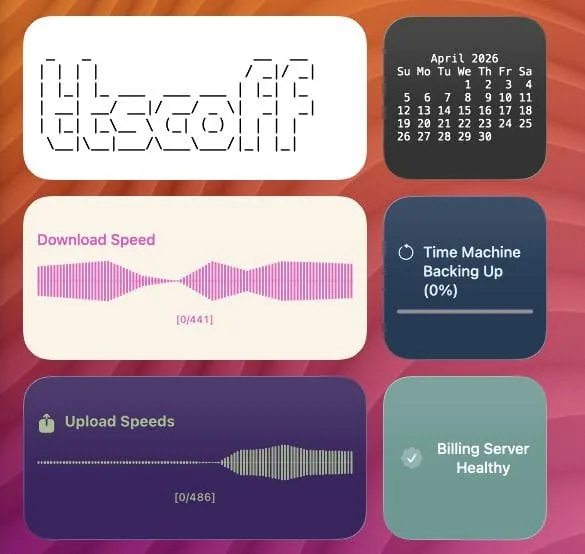
TerminalWidget is an application for Mac, iPhone, and iPad designed to help developers and power users track their workflows at a glance. The tool allows you to display text, progress bars, charts, and images directly within widgets, making it easier to monitor custom scripts and automations without opening terminal windows or external dashboards.
What TerminalWidget does
TerminalWidget is a Mac, iPhone, and iPad app that puts text, progress bars, charts, tables, and images in widgets. Developers and power users use it to monitor scripts and automations at a glance. It presents output from terminal commands and other automation tools on the Desktop or Home Screen, providing a way to view updates without using a hosted monitoring product or building a custom dashboard.
A user adds a TerminalWidget widget and assigns it a target name, then sends content to that target using the included CLI, Shortcuts, AppleScript, or a URL scheme. Updates can include text, progress, charts, tables, images, and display settings such as colors or icons. Mac updates apply immediately; iPhone and iPad content syncs through iCloud when enabled. Widgets can also be configured with tap or click actions.
The page identifies developers and power users who want to monitor scripts and automations at a glance. TerminalWidget runs on Mac, iPhone, and iPad as a native App Store app with WidgetKit widgets and a small CLI. It is driven by tools users already use, including terminal commands and Apple automation tools, rather than being a hosted monitoring product or a static widget pack.
Based on terminalwidget.app, read on Oct 27, 2026.
Key features
- Displays text, progress bars, charts, tables, and images
- Updates widgets through CLI and automation tools
- Targets individual widgets by name
- Syncs widget targets across Apple devices with iCloud
- Customizes colors, fonts, icons, titles, and captions
- Provides native WidgetKit widgets and a small CLI
What people use TerminalWidget for
- 01Monitor scripts and automations at a glance
- 02Show command output on desktop or Home Screen widgets
- 03Display progress, charts, or tables from data
- 04Trigger widget updates from Shortcuts or AppleScript
- 05Assign tap actions to open URLs or run commands
More in Developer Tools
Browse all Developer Tools Fotools Online Tools
Fotools offers over 200 free online tools for developers and everyday users
 Streamnode
Build HTTP endpoints visually without writing code
 Clonesite AI
https://clonesite.ai
 Host a site with no account, in seconds
Instant file hosting and static website publishing without an account.
 Actionbox
Human Approval for your AI Agents, Software and Scripts
 Benzi
BenziCompiler backed agent - 78.2% on SWE-bench Verified for < 10¢