Launching Aug 16–22, 2027
This launch is approved and scheduled. The page is shareable now and goes fully live in its launch week.

MinuteMill
Job time tracking. Recorded as you work.
50points
Recent Supporters
Details
Launched
November 14, 2026
Category
SaaS & B2B
Pricing
Freemium
Tags
About MinuteMill
MinuteMill helps small manufacturers and job shops see how much labor goes into each job. It started with a manufacturing owner who was tired of collecting paper timesheets, typing the hours back into a spreadsheet, and still feeling unsure about what a job had cost him.
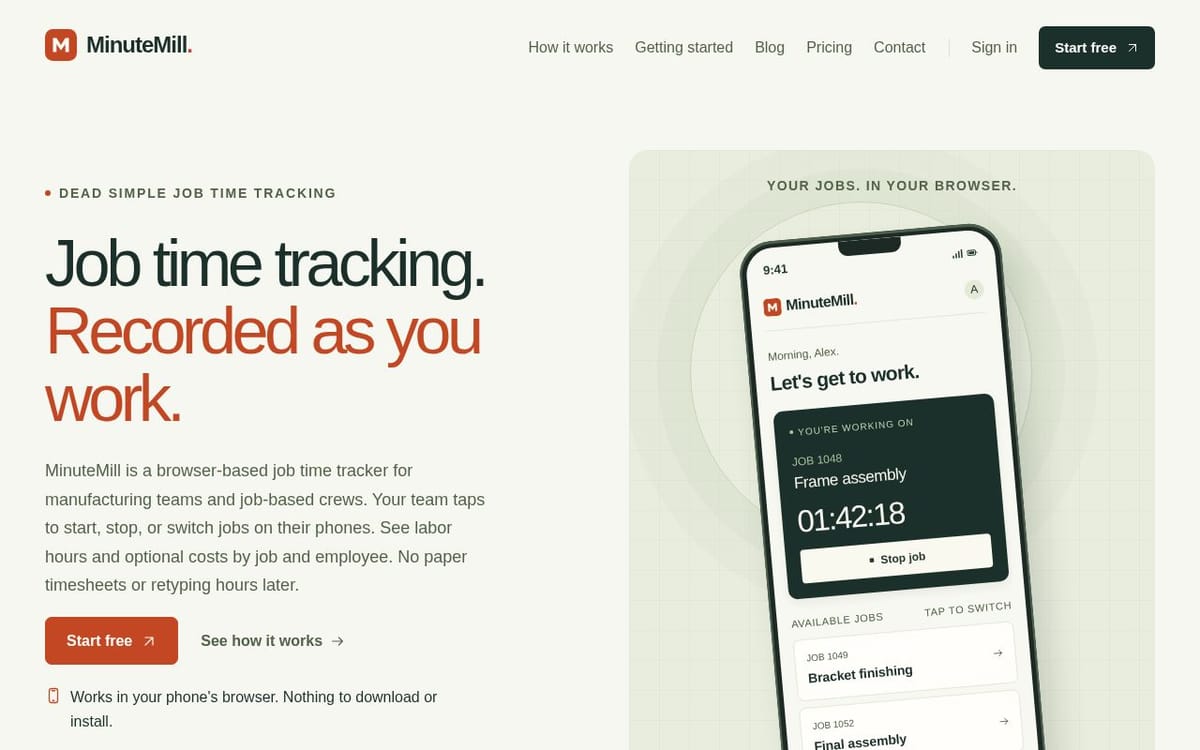
On the shop floor, employees open the job board in their phone’s browser and tap the job they’re working on. Tapping the next job ends the current entry and starts the next one. The timer keeps running if the phone locks or the browser closes. There’s no app to install, and employees can sign in without an email address.
At the desk, managers can see who’s working on what and review recorded hours by job or employee. Add hourly labor rates to see what the time cost. When it’s time to quote similar work, you can look up how many labor hours the last job actually took.
• Import jobs from CSV or Excel and save your column mapping for the next import.
• Add notes to time entries to explain delays, rework, or anything else that affected the hours.
• Correct missed starts and stops while keeping the original times and the reason for the change.
• Export hours to CSV or get a daily email recap on your schedule.
The same routine works for crews that move between repair tickets, work orders, or job sites. One manager and one employee are included free, with no credit card required. Additional active employees are $4.99 each per month.
What MinuteMill does
MinuteMill is a browser-based job time tracker for manufacturing teams and other job-based crews. Employees record time against jobs by starting, stopping, or switching a timer on a phone, tablet, or computer. Managers can review labor hours and optional labor costs by job and employee, correct missed entries, and export hours. It replaces paper timesheets and later re-entry with recorded job hours that help businesses see where labor time goes.
A manager sets up a company workspace, adds jobs, and invites employees. Employees sign in through a browser, choose a job, and tap to start, stop, or switch the timer; switching stops the old timer and starts the new one. Start and stop times are saved on the server, so a current job keeps running when a phone locks or the page closes. Managers review hours, correct entries with a reason, and export records as CSV.
MinuteMill is for manufacturing teams, job-based crews, and managers who need to track employee hours against specific work. The page also describes use by construction crews, cleaning teams, and automotive job shops. Employees use their own phones at the work rather than a shared kiosk, and the browser-based tool requires no app download or installation. It focuses on job labor tracking, while payroll, taxes, location verification, dispatch, and machine runtime remain in other systems.
Based on minutemill.com, read on Nov 14, 2026.
Key features
- Start, stop, and switch job timers
- Track labor hours by job and employee
- View optional labor costs
- Correct entries with a change record
- Export hours as CSV
- Receive daily email recaps
What people use MinuteMill for
- 01Record time spent on manufacturing jobs
- 02Track construction crew hours by job or cost code
- 03Record cleaning time by site or work order
- 04Review labor hours when planning quotes
More in SaaS & B2B
Browse all SaaS & B2B TanStarter
The complete TanStack Start boilerplate for building profitable SaaS, packed with AI
 SubmitStorm
Directory submission service for startups, SaaS and AI tools: we submit your product by hand
 MikeSullyTools
Built for Creators, Powered by AI
 Peregrine OS
Pre-call intel and daily signal feeds for agency new business.
 Postfleet
Give your agent an inbox it can trust.
 MijnEvent
Verkoop tickets. Zonder gedoe.