
QSharpener
Is your QR code blurred or unreadable? Fix and scan blurred QR codes online with AI & mathematical
50points
Recent Supporters
Details
Launched
November 23, 2026
Category
Productivity
Pricing
Freemium
Tags
About QSharpener
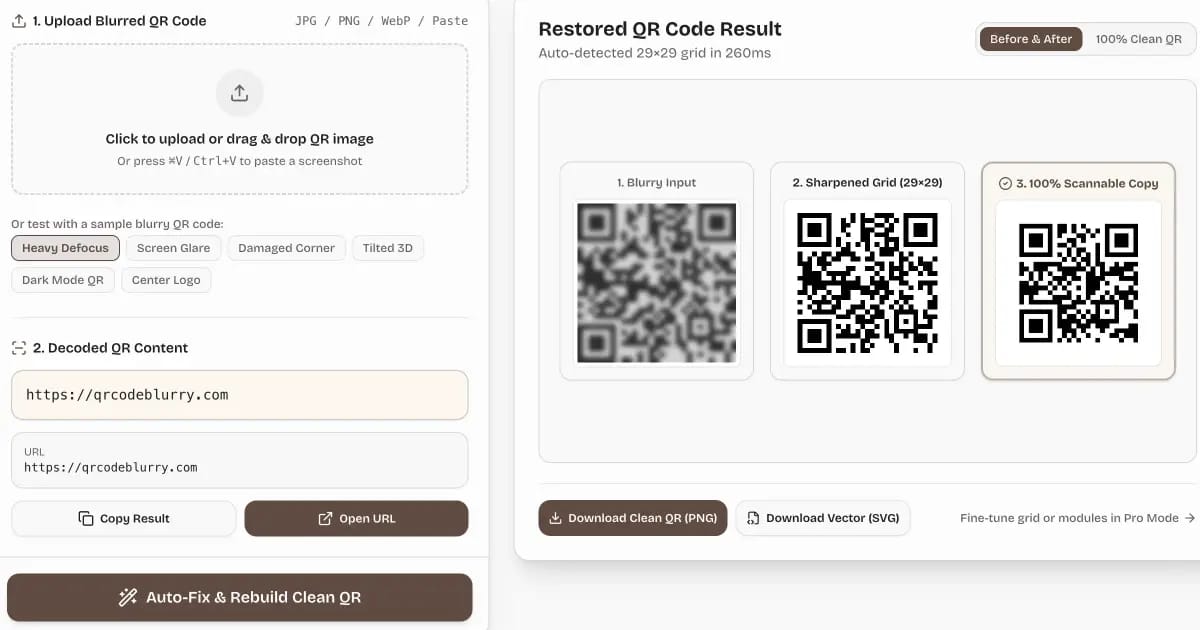
If you've ever tried to scan a QR code off a cracked phone screen or a sun-faded poster, you know the frustration. QSharpener is the fix: upload the photo, and it applies deconvolution and AI to recover the code, then rebuilds a clean copy. It handles glare, torn corners, and angled surfaces. Free to start, with credits for volume and SVG for print.
What QSharpener does
AI QR Deblurrer restores blurred or damaged QR codes by deblurring, decoding, and rebuilding them as clear copies. It addresses problems such as optical defocus, screen glare, damaged finder corners, and perspective distortion that can prevent a QR code from scanning. The page presents before-and-after examples and describes computer vision techniques for recovering code edges, contrast, position markers, and geometric alignment.
A user uploads or drags in a JPG, PNG, or WebP image, or pastes a QR code image from the clipboard. The tool offers Auto Mode and Pro Mode, and displays decoded content and a restored QR code result. The page says its pipeline models optical blur, expands local dynamic range, filters screen-grid interference, reconstructs missing position markers, and rectifies perspective before extracting modules. Pro Mode can fine-tune the grid or modules.
The page describes the tool for people who have an unreadable or blurry QR code and want to recover its content or create a clean replacement. Its examples cover codes affected by camera defocus, monitor glare, physical damage, and tilted or skewed photography. It also distinguishes the tool with a Pro Mode for fine-tuning grids or modules and provides a technical explanation of its computer vision approach.
Based on qrcodeblurry.com, read on Nov 23, 2026.
Key features
- Deblurs and decodes QR codes
- Rebuilds a clean QR code
- Accepts JPG, PNG, and WebP images
- Supports image pasting
- Offers Auto Mode and Pro Mode
- Fine-tunes QR grids or modules
What people use QSharpener for
- 01Restore QR codes blurred by camera defocus
- 02Recover codes affected by screen glare
- 03Repair codes with damaged corners
- 04Restore codes photographed at an angle
- 05Decode a pasted or uploaded QR image
More in Productivity
Browse all Productivity Mumble AI
 is a voice-first productivity app for Mac that combines meeting recording, dictation
 PixPin
An all-in-one productivity tool featuring smart screenshots, scrolling capture, screen recording
 VidBG Remover
 is an AI-powered online tool that allows users to remove video backgrounds quickly
 PDFtoMD
Convert any PDF into clean, structured Markdown in seconds with PDFtoMD
 MikeSullyTools
Fix blurry photos and improve short videos in your browser.
 Reply Argus
Best app review management for iOS and Android