Reviews
Expandi Review 2026: LinkedIn and Email Outreach on Autopilot, With the Guardrails Left On
Expandi (expandi.io) is a cloud-based LinkedIn outreach tool that runs each account from its own IP, branches campaigns on what prospects do, adds email in beta and now takes instructions from Claude or ChatGPT through Expandi MCP. Here is how a campaign runs, what it costs, how safe it is and who it fits.

Contents (19)
- Expandi in short
- What Expandi is, and why it is built the way it is
- Who Expandi is for
- How a campaign works, step by step
- Smart Sequences: outreach that reacts to the prospect
- Account safety, and the part every buyer should understand
- Personalization that goes past {firstname}
- Expandi Email: LinkedIn and email in one campaign
- Expandi MCP: run outreach from the AI assistant you already use
- Built for teams and agencies
- Integrations
- What Expandi's own data says about LinkedIn outreach
- Expandi pricing
- What users say
- Where Expandi asks something of you
- Expandi compared with popular alternatives
- How to get the most out of the 7-day trial
- The verdict
- Frequently asked questions
Disclosure: this is a sponsored review.
Product details and prices were checked against expandi.io, its pricing, smart campaigns, email, MCP, workspaces and legal pages, and the G2, Capterra and Trustpilot listings on November 19, 2026.
Quick answer: Expandi is a cloud-based LinkedIn outreach tool with email in beta. Each LinkedIn account runs from its own country-based IP with a warm-up and daily limits, campaigns branch on what each prospect does, and Expandi MCP lets Claude, ChatGPT and other AI assistants draft lists and campaigns for you to approve. It costs $99 per LinkedIn account a month, or $79 a month billed yearly, with a 7-day free trial.
If you sell, recruit or run an agency, you already know the arithmetic of LinkedIn outreach. The people you want to reach are there. Reaching enough of them by hand, with messages that sound like you wrote them for that one person, eats the hours you meant to spend on calls. Tools that automate the work have been around for years, and so has the worry that comes with them: will LinkedIn notice and lock my account?
Expandi is one of the better-known answers to that problem, and in 2026 it changed more than it had in a while. It added an email channel, a team workspace model and, most notably, a way to run the whole thing from Claude, ChatGPT or another AI assistant. This review walks through what Expandi does, how a campaign actually runs, what it costs, where it is strong, where it asks something of you, and how to get a fair read on it inside the 7-day trial.
Expandi in short
Expandi is a cloud-based LinkedIn automation tool for sales teams, recruiters, founders and lead generation agencies. It sends connection requests, messages, InMails and follow-ups on your behalf, mixes in lighter touches like profile visits and post likes, and branches each prospect's path based on what they do. Every LinkedIn account gets its own dedicated, country-based IP address and a warm-up period. It costs $99 per LinkedIn account per month, or $79 per month on annual billing, and agencies with 10 or more seats get custom pricing with white label. Expandi is built by ProfitSoft B.V. in Eindhoven, the Netherlands, and has been running since 2019.
| Quick facts | |
|---|---|
| What it is | Cloud-based LinkedIn outreach automation, with email in beta |
| Best for | Agencies, B2B sales teams, recruiters, founders who sell |
| Price | $99 per account per month, or $79 per month billed annually |
| Agency plan | Custom pricing from 10 seats, white label available |
| Free trial | 7 days, all features |
| AI assistants | Expandi MCP works with Claude, ChatGPT, Cursor, n8n, Make and other MCP clients |
| CRM sync | HubSpot, Salesforce, Pipedrive, plus Zapier and webhooks |
| Ratings (Nov 19, 2026) | G2 4.3/5 (194 reviews), Capterra 4.5/5 (45), Trustpilot 4.4/5 (236) |
| Company | ProfitSoft B.V., Eindhoven, Netherlands, founded 2019, bootstrapped |
What Expandi is, and why it is built the way it is
Expandi was started in 2019 by Stefan Smulders and Glenn Miseroy, who is now Co-Founder and CEO according to Expandi's own research report. The company never took venture money. In a 2023 interview on the saas.unbound podcast, the team describes choosing to stay bootstrapped, and a Starter Story profile of the company says the first funding came from beta users who prepaid annual plans.
That history explains a lot about the product. Many early LinkedIn tools ran as Chrome extensions, which meant your laptop had to be open and every action came from your home or office connection. Expandi went the other way from the start. It runs in the cloud, so campaigns keep going when your computer is off, and each LinkedIn account works from a dedicated IP address in the country you choose. The idea is that your account behaves like one person in one place, at a pace a person could keep, rather than a burst of activity from a data center.
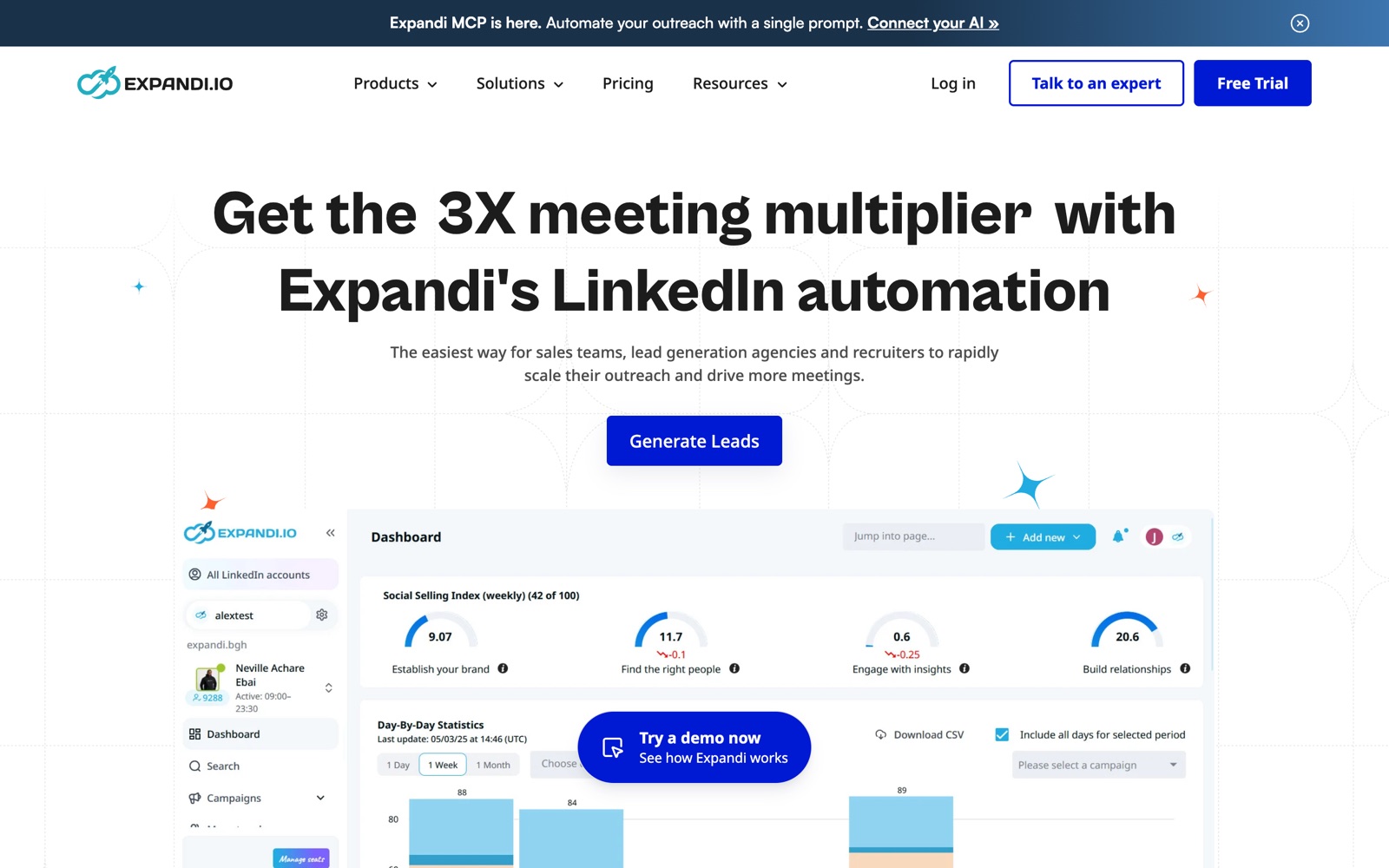
The Expandi dashboard, as shown on its homepage: your LinkedIn Social Selling Index at the top and day-by-day campaign activity below. Screenshot: expandi.io, November 2026.
Who Expandi is for
Expandi speaks to four groups, and the product is shaped around them.
Lead generation agencies get the deepest feature set. One workspace can hold many client LinkedIn accounts, with roles and permissions for staff and clients, shareable reports, and a white label option so clients see your brand instead of Expandi's.
B2B sales teams use it to keep a steady flow of first conversations going for every rep. Shared campaigns, a global inbox and CRM sync mean the manager can see what is happening without asking for screenshots.
Recruiters use the same machinery to reach candidates. Expandi supports LinkedIn Recruiter searches and CSV imports, so a sourcing list can turn into a sequence in a few minutes.
Founders and consultants who sell their own service get the most value per seat. One account, one well-built campaign and a daily habit of answering replies is a realistic way to fill a calendar without hiring.
If you send a handful of connection requests a week and enjoy writing each one, you do not need Expandi. If outreach is a core part of how you grow, it is worth a serious look.
How a campaign works, step by step
Here is the shape of a typical Expandi campaign from sign-up to first replies.
- Connect your LinkedIn account. Expandi assigns it a dedicated IP in your chosen country and starts the warm-up, which ramps your daily activity up gradually.
- Build an audience. You can pull prospects from nine sources: a Sales Navigator search, a Recruiter search, a company's employees, a list of profile URLs, the attendees of a LinkedIn event, the people who engaged with a post, members of a group, a Boolean search or a CSV file.
- Pick a campaign type or open the Smart Builder. Expandi offers ready-made types such as Connector, Mobile Connector and Recovery campaigns, or a blank canvas for custom flows.
- Write your messages with placeholders like {first_name} and {company}, and add images, GIFs or video if you use the paid personalization add-ons.
- Set daily limits for each action type and your sending hours. Expandi will not let a campaign go past them.
- Launch, then work the replies from the inbox. Expandi pauses the sequence for anyone who replies, so nobody gets a "just following up" after they have already said yes.
Expandi says you can launch a first campaign in about 15 minutes. That matches the steps above if your audience is ready. Most of the real work goes into the targeting and the copy, and no tool can do those for you without your judgement.
Smart Sequences: outreach that reacts to the prospect
The feature most users single out is the Smart Builder, Expandi's visual sequence editor. Instead of a straight line of "connect, wait three days, message, wait five days, message", you build a flow that branches on behaviour.
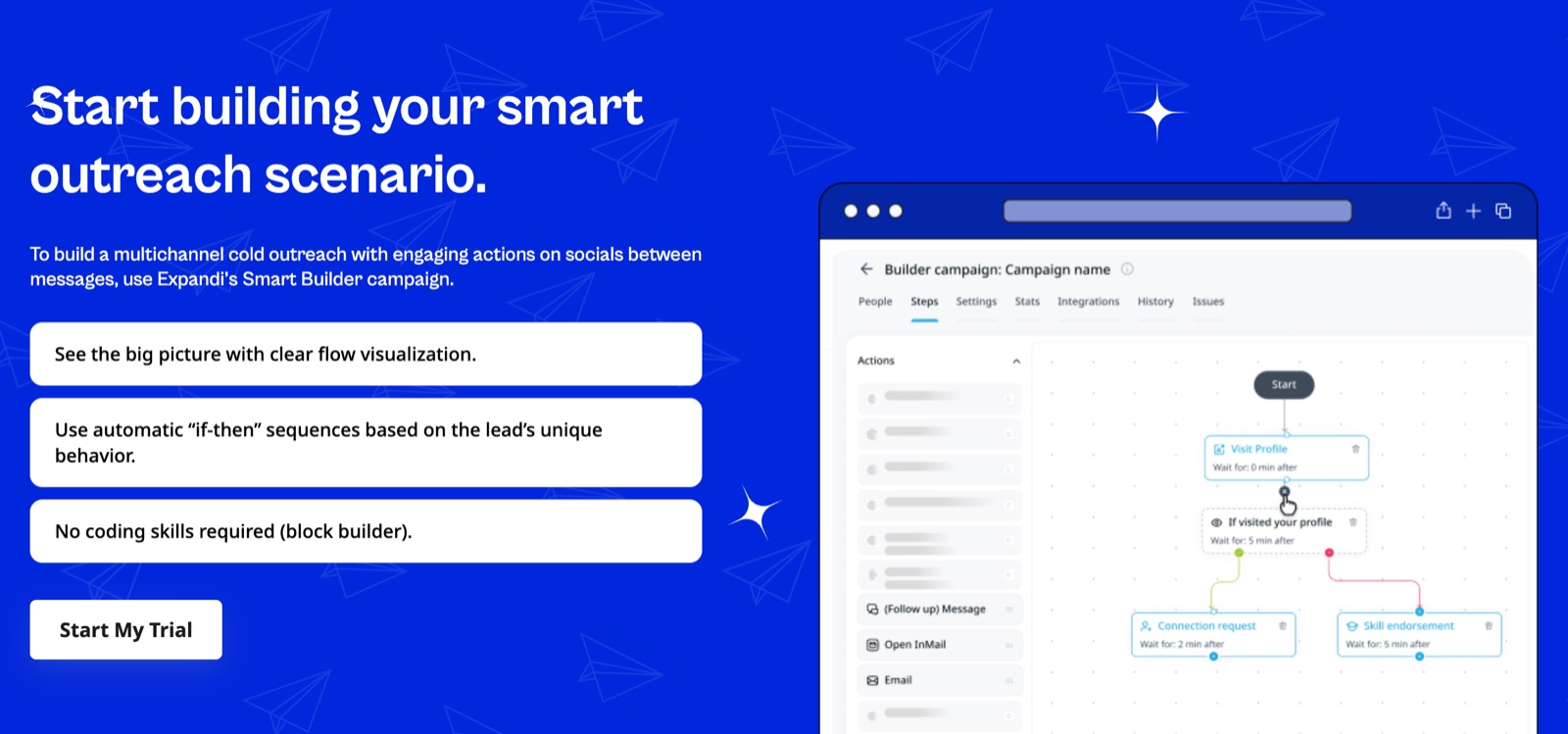
A Smart Builder flow on the Smart Sequences page: visit the profile, then branch on whether the prospect looked back. Screenshot: expandi.io, November 2026.
The example above is a good illustration of the thinking. Expandi visits the prospect's profile first. If they visit yours back within five minutes, they get a connection request straight away, because they are already curious. If they do not, Expandi endorses one of their skills instead, a small, friendly touch that puts your name in their notifications before you ask for anything.
The smart-campaigns page lists nine "if" conditions you can branch on, including whether someone accepted your request, followed you, visited your profile, opened your email, opened an InMail or liked a post. Actions include messages, InMails, emails, follows, profile visits, post likes and endorsements, and you can add manual tasks for steps you want to do yourself. Each step shows its own statistics, so you can see exactly where a sequence loses people and fix that step instead of rewriting the whole campaign.
A few safeguards sit underneath. Duplicate prevention stops two campaigns from messaging the same person, the blacklist keeps current customers and competitors out, and campaign prioritization lets your best-performing campaign use the daily limit first.
Account safety, and the part every buyer should understand
Safety is where Expandi has built its reputation, so it deserves a clear explanation.
On Expandi's side, the protections are concrete. Each account runs from its own dedicated, country-based IP. New accounts warm up gradually. You set daily ranges for connection requests, messages, InMails and event invites, and Expandi enforces them. Actions run inside the sending hours you choose. There is also a Mobile Connector campaign type. In its lead generation FAQ, Expandi describes around 100 connection requests per account per week as typical, which is a sensible pace for most profiles. The Expandi Academy even has a session titled "How to Avoid LinkedIn Account Restrictions While Using Expandi."
On LinkedIn's side, the rules are also clear. LinkedIn's User Agreement bans bots and unauthorized automated methods for adding contacts or sending messages, and its help page on prohibited software and extensions says accounts using such tools can be restricted or shut down. That applies to every automation tool on the market, Expandi included. Expandi's own terms say so too: it is not affiliated with LinkedIn, and keeping your outreach within LinkedIn's rules is your responsibility.
Put together: automation on LinkedIn always carries some risk to the account. What Expandi does well is keep that risk low, through realistic pacing, warm-up and a stable location, and it gives you the controls to stay conservative. Expandi's own guidance is to warm up a new profile before raising volume, and it is good advice. Start slow, keep your acceptance rate healthy by targeting people who will want to hear from you, and treat the limit settings as a floor for caution rather than a target.
Personalization that goes past {first_name}
Expandi's personalization starts with dynamic placeholders, which pull in a prospect's name, company and other fields, and it lets you A/B test message versions inside a campaign.
For visual outreach, Expandi connects to Hyperise for personalized images and GIFs, such as an image with the prospect's name written into it, and to Sendspark for personalized video. Both are paid add-ons on top of your Expandi plan, and Hyperise needs its own subscription. Expandi says this kind of personalization can lift reply rates by up to 55 percent in its campaign data. Even without the add-ons, the combination of placeholders, branching and A/B tests gives you plenty of room to make messages feel written rather than sent.
Expandi Email: LinkedIn and email in one campaign
In 2026 Expandi added email as a full second channel, under the name Expandi Email. The idea is simple and useful: one campaign, one sequence and one timeline per prospect across both LinkedIn and email, with one rule for replies. If someone answers on either channel, both channels pause.
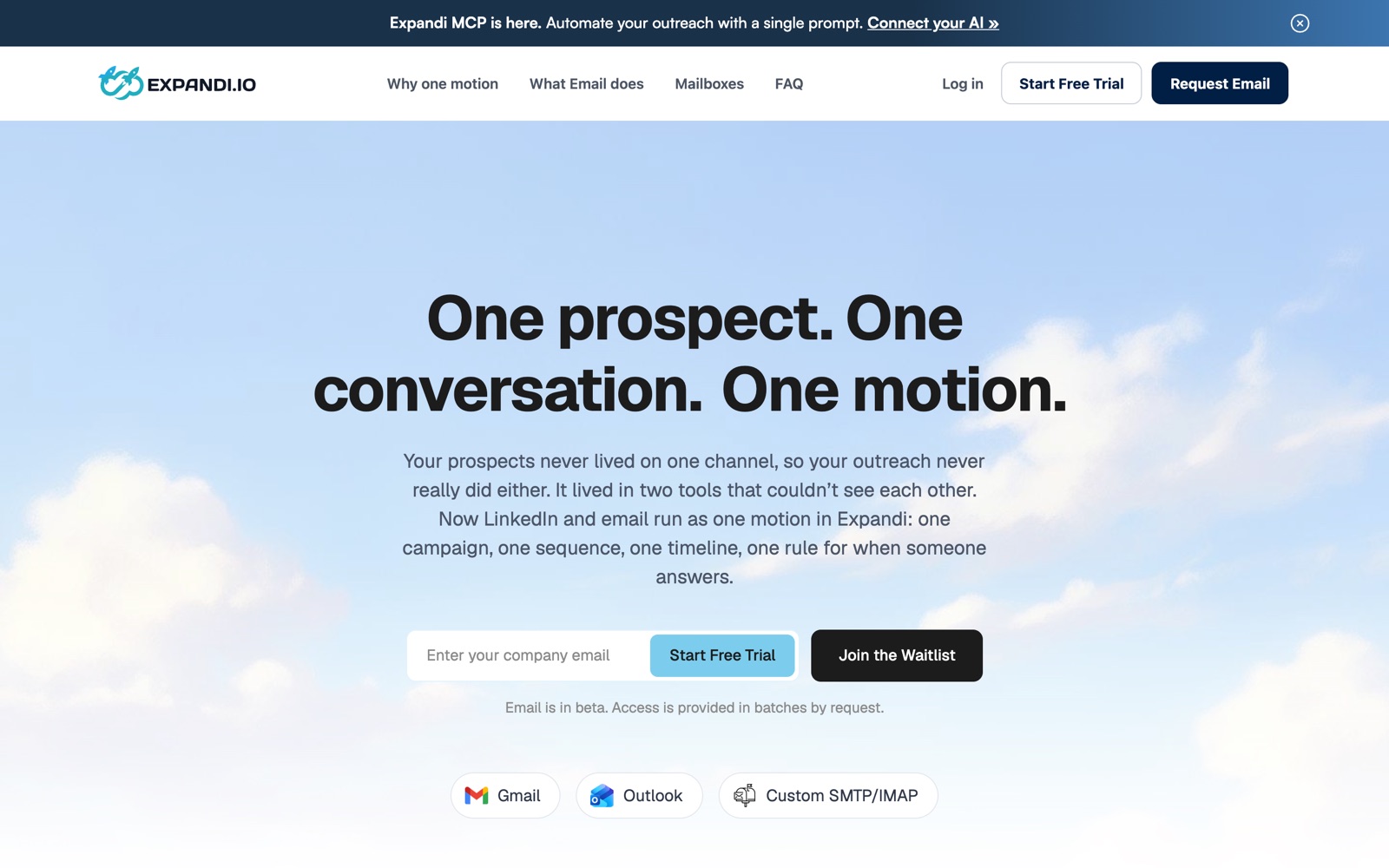
Expandi Email connects Gmail, Outlook or any SMTP/IMAP mailbox. Screenshot: expandi.io, November 2026.
You can connect Gmail, Outlook or a custom SMTP/IMAP mailbox. As of November 2026, Expandi Email is in beta, and access is rolled out in batches on request, so ask for it early in your trial if email is part of your plan. If you already run a dedicated cold email tool, Expandi also integrates with Smartlead.
Expandi MCP: run outreach from the AI assistant you already use
The biggest change this year is Expandi MCP. MCP, the Model Context Protocol, is the standard way for AI assistants to use outside tools. Expandi MCP connects your Expandi account to Claude, ChatGPT, Cursor, n8n, Make or any other MCP client, so you can ask for outreach work in plain language.
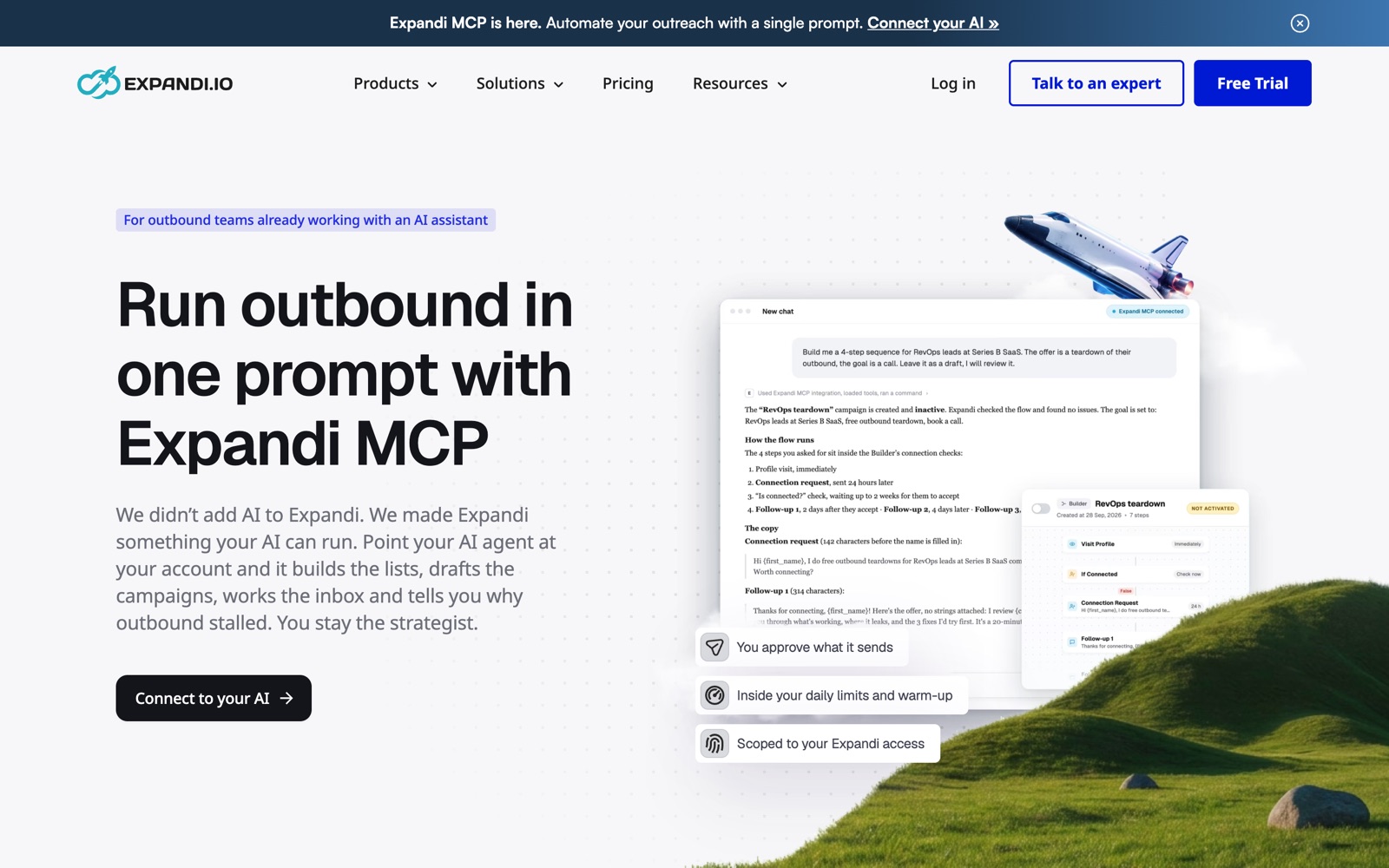
A single prompt turns into a drafted 4-step campaign, left inactive for review. Screenshot: expandi.io, November 2026.
In practice, you might type "build me a four-step sequence for RevOps leads at Series B SaaS companies, offer a teardown of their outbound, goal is a call, leave it as a draft." The assistant builds the list, writes the sequence inside Expandi's builder and leaves it switched off for you to review. It can also draft replies to messages in your inbox and explain why a campaign sent fewer messages than expected.
Expandi built firm limits into it. The MCP only drafts. You approve anything that goes out. It cannot activate a campaign or edit one that is already running, and it works inside the same daily limits, warm-up and sending hours as the rest of your account. Expandi also publishes a library of free "skills" for AI agents, each covering one outreach job such as choosing who to reach or triaging replies, and most of them work before you even connect an account.
Expandi MCP requires an active Expandi subscription, and some AI tools need their own paid plan to use MCP. For teams that already live in Claude or ChatGPT, it removes a lot of clicking from the parts of outreach that are routine, while leaving the decisions with you.
Built for teams and agencies
Expandi's Workspaces let you invite teammates or clients at no extra cost and decide exactly which LinkedIn accounts each person can see.
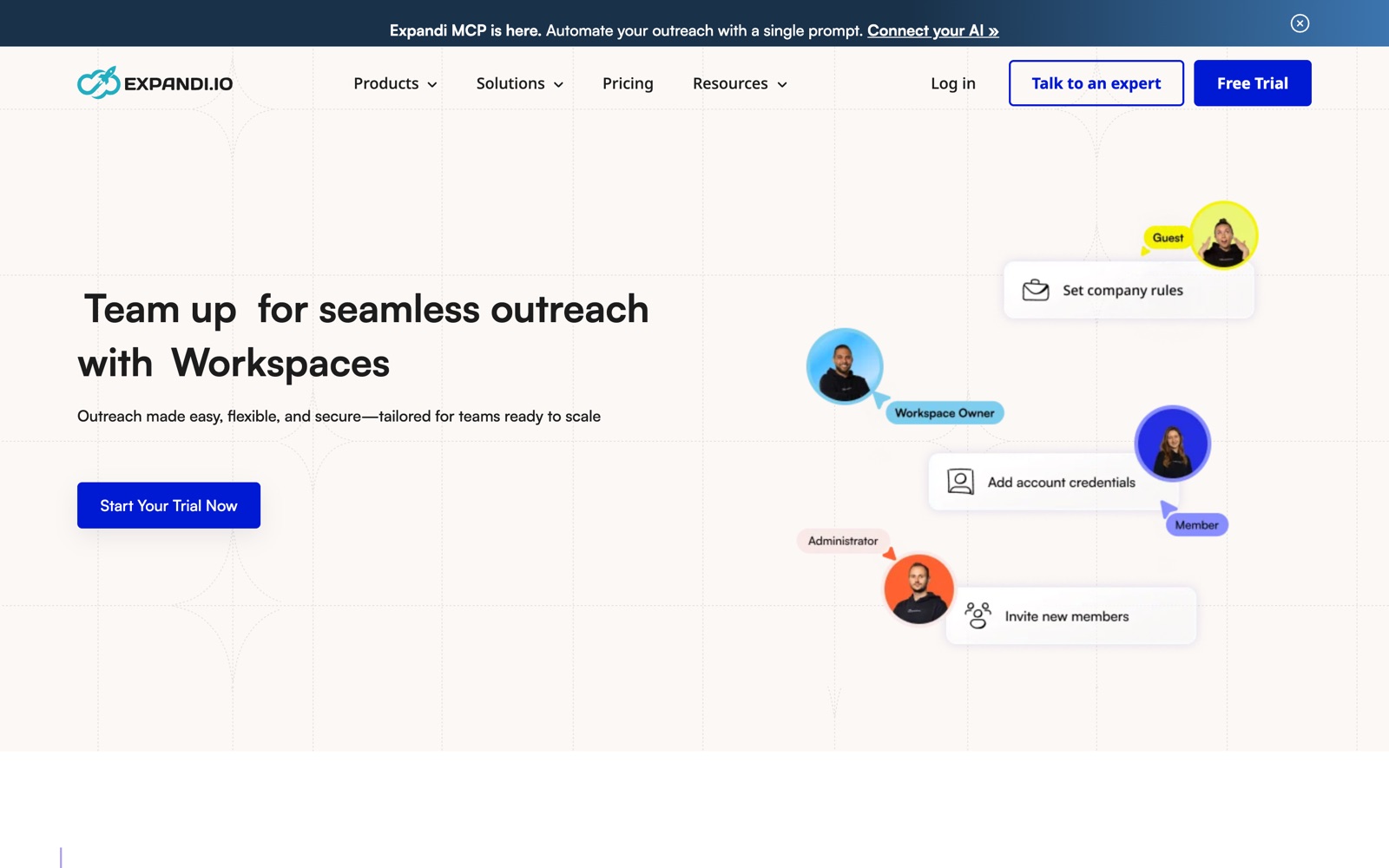
Workspaces assign roles like owner, administrator, member and guest. Screenshot: expandi.io, November 2026.
There are predefined roles (Admin, Workspace member, Company Manager) and custom roles built from more than 100 permission settings. Billing ownership can be transferred, and people can switch between workspaces without logging out. On the Agency plan you also get centralized campaign management, client-ready reports, shared templates, a dedicated Customer Success Manager and white label branding, so you can offer outreach as your own service. Expandi's case studies include a LinkedIn consultant running more than 150 client accounts this way.
Integrations
Replies and activity sync natively to HubSpot, Salesforce and Pipedrive. For everything else there is Zapier, outgoing and reversed webhooks, Google Sheets, n8n through webhooks, and API credentials. Smartlead, Hyperise and Sendspark connect for email, images and video. For most teams, the CRM sync is the integration that matters: every reply lands where your pipeline already lives.
What Expandi's own data says about LinkedIn outreach
Expandi publishes a twice-yearly benchmark report, and the H2 2026 edition is worth reading even if you never buy the tool. The State of LinkedIn Outreach is based on more than 13.2 million connection requests and 6.7 million messages sent from 13,302 Expandi accounts between May 2025 and April 2026. The report itself notes that its findings show patterns, not proof of cause. The figures below are Expandi's.
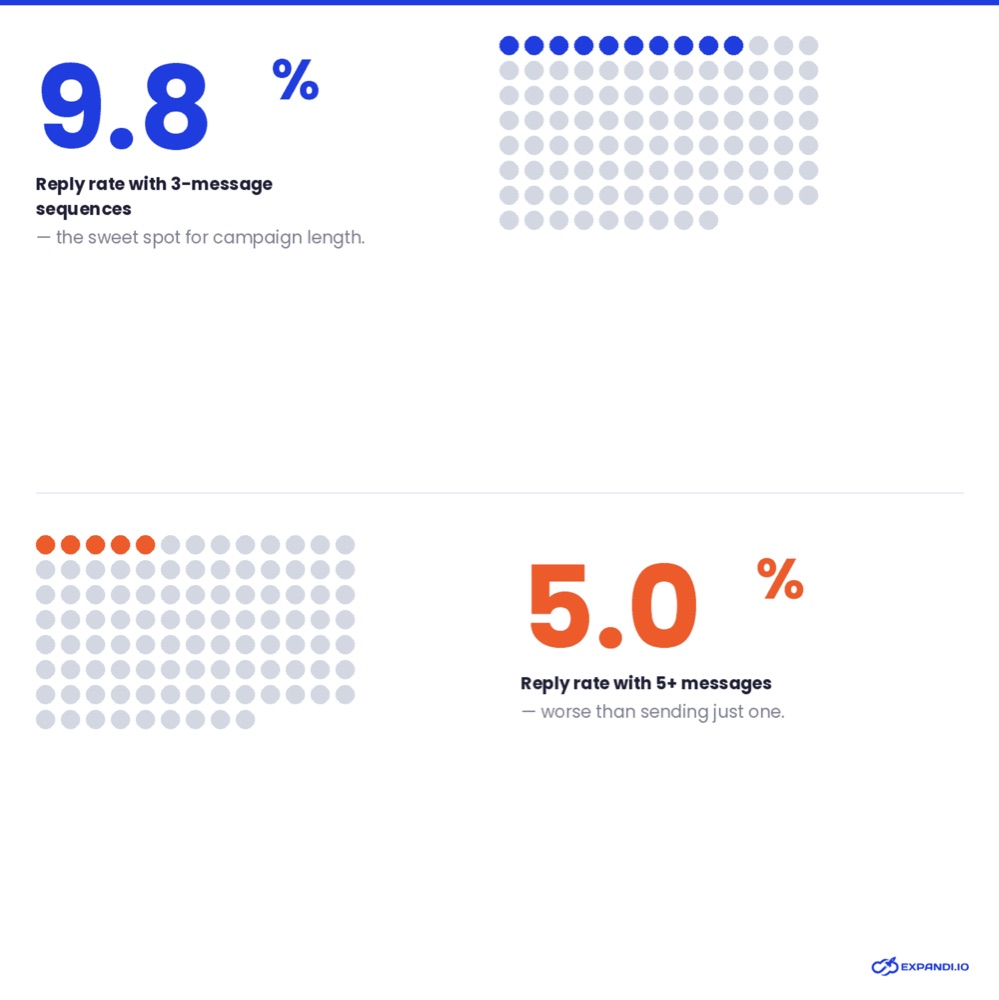
Longer sequences did not earn more replies in Expandi's data. Chart: Expandi, State of LinkedIn Outreach H2 2026.
The findings translate straight into campaign settings:
- Three-message sequences had a 9.8 percent reply rate. Sequences of five or more messages fell to 5.0 percent, lower than sending a single message. Stop at three.
- Connection requests sent between 7 and 11 in the morning (Amsterdam time) were accepted about 32 percent of the time, against about 24 percent in the evening. Schedule your sending hours for the morning in your prospects' time zone.
- Connection notes that mention a real link, such as a shared group or the fact that you follow them, were accepted 1.8 to 2.7 times as often as the 30.2 percent baseline.
- Messages between 150 and 200 characters had the best reply rate, at 8.5 percent.
- Within the same accounts, AI-personalised messages were accepted about 12 percent less often than the accounts' own templates, with reply rates unchanged. Let AI help you draft, then make it sound like you.
- Sales Navigator leads were accepted at 19.8 percent against 18.5 percent for CSV lists, with the same reply rates, so a good list matters more than where it came from.
Across all accounts, the average acceptance rate was 28.5 percent and the average reply rate 10.4 percent. Those two numbers make a useful yardstick for your own campaigns during the trial.
Expandi pricing
Expandi's pricing is simple: one Business plan with every feature, priced per connected LinkedIn account, and a custom Agency plan from 10 seats.
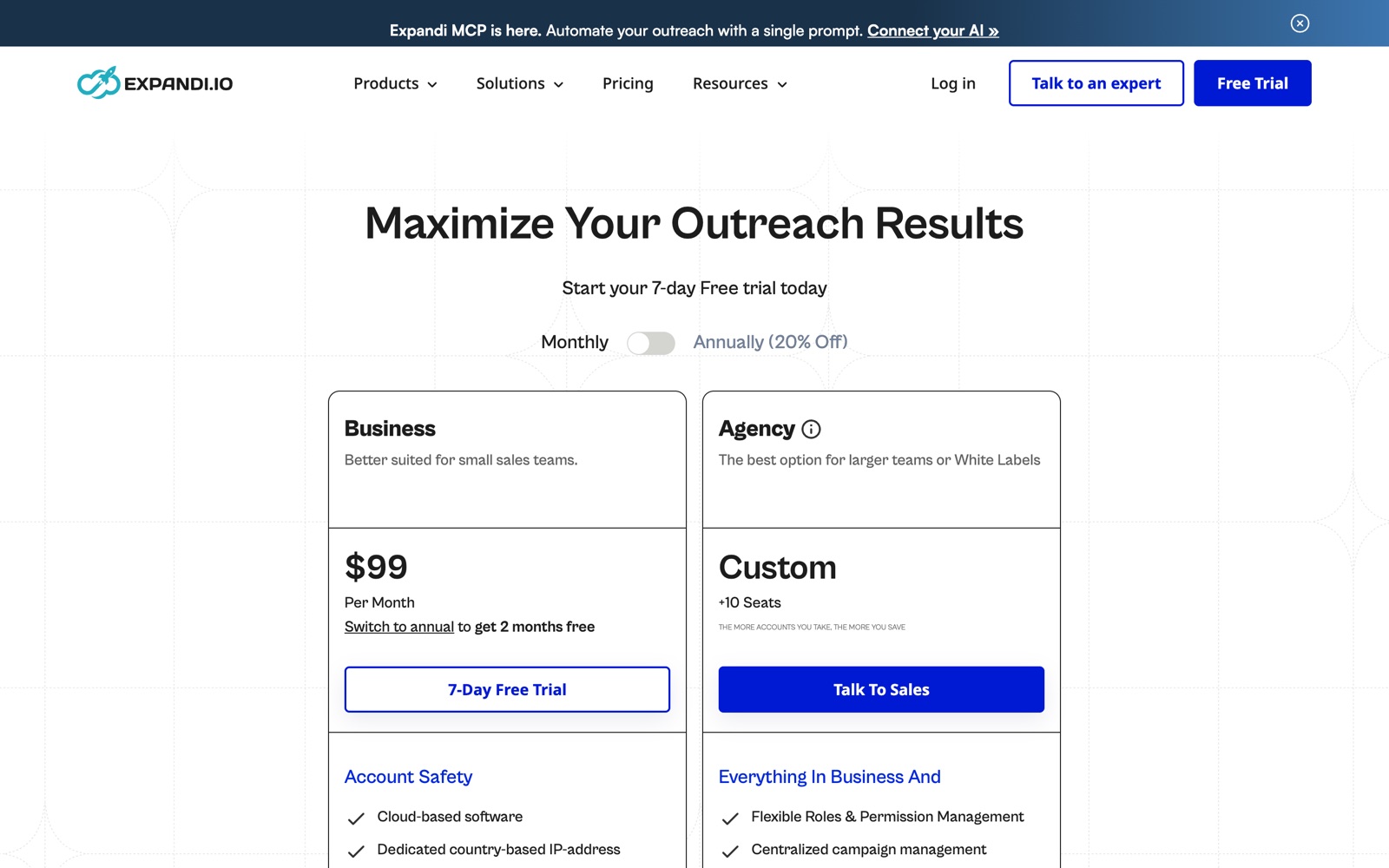
Expandi pricing, monthly view. The annual toggle drops the Business plan to $79 per month. Screenshot: expandi.io, November 2026.
| Plan | Price | Includes |
|---|---|---|
| Business, monthly | $99 per LinkedIn account per month | Every core feature: cloud, dedicated IP, warm-up, limits, all campaign types, Smart Builder, inbox, integrations |
| Business, annual | $79 per account per month, billed yearly | Same features, 20 percent less |
| Agency | Custom, from 10 seats | Everything in Business plus roles and permissions, client reports, a dedicated Customer Success Manager and white label |
| Add-ons | Priced separately | Hyperise images and GIFs, Sendspark video |
Some quick math helps here. One account on annual billing costs $948 a year instead of $1,188 on monthly billing. A three-person sales team pays $297 a month on monthly billing or $237 a month on annual, a difference of $720 over a year. The bigger the team, the more the per-account model adds up, which is why the Agency plan exists. If you plan to connect 10 or more accounts, talk to sales before you commit.
A few billing details to know before you start. The trial lasts 7 days and includes all features. Expandi's FAQ says you will not be charged until the 7 days are up, and after that the plan you picked renews unless you cancel first, so set a reminder for day six if you are still deciding. You can cancel any time, and cancellation takes effect at the end of the current billing period. Under Expandi's terms, fees already paid are not refunded unless the law requires it.
What users say
Expandi's ratings are strong and consistent across the three big review sites, as of November 19, 2026:
| Site | Rating | Reviews |
|---|---|---|
| G2 | 4.3 out of 5 | 194 |
| Capterra | 4.5 out of 5 | 45 |
| Trustpilot | 4.4 out of 5 | 236 |
The praise clusters around people. Reviewers often name the support staff who helped them, and many mention onboarding and strategy calls that got their first campaign right. Others like how granular the controls are and that everything runs in the cloud.
The complaints are worth reading too, because they tell you how to prepare. The most common is the learning curve: there are a lot of options, and some reviewers find the interface busy at first or struggled to set up campaigns alone. Some mention error notifications. On Trustpilot, 76 percent of ratings are five stars, while 18 percent are one star, and several of those concern support and billing. The practical takeaway is to book the onboarding call, start with one simple campaign and keep an eye on your renewal date.
Where Expandi asks something of you
No tool fits everyone, and Expandi has some trade-offs worth weighing:
- It is priced per LinkedIn account, so costs grow with every rep or client you add.
- Image, GIF and video personalization cost extra on top of the plan.
- Expandi Email is still in beta with access by request, so if email matters to you, check access before you build your plan around it.
- The depth of the builder takes a little time to learn, and the first week is better spent on one solid campaign than five rough ones.
- LinkedIn's rules still apply. Expandi lowers the risk to your account, but it cannot remove it.
None of these are unusual for this category. They are the things to plan for so your trial week shows you what the tool can really do.
Expandi compared with popular alternatives
| Tool | How it is positioned |
|---|---|
| Expandi | Cloud-based, dedicated IP per account, behaviour-based Smart Builder, Workspaces and white label, AI assistant control through MCP |
| Dripify | Visual drip campaigns with a simpler, more linear builder |
| Waalaxy | Freemium entry point with browser-extension roots, aimed at beginners |
| HeyReach | Agency tool built around rotating many sender accounts inside one campaign |
| Lemlist | Email-first outreach that added LinkedIn steps |
| La Growth Machine | Multichannel tool covering LinkedIn, email, X and voice |
If your outreach happens mostly by email, an email-first tool may suit you better. If LinkedIn is your main channel and you care about pacing, branching and team control, Expandi is a strong fit, and its MCP support is a real reason to choose it if your team already works in an AI assistant.
How to get the most out of the 7-day trial
Seven days is enough to learn whether Expandi works for you, as long as you use them deliberately.
On day one, connect your LinkedIn account, set conservative daily limits and let the warm-up begin. Book the onboarding call if one is offered. Then build one audience you know well, such as the people who engaged with a recent post in your niche or the attendees of a relevant LinkedIn event. Warm audiences show you what the tool can do faster than a cold list.
On day two, build one Smart Builder campaign with three messages at most, a short connection note that references something real, and a profile visit or post like before the first request. Set sending hours for the morning in your prospects' time zone. If you use an AI assistant, connect Expandi MCP and ask it to draft a second version of the same campaign, then compare the two and keep the one that sounds more like you.
From day three to day six, check the per-step statistics every morning, answer replies the same day from the inbox, and compare your acceptance and reply rates with the 28.5 percent and 10.4 percent averages in Expandi's report. Adjust the step that underperforms. On day six, decide, and if you plan to keep it, switch to annual billing for the 20 percent saving.
The verdict
Expandi is a mature, carefully built LinkedIn automation platform that takes account safety seriously and gives you a lot of control over how your outreach behaves. The Smart Builder lets you design sequences that react to people instead of firing on a timer. Workspaces and white label make it a natural fit for agencies. In 2026, Expandi MCP and the email beta show a product moving forward rather than resting on its name.
It is best for agencies, sales teams, recruiters and founders for whom LinkedIn is a primary channel and who are willing to spend a week learning the builder. It is less suited to occasional users or teams that work mostly by email. If that sounds like you, the 7-day trial is a low-risk way to find out.
Frequently asked questions
Is Expandi safe for my LinkedIn account?
Expandi is built to keep risk low. Each account runs in the cloud from a dedicated, country-based IP address, new accounts warm up gradually, and Expandi enforces the daily limits you set. That said, LinkedIn's User Agreement prohibits automated tools, so any automation carries some risk of restriction. Start with low limits, target people likely to accept, and increase activity slowly.
How much does Expandi cost?
Expandi costs $99 per LinkedIn account per month on monthly billing, or $79 per month when billed annually. Teams and agencies with 10 or more seats get custom pricing on the Agency plan. Personalized images, GIFs and video are paid add-ons.
Does Expandi have a free trial?
Yes. Expandi offers a 7-day free trial with access to all features. The plan you choose starts billing after the 7 days unless you cancel before then.
Can I cancel Expandi or get a refund?
You can cancel any time, and the cancellation takes effect at the end of your current billing period. Expandi's terms say paid fees are non-refundable unless the law requires otherwise, so cancel before renewal if you do not want the next period.
Do I need LinkedIn Sales Navigator to use Expandi?
No. Expandi works with a free or Premium LinkedIn account using its built-in search options, such as post engagers, group members, event attendees and CSV imports. Sales Navigator and Recruiter searches need those LinkedIn subscriptions, and Expandi says Sales Navigator can help widen your limits.
Is Expandi a Chrome extension?
No. Expandi is cloud-based software. Nothing is installed in your browser, and campaigns keep running when your computer is off.
Can Expandi send emails as well as LinkedIn messages?
Yes, through Expandi Email, which adds Gmail, Outlook or custom SMTP/IMAP mailboxes to the same campaign and timeline as your LinkedIn steps. A reply on either channel pauses both. As of November 2026 it is in beta, with access granted in batches on request.
Does Expandi work with ChatGPT or Claude?
Yes. Expandi MCP connects your Expandi account to Claude, ChatGPT, Cursor, n8n, Make and other MCP clients. The assistant can build lists, draft campaigns and draft replies, but it cannot send anything or activate a campaign without your approval.
How many connection requests can I send per week with Expandi?
It depends on your account's age, history and acceptance rate. Expandi describes around 100 connection requests per account per week as typical, and recommends warming up new accounts first. A conservative, steady pace protects both your account and your acceptance rate.
Can agencies white label Expandi?
Yes. The Agency plan, for 10 or more seats, includes white label branding along with custom roles and permissions, client reports and a dedicated Customer Success Manager.
Who makes Expandi?
Expandi is made by ProfitSoft B.V., a company based in Eindhoven, the Netherlands. It was founded in 2019 by Stefan Smulders and Glenn Miseroy and has grown without venture funding.
Get your SaaS in front of founders
List your product on SaaSCity for $19.99, one-time: a permanent listing and a building on the live city map.