Reviews
WEXTL Review 2026: Visual Workflow Automation and AI Agents With a Human in the Loop
WEXTL (wextl.com) is a visual workflow automation platform and AI agent builder with 1,300+ native apps, a prompt-to-workflow AI builder, human approvals, run replay and credit-based plans from $19 a month. Here is how it works, what it costs, what teams build with it and who it suits.

Contents (21)
- WEXTL at a glance
- What is WEXTL?
- How does the AI Workflow Builder work?
- What can you build on the visual canvas?
- How do AI agents work in WEXTL?
- Can WEXTL agents use MCP servers?
- How do human approvals work?
- How do you debug and replay a failed run?
- Does WEXTL have built-in databases and custom code?
- How many apps does WEXTL integrate with?
- What can teams automate with WEXTL?
- How much does WEXTL cost?
- Which WEXTL plan should you choose?
- How does WEXTL compare with n8n, Make and Zapier?
- Is WEXTL secure, and where is data stored?
- What can developers do with the WEXTL API, SDK and MCP server?
- How to build your first workflow in WEXTL
- Who is WEXTL for?
- Who is behind WEXTL?
- Is WEXTL worth it?
- FAQ
Sponsored post. Product details checked against wextl.com, its pricing, feature, solution and app pages, the developer docs, the @wextl/sdk package on npm, MAXMEL Tech's press releases and the company's Companies House record on October 14, 2026. Screenshots taken from the live site in Google Chrome.
Quick answer: WEXTL is a visual workflow automation platform and AI agent builder from MAXMEL Tech Ltd. in London. You connect 1,300+ native apps on an infinite canvas, describe workflows in plain English to an AI builder, add AI agents that call only the tools and MCP servers you approve, and pause a run for human approval wherever a person should decide. Plans start at $19 a month for 30,000 credits, with unlimited members and unlimited active workflows on every tier.
Most automation stacks grow the same way. A form submission gets piped into the CRM, someone adds a Slack ping, then an AI step to score the lead, and a few months later a manager wants to approve the big deals before a rep calls them. Each layer tends to live in a different tool, and when a run goes wrong, working out which step received what can take longer than the fix itself.
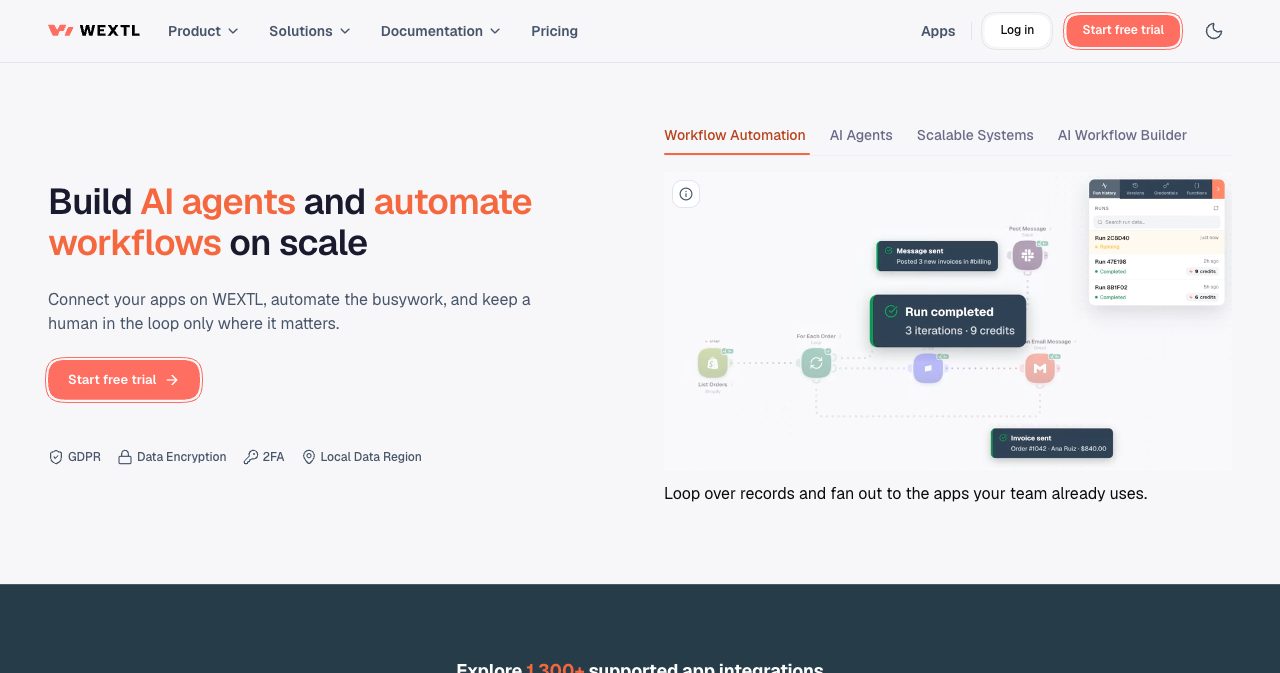
WEXTL puts those layers on one canvas. Triggers, app actions, conditions, AI agents, JavaScript and human approvals are all nodes in the same workflow, every run keeps each node's input and output, and a failed step can be replayed from where it stopped. The homepage sums up the idea in one line: connect your apps, "automate the busywork, and keep a human in the loop only where it matters."
This review walks through what WEXTL is, how the AI Workflow Builder and the AI agents work, where approvals and debugging fit, what it costs, what teams build with it and who it suits best.
WEXTL at a glance
- An AI Workflow Builder that turns a plain-English description into a wired workflow and keeps editing it as you chat.
- A visual canvas with conditions, switches, loops that get their own sub-graphs, merges, aggregation and error routes, plus webhooks, HTTP, CSV, XML, FTP and a scraper as native nodes.
- AI Agent nodes with a model, memory, a knowledge hub and a tools hub fed by your apps and MCP servers.
- Human in the Loop approvals on every plan, with a Slack or email ping and one-click continue.
- Run history that stores every node's input and output, with replay from any node and full-text search over payloads.
- 1,309 native apps in the catalog on October 14, 2026, 86+ of them AI apps.
- Built-in data tables, a JavaScript code node and reusable custom functions.
- A REST API, an MCP server and an official TypeScript SDK, with each organization's data hosted in Europe or the United States.
- Credit-based plans from $19 a month with unlimited members and unlimited active workflows.
What is WEXTL?
WEXTL is a cloud platform for building workflow automations and AI agents on a visual canvas. The name is short for "workflow extension layer." It is built by MAXMEL Tech Ltd., a London software company that also runs the automation agency StartAutomate and StartIntegrate, a maker of more than 600 native apps. Feedback from hundreds of client projects shaped WEXTL's focus on scale, predictable pricing and broad integration coverage.
The platform left closed beta for full public production at the end of July 2026, and the AI Workflow Builder shipped the same month. The company announced on September 3, 2026 that WEXTL had passed 1,000 native integrations, and by mid-October the catalog listed 1,309.
"There is considerable potential in this market, even as the initial AI hype begins to settle," CEO Maxim Melnic said in that announcement. He describes WEXTL as a response to the gaps he saw while delivering automations for clients, and reads the demand for prompt-built workflows as a sign that companies want a more practical way to adopt AI.
| Detail | What we found |
|---|---|
| Product | WEXTL, a visual workflow automation platform and AI agent builder |
| Company | MAXMEL Tech Ltd., London (UK company number 15756061) |
| CEO | Maxim Melnic |
| Public launch | Late July 2026, out of closed beta |
| Native apps | 1,309 in the catalog on October 14, 2026 |
| Plans | Starter $19, Grow $40 and Scale $150 a month |
| Trial | Free trial, sign-up with Google, GitHub or email |
| Data regions | Europe (eu1) and United States (us1) |
| Developer access | REST API v1, MCP server and the @wextl/sdk TypeScript SDK |
How does the AI Workflow Builder work?
You describe an automation in a chat panel next to the canvas, and the assistant builds it. In the homepage demo, the prompt "When a Shopify order comes in, add it to Google Sheets and post in Slack" produces three wired nodes: Shopify Watch Orders, Google Sheets Append a Row and Slack Post Message. The panel reports each step it takes, from reading the workflow to searching nodes and applying changes, and applied changes come with a Revert button.
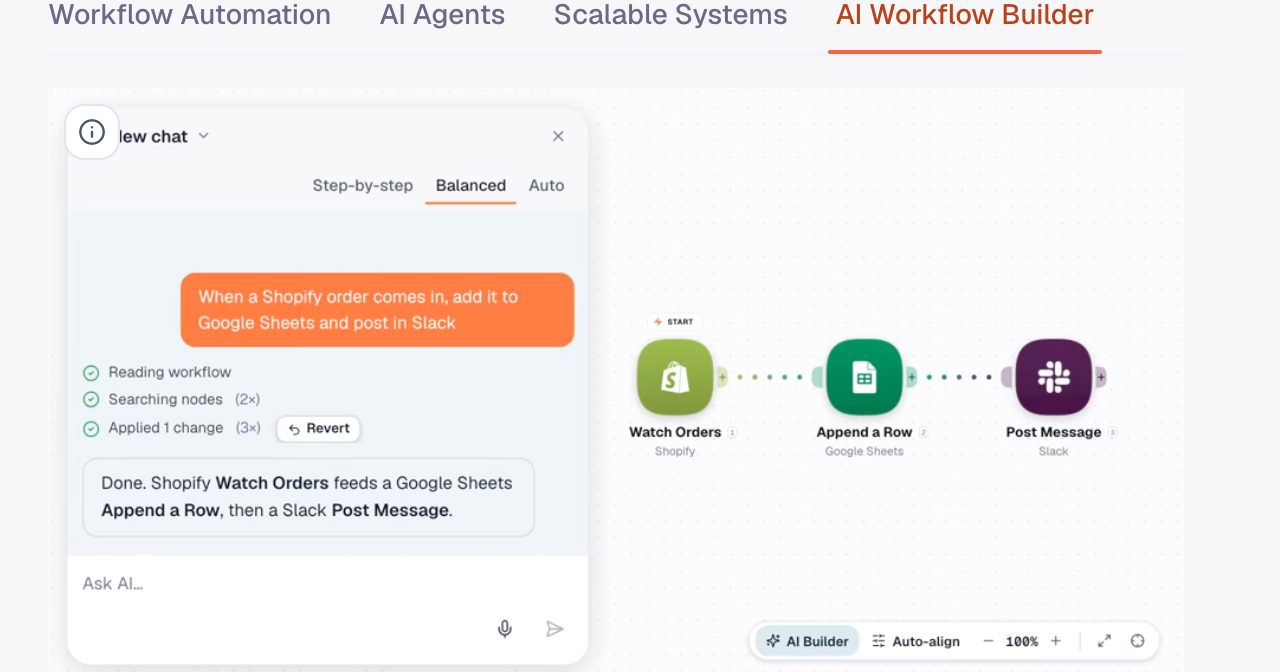
From there you keep talking. In the same demo, the follow-up "Email me instead of posting in Slack" swaps the Slack step for a Gmail one and leaves the rest of the graph as it was. The chat has Step-by-step, Balanced and Auto modes, and you can queue the next request while it works.
The builder also pre-fills fields from apps you've already connected. Ask it to "Send Slack when a Salesforce lead is created" and it wires Salesforce New Lead to a Slack channel message, then reminds you to connect Salesforce when you're ready to start watching. The starter prompts on the homepage show the range: a Slack alert for new database rows, a daily inbox digest, webhook routing by condition and a weekly Google Sheets report.
According to WEXTL's internal data, organizations that switched the feature on created 38.5% of their workflows from prompts. Building with the assistant draws on its own AI credits balance, separate from the workflow credits your runs spend.
What can you build on the visual canvas?
Whether the AI drafts it or you build it by hand, a workflow lives on an infinite canvas where triggers, apps, conditions and AI steps sit side by side, and each node type has its own icon and color, so branch logic reads differently from a plain app call at a glance. You drag nodes onto the canvas, connect their ports, and the workflow runs them in order.
The flow control nodes cover what a multi-step process needs. Condition sends matching data down one path and the rest down a fallback, and Switch routes to one of several branches by value. Splitter, Loop and Aggregate Results handle lists, and Merge joins branches back together. When a step fails, you choose what happens next: Continue, Pause and Retry, Ignore the item or Stop the run.
Loops get their own sub-graph. The steps that run once per item sit inside the loop section, which has ports in and out, so a workflow that iterates over orders stays readable even with several loops in it.
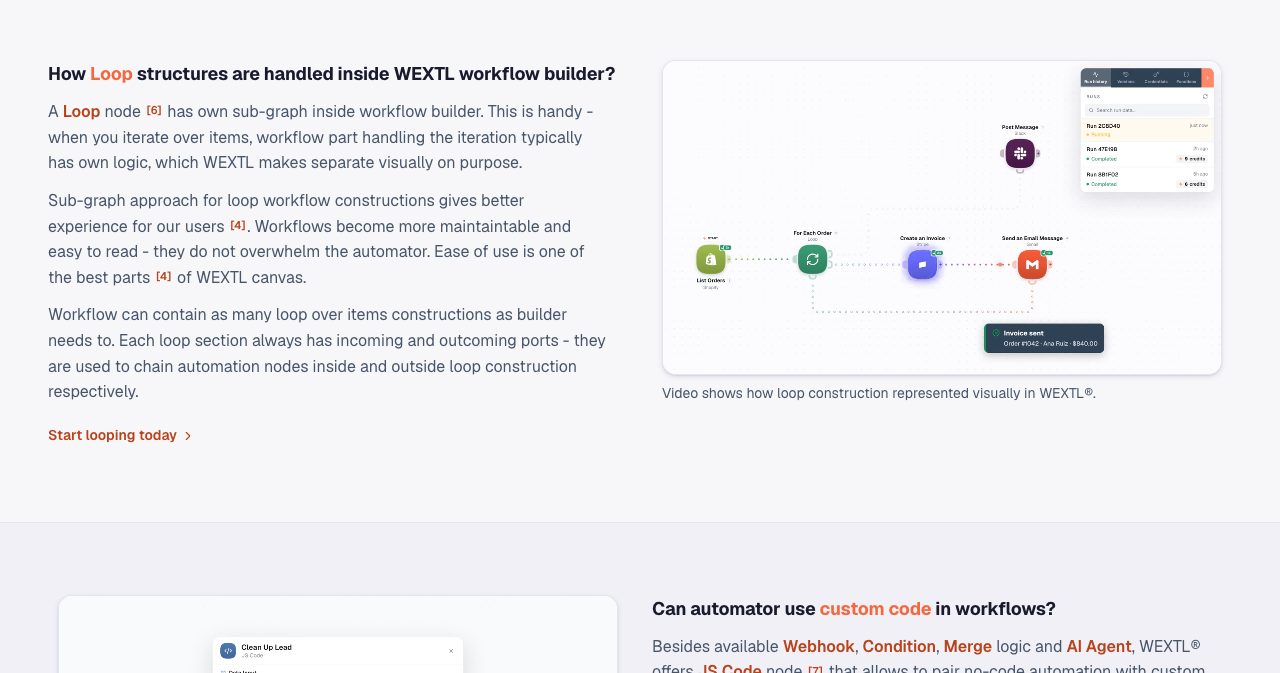
Utility work is native as well. CSV, XML and archive nodes read and write files, an FTP node moves them, a Scraper node pulls structured data from a web page and an HTTP node calls any API. Before you go live, nodes carry a badge for unmapped required fields or a disconnected account, and activating a workflow runs the same structural check as saving it, so a dangling port gets caught before a live trigger fires.
Workflows start from an app trigger, a webhook or a schedule. A Webhook node mints a unique URL, acknowledges each POST straight away and then runs the rest of the canvas, and its Respond module replies to the sender with your own status code, headers and body. Schedules run on an interval, weekly, monthly by day or weekday, or on the last day of the month, each in its own IANA timezone with explicit daylight saving rules. A skip-if-running setting keeps long jobs from overlapping.
For a head start, the template library holds verified and community workflows, such as a daily CRM sync, an invoice follow-up and lead enrichment, and every team solution deploys a complete example workflow into your workspace.
How do AI agents work in WEXTL?
An AI agent in WEXTL is a node. You add the AI Agent node to a workflow, pick a model and its credential, and attach hubs: Tools for the actions it may take, Memory for context across runs and Knowledge for your own documents. The agent reasons over the data it receives, chooses which attached tool to call, sends the result back to the model and loops until the task is done.
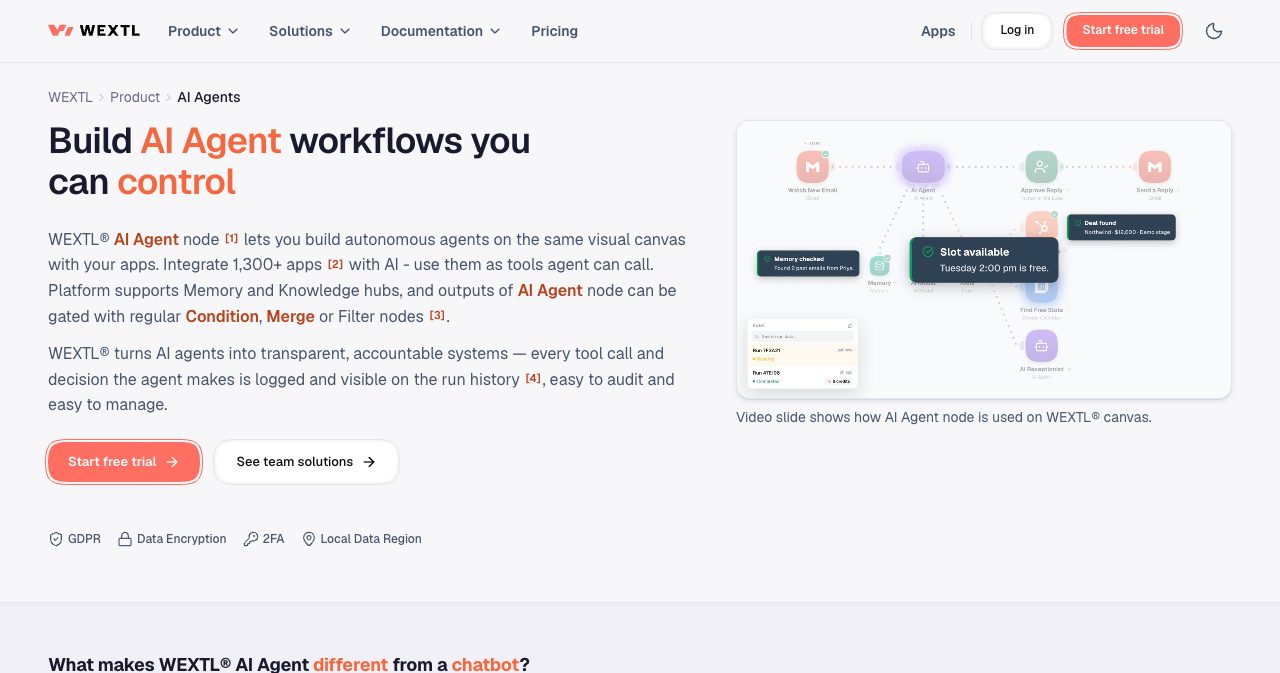
A few design choices make these agents practical for business processes:
- The agent calls only the tools you attach. Any of the 1,300+ apps, a Database node or another agent can go into the Tools hub, and each call shows up as its own step in run history.
- Memory is keyed per entity. Set the memory key from the trigger, for example
{{trigger.user_id}}, and each customer's conversation stays in its own bucket. - A Knowledge hub gives the agent a
knowledge_searchtool over your own text, with no separate retrieval pipeline to build. - Agents can call other agents as sub-agents. Call depth is capped at five, and a cycle guard stops an agent from calling back into itself.
The agent's output runs through the same logic as everything else on the canvas. Put a Condition after it, send the confident cases straight to Slack or Gmail, and route the rest to a person. WEXTL's own agent solutions follow that pattern: the agent drafts, flags and proposes, and a person makes the final call on external emails, ticket closures and CRM writes.
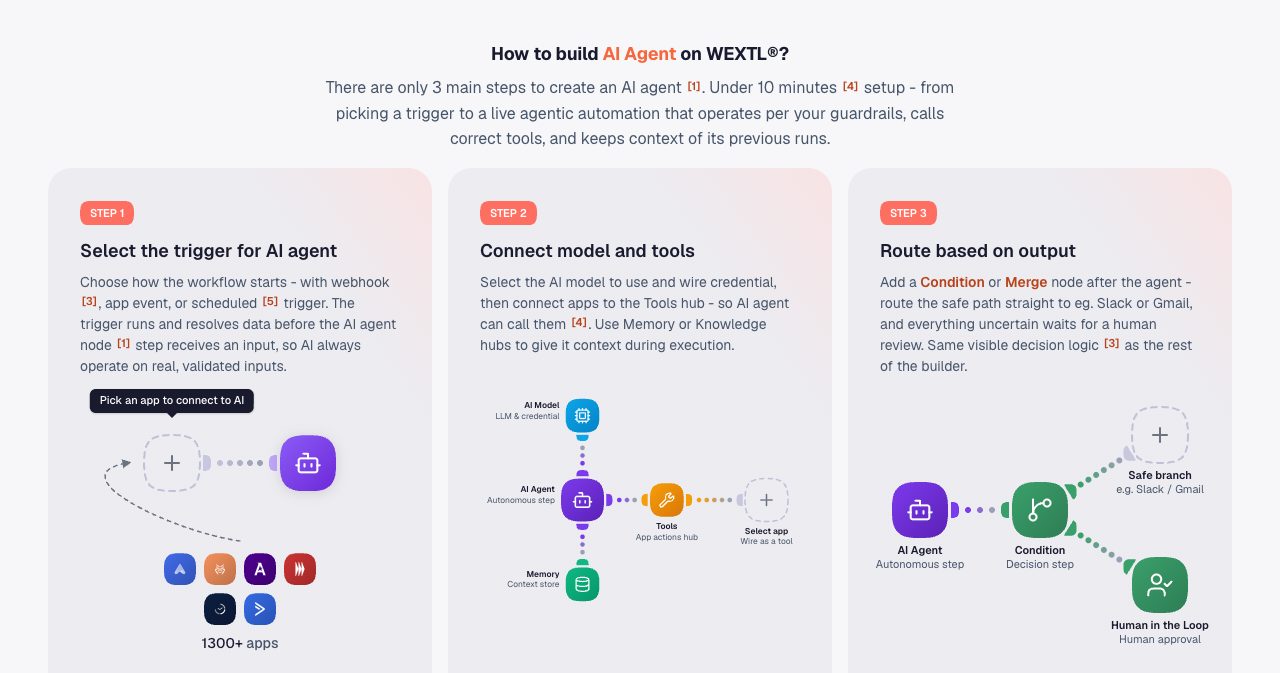
The catalog holds 86+ AI apps an agent can use as tools, from Anthropic's Claude and Alibaba Cloud's Qwen to AWS Textract, Transcribe and Rekognition. Agent steps spend regular workflow credits like any other node.
Can WEXTL agents use MCP servers?
Yes. The AI Agent node is an MCP client. You point it at a vendor-hosted or self-run MCP server, WEXTL lists exactly the tools that server advertises, and you tick the ones the agent may call. Only approved tools are visible to the agent, so in WEXTL's example the agent gets list_issues, add_comment and create_issue while delete_repo stays switched off.
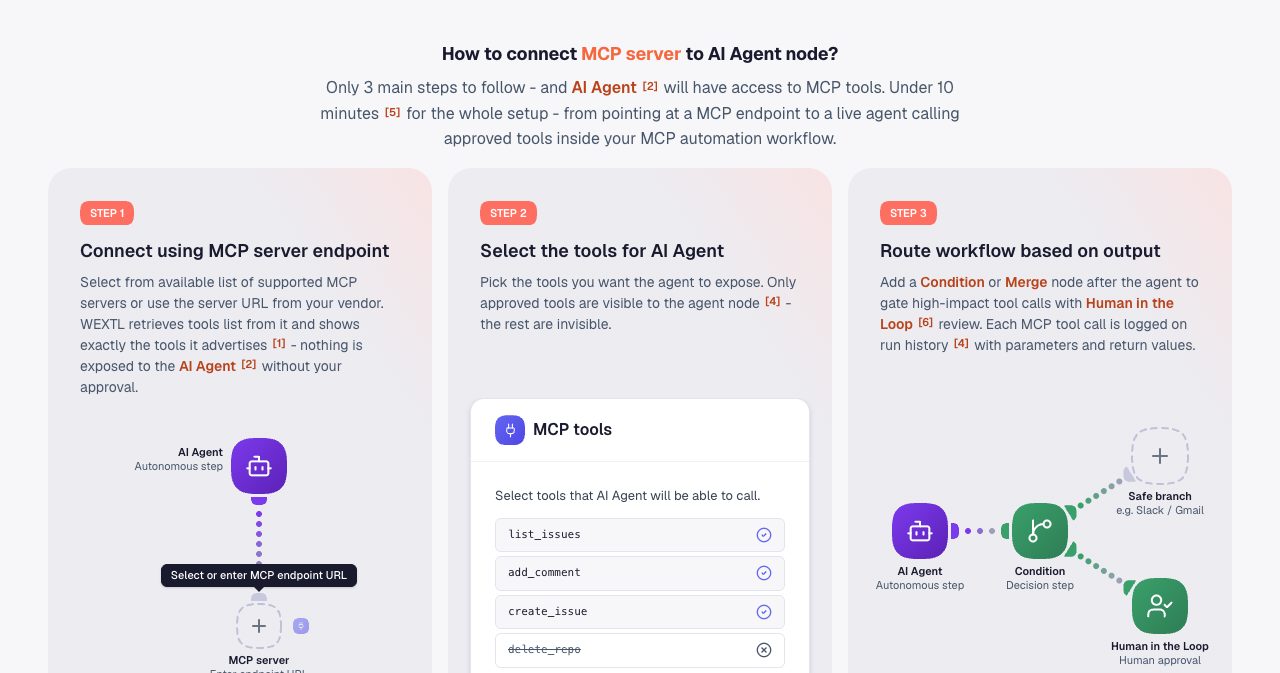
Tool lists refresh on connect. A tool the server adds later appears in the picker for you to approve, and one it removes drops out of the agent's view. An agent can chain several MCP calls in a run, across more than one server, and each call is logged with its parameters and return value next to your regular app steps. A server timeout is logged like any other node error, so you can branch to an alert, a retry or a person.
If you already work with MCP in a coding assistant, our guide to the best MCP servers for Claude Code lists servers worth connecting.
How do human approvals work?
Human in the Loop is a built-in node on every plan, Starter included. When a run reaches it, the workflow pauses and the approver gets a ping in Slack or by email. They see a review form built from the fields you added to the node, approve or reject, and with one click the run carries on from that point.
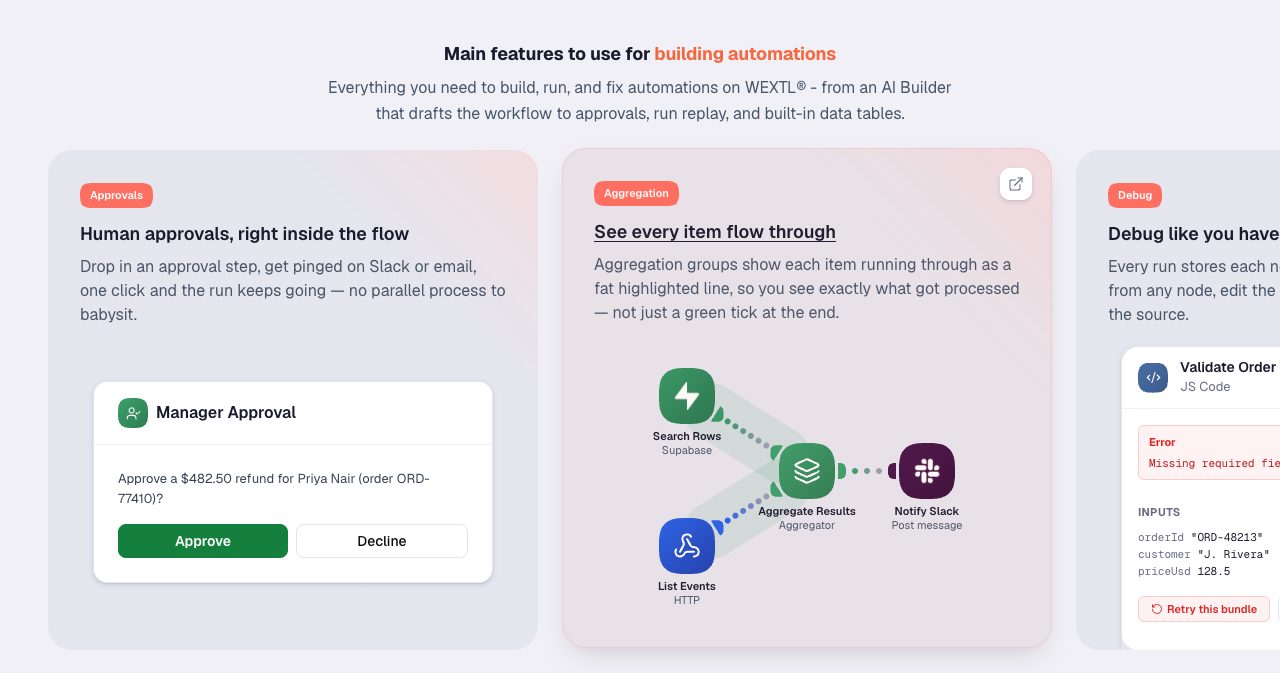
The approval step fits anywhere on the canvas. WEXTL's examples place it before a refund goes out, between an AI lead score and the rep for enterprise-tier leads, in front of any bill above an auto-approve limit, and before a new hire's pay and start date go live in the HR system. Paired with conditions, it lets the automation handle routine cases end to end while the exceptions wait for the right person.
How do you debug and replay a failed run?
This is where WEXTL feels closest to a developer tool. Every run stores each node's input and output, so you can replay from any node, edit the payload and re-run it without re-triggering the source.
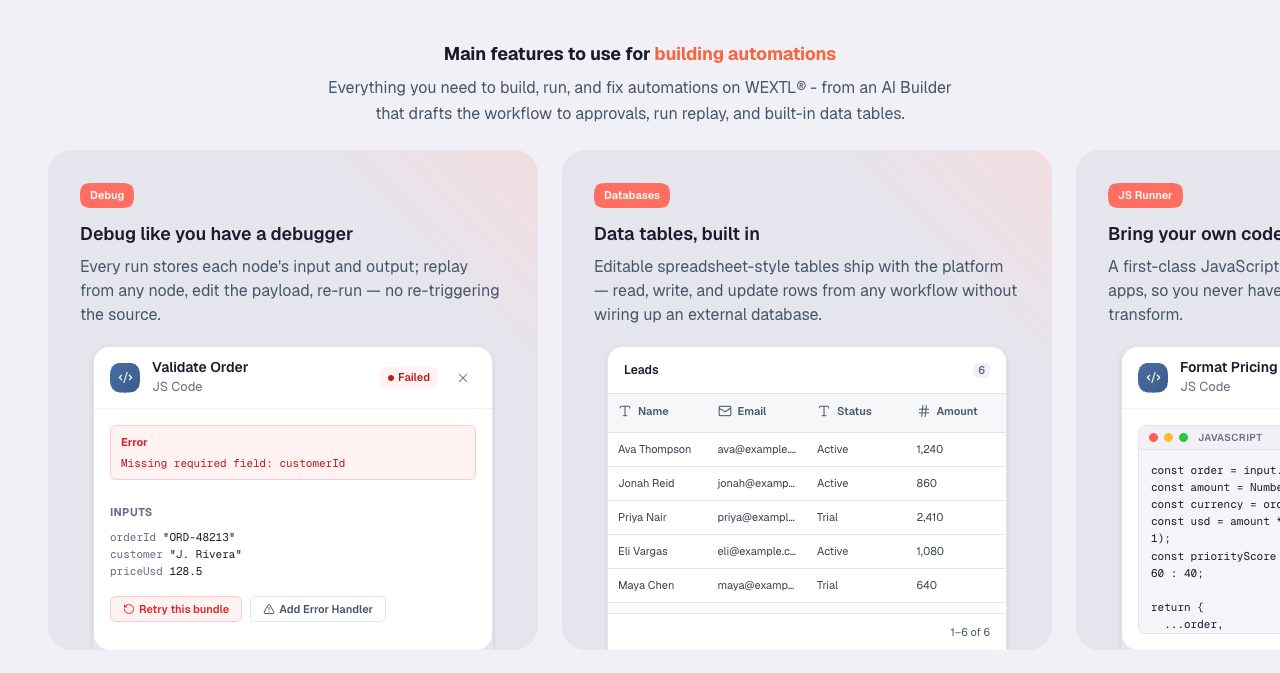
Runs land in a sidebar on the builder with a status chip (succeeded, failed or needs attention), the trigger, the start time and the credits spent. Open a failed run and the broken node is highlighted on the graph you built. Click it to read the exact payload it received and the error it returned, fix the mapping, then rerun from that step. The failed run stays in history next to the new one for comparison.
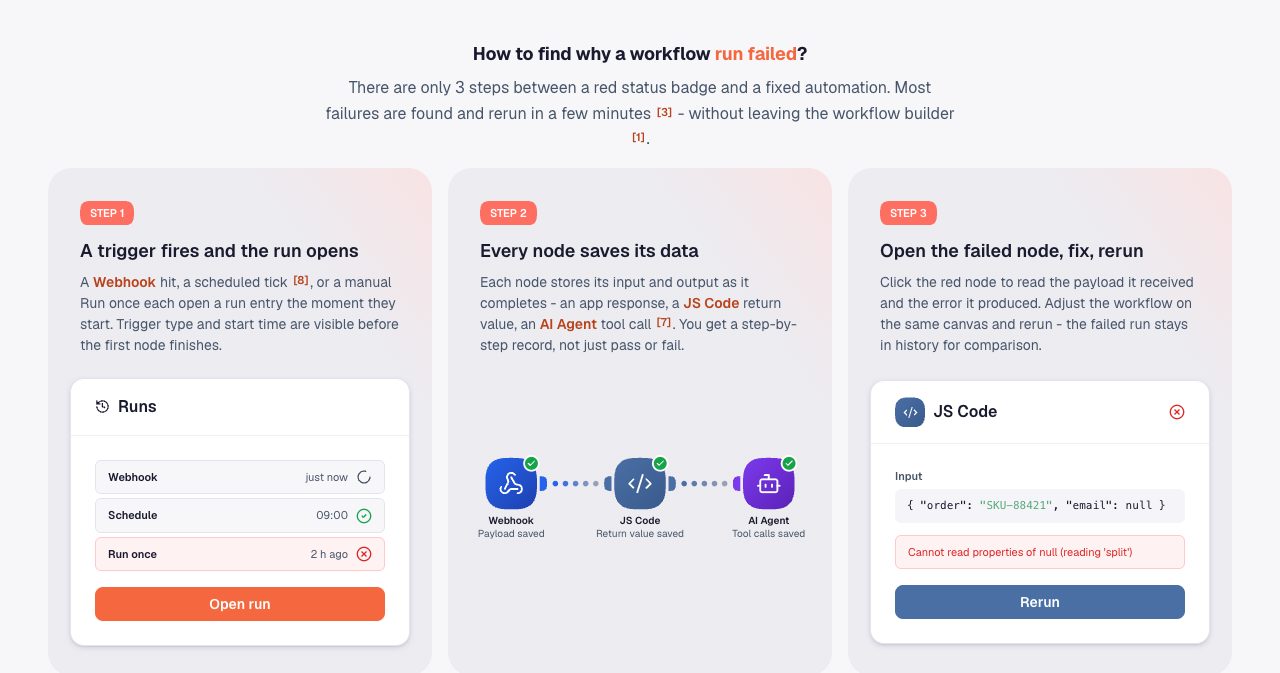
Grow and Scale add full-text search over run content, so searching an order number such as SKU-88421 lands on the one run that carried it. Aggregation views draw each item as a highlighted line through the graph, which shows exactly which records a loop processed, and the builder's side panel keeps workflow versions next to run history and credentials.
Two org-level views complete the picture. Analytics plots credits, data transfer and AI usage per day, and the Audit log (under Dashboard, then Activity) records who edited a workflow, rotated a credential or changed a member, with actions by WEXTL Support marked separately. When usage jumps on a Tuesday, Analytics shows the day, run history shows the run, and the Audit log shows the change behind it.
Does WEXTL have built-in databases and custom code?
Yes to both. Data tables are editable, spreadsheet-style tables that ship with the platform, and workflows read, write and update their rows directly. They suit lead lists, lookup tables and state kept between runs without an outside database. Grow includes 10 databases and Scale includes 40, and a Database node can also be handed to an AI agent as a tool.
For logic beyond no-code, the JS Code node runs your own JavaScript in a V8 isolate on every plan. It comes with curated modules (lodash, dayjs, date-fns, zod, uuid, nanoid, papaparse, fast-xml-parser, jsonpath-plus and slugify), so there is no package.json to maintain. It supports async/await and a guarded fetch for outside APIs, and each run gets 300 seconds by default. Return values and console logs stream to run history, and a Test run button checks the code against a sample input or the last real payload before anything downstream fires.
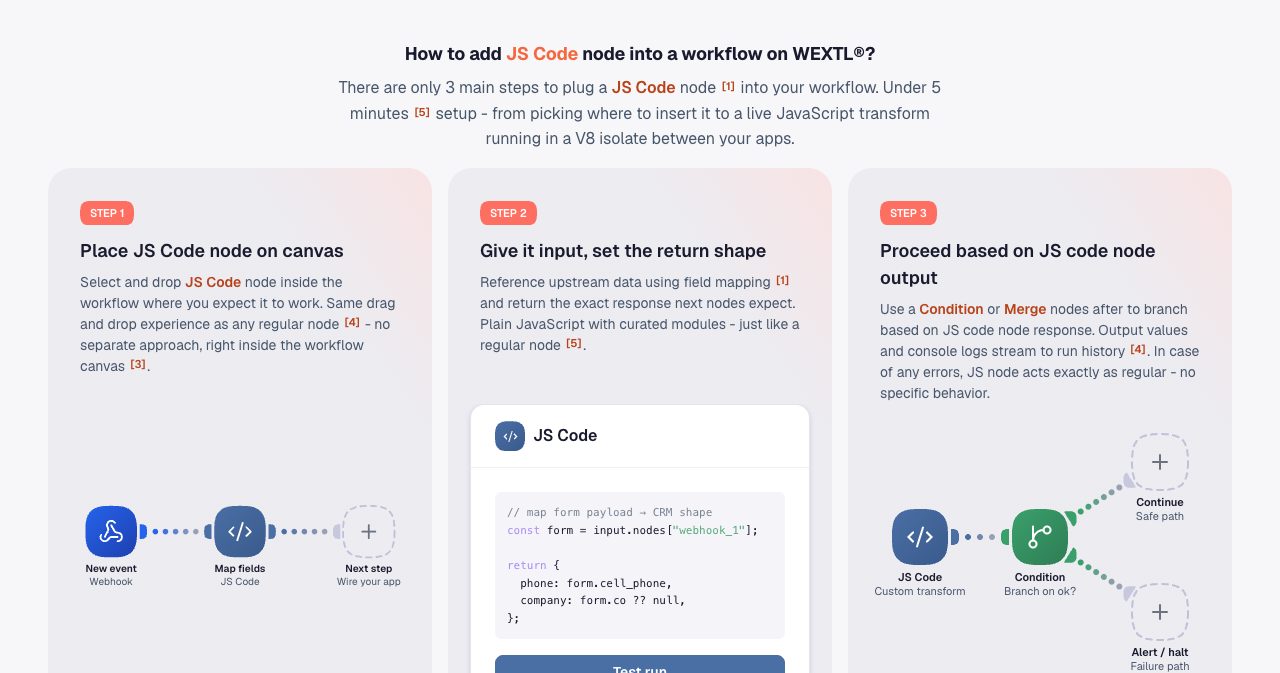
Most uses are small and practical: reshape a webhook payload into the shape a CRM expects, normalize dates, validate a row with zod or strip personal data before it reaches an AI step. Grow and Scale add custom functions, reusable JavaScript steps a team can call across workflows.
How many apps does WEXTL integrate with?
The WEXTL apps catalog listed 1,309 native integrations on October 14, 2026, sorted into categories from AI and analytics to HR, finance, sales and support. 86+ of them are AI apps that agents can call as tools.
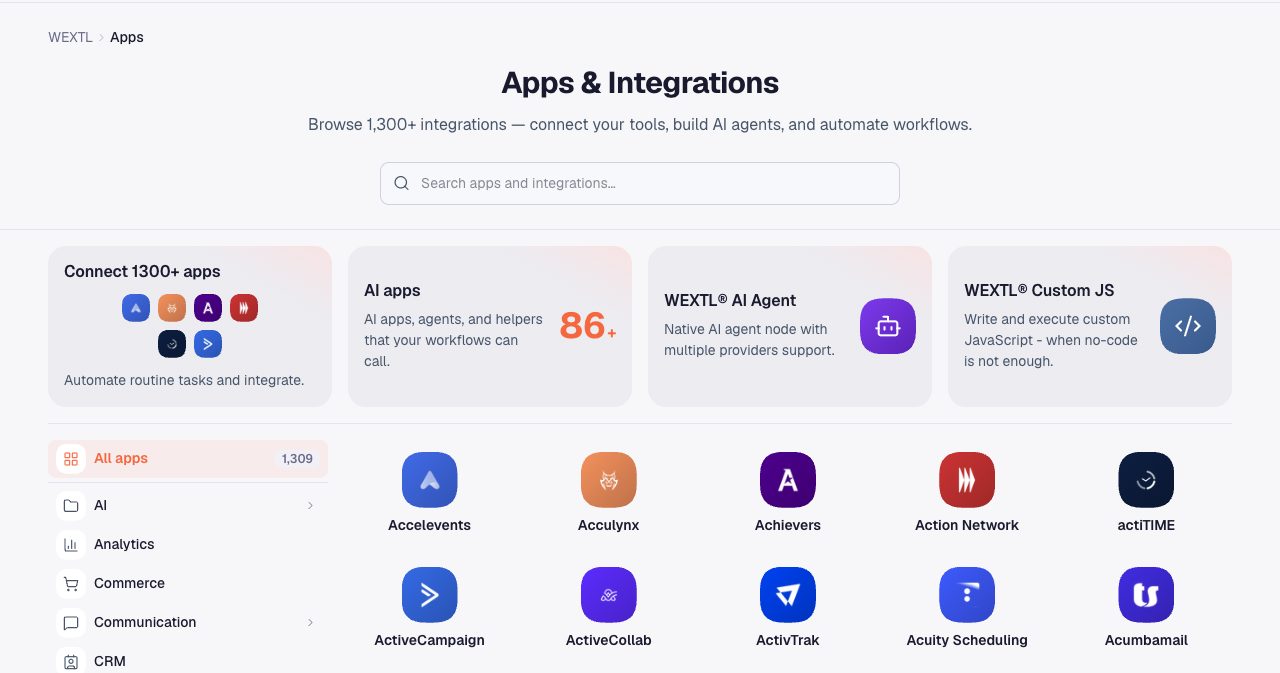
The coverage runs deep in business software. CRM teams get Salesforce, HubSpot and Pipedrive. HR teams get Personio, Rippling, Gusto, Paychex, BambooHR, HiBob, Ashby, Lever and Breathe HR, and finance teams get QuickBooks, Stripe, Bill.com and Chargebee. Support runs through Zendesk and BoldDesk, conversations through Slack, Gmail, Microsoft Outlook and Microsoft Teams, and data through Supabase, Airtable and Google Sheets.
WEXTL builds and maintains these connectors itself, auth flows included. You authorize each app once and reuse the connection across workflows, and every app logs its request and response to run history the same way built-in nodes do. For anything outside the catalog, the HTTP node and webhooks reach any system with an API, and the catalog page has a form to request a new app.
What can teams automate with WEXTL?
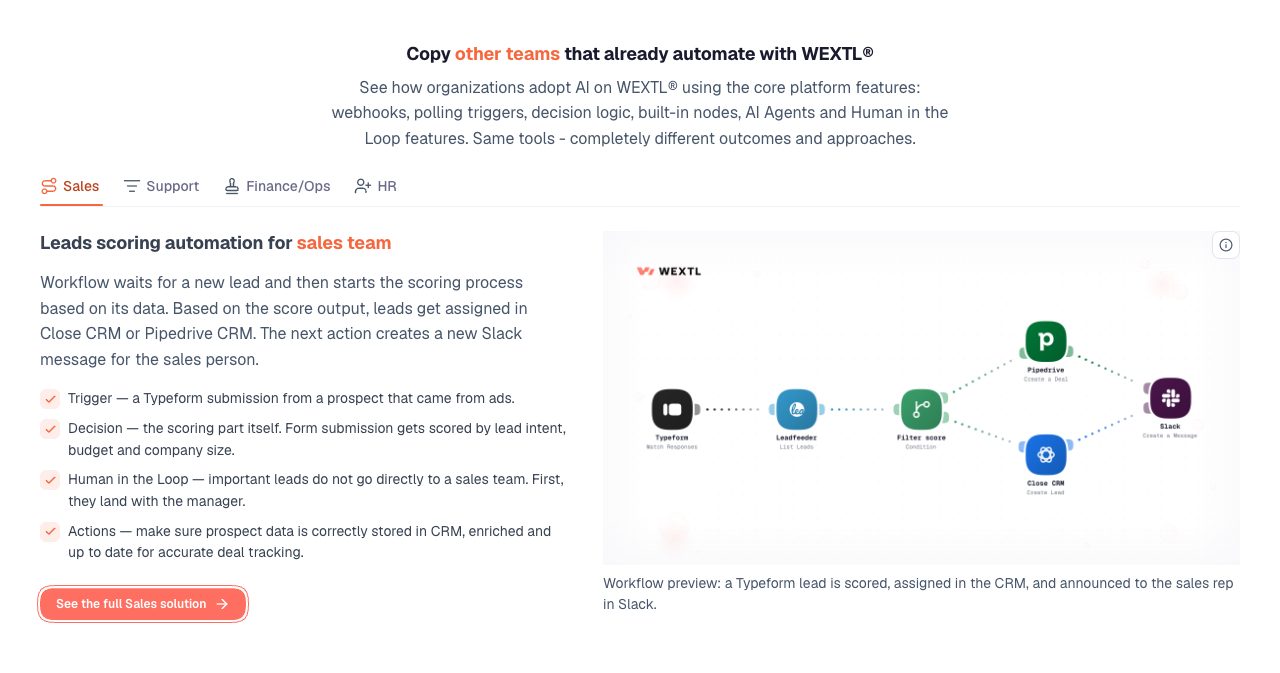
The same building blocks (triggers, decision logic, AI agents and approvals) turn into very different workflows from team to team. WEXTL publishes 21 ready-made solutions for 15+ teams, each with a workflow you deploy into your workspace and connect to your own accounts. Four examples from the homepage show the pattern.
Sales: lead scoring and routing
A Typeform submission from an ad campaign is checked against Leadfeeder, scored on intent, budget and company size, and created as a deal in Pipedrive or a lead in Close CRM, with a Slack message to the rep. Important leads land with the sales manager first. The full sales solution adds territory maps and named accounts, round-robin assignment by rep capacity, an AI-drafted first-touch note, follow-up sequences that pause when a prospect replies, stale-deal nudges and a quote-to-cash handoff that turns a signed proposal into an invoice or a subscription.
Support: ticket triage
New BoldDesk tickets from email, chat or the help center are sorted by topic, customer tier and spam signals, routed to the right queue with the right tags and announced in Slack. Tickets from VIP customers go to a senior agent for a personal reply.
Finance and operations: invoice approvals
A new bill in Bill.com is checked against the approval policy for amount, vendor history and changed bank details, then sent to the right approver in Outlook or Microsoft Teams. Bills above the auto-approve limit wait for a named approver, and the status updates in Bill.com as soon as they decide.
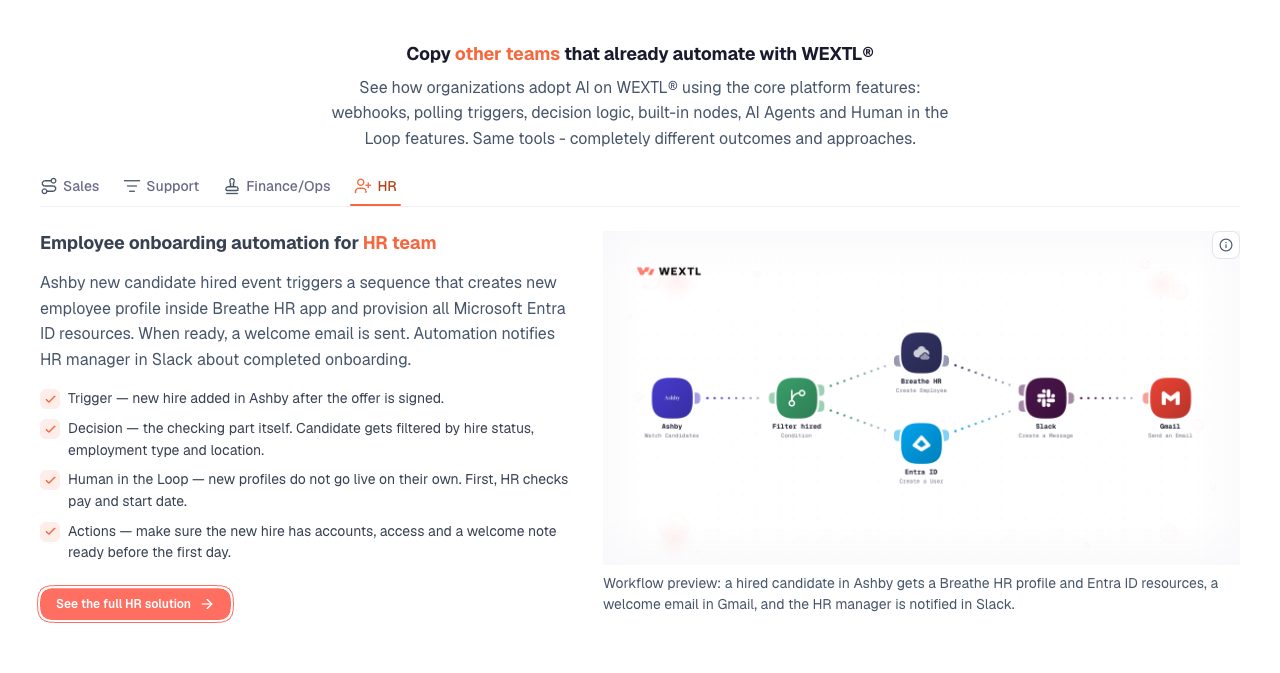
HR: employee onboarding
When a candidate is marked hired in Ashby, the workflow filters by hire status, employment type and location, creates the employee in Breathe HR, provisions Microsoft Entra ID resources, sends a welcome email from Gmail and tells the HR manager in Slack. Pay and start date get a human check before the profile goes live. The HR solution extends the same approach to raise and promotion approvals, offboarding and pulse surveys summarized into themes.
Other solutions cover marketing, IT provisioning, customer success, executive assistants, ecommerce, SecOps, RevOps, legal, product, DevOps, reporting and data sync.
How much does WEXTL cost?
WEXTL sells three plans, each with a monthly allowance of credits, and lists them on its pricing page. Every plan includes unlimited members, unlimited active workflows, AI agents, Human in the Loop, the JS Code node, team roles, a local data region, the Analytics dashboard, the Functions toolkit and the Scraper node.
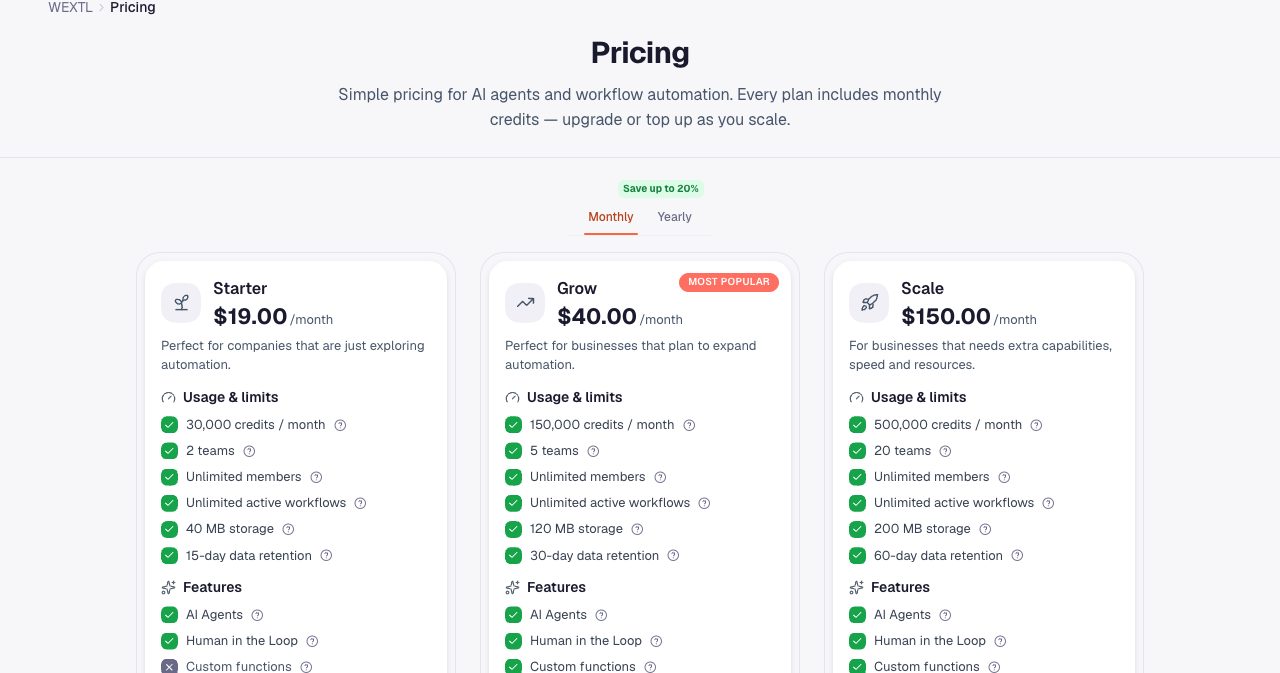
| Plan | Price per month | Credits per month | Cost per credit | Teams | Data retention | Databases |
|---|---|---|---|---|---|---|
| Starter | $19 | 30,000 | $0.000633 | 2 | 15 days | From Grow |
| Grow | $40 | 150,000 | $0.000267 | 5 | 30 days | 10 |
| Scale | $150 | 500,000 | $0.0003 | 20 | 60 days | 40 |
Grow adds custom functions, databases, dynamic credentials that resolve at run time from workflow data, full-text search over runs and the option to buy extra credits. Scale raises every limit and moves your runs to the front of the queue. Storage grows from 40 MB on Starter to 120 MB on Grow and 200 MB on Scale, and the largest file a workflow can pick, send or download grows from 200 MB to 500 MB and 1 GB. Yearly billing lowers the total on every plan, and the pricing page shows both prices with a monthly and yearly switch.
A credit is the unit that workflow steps and connected actions spend as they execute, so more runs and more complex steps use more credits. Each run shows its own cost in run history, and admins can set usage boundaries per team. On Grow and Scale, extra credits can be bought at any time. Purchased credits stay available until they're used, and auto-purchase is optional.
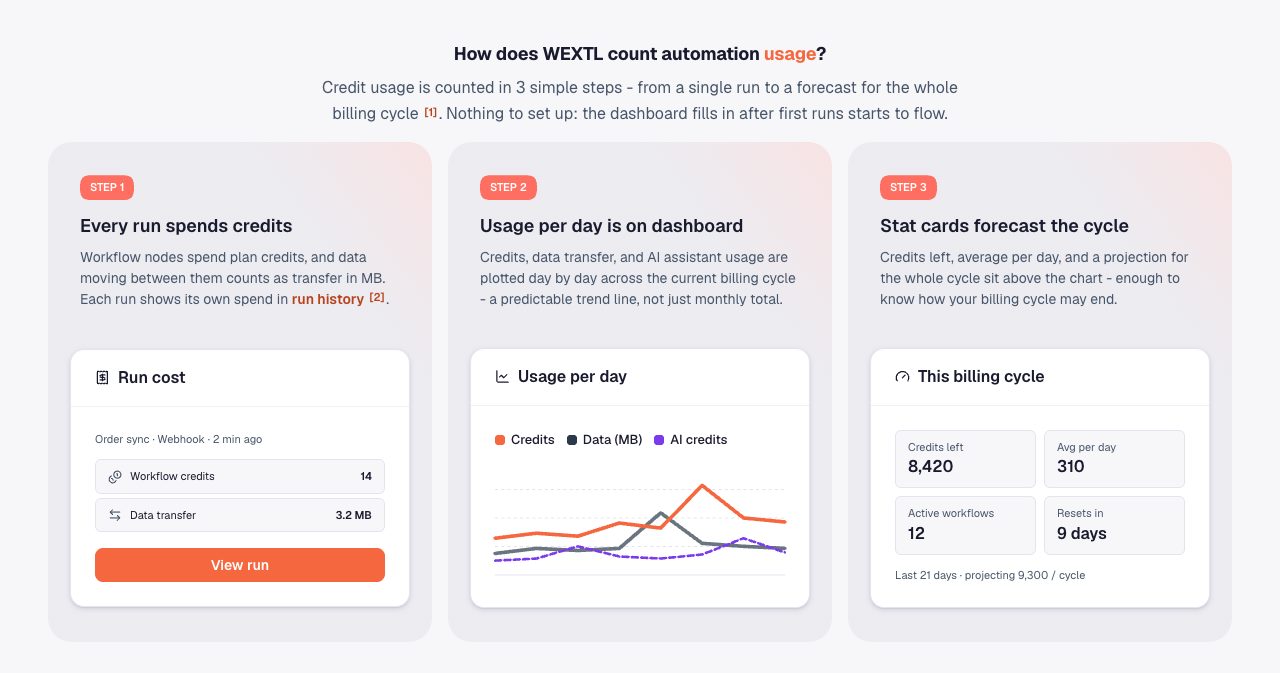
The Analytics dashboard keeps the budget visible. Stat cards show credits left, average use per day, active workflows and days until the reset, with a projection for the full cycle, and a consumption list ranks the workflows that used the most. Every plan starts with the free trial, so you can build and run your first workflow before you pick one.
Which WEXTL plan should you choose?
Starter suits a small team exploring automation, with 30,000 credits, two teams and the core features, AI agents and approvals included, for $19 a month. Grow is the plan WEXTL marks as most popular, and it has the lowest cost per credit of the three, plus databases, custom functions, dynamic credentials, full-text search over runs and extra credits on demand. Scale fits organizations running automation across many departments, with 20 teams, 40 databases, 60 days of run data and top priority in the run queue.
How does WEXTL compare with n8n, Make and Zapier?
WEXTL's launch announcement positions it as a higher-capacity alternative to n8n, Make and Zapier, built around execution limits, data transfer, AI credits and costs that stay predictable as a team scales. Read against that brief, a few things stand out in WEXTL's own offer:
- Pricing follows usage. Members and active workflows are unlimited on every plan, so adding a colleague or switching on another workflow costs nothing extra by itself.
- Agents, approvals and code are standard nodes on every plan. The AI Agent node with MCP tools, Human in the Loop and the JS Code node all sit on the same canvas as the app steps.
- Debugging goes deep for a no-code tool, with stored inputs and outputs for every node, replay from any step with an edited payload and full-text search over payloads.
- Data residency comes with every plan, as each organization picks Europe or the United States.
For a team weighing a move, a quick test is to rebuild one existing workflow with the AI Workflow Builder during the trial and compare the run history with what you see today.
Is WEXTL secure, and where is data stored?
WEXTL lists GDPR compliance, data encryption, two-factor authentication and a local data region on its product pages. Each organization's data lives in the region it picks, Europe (eu1) or the United States (us1). The region is encoded in the organization's API keys, so every request reaches the right host.
Connections are authenticated per account, stored secrets are encrypted, and OAuth access and refresh tokens are encrypted at rest and used only for the calls you start or schedule. Team roles decide who can open what, and the Audit log gives admins the full history of changes while members see the items their role allows. Run data follows your plan's retention window of 15, 30 or 60 days and is then removed in full, payloads included.
WEXTL is also open about AI processing. Its privacy policy states that content sent to the built-in AI features is processed by Anthropic and OpenAI in the United States, and organizations can switch off AI-assisted building for workflow areas that handle sensitive information, including selected run-history data.
What can developers do with the WEXTL API, SDK and MCP server?
WEXTL exposes the same workflow primitives through three surfaces, all documented in the WEXTL developer docs: a versioned REST API, an MCP server and a TypeScript SDK. Personal Access Tokens are created under Dashboard, then API, on plans with API access.
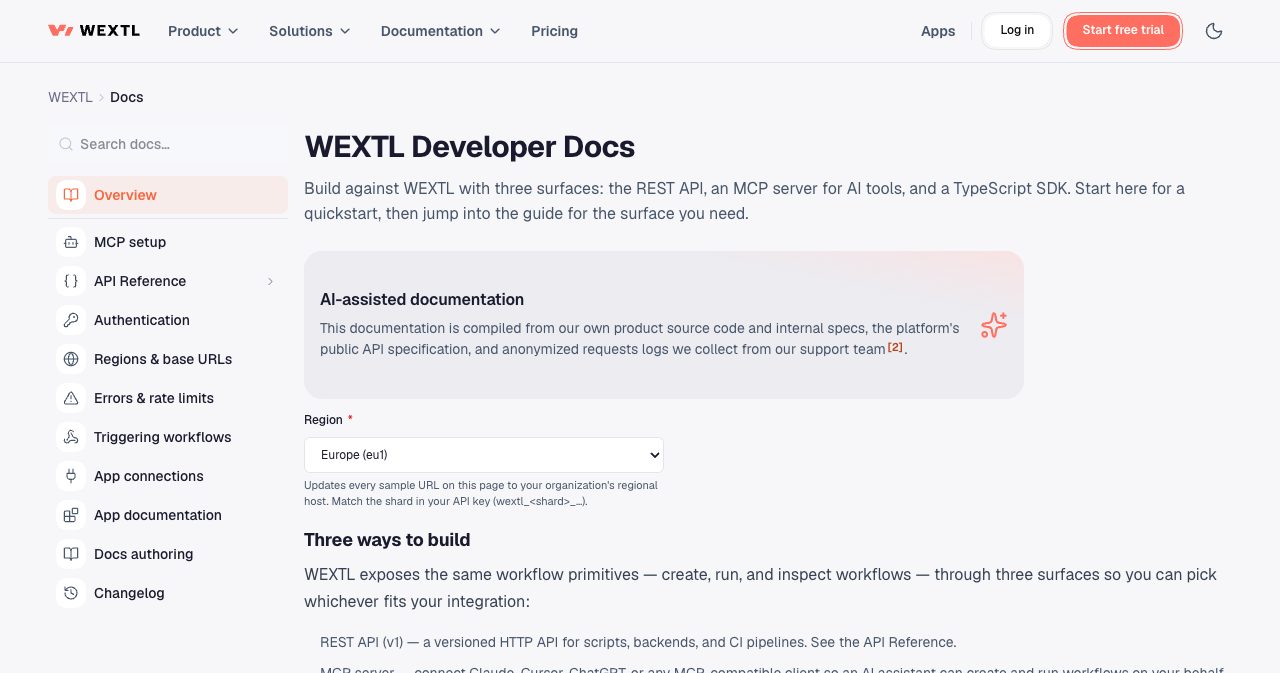
The REST API (v1) launched on August 1, 2026 and covers workflows, runs, credentials, databases, variables, functions, folders, tags, webhooks, teams, members and the activity feed. It follows a frozen-additive policy: v1 only gains new optional fields and endpoints, and a breaking change would ship as a new /api/v2, so an integration pinned to v1 keeps working. Requests go to your regional host, eu1.wextl.com or us1.wextl.com, and a call to the wrong region gets a 421 response with the correct base URL.
The official SDK, @wextl/sdk, is at version 0.3.0 on npm under the MIT license. It has zero runtime dependencies, ships ESM and CommonJS builds, works out the regional host from your token prefix and retries a wrong-region call once.
import { WextlClient } from '@wextl/sdk';

const client = new WextlClient({ apiKey: process.env.WEXTL_API_KEY! });

const { data: workflows } = await client.workflows.list({ limit: 20 });
The MCP server lets an AI assistant create, run and inspect workflows for you. Claude Code and Cursor connect with a Personal Access Token, while claude.ai and ChatGPT use an OAuth 2.1 consent screen where you pick the organization and scopes. In Claude Code it is one command:
claude mcp add --transport http wextl https://eu1.wextl.com/api/mcp --header "Authorization: Bearer wextl_..."
How to build your first workflow in WEXTL
WEXTL puts the setup for a first workflow at up to 10 minutes.
- Start a free trial at wextl.com/signup with Google, GitHub or email.
- Tell the AI Workflow Builder what you want, for example "When a Shopify order comes in, add it to Google Sheets and post in Slack", or clone a template or a team solution.
- Connect your apps. Authorize each one once when prompted, and WEXTL stores the connection encrypted and reuses it in later workflows.
- Route data with Condition, Switch or Loop nodes, and add a Human in the Loop step before any action a person should approve.
- Run the workflow once from the builder and open each node in run history to check its input and output.
- Put it on an interval, weekly or monthly schedule in your timezone, or switch on its webhook or app trigger.
- Open the Analytics dashboard to see credits spent per day, credits left and the projection for the billing cycle.
Who is WEXTL for?
It fits best if your team looks like one of these:
- Sales and RevOps teams that want every inbound lead scored, routed and assigned the moment it arrives, with a manager checking the biggest ones.
- HR and people teams running onboarding, approvals and offboarding across an HRIS, payroll and directory tools.
- Finance and operations teams that want bills, refunds and invoices approved by the right person, with a full audit trail.
- Support teams that triage tickets with AI and keep VIP replies with senior agents.
- Operations and automation leads putting AI agents into production with clear tool permissions, logged decisions and human checkpoints.
- Developers who want a visual layer they can still script, through JavaScript nodes, a REST API, a TypeScript SDK and MCP.
- Automation agencies and consultants, who can join the WEXTL partner program and get listed in its partner directory.
Who is behind WEXTL?
WEXTL is developed by MAXMEL Tech Ltd., a private limited company registered in the UK under number 15756061 and incorporated on June 2, 2024, with its registered office at 167-169 Great Portland Street in London. The company is led by CEO Maxim Melnic. It also runs StartAutomate, a no-code and AI automation agency that has supported hundreds of clients, and StartIntegrate, which has built more than 600 native apps.
That background shows in the product. WEXTL builds and maintains its own connectors, its documentation is compiled from the product's own source code, internal specs and anonymized support logs, and StartAutomate appears as a certified partner in the WEXTL partner directory for teams that want workflows built for them. WEXTL® is a registered trademark in the US and the UK, and support questions go to [email protected].
Is WEXTL worth it?
For teams that want app automation, AI agents and human sign-off in one place, yes, and the free trial makes it easy to check against your own processes. Plenty of platforms connect apps. WEXTL stands out for how much of the surrounding work it covers: an AI builder that drafts the workflow from a sentence, agents that call only the tools you approve, approvals on every plan, and a run history that replays a failed step with an edited payload. The catalog has passed 1,300 apps, every plan comes with unlimited members and active workflows, and developers get a REST API, an MCP server and a typed SDK.
The best way to judge it is to pick one process your team still runs by hand every week, describe it to the AI Workflow Builder during the trial, put an approval step in front of the part that matters and read the run history after the first few runs. You'll find WEXTL at wextl.com.
FAQ
What is WEXTL?
WEXTL is a visual workflow automation platform and AI agent builder made by MAXMEL Tech Ltd. in London. Teams connect 1,300+ native apps on a canvas, describe workflows in plain English to an AI builder, add AI agents that call approved app tools and MCP servers, and place human approval steps before important actions. The name is short for workflow extension layer.
How much does WEXTL cost?
WEXTL has three plans billed monthly: Starter at $19 with 30,000 credits, Grow at $40 with 150,000 credits and Scale at $150 with 500,000 credits. Every plan includes unlimited members, unlimited active workflows, AI agents, human-in-the-loop approvals, the JS Code node and a local data region. Yearly billing lowers the total on every plan.
Does WEXTL have a free trial?
Yes. You can sign up at wextl.com with Google, GitHub or email, start a free trial and build your first workflow before you choose a paid plan. WEXTL's app pages describe it as a free 3-day trial that you can cancel any time.
What is a WEXTL credit?
A credit is WEXTL's usage unit. Workflow steps and connected actions spend credits as they run, so more runs and more complex steps use more. Each run shows its own cost in run history, and the Analytics dashboard tracks daily use, credits left and a projection for the billing cycle. Grow and Scale can buy extra credits, which stay available until used.
How many integrations does WEXTL have?
The WEXTL catalog listed 1,309 native apps on October 14, 2026, including 86+ AI apps. It covers CRM, HR, finance, support, marketing, databases and developer tools, with apps such as Salesforce, HubSpot, Pipedrive, Personio, Rippling, Gusto, QuickBooks, Stripe, Zendesk, Slack and Supabase. HTTP and webhook nodes reach any other system with an API.
Can WEXTL build a workflow from a prompt?
Yes. The AI Workflow Builder takes a plain-English request such as "Send Slack when a Salesforce lead is created", lays out the nodes, wires them and pre-fills fields from your connected apps. You keep chatting to change the workflow and can revert any change. WEXTL reports that 38.5% of workflows were created from prompts in organizations that enabled the builder.
How do AI agents work in WEXTL?
An AI Agent node sits on the same canvas as your apps. You choose a model, attach tools from connected apps or MCP servers, and add memory or a knowledge hub for context. The agent reasons over its input, picks which approved tool to call and loops until the task is done. Every tool call is logged in run history, and Condition or Human in the Loop nodes check its output.
Does WEXTL support MCP?
Yes, in two directions. The AI Agent node is an MCP client: you connect a vendor-hosted or self-run MCP server and choose which of its tools the agent may call. WEXTL also runs its own MCP server, so claude.ai, Claude Code, Cursor and ChatGPT can create, run and inspect your workflows.
Does WEXTL have human-in-the-loop approvals?
Yes, on every plan. A Human in the Loop node pauses a run until a person approves or rejects it, using a review form built from the fields you add. Approvers get a Slack or email ping and continue the run with one click. Teams use it for refunds, high-value leads, bills above an auto-approve limit and new-hire profile checks.
Can I write code in WEXTL?
Yes. The JS Code node, included on every plan, runs JavaScript in a V8 isolate with curated modules such as lodash, dayjs, date-fns, zod, uuid and papaparse, plus async/await and a guarded fetch. Return values and console logs appear in run history. Grow and Scale add reusable custom functions.
Is WEXTL GDPR compliant, and where is data stored?
WEXTL lists GDPR compliance, data encryption, two-factor authentication and a local data region on every plan. Each organization's data lives in the region it chooses, Europe (eu1) or the United States (us1), and that region is encoded in its API keys. Connections are authenticated per account and stored secrets are encrypted.
Does WEXTL have an API?
Yes. WEXTL has a versioned REST API (v1) on regional hosts, an MCP server and an official TypeScript SDK, @wextl/sdk, published on npm under the MIT license. The v1 API is frozen-additive: it only gains new fields and endpoints, so integrations built against it keep working.
Who makes WEXTL?
WEXTL is developed by MAXMEL Tech Ltd., a UK private limited company (number 15756061) incorporated in June 2024 with its registered office in London. Its CEO is Maxim Melnic. MAXMEL also runs the automation agency StartAutomate and StartIntegrate, which has built more than 600 native apps, and WEXTL grew out of that client work.
If you're building an automation or AI product yourself, SaaSCity is a free, human-reviewed startup directory with a live city map, where your listing is a permanent page that other founders browse. We also keep a list of the best directories for no-code and low-code tools. Submitting takes about ten minutes.
Get your SaaS in front of founders
List your product on the SaaSCity live city map - a permanent listing, real discovery, and a backlink from a high-DR directory. Free to start; upgrade for a dofollow link and a building on the map.