News
Microsoft's Outage Hit 74 Countries in an Hour. Did Your Login Page Go Down With It? (2026)
Downdetector logged Microsoft 365 outage reports from 74 countries and territories within about an hour on November 12, and Kentik watched traffic take roughly 18 hours to come back. Here is the timeline, plus the continuity plan a 1-20 person SaaS can actually run: identity, email, customer updates, SLA credits and a 7-step drill. You are reading it on SaaSCity's blog, a startup directory with the same vendor problem as everyone else.

Contents (14)
- Key takeaways
- The Microsoft 365 outage at a glance
- Is Microsoft 365 or Outlook down right now, and why does the status page look fine?
- What broke on November 12-13, hour by hour
- Is this a pattern? The second suite-wide outage in ten weeks
- Which parts of a small SaaS really depend on Microsoft?
- If Microsoft Entra ID goes down, can your customers still sign in?
- Why password resets and magic links die when Exchange Online stalls
- What is a Microsoft 365 outage worth in SLA credits?
- What should you tell customers while your vendor is down?
- How to drill for a vendor outage: the 7-step continuity test
- Where SaaSCity fits
- FAQ
- Sources
If your app sends password resets through Microsoft 365, some of Thursday's resets probably reached your users after the link inside them had already expired.
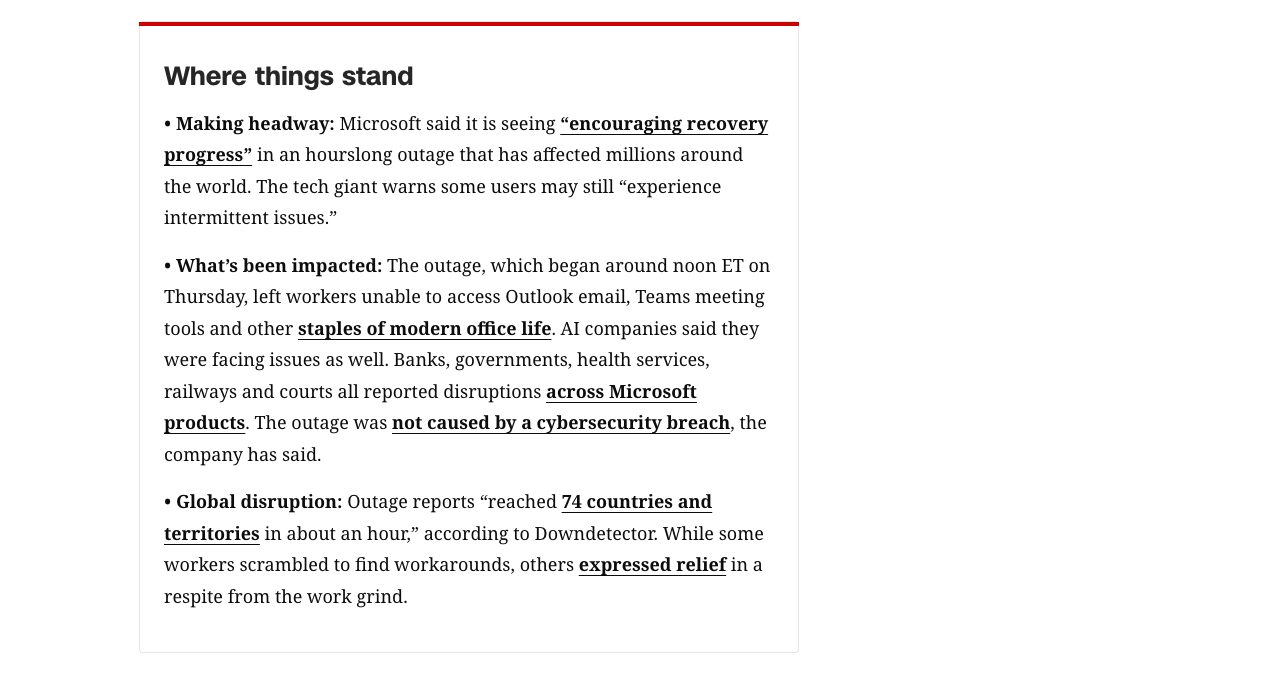
Quick answer: The Microsoft 365 outage of November 12-13, 2026 began around noon ET on Thursday, when a large number of Microsoft servers became unexpectedly unavailable. Exchange Online, Outlook, Teams, SharePoint Online, Copilot, Microsoft Defender and Microsoft Intune dashboards degraded, reports came in from 74 countries and territories within an hour, and traffic took about 18 hours to return.
Last updated: November 13, 2026. Microsoft had not published its Post Incident Report when this went up. Every figure below links to its source, with the date I read it.
The headlines were about Outlook and Teams, UK police forces asking people to phone instead of reporting crimes online, and Deutsche Bahn reporting significant delays in its internal communications. For a small SaaS the damage was harder to see. Your login page loaded fine and sent the email. Then the email sat in a queue somewhere between your app and Microsoft for hours, and your own status page stayed green because your servers really were fine.
A status page reports whether your infrastructure is up. When sign-in and email run through somebody else's servers, that tells a customer very little about whether they can get in, and on Thursday that gap showed up for anyone whose login depends on Microsoft. Below: what happened, what broke for SaaS teams in particular, and a seven-step drill that shows which of your vendors could take you down with them.
Quick disclosure before the timeline: you are reading this on a directory's blog. SaaSCity is a gamified startup directory where every product gets a listing page and a building on a live city map, and a human reviews each one. We are a small team with the same vendor dependencies you have, which is why most of this post is a checklist. The SaaSCity paragraph near the end is short.
Key takeaways
- Microsoft 365 degraded worldwide from around noon ET on November 12, 2026. Kentik saw traffic return after about 18 hours, and Microsoft had not published a root cause by November 13.
- status.cloud.microsoft is a fallback for when admins can't reach Service health, so a green card there says little about your tenant. The Microsoft Graph service health API gives you the tenant view in your own logs.
- Microsoft's Entra backup authentication system does not protect web apps that use OpenID Connect to request access tokens, or SAML apps set up for SP-initiated SSO. Check whether your SSO uses either.
- Mail to Microsoft-hosted inboxes got temporary 4xx replies and waited in queues. Resending queued mail creates duplicates, so reissue reset links and one-time codes instead.
- Microsoft 365 SLA credits are 25%, 50% or 100% of the affected service's monthly fee, counted in user-minutes and paid as invoice credit. Direct customers must claim this outage by December 31, 2026.
- This was the second suite-wide Microsoft 365 incident in ten weeks, after the outage that ran from August 31 to September 3, 2026.
The Microsoft 365 outage at a glance
What's confirmed so far, with sources named where the figure came from a third party:
| Question | Answer |
|---|---|
| When it started | Thursday, November 12, 2026, around noon ET; Microsoft's Exchange Online incident record starts at 11:17 a.m. ET |
| How long | About 18 hours until traffic returned (Kentik, via TechCrunch); full mitigation still under way on the morning of November 13 |
| How far | Reports from 74 countries and territories within about an hour (Downdetector, via CNN); more than 100,000 Downdetector reports by about 1:30 p.m. ET (Global News) |
| Services hit | Exchange Online and Outlook, Teams, SharePoint Online, Copilot, Microsoft Defender, Microsoft Intune admin dashboards, some cloud PCs, and on November 13 parts of the Microsoft 365 admin center |
| Microsoft's explanation so far | "A large number of servers being unexpectedly unavailable" |
| Attack? | Microsoft: "no evidence of malicious activity" |
| Incident IDs | EX1550543 (Exchange Online), MO1550821 (other Microsoft 365 services) |
| Root cause | Promised in a Post Incident Report after mitigation |
| SLA claim deadline, direct customers | December 31, 2026 |
Is Microsoft 365 or Outlook down right now, and why does the status page look fine?
As of Friday morning, November 13, Microsoft 365 was recovering but not fully back. Microsoft's 8 a.m. ET update reported "broader improvements now observed in North America and sustained improvements across much of Europe," while warning that some users may still hit intermittent access issues or delayed email, according to The Verge's coverage by Jess Weatherbed.
The confusing part for admins is where to look. The public page at status.cloud.microsoft is a fallback, and during this incident Microsoft said so right on the page: the issue was posted there "because Microsoft 365 administrators may be unable to access the admin center to get Service health information."
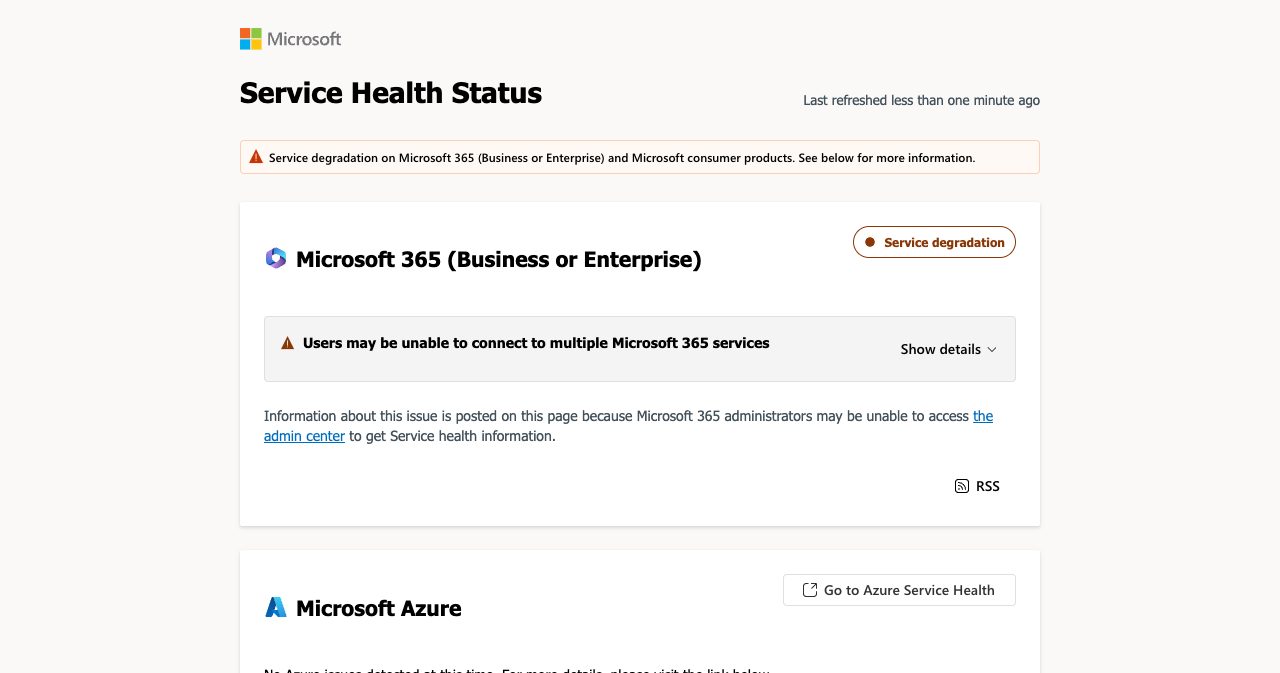
In other words, Microsoft posts on the public page when the private one is out of reach. The Uptime Report quotes Microsoft's own RSS feed saying the site is updated "when service issues are preventing tenant administrators from accessing Service health." On a normal day, then, a green card there tells you little about your tenant. And on Friday the admin center itself was on the list: the admin center feed item posted at 14:00 UTC on November 13 said admins "may be unable to load some admin center pages."
The status page had its own rough afternoon, too. In the Hacker News thread about the outage, one commenter wrote "Looks like the status page needs a status page," and another reported that the service behind it "isn't responding to Azure Front Door."
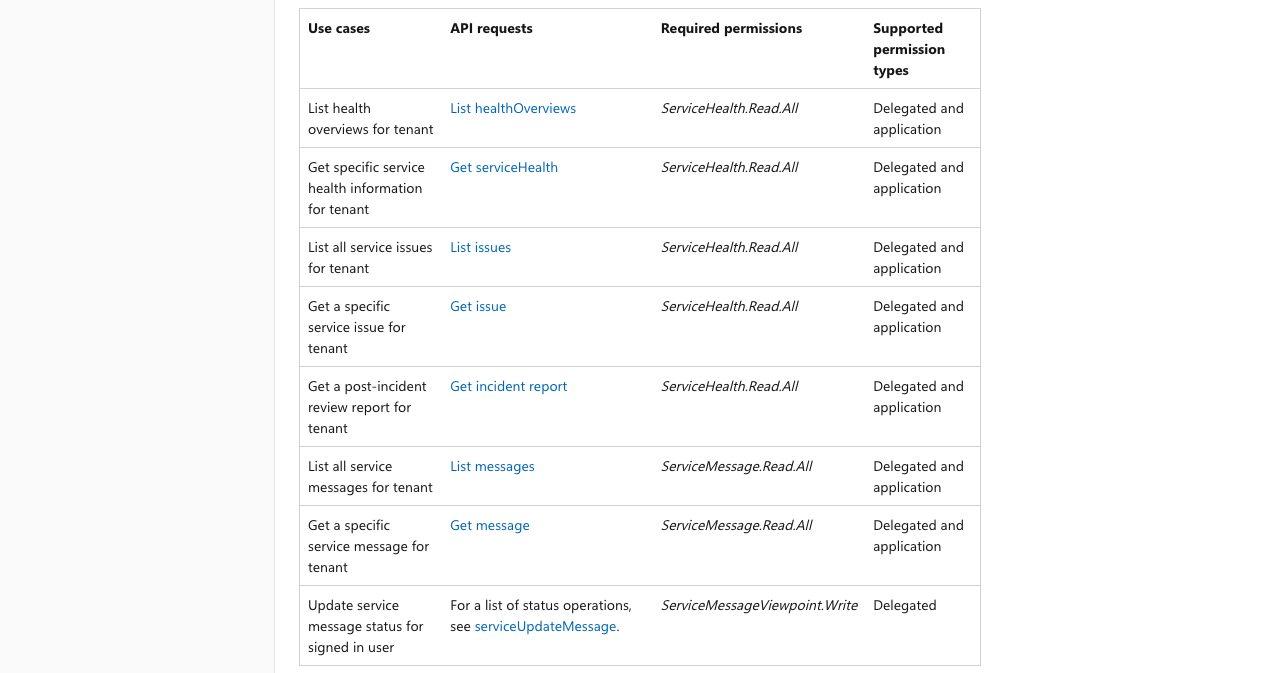
You can get the same data without a browser tab. Microsoft Graph's service communications API returns the same health overviews, issues and post-incident reports the admin center shows, and Microsoft's docs say application permissions let you call it "without a signed-in user." One app registration with ServiceHealth.Read.All plus a scheduled job puts incident IDs in your own logs, which you will want later for the SLA claim. It runs on Microsoft's infrastructure as well, so log what it returns and alert when it stops answering.
What broke on November 12-13, hour by hour
The outage started in Exchange Online in the Americas and spread across most of the Microsoft 365 suite within about two hours. Microsoft's first public wording, quoted by Global News, described "issues accessing Exchange Online mailboxes through multiple connection methods in the Americas" that "may affect Microsoft 365 service connectivity for users in any region." Times below are Eastern.
| Time (ET) | What happened | Source |
|---|---|---|
| Nov 12, 11:17 a.m. | Start time on Exchange Online incident EX1550543; first post at 11:20 | DMARCguard, quoting Service health |
| Around noon | Outage reports spike | CNN, Global News |
| 12:30 p.m. | SparkPost's estimate for when mail to Microsoft started failing | DMARCguard |
| 1:20 p.m. | Hacker News thread "Service degradation on Microsoft 365" opens | Hacker News |
| 1:26 p.m. | Microsoft opens MO1550821 for other Microsoft 365 services | DMARCguard |
| About 1:30 p.m. | More than 100,000 Downdetector reports | Global News |
| About 2 p.m. | Microsoft pursuing "all pathways," including "a pause to all deployments" | Global News |
| 2:18 p.m. | Microsoft cites "a large number of servers being unexpectedly unavailable" | DMARCguard |
| Shortly after 5 p.m. | "Our actions taken thus far have not provided the anticipated relief" | Global News |
| About 6 p.m. | Some affected servers back in service | Global News |
| 7 p.m. | MO1550821 adds that email delivery may be delayed | DMARCguard |
| Nov 13, 4:03 a.m. | Microsoft extends its email timeout window to 48 hours | DMARCguard, CNN |
| 8 a.m. | "Continued recovery progress"; no evidence of malicious activity; Post Incident Report promised | The Verge |
| By 8:15 a.m. | Kentik sees traffic returning after about 18 hours of downtime | TechCrunch |
The list of what failed is longer than "email." TechCrunch's Zack Whittaker reported problems with Copilot and Microsoft Defender, Microsoft Intune dashboards that system administrators could not reach, and some users locked out of their cloud-based Windows PCs. The Verge added SharePoint Online and the Microsoft 365 apps. CNN's live coverage logged banks, governments, health services, railways and courts reporting disruption. UK police forces, Hertfordshire Police among them, told people to report crimes by telephone instead of online. Deutsche Bahn said the outage was causing significant delays across its internal communications, and VIA Rail Canada warned passengers they "may not be able to receive email."
Microsoft's explanation shifted overnight. Before 3:30 p.m. ET it said it had not identified any "recent change correlated with the start of the impact," per Global News. Later updates, as DMARCguard tracked them, moved from elevated load to failed health checks to an overwhelmed secure-connection process to a network change Microsoft tried to revert. None of that is a root cause. Microsoft says the Post Incident Report will contain one, with "defense-in-depth actions," once mitigation is complete. Until then, anyone telling you exactly what broke is guessing.
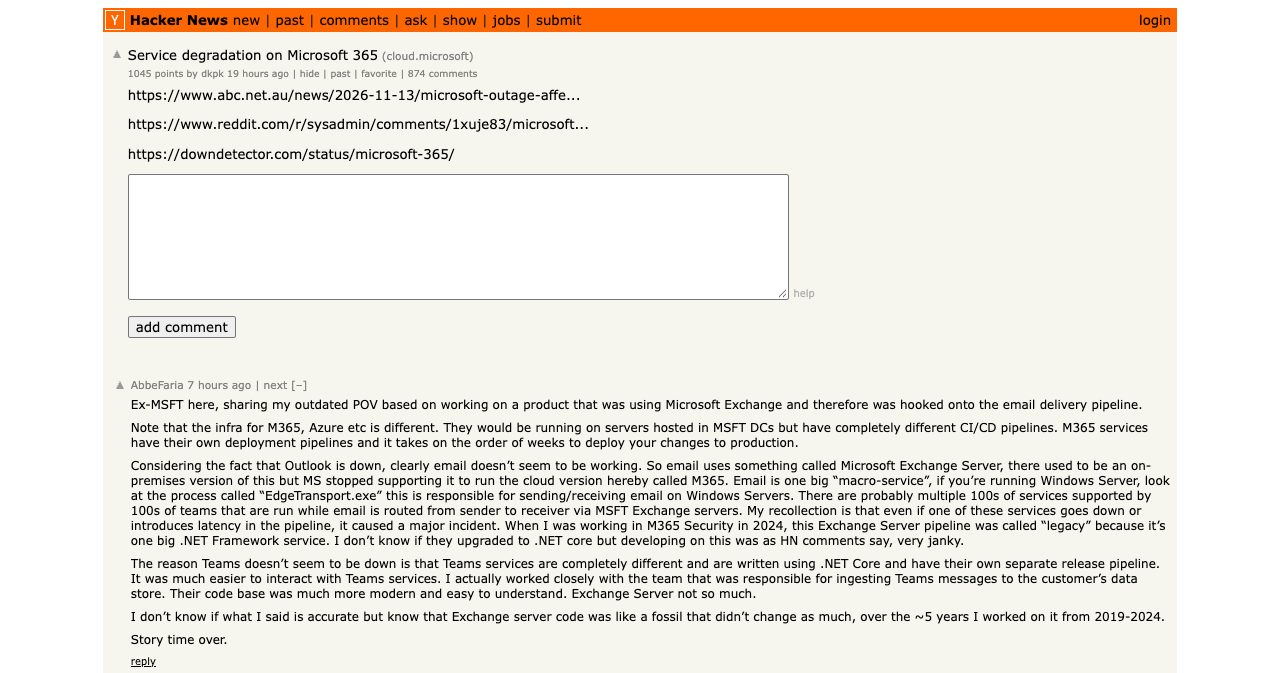
That includes the Hacker News thread, which had 1,045 points and 874 comments when I checked on November 13. The top comment comes from a self-described former Microsoft engineer who calls it an outdated point of view, so I wouldn't lean on it for anything about this incident.
The outage reached AI tools too
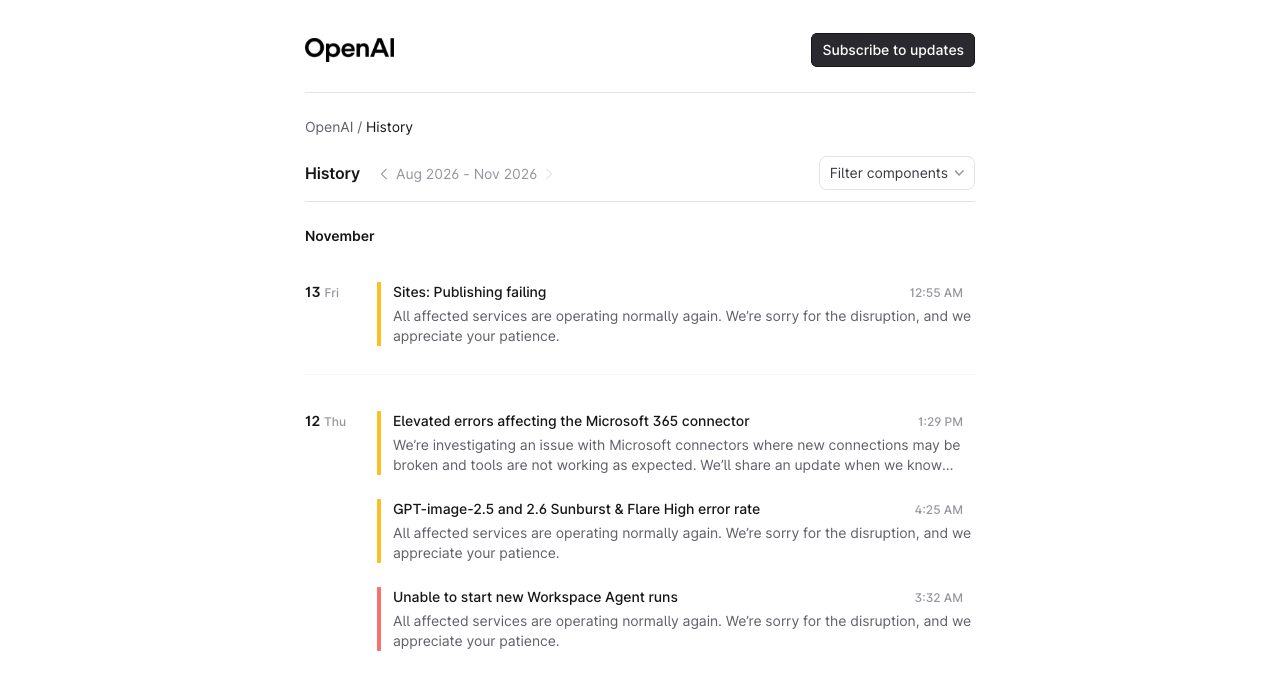
OpenAI's status page logged "Elevated errors affecting the Microsoft 365 connector" on November 12, saying new Microsoft connections "may be broken and tools are not working as expected." That is the newer dependency to watch. If your product reads a customer's mail, files or calendar through Microsoft Graph, the feature goes down with Exchange: Microsoft's EX1550543 notice warned that Graph requests touching mail, calendar and contacts "may time out."
Anthropic's status page separately logged trouble with "users authenticating to Claude.ai and Claude Code" from 09:58 UTC on November 13, with a fix deployed at 11:05 UTC. It names no cause and never mentions Microsoft, so the overlap in timing proves nothing on its own.
Is this a pattern? The second suite-wide outage in ten weeks
Yes. This is the second time since late August that a large part of Microsoft 365 failed at once for most of a day or longer.
On August 31, 2026, an Exchange Online problem spread into SharePoint, Teams, Purview, Defender XDR, Copilot, the Microsoft 365 admin center and Universal Print, per TechCrunch's Sarah Perez on September 1. Microsoft blamed "core authentication configuration used by multiple Microsoft 365 services" and tracked it as EX1464935, and full recovery wasn't declared until September 3, according to SSL.com's September 24 briefing. You will see an expired internal certificate blamed for that one. Microsoft never confirmed it, and SSL.com, which sells certificate automation, says as much itself.
Microsoft's own uptime numbers show the same wobble. Its service health and continuity page, last updated July 2026, lists worldwide Microsoft 365 uptime of 99.526% for Q1 2026, the lowest figure in a table that goes back to 2022, and 99.994% for Q2. Every other quarter in the table sits at 99.927% or higher. Q3 and Q4 2026 aren't published yet, and both incidents fall inside them.
For planning, two suite-wide incidents ten weeks apart is reason enough to assume a third.
Which parts of a small SaaS really depend on Microsoft?
For most small SaaS companies Microsoft shows up in four places: your customers' sign-in, your outbound email, your customers' inboxes, and your own team's tools. Some also host on Azure. Here's what each one does in an outage like this week's.
| Where Microsoft sits | What breaks | Who notices first | What you control |
|---|---|---|---|
| Customer SSO through Microsoft Entra ID | New sign-ins for SSO-enforced customers, depending on the flow | Your customers' staff, at your login screen | Session length, fallback for org admins, error copy |
| Outbound mail through a Microsoft 365 mailbox (SMTP AUTH or Graph sendMail) | Password resets, magic links, invoices, alerts | New and locked-out users | A second sending provider and an outbox with idempotency keys |
| Customers whose domains are hosted on Exchange Online | Your mail is deferred at their end, whoever sends it | Customers on Microsoft-hosted domains | Expiry windows, in-app notices, no blind resends |
| Your team's Outlook and Teams | Support inbox, internal chat, paging that routes through email | You, an hour late | A support and paging path off Microsoft |
| Microsoft Intune and Defender consoles | Device and security admin views | Whoever is on ops duty | Written manual procedures |
| Azure hosting | Whatever runs there, if the incident reaches it | Everyone | A second region or provider for the critical path |
The row people miss is the third one. Even if you send through a perfectly healthy provider, mail to a customer whose domain sits on Exchange Online gets deferred while Exchange is struggling. SparkPost, quoted by DMARCguard, saw replies like 451 4.7.0 Temporary server error, and at 04:45 UTC on November 13 still had "about three in four delivery attempts to Microsoft" deferred. Your provider did its job; the inbox at the other end wasn't taking delivery.
Then there's the console problem. The tools you would use to see what's wrong were on the incident list: Intune dashboards, Defender and, by Friday morning, parts of the Microsoft 365 admin center. If your diagnosis plan starts with "log into the admin center," it was a weak plan on Thursday. One small relief for Azure customers: the Azure card on the same public status page reported no Azure issues detected, a reminder that "Microsoft is down" and "Azure is down" are different questions.
If Microsoft Entra ID goes down, can your customers still sign in?
Some of them can. Whether your app's SSO button keeps working depends on which sign-in flow you built.
Start with what held this time. In the Hacker News thread, one admin reported "Entra is not impacted, SSO is working for non-M365 apps," and Microsoft's updates centered on Exchange and the services around it. September was the opposite case: the failure sat in authentication configuration, which is why Teams, SharePoint and the admin center went down together. Your plan has to survive both.
Microsoft does run a safety net for identity. The Microsoft Entra backup authentication system is Microsoft's fallback that handles sign-ins for supported apps when the primary Entra ID service is unavailable or degraded, for users who signed in to the same app on the same device within the last three days. Microsoft's documentation for it, updated September 2026, says it has run since 2021 and "transparently and automatically handles authentications for supported applications and services." Read the exclusions before you count on it.
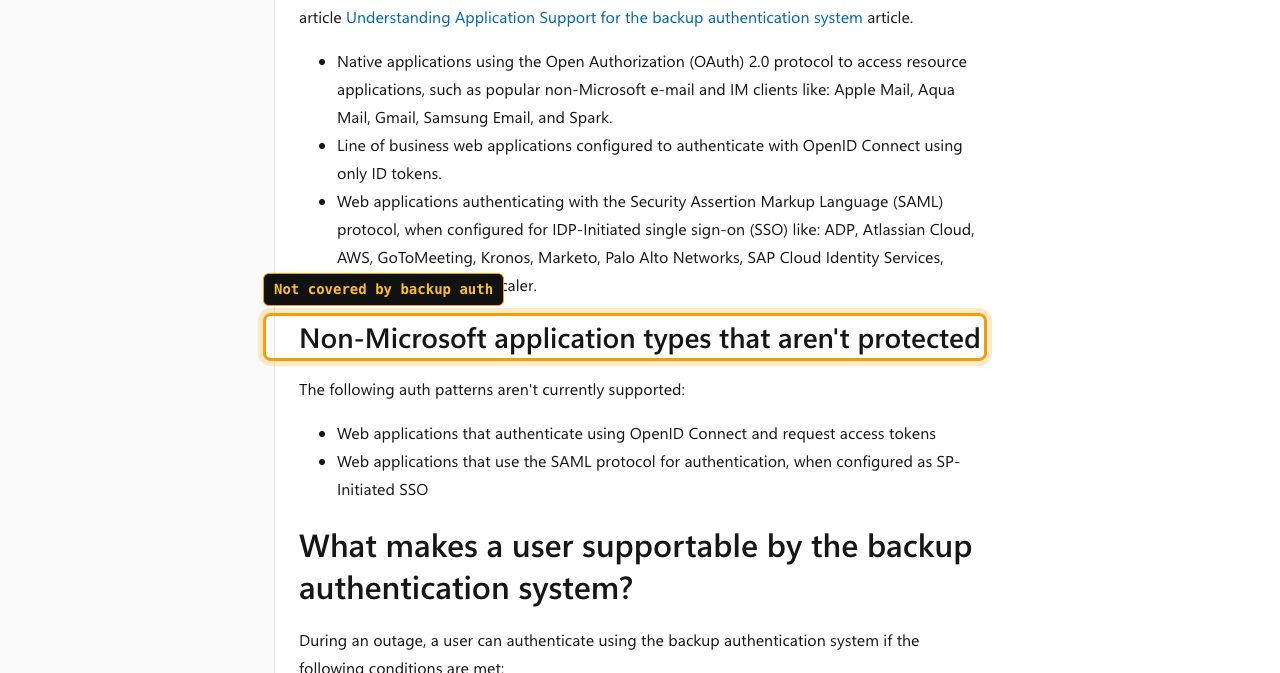
Two patterns are listed as not protected: "Web applications that authenticate using OpenID Connect and request access tokens," and SAML apps "configured as SP-Initiated SSO." Hold your login up against that list. If enterprise users type their email on your page and get redirected to Microsoft, that's SP-initiated. If your "Sign in with Microsoft" button requests an access token to call Microsoft Graph, that's the first pattern. Apps using OpenID Connect with ID tokens only, or IdP-initiated SAML, are on the supported side, and even those need a sign-in from the same app and device in the previous three days. The backup system also "can't perform fresh revocation checks," so it relies on certificate revocation data from its last backup.
As the builder, you control what happens on your side of the redirect, and that half of the playbook is the same whichever identity provider your customers use.
- Session length is yours. Your own session cookie decides whether an already-signed-in user notices an identity provider outage at all. Microsoft's client resilience guidance tells app builders to cache tokens, refresh silently and avoid forcing prompts like "login" and "consent." Apply the same logic to your session and don't log people out because one background refresh failed.
- Retries should back off. The same guidance asks for exponential back-off with the first retry at least 5 seconds later, and for honoring Retry-After on HTTP 429. A login page that hammers a degraded provider slows everyone's recovery.
- Agree a fallback with each enterprise customer before you need it. Some will want a time-limited, logged, non-SSO login for their admins during a provider outage. Some will refuse, which is their call. Either answer belongs in writing.
- Error copy matters at 2 a.m. "Your sign-in provider is having an outage, here is the status link" beats a generic error page.
What is a break-glass account, and how do you set one up?
A break-glass account, which Microsoft calls an emergency access account, is a cloud-only Global Administrator account kept outside your normal sign-in controls, so someone can still get into the tenant when every regular admin is locked out. Your own Microsoft tenant needs at least two, and Microsoft's Entra documentation, updated June 2026, is specific.
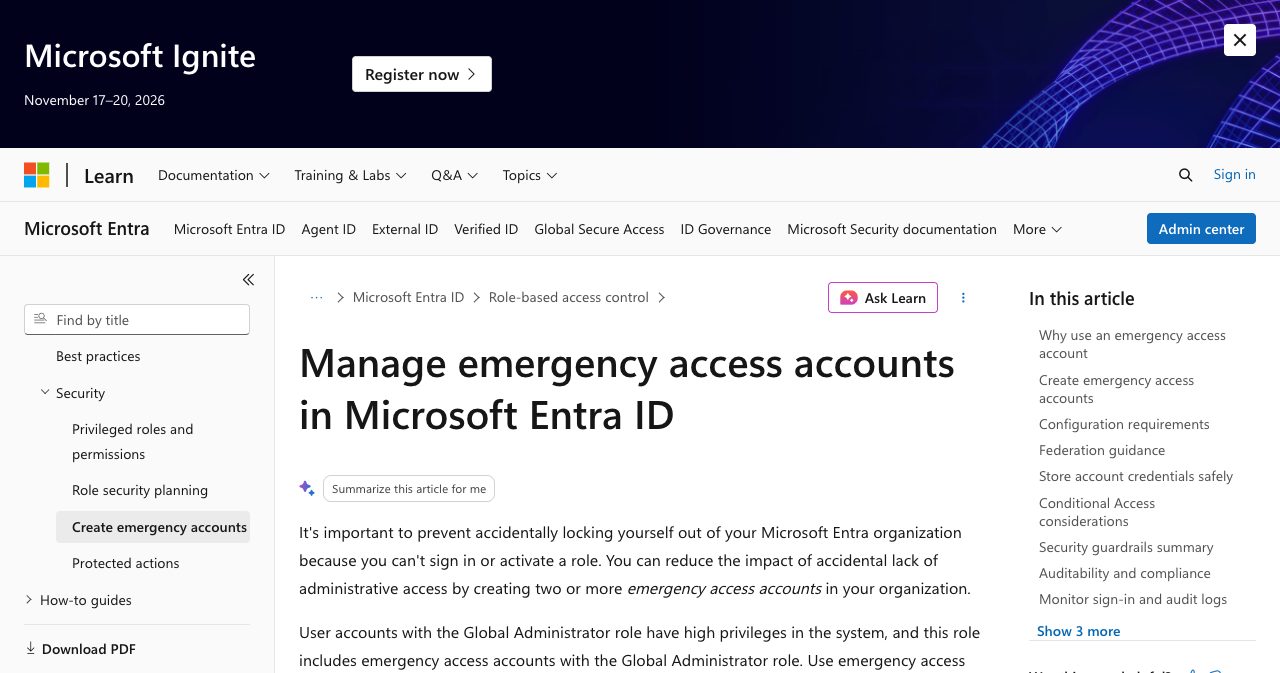
Create two or more. Make them cloud-only accounts on the *.onmicrosoft.com domain, never federated or synced from on-premises. Give them Global Administrator as an active permanent assignment, not an eligible one. Sign in with a passwordless method: FIDO2 passkeys are the recommended option, or certificate-based authentication if you already run a PKI, and it shouldn't be the same method your other admin accounts use. Exclude the accounts from Conditional Access policies that block sign-in. Don't tie them to one person or to an employee's phone, store the credentials where several admins can reach them, alert on every use, and review them at least every 90 days and whenever staff change.
A break-glass account has limits. It won't help while Microsoft's own admin center is down, as parts of it were on Friday. It covers a different failure, the Conditional Access change, MFA problem or federation outage that locks every admin out of your own tenant. For a five-person team it's an afternoon of work: two hardware keys, two accounts, one exclusion group, one alert rule. The hard part is remembering to test them, which is step 3 of the drill below.
Why password resets and magic links die when Exchange Online stalls
They die because the email that proves who a user is gets sent through Microsoft, delivered to Microsoft, or both, and a reset link only lives so long.
There are two ways this hits you. If your app sends through a Microsoft 365 mailbox, using SMTP AUTH or Microsoft Graph sendMail, you share Exchange Online's fate directly, and the EX1550543 notice warned that Graph requests touching mail "may time out." Even on a good day a mailbox is the wrong tool for this job: Microsoft's Exchange Online limits cap it at 10,000 recipients a day and 30 messages a minute. The second way catches everyone else. If your users sit on Microsoft-hosted domains, your mail waits at their end no matter who sends it.
The good news is that deferred doesn't mean lost. DMARCguard's summary: mail Microsoft answered with a temporary 4xx reply "is deferred, not rejected," and it only bounces when the sender's retry window closes. Microsoft extended its email timeout window to 48 hours at 09:03 UTC on November 13 "to help protect delayed messages while service recovery continues," up from the 24-hour retry window DMARCguard cites as Exchange Online's documented default. The bad news is your token. The message arrives eventually, but the link inside may not outlive the wait, and SparkPost warned that short-lived messages "may expire before Microsoft recovers."
How to fail over transactional email without double-sending
The instinct during an outage is to hit resend. Don't. SparkPost's advice, via DMARCguard, is blunt: "Resending creates duplicates once the queued mail goes through." A user who gets three reset emails at 3 a.m., two of them with dead links, will open a support ticket about it.
Here's the pattern I'd use on a small team:
- Write every transactional email to an outbox table first, with a stable message key derived from the event, such as the reset token's ID.
- Send from the outbox and pass that key to your provider as its idempotency key. Resend documents an Idempotency-Key header that it keeps for 24 hours, up to 256 characters. If your provider has nothing similar, dedupe in your own table.
- Fail over to the second provider only for messages your primary rejected or never accepted, never for messages it accepted and queued.
- For time-bound mail, issue a fresh token on each new attempt and kill the old one, so only one link works no matter which email lands first.
- Say it in the product: "We sent a link. Microsoft-hosted inboxes are delayed right now" answers the ticket before anyone writes it.
Picking the second sender is mostly a matter of price and volume. Here are the entry prices I checked on November 13, 2026:
| Sender | Entry price | Included volume | Note |
|---|---|---|---|
| Microsoft 365 mailbox (SMTP AUTH or Graph) | Part of your licence | 10,000 recipients a day, 30 messages a minute | Shares Exchange Online's outages |
| Amazon SES | $0.10 per 1,000 emails a la carte; new accounts start on Essentials at $0.16 per 1,000 | Pay as you go | Cheapest at volume |
| Postmark | $15 a month | 10,000 emails, then $1.80 per 1,000 | Free plan: 100 emails a month |
| Resend | Free, or $20 a month for Pro | 3,000 a month (100 a day) free; 50,000 on Pro | Documented idempotency keys |
Whichever you add, get its authentication right before you need it. Outlook.com began bouncing mail from domains with no DMARC record earlier this month, which we covered in our DMARC fix guide. If your sending domain has no DMARC record, Outlook.com may bounce the backup sender's mail as well.
What is a Microsoft 365 outage worth in SLA credits?
Less than you'd hope. A Microsoft 365 SLA credit is 25%, 50% or 100% of one month's fee for the affected service, depending on how far uptime fell below 99.9%, paid as a credit on a future invoice, and only if you file by the deadline.
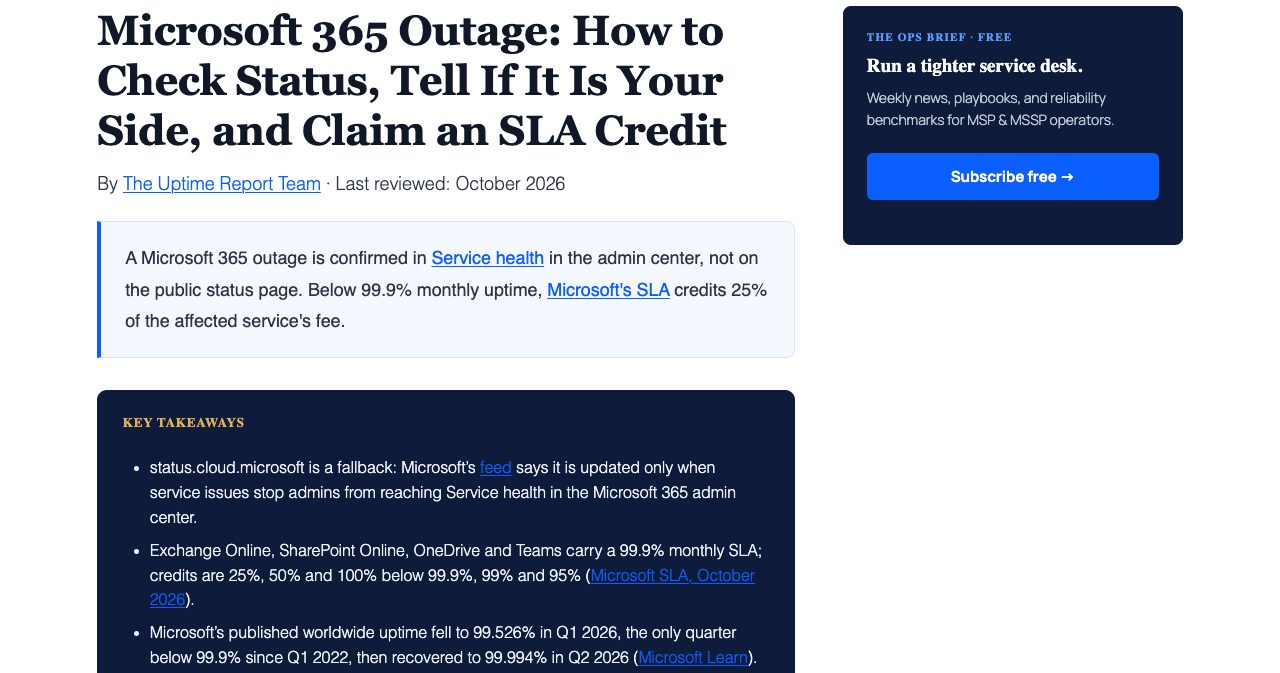
Microsoft's SLA for Online Services promises 99.9% monthly uptime per service for Exchange Online, SharePoint Online, OneDrive and Teams. Miss it and the credit is 25% of that service's monthly fee, 50% below 99% and 100% below 95%. Office Watch's November 12 breakdown explains the four details that decide what you actually get. Downtime is counted in user-minutes, users times minutes, so an outage that hits some of your people counts for less than one that hits everyone. For Exchange Online, downtime means users can't send or receive in Outlook on the web; desktop Outlook failing on its own doesn't count. The credit covers only the affected service's share of your suite and comes off a future invoice: "No money is paid back." And it is your "only contractual remedy," with nothing for lost sales or overtime.
A user-minute is one licensed user unable to use a service for one minute. Office Watch gives the formula as monthly uptime = (user-minutes minus downtime) divided by user-minutes, times 100, which is how a partial outage ends up paying nothing. Here's an illustration with made-up numbers for a 20-seat tenant in a 30-day month, which works out to 864,000 user-minutes:
| Scenario (illustrative) | Downtime in user-minutes | Monthly uptime | Credit tier |
|---|---|---|---|
| All 20 users out for 18 hours | 21,600 | 97.5% | 50% |
| 6 of 20 users out for 18 hours | 6,480 | 99.25% | 25% |
| 5 of 20 users out for 2 hours | 600 | 99.93% | None |
That assumes every minute meets Microsoft's definition of downtime, which for Exchange means Outlook on the web was failing too. Office Watch's own example sets the ceiling: 50 Business Standard users paying $700 a month can get at most $175 at the 25% tier, and an Exchange-only claim gets a share of that.
Switching suites doesn't change the shape of the deal. Google Workspace's SLA, last modified August 31, 2026, also promises 99.9% and also calls its credit the "sole and exclusive remedy."
| Term | Microsoft 365 (Exchange Online, SharePoint Online, OneDrive, Teams) | Google Workspace |
|---|---|---|
| Monthly uptime promise | 99.9% per service | 99.9% |
| Below 99.9% | 25% of the affected service's monthly fee | 3 extra days of service |
| Below 99% | 50% | 7 extra days |
| Below 95% | 100% | 15 extra days, the monthly maximum |
| Paid as | Credit on a future invoice | Extra days, or a money credit for online monthly billing |
| Claim deadline | End of the calendar month after the incident (direct customers) | Support case within 30 days of becoming eligible |
| Only remedy? | Yes | Yes |
How to claim: if you buy direct, file with Microsoft support by the end of the calendar month after the incident, which for this outage is December 31, 2026. If you buy through a CSP partner, the partner files in Partner Center, and Microsoft's partner documentation gives it "one month from the end of the billing month in which the incident occurred." Office Watch adds that resellers can set earlier cutoffs of their own. Partners need your tenant GUID, the incident ID and proof of your request sent from the affected tenant's own domain, and "Advisory incidents aren't typically eligible." Have EX1550543 and MO1550821 ready, along with times, the number of affected users and the error messages.
File it anyway. The credit won't rescue your Thursday, but the claim makes you write down which services failed, for whom and for how long, and that record is the raw material for your own post-mortem.
What should you tell customers while your vendor is down?
Tell them what's broken for them, what still works and when you'll update next, in that order, from a channel that doesn't depend on the broken vendor.
If customers can't log in, start there. A useful update names the symptom ("password reset emails to Outlook and Microsoft 365 addresses are delayed"), the workaround if there is one ("you're still signed in on devices you've used; please request only one reset"), the cause in one plain line ("our email reaches you through Microsoft, which is in a global outage, incident EX1550543") and the time of the next update. Then keep that promise even when there's nothing new to say.
Next, decide where it gets posted. If your status page shares hosting, DNS or an email provider with your app, it fails with the app. If email is your only announcement channel and email is what broke, you have no announcement channel. Write the template now, keep it outside your stack, and decide who is allowed to post it at 2 a.m.
Afterwards, send one short follow-up covering what happened, what you're changing and what customers need to do, if anything. Our churn playbook covers keeping accounts through a bad week. If you're working toward SOC 2, the dependency map and drill record below are the kind of vendor-management evidence our compliance checklist asks you to collect. It's the same lesson as Cloudflare's GLM-5.3 cache leak: things you assume you own, tenant isolation there and login availability here, actually live in a vendor's infrastructure.
How to drill for a vendor outage: the 7-step continuity test
A vendor continuity plan is a written, tested account of what happens when a supplier fails: which features degrade, what takes over, who tells customers and how you recover the cost. The drill below is how you test it. Run it once a quarter, in staging where you can, and turn every step that fails into a ticket. Block two hours for the first run.
- Map the blast radius. List every place one vendor sits in your product and your operations: customer SSO, outbound mail, hosting, device management and the admin consoles you would use to diagnose it. For each one, write down what fails and who notices first.
- Block your identity provider in staging. Block the identity provider's endpoints and confirm that existing sessions survive, that a failed token refresh does not trap users in a login loop, and that an SSO-enforced customer admin has a documented way back in.
- Sign in with both break-glass accounts. Keep two cloud-only *.onmicrosoft.com Global Administrator accounts with FIDO2 passkeys, excluded from Conditional Access policies that block sign-in, and confirm that each one signs in and fires its alert.
- Fail over transactional email. Switch your sender to the secondary provider, trigger a password reset and a magic link, and confirm that each message goes out exactly once under its idempotency key.
- Post a status update from outside your stack. Publish a test incident from a status page on separate hosting and DNS, using a template you wrote in advance, and time how long it takes from alert to post.
- Pull the vendor's incident record by API. Call the Microsoft Graph service health issues endpoint with an app-only ServiceHealth.Read.All token and save the incident IDs, times and impact you would need for an SLA claim.
- Write down the gaps and book the next drill. Record what broke, who fixed it and how long it took, then put the next drill on the calendar within 90 days, the review cadence Microsoft gives for emergency access accounts.
Where SaaSCity fits
One more dependency is worth owning: how people find you when your own channels are down. When your email is stuck, customers search your product name, and what they land on is whatever you set up before the bad day. SaaSCity gives every product a free listing page and a building on the city map. Add the SaaSCity badge to your site and you get a dofollow backlink from a domain rated DR 71 at our latest Ahrefs refresh (November 14, 2026), plus a Monday launch slot. Quick Pass ($19.99) goes live within 24 hours, Premium ($39.99) adds a written launch post with three dofollow links, and Max ($99.99) adds 30 days of billboard, ticker and homepage pin. If you build status pages, uptime monitoring or email infrastructure, this is a good week to list it on SaaSCity.
Microsoft has promised a Post Incident Report with a root cause. It won't mention your login page. So here's a test for tonight: open your password reset flow and ask which company's outage would stop that email from arriving. If the answer is one name, that's next week's first ticket.
FAQ
Is Microsoft 365 down right now?
As of the morning of November 13, 2026, Microsoft 365 was recovering but not fully restored. Microsoft's 8 a.m. ET status update reported broader improvements in North America and much of Europe, while some users could still see intermittent access issues and delayed email. The incidents to watch are EX1550543 for Exchange Online and MO1550821 for other Microsoft 365 services. Check Service health in the Microsoft 365 admin center first, and use status.cloud.microsoft only when admins cannot reach it.
Why does the public Microsoft status page say services are available when my tenant is broken?
Because status.cloud.microsoft is a fallback, not a live view of your tenant. During the November 12-13, 2026 incident, Microsoft's page said the issue was posted there because Microsoft 365 administrators may be unable to access the admin center. Microsoft's RSS feed, as quoted by The Uptime Report in October 2026, says the site is updated when service issues prevent tenant administrators from reaching Service health. Service health in the admin center, or the Microsoft Graph service health API, is the real source for your tenant.
What happened in the Microsoft outage on November 12-13, 2026?
Starting around noon ET on Thursday, November 12, 2026, Exchange Online, Outlook, Teams, SharePoint Online, Copilot, Microsoft Defender and Microsoft Intune admin dashboards degraded worldwide. Microsoft blamed a large number of servers being unexpectedly unavailable, which shifted load onto the remaining infrastructure. CNN reported, citing Downdetector, that outage reports reached 74 countries and territories in about an hour. Microsoft said it found no evidence of malicious activity and promised a Post Incident Report with the root cause.
How long did the November 2026 Microsoft outage last?
Roughly 18 hours for the worst of it. Microsoft's Exchange Online incident, EX1550543, starts at 16:17 UTC (11:17 a.m. ET) on November 12, 2026, according to DMARCguard's copy of Service health. TechCrunch reported on November 13 that Kentik's Doug Madory saw traffic returning to Microsoft services after about 18 hours of downtime. Recovery was uneven: Microsoft's 8 a.m. ET update on November 13 still mentioned intermittent access issues and delayed email in some regions.
What caused the Microsoft 365 outage?
Microsoft had not published a root cause by November 13, 2026. Its updates described a large number of servers being unexpectedly unavailable, then failed health checks and mitigations that did not bring the expected relief, and it paused all deployments during the incident. Microsoft said it had no evidence of malicious activity and committed to a full Post Incident Report with root cause and defense-in-depth actions once mitigation is complete, per its status update quoted by The Verge.
Can customers sign in to my SaaS with Microsoft Entra ID during a Microsoft outage?
Not reliably. Microsoft Entra ID has a backup authentication system that keeps users working if they used an app from the same device in the last three days. Microsoft's documentation, updated September 2026, lists two patterns it does not protect: web apps that use OpenID Connect and request access tokens, and SAML apps configured for SP-initiated single sign-on. Many SaaS "Sign in with Microsoft" buttons and enterprise SSO setups use exactly those patterns, so check yours.
What is a break-glass account in Microsoft Entra ID?
A break-glass account, which Microsoft calls an emergency access account, is a highly privileged account kept for when normal admin sign-in fails. Microsoft Learn recommends two or more cloud-only accounts on the *.onmicrosoft.com domain, permanently assigned Global Administrator, using passwordless sign-in such as FIDO2 passkeys or certificate-based authentication, excluded from Conditional Access policies that block sign-in, not tied to any one person or phone, with an alert on every use and a review at least every 90 days.
Why did password reset and magic link emails fail during the Microsoft outage?
Because the mail path ran through Exchange Online. Microsoft's EX1550543 notice warned that Microsoft Graph requests touching mail, calendar and contacts may time out, which breaks Graph sendMail. Mail to Microsoft-hosted inboxes got temporary 4xx replies and waited in queues: SparkPost still saw about three in four delivery attempts to Microsoft deferred at 04:45 UTC on November 13, 2026, per DMARCguard. A reset link that expires before it arrives is useless.
Should I resend emails that were delayed by the Microsoft outage?
No, not while they are still queued. SparkPost warned that resending creates duplicates once the queued mail goes through, as DMARCguard reported on November 13, 2026. Wait for bounce or expiry events, resend only the expired messages that still matter once Microsoft accepts mail again, and reissue time-bound messages such as one-time codes and reset links instead of resending the old ones. Also check your suppression list for Microsoft-hosted addresses added since November 12.
How much is a Microsoft 365 SLA credit worth?
Usually less than founders expect. Microsoft's SLA promises 99.9% monthly uptime per service. Below that the credit is 25% of the affected service's monthly fee, 50% below 99% and 100% below 95%. Downtime is counted in user-minutes, the credit covers only the affected service's share of your suite, and it comes off a future invoice, never as cash. Office Watch's November 12, 2026 example: 50 Business Standard users paying $700 a month can get at most $175 at the 25% tier.
How do I claim a Microsoft 365 SLA credit for the November 2026 outage?
If you buy directly from Microsoft, file a claim with Microsoft support by the end of the calendar month after the incident, which for the November 12-13, 2026 outage means December 31, 2026. Include the incident IDs EX1550543 and MO1550821, the times, the number of affected users and the errors they saw. If you buy through a CSP partner, the partner files in Partner Center within one month of the end of the billing month and needs your request from your tenant's own email domain.
Was ChatGPT or Claude affected by the Microsoft outage?
OpenAI's status page logged "Elevated errors affecting the Microsoft 365 connector" on November 12, 2026, saying new Microsoft connections may be broken and tools were not working as expected. Anthropic's status page logged authentication errors on claude.ai, Claude Code and the Claude Console from 09:58 UTC on November 13, with a fix deployed at 11:05 UTC, but it names no cause and does not mention Microsoft. CNN reported that AI companies said they were facing issues as well.
Sources
- Microsoft outage live updates (CNN, November 12-13, 2026)
- Microsoft's latest email outage turned into a full-blown global cloud crisis, by Zack Whittaker (TechCrunch, November 13, 2026)
- Microsoft's massive Outlook outage continues, by Jess Weatherbed (The Verge, November 13, 2026)
- A Microsoft 365 outage is hitting users in regions around the world (Global News, November 12, 2026)
- Microsoft 365 Outage EX1550543: What Deferred Email Means for Senders, by Meysam Azad (DMARCguard, November 13, 2026)
- Microsoft Service Health Status (status.cloud.microsoft, read November 13, 2026) and its admin center RSS feed
- Service degradation on Microsoft 365 (Hacker News, November 12, 2026)
- OpenAI status history (read November 13, 2026)
- Elevated errors on claude.ai, Claude Code, and platform.claude.com (Claude status, November 13, 2026)
- Microsoft 365 outage drags on, but things are improving, by Sarah Perez (TechCrunch, September 1, 2026)
- The Trust Briefing, September 2026 (SSL.com, September 24, 2026)
- Microsoft 365 service health and continuity, recent worldwide uptimes (Microsoft Learn, July 2026)
- Service Level Agreements for Online Services (Microsoft Licensing, read November 13, 2026)
- Microsoft 365 outage: how to claim your SLA credit (Office Watch, November 12, 2026)
- Microsoft 365 Outage: How to Check Status, Tell If It Is Your Side, and Claim an SLA Credit (The Uptime Report, October 2026)
- Request a credit from Microsoft (Partner Center, Microsoft Learn, June 2026)
- Google Workspace Service Level Agreement (Google, August 31, 2026)
- Manage emergency access accounts in Microsoft Entra ID (Microsoft Learn, June 2026)
- Backup authentication system for Microsoft Entra ID (Microsoft Learn, September 2026)
- Increase resilience of authentication and authorization in client applications (Microsoft Learn, February 2026)
- Working with service communications APIs in Microsoft Graph (Microsoft Learn)
- Exchange Online limits (Microsoft Learn, November 2026)
- Idempotency keys (Resend docs), Resend pricing, Postmark pricing and Amazon SES pricing, all read November 13, 2026
All sources were checked on November 13, 2026. Microsoft's Post Incident Report for EX1550543 and MO1550821 had not been published at that point.
Get your SaaS in front of founders
List your product on SaaSCity for $19.99, one-time: a permanent listing and a building on the live city map.
Founder resources
Related articles
Outlook.com Started Bouncing Mail From Domains Without DMARC. One TXT Record Stops It (2026)
Cloudflare Returned Other Customers' Prompts in 155 Responses. Your AI Feature's Tenant Isolation Is a Vendor Property (2026)