News
MiniMax M3.1 Flash Preview: What's Confirmed, How to Use It, and How It Differs from M3
MiniMax-M3.1-Flash-Preview launched on September 27, 2026 inside MiniMax Code and the Token Plan. It has a 1M-token context window, text, image and video input, and five effort levels, and thinking cannot be turned off. There is no model card, no benchmark table and no open weights yet. This guide separates what MiniMax has confirmed from the leaks and explains when M3 is still the better choice.

Contents (14)
- Key takeaways
- What is MiniMax M3.1?
- MiniMax M3.1 release date and availability
- Official specs
- Effort levels explained
- How to use MiniMax M3.1 today
- MiniMax M3.1 vs MiniMax M3
- Benchmarks: what exists and what does not
- Pricing and plans
- Architecture: official vs leaked
- What about Space Bunny Alpha?
- Who should switch, and who should wait
- Limitations and open questions
- Bottom line
Last updated: September 28, 2026. This story is moving daily. We will update the "what we still don't know" section first when MiniMax publishes more.
Quick answer: MiniMax-M3.1-Flash-Preview is MiniMax's newest M-series language model. It launched quietly on September 27, 2026 inside MiniMax Code and on the Token Plan. The official docs list a 1,000,000-token context window, text, image and video input, and five effort levels from low to max. Thinking is always on. MiniMax has not published a model card, benchmarks, a parameter count, open weights or a per-token price, so treat it as a preview of a fast everyday coding model, not a documented successor to M3.
If you searched "MiniMax M3.1", this is the model you found. There is no separate full M3.1 yet. The official name is MiniMax-M3.1-Flash-Preview, and both parts of the suffix matter. "Flash" means MiniMax built it for speed on short, everyday tasks. "Preview" means you get no model card, and the details can change.
A note on who is writing this. SaaSCity is a startup directory, and most of the founders who launch with us build their products with AI coding tools. When a new coding model ships, they ask us whether to switch. So this guide keeps two lists apart: what MiniMax has put in writing, and what the community is guessing.
Key takeaways
- Launched September 27, 2026 in MiniMax Code and on the Token Plan.
- Official model ID:
MiniMax-M3.1-Flash-Preview. - 1M-token context. Text, image and video input.
- Five effort levels (
low,medium,high,xhigh,max). The default ismax. Thinking cannot be disabled. - No official benchmarks, parameter count, open weights or pay-as-you-go price.
- MiniMax-M3 is still the public API and open-weight flagship.
What is MiniMax M3.1?
MiniMax M3.1 currently means one model: MiniMax-M3.1-Flash-Preview. MiniMax describes it as a frontier multimodal coding model with a 1M context window and tunable thinking depth. It sits beside MiniMax-M3, M2.7 and M2.7-highspeed in the model list, and it does not replace them.
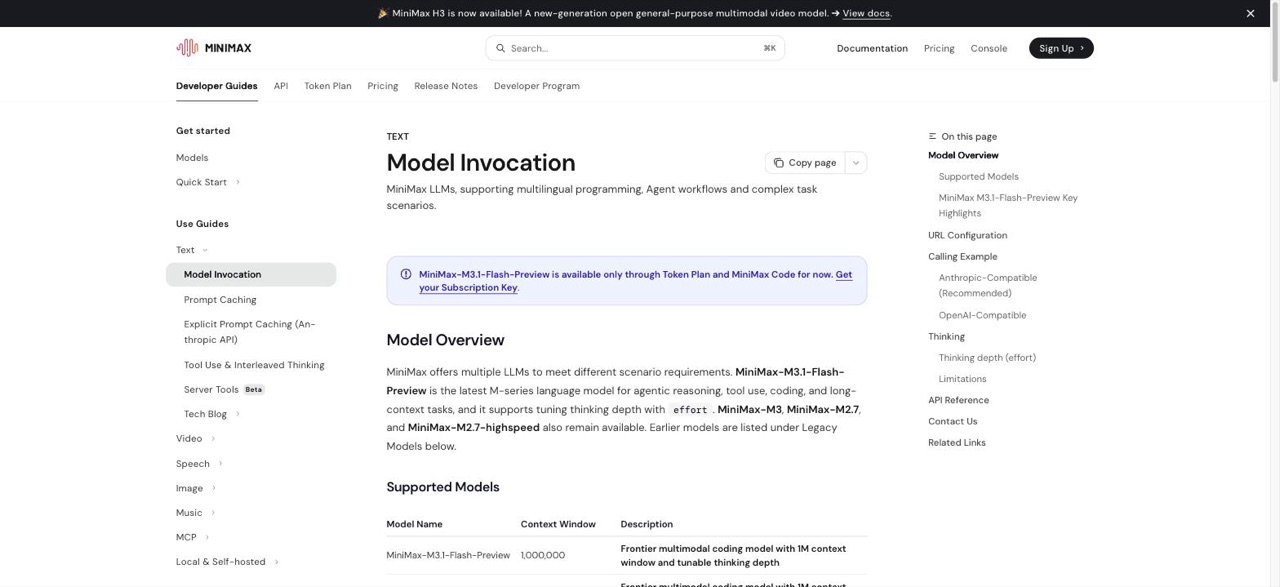
The docs call it "the latest M-series language model for agentic reasoning, tool use, coding, and long-context tasks." The blue banner at the top of the same page carries the restriction that matters most: the model is "available only through Token Plan and MiniMax Code for now."
The M-series has moved quickly:
- MiniMax-M1 (2025): reasoning model with Lightning Attention, 1M context, Apache-2.0 weights.
- M2, M2.1, M2.5, M2.7 and M2.7-highspeed: 204,800-token context, the agentic coding line.
- MiniMax-M3 (June 1, 2026): native multimodal MoE with MiniMax Sparse Attention, 1M context, open weights under the MiniMax Community License. Our MiniMax M3 review covers it in depth.
- MiniMax-M3.1-Flash-Preview (September 27, 2026): the current model, sold for daily development work.
MiniMax announced it through its agent account on X:
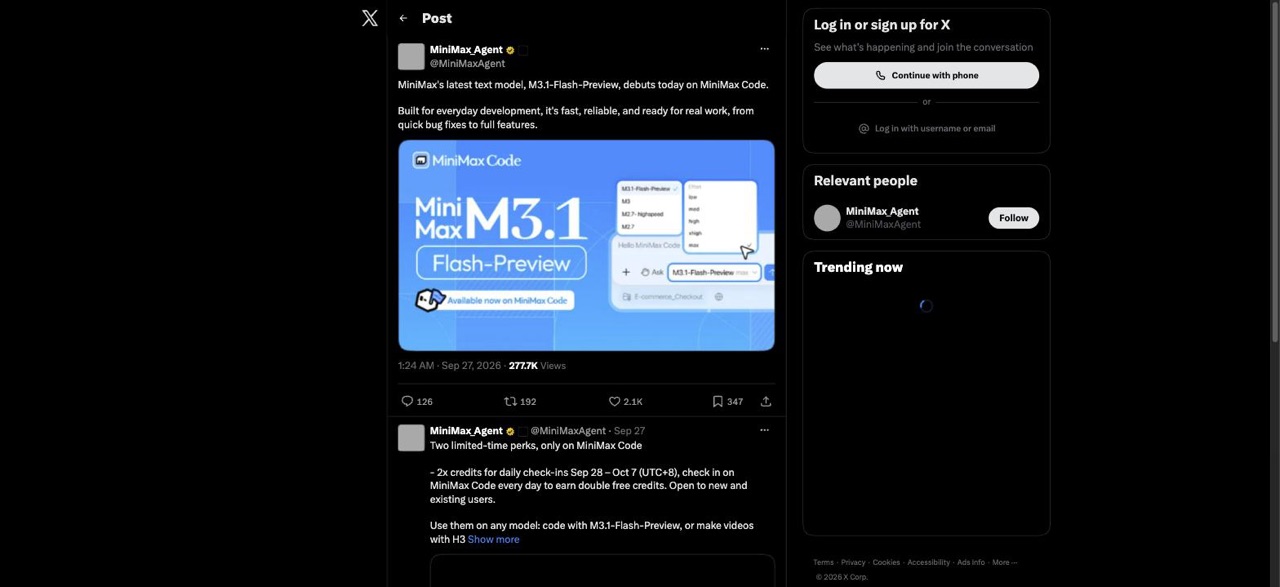
The launch post from @MiniMaxAgent says the model is "built for everyday development." Look at the launch graphic. The model picker shows M3.1-Flash-Preview above M3 and M2.7, and a second menu lists the five effort levels. MiniMax put the effort control in its launch image, which suggests effort is the main way you control this model.
MiniMax M3.1 release date and availability
MiniMax-M3.1-Flash-Preview became public on September 27, 2026. Is it out? The Flash Preview is, but a fully documented M3.1 is not.
Where you can use it:
- MiniMax Code, on desktop (macOS and Windows) and on the web, from the model picker. Some early reviews say it is the default model there.
- The Token Plan, through a Subscription Key on the Anthropic-compatible and OpenAI-compatible endpoints.
Where it is missing (as of September 28, 2026):
- No public Hugging Face repository.
- No public OpenRouter listing under that name.
- No research blog post or model card.
- No pay-as-you-go listing. That API still centers on MiniMax-M3.
Launch promotions, from the follow-up post in the same X thread:
- Token Plan quotas were reset when the model went live.
- Daily check-ins in MiniMax Code earn 2x credits from September 28 to October 7, 2026 (UTC+8), for new and existing users.
- You can spend those credits on M3.1-Flash-Preview or on MiniMax's H3 and H3 Max video models.
Official specs
This table lists only what MiniMax has published. Everything else is unknown.
| Spec | Official value |
|---|---|
| Model ID | MiniMax-M3.1-Flash-Preview |
| Context window | 1,000,000 tokens |
| Input | Text, image, video |
| Output | Text, plus a separate thinking stream |
| Thinking | On by default, cannot be disabled |
| Effort levels | low, medium, high, xhigh, max |
| Default effort | max |
| Access | Token Plan and MiniMax Code only |
| Open weights | Not announced |
| Official benchmarks | None published |
| Parameter count | Not disclosed |
| Per-token price | Not published |
| Output speed (tps) | Not published (M3 is listed at about 100+ tps) |
The 1M context means you can put a mid-sized repository, a long agent transcript or a stack of API docs in one request. MiniMax has not said how quality holds up near the limit on the Flash model, so test it on your own large contexts before you rely on it.
The multimodal input is useful for coding work. You can paste a screenshot of a broken layout and ask for the CSS fix, or record a short clip of a UI bug and ask for the patch. Token cost for images depends on size and detail. MiniMax's OpenAI-compatible docs give rough ranges: a few hundred tokens at low detail, about 1k to 3k by default, and several thousand or more at high. Check the usage field in the response for the real number.
The always-on thinking is a deliberate design choice. MiniMax says reasoning before answering "measurably improves accuracy on agentic reasoning, tool use, coding, and maths." Because thinking cannot be turned off, the effort level is the only speed control you have.
Effort levels explained
The effort parameter sets how much the model thinks before it answers. Higher levels produce more output tokens and take longer. If you omit it, M3.1-Flash-Preview uses max.
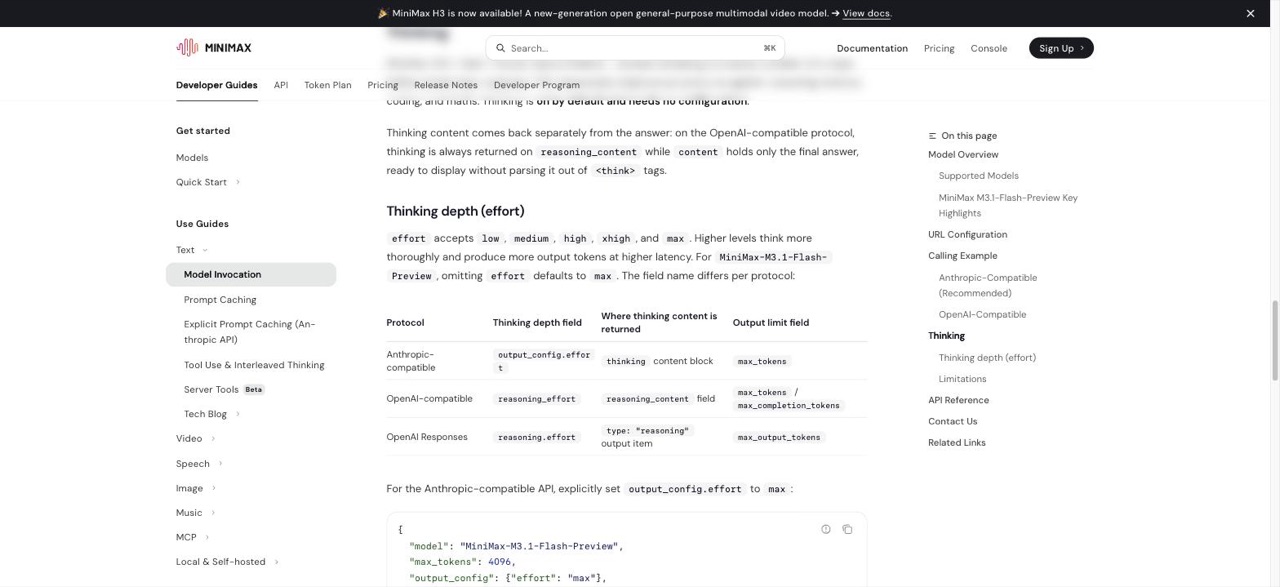
The field name depends on which API protocol you call:
| Protocol | Effort field | Where thinking comes back | Output cap field |
|---|---|---|---|
| Anthropic-compatible (recommended) | output_config.effort | thinking content block | max_tokens |
| OpenAI Chat Completions | reasoning_effort | reasoning_content | max_tokens / max_completion_tokens |
| OpenAI Responses | reasoning.effort | output item type: "reasoning" | max_output_tokens |
MiniMax has not published latency or quality curves for each level. The table below is our suggested starting point, not official guidance. Test it on your own tasks.
| Effort | Try it first for |
|---|---|
low | Formatting, renames, tiny patches, tool-call glue |
medium | Standard bug fixes, code review comments |
high | Multi-file changes, debugging |
xhigh / max | Planning, hard reasoning, repo-wide design. Expect more tokens and a longer wait |
One thing will catch many people. The default is max, in the API and, per early reviews, in the MiniMax Code UI. If you leave it there and ask for a one-line rename, the model will still think at full depth, and the "Flash" model will feel slow. Most complaints about speed in the first 24 hours probably come from this default.
The thinking limitation
The docs state the rule directly. If you send thinking: {"type": "disabled"} or effort: "none", you get a 400 error:
model "MiniMax-M3.1-Flash-Preview" requires adaptive thinking
This matters if you are porting code from MiniMax-M3. On M3, community reports describe enabled, adaptive and disabled thinking modes, so a client that disables thinking to save tokens will fail against M3.1. Lower the effort level instead.
How to use MiniMax M3.1 today
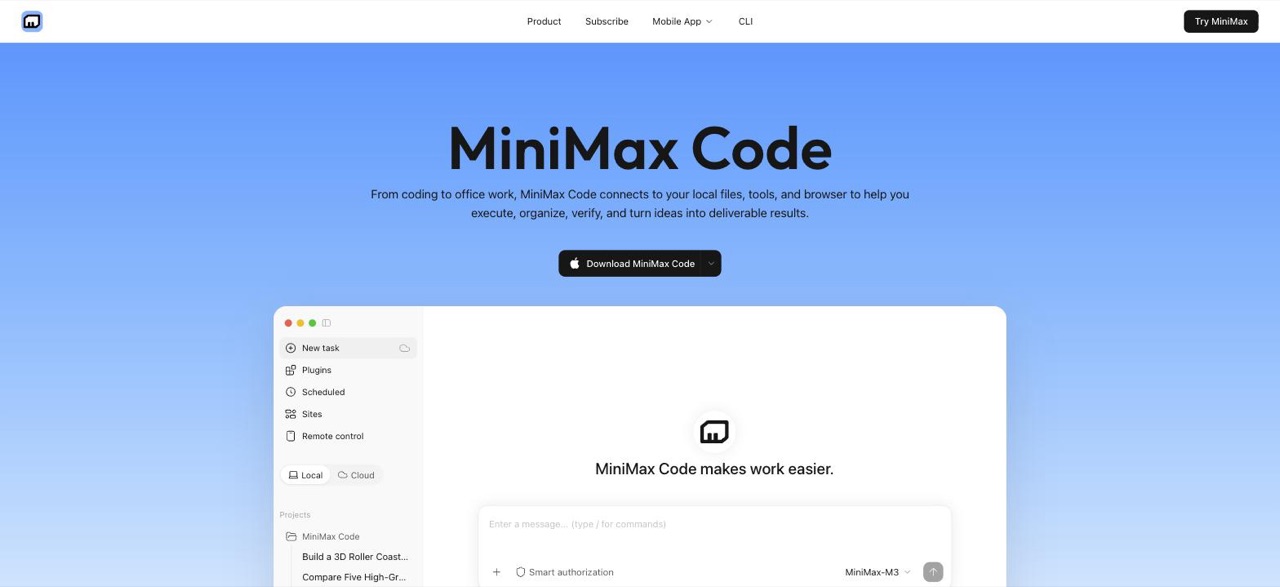
In MiniMax Code
- Download MiniMax Code from agent.minimax.io/download, or open the web workspace.
- Sign in. Early users mention Google login.
- Open the model picker next to the prompt box and choose M3.1-Flash-Preview.
- Set the effort level before you start. Pick
mediumorhighfor normal coding. Keepmaxfor planning. - Check in every day until October 7, 2026 to collect the double credits.
The desktop app has more features than a chat window. Reviews mention Agent Teams, memory, a built-in browser and scheduled tasks. There is also a CLI, which is easier to script. Some developers use a community minimax-vscode plugin with VS Code and Copilot. MiniMax does not maintain it, so treat it as unofficial.
Through the API
Use your Token Plan Subscription Key. A pay-as-you-go API key is a different credential, and the Token Plan docs say the two are "not interchangeable."
Base URLs:
- Anthropic-compatible:
https://api.minimax.io/anthropic(mainland China:https://api.minimax.cn/anthropic) - OpenAI-compatible:
https://api.minimax.io/v1(mainland China:https://api.minimax.cn/v1)
Anthropic-compatible request (recommended by MiniMax):
curl https://api.minimax.io/anthropic/v1/messages \
  -H "Authorization: Bearer <MINIMAX_API_KEY>" \
  -H "Content-Type: application/json" \
  -d '{
    "model": "MiniMax-M3.1-Flash-Preview",
    "output_config": {"effort": "medium"},
    "max_tokens": 4096,
    "messages": [{"role": "user", "content": "Find the off-by-one bug in this loop: ..."}]
  }'
OpenAI-compatible request (Python):
from openai import OpenAI

client = OpenAI(base_url="https://api.minimax.io/v1", api_key="<MINIMAX_API_KEY>")

response = client.chat.completions.create(
    model="MiniMax-M3.1-Flash-Preview",
    reasoning_effort="medium",
    messages=[{"role": "user", "content": "Find the off-by-one bug in this loop: ..."}],
)

print(response.choices[0].message.content)
On the OpenAI-compatible protocol, the final answer is in content and the thinking is in reasoning_content. You do not need to strip <think> tags. MiniMax's examples use max. We changed them to medium because most coding requests do not need maximum depth.
Because the Anthropic-compatible endpoint is the recommended path, you can also point tools such as Claude Code or Cursor at it. MiniMax has integration guides for these tools in the Token Plan docs. If you are new to agentic coding tools, our Claude Code pricing breakdown is useful for comparing costs.
MiniMax M3.1 vs MiniMax M3
| M3.1-Flash-Preview | MiniMax-M3 | |
|---|---|---|
| Status | Preview, September 27, 2026 | Generally available, June 1, 2026 |
| Context | 1M (official) | 1M (official) |
| Input | Text, image, video | Text, image, video |
| Thinking | Always on, 5 effort levels | Enabled, adaptive or disabled (reported) |
| Benchmarks | None official | Full vendor table |
| Weights | Not public | Hugging Face (MiniMaxAI/MiniMax-M3) |
| API access | Token Plan and MiniMax Code | Public API plus third-party hosts |
| Price | Not listed | About $0.30 / $1.20 per 1M tokens (promo), $0.60 / $2.40 list, commonly cited |
| Best for | Daily coding loops | Long-horizon agents, self-hosting, evals |
Our recommendation: If you run MiniMax in production through an API, stay on M3 for now. It has a stable model ID, public pricing, third-party hosts and published scores. If you use MiniMax Code every day, compare Flash with M3 at medium and high effort on your real tasks. That test takes about an hour and tells you more than a leaderboard would.
Benchmarks: what exists and what does not
MiniMax has published no benchmark results for M3.1-Flash-Preview. BenchLM lists the model as unranked. Partner notes that leaked before launch say, in effect, that no 3.1 baselines exist and that M3 numbers should not be reused as targets.
So be careful when you read posts that credit "M3.1" with 59% on SWE-Bench Pro. That number is M3's, and MiniMax reported it itself. For context, these are the M3 figures:
| Benchmark (MiniMax-M3 only, vendor-reported) | Score |
|---|---|
| SWE-Bench Verified | 80.5% |
| SWE-Bench Pro | 59.0% |
| Terminal-Bench 2.1 | 66.0% |
| MCP Atlas | 74.2% |
| BrowseComp | 83.5 |
| OSWorld-Verified | 70.06 |
Independent indices rate M3 lower than MiniMax's own tables. Artificial Analysis snapshots from September put its Intelligence Index around the high 20s to about 30. We have no public data on where a Flash version will land.
Run your own quick eval. Pick ten real tasks from your own repositories. Run each one on M3.1-Flash-Preview at medium and at high, and on M3 as a baseline. Track three things: whether the patch was complete, whether the model stopped in the middle of an edit, and how long you waited. Early users report that long diffs sometimes stop mid-edit and leave half-written imports, so the second measure matters most.
Pricing and plans
MiniMax has not published a per-token price for M3.1-Flash-Preview. Today you pay for it through the Token Plan or with MiniMax Code credits.
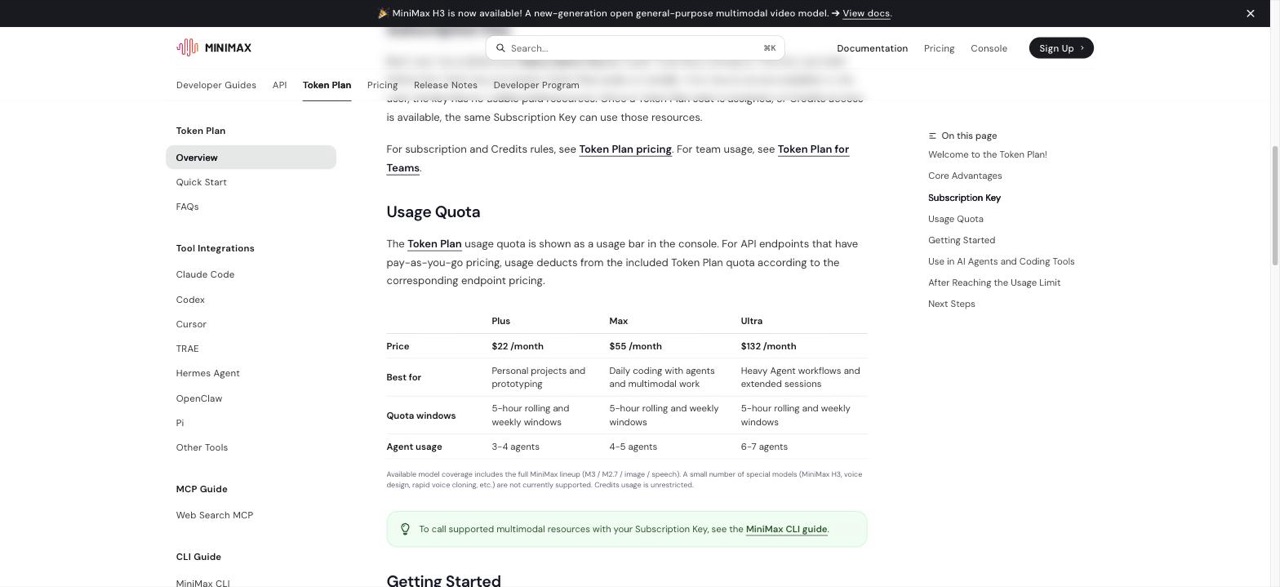
| Token Plan tier | Price | Best for (per MiniMax) | Agent usage |
|---|---|---|---|
| Plus | $22 / month | Personal projects and prototyping | 3 to 4 agents |
| Max | $55 / month | Daily coding with agents and multimodal work | 4 to 5 agents |
| Ultra | $132 / month | Heavy agent workflows and long sessions | 6 to 7 agents |
All tiers use 5-hour rolling windows plus a weekly window. The quota is shared across eligible text, image and speech models. H3 video, voice design and some other special models are not covered by the included quota. When you reach the limit, purchased credits cover the rest. International docs price credits at 1,000 credits for $1, valid for 365 days. Some older posts still quote $20, $50 and $120 for the tiers. The docs show $22, $55 and $132.
Is MiniMax M3.1 free? You can use it without a subscription through free quota and check-in credits in MiniMax Code, and the check-ins pay double until October 7. There is no free, unlimited public API.
The only public per-token price in the M-series is for MiniMax-M3. Do not apply M3's price to M3.1.
Architecture: official vs leaked
Official. MiniMax has said three things: it is a multimodal coding model, it has a 1M context window, and it has tunable effort. That is all.
Leaked and unverified. A partner onboarding note dated about September 22 has circulated in a public evaluation repository and in summaries by OrcaRouter and AlphaSignal. It is not a MiniMax statement. According to those summaries, the changes from M3 include:
- All-sparse attention. M3's first three full-attention anchor layers are replaced with sparse attention.
- Q8KV4. Queries move from BF16 to FP8, and keys and values are stored as 4-bit values in blocks of 16. That would roughly halve KV-cache memory compared with M3.
- NVFP4 experts. The routed MoE experts move toward W4A4 NVFP4. The shared expert is excluded.
- DSpark speculative decoding. A Markov-style draft model replaces M3's EAGLE-style multi-token prediction.
- Private checkpoints of about 250 GB and 236 GB on Hugging Face, which are not publicly accessible.
Each of these would make a model cheaper and faster to serve, which fits the "Flash" name. The same notes also report internal scores that disagree with each other, so they are not reliable. Treat all of this as engineering rumor until MiniMax publishes a card or paper.
What about Space Bunny Alpha?
About four days before the launch, an anonymous stealth model called stealth/space-bunny-alpha appeared on OpenRouter, free to use during its preview. Some developers fingerprinted it through tokenizer behavior, error messages and token-count probes, and several concluded that it came from MiniMax.
MiniMax has not confirmed this. On September 28, at least one public tester reported that Space Bunny scored differently from M3.1-Flash-Preview on their GameFeel v1.1 test. It may be an earlier checkpoint, a sibling model or something unrelated. For now, it is an interesting possibility that nobody has proven.
Who should switch, and who should wait
Indie hackers and solo founders. Try it. If you already use MiniMax Code or a Token Plan, switching costs nothing, and the double credits make this week a good time to test. Set effort to medium and raise it only when the model gets something wrong. If you are building a product on top of a model, you still need a stable one. See our guide to building an AI SaaS in 2026 for how to plan around that.
Agent platforms and tool builders. Wait, and prepare. You cannot route it through OpenRouter or another third-party host, and you cannot self-host it. Update your client so it never sends a thinking-disabled request, so you are ready when general API access opens.
Enterprise evaluation teams. Keep M3 in production. A preview model with no card, no license and no benchmarks cannot pass a procurement review. Add M3.1-Flash-Preview to your eval set so you have your own numbers when MiniMax publishes theirs.
Limitations and open questions
What MiniMax has not told us yet:
- Total and active parameter counts.
- Whether Flash is a distilled, quantized or separately trained checkpoint.
- Output speed in tokens per second.
- How quality compares with M3 on long-horizon agent tasks.
- Whether a full, non-Flash M3.1 is coming.
- Whether it will get open weights, and under which license.
- When general pay-as-you-go API access will open.
The known limits are the preview label, always-on thinking, access only through Token Plan and MiniMax Code, mixed early reports on long patches, and some confusion with Space Bunny Alpha.
Bottom line
MiniMax-M3.1-Flash-Preview is a product release for everyday coding, not a documented successor to M3. The confirmed parts are useful: 1M context, multimodal input and an effort control that gives you real speed choices once you move off the max default. Before you replace M3 in production, wait for three things: a model card, a public API model ID and independent benchmarks. Until then, test it in MiniMax Code, keep M3 for production, and do not trust anyone who quotes M3.1 benchmark scores.
If you are building with these models and plan to launch, list your product on SaaSCity to get in front of other founders who use the same tools.
Sources: MiniMax Model Invocation docs, MiniMax Token Plan overview, @MiniMaxAgent launch post, MiniMax-M3 on Hugging Face and the MiniMax M3 announcement. Leak details come from secondary partner-note summaries and are labeled as unverified.
Get your SaaS in front of founders
List your product on the SaaSCity live city map - a permanent listing, real discovery, and a backlink from a high-DR directory. Free to start; upgrade for a dofollow link and a building on the map.