Reviews
Atrium by Cloudly Move Review 2026: SharePoint Intranet Templates, Web Parts and Business Apps You Buy Once
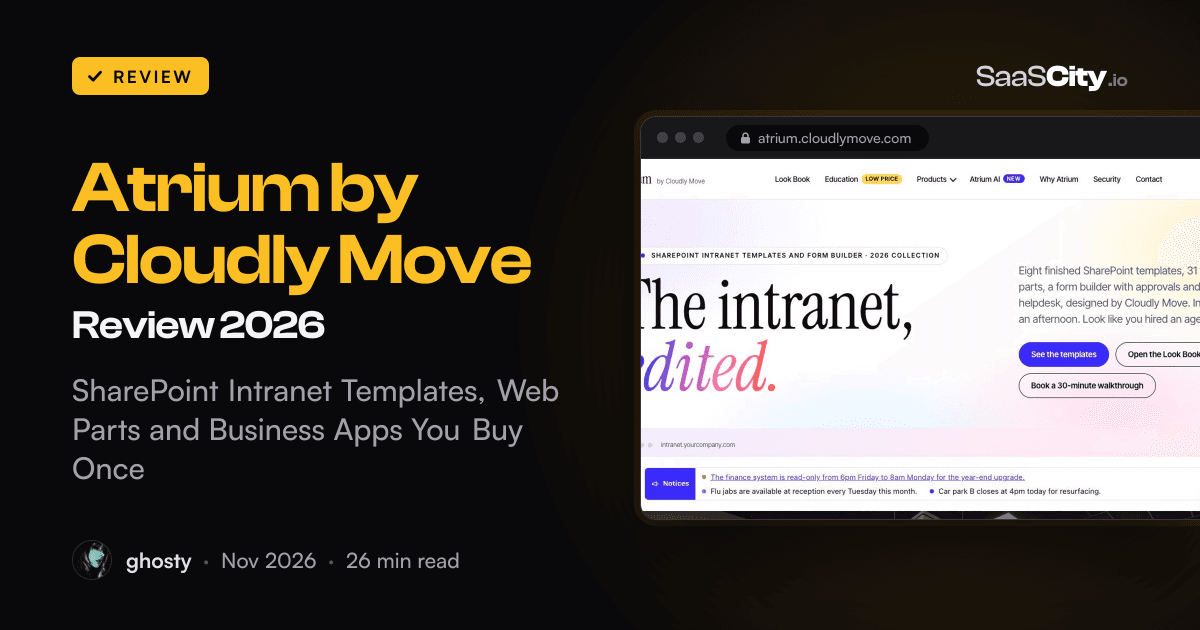
Atrium by Cloudly Move sells eight finished SharePoint Online intranet templates, 31 web parts and a set of business apps (forms and approvals, helpdesk, LMS, document control, zip) for a single payment per Microsoft 365 tenant. Here is what each part does, what it costs, how it installs, where it stops, and who should buy it.

Contents (16)
- Key takeaways
- What is Atrium?
- Who makes Atrium?
- What do the eight templates include?
- What are the 31 web parts?
- What do the business apps do?
- What is Atrium AI, and why does it matter for Copilot?
- How much does Atrium cost?
- How does Atrium compare with ShortPoint, Origami and a custom build?
- How do you install Atrium?
- Is Atrium secure, and where does the data live?
- What about schools and universities?
- Who is Atrium best for?
- What should you know before you buy?
- Is Atrium worth it?
- FAQ
Disclosure: this is a sponsored review.
Product details were checked against atrium.cloudlymove.com, its product, comparison, setup guide and terms pages, and Companies House on November 12, 2026. Screenshots were taken from the live site in Google Chrome.
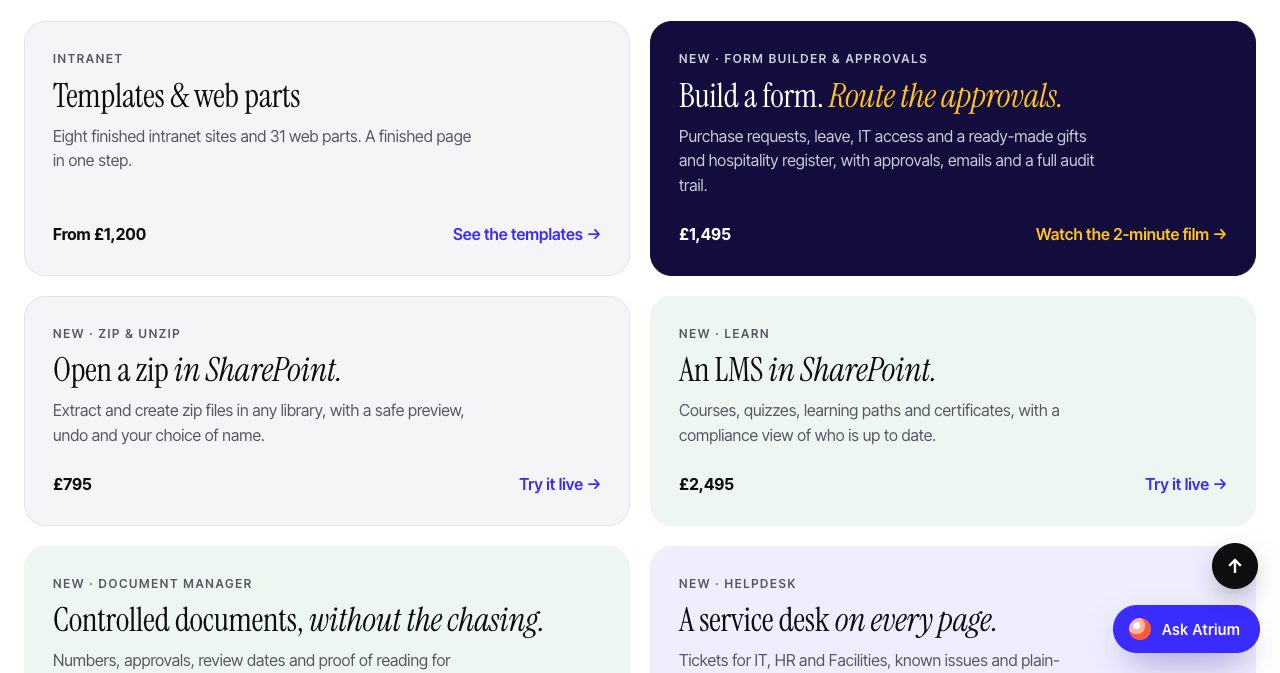
Quick answer: Atrium by Cloudly Move is a set of SharePoint Online intranet products that you buy once. It has eight finished intranet templates, 31 web parts and business apps for forms and approvals, a helpdesk, an LMS, controlled documents and zip files. Templates start at £1,200 and web parts at £95, plus VAT, for one Microsoft 365 tenant with unlimited sites and users. There is no subscription. Everything runs inside your own tenant, and the intranet packages ask for no API permissions.
Most organisations that pay for Microsoft 365 already own an intranet platform. It is called SharePoint, and for a lot of teams it is where good intentions go quiet. Someone creates a communication site, adds a hero web part and a news feed, and the result looks like a file store with a banner. The project then goes one of two ways. Either the company signs up for an intranet product priced per user per year, or it hires an agency and the build runs for months.
Atrium is a third option from a small London consultancy. It sells the finished article as an ordinary SharePoint app package: you upload it, press one button and get a designed page with artwork and starter content. This review covers what is in the range, what it costs over three years, how the install works, what the security story looks like, and where Atrium tells you to shop elsewhere.
Key takeaways
- Atrium is sold as a perpetual licence per Microsoft 365 tenant, with unlimited sites and users. There are no per-user fees.
- One template is £1,200, three are £2,950 and all eight are £5,950. One web part is £95 and all 31 are £1,950. Prices exclude VAT.
- The business apps are priced separately: Form Builder & Approvals £1,495, Helpdesk £1,495, Learn £2,495, Document Manager £2,995 and Zip & Unzip £795.
- Everything is a standard SharePoint Framework package. There is no Azure, no app registration and no external database, and content stays in SharePoint lists on your sites.
- The intranet packages ask for no Microsoft Graph or API permissions. The business apps ask for one optional permission, Mail.Send, for emails.
- The price includes 12 months of updates and email support. Atrium keeps working after that.
- It runs on SharePoint Online only. SharePoint Server on-premises is not supported.
- Cloudly Move Limited was incorporated in April 2024, so the company is young, and we found no independent customer reviews yet.
What is Atrium?
Atrium is a product range for SharePoint Online. It fills the gap between an empty SharePoint site and an intranet people open on purpose. The range has three layers:
- Templates. Eight finished intranet pages, each delivered as its own package with artwork and starter content.
- Web parts. 31 building blocks, such as Targeted News, Employee Directory, Org Chart, Poll and Canteen Menu, that sit next to Microsoft's own web parts on any modern page.
- Business apps. Form Builder & Approvals, Helpdesk, Learn, Document Manager and Zip & Unzip. These cover the jobs that normally send a company to another vendor.
A fourth product, Atrium AI, is sold separately and deals with what happens to intranet content after launch. More on that below.
Each product is built on the SharePoint Framework, which is Microsoft's own model for extending SharePoint. That matters for a buyer. An SPFx package installs through the tenant app catalog like any other, runs in the browser as the signed-in person, and follows the permissions you already have. Atrium is not a separate platform with a connector into Microsoft 365. It is SharePoint with the design and the missing features added.
The site is also unusually easy to evaluate. Almost every product page has a live demo running in the browser with sample data, a film of two or three minutes and a plain list of what the product does not do. You can click through a helpdesk queue or approve a fake expenses policy before you speak to anyone.
Who makes Atrium?
Atrium comes from Cloudly Move Limited, which describes itself as a Microsoft 365 consultancy. Companies House lists the company under number 15646622 as active, incorporated on April 15, 2024, with its registered office at 167-169 Great Portland Street, London W1W 5PF. Its nature of business is information technology consultancy. The site footer carries the same company number and an ICO registration, ZC297005.
The "Why Atrium" page has a short film presented by Saurabh, named there as the Atrium founder. The caption says the presenter is an AI avatar made with HeyGen from his own likeness and voice. The site states that openly, and the same habit of saying how things were made runs through the rest of the product pages.
Atrium is not affiliated with or endorsed by Microsoft, and the footer says so.
What do the eight templates include?
Each template is a complete page for one job, and each is its own SharePoint package. The setup bar creates the lists, uploads the photos, adds starter content and publishes the page.
| Template | What it is for |
|---|---|
| Company Home | The front door: a greeting by first name, shortcuts, top stories, key figures, must-reads, events, celebrations and shoutouts |
| Team Hub | A department home with news, tools, who's who, FAQs and a jargon glossary |
| Events & Culture | A social hub with countdowns, a pulse check, thank-yous and an ideas box |
| People & Help Centre | Searchable FAQs, forms, policies, internal vacancies, offices and contacts |
| Location Home | A page for site and frontline teams with notices, the canteen menu, events and a world clock |
| Owner Dashboard | Governance for the intranet owner: content health, roadmap and setup |
| Onboarding | A new starter's first 90 days, day by day, with the essentials |
| Learning Hub | A training home with courses, progress, compliance and a calendar |
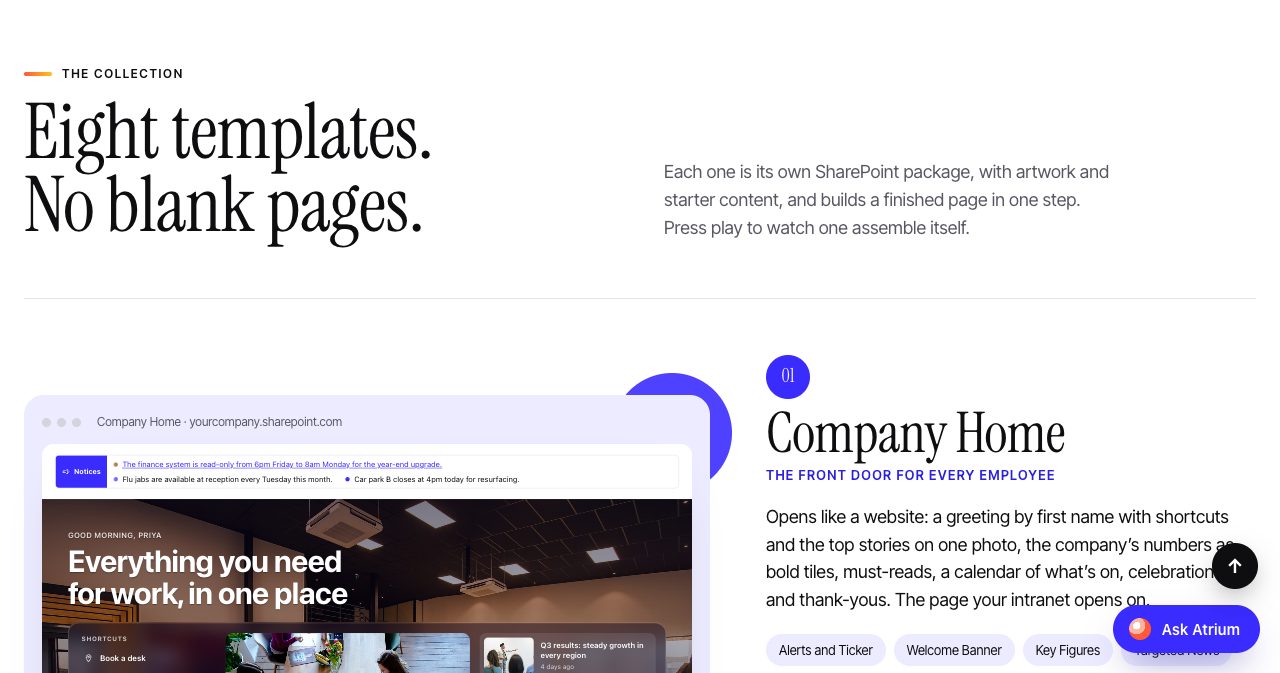
The detail that makes these usable is the starter content. A new page arrives with sample news, events and invented colleagues with licensed stock photos, so it looks finished on the first load. You then replace the content in the lists behind each web part. That is a much easier brief to hand to a communications team than "here is an empty page".
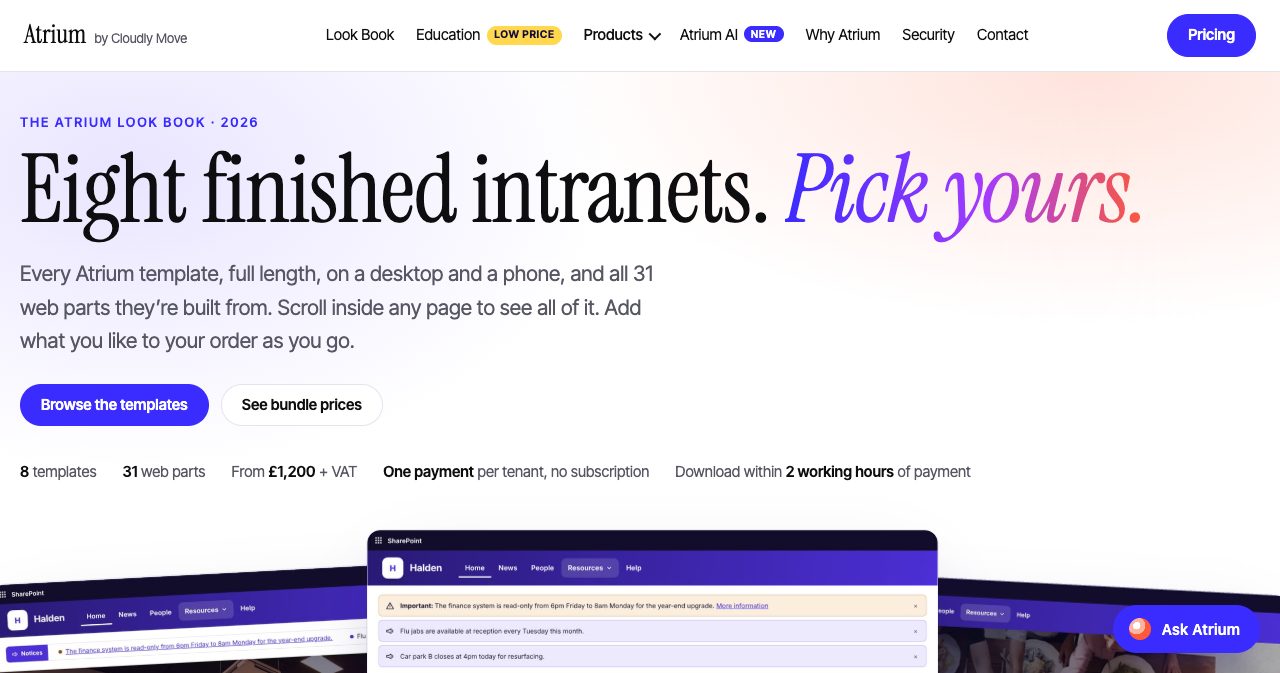
Colours come from your SharePoint site theme, so a template picks up your brand through Change the look. Photos are ordinary files in Site Assets that you swap for your own. The full set is on the Atrium templates page, and the Look Book shows every page at full length on a desktop and a phone.
What are the 31 web parts?
The web parts are the pieces the templates are made from, and they are also sold one at a time. They fall into eight groups:
- Communication: Targeted News, News Carousel, Welcome Banner, Alerts and Ticker, Events, Key Figures
- People: Employee Directory, Org Chart, My Profile, Shoutouts, Spotlight, Celebrations, Internal Jobs
- Engagement: Countdown, Poll, Pulse, Ideas Box
- Knowledge: FAQs, Glossary, Timeline
- Pages: Accordion, Content Tabs, Table of Contents
- Navigation: App Launcher, Search, Breadcrumb
- Workplace: Offices, World Clock, Canteen Menu
- Admin: Content Health, Setup and Templates
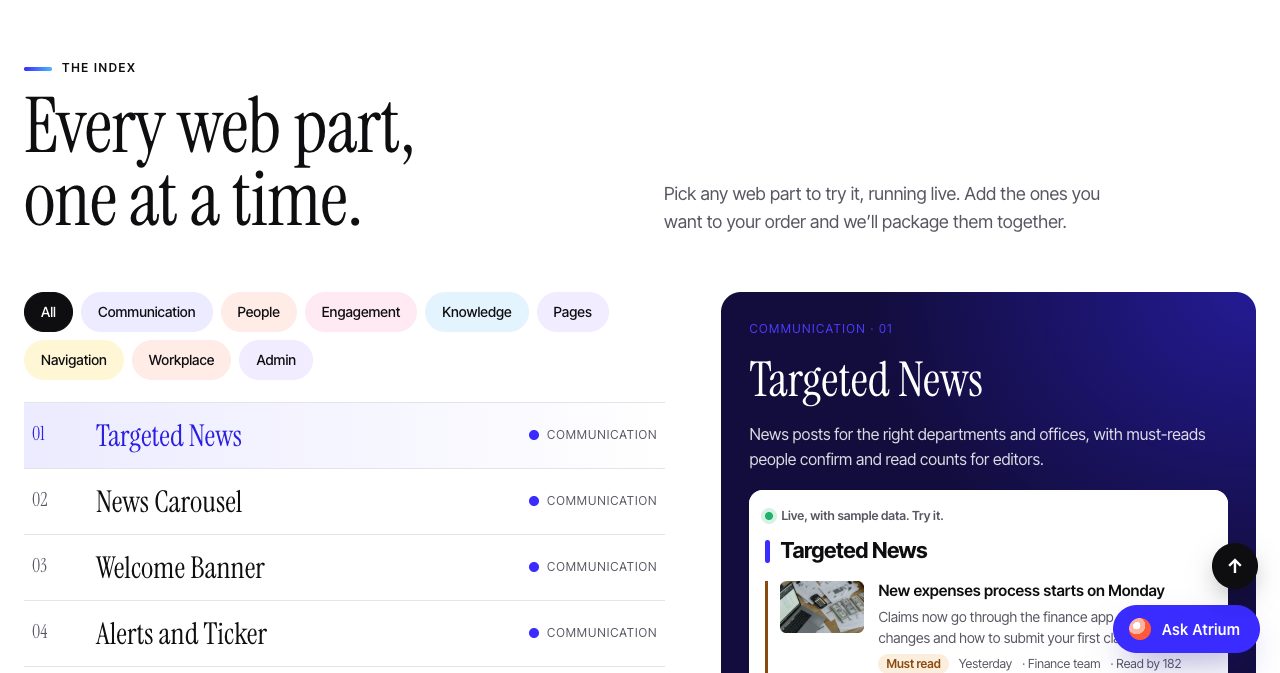
Each one reads from a SharePoint list on the site. Targeted News is a good example of the thinking: it shows news to the right departments and offices, lets you mark a post as a must-read that people confirm, and gives editors a read count. Those are small features, and they are the ones internal communications teams ask for in the first month.
At £95 a web part, this is also the cheapest way into the range. A team that already has a working intranet and only wants an org chart, a poll or a canteen menu can buy that one piece.
What do the business apps do?
This is where Atrium goes beyond a template shop. Each app replaces a category of software that a mid-sized organisation would otherwise rent.
Form Builder & Approvals (£1,495)
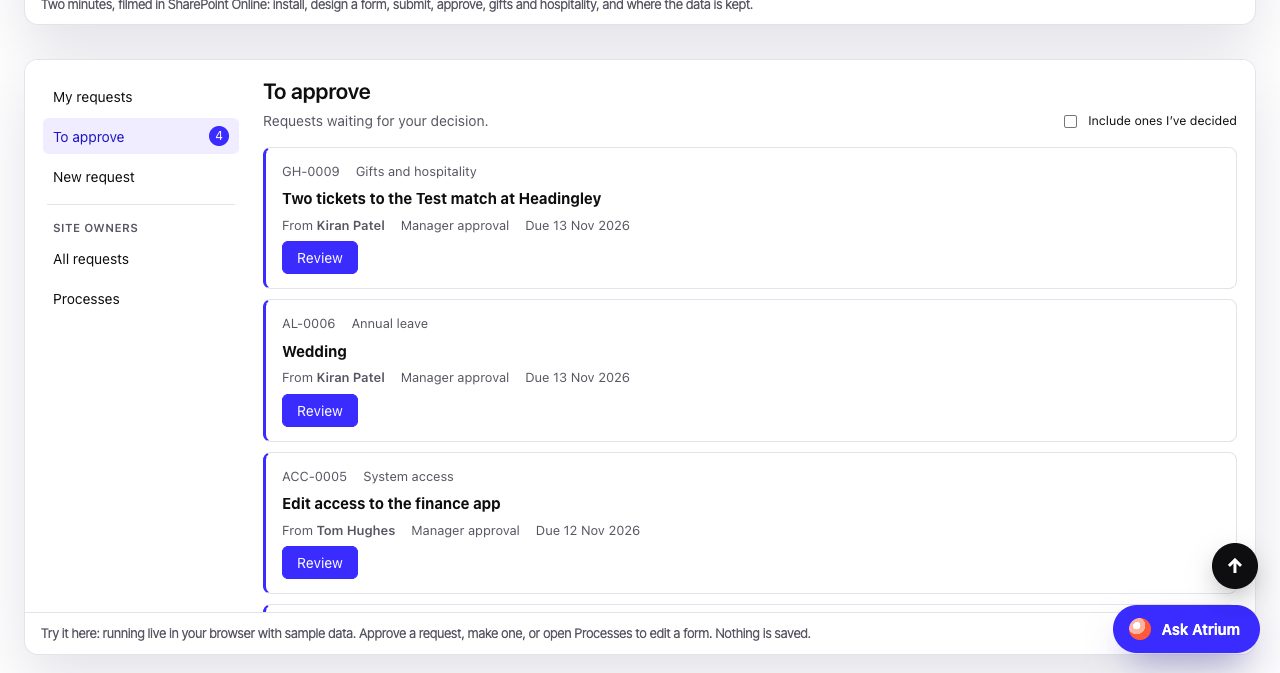
A drag-and-drop form designer with eleven field types, defaults pulled from each person's profile, and rules that show or require fields only when they matter. Approvals route to the requester's manager from Microsoft 365, to a named person, or to someone chosen on the form. You can add stages that only run in certain cases, such as a purchase over £5,000.
Everyone gets a "My requests" view and approvers get "To approve". Every submission and decision is recorded, with a CSV export for owners. One licence covers unlimited forms, users and requests, and the site is clear that no Power Apps Premium licence is needed.
It ships with a ready-made gifts and hospitality register built around UK anti-bribery practice. Staff declare what they are offered or give. A manager approves £25 or more, and compliance approves anything over £75 or anything involving a tender, a public official, cash, travel or repeat offers. For a UK public body or a regulated firm, that register alone is a project most teams keep postponing.
Helpdesk (£1,495)
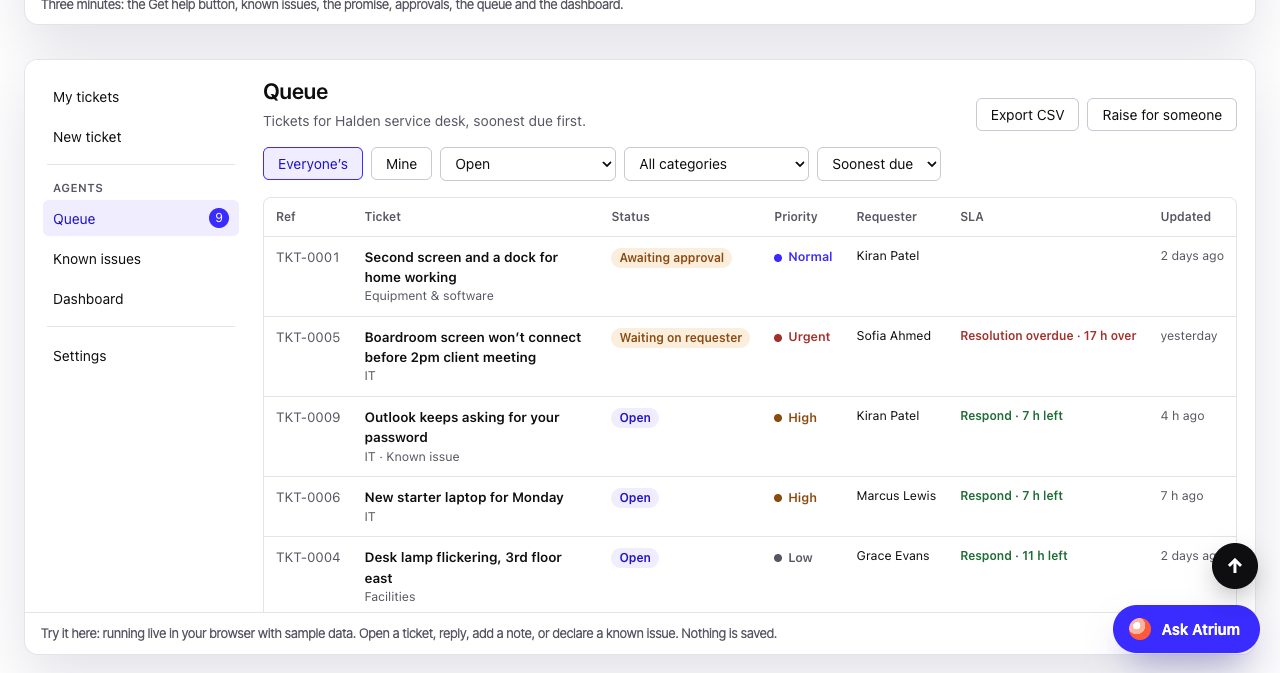
A service desk for IT, HR and Facilities that lives in the intranet. A Get help button sits on every page. It answers from your own FAQ and glossary first, shows known issues, and raises a ticket that already knows which page the person was on.
The known issues feature is the standout. You post one update when something is down, everyone affected is told, an alert shows on the intranet, and resolving the issue closes every linked ticket. There are working-hours SLAs, round-robin or named assignment, canned replies, internal notes in a separate agents-only list, and a dashboard. One price covers every agent, which is the opposite of how helpdesk software is normally sold.
Learn (£2,495)
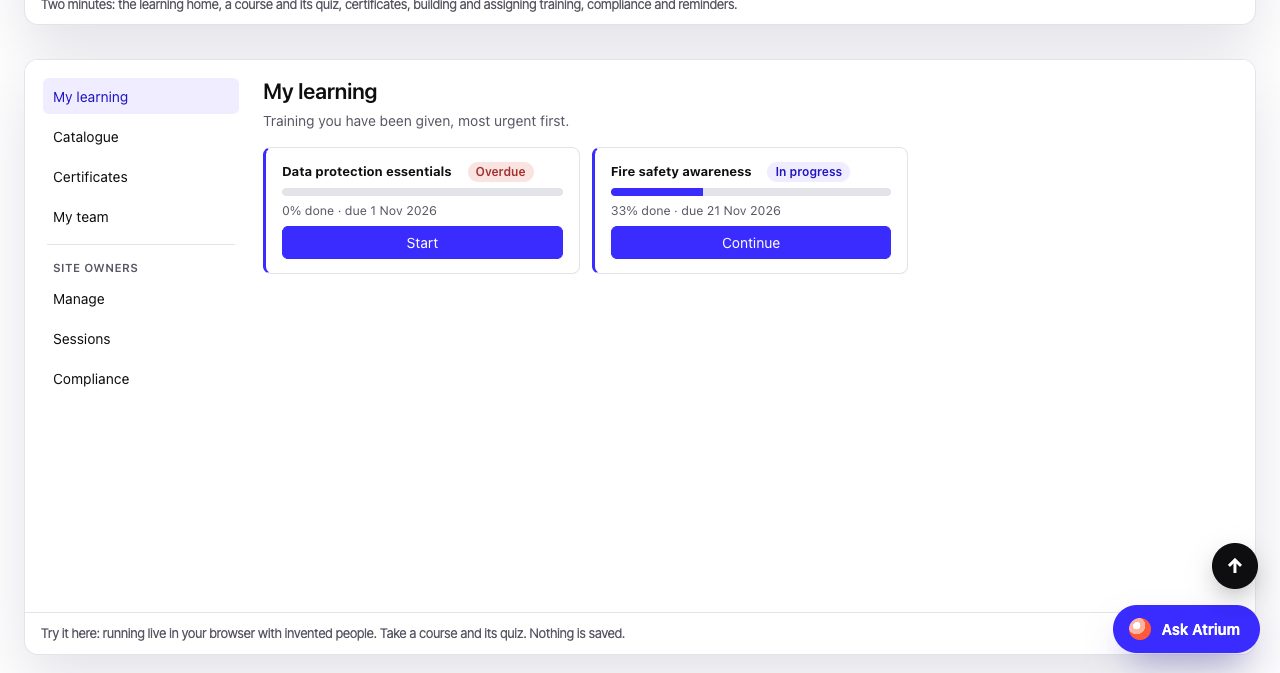
A learning management system inside SharePoint. Courses are built from pages, videos, documents, links, quizzes and classroom sessions. Quizzes have a pass mark, a limit on attempts and four question types. Courses group into learning paths, training can repeat every few months, and certificates are numbered with an expiry date.
A compliance view shows who is up to date and who is overdue, and it downloads for auditors. Line managers get a My team view with a reminder button. Results export as xAPI statements, and Learn can be added as a Microsoft Teams tab. There is no second login and no per-learner fee.
One limit is stated plainly: SCORM packages are not supported yet. Cloudly Move says it is testing a safe way to serve them before it promises the feature. If your training library is built in Articulate, read that line twice.
Document Manager (£2,995, initial offer)
A controlled document system for policies and procedures. Documents get a number in your own format the moment they are saved, such as QMS-SOP-0042. Approvers sign in order, readers only see approved versions, reviews come up on time, and read-and-acknowledge records who has confirmed each version. There is an audit trail you can download for an auditor.
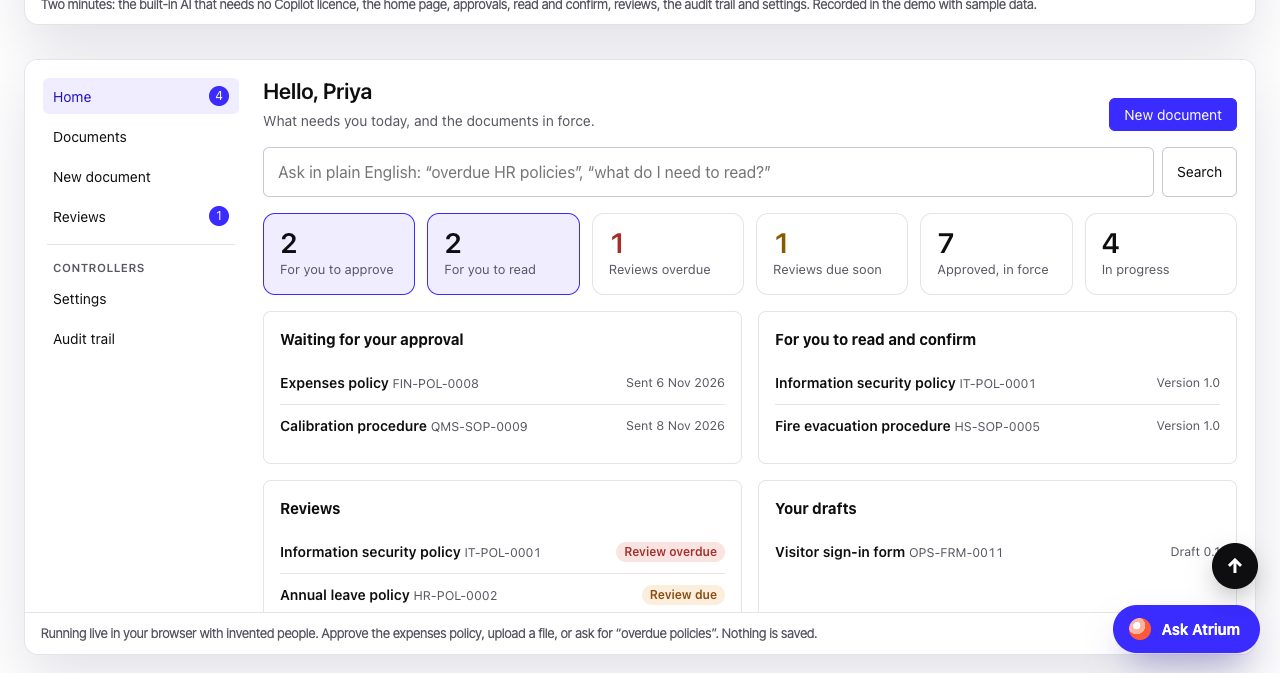
The AI is the interesting part. Upload a Word, PowerPoint, Excel or text file and Document Manager reads it in the browser, then suggests the title, type, department, tags and a summary. You can also ask in plain English, for example "overdue HR policies", and the question is turned into filters you can see. In recent Chrome and Edge on a capable computer, the browser's own built-in AI writes the summary. No Copilot licence and no AI key are needed, and Cloudly Move says the file is never sent to an outside AI service.
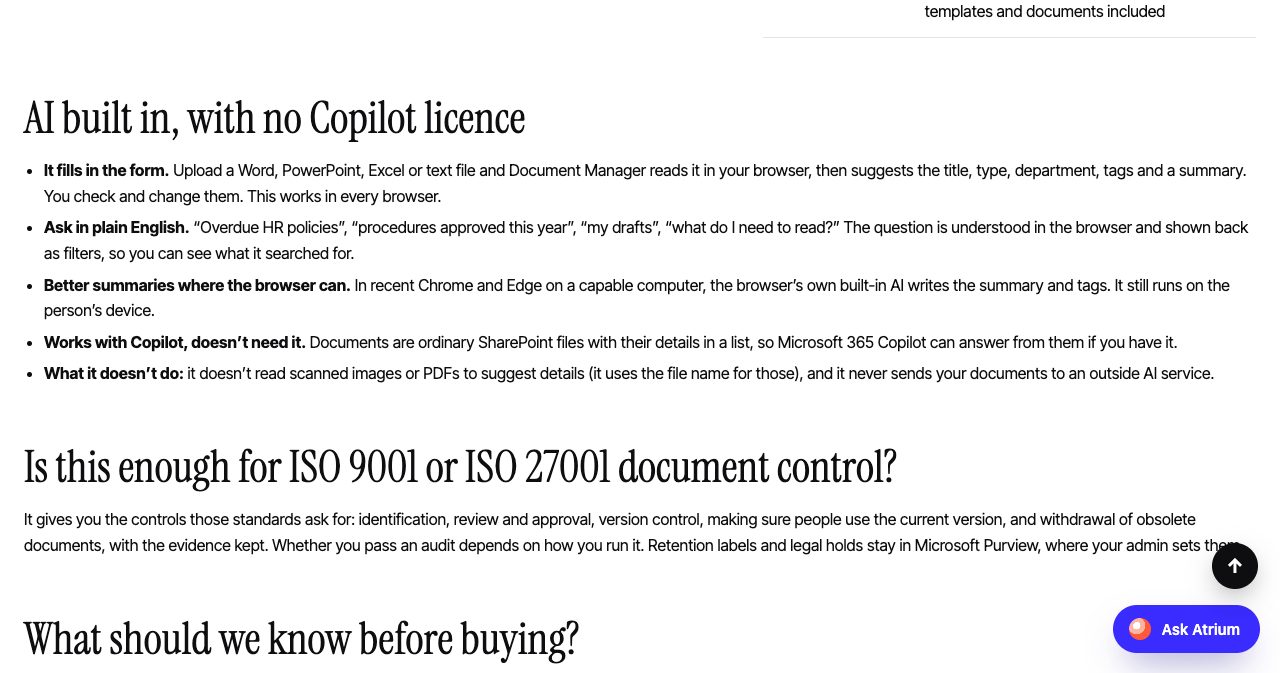
The same page answers the ISO question without overselling. It says the product gives you the controls ISO 9001 and ISO 27001 ask for, and that whether you pass an audit depends on how you run it. Retention labels and legal holds stay in Microsoft Purview.
Zip & Unzip (£795)
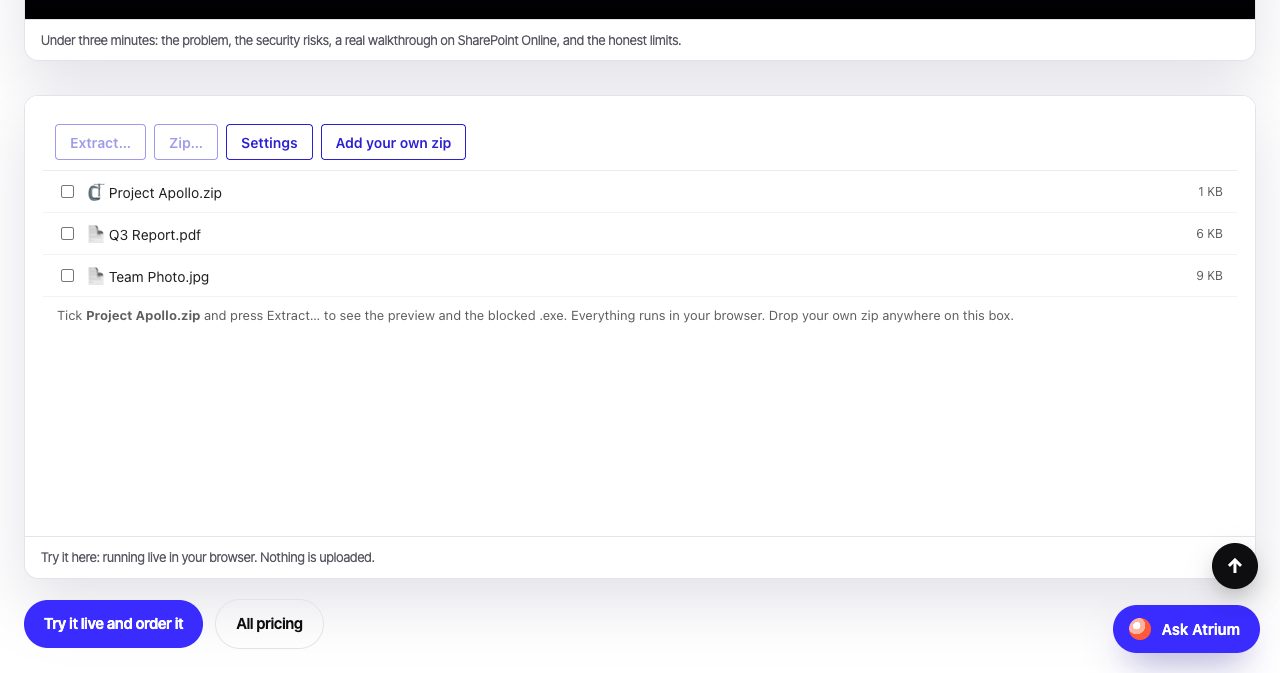
SharePoint can zip selected files only as a download, with a name it picks, and it cannot extract an archive at all. Zip & Unzip adds both actions to every document library. You preview what is inside before anything is written, untick what you do not want, and undo a whole extraction in one click. Path-traversal tricks and zip bombs are stopped, and an admin sets blocked and allowed file types. It handles .zip, .tar and .tar.gz, AES-256 passwords and auto-unzip rules per library.
It is the smallest product in the range and probably the one that solves the most daily irritation per pound.
What is Atrium AI, and why does it matter for Copilot?
Every intranet is accurate on launch day and then drifts. That used to be an annoyance. With Microsoft 365 Copilot it is a risk, because Copilot answers from whatever pages it finds. If two pages disagree about annual leave, or the expenses policy was last touched three years ago, Copilot can still quote them with confidence.
Atrium AI is built for that problem. It is aimed at organisations of about 500 to 5,000 staff that already use Copilot. Every page gets an owner, a backup owner, a review period and a topic, and a page without them cannot be published. A banner on each page shows who owns it and when it was last checked.
Then the intranet does the chasing:
| Day | What happens |
|---|---|
| 0 | The owner is asked to review the page |
| 7 | The owner and the backup are reminded |
| 14 | The page passes to the backup owner |
| 44 | The page moves to a Holding site, with its history |
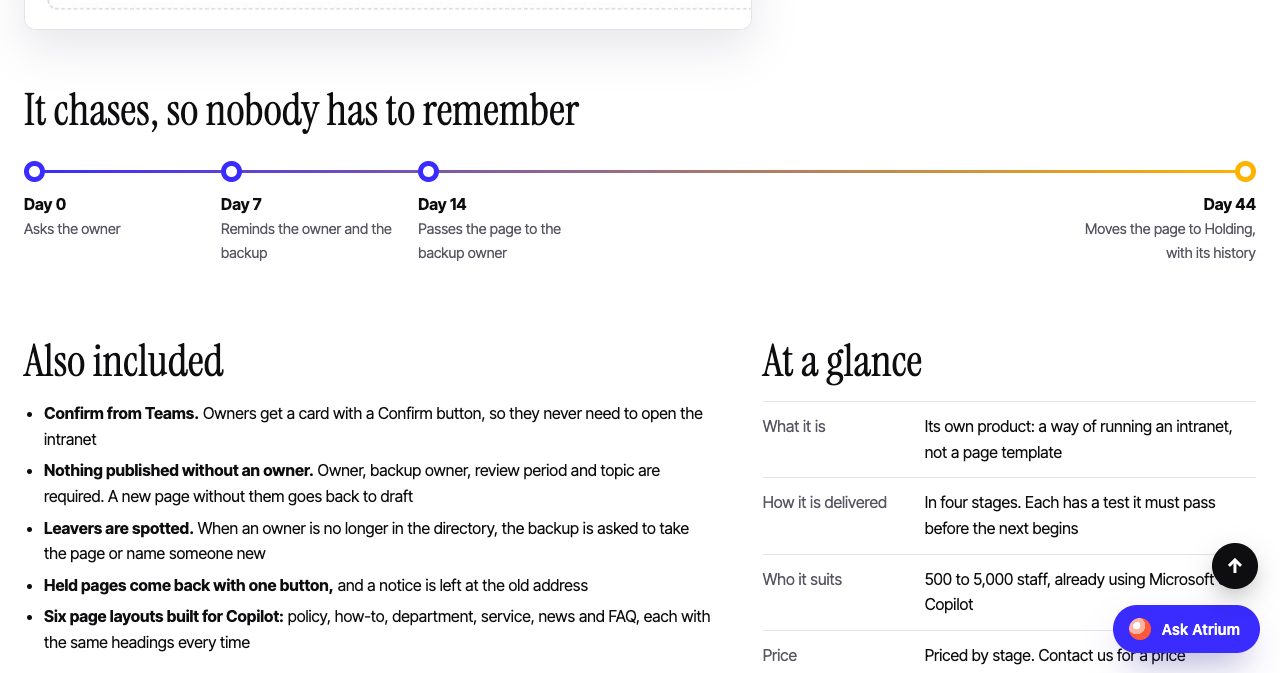
Owners confirm from a card in Teams, so they never have to open the intranet. Leavers are spotted when an owner drops out of the directory. When a second page claims the same topic, Atrium AI flags it and tells both owners, which keeps one source of truth per topic.
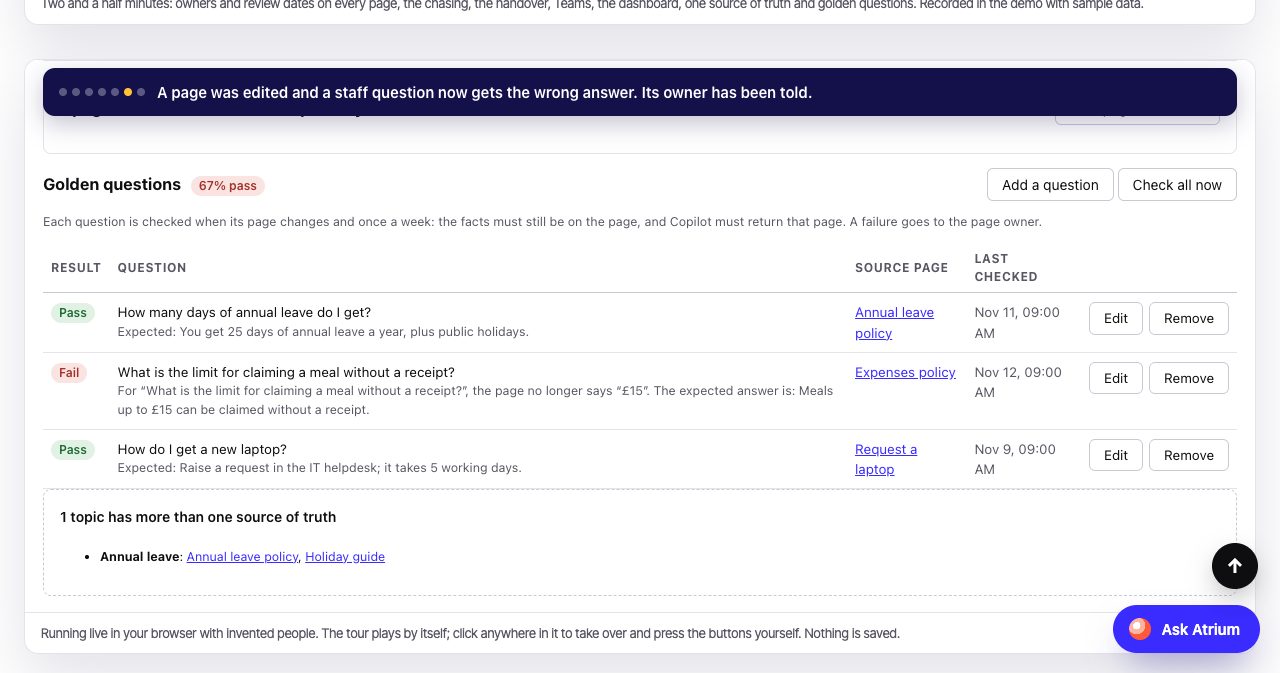
The cleverest piece is golden questions. You list the questions staff really ask. After every change, Atrium AI checks that the answer is still on the page and that Copilot's retrieval still returns that page. Cloudly Move says a deliberately wrong edit failed the test in eight seconds on its own tenant.
The Holding site is hidden from Copilot and search with Microsoft's Restricted Content Discovery setting, which needs the right Microsoft licences. Cloudly Move says it checks this with you first.
Atrium AI is delivered in four stages, each with a test it must pass before the next begins. Foundation, Upkeep and Golden Questions are available now. The fourth stage, AI agents that draft fixes for out-of-date pages, is in development, and the page says so in as many words.
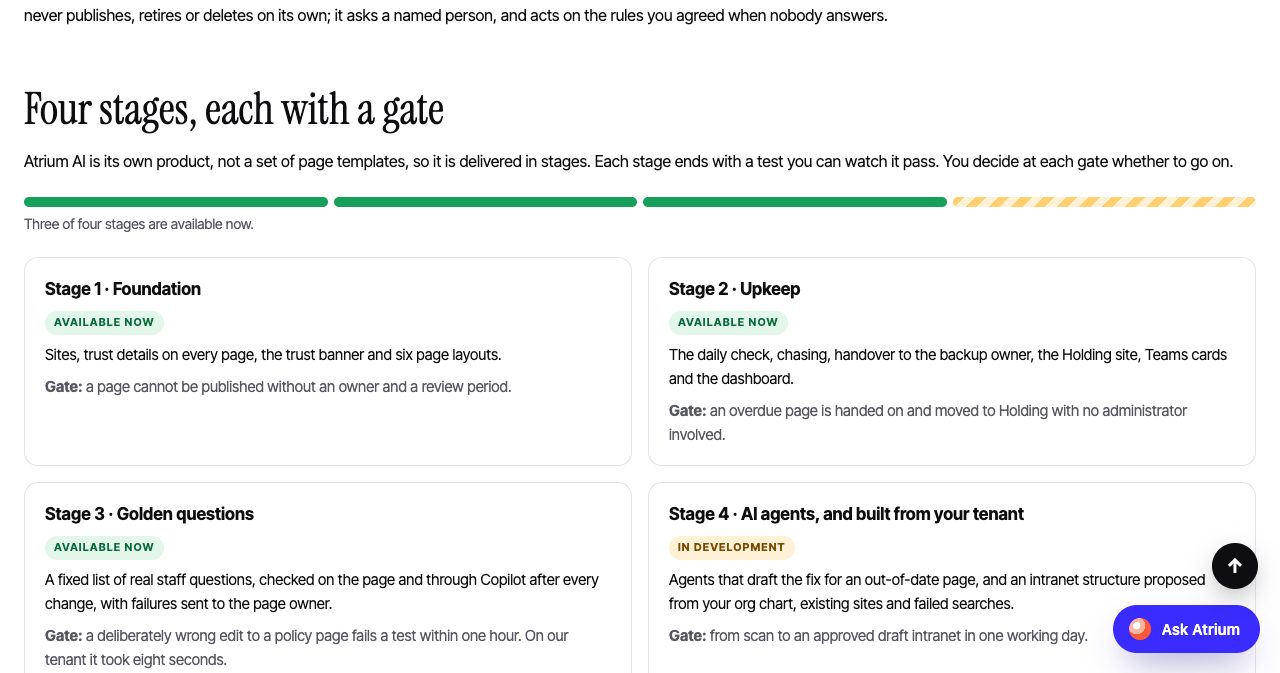
Two more things to know before you ask for a price. Atrium AI needs Microsoft 365 Copilot, and there is no mode for organisations without it. And the page states that stages 1 to 3 have been tested on Cloudly Move's own tenant and have not yet been installed for a customer. Early buyers will be early, and they will know it going in.
How much does Atrium cost?
Atrium is paid for once, per Microsoft 365 tenant. These are the list prices on the site as of November 12, 2026, all excluding VAT:
| Product | Price |
|---|---|
| One template | £1,200 |
| Any three templates | £2,950, then £600 for each one after |
| All eight templates | £5,950 |
| One web part | £95 |
| All 31 web parts | £1,950 |
| Form Builder & Approvals | £1,495 |
| Helpdesk | £1,495 |
| Learn (LMS) | £2,495 |
| Document Manager | £2,995 (initial offer) |
| Zip & Unzip | £795 |
| Atrium AI | By stage, on request |
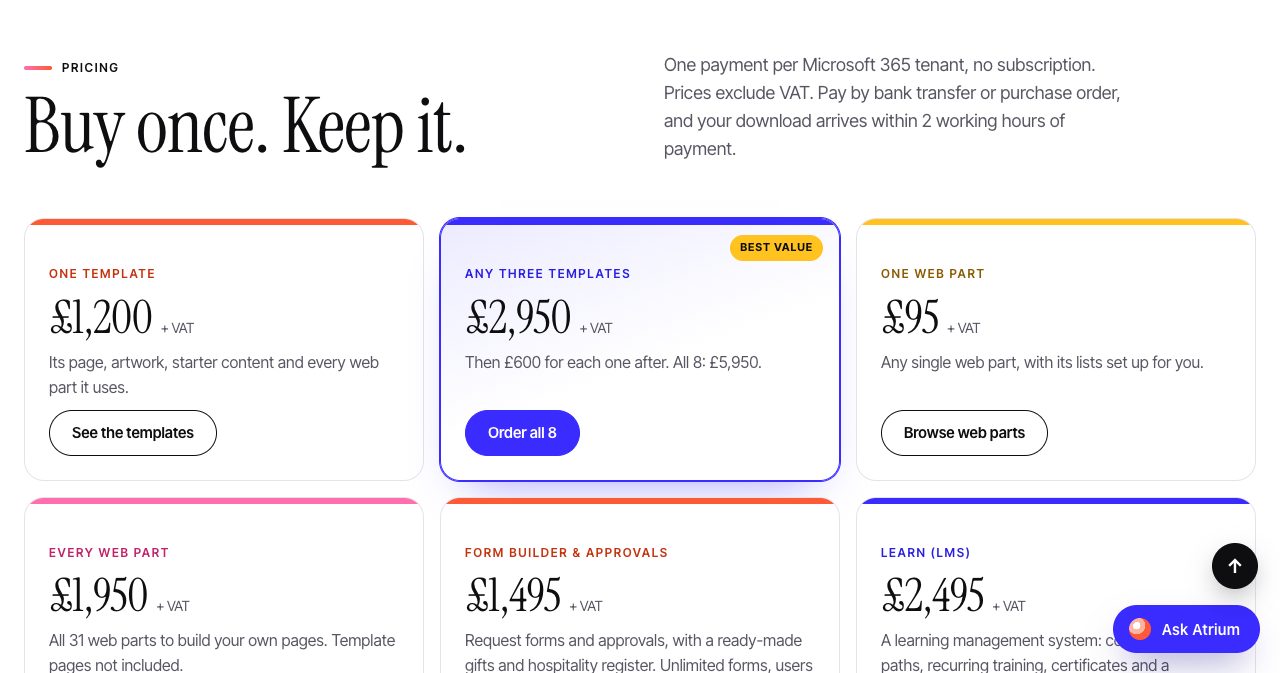
Cloudly Move quotes £12,230 for all eight templates plus Form Builder & Approvals, Helpdesk, Learn and Zip & Unzip. Add Document Manager and the total is £15,225. That second figure is our own sum from the list prices.
The useful way to read these numbers is per head. For an organisation of 1,000 people, £12,230 works out at about £12.23 per person, paid once. At 3,000 people it is about £4.08. Those are our own figures. The licence does not count users, so the cost per person falls as you grow, which is the reverse of a per-user subscription.
Payment is by bank transfer or purchase order. That will suit public-sector and enterprise buyers who cannot put software on a card. The download link arrives within 2 working hours of payment, Monday to Friday in UK hours.
How does Atrium compare with ShortPoint, Origami and a custom build?
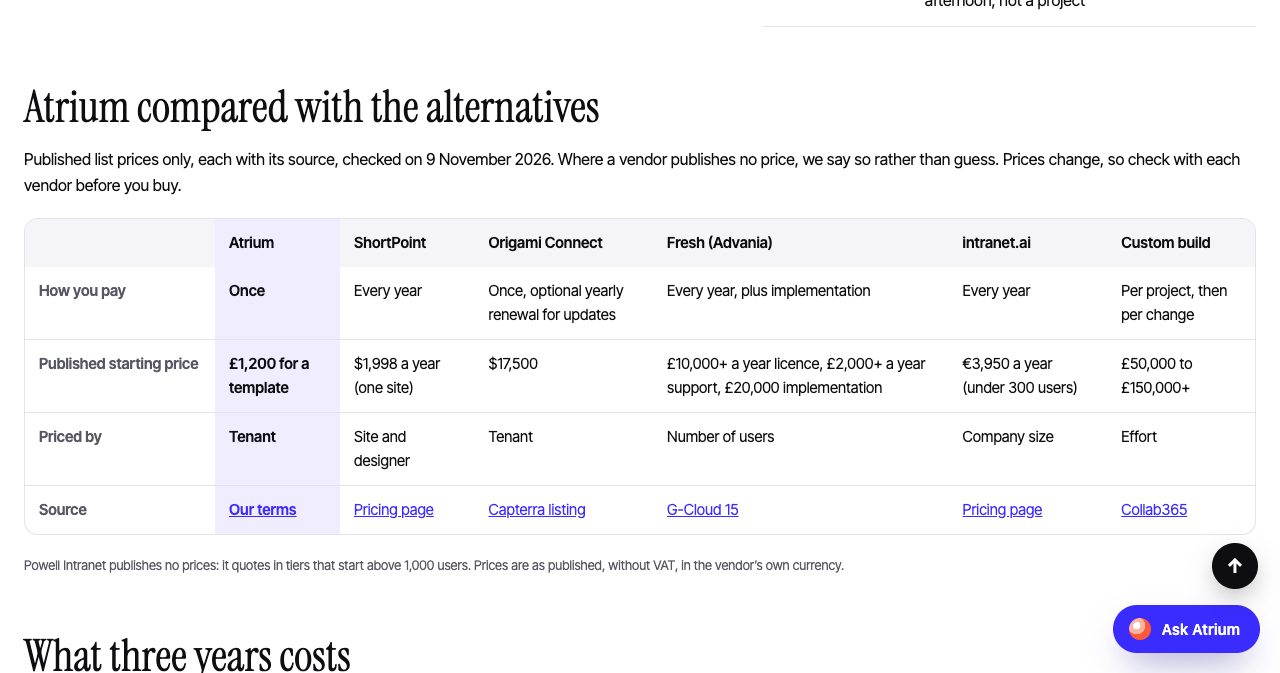
Atrium publishes its own comparison on the Why Atrium page. It uses published list prices only, names the source for each, and carries a check date of November 9, 2026. Where a vendor publishes no price, the page says so.
| Atrium | ShortPoint | Origami Connect | Fresh (Advania) | intranet.ai | Custom build | |
|---|---|---|---|---|---|---|
| How you pay | Once | Every year | Once, optional yearly renewal | Every year, plus implementation | Every year | Per project, then per change |
| Published starting price | £1,200 | $1,998 a year (one site) | $17,500 | £10,000+ a year, plus £20,000 implementation | €3,950 a year (under 300 users) | £50,000 to £150,000+ |
| Priced by | Tenant | Site and designer | Tenant | Number of users | Company size | Effort |
Source: Atrium's Why Atrium page, checked by Cloudly Move on November 9, 2026. Prices are in each vendor's own currency, without VAT.
The same page works the prices out over three years, on the basis that an intranet usually lives at least that long. One Atrium template stays at £1,200. Everything in the £12,230 bundle stays at £12,230. ShortPoint comes to $5,994 on Lite or $11,994 on Pro, intranet.ai to €11,850 or more, and Fresh to £56,000 or more once licence, support and implementation are added.
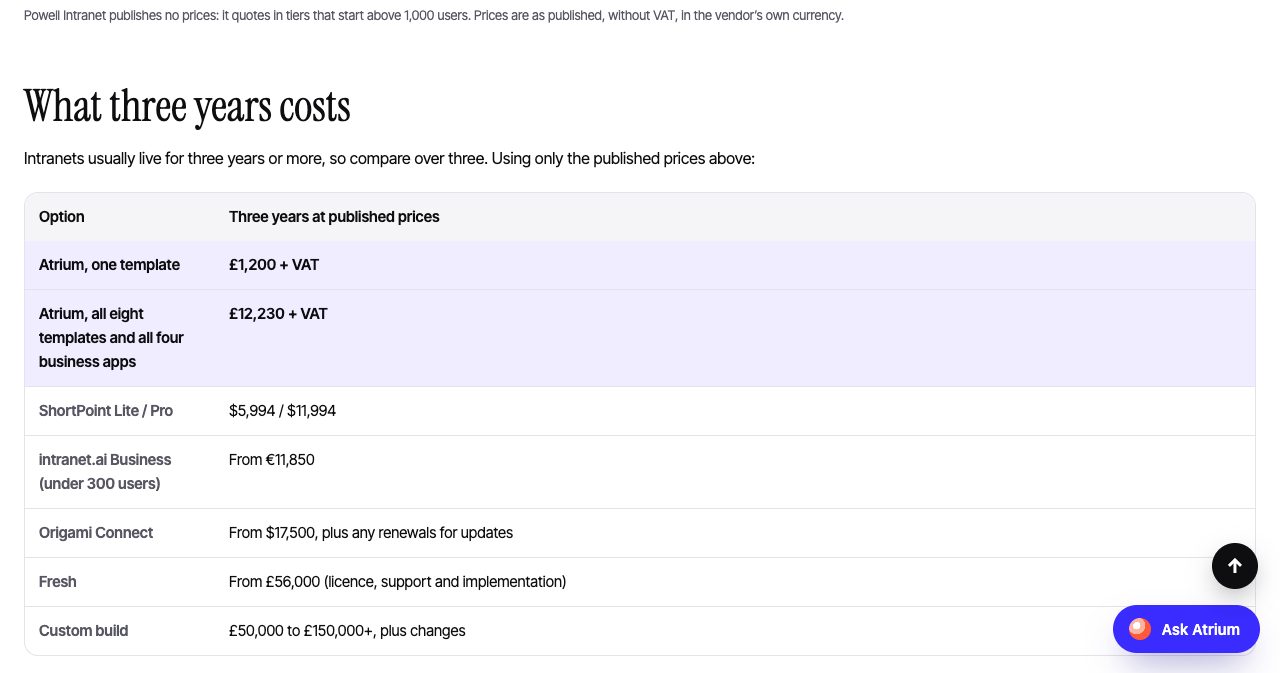
This is a vendor's own table, so treat it as a starting point and open each competitor's pricing page yourself. The products are also not identical. ShortPoint is a page designer, which Atrium is not. Fresh and Powell are managed platforms with services attached. What the table does show fairly is the shape of the bill: Atrium is the only option in it where both the starting price and the three-year price fit on a single purchase order.
How do you install Atrium?
The claim on the homepage is "install in an afternoon", and the setup guide backs it with steps a SharePoint administrator will recognise.
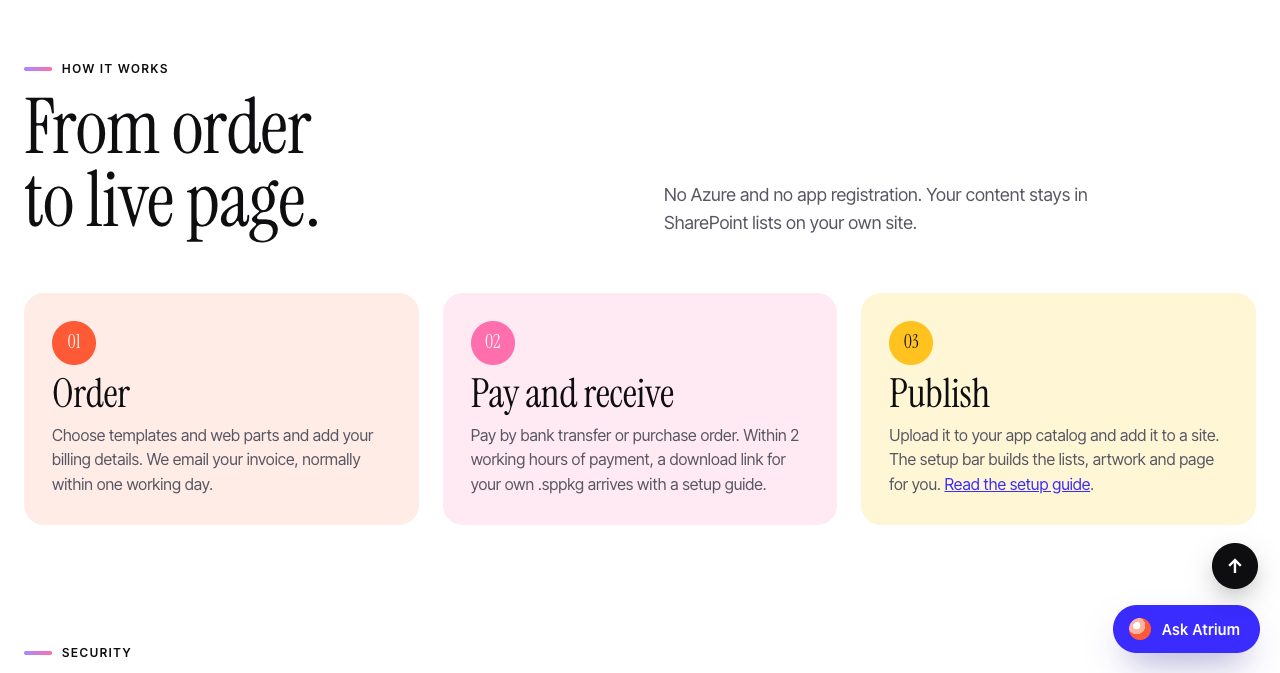
- Download the package. The email link gives you a .sppkg file made for your order.
- Upload it to the app catalog. In the SharePoint admin center, open More features, Apps, upload the file and choose Enable app.
- Add it to a site. On the site, open Settings, Add an app, and add the Atrium package. Nothing appears on sites you have not chosen.
- Run the setup bar. Site owners see a dark bar at the top. Choose Set it up, keep Add starter content ticked, and choose Create page. The guide says the lists, photos, starter content and published page take about a minute.
- Make it yours. Swap the photos, delete the invented starter people, edit the lists and set the colours.
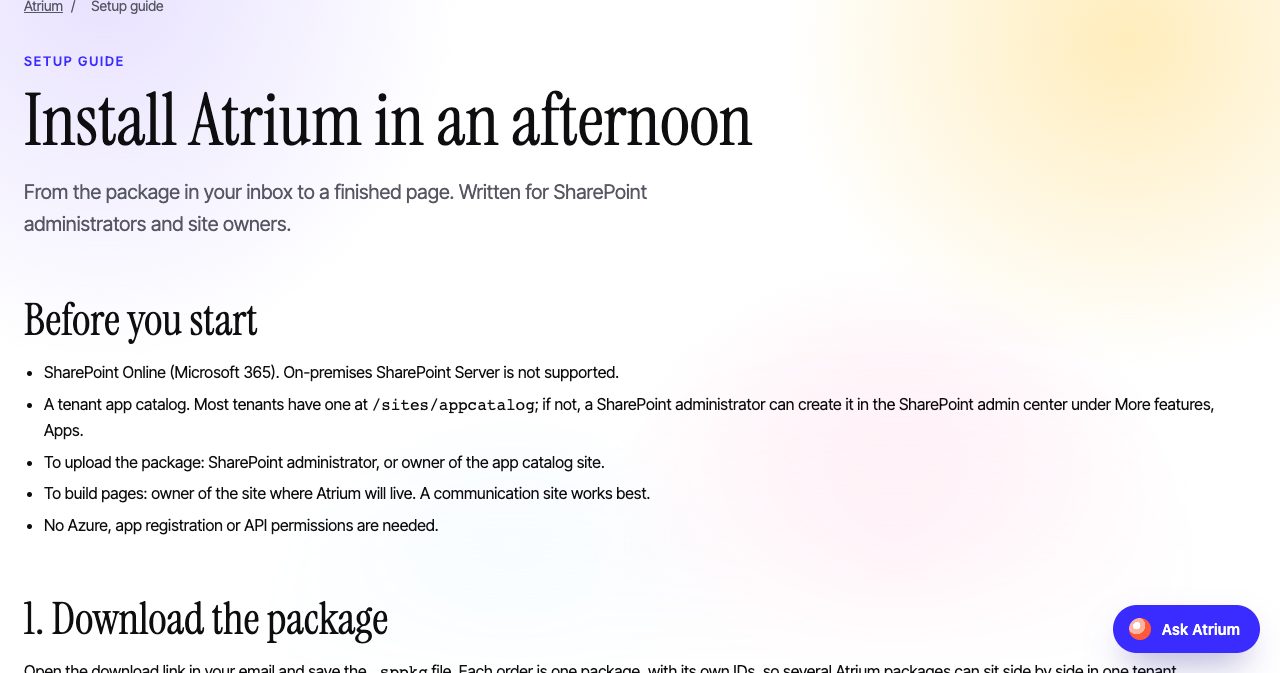
The minute of setup is the easy part. The afternoon is for the real work, which is replacing sample content with your own. If you would sooner not do that yourselves, Cloudly Move's consultants will brand, install and launch Atrium on your tenant as paid work, and the site says that takes days.
Every package has its own IDs, so several templates install side by side without clashing, and an upgrade replaces the package in place. The setup guide also covers removal, which is a reassuring thing to find documented before you buy.
Is Atrium secure, and where does the data live?
The security section is written for the people who sign off what goes on a tenant, and it is short because the architecture is simple.
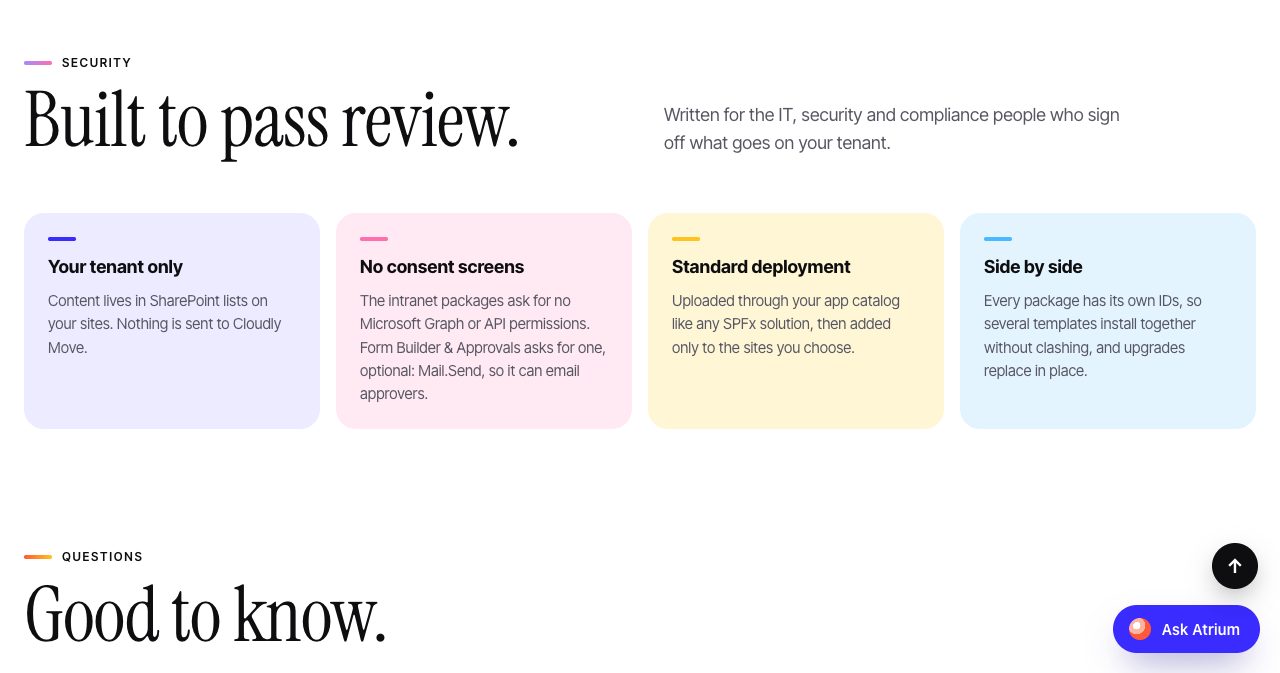
- Your tenant only. Content lives in SharePoint lists on your sites. Cloudly Move says nothing is sent to it.
- No consent screens. The intranet packages ask for no Microsoft Graph or API permissions. The business apps ask for one optional permission, Mail.Send, which lets them send email as the person who acts. An admin approves it once, and without it everything else still works.
- Standard deployment. Packages go through your app catalog like any SPFx solution and are added only to the sites you choose.
- No servers. There is no Azure, no app registration and no external database.
Because everything runs as the signed-in person, your existing SharePoint permissions, retention and backups apply without extra work. For a security reviewer, that removes the hardest questions: there is no third-party cloud holding staff data, and no service account with standing access.
The no-server design has side effects, and the site lists them. Reminder emails in Document Manager go out when a document controller opens the page or presses the button, because nothing runs in the background. Overdue reminders in Learn are sent when a manager presses one button. For most teams that is a fair trade for not adding a hosted service to the estate.
What about schools and universities?
Atrium Education is a separate package that builds a whole school or university site in one step. It comes in two editions. The schools edition has subjects and classes by year group, homework, clubs, fees and a School Office help desk. The universities and colleges edition has departments and programmes, a course catalogue, research updates and a Student Services Desk.
One install builds the home page, the curriculum or programme pages, a library portal, a student portal where each student sees their own timetable and work due, a teacher dashboard with a lesson planner, a help desk and three request forms.
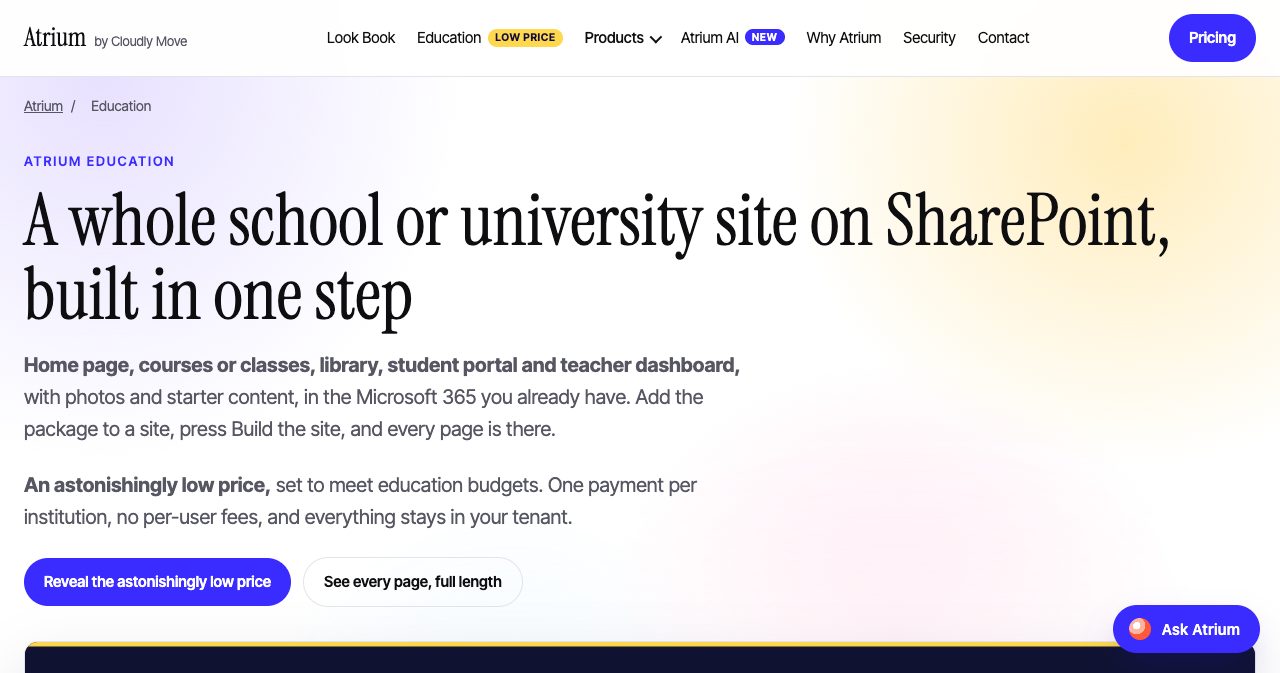
The price is not published. Cloudly Move says education institutions pay "a small fraction" of the £1,200 template price and emails the figure to a school, college or university address. The education licence has conditions: the institution is checked first, the package only sets up on that tenant, Atrium branding stays in the header and footer, and it cannot be resold.
Who is Atrium best for?
Atrium fits some organisations very well.
- Mid-sized organisations on Microsoft 365. If you have a few hundred to a few thousand staff and SharePoint already, you are paying for the platform and missing the finish.
- Teams with a capital budget and no appetite for another subscription. One purchase order and it is yours.
- UK public sector, charities and regulated firms. Purchase orders, English-law terms, a gifts and hospitality register and controlled documents are all aimed at this group.
- Security-conscious IT teams. Nothing leaves the tenant and almost nothing needs consent.
- Organisations rolling out Copilot. Atrium AI goes at the content problem that decides whether Copilot's answers can be trusted.
- Schools and universities. The education edition is priced for education budgets.
What should you know before you buy?
Atrium's own site has a section titled "When Atrium isn't the right choice". Vendors rarely write that page, and it makes a buying decision quicker.
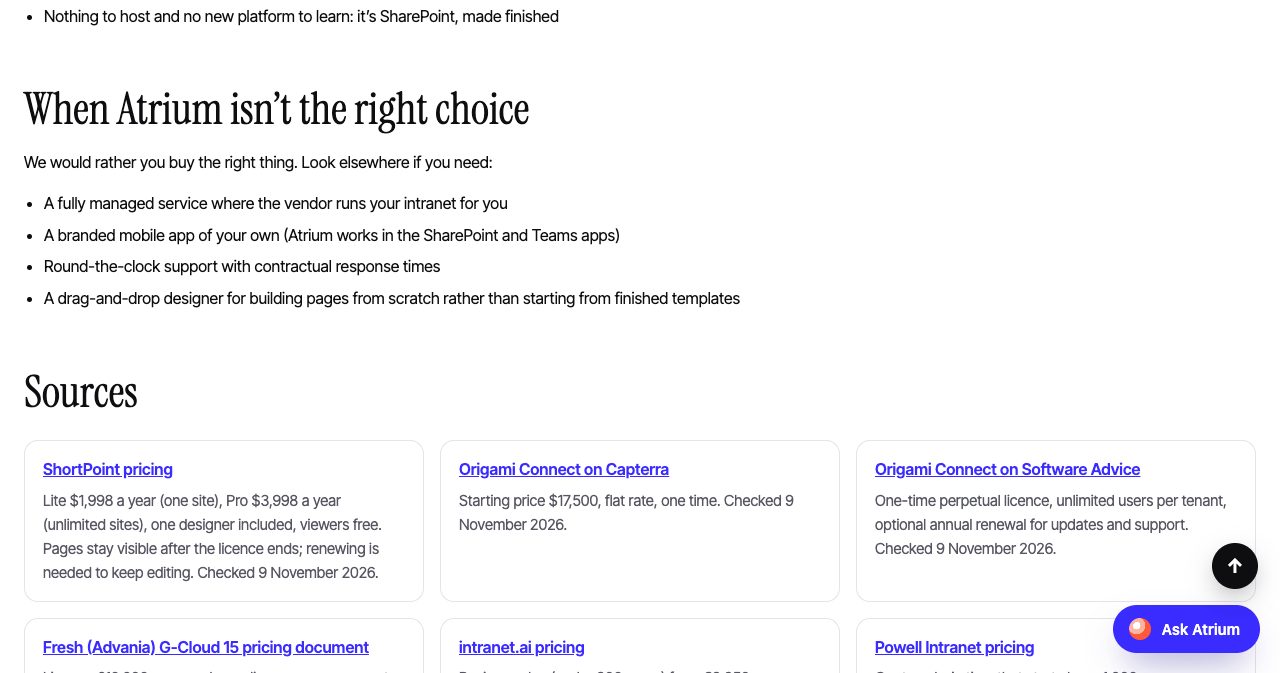
- It is not a managed service. You install it and you run it. Hands-on setup and branding are paid consultancy.
- There is no branded mobile app. Atrium works in the SharePoint and Teams mobile apps.
- Support is by email in UK working hours. It is included for 12 months. There are no contractual response times.
- It is not a page designer. You start from finished templates. If you want to draw layouts from scratch, a designer tool suits you better.
- SharePoint Online only. On-premises SharePoint Server is not supported.
- Refunds are limited. If an item does not work as described, you tell Cloudly Move within 30 days and it fixes the problem or refunds that item. There are no other refunds once a download link has been sent, so use the live demos first.
- Some features are still on the way. SCORM in Learn, a scheduled daily check for quiet sites in Atrium AI, and the AI agents stage are all marked as not ready.
- The company is young. Cloudly Move was incorporated in April 2024. We found no independent customer reviews or case studies yet.
None of this is hidden. Each point comes from the vendor's own pages, and most buyers in the target group will not be stopped by any of them. The youth of the company is the one to weigh. The architecture softens it: your content sits in your own SharePoint lists and the licence is perpetual, so an installed Atrium does not depend on a vendor service staying online.
Is Atrium worth it?
Yes, for an organisation that already runs Microsoft 365 and wants a finished intranet without a yearly bill or a long build.
The pricing is the strongest argument. A complete intranet with forms, a helpdesk, an LMS and zip handling for £12,230, once, sits below a single year of several subscription products at mid-sized headcounts. A team that only needs a front page can spend £1,200 and stop there.
The second argument is trust in how the product is presented. The demos run live in the browser. The comparison table names its sources and its check date. The pages list what each product does not do, and the Atrium AI page tells you it has not yet been installed for a customer. A company that writes that sentence about its own flagship is one you can have a straight conversation with.
The fair caveats are the company's age, email-only support and the features still in development. All three are easy to test before money changes hands. Open the Atrium Look Book to see every page at full length, try the live demos, and book the 30-minute walkthrough if the design fits. If it does, start with one template or a handful of web parts and grow from there.
FAQ
What is Atrium by Cloudly Move?
Atrium is a range of SharePoint Online intranet products from Cloudly Move Limited, a Microsoft 365 consultancy in London. It includes eight finished intranet templates, 31 web parts, and business apps for forms and approvals, a helpdesk, an LMS, controlled documents and zip files. Everything installs into your own Microsoft 365 tenant.
How much does Atrium cost?
One template costs £1,200, any three cost £2,950 and all eight cost £5,950. One web part costs £95 and all 31 cost £1,950. Form Builder & Approvals and Helpdesk cost £1,495 each, Learn £2,495, Document Manager £2,995 and Zip & Unzip £795. Prices exclude VAT and are paid once per tenant. Atrium AI is priced on request.
Is Atrium a subscription?
No. It is a perpetual licence for one Microsoft 365 tenant with unlimited sites and users. The price includes 12 months of bug-fix and compatibility updates and email support. After that the product keeps working, and newer versions are optional.
Does Atrium work with SharePoint Server on-premises?
No. Atrium is built for SharePoint Online in Microsoft 365. You need a tenant app catalog, a SharePoint administrator or app catalog owner to upload the package, and a site owner to build the pages.
Where is our data kept, and what permissions does Atrium need?
Content stays in SharePoint lists on your own sites. There is no Azure hosting, no app registration and no external database. The templates and web parts ask for no Microsoft Graph or API permissions. The business apps ask for one optional permission, Mail.Send, to send emails.
How long does Atrium take to install?
Cloudly Move says an afternoon. You upload the .sppkg file to the app catalog, add the app to a site and choose Set it up. The setup guide says the lists, photos, starter content and page are created in about a minute. The rest of the afternoon goes on adding your own content.
What is Atrium AI?
Atrium AI keeps an intranet accurate after launch for organisations that use Microsoft 365 Copilot. Every page gets an owner, a backup and a review date. The intranet chases reviews, hands a page to the backup after 14 days and moves it to a Holding site after 44 days. Three of four stages are available now.
Does Document Manager need a Copilot licence for its AI?
No. The AI runs in the browser. It reads Word, PowerPoint, Excel and text files to suggest a title, type, department, tags and a summary, and it answers plain-English searches. It does not read scanned images or PDFs, and files are not sent to an outside AI service.
How does Atrium compare with ShortPoint, Origami Connect or a custom build?
Atrium is paid for once and priced per tenant, from £1,200. Its comparison page, checked on November 9, 2026, lists ShortPoint from $1,998 a year, intranet.ai from €3,950 a year, Origami Connect from $17,500 once, and a custom build at £50,000 to £150,000 or more. Check each vendor's own pricing page before you decide.
Who is behind Atrium?
Cloudly Move Limited, company number 15646622, incorporated on April 15, 2024 and registered at 167-169 Great Portland Street, London W1W 5PF. Its ICO registration is ZC297005. It is not affiliated with Microsoft.
Is there a version of Atrium for schools and universities?
Yes. Atrium Education builds a whole school or university site in one step, including a student portal, a teacher dashboard, a help desk and three request forms. Cloudly Move emails the education price to an institutional address and says it is a small fraction of the £1,200 template price.
Who should not buy Atrium?
Look elsewhere if you need a fully managed intranet service, a branded mobile app of your own, round-the-clock support with contractual response times, or a drag-and-drop page designer. Atrium also does not support SharePoint Server on-premises.
Atrium is a good example of unglamorous software sold at a plain price, the kind we wrote about in the boring SaaS ideas that quietly print $5K MRR. If you are building something like it yourself, SaaSCity is a human-reviewed startup directory with a live city map, and submitting takes about ten minutes.
Get your SaaS in front of founders
List your product on SaaSCity for $19.99, one-time: a permanent listing and a building on the live city map.