Reviews
Nyria Review 2026: Turn TradingView, Discord and Telegram Alerts Into Orders at Your Own Broker
Nyria (nyria.io) turns alerts from TradingView, Discord, Telegram, TrendSpider or your own webhook into stock, options and crypto orders in your own brokerage account, and lets strategy creators charge members to run their alerts. Here is how it works, what it costs, where its limits are and who it suits.

Contents (18)
- Nyria at a glance
- What is Nyria?
- How does Nyria turn an alert into an order?
- Which alert sources does Nyria support?
- What can you trade with Nyria?
- Which brokers does Nyria work with?
- How much does Nyria cost?
- How do creators sell a strategy on Nyria?
- How does Nyria report results?
- How fast is Nyria?
- Is Nyria safe to connect to your broker?
- What should you know before going live?
- How do you automate your first alert with Nyria?
- Who is Nyria for?
- Who is behind Nyria?
- How does Nyria compare with TradersPost, SignalStack and Collective2?
- Is Nyria worth it?
- FAQ
Sponsored post. Product details checked against nyria.io, its pricing, creators, security and about pages, and the Nyria docs on October 13, 2026. Screenshots taken from the live site in Google Chrome. Trading involves substantial risk of loss, and nothing in this review is investment advice.
Quick answer: Nyria is no-code software that turns trading alerts from TradingView, Discord, Telegram, TrendSpider or your own webhook into orders in your own Charles Schwab, Tradier, tastytrade or Alpaca account. It trades stocks, ETFs, options spreads of up to 4 legs and crypto spot. Paper trading is free for up to 10 bots, live trading costs $100 a month per $10,000 of total entry allocation, and creators can charge other traders to run their strategy.
Anyone who trades from alerts knows the gap between the alert and the order. TradingView pings your phone, or someone in your Discord posts "grabbed TSLA 375p 10/16", and by the time you've opened the broker app, found the contract and typed a quantity, the price has moved. If the alert lands during a meeting, you miss the trade.
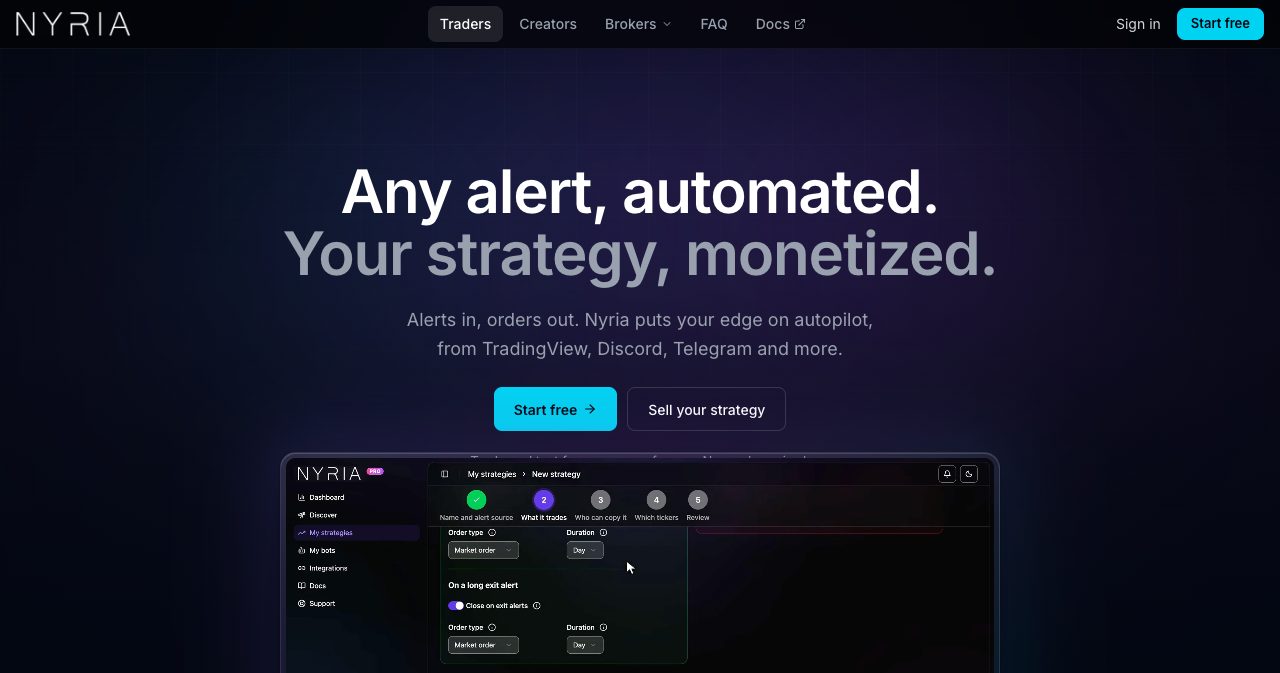
Nyria is built to close that gap. You keep writing alerts the way you already do, tell Nyria once what each one means, and it places the matching order in your own brokerage account. The homepage slogan is "Any alert, automated. Your strategy, monetized." The second half refers to the creator side: when other traders want your alerts, they can pay you to run them in their own accounts.
This review covers how the alert-to-order flow works, what you can trade and where, the pricing model (which works differently from most rivals), the creator program, security, the limits Nyria publishes about itself and who will get the most out of it.
Nyria at a glance
- Alerts come from TradingView, TrendSpider, a Discord server or Telegram chat you run, or any service that can send a webhook, in plain text or JSON, with no fixed template.
- Orders go to your own account at Charles Schwab, Tradier, tastytrade or Alpaca. Nyria can place and cancel orders there but cannot withdraw or move money.
- It trades stocks and ETFs, single options and spreads of up to 4 legs on one expiration, and crypto spot on tastytrade and Alpaca.
- Paper trading is free with no time limit: up to 10 paper bots on Nyria's built-in simulated broker or on a broker's own paper account.
- Live trading costs $100 a month (or $1,000 a year) per $10,000 of total entry allocation, with no per-bot or per-order fee.
- Creators can sell a strategy through Nyria's checkout or their own Stripe or Whop, and pay Nyria $50 a month per member for each $10,000 of allocation the member's tier allows.
- Nyria publishes a median of 0.64 seconds from reading an alert to placing the order, measured over 15,904 orders.
What is Nyria?
Nyria is trading automation software made by Nyria LLC, a Wyoming company. It sits between the place your alerts come from and the brokerage account you already use. When an alert arrives, Nyria reads the ticker, the side and any contract details in it, and each bot attached to that strategy places its own order at its own broker, sized to its own budget.
The company is careful to say what it isn't. The footer of every page states that Nyria "is not a broker-dealer or investment adviser, does not give investment advice or recommendations, and never holds or moves the money in your brokerage account." Strategies on the platform are made by independent users, not by Nyria. You stay with your broker, your money stays in your account, and Nyria is the software that turns an alert into an order ticket.
Nyria went public in October 2026, with launches on Product Hunt, Fazier and Uneed. The product itself is older. Its founder describes "a long couple years of development" before launch, and between April 1 and September 25, 2026 the platform placed 15,904 orders from alerts, 669 of them in live broker accounts and 15,235 on paper.
How does Nyria turn an alert into an order?
Setup takes five steps, and you can do all of them on paper before you connect a real account.
- Connect a broker. Schwab, tastytrade and live Tradier accounts connect by signing in at the broker. Alpaca and the Tradier sandbox use an API key or token you create. Nyria Paper, the built-in simulated broker, is one click away on every account.
- Point Nyria at your alerts. Each strategy gets its own webhook URL, or reads a channel in a Discord server or a Telegram group or channel that you run.
- Tell it what an alert means. You set what an entry and an exit do on each side (long, short or both), whether orders go at market or at a limit, and how option contracts are picked.
- Send a test alert. Nyria shows the exact contract, the live price and the side before anything reaches your broker.
- Deploy a bot. A bot runs one strategy on one broker account, with a dollar budget per entry or an exact number of units, and a list of the tickers it may trade.
The homepage demo shows how little the alert needs to say. A Discord message reading "Long SPY here" becomes "Buy SPY 785C Fri, Oct 16" for 5 contracts, about $865 of a $1,000 budget per entry, with the contract picked by the strategy's rules. The prices in the demo are illustrative.
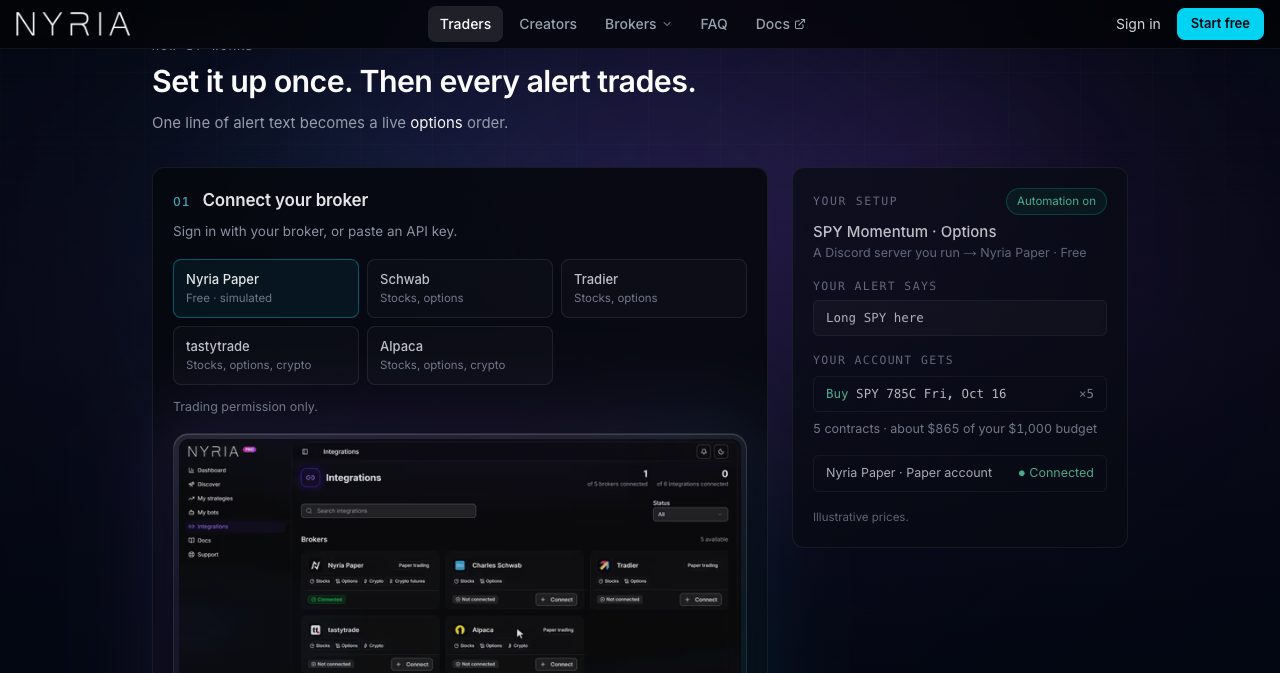
Two terms do most of the work in Nyria, so it helps to get them straight early. A strategy is the rulebook: the alert source, the asset class, what entries and exits do, which tickers are allowed and who can copy it (Public, Premium for paying members, or Private with a share link). A bot is a strategy deployed on one broker account at its own size. One strategy can feed many bots, so a single alert can trade a paper account and a live account side by side. Each strategy takes one bot per broker account.
Which alert sources does Nyria support?
Nyria reads five kinds of source, and none of them needs a fixed message template.
- TradingView: paste the strategy's webhook URL into a strategy, price or indicator alert. The default TradingView strategy message works, and so does plain text such as "long entry {{ticker}}". Webhooks need one of TradingView's paid plans.
- Discord: invite the Nyria bot to a server you run (inviting it needs Discord's Manage Server permission), pick a channel and, if you like, filter by author or keyword. Messages like "SPY long entry" or "SPY 775C" are enough.
- Telegram: add @NyriaAlertsBot as an admin of a group or channel you run. It only reads messages and never posts, and the same author and keyword filters apply.
- TrendSpider: its Alerts and Strategy Bots post to the strategy's webhook URL the same way TradingView does.
- Custom webhook: any script, bot or service that can send an HTTP POST, as JSON or plain text.
Posts on X and newsletters aren't sources. The alert has to come from one of the five above.
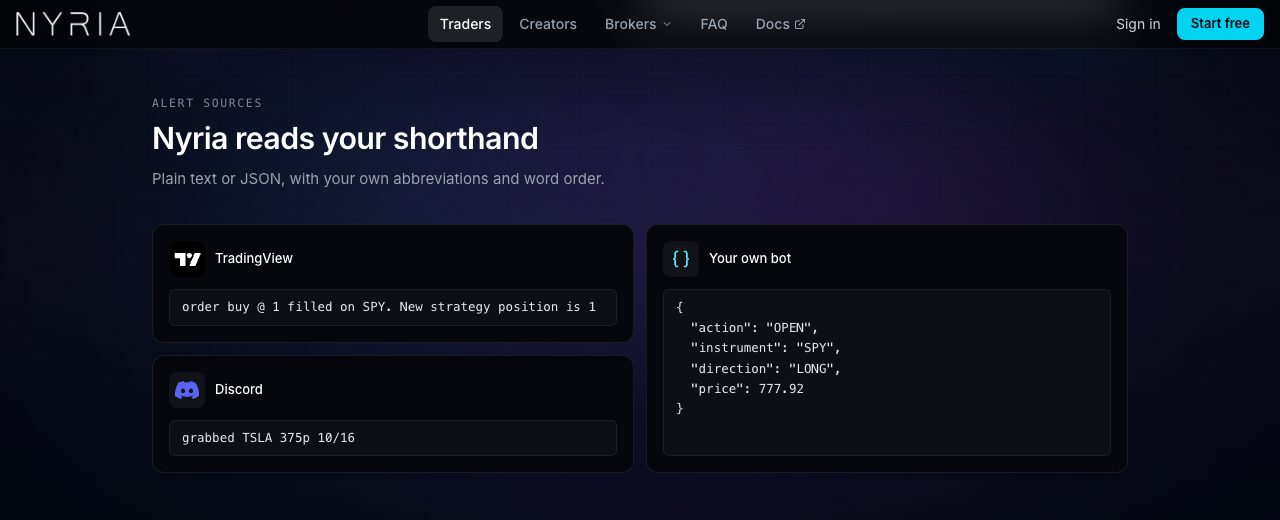
The parsing is what saves the most time, especially if you're coming from a tool that wanted every alert in its own JSON template. Nyria's homepage shows three formats side by side: a TradingView strategy fill message ("order buy @ 1 filled on SPY. New strategy position is 1"), a Discord trade call ("grabbed TSLA 375p 10/16") and a JSON payload from a custom bot. All three work with your own abbreviations and word order. If you'd rather send structured data, the documented JSON is short: a ticker and an action for a stock, plus strike, expiry and type for an option.
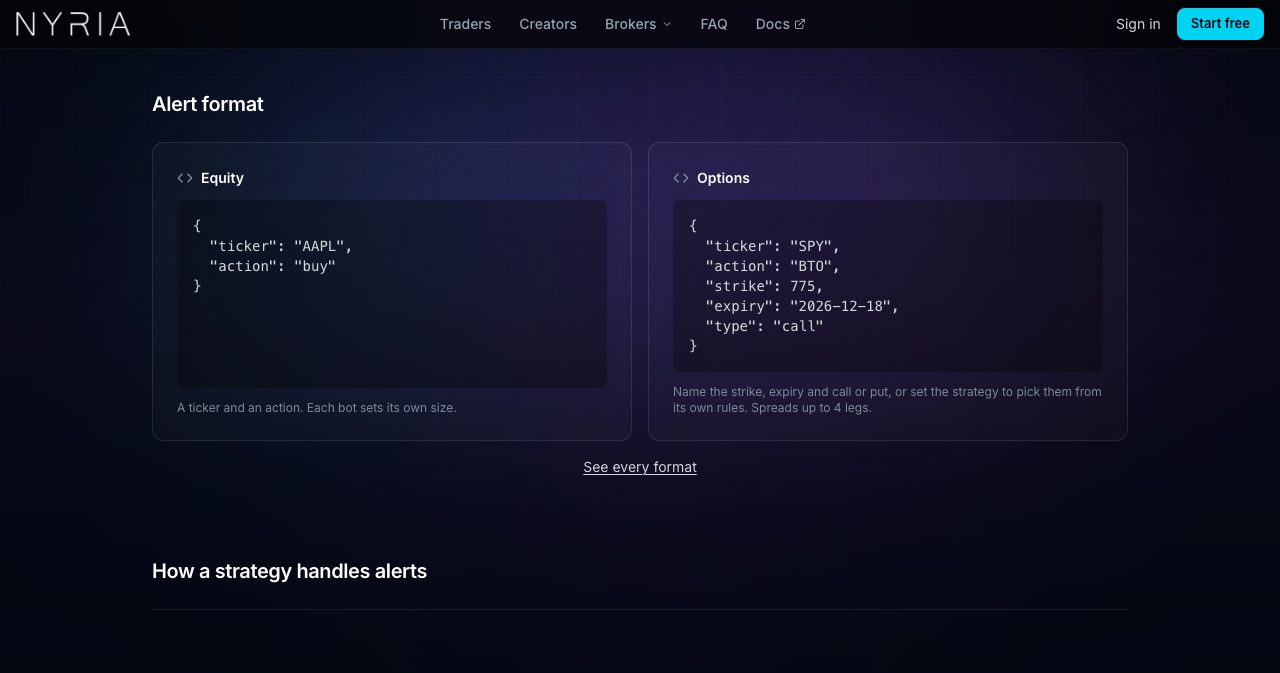
A strategy stays in Draft until it proves it can read you. On the strategy's Integration tab you paste a sample alert for each trade type and select Check format, and Nyria shows what it read and the order it would place. The strategy turns Active only when every sample passes. That check is where a misread alert gets caught, on your screen and before any order exists.
Three more alert rules matter before you automate anything:
- An identical alert sent to the same strategy within 30 seconds, or within 5 minutes with nothing else in between, counts as a duplicate and is dropped. That protects you from a webhook that fires twice, a classic money bug we looked at in our fintech engineering patterns piece. To scale in on purpose, change the alert body or send a distinct message ID.
- A trading window ignores entries outside the hours you set. Exit alerts still go through.
- Every alert is logged with what Nyria did with it and why, refusals included, on the strategy's or the bot's Logs tab.
What can you trade with Nyria?
Stocks and ETFs, options and crypto spot, with market and limit orders.
- Stocks and ETFs: long, short or both, at market or at a limit.
- Options: single calls and puts, debit and credit verticals, straddles, strangles, iron condors and iron butterflies, plus cash-secured puts and covered calls, each on its own alert. A spread of up to 4 legs on one expiration goes to the broker as a single order, so you never leg in. SPX alerts trade the PM-settled SPXW chain, 0DTE included, at Schwab, Tradier and tastytrade.
- Crypto spot: long only, live on tastytrade and Alpaca and simulated on Nyria Paper. Crypto perpetuals currently run on Nyria Paper only.
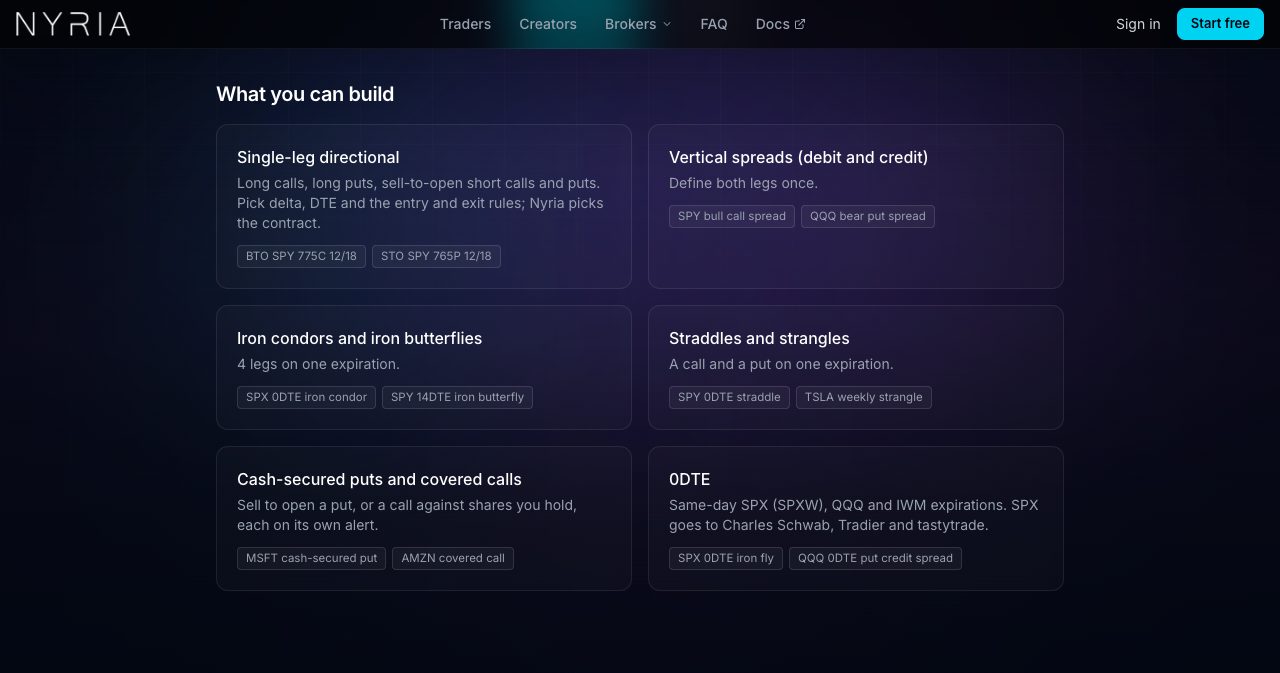
Option contracts can be picked in two ways. With From my rules, the strategy picks strikes by delta, by a number of strikes from at-the-money or as an offset from another leg, and an expiration 0 to 31 trading days out. The quick start, for example, buys a SPY call near 30 delta, 7 to 31 days out. With Provided in alert, the alert names every contract and can use any listed expiration. A Discord or Telegram alert that names a strike with no date takes the nearest listed expiration, which can be today's 0DTE contract even late in the day, so put the date in your alerts if you don't trade 0DTE. TradingView options strategies always use From my rules.
The structure has firm edges. Every leg trades the same quantity, so ratio spreads such as a 1:2:1 butterfly aren't possible, and neither are calendars or diagonals. Rule-picked expirations stop at 31 trading days, which rules out 45-day entries and LEAPS. Futures don't trade on any live broker yet, and Nyria places no bracket, OCO, trailing-stop or attached take-profit orders. Stops and targets are exit alerts that your alert source sends.
Which brokers does Nyria work with?
Four live brokers, plus Nyria's own paper broker.
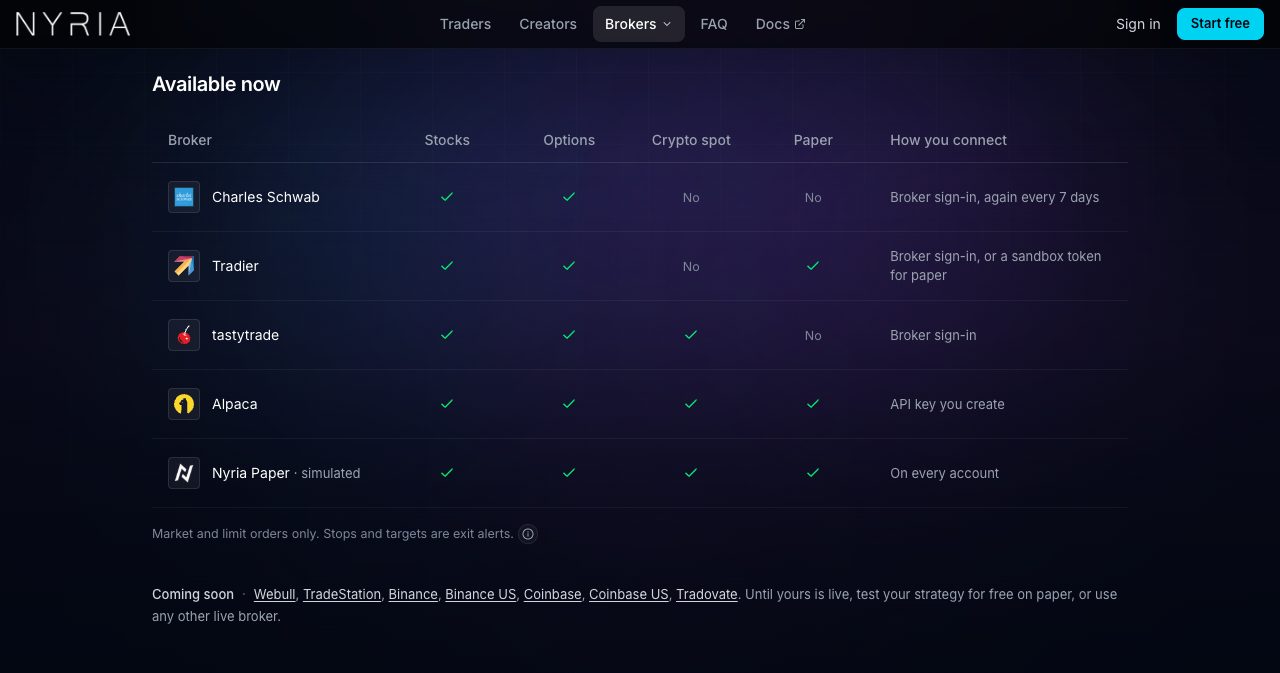
| Broker | Trades on Nyria | How you connect | Paper account |
|---|---|---|---|
| Charles Schwab | Stocks, ETFs, options up to 4 legs | Sign in at Schwab (OAuth), again every 7 days | No, test on Nyria Paper |
| Tradier | Stocks, ETFs, options up to 4 legs | Sign in for live, sandbox token for paper | Yes |
| tastytrade | Stocks, ETFs, options up to 4 legs, crypto spot | Sign in at tastytrade (OAuth) | No, test on Nyria Paper |
| Alpaca | Stocks, ETFs, options up to 4 legs, crypto spot | API key and secret you create | Yes |
| Nyria Paper | Simulated stocks, options and crypto | Built in, one click | Paper only |
Webull, TradeStation, Binance, Binance US, Coinbase, Coinbase US and Tradovate are listed as coming soon, without dates. You can connect more than one broker and point each bot at a different account.
Schwab asks you to sign in again every 7 days, so set a weekly reminder to reconnect. A disconnected broker places no orders, exits included, until you sign in again.
How much does Nyria cost?
Paper is free, and live trading is priced by size.
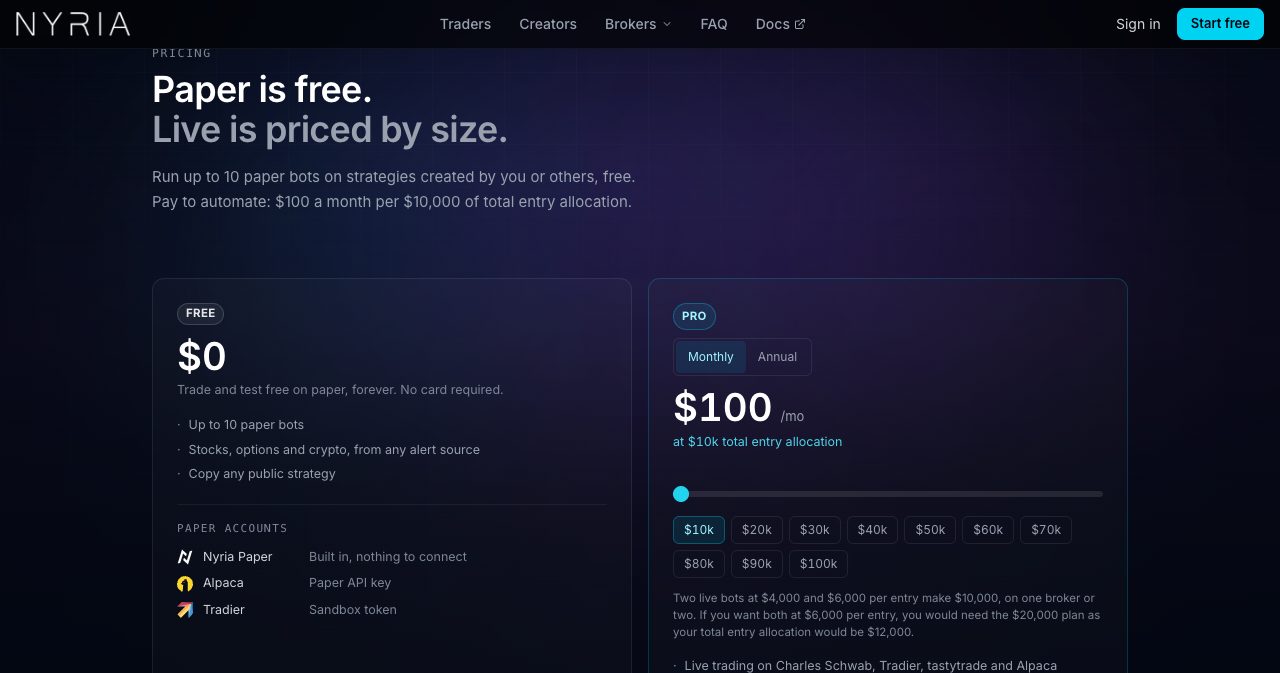
The Free plan costs $0, needs no card and has no time limit. It covers up to 10 paper bots, every alert source and strategy setting, and copying any public strategy, on Nyria Paper or on Alpaca's or Tradier's own paper accounts.
Pro, for live trading, costs $100 a month per $10,000 of total entry allocation, in steps from $10,000 to $100,000, or $1,000 a year per $10,000. One plan covers every live broker you connect. There's no setup fee, no per-bot fee and nothing per order, although your broker's own commissions still apply. Above $100,000, Nyria asks you to email [email protected].
Total entry allocation decides your price. It's the sum of the budget per entry of every bot on your live accounts, which is the most your live bots could commit if all of them fired at once. A bot sized in shares or contracts adds its units times the strategy's cost per unit. Paper bots never count.
| Your live bots | Total entry allocation | Plan | Monthly | Yearly |
|---|---|---|---|---|
| Two bots at $4,000 and $6,000 per entry | $10,000 | $10k | $100 | $1,000 |
| Two bots at $6,000 per entry | $12,000 | $20k | $200 | $2,000 |
| Three bots at $10,000 per entry | $30,000 | $30k | $300 | $3,000 |
| Bots adding up to $100,000 | $100,000 | $100k | $1,000 | $10,000 |
Because the price follows what your bots can commit at once, a bot that trades once a week costs the same as one that trades ten times a day at the same budget, and connecting a second broker costs nothing extra.
Following someone else's paid strategy works differently. If you buy access to a Premium strategy, your live bots on it count toward the tier the creator sold you, the creator pays Nyria's fee for them, and you need no Nyria plan at all.
Billing runs through Stripe, monthly or yearly, until you cancel. A cancelled plan runs to the end of the period you paid for, and Nyria emails yearly customers about 30 days before each renewal. The terms say fees are non-refundable, which makes the free paper tier the right place to decide whether Nyria fits before you pay.
How do creators sell a strategy on Nyria?
Nyria's second audience is people who post trade calls. If you run a Discord or Telegram group today, your members copy your calls by hand. On Nyria you make the strategy Premium and set a price for each allocation tier, and each alert you send then trades in every paying member's own broker account, sized by that member's own budget. Members' money stays at their brokers, and Nyria's access to their accounts is trade-only.
There are two ways to take payment:
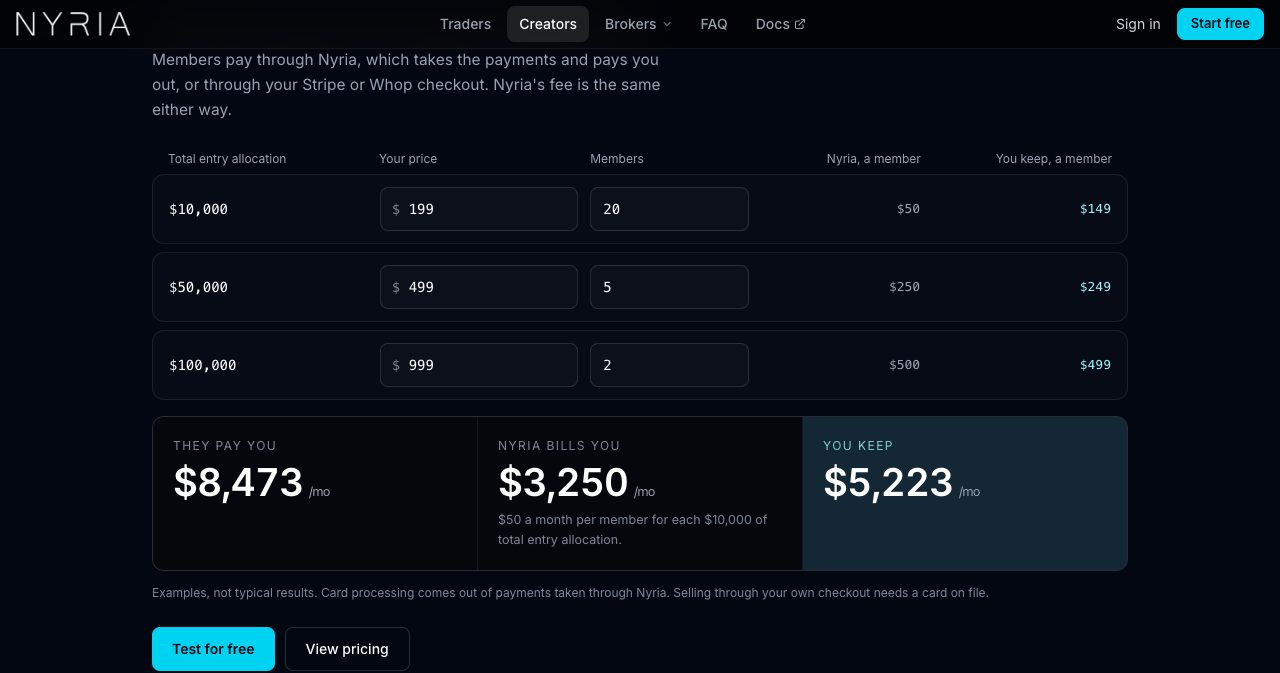
- Sell through Nyria. You set a price and publish. Members pay Nyria by card, Nyria keeps its fee (card processing comes out of each payment too) and pays you the rest through Stripe. You need no payment account of your own and no creator plan, and your share is held for you until you set up payouts.
- Keep your own checkout. If you already sell through Stripe or Whop, you link a product to each tier and members pay you directly. Nyria then bills you on the 1st of each month for the previous month's members, starting November 1, 2026.
The fee is the same either way: $50 a month per member for each $10,000 of total entry allocation their tier allows, rounded up to the next $10,000. You set tiers in $1,000 steps, so a member on a $25,000 tier costs you $150 a month, and an $11,000 tier bills as $20,000, or $100. You're billed for a member once they claim access in Nyria, for every month their paid access is live, whether or not they trade.
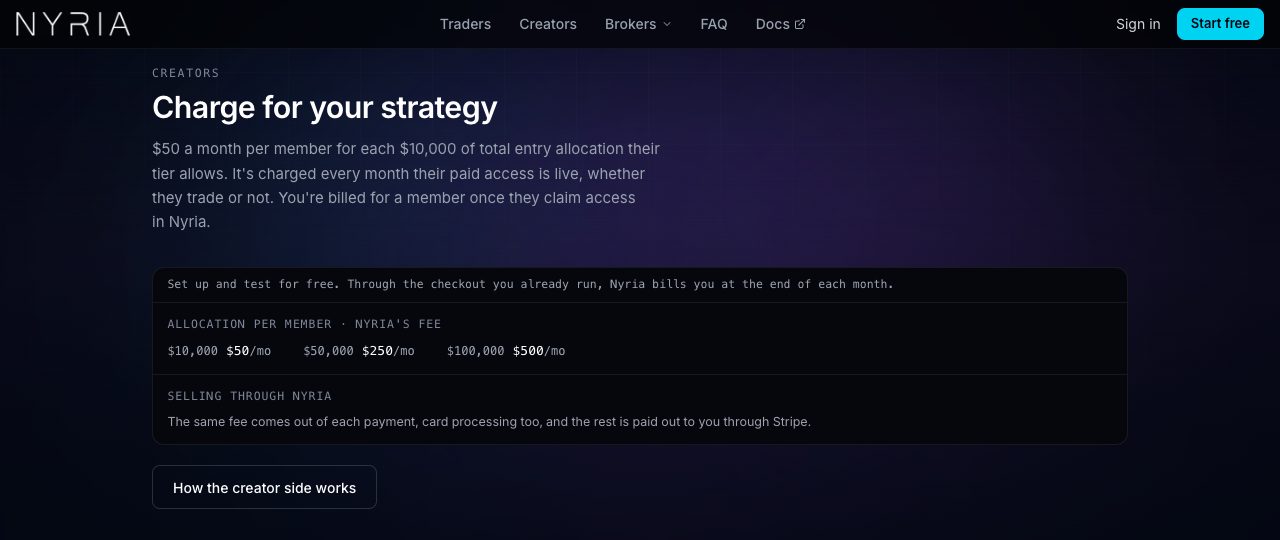
The calculator on the creators page makes the math concrete. With its default inputs (20 members at $199 on a $10,000 tier, 5 at $499 on $50,000 and 2 at $999 on $100,000), members pay $8,473 a month, Nyria bills $3,250 and the creator keeps $5,223. Nyria labels these "Examples, not typical results" and says it "has no record of typical creator earnings yet", which is the honest answer for a platform this new.
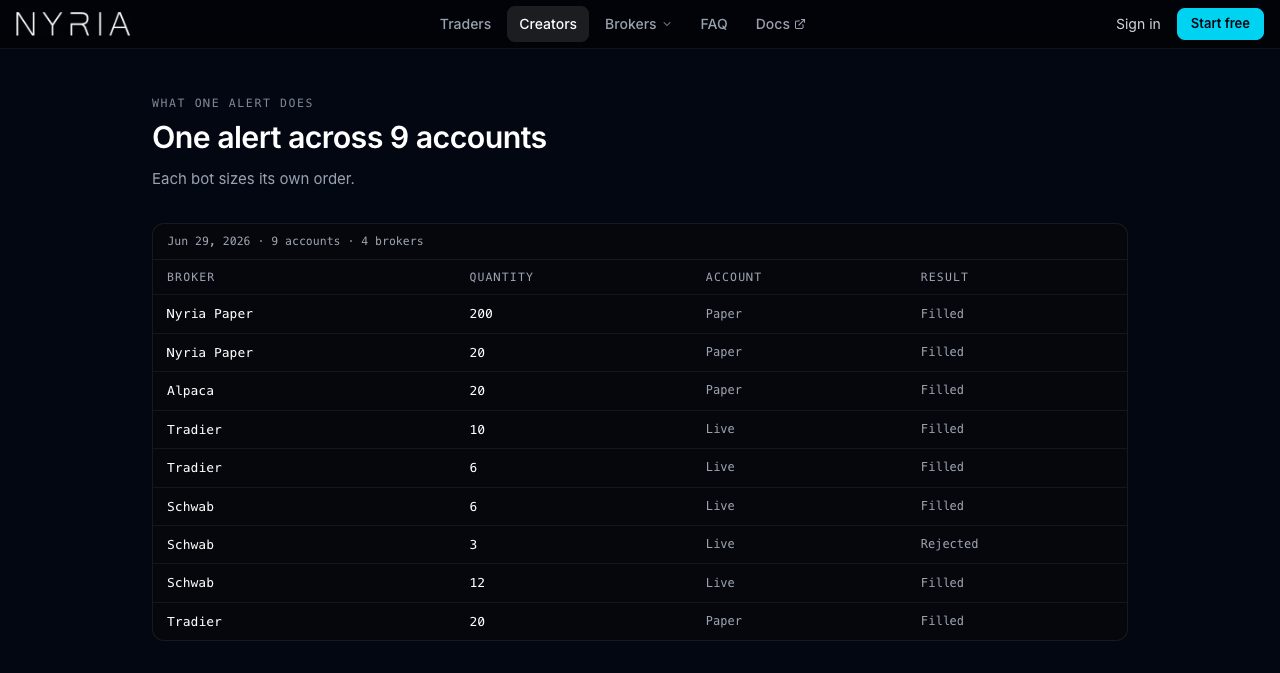
The same page shows what a single alert does across members. One alert on June 29, 2026 placed orders in 9 accounts at 4 brokers, each bot at its own quantity, from 200 on a paper account down to 3 on a live Schwab account. Eight filled and one Schwab order was rejected. We liked that Nyria left the rejected row in: real execution logs have them.
A few details creators usually ask about:
- You keep your Discord or Telegram group and post the way you do now. Nyria reads the alerts you already send.
- Live alerts and open positions go only to members. Closed trades appear on your public strategy page as a track record, and your alert text is never published or resold.
- A Free paper bots switch lets anyone run a Premium strategy on paper before buying. Live bots still need paid access.
- When a subscription ends, that member's bots stop opening positions and still send exits for anything they hold.
- Selling access to a strategy comes with its own rules, and Nyria's guide asks creators to state the risks on their checkout page and never promise returns.
How does Nyria report results?
Every strategy and every bot keeps a full record of its trades: cumulative P&L per contract, win rate, average win and loss, profit factor, streaks and a calendar view. The homepage example below is a Nyria Team strategy's alert results, and Nyria prints "Past results don't guarantee future results" right under it.
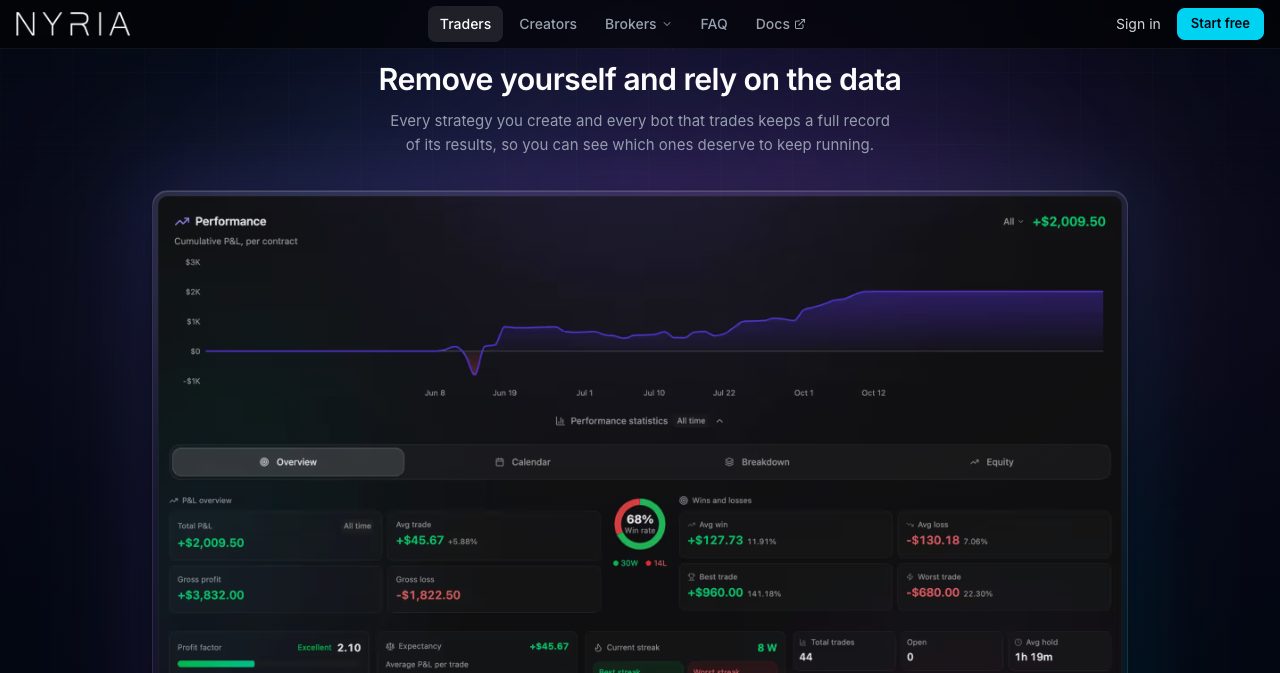
Strategy pages show Alert P&L, calculated from the strategy's alerts, with a reminder that your own fills may differ. There is no backtester: you test going forward, on paper, in real time. Paper and live statistics are kept per bot, so a paper bot's numbers never mix into a live bot's.
Paper results deserve a careful read. Nyria Paper fills a market order at the quoted bid or ask with no slippage, and the docs say outright that paper P&L "reads better than live". It doesn't simulate assignment, broker rejections, partial fills or funding on perpetuals. Paper shows that your setup works, and it can't tell you whether the strategy makes money.
How fast is Nyria?
Fast enough for strategies on 1-minute charts and slower, which is the range Nyria says it's built for.
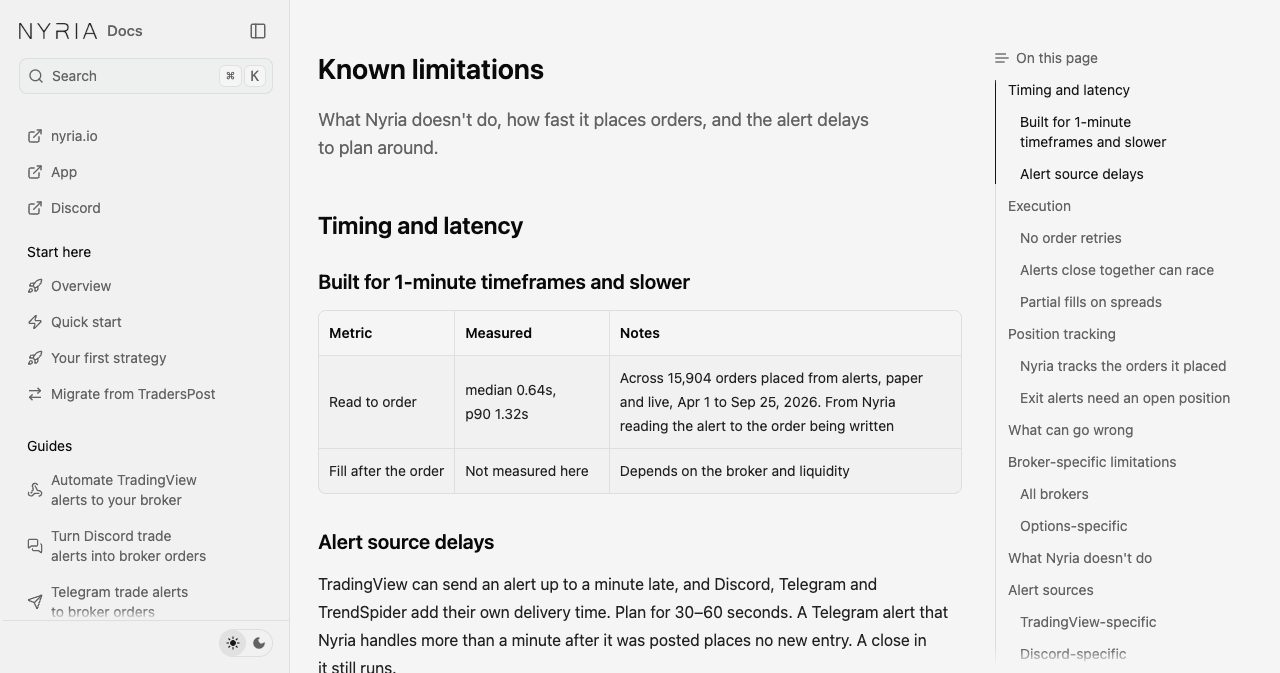
Across 15,904 orders placed from alerts between April 1 and September 25, 2026, the time from Nyria reading an alert to writing the order had a median of 0.64 seconds and a 90th percentile of 1.32 seconds. The homepage rounds that to an average of 0.6 seconds and plays a recording of an alert hitting Nyria and the order showing up at Alpaca.
Those figures cover Nyria's own step. TradingView can send an alert up to a minute late, and Discord, Telegram and TrendSpider add their own delivery time, so the docs tell you to plan for 30 to 60 seconds end to end. The fill then depends on your broker and the market. If your edge depends on seconds, alert-based automation is a poor match in general, because the alert source alone can add a minute. For swing trades, daily options entries and most indicator strategies, that delay hardly matters.
Is Nyria safe to connect to your broker?
Nyria's access is limited to trading, and you can cut it off at your broker at any time.
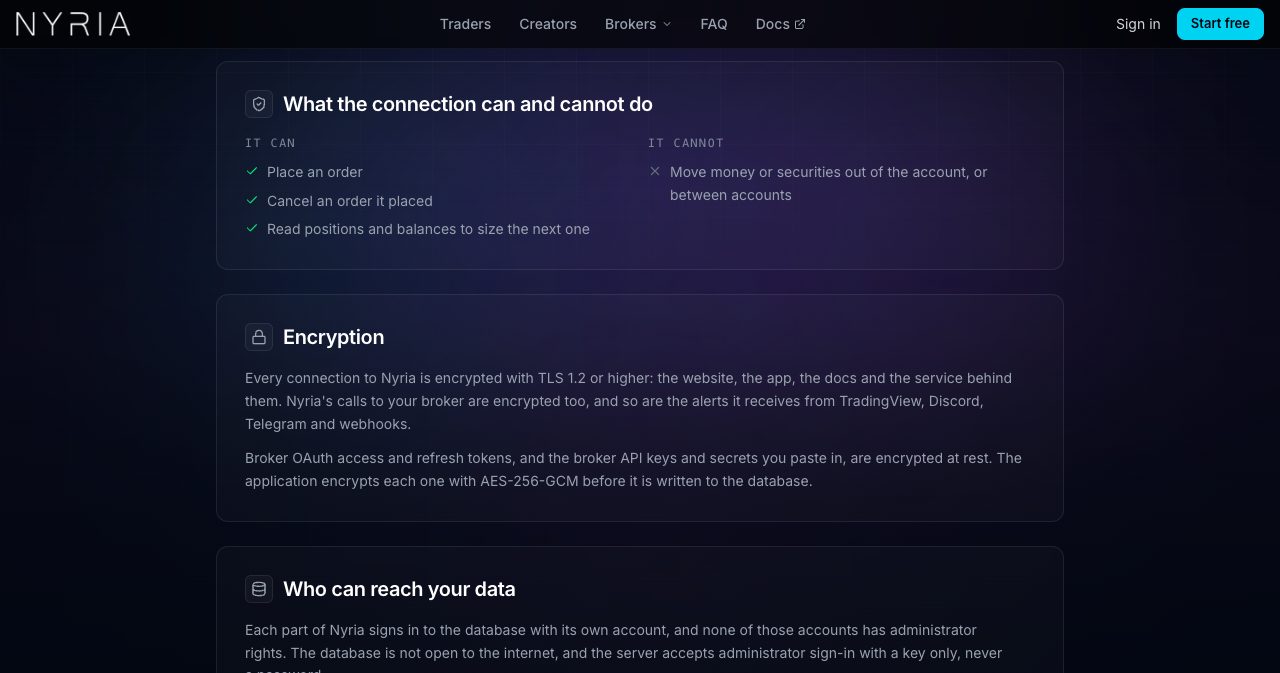
- Nyria can place an order, cancel an order it placed and read positions and balances to size the next order. It cannot move money or securities out of the account or between accounts.
- Schwab, tastytrade and live Tradier connect through OAuth on the broker's own sign-in page, so Nyria never sees your password. Alpaca keys and Tradier sandbox tokens are created at the broker and pasted in.
- Broker tokens, API keys and secrets are encrypted with AES-256-GCM before they're written to the database, and every connection uses TLS 1.2 or higher.
- Revoking access at your broker stops Nyria's token or key at once.
- Two-factor sign-in on your Nyria account is optional, and you can turn it on under Account.
- Nyria runs in the US Northern Virginia region behind Cloudflare, none of its database accounts has administrator rights, and the database is backed up every 12 hours with point-in-time recovery.
The security page has the full detail. When we checked the status page on October 13, every system was operational and no incidents had been posted in the previous 90 days. Incident updates go out in Nyria's Discord.
What should you know before going live?
Nyria keeps a known limitations page in its docs, and it's the most useful page to read before you connect real money. These are the points that matter most in practice:
- Give Nyria an account of its own. It tracks the orders it placed, not everything in the account, so manual trades or another system trading the same tickers can make its records drift from your broker's. When an exit alert arrives and Nyria tracks no open position, it sends nothing and logs the alert as Skipped.
- Nyria doesn't retry a failed or rejected order, apart from one cash-account close. Failures land on the Logs tab with the broker's reason, and you can be notified when they happen.
- Leave 30 to 60 seconds between alerts. Alerts sent close together can arrive out of order, so to flip from long to short, send one alert that reverses the position.
- Some legs of a multi-leg order can fill while others don't, most often on thin options with wide spreads. Nyria tracks the filled legs and exits them on the next exit alert.
- A paused bot ignores every alert, exits included, and its positions stay open at your broker. Pause a bot only when it's flat, or close the position at your broker first.
- If you're switching platforms, turn the old one off before you connect the same account to Nyria, or every alert trades twice.
- There's no daily loss cap. Every order is sized by the bot's budget per entry, so that budget is your main risk control.
The docs also suggest paper trading a strategy for one to two weeks, keeping buying power for exits as well as entries (a credit spread exits as a debit) and starting with a budget per entry you could afford to lose in full. That's sound advice for any automation tool, and it's good to see a vendor give it before you've paid anything.
How do you automate your first alert with Nyria?
A first session on paper costs nothing and takes about half an hour.
- Create a free account. Sign up at app.nyria.io and confirm your email. No card is needed.
- Connect Nyria Paper. Under Integrations, select the Nyria Paper card and create the paper account in one click.
- Create a strategy. In My strategies, name the strategy, pick the alert source, the asset type, what entries and exits do and the tickers you allow, and set it to Private.
- Check the alert format. On the strategy's Integration tab, paste one of your real alerts for each trade type and select Check format. The strategy turns from Draft to Active when every sample passes.
- Deploy a paper bot and test it. Select Deploy bot, set a budget per entry such as $500, deploy on Nyria Paper and press Send under Sample alert. The card marks each stage: Sent, Read, Order placed and Filled.
- Go live with a small budget. After a week or two of paper trades that look right, connect your broker, start a Pro plan at the size you need and deploy a bot with a small budget per entry.
An options sample alert runs only while the options market is open. Outside market hours the test card shows "Rejected: Options market is closed", so run options tests during the session. The quick start walks through the same steps field by field.
Who is Nyria for?
- TradingView traders with a strategy or indicator they trust who want its alerts executed at a US broker without watching the screen.
- Options traders who run verticals, iron condors, straddles or 0DTE structures and want the whole spread sent as one order.
- People who follow a trade caller on Discord or Telegram and want the calls placed in their own account, at their own size.
- Signal providers and community owners who want to charge for automated execution without holding anyone's money or giving up their Discord, Stripe or Whop setup.
- Developers with their own signal code who want broker connections, sizing and logging without building them.
It's a weaker fit for futures and forex traders, for scalpers working below the 1-minute timeframe, for anyone who needs stop-loss or bracket orders resting at the broker, for traders who want a built-in backtester, and for anyone whose broker isn't one of the four yet. Nyria lists every one of these limits in its own docs.
Who is behind Nyria?
Nyria LLC is a Wyoming limited liability company at 30 N Gould St, Sheridan, WY 82801. Its about page names Michael Benjamin as co-founder: a 23-year-old full-stack developer who has traded multiple asset classes for over five years and builds Nyria with teammates Vemund and Jaron. On Product Hunt, Michael wrote that he and Nyria's CTO have also been delivering and maintaining other trade-automation tools, "like PeakBot and others", and that the experience went into Nyria.
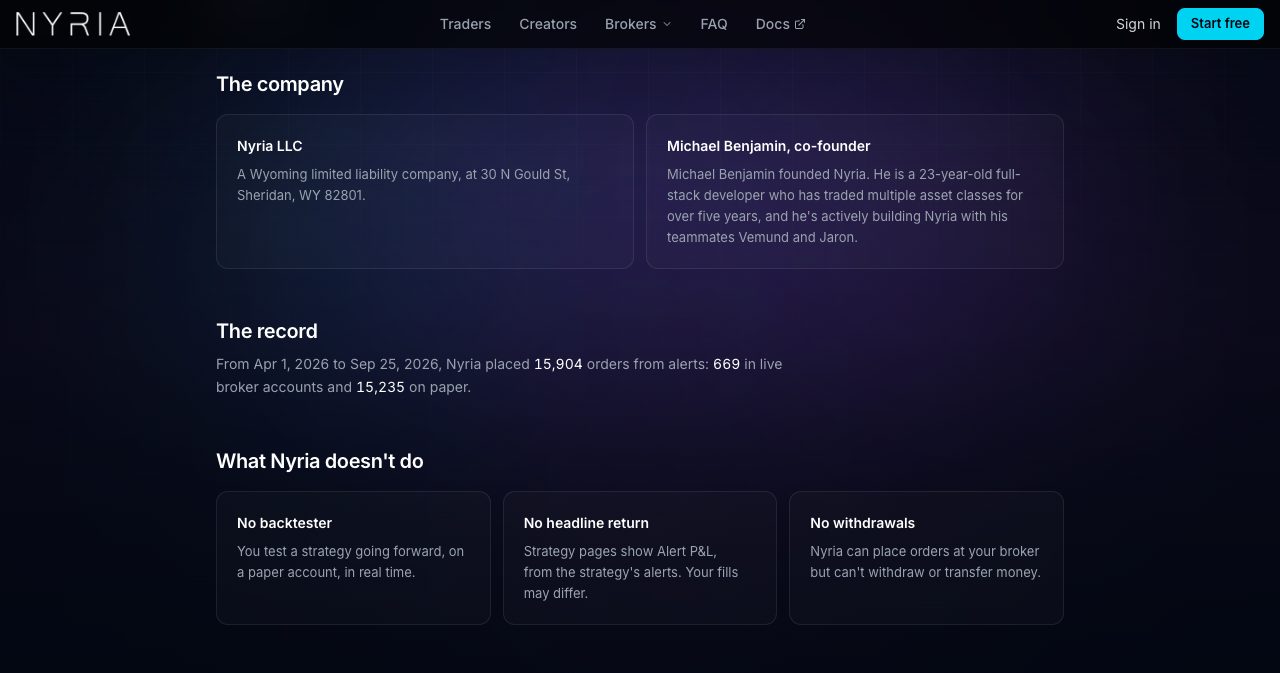
The team is small and remote, and one line from its careers page explains the tone of the whole site: "A claim on the site needs a number, and the number needs a source." You can see it in the docs, which publish latency percentiles, an order count with a date range and a full page on what the product doesn't do.
Support runs through Discord tickets, which the support page says get an answer "within a few hours, sooner during market hours", plus in-app chat and [email protected]. Nyria went public in October 2026, so there are few user reviews on directories yet. The free paper tier and the Discord are the best ways to judge it for yourself.
Nyria is also running a launch giveaway until Saturday, October 17, 2026 at 11:59 PM ET. To enter, link any broker (Nyria Paper counts) and get one trade executed on a bot. Three winners each get three months of Pro at the $10,000 tier plus $100 in cash, drawn on October 19. It's open to legal US residents aged 18 or over, and no purchase is needed.
How does Nyria compare with TradersPost, SignalStack and Collective2?
Nyria publishes its own comparison, which it says was checked against each competitor's site on October 10, 2026. The table includes the rows where Nyria's answer is "No", which makes it more useful than most vendor comparisons.
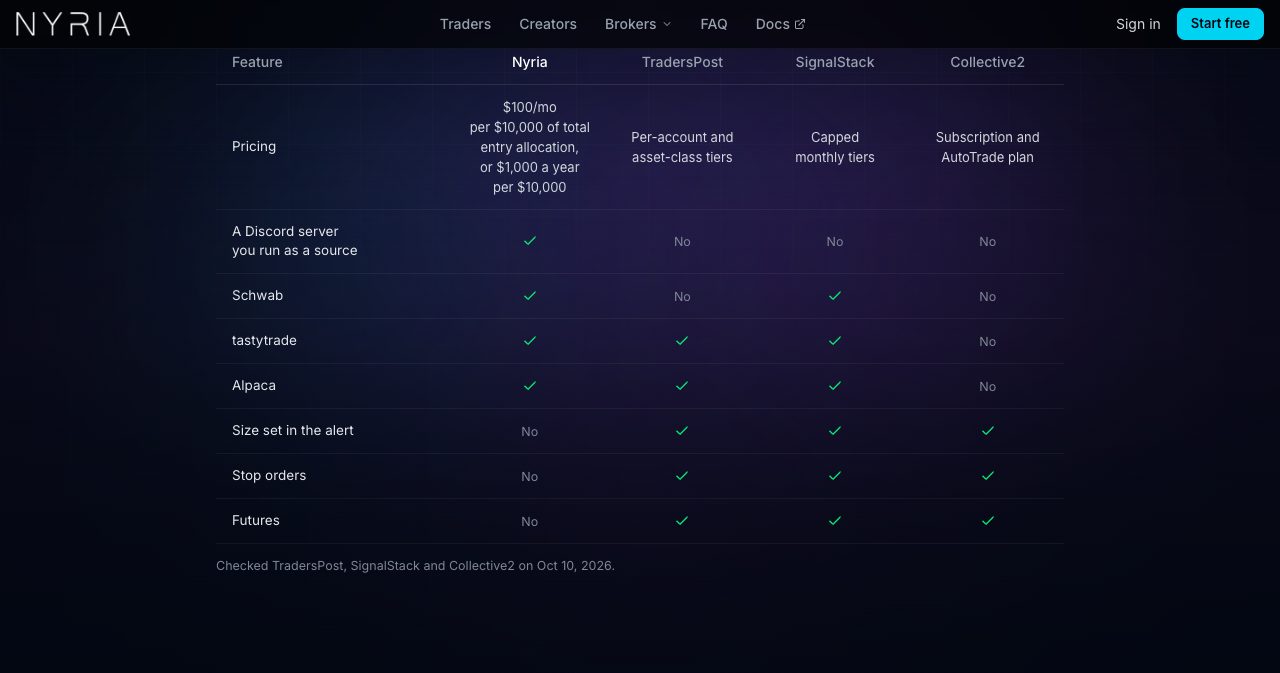
By Nyria's table, it's the only one of the four that reads a Discord server you run as an alert source, and it connects to Schwab, tastytrade and Alpaca. TradersPost, SignalStack and Collective2 all support a position size set in the alert, stop orders and futures, which Nyria doesn't yet. On price, Nyria's breakdowns note that SignalStack meters orders ($340 a month for 1,000, with unused orders expiring) and that Collective2 keeps up to 50% of what a strategy's subscribers pay.
| Option | Where orders go | How it differs from Nyria | Best for |
|---|---|---|---|
| Nyria | Schwab, Tradier, tastytrade and Alpaca | Reads Discord and Telegram chats you run, prices live trading by total entry allocation and bills creators per member | US stock and options traders, trading communities and strategy sellers |
| TradersPost | Stock, options, crypto and futures brokers | Supports futures, stop orders and size in the alert, priced in per-account and asset-class tiers | Futures traders and anyone who needs stops at the broker |
| SignalStack | A wide range of brokers | Priced by the number of orders | Traders who send a low, steady number of alerts |
| Collective2 | Brokers that support its AutoTrade | A strategy marketplace that takes a share of subscriber payments | Sellers who want a marketplace audience |
| PineConnector | MetaTrader 4 and 5 | Built for forex and CFD trading on MetaTrader | MetaTrader traders |
| 3Commas | Crypto exchanges | Crypto only | Crypto-only traders |
If you're already on one of these, Nyria's migration page explains how to switch without rewriting your alerts, and the docs include a separate guide for moving from TradersPost.
Is Nyria worth it?
Yes, if you trade stocks or options at Schwab, Tradier, tastytrade or Alpaca from alerts you already trust, or if you run a trading community and want to charge for automated execution.
Your alerts stay as you write them, multi-leg options go out as one order, and every alert format is checked on screen before it can touch your account. Pricing follows what your bots can commit, so busy and quiet bots cost the same. On the creator side, Nyria handles per-member billing through its own checkout, Stripe or Whop while members' money stays in their own accounts. The documentation is unusually frank, with latency percentiles, a dated order count and a whole page on what the product doesn't do.
The trade-offs are the ones Nyria lists itself: no futures yet, no resting stops or brackets, no backtester and a broker list that's still growing. For the traders it's built for, none of them stands in the way of a free test.
The best test is one of your own alerts. Start free on Nyria with no card, send that alert to Nyria Paper and watch the order it places, then compare Pro and creator pricing once you know your total entry allocation. If you sell a strategy, the creators page has the fee calculator, and the Nyria docs cover every setting.
FAQ
What is Nyria?
Nyria is no-code trading automation software from Nyria LLC. It turns alerts from TradingView, Discord, Telegram, TrendSpider or a custom webhook into orders in your own Charles Schwab, Tradier, tastytrade or Alpaca account. It trades stocks, ETFs, options spreads of up to 4 legs and crypto spot, and lets creators charge members to run their strategies.
How much does Nyria cost?
Paper trading is free with no card and no time limit, for up to 10 paper bots. Live trading on Nyria Pro costs $100 a month, or $1,000 a year, per $10,000 of total entry allocation, from $10,000 to $100,000. There are no setup, per-bot or per-order fees, and broker commissions are separate.
What is total entry allocation on Nyria?
Total entry allocation is the sum of the budget per entry across all bots on your live broker accounts, the most they could commit if every bot fired at once. Two live bots at $4,000 and $6,000 per entry make $10,000, which is the $100 a month plan. Paper bots don't count toward it.
Which brokers does Nyria work with?
Charles Schwab, Tradier, tastytrade and Alpaca for live trading, plus Nyria Paper, a free built-in simulated broker. Schwab and Tradier trade stocks and options, and tastytrade and Alpaca also trade crypto spot. Webull, TradeStation, Binance, Binance US, Coinbase, Coinbase US and Tradovate are listed as coming soon.
Is Nyria safe to connect to my brokerage account?
Nyria's connection can place orders, cancel orders it placed and read positions and balances. It can't withdraw or transfer money or securities. Schwab, tastytrade and live Tradier connect by OAuth at the broker, broker keys and tokens are encrypted with AES-256-GCM, and you can revoke access at your broker at any time.
Do I need to write code or reformat my alerts for Nyria?
No. Nyria reads plain text or JSON in your own wording, such as 'SPY long entry' or 'grabbed TSLA 375p 10/16'. You paste sample alerts into the strategy, Nyria shows what it read and the order it would place, and the strategy only goes active once every sample passes.
Can Nyria trade options spreads and 0DTE?
Yes. Nyria trades single options and spreads of up to 4 legs on one expiration, including verticals, straddles, strangles, iron condors and iron butterflies, sent to the broker as one order. SPX alerts trade the SPXW chain, 0DTE included. Every leg trades the same quantity, so ratio spreads, calendars and diagonals aren't supported.
How fast does Nyria place orders?
Nyria reports a median of 0.64 seconds and a 90th percentile of 1.32 seconds from reading an alert to placing the order, across 15,904 orders from April 1 to September 25, 2026. Alert sources add their own delay, up to a minute for TradingView, so Nyria is built for 1-minute timeframes and slower.
How do creators get paid on Nyria?
Creators can sell through Nyria's checkout, which pays their share through Stripe after Nyria's fee and card processing, or through their own Stripe or Whop checkout, where members pay them directly and Nyria bills the creator monthly. The fee is $50 a month per member for each $10,000 of allocation the member's tier allows.
Does Nyria support futures, stop orders or backtesting?
Not yet. Nyria doesn't trade futures on live brokers, it places market and limit orders only, with stops and targets sent as exit alerts, and it has no backtester. You test a strategy forward on paper in real time. Tradovate, for futures, is listed as coming soon.
Is Nyria a broker or an investment adviser?
No. Nyria LLC provides software only. It is not a broker-dealer or investment adviser, gives no investment advice or recommendations, and never holds or moves the money in your brokerage account. Strategies on Nyria are made by independent users, and trading through it carries the usual risk of loss.
If you're building a fintech product or any other SaaS yourself, SaaSCity is a free, human-reviewed startup directory with a live city map, where your listing is a permanent page that other founders browse. Submitting takes about ten minutes.
Get your SaaS in front of founders
List your product on the SaaSCity live city map - a permanent listing, real discovery, and a backlink from a high-DR directory. Free to start; upgrade for a dofollow link and a building on the map.