Reviews
Monobot Review 2026: A Contact Center Take on No-Code AI Voice Agents
Monobot CX is a no-code platform for AI voice, chat and SMS agents aimed at contact centers and BPOs. This review covers the Flow builder, SIP and phone numbers, live call takeover, per-minute pricing from $200 a month, the free sandbox and who it fits.

Contents (13)
- Key takeaways
- What is Monobot?
- How does a Monobot agent work?
- How do you set up your first Monobot agent?
- What can Monobot connect to?
- What happens when a call needs a human?
- How do you monitor and debug a Monobot agent?
- How much does Monobot cost?
- How does Monobot compare to other AI voice agent platforms?
- What should you ask on the demo call?
- Who is Monobot a good fit for?
- Verdict
- FAQ
Sponsored post. For this Monobot review, product details were checked against monobot.ai, its pricing page, docs, release notes and Trust Center on October 5, 2026. Screenshots were taken from the live site and docs. The opinions and the pricing math are ours.
Quick answer: Monobot is a no-code platform for building AI voice, chat and SMS agents, made for contact centers, BPOs and any business that runs on phone calls. You design the conversation in a visual Flow builder, attach a phone number or SIP trunk, and supervisors can listen in or take over live calls. Plans start at $200 a month, voice costs $0.22 to $0.27 per minute, and testing in the sandbox is free.
Most AI voice products I get pitched are one long prompt with a pleasant voice attached. They demo well. Then a real caller changes their mind halfway through a booking, or asks for a person, and the whole thing wobbles.
Monobot comes at the problem from the phone side. Its founder has run software companies for more than 20 years, with contact center software and outsourcing as his specialty, and the product shows it. There are SIP settings, call transfers that carry data to the next agent, a button that lets a supervisor take over a live call, and a seat-based desktop for the humans who still handle the hard conversations.
For this review I read the public site, every page of the documentation, the pricing page and the June 2026 release notes, then did the pricing math for a few realistic call volumes. I have not run production traffic through it. Where a number comes from Monobot's own marketing, I say so.
Key takeaways
- Monobot CX builds voice, chat and SMS agents without code, and one agent can answer a web chat, a browser call and a real phone number.
- Conversations run on a visual Flow of nodes, transitions and tools, so a booking or verification call follows steps you can see and test.
- Telephony is built in: SIP connections, external SIP trunks, phone numbers at $2.50 a month and transfers that pass call data to the next system.
- Supervisors can listen to a live call or barge in and take it over, a feature that shipped on June 22, 2026.
- Pricing is public. Starter is $200 a month, Growth is $500 and Business is $1,000, with voice at $0.27, $0.25 and $0.22 per minute.
- The free sandbox needs no credit card, but it only works inside the admin panel. Publishing to a website or a phone number needs a paid plan.
- The outcome figures on the site, such as up to 80% of inbound requests automated, are Monobot's own numbers. Ask for a reference customer before you budget around them.
What is Monobot?
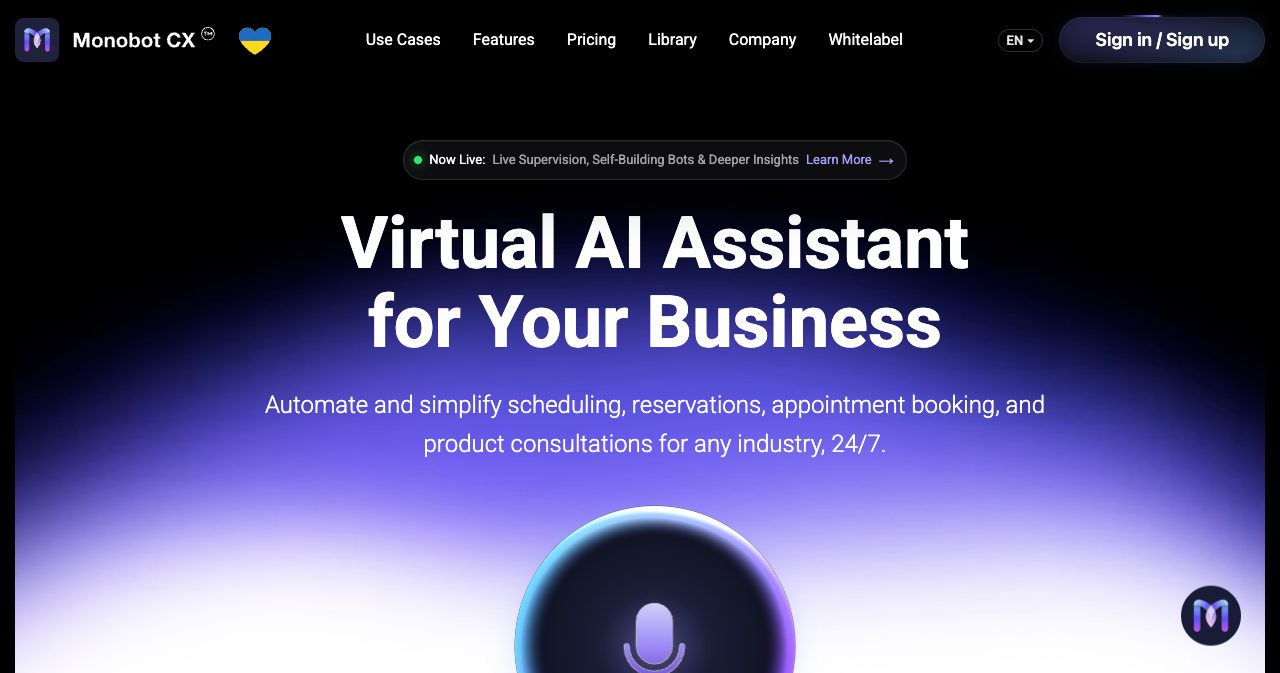
Monobot is an AI platform for building virtual agents that handle voice calls, web chat and SMS for customer service, sales and scheduling. The product is called Monobot CX, and its documentation is branded Platform CX. It is built for BPOs and enterprises that want software to answer routine calls and people to handle the complicated ones.
The company's about page names three leaders: Arkady Erlikhman, founder and CEO, whose background is contact center software and outsourcing; Alexey Shulyak, co-founder and CTO; and Volodymyr Husakovskyi, head of product development. The mission statement is direct about the buyer: "Monobot is an AI-powered voice assistant designed for BPOs and enterprises that want to scale faster and reduce costs."
| Detail | What we found |
|---|---|
| Product | Monobot CX (docs branded Platform CX) |
| Operator | TRING, Inc., named in the terms and the privacy policy |
| Location | 1195 Awalt Dr, Mountain View, California |
| Founded | 2023, according to LinkedIn and F6S |
| Leadership | Arkady Erlikhman (CEO), Alexey Shulyak (CTO), Volodymyr Husakovskyi (Head of Product Development) |
| Category | No-code AI voice, chat and SMS agent platform |
| Channels | Phone (PSTN and SIP), web call, chat widget, SMS, Instagram DMs |
| Languages and voices | 20+ languages and 30+ voices, per Monobot |
| Pricing | $200, $500 and $1,000 monthly packages, plus custom Enterprise |
| Free trial | Sandbox with free chat and voice units, no credit card |
| Latest major release | June 22, 2026 |
The site ships in English, Ukrainian, Russian and Spanish, and a small Ukrainian flag heart sits next to the logo.
How does a Monobot agent work?
Every voice turn passes through four stages. Speech-to-text transcribes the caller, the Flow decides what happens next, a language model writes the reply, and text-to-speech speaks it. Each stage is configurable per agent, which is where Monobot differs from builders that hand you a single prompt box.
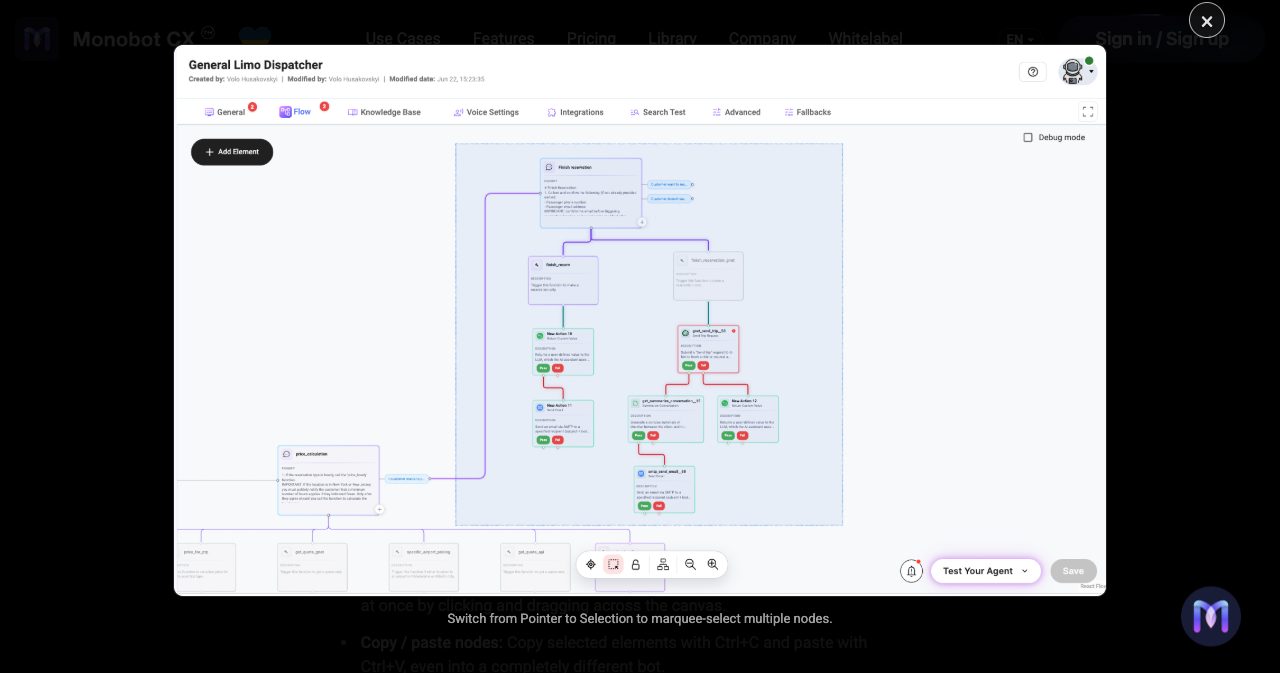
The Flow builder
A flow is a canvas of connected nodes that starts from a Root Flow. A Conversation node holds the instructions for one step of the call. The example in the docs tells the agent to collect a first name, last name and phone number under the rule "One question per message", and then trigger a tool called create_lead_record.
Nodes are joined by transitions, and a transition is written in plain language. "The client wants to book a vehicle for a special event" is a valid condition. The model reads the conversation and decides whether it applies. On the way through, a transition can extract variables such as event type or pickup location, each with a description, a list of allowed values and a required flag.
Tools hang off nodes. A custom tool has a name, typed parameters and a description that tells the model when to fire it, and a Function action lets you write your own Python when the built-in actions run out. Global tools are defined once and reused across flows. The built-in ones handle call termination, call redirection and spam detection. Event tools run on their own: when a call starts, on each caller message, on each answer, at the end, on a schedule and, since June, on a timeout or an error.
Each flow can run its own model and temperature, so the strict part of a call (taking a booking) can run cold while the small talk stays loose. Monobot's docs recommend that split, and it is the design choice I like most in the builder.
Voice settings
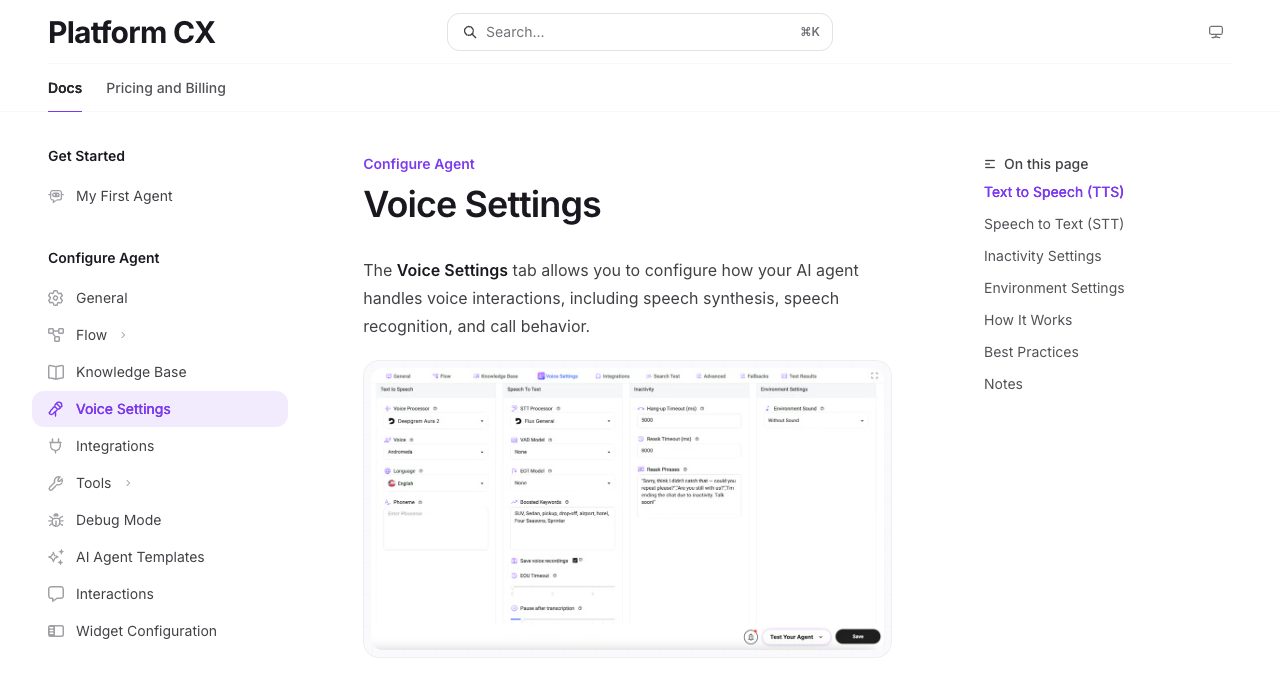
The voice tab exposes more of the speech stack than most no-code tools do. For text-to-speech you pick a processor, a voice and a language, and you can add phoneme overrides for words the voice mangles. For speech-to-text you pick the processor, a voice activity detection model, an end-of-turn model and an end-of-utterance timeout.
Set up boosted keywords early. The example in Monobot's docs boosts "SUV, Sedan, pickup, drop-off, airport, hotel, Four Seasons, Sprinter" for a limo dispatcher. Those are the words a general recognizer tends to fumble on a noisy line, and a dispatcher cannot afford to get them wrong.
Silence handling is configurable too. You set how long the agent waits before asking again, a list of phrases to rotate through ("Are you still there?") and a hang-up timeout that starts after the last phrase. An environment sound option adds background audio to the call. It is a small thing, but dead silence on a phone line makes people ask whether anyone is there.
On models, the docs screenshot shows Deepgram's Aura 2 voice and Flux recognition model in use. The June release added Deepgram Flash multilingual with code switching, for callers who mix two languages in one sentence, along with Gemini 3.5 Flash, GPT 5.4 and GPT 5.5 on the language model side.
How do you set up your first Monobot agent?
Setup takes six steps and no code. The first agent guide in the docs walks through it like this:
- Register at platform.monobot.ai with an email and password, then confirm the verification link.
- Create an organization. Agents, billing and access all belong to an organization.
- Open AI Agents, click New Agent, and pick a template or start blank.
- Set the agent title, a welcome message and the prompt instruction.
- Press Play and test it in Chat, or as a Web Call from your browser.
- Publish: embed a widget on your site, or buy a phone number and attach the agent. This step needs a paid plan.
The template library in the docs lists 19 starting points, grouped under categories such as healthcare, restaurants, beauty and automotive. They include a Dental Clinic, a Barber Shop, Pizza Delivery and Pickup, a Limo Service, Real Estate, a Moving Company and an Interview Agent for candidate screening.
Create From Web
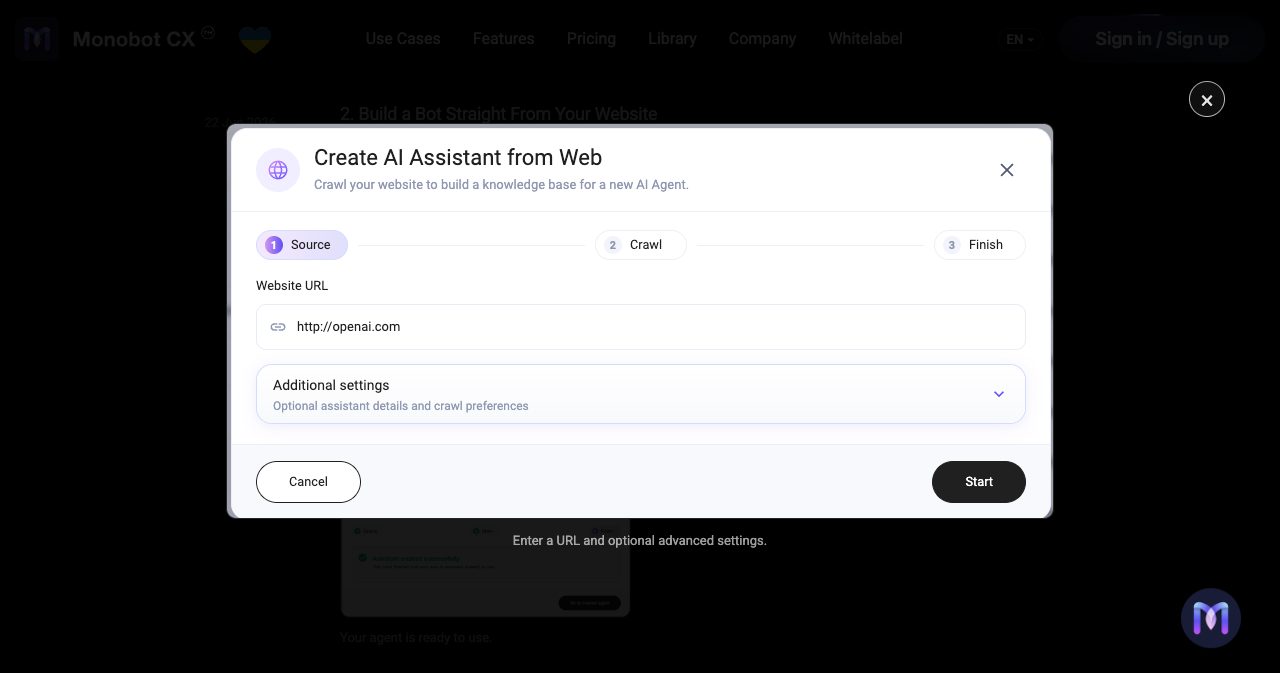
The June 2026 release added a shortcut called Create From Web. You paste your website URL into a three-step wizard (Source, Crawl, Finish). Monobot crawls the site, builds a knowledge base from it and hands you an agent that already knows your business. I would start here for a first test, because you hear the agent talk about your own content before you have spent any time on a flow.
The knowledge base
Knowledge is organized into categories such as FAQ, pricing or vehicles. A category accepts CSV, TXT, JSON and PDF files up to 50 MB, or a web page imported by URL. You can attach instructions to each category ("Use only exact matches for vehicle type"), tune chunk size and overlap, and set how many chunks a search returns and how strict the relevance threshold is.
Two details suggest this was built against real data. CSV files are treated as structured records for precise lookups, which is what you want for a price list. A Preview Data view shows what was extracted from each file, so you can catch a badly parsed PDF before a caller does.
What can Monobot connect to?
Monobot connects to phone networks over SIP and PSTN, publishes to websites through chat and call widgets, and has documented integrations for Google, Cal.com, Genesys, WooCommerce, Instagram, email and several booking and dispatch systems. Anything else goes through the API Call action.
Phone and SIP
The telephony docs cover SIP extensions, SIP connections, external SIP trunks, digest authentication, IP whitelisting and PSTN phone numbers. You buy a number inside the dashboard by choosing a country and clicking Buy Now. Each number costs $2.50 a month and belongs to one agent.
Transfers use the standard SIP REFER method, with INFO as a fallback for phone systems that do not support it. The June release added SIP registration from other SIP servers and the option to redirect a call from one bot to another.
Contact center people will care most about call-attached data. The agent can save custom data with the interaction and pass it along when a call is transferred or escalated to the target SIP server. The person who picks up does not have to ask for the account number again.
Integrations
| Integration | What the agent can do |
|---|---|
| Manage Calendar events, send Gmail, calculate Maps routes and autocomplete addresses | |
| Cal.com | Search available slots, then create, look up, reschedule or cancel bookings |
| Genesys | Connect the assistant to contact center routing and support flows |
| WooCommerce | Look up products, orders and customers through the store's REST API |
| Reply to Direct Messages on Business and Creator accounts | |
| SMTP email | Send confirmations and summaries from one or several sender addresses |
| Telegram | Send a message to a chat, handy for staff alerts |
| Altegio | Service selection, staff availability and appointment booking |
| Syrve | Restaurant reservations and order tracking |
| EverTransit, G-Net | Ride reservations and dispatch for ground transport |
| API Call, Function | Call any REST endpoint or run custom Python |
Publishing
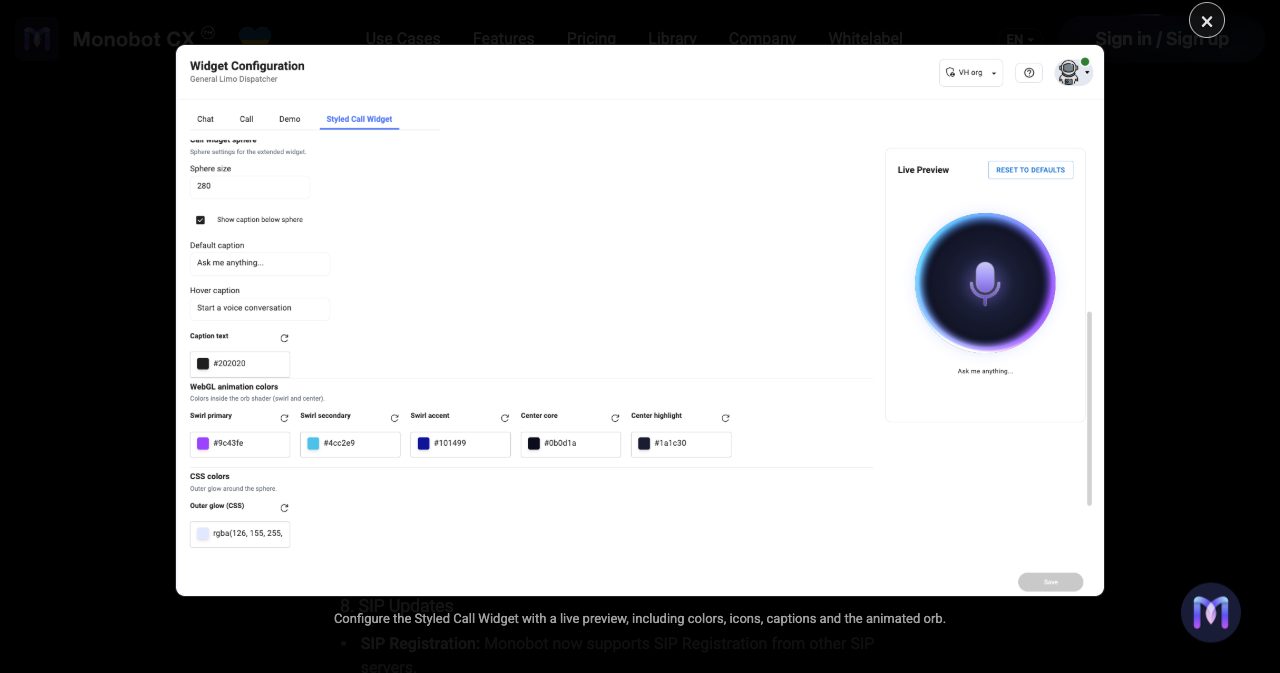
An agent can go out through four widget types: a chat widget, a call widget, a shareable demo page and, since June, a Styled Call Widget where you set the orb's size, colors and captions against a live preview. The embed is a single script placed before the closing body tag. A Monobot Chat Widget plugin is also listed on WordPress.org for sites that run WordPress.
What happens when a call needs a human?
A Monobot agent can transfer the call, brief the person who picks up, and let a supervisor take over mid-conversation. For teams that already run a support floor, this handoff design is the best argument for the product.
The Redirect Call action sends a call to a phone number or a call center, and since June it can brief the human who picks up before they take over. Combined with call-attached data, the human starts the conversation already knowing who is calling and why.
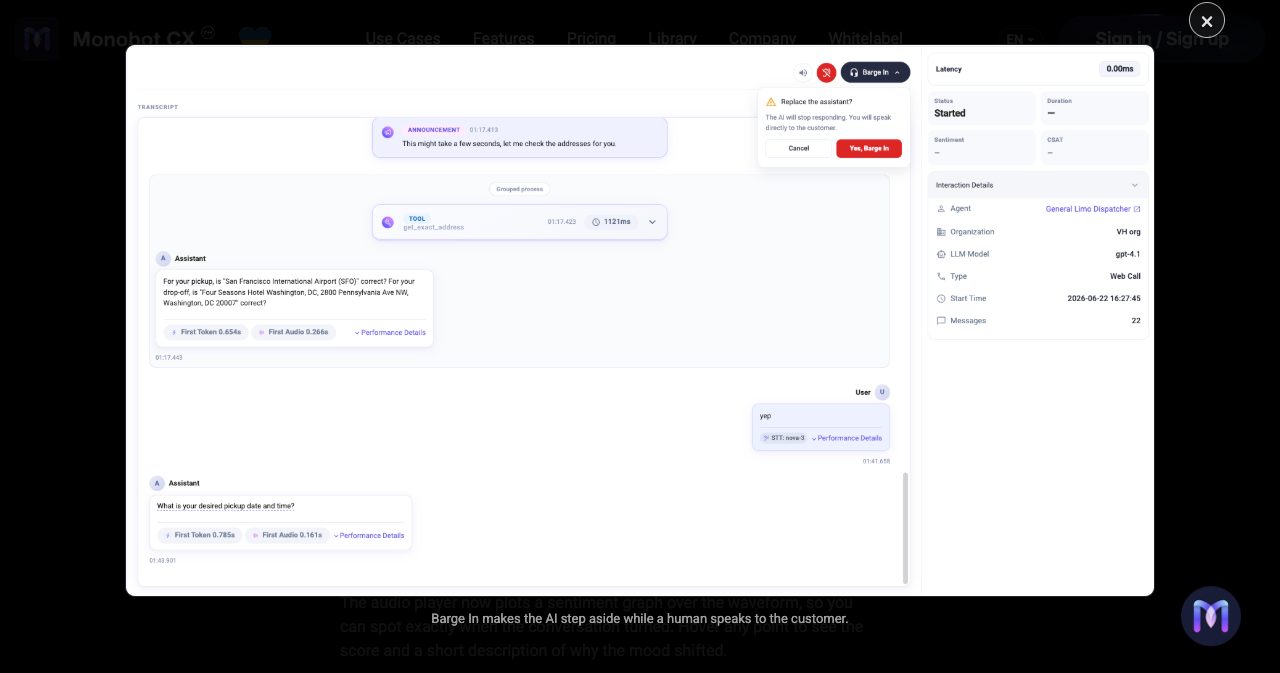
The supervisor controls came in the same release. Start Listening connects a supervisor to an active call silently. Barge In interrupts the bot, and the confirmation dialog spells out the consequence: "The AI will stop responding. You will speak directly to the customer." Anyone who has run a call floor knows these two buttons from their existing software. Finding them in an AI agent builder tells you who the product was designed for.
Workspace, the human side
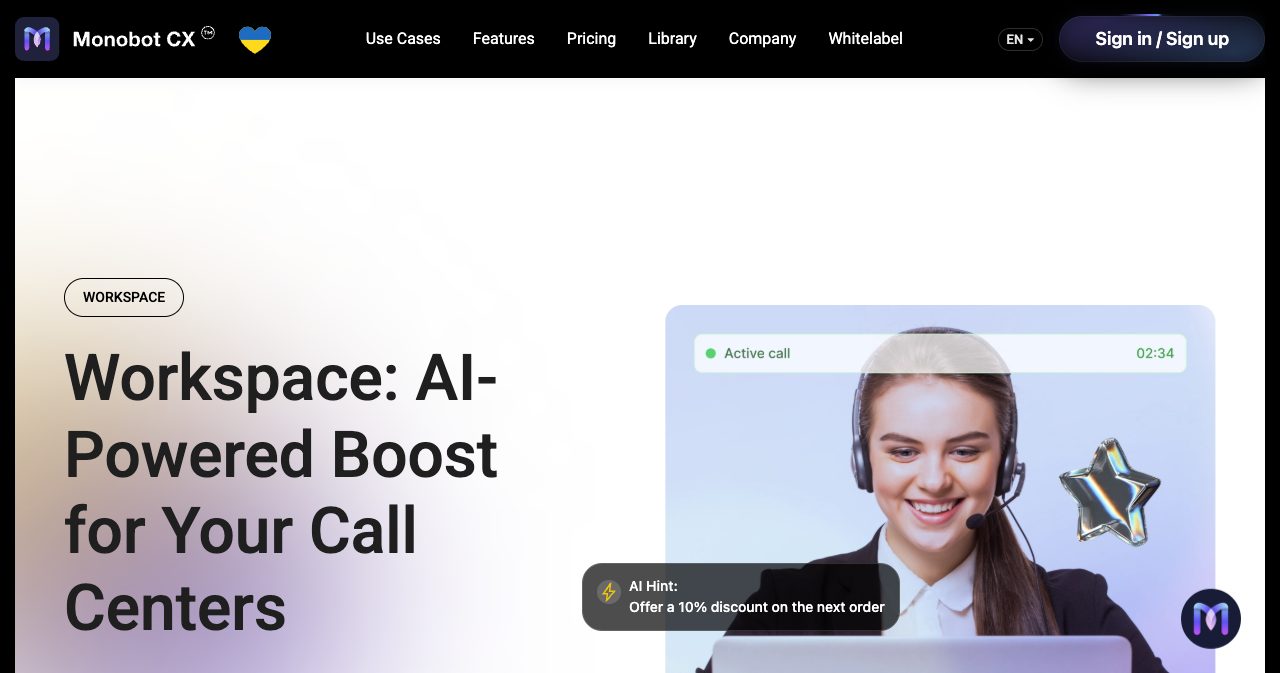
Workspace is the agent desktop. Human agents make and receive calls and SMS in it while an AI participant listens without being heard and feeds them hints, a live transcript, sentiment and a summary when the call ends. The example hints on the product page are things like "Confirm the delivery address."
Workspace is billed separately from the AI agent, at $0.03 to $0.05 per minute. One, three or five seats are included depending on the plan, and each extra seat costs $10.
How do you monitor and debug a Monobot agent?
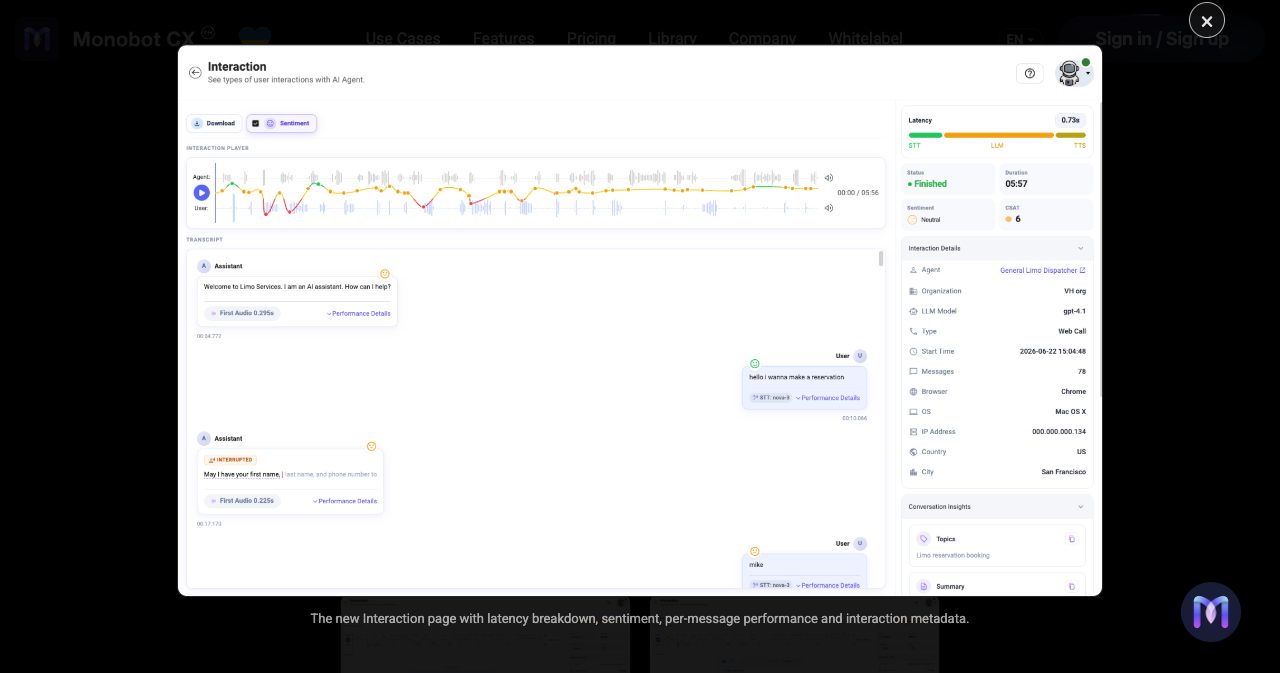
Every conversation gets an Interaction page with the transcript, the recording, a sentiment graph and a latency breakdown across speech-to-text, the language model and text-to-speech. A Debug mode streams tool calls and model responses live while you test.
The redesigned Interaction page shipped on June 22, 2026. In Monobot's own example, a six-minute web call to a limo dispatcher agent shows a latency reading of 0.73 seconds, split into STT, LLM and TTS segments with the language model taking the largest share. Each reply carries a First Audio figure of roughly 0.2 to 0.3 seconds, and turns where the caller interrupted the bot are tagged. The side panel records the language model, the speech model used on each caller turn, the message count and a CSAT estimate on a 1 to 10 scale with a written reason.
It is a single vendor example, so do not read it as a benchmark. It does show how much detail you get per call. Latency decides whether a voice product feels like a conversation, a point we also made in our HaloVoice review.
Debug mode is a checkbox in the Flow editor. Turn it on and a Live Debug Feed prints each step with a millisecond timestamp: the active flow, the tools offered to the model, the arguments it passed, the full JSON a tool returned and how long each action took. If you have ever tried to work out from a transcript alone why a voice bot said something odd, you will want this.
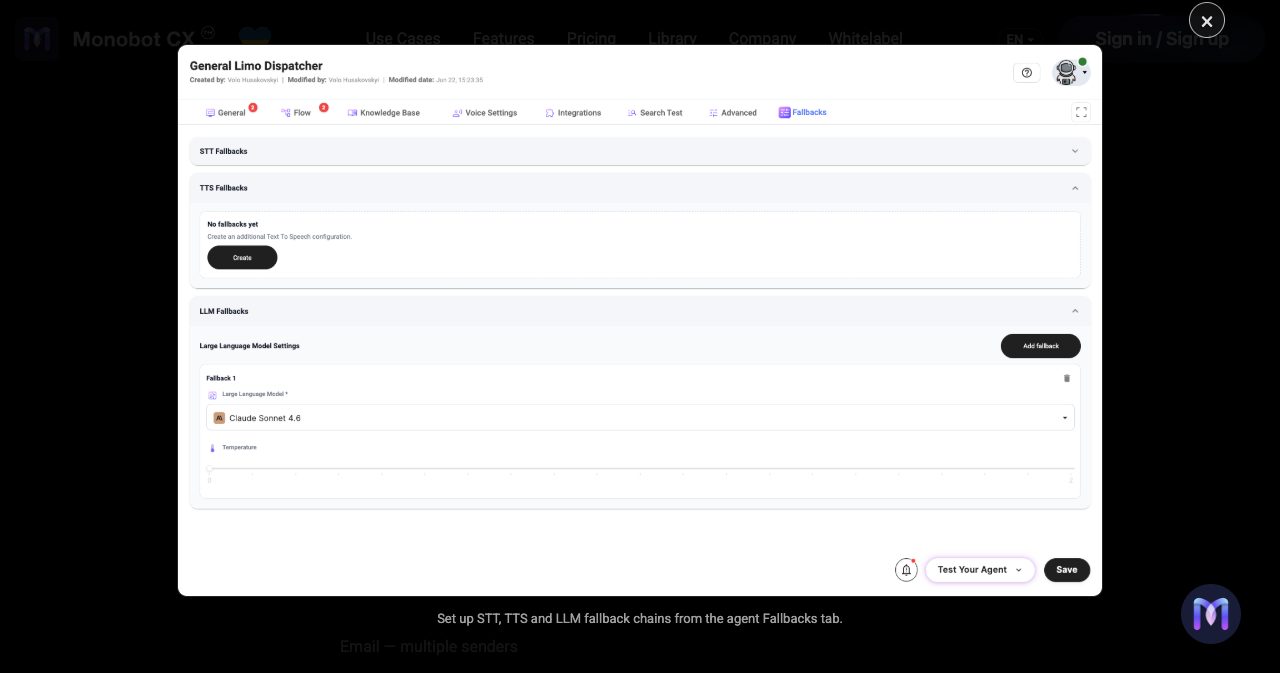
Model fallbacks are the other reliability feature I would set up on day one. You can chain fallback models for STT, TTS and the LLM. If the primary provider errors, the agent moves to the next one and the call continues. Model providers have bad afternoons, and new models ship constantly (we wrote about that in our piece on AI model fatigue), so a call that survives an outage is worth the setup time.
The pricing page also lists Automated AI Agent Testing, billed at your plan's chat rate, and the agent editor has Search Test and Test Results tabs. The public docs do not cover testing in depth yet, so ask for a walkthrough on the demo.
How much does Monobot cost?
Monobot sells monthly credit packages: Starter at $200, Growth at $500 and Business at $1,000, plus a custom Enterprise plan. The package is a balance you spend on any channel at your plan's unit rates. Voice costs $0.27, $0.25 or $0.22 per minute, and overage is billed at the same rates. The figures below come from Monobot's pricing page.
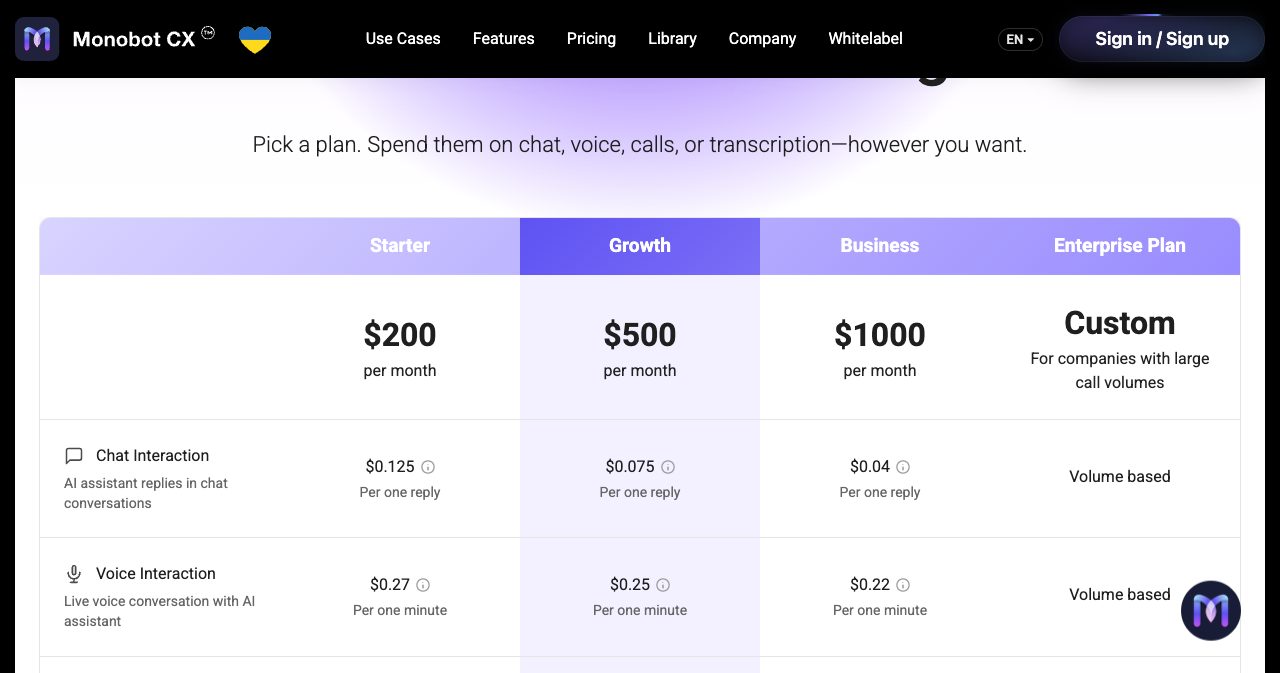
| Starter | Growth | Business | Enterprise | |
|---|---|---|---|---|
| Monthly package | $200 | $500 | $1,000 | Custom |
| Chat reply | $0.125 | $0.075 | $0.04 | Volume based |
| Voice minute | $0.27 | $0.25 | $0.22 | Volume based |
| Workspace minute | $0.05 | $0.04 | $0.03 | Custom |
| SMS | $0.035 | $0.03 | $0.025 | Custom |
| Imported recording minute | $0.05 | $0.04 | $0.03 | Custom |
| Phone number, per month | $2.50 | $2.50 | $2.50 | Custom |
| Workspace seats included | 1 | 3 | 5 | Custom |
| Extra seat | $10 | $10 | $10 | Custom |
| Professional services included | 8 hours | 24 hours | 48 hours | 240+ hours |
| Support first response | Mon to Fri, 48h | Mon to Fri, 24h | Mon to Fri, 12h | 24x7, custom |
| Infrastructure SLA | Not listed | Not listed | Not listed | 99.99% |
| HIPAA Zero Data Retention add-on | $1,000/mo | $1,000/mo | $1,000/mo | $1,000/mo |
Every paid plan includes engineer time, which I rarely see on self-serve plans. The pricing page calls it Professional Services, and the site has an Expert Setup page where you request help through a Hire Expert button once a plan is active.
What a package buys
By Monobot's own estimates, $200 on Starter covers about 1,600 chat replies, or 741 voice minutes, or 5,714 SMS. $500 on Growth covers 2,000 voice minutes, and $1,000 on Business covers 4,545.
The package fee is also your minimum spend, so the cheapest plan depends on volume. I ran the numbers for voice-only usage:
| Voice minutes per month | Cheapest plan | Monthly bill |
|---|---|---|
| 500 | Starter | $200 (the package covers 741 minutes) |
| 1,500 | Starter | $405 |
| 2,000 | Growth | $500 |
| 3,000 | Growth | $750 |
| 5,000 | Business | $1,100 |
Starter stays cheapest up to about 1,850 voice minutes a month. Growth wins from there to 4,000 minutes, and Business wins above that.
A mixed example is more realistic. Take a clinic with 1,500 voice minutes, 2,000 chat replies, 500 SMS and two phone numbers a month. At Starter rates that comes to $677.50. At Growth rates it is $545, which is the $500 package plus $45 of overage. On Business the same usage adds up to only $427.50, well short of the $1,000 package. Growth is the right plan for that profile.
Monobot's pricing FAQ argues that most voice platforms bill the language model, the voice provider and the platform separately, and that the combined cost can reach $0.40 to $0.80 or more per minute. That comparison is Monobot's own, and your stack may differ. The structural point stands, though: one bundled rate is easier to forecast than three invoices. Voice prices across the category are also under pressure as open speech models improve, which we covered in our look at Microsoft VibeVoice.
The free sandbox
New accounts get free units to test with, and no credit card is required. One chat unit is one bot reply, and one voice unit is one minute of a call. Monobot's documentation lists the allowance as 100 bot responses and 10 voice minutes. Your live balance sits in the bottom-left corner of the admin panel.
The limit is where you can use them. Free units work only inside the admin panel, for chat tests and test calls. Putting a widget on a public site or connecting a phone number requires a subscription. I think that is a fair line to draw, and the docs state it plainly.
How does Monobot compare to other AI voice agent platforms?
Monobot sits between developer-first voice APIs such as Vapi and Retell AI and enterprise conversational AI suites such as PolyAI and Parloa. It gives non-engineers a visual builder, and it keeps the telephony and supervision features that contact centers expect.
| Monobot CX | Developer-first voice APIs | Enterprise conversational AI suites | |
|---|---|---|---|
| Who builds the agent | Operations or product staff, in a visual Flow | Engineers, in code and configuration | Vendor or partner teams, as a project |
| Pricing | Public packages with one bundled voice rate | Usage based, often with model, speech and telephony as separate lines | Custom quotes |
| Telephony | SIP, SIP trunks and phone numbers in the dashboard | Bring your own carrier or buy through the platform | Deep contact center integrations |
| Tools for human agents | Workspace desktop, listen-in and barge-in | Usually left to your own stack | Usually the existing contact center platform |
| White label | White-label and OEM modes | Varies by vendor | Uncommon |
Category descriptions are generalizations from each vendor's public positioning. Check their current pages before you decide.
If you want raw API control and have engineers to spare, a developer-first platform gives you more freedom. If you are a bank with a procurement department and a two-year roadmap, you will probably end up with an enterprise suite. Monobot is the practical choice for the wide middle: BPOs, clinics, dispatch desks and agencies that resell voice agents.
That last group gets its own feature set. Monobot offers white-label and OEM deployments on your own domain and branding, multi-tenant portals with roles and usage limits, SAML or OIDC single sign-on, and since June a shared balance that lets child organizations draw from the parent's credits.
What should you ask on the demo call?
Monobot's public material answers most product questions. A few things are not spelled out on the site, and a 30-minute demo should settle them. These are the ordinary gaps of a young company's public docs.
- Who can I talk to in my industry? The site quotes figures such as up to 80% of inbound requests automated, 40% lower support costs and 92% of issues solved on the first call. Those are Monobot's numbers, and I did not find detailed public case studies behind them. A reference call is the normal way to close that gap.
- How does the Genesys integration work? Genesys is on the integrations list and the about page names Genesys and Twilio, but the public docs give the integration two sentences. Ask whether your setup would use a Genesys audio integration or a SIP transfer, and how call-attached data maps across.
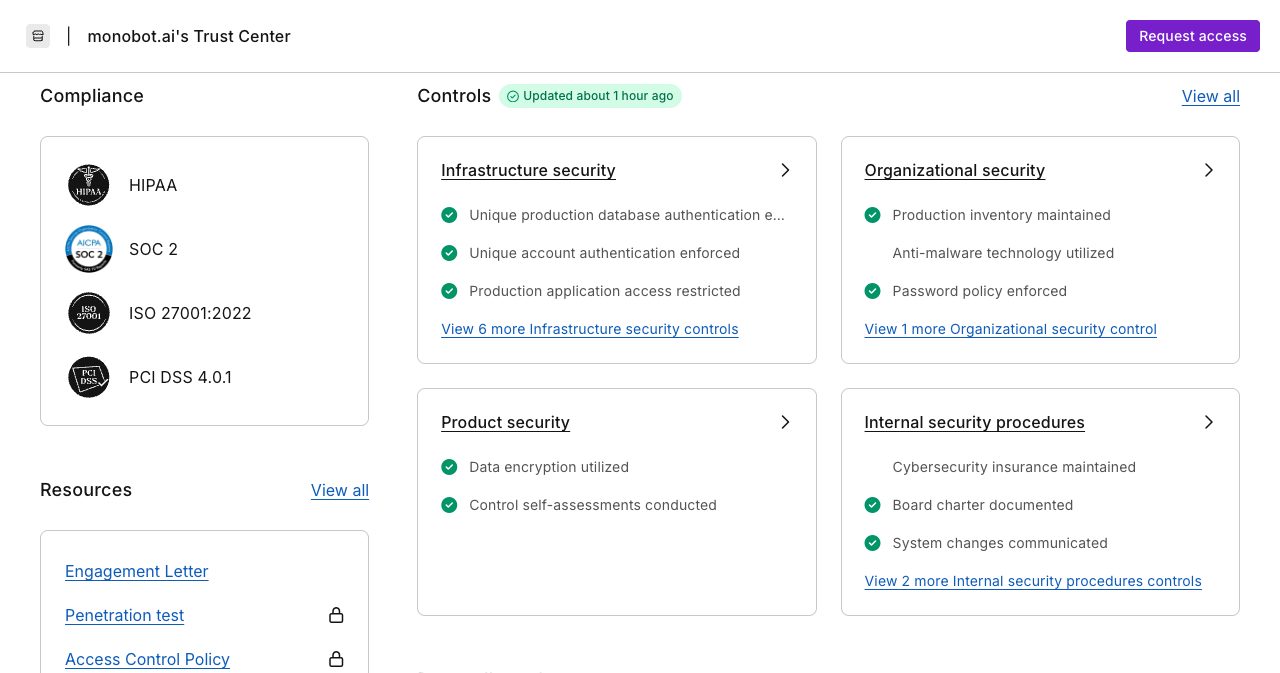
- Which compliance audits are complete? The footer links to a Trust Center hosted on Vanta. It lists HIPAA, SOC 2, ISO 27001:2022 and PCI DSS 4.0.1, shows monitored security controls and names subprocessors including Amazon Web Services, Deepgram, OpenAI and Twilio. The penetration test and the policies sit behind a Request access button. If you handle patient or card data, request access, ask for the audit reports and their dates, and get a Business Associate Agreement in writing. Our SaaS compliance checklist covers what a SOC 2 report does and does not prove.
- How long are recordings and transcripts kept? Recording is a per-agent switch called Save Voice Recordings. Ask about default retention and the storage region.
- How do the package details work? Ask whether unused balance rolls over, whether the included engineer hours are monthly or one time, and whether carrier charges on phone calls sit inside the voice rate.
- Is my language pair covered? The site says 20+ languages and 30+ voices. The real list depends on the speech providers you choose, so test with the accents your callers have.
Who is Monobot a good fit for?
Monobot fits businesses with steady call volume that want AI agents and human agents working in one system.
A good fit:
- BPOs and contact centers that want AI on first-line calls while keeping humans, supervision and reporting in the same tool.
- Appointment and reservation businesses such as clinics, salons, restaurants and service shops. The Cal.com, Google Calendar and Altegio actions cover the whole booking loop.
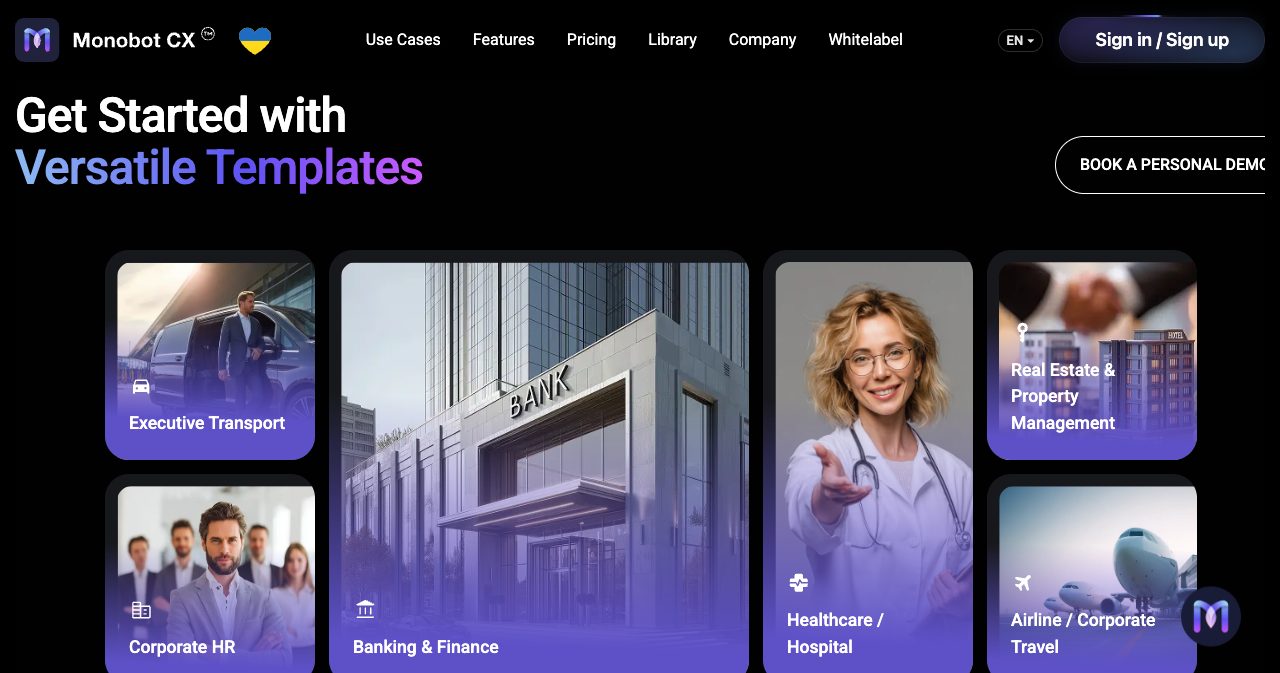
- Ground transport and dispatch companies. This is the clearest vertical in Monobot's own material. The demo agent in the release notes is a limo dispatcher, the integrations include EverTransit and G-Net, and the homepage logo strip shows limousine operators such as Holland Limousine Group next to technology partners such as Deepgram and Eccentex.
- Agencies and SaaS teams that want to resell voice agents under their own brand.
- Teams on SIP or Genesys that need an AI layer without replacing their phone system.
Less of a fit:
- Solo founders who need a $20 chatbot. The $200 minimum is sized for businesses with real call volume.
- Engineering teams that want to own every layer in code.
Verdict
Monobot reads like a contact center product that learned to use language models, and for a business that depends on calls being answered, that is the right order. The Flow builder gives conversations a structure you can test, and the speech stack is visible and swappable. The handoff to humans, with listen-in, barge-in and a separate agent desktop, is more complete than I expected from a company this young. The price list is public down to the SMS.
It is still an early-stage vendor. The headline outcome numbers are its own, a few integrations have only brief public docs, and the compliance reports are available on request, so read them yourself. The release pace is encouraging: Flow 2.0 and white-label mode arrived in February 2026, then live supervision, Create From Web and model fallbacks in June.
My suggestion is to make the product prove itself on your content. Create a free Monobot account, build an agent from a template or from your own website, make a few short test calls inside the free voice minutes, and open the Interaction page to read the latency and the transcript. If the agent holds up, use the pricing table above to pick a plan and the question list to run the demo.
FAQ
What is Monobot?
Monobot is a no-code platform for building AI agents that handle voice calls, web chat and SMS. The product is called Monobot CX and is operated by TRING, Inc. of Mountain View, California. It is aimed at contact centers, BPOs and appointment-driven businesses that want AI to answer routine conversations and hand complex ones to human agents.
How much does Monobot cost?
Monobot sells monthly credit packages: Starter at $200, Growth at $500 and Business at $1,000, plus a custom Enterprise plan. The package is a balance you spend at your plan's unit rates. Voice costs $0.27, $0.25 or $0.22 per minute, chat costs $0.125, $0.075 or $0.04 per reply, and phone numbers cost $2.50 a month. Overage is billed at the same rates.
Does Monobot have a free trial?
Yes. New accounts get free units for testing inside the admin panel, with no credit card required. Monobot's documentation lists the allowance as 100 bot responses and 10 voice minutes. Free units cannot be used for public website widgets or phone numbers. Publishing an agent to either one requires a paid plan.
Which channels and phone systems does Monobot support?
Monobot agents work on phone calls, browser web calls, website chat widgets, SMS and Instagram direct messages. For telephony the docs cover SIP connections, SIP extensions, external SIP trunks, SIP registration and phone numbers bought inside the dashboard. Calls can be transferred to a phone number or call center with call-attached data.
Can a human take over a call from a Monobot AI agent?
Yes. Since the June 22, 2026 release, supervisors can use Start Listening to monitor a live call silently and Barge In to interrupt the bot and speak to the customer directly. Agents can also transfer calls with a spoken introduction for the person who picks up, and the separate Workspace product gives human agents AI hints, transcripts and summaries.
Does Monobot integrate with Genesys?
Genesys appears in Monobot's integrations list, and the company's about page names Genesys and Twilio as platforms it connects with. The public documentation for the Genesys integration is brief, so ask Monobot whether your setup would use a Genesys audio integration or a SIP transfer, and how call-attached data is passed.
Which languages and AI models does Monobot support?
Monobot says it supports 20+ languages and 30+ voices. You choose the speech-to-text and text-to-speech providers per agent, and the June 2026 release added Deepgram Flash multilingual with code switching plus the Gemini 3.5 Flash, GPT 5.4 and GPT 5.5 language models. Fallback models can be configured for each layer.
Is Monobot HIPAA compliant?
Monobot sells a HIPAA Zero Data Retention add-on for $1,000 a month on every plan, and its Vanta-hosted Trust Center lists HIPAA, SOC 2, ISO 27001:2022 and PCI DSS 4.0.1. The reports and policies sit behind a Request access button. Healthcare buyers should request them and ask for a Business Associate Agreement before sending patient data.
Who is Monobot best for?
Monobot fits BPOs and contact centers that want AI on first-line calls, appointment-driven businesses such as clinics, salons and restaurants, ground transport and dispatch companies, and agencies that want to resell voice agents under a white label. Teams that want to build everything in code, or that need a tool under $200 a month, should look at other options.
Building a voice or AI product of your own? Launch it on SaaSCity and put it in front of founders and early adopters.
Get your SaaS in front of founders
List your product on the SaaSCity live city map - a permanent listing, real discovery, and a backlink from a high-DR directory. Free to start; upgrade for a dofollow link and a building on the map.