Reviews
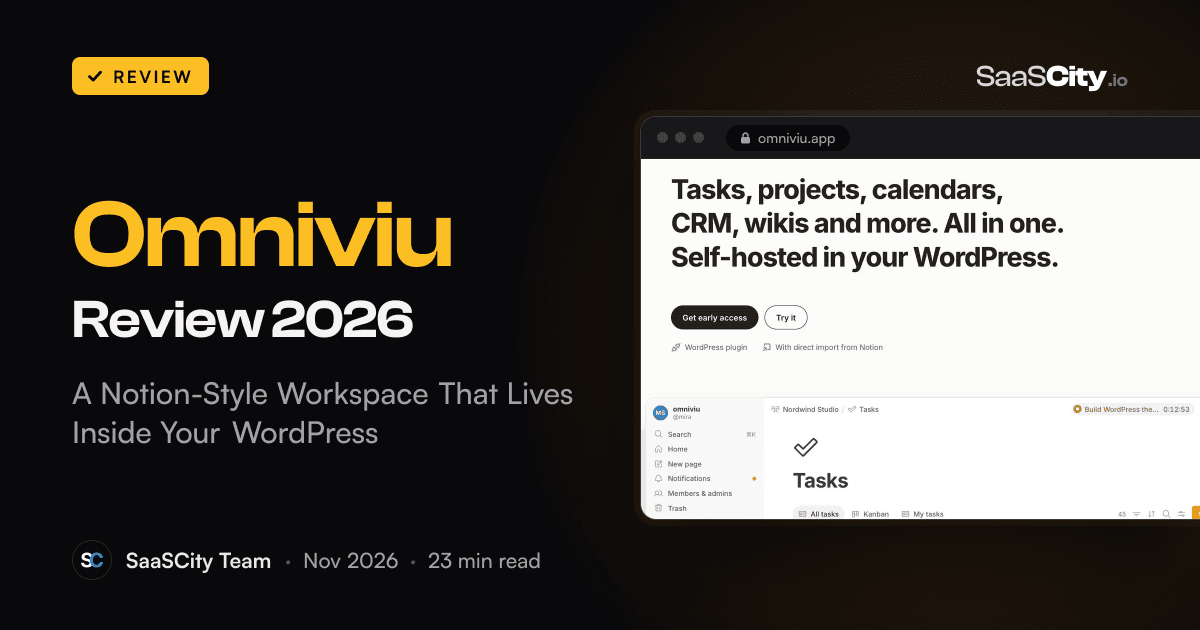
Omniviu Review 2026: A Notion-Style Workspace That Lives Inside Your WordPress
Omniviu (omniviu.app) is a WordPress plugin that adds a Notion-style workspace to your own site: wiki pages, databases in six views, tasks, a light CRM and time tracking with budgets, plus a direct import from Notion. Here is how it works, what it needs, what it costs and who it fits.

Contents (16)
- Omniviu in short
- Who makes Omniviu, and why it is built on WordPress
- A tour of the workspace
- Real-time collaboration, even on cheap hosting
- Time tracking, budgets and hourly rates
- Moving from Notion: how the direct import works
- Privacy and data ownership
- What you need to run Omniviu
- Backups, exports and peace of mind
- Who Omniviu is for
- Omniviu pricing
- Where Omniviu asks something of you
- Omniviu vs Notion and other alternatives
- How to get started with Omniviu
- The verdict
- Frequently asked questions
Disclosure: this is a sponsored review.
Product details and prices were checked against omniviu.app, its documentation, blog, licence terms, withdrawal and privacy pages on November 20, 2026.
Quick answer: Omniviu is a WordPress plugin that adds a private, Notion-style workspace to your own site: wiki pages, databases in six views, tasks, projects, a light CRM and server-side time tracking with budgets, with real-time co-editing that runs on ordinary shared hosting. Your data stays in your WordPress database, and a direct import brings your Notion pages, databases and views across. It costs $99 a year for one site, $199 for up to five and $399 for up to 100, with unlimited people on every plan. As of November 20, 2026, it is in early access with a public waitlist.
Most small teams end up with the same stack. Notes and the company wiki in one app, tasks in another, client details in a CRM, hours in a time tracker. Each one bills per person, each one keeps its own copy of your data on someone else's servers, and none of them knows what the others contain. The bill grows every time you hire, and the question of where your client files actually live gets harder to answer.
Omniviu takes a different route. It is a WordPress plugin that adds a full workspace to a WordPress site you already control: wiki pages, relational databases, tasks, projects, a light CRM and time tracking with budgets, all in one app. It runs on ordinary shared hosting, keeps everything in your own database, costs one flat price per website no matter how many people use it, and brings your content over from Notion with a direct import. This review covers what Omniviu does, how it works under the hood, what it costs, who it suits best and what to know before you move your team onto it.
Omniviu in short
Omniviu is a self-hosted workspace plugin for WordPress. Once installed, it runs as an app at /app/ on your site, where your team signs in with their existing WordPress accounts. Inside, you get nested wiki pages with a block editor, databases with relations and rollups shown in six views, tasks and projects with a server-side timer, client records, comments and real-time co-editing that works without WebSockets. All content stays in your WordPress database and a protected folder on your server, and nothing is sent to cloud services while you work. Pricing is per website per year with unlimited users: $99 for one site, $199 for up to five, $399 for up to 100. Omniviu is made by design frischgepresst, a web design and branding studio in Heidelberg, Germany, and as of November 20, 2026, it is in early access with a public waitlist.
| Quick facts | |
|---|---|
| What it is | A WordPress plugin that adds a wiki, databases, tasks, projects, CRM and time tracking |
| Where it runs | Your own WordPress site, at /app/, on shared hosting with PHP and MySQL or MariaDB |
| Best for | Agencies, freelancers, law firms, practices, clubs, schools and anyone leaving Notion |
| Price | $99 a year (1 site), $199 (up to 5), $399 (up to 100), unlimited people on every plan |
| Refunds | 30-day money-back guarantee on the first purchase, 14 days after a renewal |
| Notion import | Direct import of pages, databases, views, relations, people, dates and comments |
| Languages | English and German interface, chosen per person |
| Apps | Runs in any browser, installable on phones as a home screen web app |
| Licence | GPL version 2 or later, sold through Freemius |
| Status (Nov 20, 2026) | Early access, waitlist open on omniviu.app |
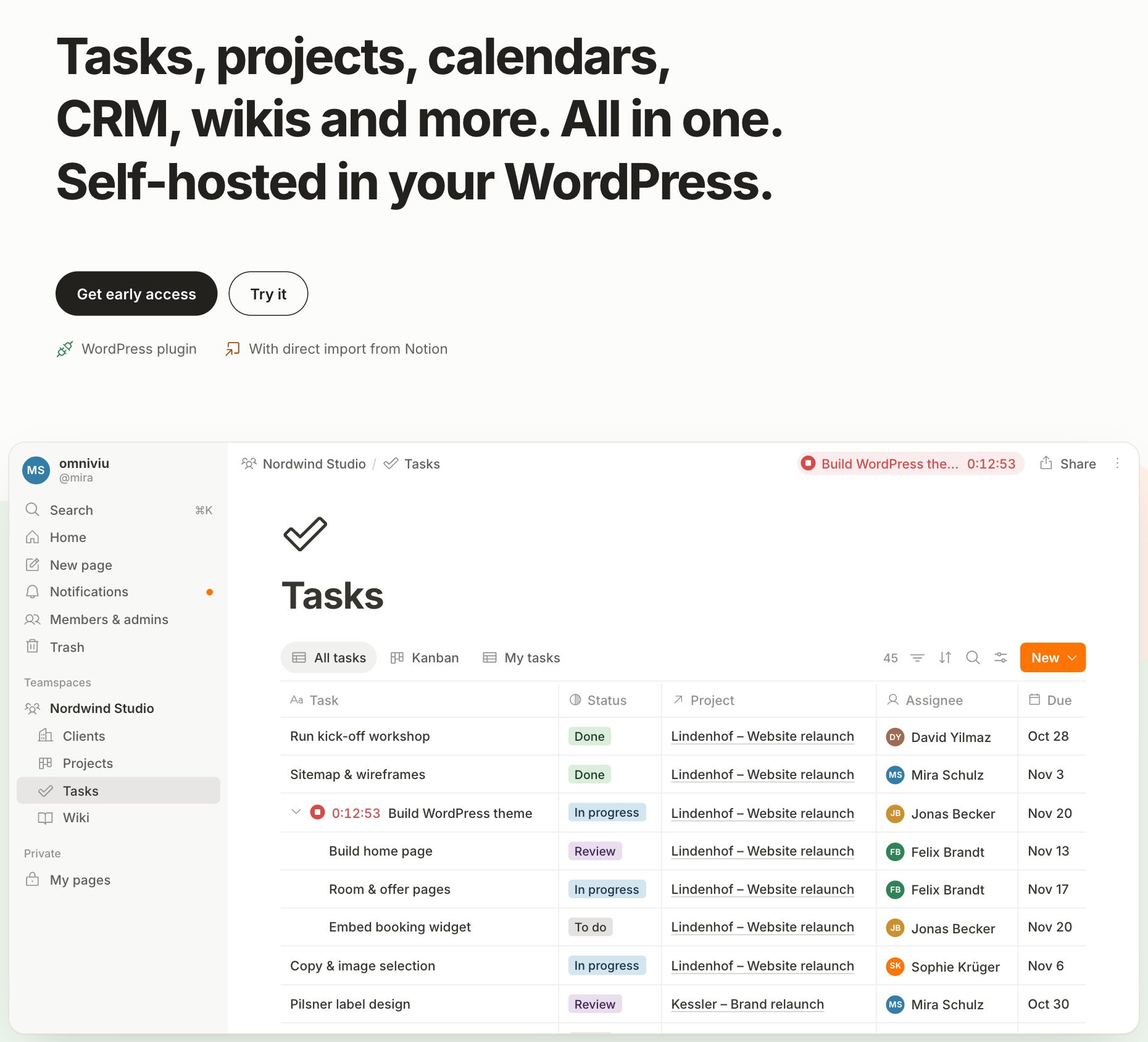
The Omniviu homepage opens with a working demo. Here, a Tasks database with subtasks, statuses, linked projects and a timer running on "Build WordPress theme". Screenshot: omniviu.app, November 2026.
Who makes Omniviu, and why it is built on WordPress
Omniviu comes from design frischgepresst, a Heidelberg studio run by Georg Kettler that builds websites and brands for its own clients and for agencies. The studio's site describes more than 20 years of project work. That background shows in the product's choices. A studio that has spent two decades setting up WordPress sites for clients knows two things well: almost every small business already has WordPress hosting, and almost nobody wants to run Docker containers or a Node.js server just to keep a team wiki.
So instead of asking you to rent another cloud service or maintain a separate server stack, Omniviu goes where your hosting already is. It installs like any plugin, uses WordPress accounts and roles for sign-in, and stores its data in WordPress tables. Your existing backup plugin covers it, your host's security covers it, and your data sits in the same place as the rest of your site.
There is also a principle behind it. Omniviu's site says it loads no external fonts, makes no Gravatar requests and uses no cloud services while in operation. The only outside connections happen when you trigger them, such as a Notion import or a web bookmark, plus licence checks and updates. If the point of self-hosting is to keep your data at home, the software should not quietly send it back out.
A tour of the workspace
The homepage demo is clickable, and it gives a good feel for the app before you install anything. The layout will look familiar to anyone who has used Notion: a sidebar with search, home, notifications and trash, teamspaces with their pages underneath, and a private section for your own pages.
Pages and the wiki
Pages are the backbone. You write in a block editor with a slash menu, callouts, toggles and web bookmarks, nest subpages as deep as you like and link between pages by typing "@". Version history, a trash and undo protect against mistakes, and undo works outside the editor too. You can duplicate any page, database or entry, or copy only its structure to use as a template.
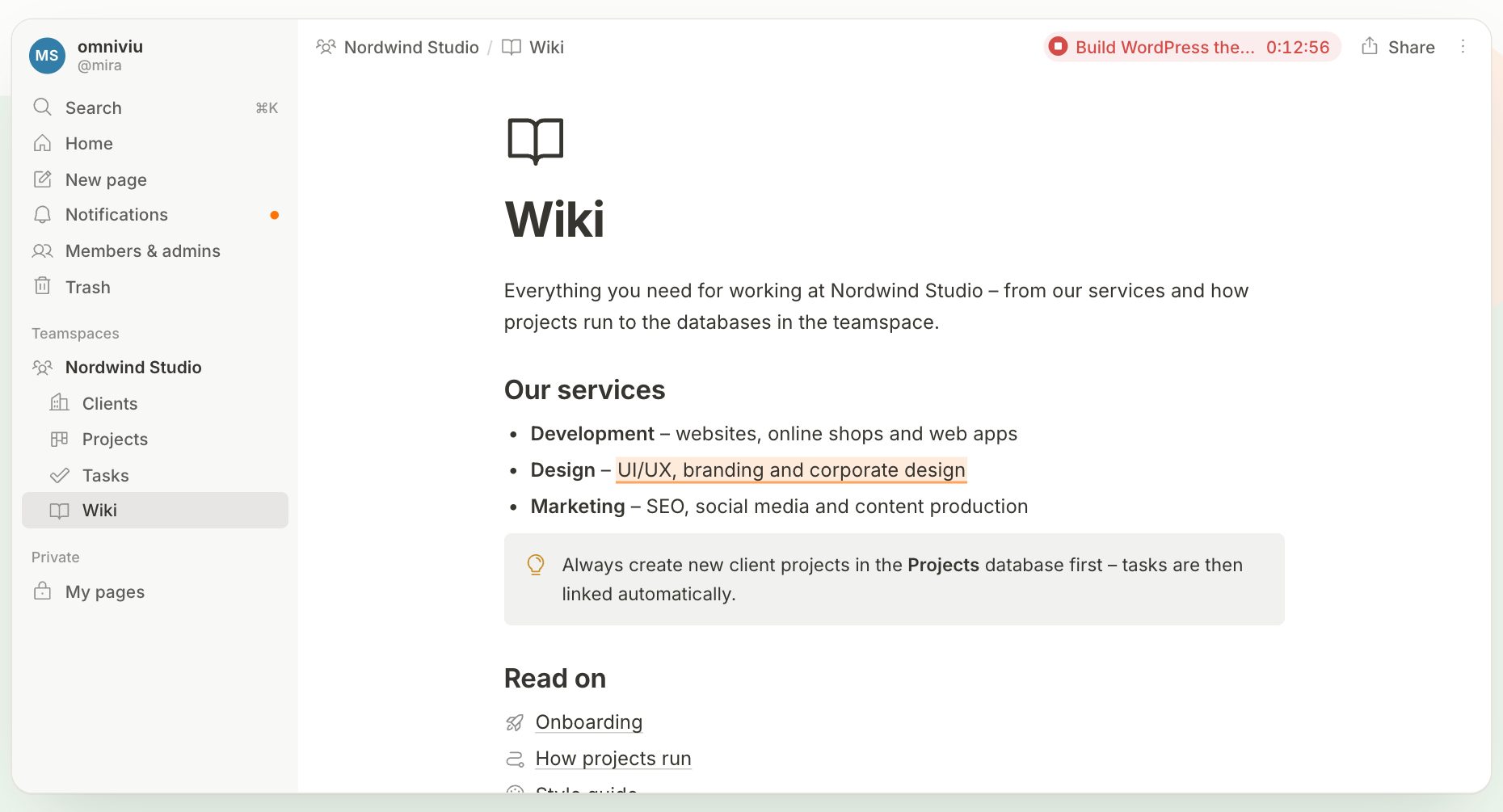
A company wiki page in the demo, with a commented passage and a callout. Screenshot: omniviu.app, November 2026.
Small touches make it feel personal. There are around 1,500 icons, all emojis or your own uploads. Each person picks light mode, dark mode or the system setting, and each person sets the interface language to English or German. Everyone also gets a personal home page that can hold linked views of any database, with their own filters, so a dashboard of "my tasks this week" sits right next to your notes.
Databases and views
Databases are where Omniviu goes beyond a wiki. A database holds entries with properties such as status, dates, people, progress bars and sub-items, and databases connect through relations and rollups. Link projects to clients and tasks to projects, and a rollup on the project can count open tasks or show progress without any manual updating. Relations also work across teamspaces.
You can show the same database in six views: table, board, calendar, gallery, timeline and chart. Personal views let each person set up their own filters without changing what everyone else sees. You can also embed a database inside a page and show only the entries that belong to that page, which is how a client page ends up showing just that client's projects.
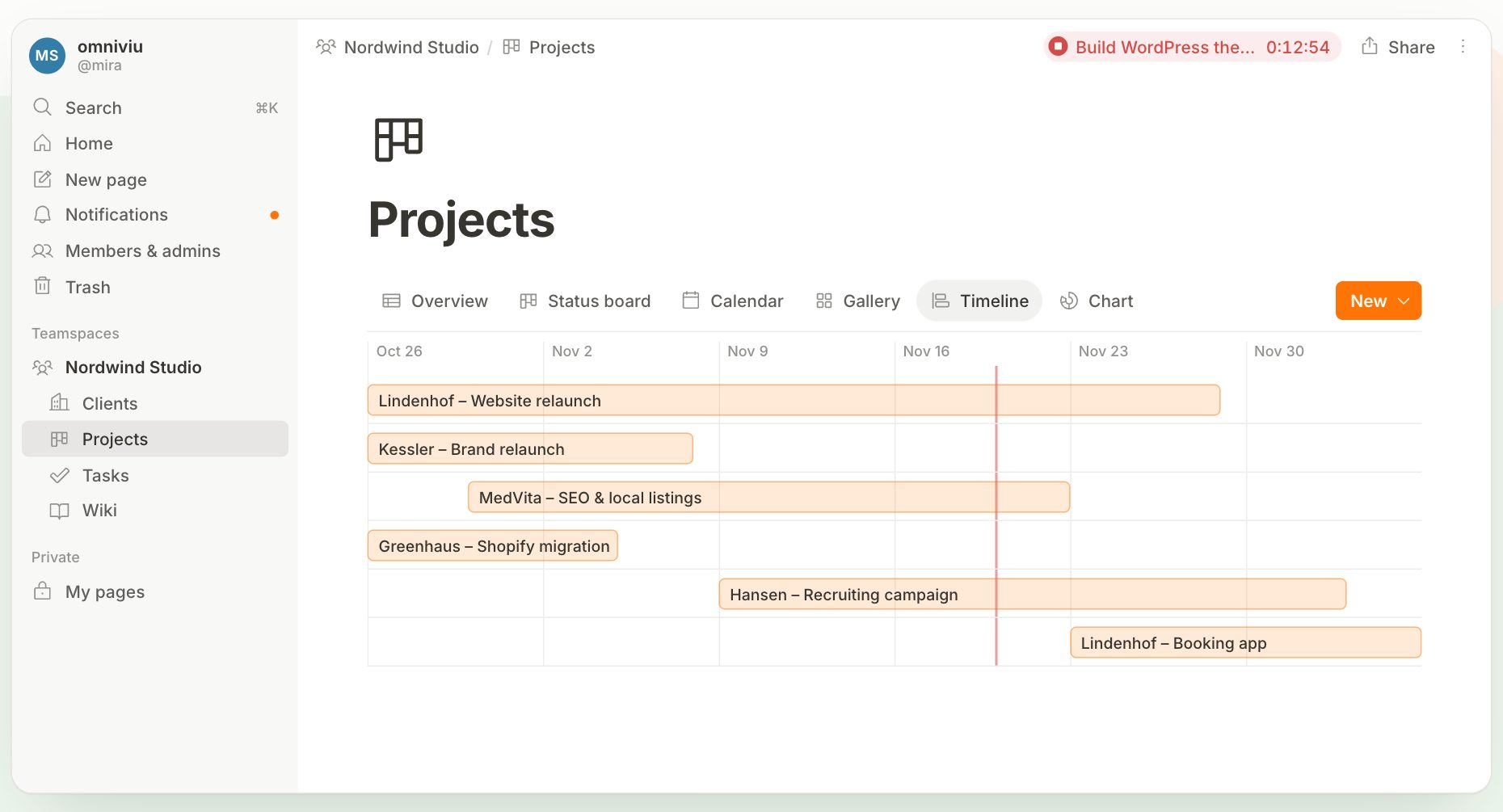
The demo's Projects database in timeline view. The same data switches to a status board, calendar, gallery or chart with one click. Screenshot: omniviu.app, November 2026.
Tasks, projects and clients
Omniviu ships with the building blocks for project work and leaves the shape to you. Tasks can live in a list, on a board or in the calendar, with subtasks, statuses, due dates and assignees. Projects get a timeline, a progress percentage and tracked time. Clients become a database of their own, linked to projects and tasks, and a board view of that database turns into a simple sales pipeline. Content plans and appointments go in the calendar and move by drag and drop.
Real-time collaboration, even on cheap hosting
This is the most unusual part of the product. Real-time editing in web apps usually depends on WebSockets, which ordinary shared hosting rarely supports, so self-hosted wikis such as Outline or Docmost run on a server stack of their own. Omniviu gets real-time co-editing working on standard PHP hosting without WebSockets.
Several people can work on the same page at once, and the sidebar, databases and titles update for everyone as they change. Comments attach to specific passages, mentions notify the right person, and a daily email digest rounds up what happened. Anyone who prefers a quiet inbox can switch the digest off.
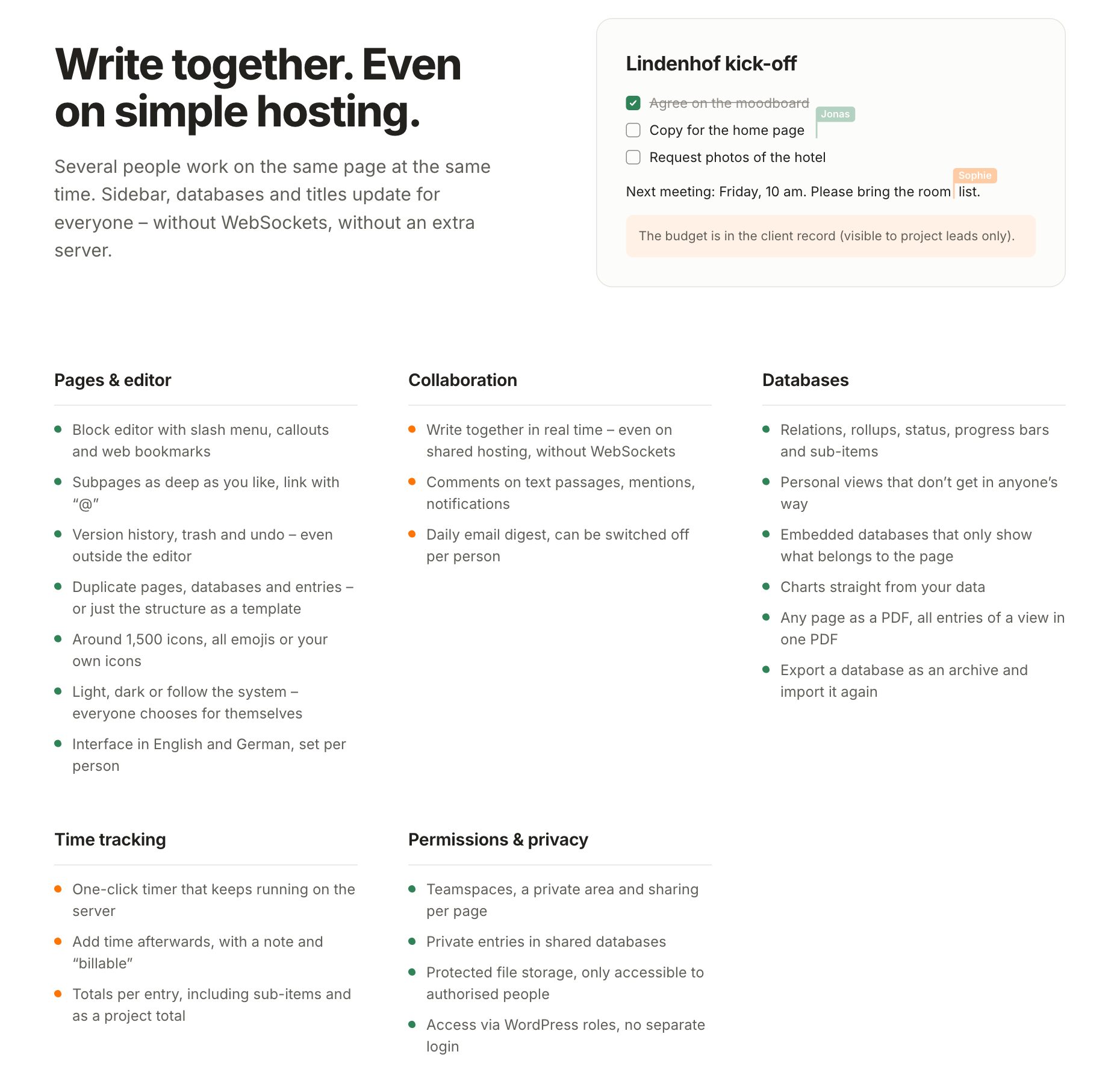
Two people editing the same kick-off page, above Omniviu's full feature list. Screenshot: omniviu.app, November 2026.
The site is clear about one practical point: very cheap hosting plans sometimes throttle lots of small requests. Omniviu's system status page in the WordPress admin spots this and tells you, so you find out on day one and not in the middle of a meeting. If a security plugin or host blocks direct calls to PHP files inside plugin folders, the docs show the single exception to add for the sync file.
Time tracking, budgets and hourly rates
For agencies and freelancers, this section alone may justify the switch. Omniviu has time tracking built into its databases, so hours live next to the tasks and projects they belong to instead of in a separate app.
You turn tracking on for any database, such as tasks or projects. A one-click timer starts from the table, the entry page or the header. The timer runs on the server, so it keeps going when you close the browser and shows up on your phone. If you forget to stop it, Omniviu notices and offers to correct the end time. You can add time afterwards with a note and a "billable" flag, and columns show what the whole team tracked and what you tracked yourself, including sub-items.
Budgets sit on top of that. Set a budget in hours, in money or both, as a fixed total or as a retainer that resets every month, quarter or year. Omniviu adds up time across linked tasks, subtasks and sub-projects and shows what is used and what is left.
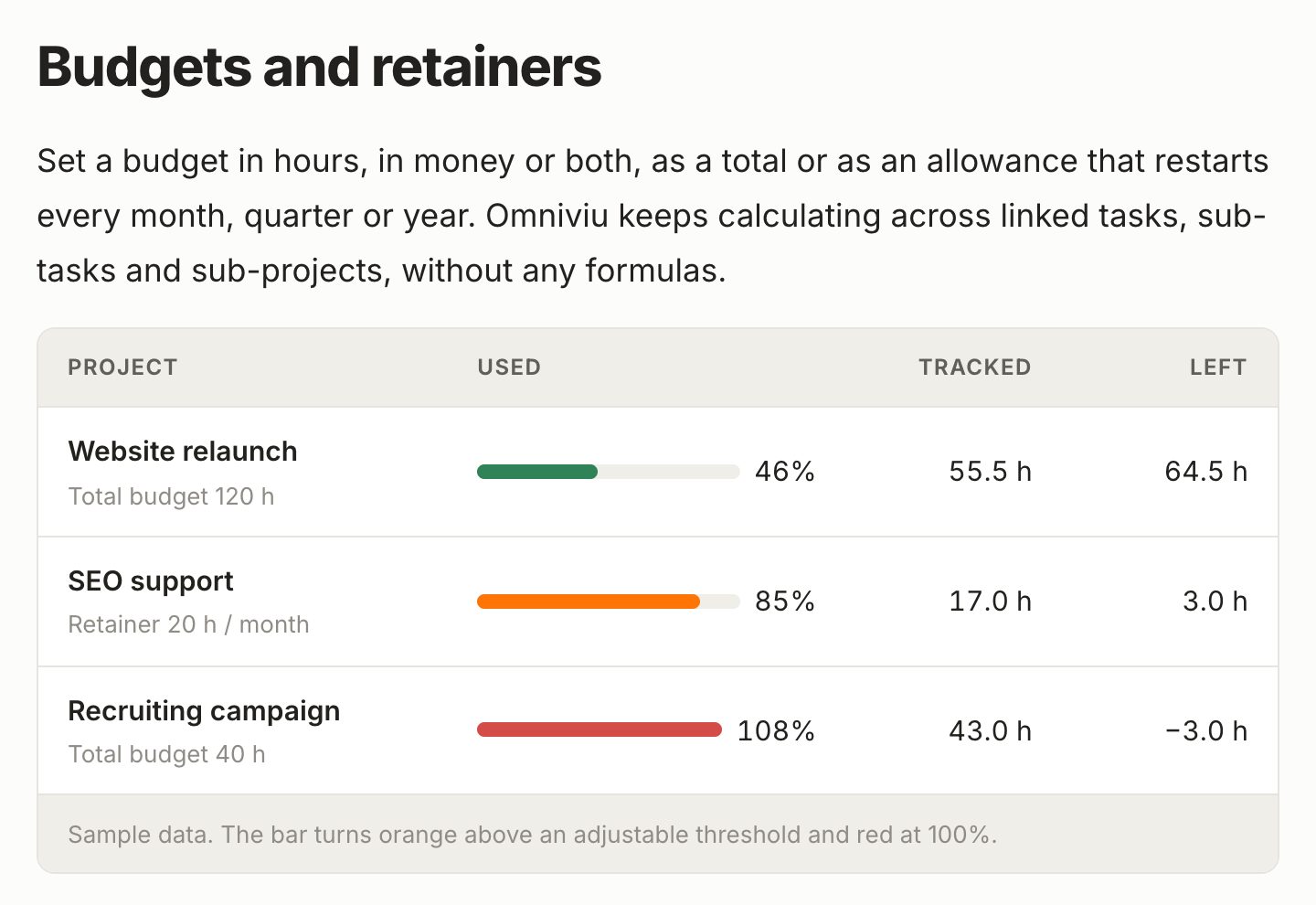
Budgets and retainers, with sample data from Omniviu's time-tracking guide. Bars turn orange above a threshold you set and red at 100 percent. Screenshot: omniviu.app, November 2026.
Hourly rates inherit from the general to the specific. You might set a default of $95, override it with $110 for one client, $120 for a project and $140 for a single specialist task, and Omniviu uses the most specific rate that applies. Only app admins see rates, money budgets and amounts, and Omniviu's guide to time tracking and project budgets says those figures stay hidden from everyone else in filters, rollups, exports and published pages. Your team sees hours, you see money.
Because "used" and "remaining" are ordinary properties, you can filter on them. A saved view such as "over 80 percent used" becomes a morning list of the clients you should talk to before a budget runs out. For billing, you filter billable time by project and export it as a CSV file for Excel or your accounting software, and billed time is locked so nothing shifts afterwards. An invoicing module is in development.
Moving from Notion: how the direct import works
Plenty of teams like Notion's way of working and simply want it on their own server. Omniviu's direct import is built for them, and it goes well beyond uploading an export file.
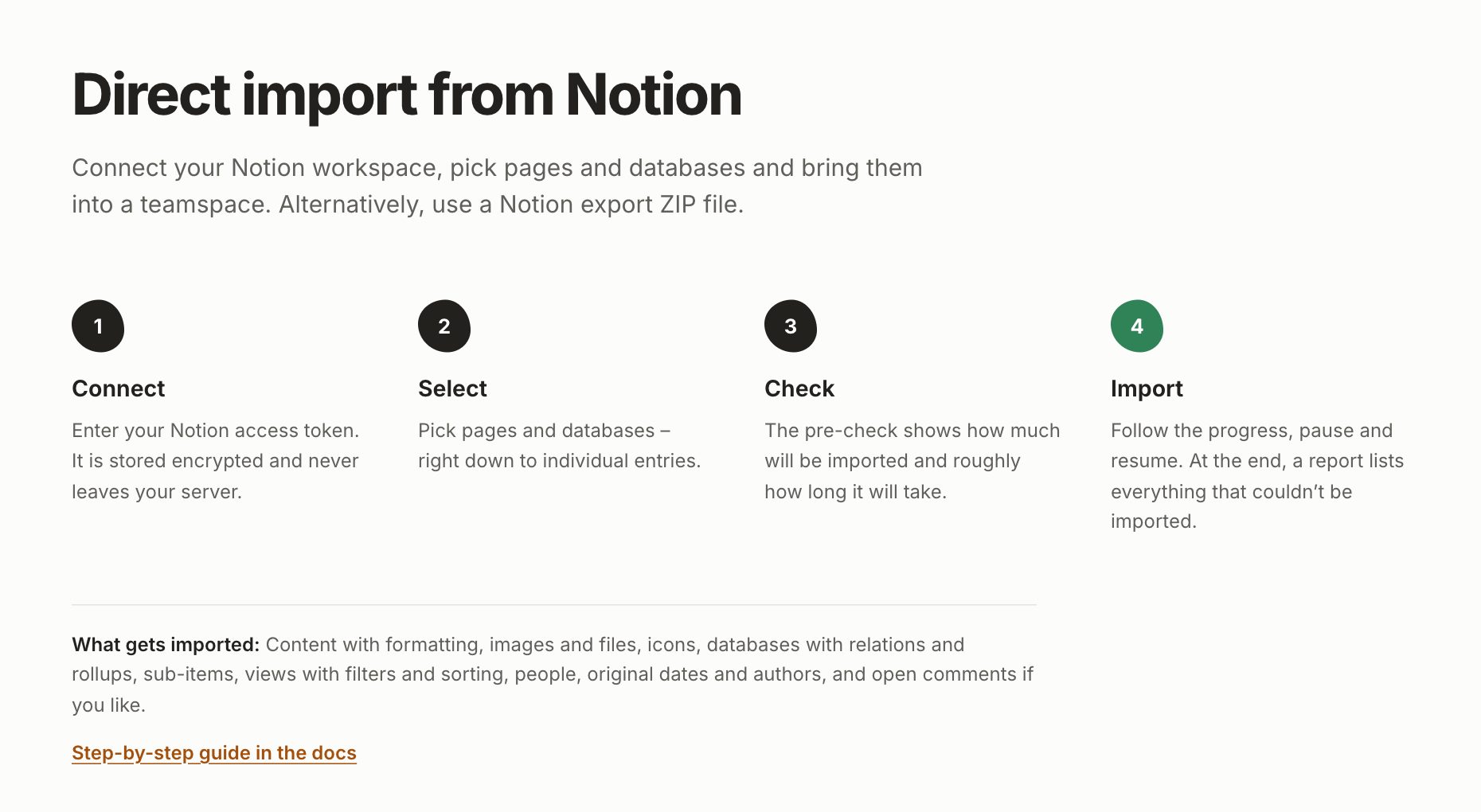
The four steps of the Notion import. Screenshot: omniviu.app, November 2026.
Here is how a move works, step by step:
- In Notion, create an internal integration and share the pages you want to move with it. Omniviu's import dialog shows you how.
- In Omniviu, click "+" next to a teamspace, choose "Import" and then "Directly from Notion", and paste the access token. It is stored encrypted on your server and never sent to the browser.
- Pick what to bring over from a searchable tree, down to single database entries.
- Read the pre-check, which tells you how many pages, databases and entries will come across and roughly how long it will take.
- Start the import, follow the progress bar, and pause or resume whenever you like.
- Review the final report, which lists anything that could not be imported.
What comes along is impressive: formatted text, column layouts with their widths, images and files, icons, databases with all common property types, relations, rollups and sub-items, views with their filters and sorting, original creation dates and authors, and open comments if you want them. People are matched to WordPress accounts by email address, so assignees survive the move if your team has accounts first.
A few Notion features have no direct counterpart. Formulas come across as fixed values, while rollups Omniviu can calculate stay live. Buttons, places and verification properties are skipped, as are form, map and dashboard views, and very complex nested filters may be simplified. The final report lists each of these, so nothing goes missing silently.
Two details make the move low-stress. You can run the import again later, and Omniviu skips what is already there and fills in links to pages that arrive in the second run, so you can move one teamspace at a time and keep Notion running in parallel. And if you are not an admin, you can still import a Notion "Markdown & CSV" export file, which carries less detail. The Moving from Notion guide in the docs walks through every option.
Privacy and data ownership
Omniviu's main promise is that your workspace data never leaves your server, and the architecture backs that up. Pages, permissions, versions, comments and time entries live in your WordPress database. Uploaded files, images and custom icons go to a private folder, separate from the public Media Library, that only authorised people can open.
Inside the app, permissions are fine-grained. Work is organised in teamspaces, everyone has a private area only they can see, and pages can be shared one by one. Entries in a shared database can be marked private, which matters for things like job applications or client files that should sit in the same database without being visible to everyone. When you need to show something outside the team, you can publish a read-only page through a link, and search engines do not index it.
This makes Omniviu a natural fit for work that comes with confidentiality duties. Law firms, medical practices, therapists and agencies under NDA can keep their knowledge, files and projects on their own server or with a host they chose, with no third-party cloud involved while they work. GDPR compliance still depends on your hosting and your processes, as Omniviu's FAQ points out, but the hardest part, keeping data out of other people's clouds, is handled by design.
Omniviu has no AI features today, and that is a choice it explains on its blog. AI tools inside cloud workspaces usually send your content to an outside language model, and Omniviu would rather not open that side door. If it adds an AI connection later, the stated plan is that it stays off until an admin turns it on, uses the provider and key you choose (a self-hosted model included), respects the same permissions as everything else and works through an open standard such as the Model Context Protocol.
What you need to run Omniviu
The requirements are modest, and most WordPress hosts meet them already.
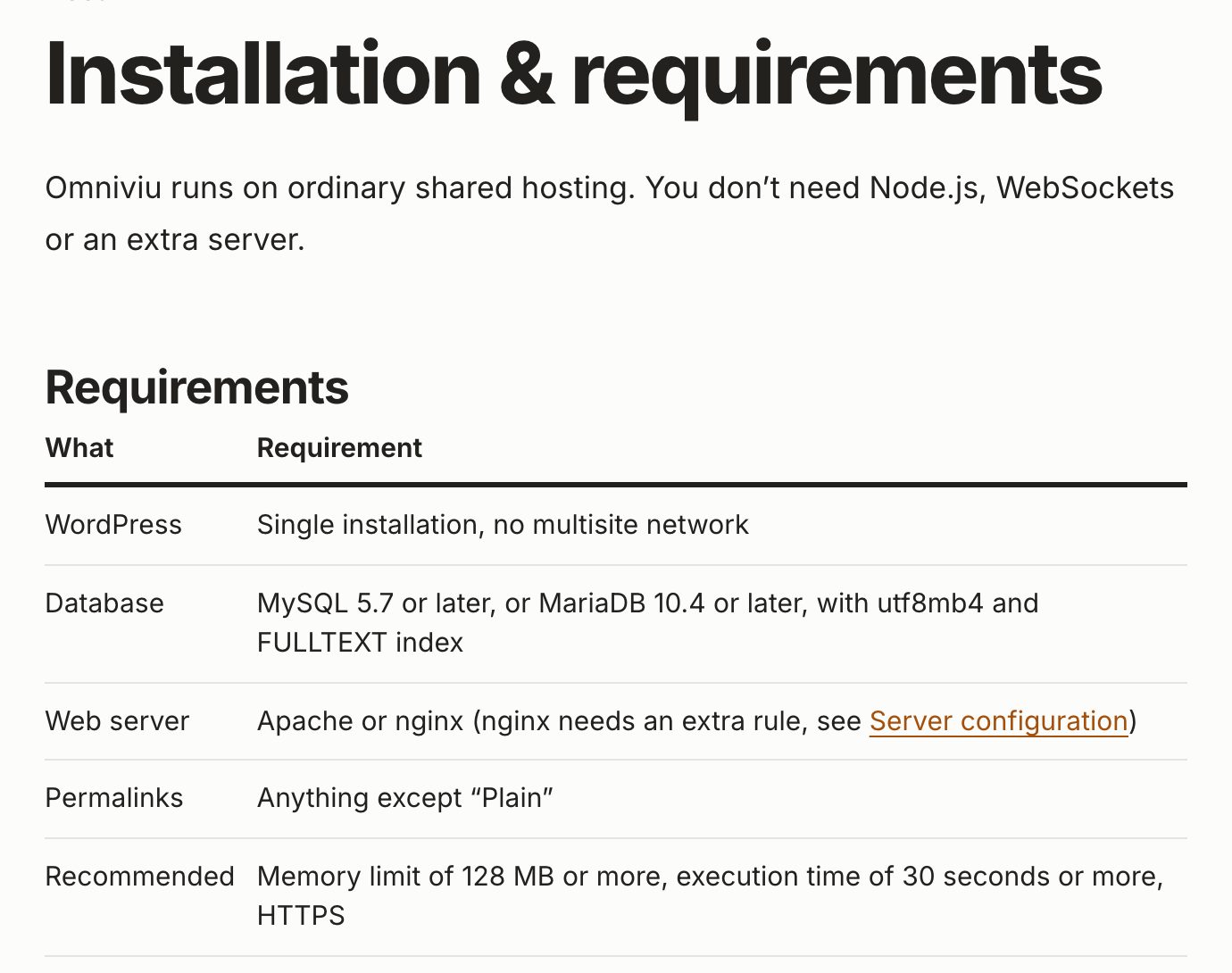
The requirements table in Omniviu's documentation. Screenshot: omniviu.app/docs, November 2026.
You need a single WordPress installation (multisite networks are not supported), MySQL 5.7 or later or MariaDB 10.4 or later, Apache or nginx, and any permalink setting except "Plain". Omniviu recommends a memory limit of at least 128 MB, an execution time of at least 30 seconds and HTTPS. On nginx you add one rule to protect the file storage, and the system status shows you the exact line for your server.
The best setup is a separate WordPress install just for the app, on a subdomain such as team.yourcompany.com. That keeps your internal workspace apart from your public website, so a theme update or a marketing plugin on the main site cannot get in the way. Installing on an existing site works too.
Getting started takes about ten minutes, according to the docs:
- Upload the Omniviu zip under Plugins, then Add New Plugin, then Upload Plugin, and activate it.
- Fix anything the overview flags, such as plain permalinks or a page already using
/app/. Most fixes take one click. - Under Omniviu, Settings, Access, choose which WordPress roles may use the app. Any role from Author upwards works, and administrators always have access.
- Open the app at
yourdomain.com/app/, create your first teamspace and invite people. - Create a page or database, or start a Notion import.
- Add Omniviu to your existing backup routine.
A "First steps" checklist in the WordPress admin ticks itself off as you go.
Backups, exports and peace of mind
Because everything lives in standard WordPress storage, the backup tool you already trust covers Omniviu. The docs give exact settings for BackWPup and UpdraftPlus, and the rule is simple: back up the database and the uploads folder together, in the same run. File paths are stored as relative addresses, so moving to a new domain does not break images.
For getting data out, you can save any page as a PDF, print all entries of a view into one PDF (up to 200 entries, with your choice of properties), and export a whole database as a ZIP archive. That archive carries entries, sub-items, pages, views, comments, files, time tracking and sharing settings, and you can import it again into another teamspace or onto another Omniviu site. There is no Markdown or CSV export of page content, so the archive and PDF are your formats for moving and keeping content.
Two more details are reassuring. If you delete the plugin, your tables and files stay where they are, and a reinstall finds them again. And if you ever stop paying, Omniviu keeps working. You lose updates and support, not your workspace.
Who Omniviu is for
Omniviu's flat pricing and self-hosting make it strongest for a few kinds of teams.
Agencies and freelancers can give every client their own teamspace, track time per project, watch retainers as they fill up and grant client access with exactly the permissions they choose. Adding a new hire or a freelancer costs nothing.
Law firms, medical practices and trades keep knowledge, files and projects on their own server or with their host, and private entries keep sensitive records visible only to the right people.
Clubs, associations and schools get a shared wiki, meeting minutes and task boards for ten members or two hundred, at the same price.
Teams leaving Notion can move the structure they already built, including views and relations, so nobody starts from a blank page.
WordPress professionals will find it installs like any plugin, uses the accounts and roles they know, and catches typical hosting issues on its system status page before users notice them.
It also works for one person. Omniviu's blog shows how to build a second brain or a family "Life OS" with goals, habits, a journal and a meal plan, each person keeping a private space while sharing a family teamspace, all under one licence.
Omniviu pricing
Omniviu charges per website, never per person. Every plan includes unlimited people, a year of updates and email support.
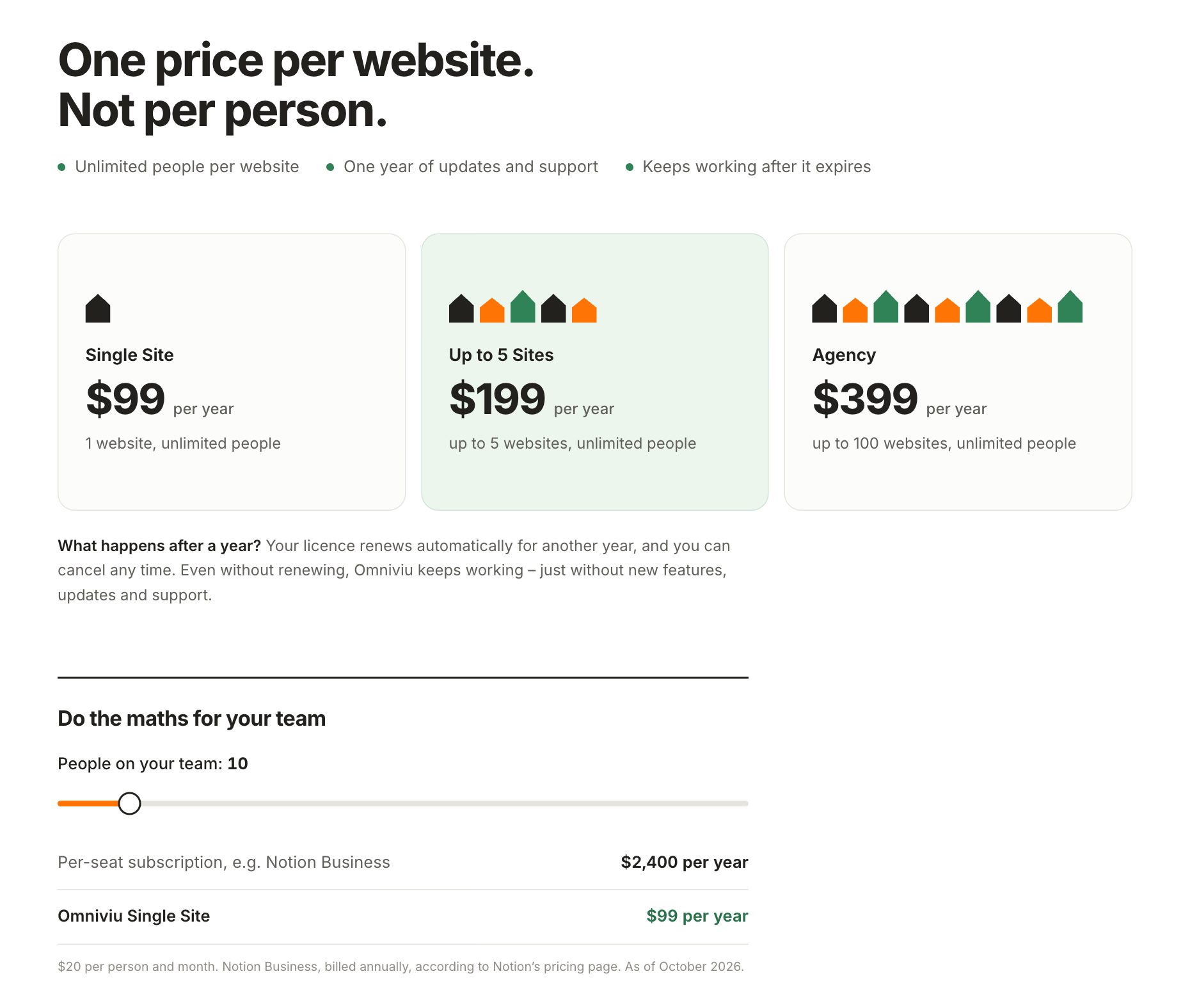
Omniviu's three plans and its team cost calculator. Screenshot: omniviu.app, November 2026.
| Plan | Price per year | Websites | People |
|---|---|---|---|
| Single Site | $99 (99 € in Europe) | 1 | Unlimited |
| Up to 5 Sites | $199 (199 €) | Up to 5 | Unlimited |
| Agency | $399 (399 €) | Up to 100 | Unlimited |
Prices exclude VAT or sales tax where it applies, and you see the final price for your country at checkout. Local and staging installs do not count toward your site limit, so you can test updates on a copy freely.
The value comes from the per-website model. Omniviu's calculator uses Notion Business at $20 per person per month, billed annually, as listed on Notion's pricing page in October 2026. On that basis a team of ten pays about $2,400 a year for seats, while Omniviu Single Site costs $99. At 25 people the per-seat figure reaches about $6,000, and Omniviu still costs $99. A volunteer association with 200 members pays the same $99 as a team of three. On the Agency plan, 100 sites work out to $3.99 per site per year, which makes it realistic to give each client their own private workspace on their own hosting.
The licence renews automatically each year, and you get a reminder email before each renewal. You can cancel at any time through the "Cancel contracts here" link at the bottom of every page, with no login needed, or by email. Upgrading to a bigger plan credits what you already paid.
The money-back guarantee is generous: 30 days from your first purchase and 14 days after an automatic renewal, no reason needed, for businesses as well as consumers. Payment runs through Freemius, which acts as the reseller and handles invoices and VAT, with Stripe and PayPal as payment options.
Where Omniviu asks something of you
Self-hosting gives you control, and control comes with a few responsibilities. These are the points to weigh before you commit:
- You run it. Hosting, plugin updates and backups are yours to look after. For most WordPress users that is already routine, but it is a step up from a cloud app where someone else does it all.
- It lives in the browser. There are no native desktop or mobile apps and no offline mode. On phones you add Omniviu to the home screen as a web app.
- Some Notion features have no counterpart. Omniviu's own comparison lists formulas, built-in AI, a public API with third-party integrations and public sites with custom domains as areas where Notion is ahead.
- Single sites only. WordPress multisite networks are not supported, so each workspace needs its own WordPress install.
- Content export is PDF and Omniviu's own archive, with CSV for time entries. Teams that rely on Markdown exports should plan around that.
- It is in early access. The waitlist is open, and the product is new, so expect the feature set to grow, with invoicing already in the works.
For teams whose priority is owning their data and keeping costs flat as they grow, these trade-offs are usually easy to accept.
Omniviu vs Notion and other alternatives
Omniviu's Notion vs Omniviu comparison is even-handed for a vendor page, and it is worth reading in full, including the section on where Notion comes out ahead. Here is the short version, along with a few other tools people weigh against it.
| Tool | How it compares |
|---|---|
| Omniviu | WordPress plugin on your own server, per-website pricing, wiki plus databases, time tracking and budgets built in, direct Notion import |
| Notion | Cloud service with native apps, formulas, AI and a large integration ecosystem, priced per person per month |
| Confluence | Atlassian's enterprise wiki, closely tied to Jira and priced per seat |
| ClickUp | Cloud project management suite priced per seat, with no self-hosted option |
| AppFlowy, AFFiNE, Outline, Docmost | Open-source workspaces and wikis that need Docker or a dedicated server stack to self-host |
| BookStack | Free PHP wiki organised as shelves, books, chapters and pages, without relational databases or time tracking |
| WordPress PM and docs plugins | Tools such as FluentBoards, WP Project Manager or BetterDocs cover boards or documentation, not a combined wiki and database workspace |
The pattern is clear. If you want a Notion-style workspace on your own infrastructure, most options mean running a dedicated server. Omniviu is the one that fits on the WordPress hosting you probably already pay for.
How to get started with Omniviu
As of November 20, 2026, Omniviu is in early access. The best first step is to click through the live demo on the homepage, open the Projects database and switch between its six views to see how the data model feels. Then read the docs page on installation to confirm your hosting meets the requirements, which takes two minutes.
If it looks right for your team, join the Omniviu early access list. Omniviu says it will email you when the plugin is ready, and nothing else. While you wait, it is worth deciding where the workspace will live (a subdomain on your existing hosting is ideal), which Notion teamspace you will import first as a test, and which WordPress roles should get access. The docs put the setup itself at about ten minutes, so the import of your first teamspace will take longer than the install.
The verdict
Omniviu is a thoughtful, well-documented answer to a real problem: teams want the flexibility of a Notion-style workspace without per-seat bills and without handing their data to another cloud. It delivers the core of that experience, with nested pages, relational databases in six views, real-time co-editing and fine-grained permissions, and it adds things Notion does not have built in, such as server-side time tracking, budgets, retainers and rates that only admins see. The Notion import is careful and transparent, and the documentation is clear about what moves and what does not.
It suits agencies, professional practices, associations and WordPress-savvy teams that value data ownership and predictable costs, and it is especially good value for groups that grow, since adding people never changes the price. Teams that depend on native apps, formulas, AI or a wide integration ecosystem may still prefer a cloud tool. For everyone else, Omniviu is one of the most interesting self-hosted workspaces to arrive in 2026, and the early access list is the place to start.
Frequently asked questions
What is Omniviu?
Omniviu is a WordPress plugin that adds a self-hosted workspace to your site. It combines wiki pages, relational databases, tasks, projects, a light CRM, time tracking and budgets in one app at /app/, with real-time collaboration and a direct import from Notion. Your data stays in your WordPress database.
Is Omniviu a WordPress plugin?
Yes. You install it like any other plugin by uploading the zip file, and your team signs in with their existing WordPress accounts. Omniviu recommends a separate WordPress install just for the app, for example on a subdomain, although it also works on an existing site.
How much does Omniviu cost?
Omniviu costs $99 a year for one website, $199 a year for up to five websites and $399 a year for up to 100 websites. Every plan includes unlimited people, a year of updates and email support. Prices exclude VAT or sales tax where it applies.
How can I try Omniviu before paying?
The Omniviu homepage has a clickable demo of the app with tasks, projects in six views, clients and a wiki. After purchase, a 30-day money-back guarantee applies to your first payment, no reason needed, and a 14-day guarantee applies after each automatic renewal.
Is Omniviu available now?
As of November 20, 2026, Omniviu is in early access. You can join the waitlist on omniviu.app, and Omniviu says it will email you when the plugin is ready.
Can I import my Notion workspace into Omniviu?
Yes. The direct import connects to Notion and brings over pages, databases with relations and rollups, views with filters and sorting, images, files, icons, people matched by email, original dates and authors, and open comments if you choose. Formulas arrive as fixed values, and a final report lists anything that could not be imported. You can also import a Notion "Markdown & CSV" export file.
Does Omniviu work on shared hosting?
Yes. Omniviu needs PHP and MySQL 5.7+ or MariaDB 10.4+, which ordinary shared hosting provides. It needs no Node.js, no Docker and no WebSockets, and real-time collaboration works on shared hosting. Very cheap plans that throttle many small requests are flagged by the system status page.
Where is my data stored, and is Omniviu GDPR compliant?
Your content lives in your WordPress database and in a protected file folder on your server. Omniviu sends nothing to cloud services while you work and uses no trackers, external fonts or Gravatar requests. Full GDPR compliance also depends on your hosting and processes, but keeping data on your own server covers the hardest part.
Does Omniviu have AI features?
No. As of November 2026, Omniviu has no AI features and no connection to AI services, so your content does not leave your server. Omniviu is exploring an optional connection that would stay off by default and use the AI provider you choose.
Is there an Omniviu mobile app?
There are no native apps in the App Store or Google Play. Omniviu runs in the browser on phones, tablets and computers, and you can add it to your home screen as a web app with its own icon.
How many people can use Omniviu?
As many as you like. Every plan includes unlimited people per website, and the plans differ only in how many websites you can use Omniviu on.
What happens when my Omniviu licence expires?
Omniviu keeps working. Without renewing, you no longer receive new features, updates or support. If you delete the plugin, your data stays in the database and file storage, and a reinstall finds it again.
Does Omniviu support WordPress multisite?
No. Omniviu runs on single WordPress installations. The "Up to 5 Sites" and Agency plans cover several separate single installs, not sites inside a multisite network.
Can I export my content from Omniviu?
Yes. You can save any page or entry as a PDF, print up to 200 entries of a view into one PDF, export a whole database as a ZIP archive that you can import again, and export billable time as CSV. Page content has no Markdown or CSV export.
Who makes Omniviu?
Omniviu is developed by design frischgepresst, a web design and branding studio in Heidelberg, Germany, run by Georg Kettler. It is sold through Freemius, which handles payment, invoicing and VAT.
Get your SaaS in front of founders
List your product on SaaSCity for $19.99, one-time: a permanent listing and a building on the live city map.