Reviews
SetterMaxer Review 2026: The AI Appointment Setter That Qualifies and Books Leads on WhatsApp
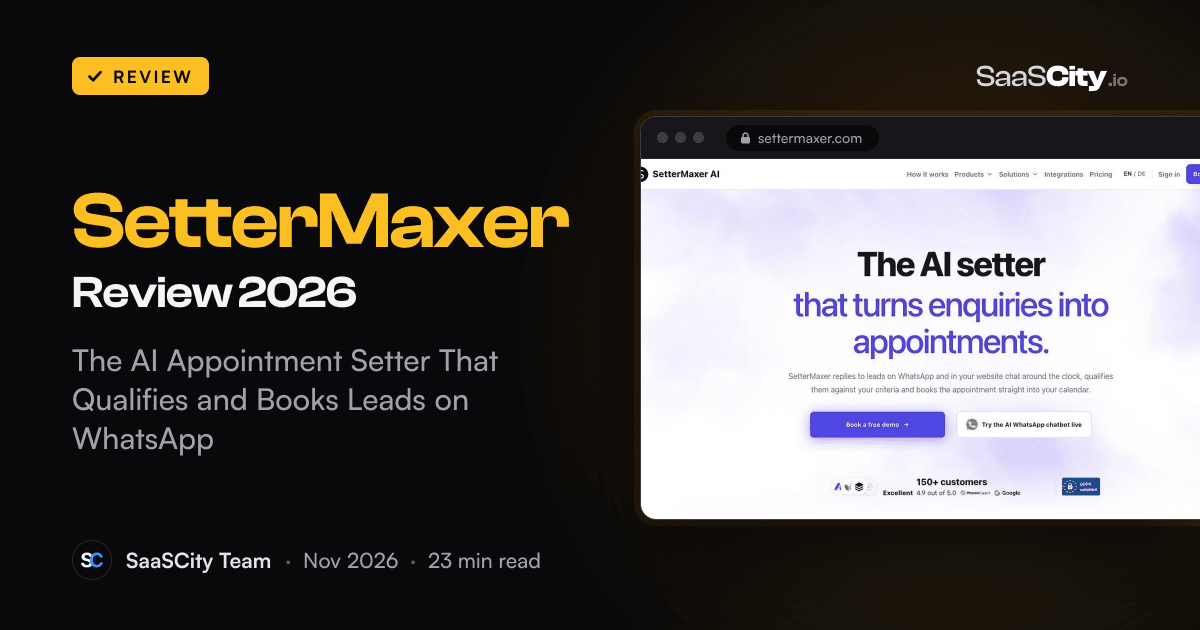
SetterMaxer (settermaxer.com) is an AI appointment setter that answers leads on WhatsApp and in your website chat, checks them against your must-haves and books qualified people into Google Calendar, Calendly or Acuity. Here is how it works, what each plan costs, how the WhatsApp side fits Meta's rules, and which sales teams get the most from it.

Contents (15)
- Key takeaways
- What is SetterMaxer?
- How SetterMaxer works, from first message to booked call
- How strict is the AI lead qualification?
- Booking into the calendar you already use
- The website chat widget, and a script written from your own site
- Reactivating old leads with WhatsApp campaigns
- Email leads, Zapier, webhooks and the Lead API
- SetterMaxer pricing in 2026
- WhatsApp, Meta's 2026 rule and data protection
- Setting up SetterMaxer: how long it takes
- What customers say
- Who SetterMaxer suits best
- Is SetterMaxer worth it?
- FAQ
Disclosure: this is a sponsored review.
Product details and prices were checked against settermaxer.com, its pricing, integrations, use-case and legal pages, and docs.settermaxer.com on November 17, 2026.
Quick answer: SetterMaxer is an AI appointment setter for WhatsApp and website chat. It answers every new enquiry within seconds at any hour, asks the qualifying questions you define, refuses to book anyone who misses a must-have, and puts qualified leads straight into Google Calendar, Calendly or Acuity. Plans run from free (10 leads a month) to €499 a month (750 leads), and the service is hosted in Frankfurt with a DPA.
Picture a coach who runs Facebook ads in the evening, when people actually scroll. The enquiries arrive at 21:30, 22:10 and 23:40. By the time anyone on the team replies the next morning, half of those people have forgotten why they asked, and the other half booked a call with someone faster. The sales team then spends its afternoon on discovery calls with people who never had the budget in the first place.
That gap between "someone is interested right now" and "someone qualified is on the calendar" is the job a human appointment setter used to do. SetterMaxer, built in Berlin, hands that job to an AI agent that lives where your leads already talk: WhatsApp and the chat bubble on your website. This review covers how the agent works, how strict its qualification really is, what the plans cost, how the WhatsApp side fits Meta's 2026 rules, and which teams will feel the difference first.
Key takeaways
- SetterMaxer answers leads on WhatsApp and in a website chat widget around the clock, in the language each lead writes in.
- Qualification is rule based: you list must-haves and deal breakers, and the AI cannot offer a time until every must-have is met. Each verdict is backed by a quote from the lead.
- It books inside the conversation with Google Calendar or Calendly, or sends an Acuity booking link.
- Outbound works too: WhatsApp campaigns to old CSV lists on every plan, and automatic first contact for new CRM, Zapier, API or email leads from the Standard plan.
- Pricing: Free (€0, 10 leads), Hobby (€49), Standard (€199), Pro (€499) a month, two months free on yearly billing. A rented WhatsApp number is €15 a month.
- It runs on Meta's official WhatsApp Business API, is hosted in Frankfurt, lists its subprocessors and offers a DPA.
- Setup takes minutes and needs no developer. From Standard up, the SetterMaxer team sets it up with you.
What is SetterMaxer?
SetterMaxer is software that takes over the first part of a sales conversation: replying to a new enquiry, asking the questions that decide whether this person is worth a sales call, handling the "how much is it?" and "can we do Friday instead?" messages, and booking the meeting. In sales teams that role is usually called a setter or an SDR. SetterMaxer's site calls the product "the AI setter we set up for you", and that sums up both halves of the offer: an AI agent, plus a team that helps you tune it.
Each agent follows a sales script that you write or that SetterMaxer drafts from your website. The agent then works on two channels:
- WhatsApp, on your own WhatsApp Business number or one you rent from SetterMaxer.
- A chat widget that you embed on your website with a short script or an iframe.
Both channels feed the same conversation history and the same lead record. Someone who asks a question on your site on Monday and messages you on WhatsApp on Wednesday stays one lead, with one history.
The product is aimed at businesses where a booked call is the key step before a sale: coaches and consultants, fitness coaches, real estate agents, insurance agents, agencies and B2C service providers. Its site has dedicated pages for each of those groups.
How SetterMaxer works, from first message to booked call
The AI WhatsApp chatbot page lays out the flow as two ways in and one path out.
Inbound. You put a WhatsApp link, QR code or button in your ads, on your website or in your social bio. A lead taps it, WhatsApp opens, and the lead sends the first message. The AI answers within seconds, day or night.
Outbound. You send opted-in leads into SetterMaxer from your CRM, a form, Zapier or the Lead API. Because WhatsApp only lets businesses open a conversation with a template that Meta has approved, SetterMaxer sends that template first. When the lead replies, the AI takes over exactly as it would for an inbound chat.
From there the path is the same:
- Conversation. The agent answers questions and guides the chat using your script, your offer and your tone. It also understands voice messages, which matters on WhatsApp, where many people would rather talk than type.
- Qualification. The agent works your must-haves and deal breakers into the conversation, one question per message.
- Booking. Once the lead qualifies, the agent offers open slots from your connected calendar and books the one the lead picks.
- Follow-up. If a lead goes quiet before booking, the agent sends automatic follow-ups. Leads who failed a deal breaker are left alone.
Your team can step in at any point. The moment a person on your side writes in the thread, the AI pauses on its own, with no button to remember. Switch it back on and the agent continues from where the conversation stands.
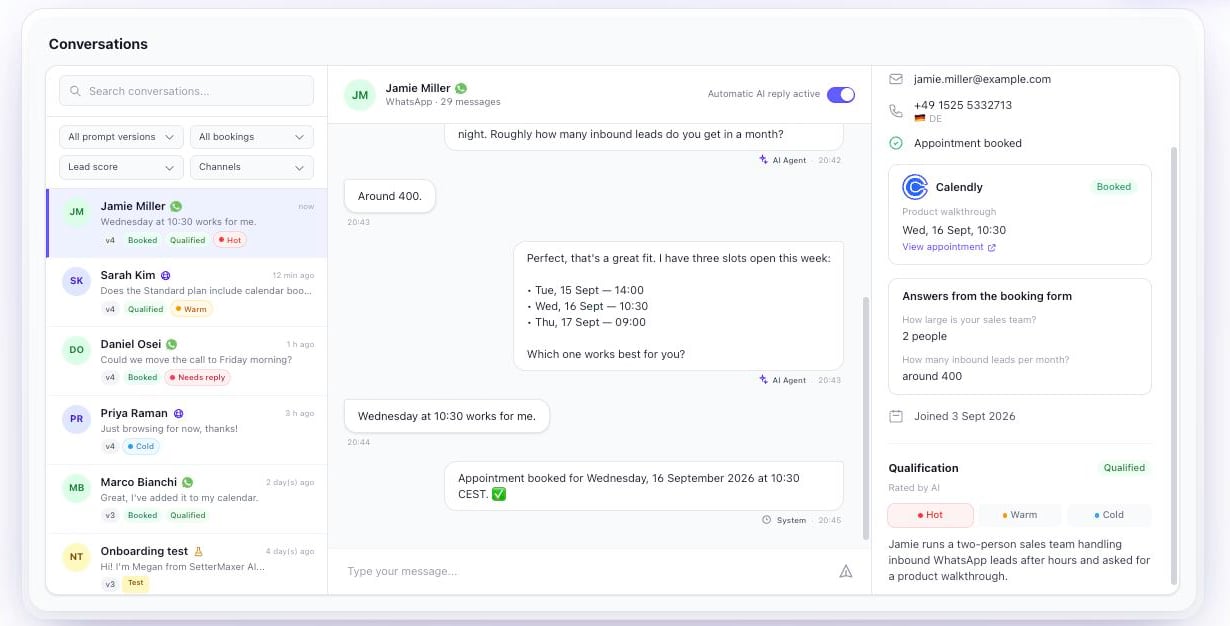
The inbox above is the interactive demo on SetterMaxer's homepage, filled with example leads. It shows the layout well: conversations on the left with filters for prompt version, bookings, lead score and channel, the chat in the middle with an "Automatic AI reply active" switch, and the lead's details on the right. That right-hand panel is where a closer looks before a call. It holds the booking, the answers the lead gave, the qualification verdict and a short AI summary of who this person is and what they want.
How strict is the AI lead qualification?
This is the part that separates SetterMaxer from a chatbot that books anyone who asks. The AI lead qualification guide walks through it with an estate agency example, and the rules are clear.
You write the criteria as plain bullet points. In the agent's Prompt Configuration you add a section called "## Qualification Criteria" with one line per must-have, and a "## Disqualification Criteria" section for deal breakers. SetterMaxer spots both sections automatically and shows a "Qualification is active" panel with your rules as tags. Each list can hold up to eight criteria. Add "(optional)" to a line and it becomes a nice-to-have that does not block a booking.
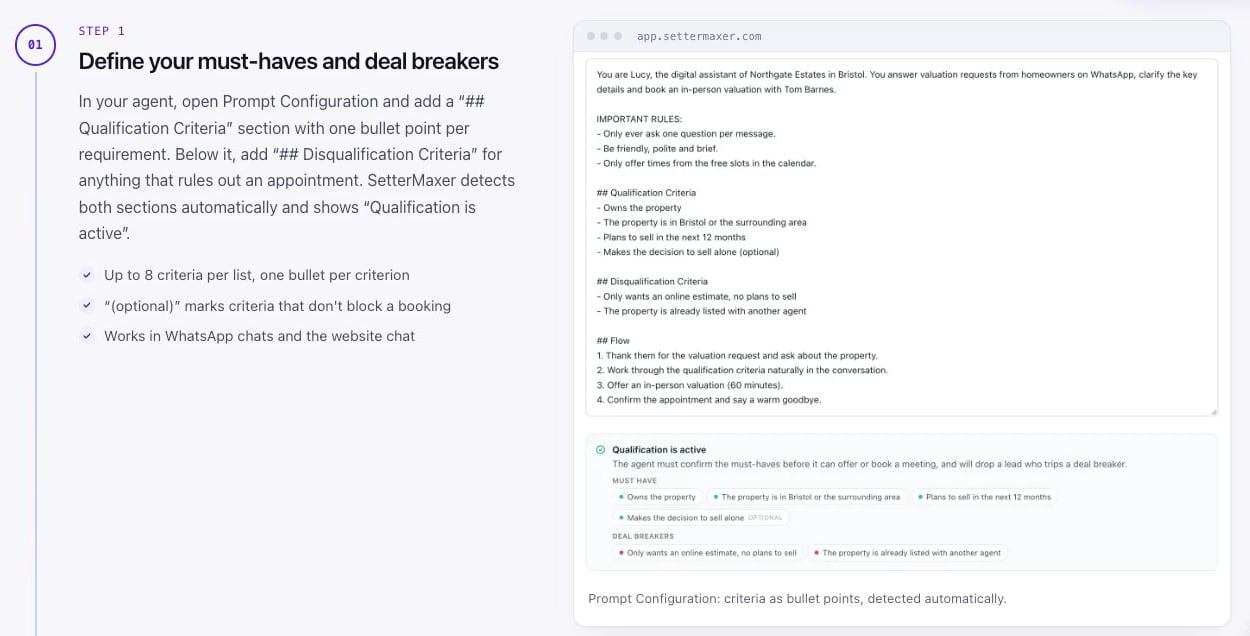
Booking stays locked until every must-have is met. The agent asks about one criterion at a time and also counts anything the lead already said without being asked. If someone opens with "I own a two-bed flat in Clifton and we're moving in spring", three questions are already answered, and the agent skips ahead instead of interrogating them.
Every verdict comes with evidence. Next to each must-have, the lead record shows "Met", "Open" or "Does not apply", plus the exact words from the chat that justify it. The AI has to quote the lead to mark a criterion as met, so it cannot simply decide someone looks promising. For a sales manager, that is the difference between trusting the calendar and double-checking every booking.
Deal breakers end the conversation politely. If a homeowner says they only want an online estimate and have no plans to sell, the agent thanks them, points them to the right resource and does not offer a slot. Automated follow-ups are skipped for that lead, and the conversation is marked "Not qualified". You can flip any verdict by hand.
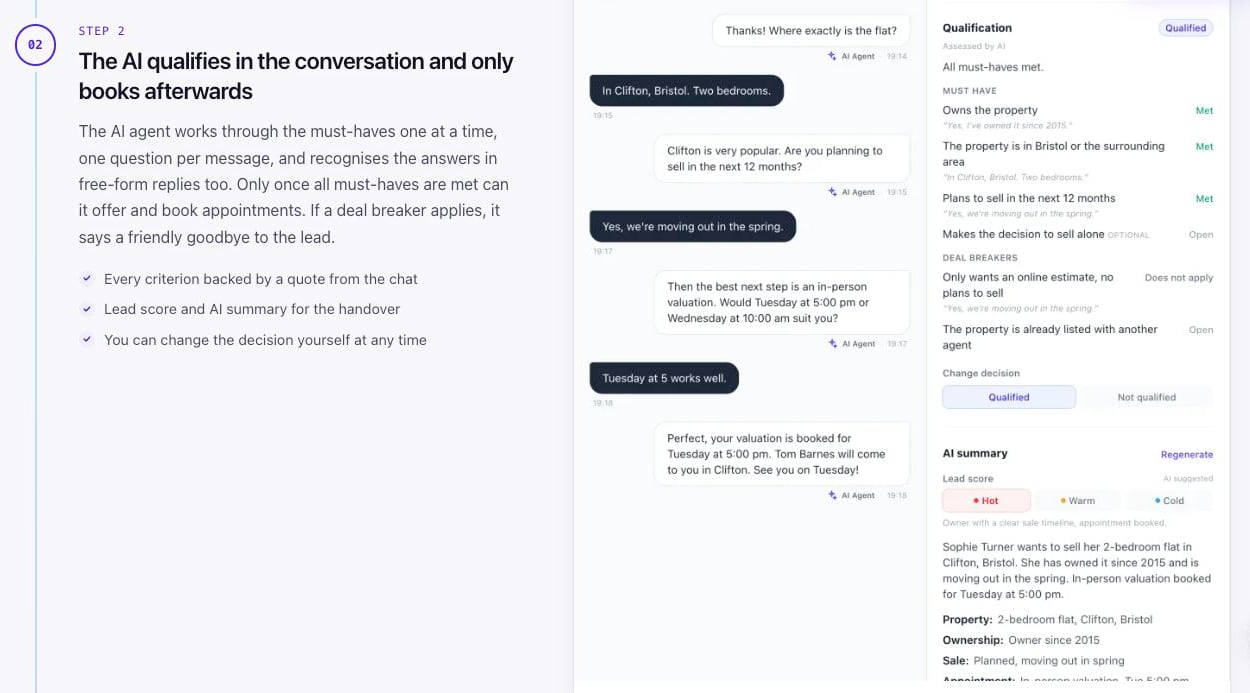
On Standard and above, the agent adds a lead score (Hot, Warm or Cold) with a one-line reason, and an AI summary of the conversation. The guide also translates classic frameworks into rules the AI can check. BANT (Budget, Authority, Need, Timing) becomes four must-haves, each with a question that sounds natural in a chat, such as "Roughly what budget do you have in mind?". Three to five must-haves are usually enough. More than that and the chat starts to feel like a form.
Booking into the calendar you already use
All three calendar integrations are included on every plan, Free included, and each agent connects to one of them.
- Google Calendar gives the most complete experience. The AI checks your free times and books inside the chat, with no booking link to click. You set working hours, appointment length, buffers, minimum notice and how far ahead people can book. It works with a shared team calendar and fixed extra participants, reschedules in the same chat, and picks up changes if you move or delete the event yourself. Each booking can carry a fresh Google Meet link or your own fixed Zoom or Microsoft Teams room.
- Calendly sends a single-use booking link for the event type you choose by default. If you are on Calendly Standard or higher, the AI can instead check availability, ask your event type's questions and book inside the chat. Rescheduling uses Calendly's own link.
- Acuity works through booking links. Once the lead books, SetterMaxer marks the conversation as booked and confirms the appointment in the chat.
The difference between in-chat booking and a booking link sounds small, but on a phone it is real. Every extra tap and page load is a chance for the lead to get distracted. If you have the choice, Google Calendar or Calendly Standard keeps the whole thing inside WhatsApp.
The website chat widget, and a script written from your own site
The second channel is a chat bubble on your website. You switch the widget on, list the domains where it may load, and paste the snippet as a floating button or as an iframe inside a page. The greeting, name and look match your brand, and it books through the same calendar as the agent's WhatsApp side.
Setup is where SetterMaxer saves most time. When you create an agent, you give it a name, a look and a language, then enter your website address. SetterMaxer reads the site and drafts a conversation script: a role, a conversation flow, one qualification question at a time, and guidelines such as keeping replies short and never inventing prices or availability. You can edit every line.
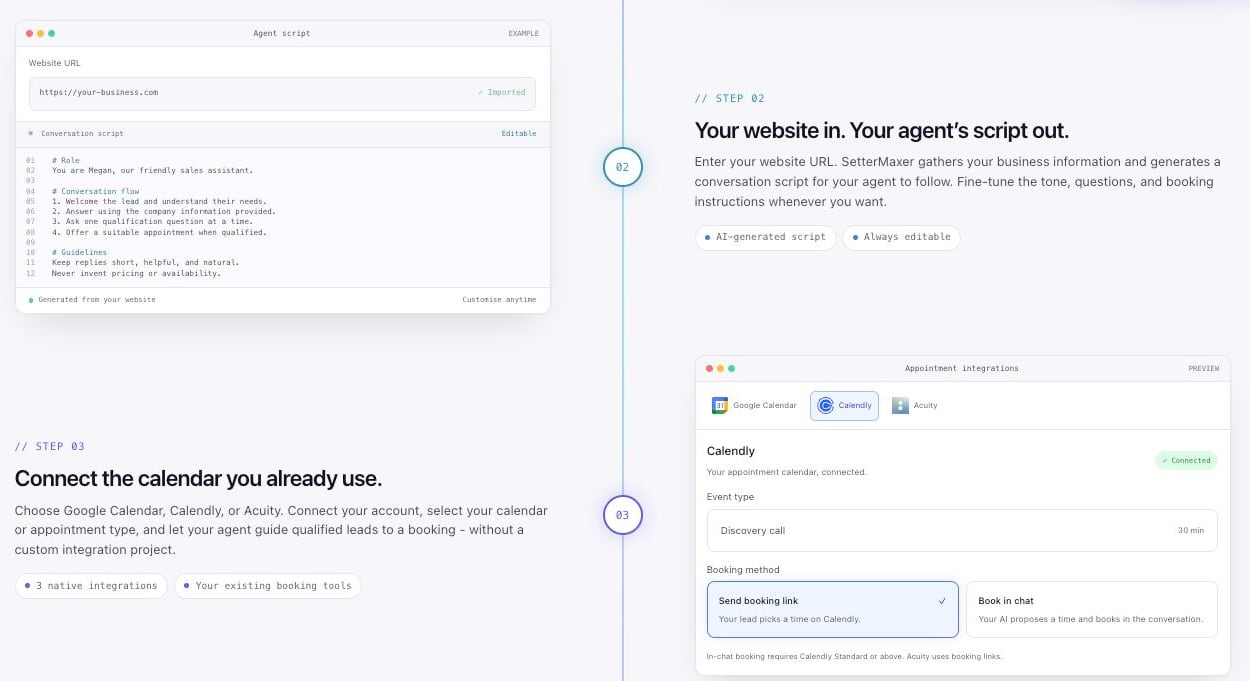
On Standard you can also give the agent a knowledge base of up to 5 sources (50 on Pro): your website and uploaded documents such as PDFs, Word files and spreadsheets. The agent answers from them, which helps with the long tail of questions a script never covers, like parking, refund terms or what a package includes. Before any real lead sees the agent, you can test it in a playground. SetterMaxer keeps versions of your prompt with drafts, and from Standard up it runs A/B tests between prompt versions and compares their booking rates.
Reactivating old leads with WhatsApp campaigns
Most businesses sit on a list of people who once filled in a form, came to a webinar or asked for a quote, then went quiet. The lead reactivation guide is SetterMaxer's answer to that list, and campaigns are included on every plan.
The setup runs through a five-step wizard:
- Import a CSV exported from your CRM, Excel or Google Sheets. SetterMaxer matches the columns, merges first and last names, shows what is new and what is a duplicate, and tags the import so you can find the list later. A file can hold up to 1,000 rows and 5 MB, and the import itself does not use up your plan's leads.
- Choose the leads by filtering on the import tag. Leads who already booked, or who are in another running campaign, are left out automatically.
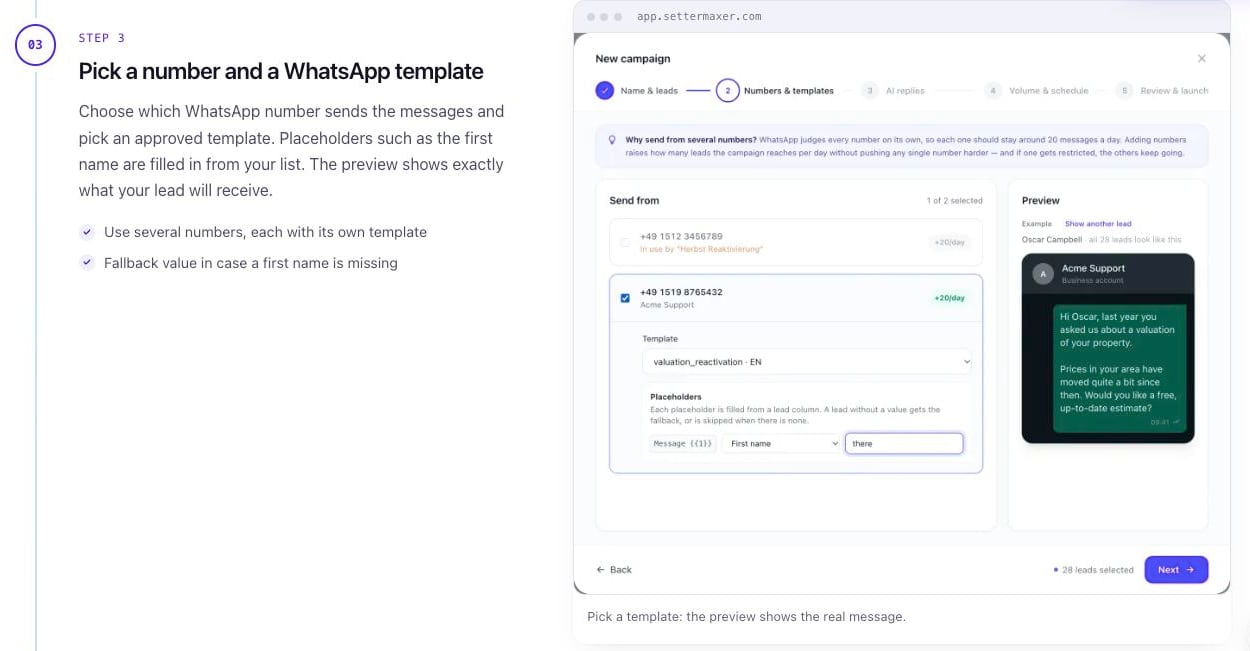
- Pick a sending number and a template. Placeholders such as the first name are filled in from your list, with a fallback for empty cells, and a preview shows exactly what each lead will receive. You can spread a campaign across several numbers, each with its own template.
- Give the AI context in two or three sentences: who these people are and what you are offering them now.
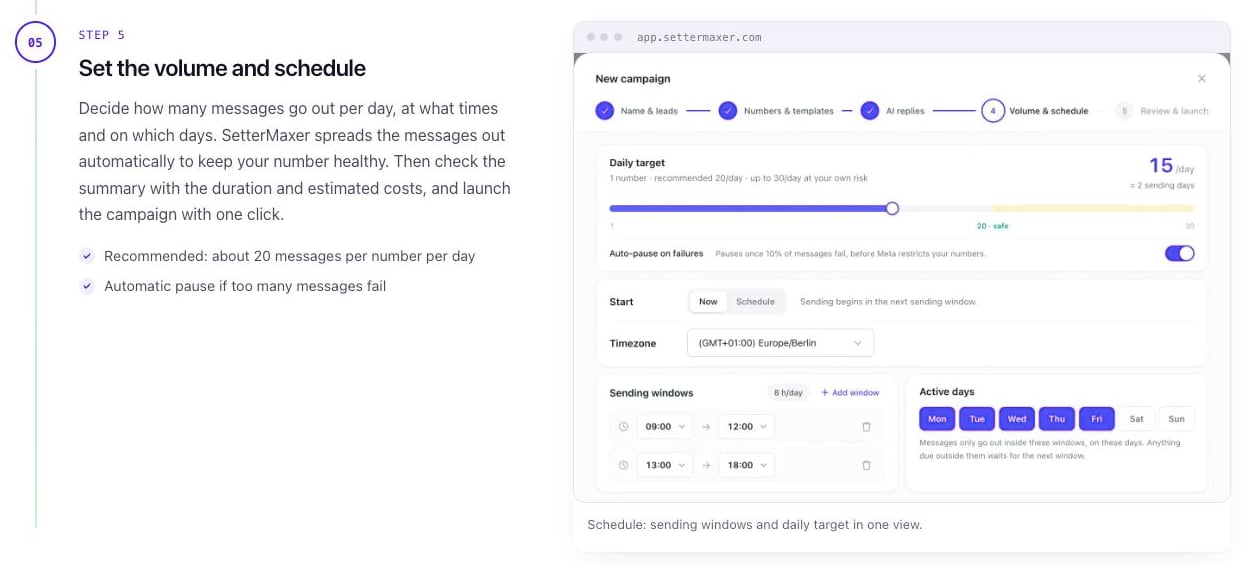
- Set the volume and schedule: a daily target, sending windows, active days and a time zone. SetterMaxer then shows the expected duration and estimated cost before you launch.
The volume step is where SetterMaxer protects you from yourself. WhatsApp judges each number on its own, and a number that blasts hundreds of strangers in a day can get restricted. SetterMaxer recommends about 20 messages per number per day, allows up to 30 at your own risk, spreads messages across your sending windows, and pauses the campaign automatically once 10% of messages fail, before Meta steps in. To reach a big list faster, you add numbers rather than push one number harder.
When a lead replies, the AI picks up the conversation, qualifies them and books. Leads who never reply are not chased with reminder sequences, which keeps the campaign polite and your number healthy. A dashboard shows sent, delivered, replied and booked counts as the campaign runs.
Email leads, Zapier, webhooks and the Lead API
Plenty of leads still arrive by email: form notifications, lead portals, CRM alerts. From the Standard plan, each agent gets its own email forwarding address. The AI reads forwarded emails, pulls out the name, phone number, email and any custom fields you define, and creates the lead. With Automatic Contact on, the agent then opens the conversation on WhatsApp with your approved template after a delay you choose.
A few details show the feature was built by people who have dealt with messy inboxes:
- You can limit lead creation to a list of allowed senders, and the AI holds back newsletters and invoices.
- Emails without a phone number wait in a review list with the reason, instead of disappearing.
- Each phone number is messaged only once per agent, ever. A second enquiry from the same person updates the existing lead.
- Forwarded emails are deleted after 30 days.
For everything else, Standard and above add the plumbing a sales team needs:
| Integration | What it does | Plan |
|---|---|---|
| Zapier | A Create Lead action plus six triggers: New Lead, Lead Info Updated by Agent, Appointment Booked, Appointment Rescheduled, Conversation Handed Off, Follow-Up Sent | Standard and up |
| Webhooks | The same six events sent to your HTTPS URL, signed with HMAC-SHA256 and retried up to five times | Standard and up |
| Lead API | One POST request creates or updates a lead, matched by phone or email; empty fields never overwrite stored values | Standard and up |
| finCRM | Deals at chosen stages become leads, and booked appointments go back to finCRM as a call and a note | Standard and up |
| CSV import | Up to 1,000 rows per file for campaigns | All plans |
HubSpot, Pipedrive, Google Sheets, Facebook Lead Ads and similar tools connect through Zapier or webhooks. Every trigger delivers the full lead, with its qualification, tags and your custom columns, so your CRM sees what the AI learned in the chat.
SetterMaxer pricing in 2026
SetterMaxer prices by leads per month. A lead counts when someone engages with one of your AI agents, inbound or outbound. Follow-up messages in an existing conversation cost nothing extra.
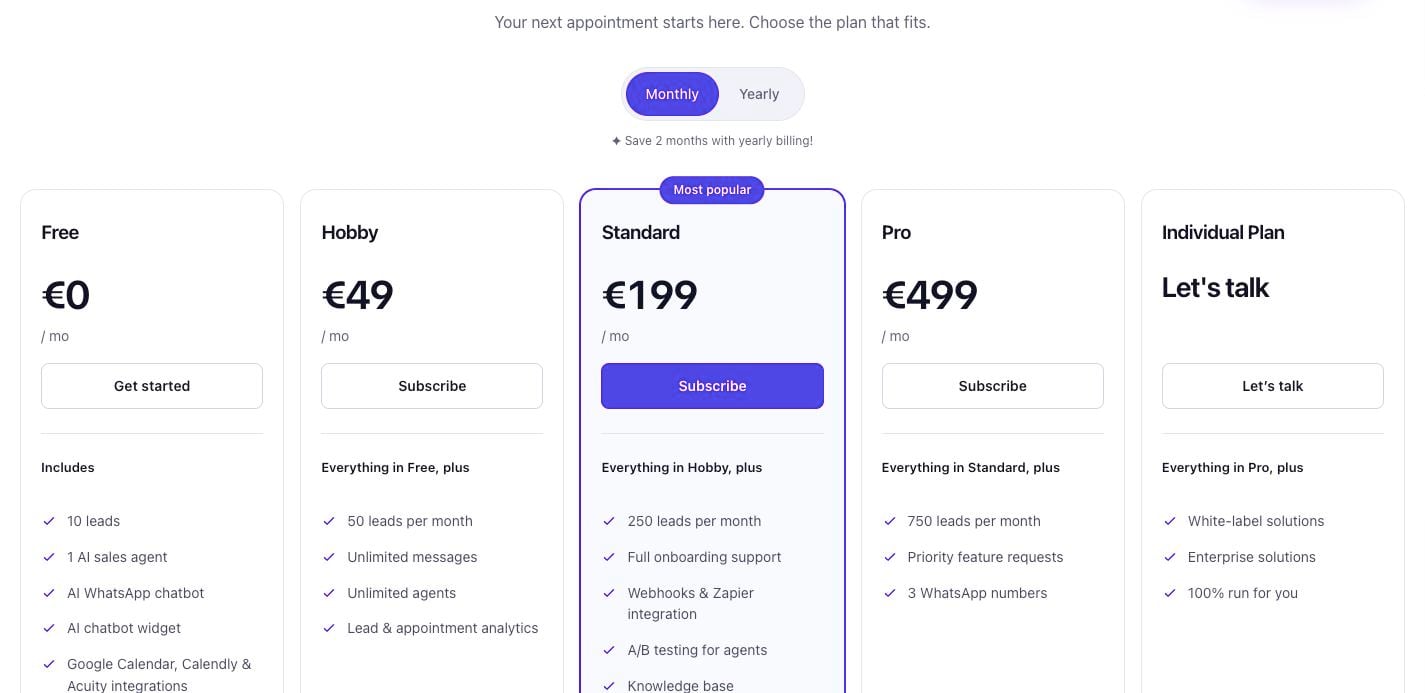
| Plan | Monthly | Yearly | New leads a month | Highlights |
|---|---|---|---|---|
| Free | €0 | €0 | 10 | 1 agent, 100 messages, WhatsApp and widget, calendar booking, qualification, follow-ups, campaigns |
| Hobby | €49 | €490 | 50 | Unlimited messages and agents, lead and appointment analytics |
| Standard | €199 | €1,990 | 250 | Onboarding support, Zapier and webhooks, CRM-triggered outbound, lead scoring and AI summaries, A/B tests, knowledge base (5 sources) |
| Pro | €499 | €4,990 | 750 | 3 WhatsApp numbers included, knowledge base (50 sources), priority feature requests |
| Individual | On request | On request | Custom | White-label, enterprise options, fully run for you |
Prices are as listed on SetterMaxer's pricing page on November 17, 2026.
Two costs sit outside the plan:
A WhatsApp number, if you do not have one. Renting a dedicated number costs €15 per number per month on any plan. It is connected in a few minutes, needs no SIM card, SetterMaxer answers Meta's verification call, and you can cancel any time. The Pro plan includes three.

Meta's fee for template messages. When a business opens a WhatsApp conversation with a template, as in an outbound campaign, Meta charges for that first message, and the rate depends on the lead's country. Replies within 24 hours are free. Inbound chats that the lead starts do not need a template. SetterMaxer shows the estimated Meta cost before you launch a campaign.
Which plan fits? The Free plan is enough to build an agent, connect a calendar and run real conversations with a first handful of leads. Hobby suits a solo coach or consultant with a steady trickle of enquiries. Standard is the plan most growing teams will land on, because it is where the CRM connections, email inbox, lead scoring and hands-on onboarding live. Pro makes sense once you are running reactivation campaigns at scale and want several sending numbers included.
A useful way to judge the price is cost per booked call. On Standard, €199 covers up to 250 new conversations a month, so if 40 of them end in a qualified booking, each appointment costs you about €5 in software. Put your own booking rate into that sum, compare it with what you spend to win each lead in the first place, and check the real figure in the plan's analytics after the first month.
WhatsApp, Meta's 2026 rule and data protection
Two questions come up with any WhatsApp AI tool in 2026, and SetterMaxer addresses both directly.
Is an AI chatbot on WhatsApp still allowed? Since January 15, 2026, Meta no longer lets providers of general-purpose AI assistants, the ChatGPT-style bots, offer their chatbot through the WhatsApp Business Platform. Businesses can still use AI for their own customer conversations, such as answering enquiries and booking appointments. SetterMaxer is a business bot of that kind, running on Meta's official WhatsApp Business API, on your number or a rented one. One insurance seller quoted on SetterMaxer's site is pleased to finally reach leads on WhatsApp without bans, which is what the official API and the sending limits above are for.
Where does the data live? SetterMaxer is hosted in the EU, in Frankfurt. It publishes a list of subprocessors, offers a data processing agreement in English and German, and supports two-factor authentication on accounts. The widget only loads on domains you allow, webhooks are signed, and API keys are shown once at creation.
The one thing no tool can settle for you is consent. Whether you may message a contact on WhatsApp depends on how you collected their number and what they agreed to. Before you import an old list for a reactivation campaign, check your forms and consent records, ideally with your data protection adviser.
Setting up SetterMaxer: how long it takes
SetterMaxer says most agents are live in under 10 minutes, and one customer quote on its site reports a chatbot running after 30 minutes. The steps are short:
- Create an agent, give it a name and language, and let SetterMaxer draft the script from your website.
- Add your must-haves and deal breakers to the prompt.
- Connect Google Calendar, Calendly or Acuity.
- Connect your WhatsApp Business number through Meta's guided signup, or rent one, and paste the widget snippet on your site.
- Test in the playground, then go live.
No developer or API keys are needed for any of that. If you get stuck, the in-app Academy has video tutorials for every feature, live chat is available inside the app, and you can book an onboarding session. On Standard and above, the SetterMaxer team sets everything up together with you in dedicated sessions, and it also shares marketing advice on reaching and qualifying leads. The Individual Plan goes one step further and runs the whole thing for you.
What customers say
SetterMaxer's homepage says it has more than 150 customers and shows a 4.9 out of 5 rating from ProvenExpert and Google reviews. Alongside the reviews, it publishes screenshots of customer WhatsApp messages and posts from its own community, many in their German originals.
The recurring themes are the ones you would hope for from a setter: enquiries picked up straight away instead of hours later, fewer unqualified people on the calendar, higher show-up rates when leads booked through the chat, and closers who get to spend their time closing. Users in insurance sales, real estate, coaching, an energy agency and a social media agency are among them. The figures in those posts, such as revenue from reactivated leads or a lower cost per appointment, are the customers' own reports, so treat them as examples of what is possible rather than as a forecast for your business.
Who SetterMaxer suits best
SetterMaxer fits best when three things are true: leads reach you by message, a booked call is the step before the sale, and you can write down what makes someone a good fit.
- Coaches, consultants and course sellers who run ads and get enquiries outside office hours. Budget and timing questions filter out tyre-kickers before they reach your calendar.
- Real estate agents who need to know about ownership, location and timeline before a valuation visit. The native finCRM link sends booked appointments back into the CRM.
- Insurance and financial sales teams with long lists of old leads, where a reactivation campaign on WhatsApp gets far more replies than another email.
- Fitness coaches and local service businesses whose customers already prefer WhatsApp to phone calls.
- Agencies that set up lead handling for clients. The Individual Plan offers white-label options.
It is a weaker fit in a few cases, and it is better to know them up front:
- You need other channels. SetterMaxer covers WhatsApp and website chat. It does not answer phone calls, SMS, Instagram DMs or email replies.
- You need native CRM sync on a small budget. Zapier, webhooks, the Lead API and the email inbox start at the €199 Standard plan. On Free and Hobby, leads come in through WhatsApp, the widget and CSV uploads.
- Your sale has no qualifying step. If every visitor can simply buy online, a booking agent adds a step instead of removing one.
- Your team works in a language other than English or German. The AI talks to leads in their own language, but the app, the generated scripts and the summaries are in English and German only.
Is SetterMaxer worth it?
For a business that lives on booked calls, SetterMaxer covers the hours and the follow-through that human setters struggle with: the reply at 23:40, the third follow-up, the patient question about budget, the polite no to someone who will never buy. What sets it apart from generic chatbots is the discipline of its qualification. The AI cannot book until every must-have is met, it shows the lead's own words as proof, and your team can take over any conversation simply by typing.
The pricing is easy to try. The Free plan lets you build a real agent, connect your real calendar and talk to your first ten leads without a card. If you have a list of old enquiries sitting in your CRM, a small reactivation campaign is the quickest way to see what the agent does with real people.
Start by writing down the three to five things a lead must have before you want them on your calendar. Then open the SetterMaxer pricing page, create a free agent, paste those criteria into the prompt and run a few test chats in the playground. If the agent asks the questions the way your best setter would, connect your WhatsApp number and let it take tonight's enquiries.
FAQ
What is SetterMaxer?
SetterMaxer is an AI appointment setter at settermaxer.com. It replies to new leads on WhatsApp and in a chat widget on your website, asks the qualifying questions from your sales script, and books qualified leads into Google Calendar, Calendly or Acuity. It runs on Meta's official WhatsApp Business API, is hosted in Frankfurt, and the app is available in English and German.
How much does SetterMaxer cost?
Free costs €0 for 10 leads a month, Hobby is €49 a month for 50 leads, Standard is €199 a month for 250 leads, and Pro is €499 a month for 750 leads with three WhatsApp numbers included. Yearly billing gives two months free. The Individual Plan is priced on request, and a rented WhatsApp number costs €15 a month.
Is there a free plan, and what counts as a lead?
Yes. The Free plan covers 10 leads a month with no credit card and no end date. A lead is used when someone engages with one of your AI agents, inbound or outbound. Continuing a conversation costs nothing extra, and a CSV import uses no leads until those people are contacted.
Do I need my own WhatsApp Business number?
No. Connect an existing WhatsApp Business number through Meta's embedded signup, or rent one from SetterMaxer for €15 a month. A rented number needs no SIM card, SetterMaxer answers Meta's verification call, and you can cancel it at any time.
Is an AI chatbot on WhatsApp still allowed after Meta's January 2026 rule?
For business conversations, yes. Meta now bars general-purpose AI assistants from the WhatsApp Business Platform, but businesses can still use AI to answer their own customers and book appointments. SetterMaxer is that kind of business bot, running on the official WhatsApp Business API.
How does SetterMaxer qualify leads?
You list must-haves and deal breakers in the agent's prompt, up to eight each. The AI asks about them one at a time, counts answers the lead already gave, and only allows booking once every must-have is met. Each verdict cites the lead's own words, and you can override any decision.
Can my team take over a conversation from the AI?
Yes. As soon as someone on your team sends a message in the thread, the AI pauses automatically. Switch it back on and it continues the conversation.
Which calendars does SetterMaxer work with?
Google Calendar, Calendly and Acuity, on every plan. Google Calendar and Calendly Standard or higher allow booking inside the chat. Acuity, and Calendly by default, work with a booking link. Google Calendar bookings can include a Meet link or your own Zoom or Teams room.
Can SetterMaxer message old leads from my CRM?
Yes. WhatsApp campaigns are included on every plan. Upload a CSV of up to 1,000 contacts, pick an approved template, set a daily volume of around 20 messages per number, and the AI handles every reply through to the booking.
Does SetterMaxer connect to HubSpot, Zapier or my own CRM?
From the Standard plan. SetterMaxer has a native Zapier app, signed webhooks, a Lead API and a native finCRM integration. HubSpot, Google Sheets and similar tools connect through Zapier or webhooks.
Is SetterMaxer GDPR compliant?
SetterMaxer is hosted in Frankfurt, publishes its subprocessors and offers a DPA. Forwarded lead emails are deleted after 30 days. Whether you may message a given lead on WhatsApp depends on the consent you collected.
Which languages does the SetterMaxer AI speak?
The AI replies in the language the lead writes in. The app, the generated scripts and the summaries are in English and German.
Get your SaaS in front of founders
List your product on SaaSCity for $19.99, one-time: a permanent listing and a building on the live city map.