Reviews
QRBliss Review 2026: The Free QR Code Generator That Gives You 15 Dynamic Codes, Your Brand Colors and a Scan Test
QRBliss is a browser-based QR studio that pulls colors from your logo, verifies the code still scans, and hands you 15 editable dynamic codes on the free plan with no watermark, no scan cap and no expiry. We walked through the studio, checked the pricing page and read the fine print. Here is what it does, what it costs, and who should use it.

Contents (13)
- Why another QR generator deserves a review
- What QRBliss is, in one paragraph
- How the studio works
- Static versus dynamic, explained without jargon
- Three things the product is built around
- Templates and the 14 QR types
- Pricing, verified on the pricing page
- How it compares to QR Tiger, Canva, Bitly and the rest
- Where it fits: five real use cases
- Things to know before you rely on it
- Verdict
- FAQ
- Summary
Reviewed against qrbliss.com, the live generator at qrbliss.com/generator and the pricing page on September 10, 2026. Screenshots are ours. This is a sponsored post; the opinions and the fact-checking are ours.
Short version: QRBliss is a QR code generator that runs in the browser, takes your logo, extracts its palette, styles the code to match, and then verifies the result still scans before you download it. The free plan gives you unlimited static codes plus 15 dynamic codes with unlimited scans and no expiry, exports in PNG, JPG, SVG and print-ready PDF, and puts no watermark on anything. You do not need an account to make your first code. Pro is $84 a year and Business is $290 a year if you outgrow it.
Why another QR generator deserves a review
Every business has a QR code somewhere now. On the window, on the menu, on the yard sign, on the back of the packaging, on the slide at the end of the pitch. Almost all of them look identical: a black square grid on white, generated in thirty seconds from whichever site ranked first that day.
The category has settled into two bad options. Free static generators give you a black-and-white code that can never be changed, often watermarked, often behind an email gate. "Dynamic" platforms let you edit the destination after printing, but charge monthly for it, cap your scans, and turn the code off when you stop paying. An agent who printed a hundred yard signs during a free trial finds out about that last part the hard way.
QRBliss sits between those options. Its founder, Scott Foster, runs VeloRank, a local SEO and web design company in Minnesota. His clients kept asking for QR codes, he got tired of paying $15 a month per editable code, so he built a generator for his own client work and then opened it up. That origin explains the product: a local SEO operator cares about print, brand consistency across client accounts, and no surprise invoices.
What QRBliss is, in one paragraph
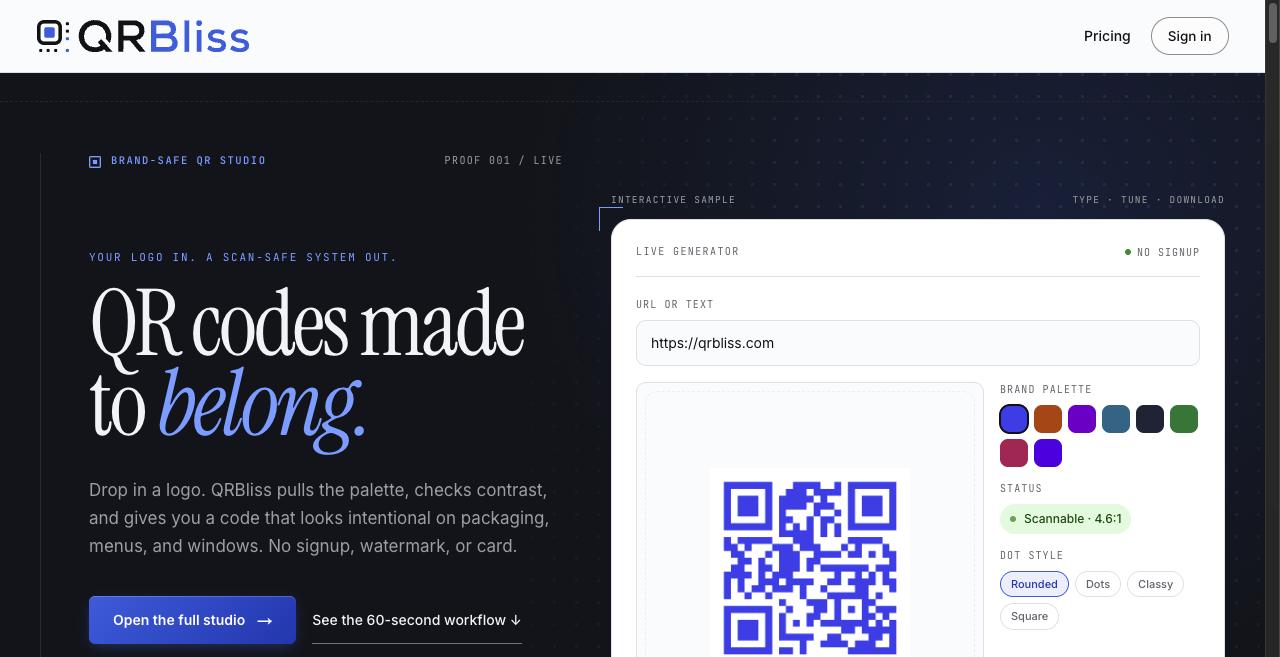
QRBliss is a web application, not a phone app. You open it in a browser, pick one of 14 QR types, drop in a logo or choose from 36 templates, adjust dots, eyes, frames and colors while a live preview updates, run the built-in scan test, and export. If you want to be able to change where the code points after it is printed, you save it as a dynamic code and get a short link that you control. The company's own positioning line is "Brand-safe QR studio: your logo in, a scan-safe system out," and after using it that is a fair description.
How the studio works
The homepage promises a first code in under sixty seconds. We timed it and that holds, mostly because there is no sign-up step in the way. Here is the flow as it actually appears in the generator.
Step 1: Pick a type and enter the content
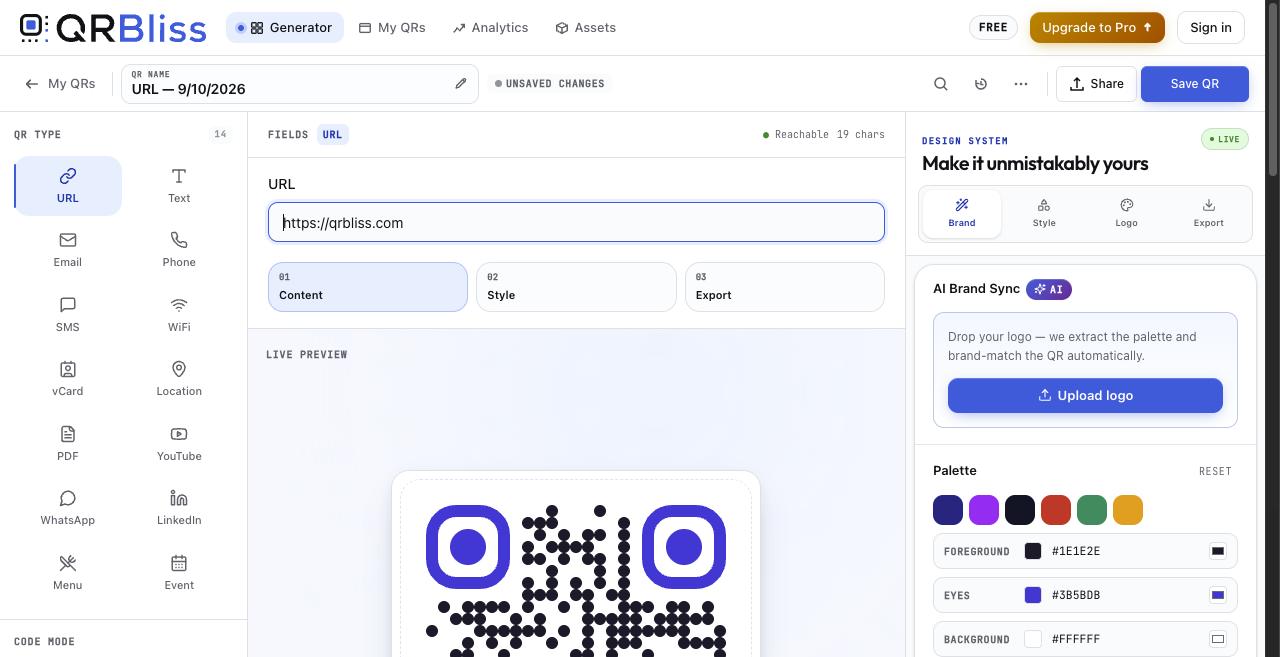
The left rail lists all 14 QR types. URL is the default, and a "Reachable" indicator confirms the destination resolves as you type. Other types swap in their own fields: WiFi asks for network and password, vCard for contact details. Menu and Event hint at who the tool was built for.
Step 2: Brand it
This is where QRBliss separates from the pack. The right-hand "Design System" panel has four tabs: Brand, Style, Logo and Export. Under Brand sits AI Brand Sync with one button, "Upload logo."
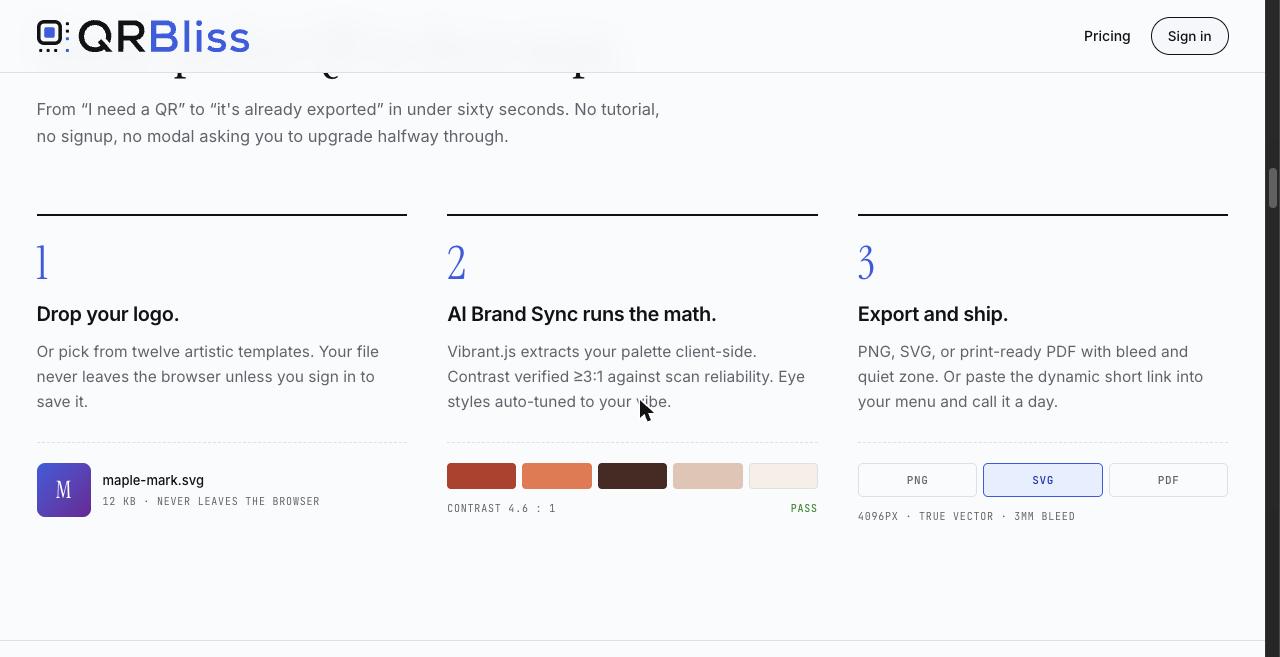
Drop a logo and the studio extracts a palette using Vibrant.js, a color-quantization library that runs entirely in the browser. That detail is not marketing filler. Because extraction is client-side, your logo file never leaves your machine unless you sign in and save it. The palette then populates the foreground, eye and background swatches, and the status pill reports the contrast ratio. The sample on the homepage shows 4.6:1 against a 3:1 minimum. If your brand's colors would fail, the studio adjusts toward a version that scans and tells you it did so.
You can override any color by hex, toggle a transparent background or a gradient, pick dot shapes (Rounded, Dots, Classy, Square) and eye styles, and add a frame: Scan me, Banner, Badge, Rounded or Circle.
One note on the "AI" label. AI Brand Sync is color and shape intelligence, not generative art. If you want a code that looks like a watercolor, this is the wrong product. If you want one that looks like your design team made it and still scans on a Pixel in low light, this is the right one.
Step 3: Run the scan test
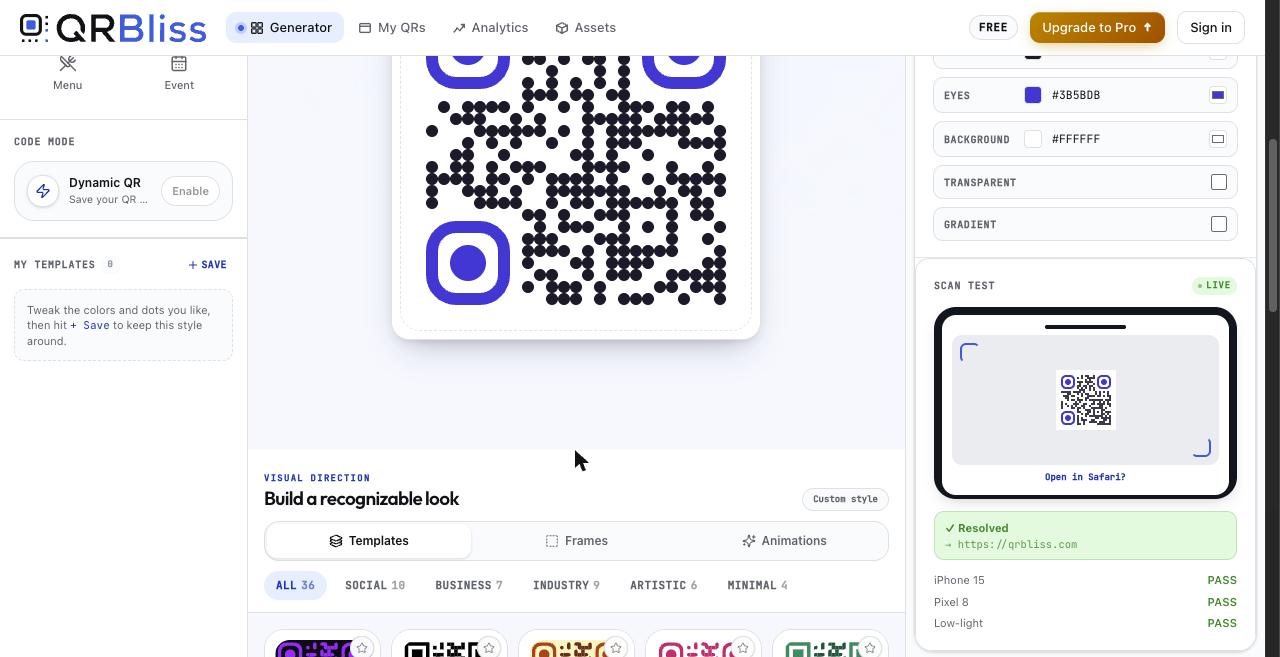
Lower in the right panel is a live scan test. It renders your code into a phone mock-up, resolves the destination, and reports pass or fail for iPhone 15, Pixel 8 and Low-light. This is the feature we would put at the top of any review. People pick pretty colors, print five hundred flyers, and discover at the event that half the phones cannot read the thing. QRBliss makes you look at that result before you export.
Step 4: Export, or make it dynamic
The Export tab offers PNG, JPG, SVG and PDF. SVG is real vector, so one file works on a business card and a trade-show backdrop. The PDF is set up for a print shop: quiet zone, crop marks, 3mm bleed. No tier adds a watermark.
To edit the destination later, click "Enable" next to Dynamic QR in the left rail. That requires saving the code, which requires an account, the only point in the flow where sign-in becomes necessary.
Static versus dynamic, explained without jargon
A static QR code is a picture with the address written into the squares. Anyone can scan it forever, it needs no server, and QRBliss could vanish tomorrow without affecting it. It is also frozen: change your menu URL and every printed static code is wrong.
A dynamic QR code is a picture of a short link that forwards wherever its owner currently points it. That lets you fix a typo after printing or swap the winter menu for summer. It also lets the provider count scans, and lets the provider kill your code when you stop paying.
QRBliss's position on this is the most generous we have seen from a tool that also sells a paid plan:
- Static codes are unlimited on every plan, including Free.
- Dynamic codes are 15 on Free, with unlimited scans and no expiry date.
- Smart redirects work on Free. You can route by device (send iPhone users to the App Store, Android to Google Play) or by time of day (lunch menu before 3pm, dinner after).
- Codes do not deactivate. The comparison table on the homepage lists "Never" under code deactivation for QRBliss, against "After trial," "After downgrade" and "14-day trial only" for others.
For most small businesses, 15 editable codes is the whole job: window, menu, receipt, van, a few campaigns. Agencies and multi-location operators hit the cap, and Pro exists for them.
Three things the product is built around
QRBliss's own "Why" section says the team pruned the feature list to three pillars. In a category full of dashboards nobody asked for, they are the right three.
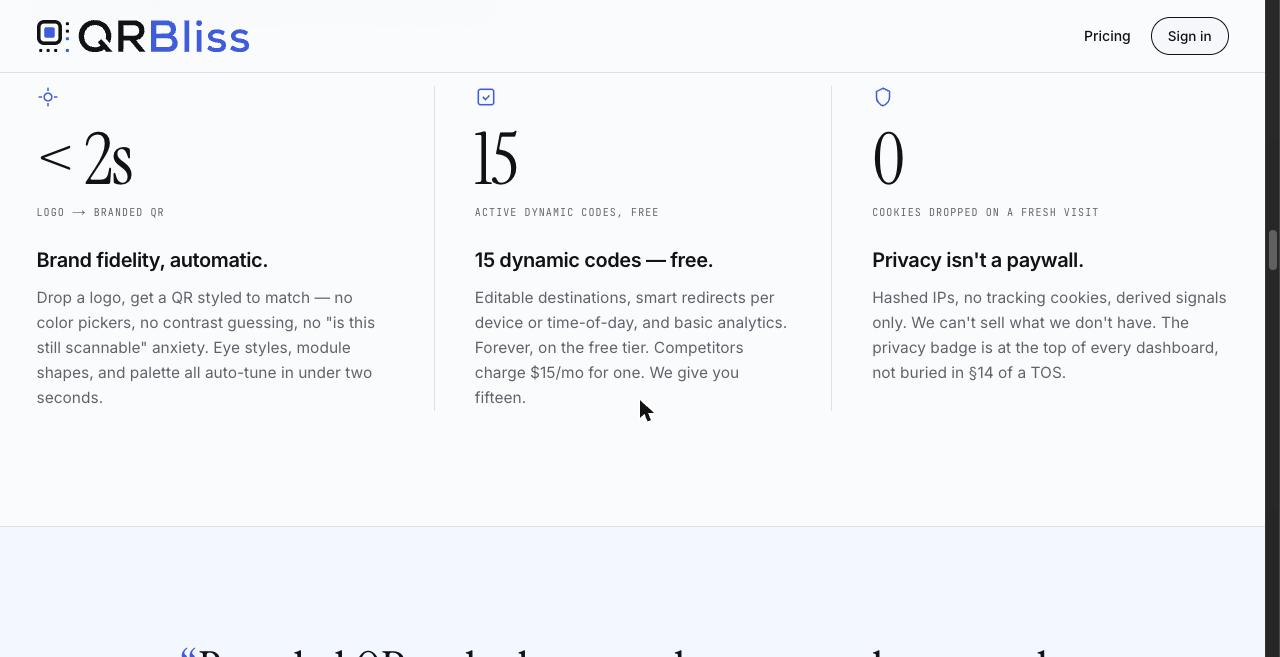
Brand fidelity, automatic. Under two seconds from logo to a styled code. No color pickers to fiddle with unless you want to, no guessing about contrast, no anxiety about whether it still scans.
15 dynamic codes, free. Editable destinations, smart redirects, basic analytics, forever, on the tier that costs nothing.
Privacy is not a paywall. Zero cookies dropped on a fresh visit. Analytics use hashed IPs and derived signals only: device class, rough country, timestamp. No raw IP addresses, no persistent identifiers, and nothing sold. The company's line is "we can't sell what we don't have," and the privacy badge sits at the top of the dashboard rather than in section 14 of a terms document. Analytics are also opt-in per dynamic code, so a code on a medical clinic's door can simply not track.
Templates and the 14 QR types
The 36 templates sit in five families whose names tell you the audience: Social (TikTok, Instagram, Spotify, Snapchat and six more), Business (Menu, Event, Product Tag, Business Card, WiFi, vCard, Location), Industry (Healthcare, Real Estate, Education, Google Form, App Store and others), Artistic (Neon, Gradient Burst, Sunset, Festive) and Minimal (Ink, Slate, Mono).
Templates are starting points. Pick Real Estate, upload the brokerage logo, and AI Brand Sync recolors it to match. You can save your own tweaked style from the "My Templates" panel.
All 14 QR types (URL, Text, Email, Phone, SMS, WiFi, vCard, Location, PDF, YouTube, WhatsApp, LinkedIn, Menu, Event) are on the free plan. No "PDF codes are Pro only" surprise.
Pricing, verified on the pricing page
The homepage and the pricing page frame prices slightly differently. The pricing page is the source of truth below.
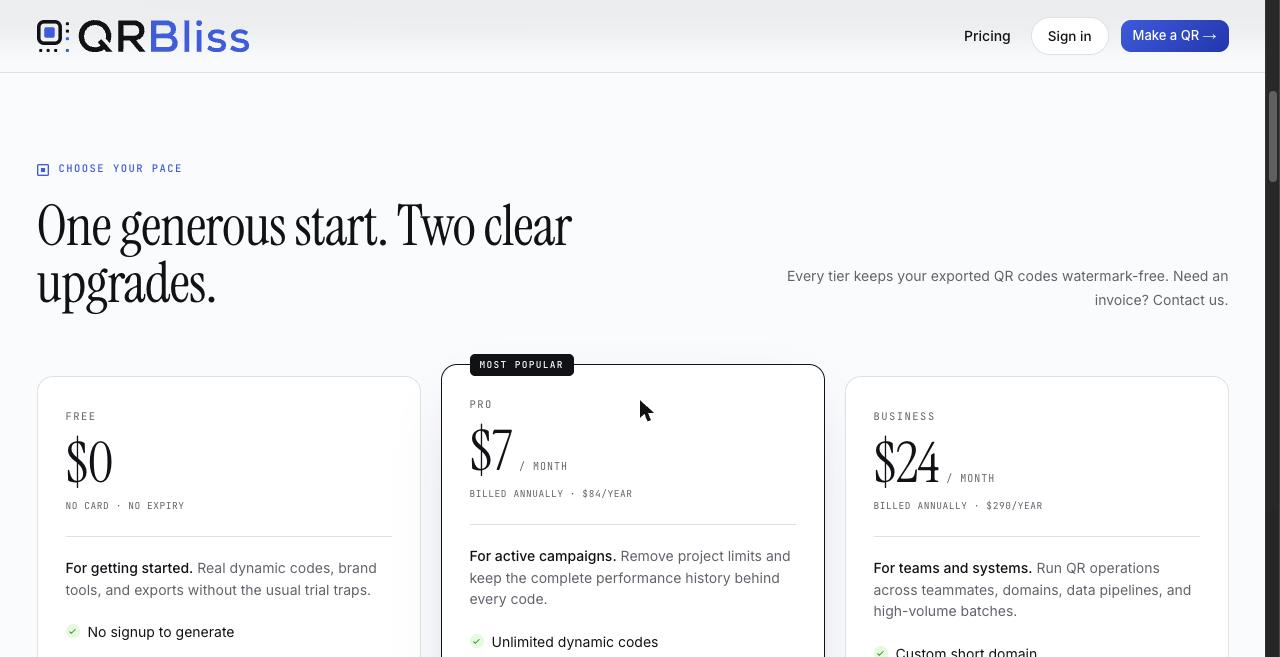
| Free | Pro | Business | |
|---|---|---|---|
| Price, annual billing | $0 | $7/mo ($84/yr) | $24/mo ($290/yr) |
| Price, monthly billing | $0 | $9/mo | $29/mo |
| Static codes | Unlimited | Unlimited | Unlimited |
| Dynamic codes | 15 | Unlimited | Unlimited |
| Scans | Unlimited | Unlimited | Unlimited |
| QR types and templates | All 14, all 36 | All | All |
| AI Brand Sync | Yes | Yes | Yes |
| Exports | PNG, JPG, SVG, PDF | Same | Same |
| Watermark | None | None | None |
| Smart redirects (device, time) | Yes | Yes | Yes |
| A/B test redirects | No | No | Yes |
| Analytics history | 30 days | Full | Full |
| Saved assets | 5 | Unlimited | Unlimited |
| Bulk CSV generation | No | No | Yes |
| Custom short domain | No | No | Yes, one per account via CNAME |
| REST API and webhooks | No | No | 10k requests/mo, scoped keys, signed webhooks |
| Team workspace | No | No | Up to 5 members |
| Support | Community and docs | Priority email, within a business day | Dedicated Slack or email |
The annual discount is stated plainly on the page: Pro at $84 a year is $24 less than paying monthly, and Business at $290 a year is $58 less. That is where the $9 and $29 monthly figures come from, and the homepage's "$29 per month, starting" for Business is the monthly-billing price, not a different plan.
Commercial terms worth knowing: upgrades apply immediately, downgrades at the end of the period, cancellation any time with access through the paid period, invoices on request, a 30-day no-questions money-back guarantee, and pro-rated refunds on annual plans after those 30 days. The pricing page's own summary is "Free forever for personal use. Your QRs never expire. Exports are yours."
Who should stay on Free: any single business with fewer than 15 things that need an editable code, and anyone who mainly needs branded static codes for print.
Who should pay for Pro: agencies making codes for multiple clients, marketers running campaigns who need more than 30 days of scan history, and anyone who has hit 15 dynamic codes.
Who should pay for Business: operations that generate codes from a spreadsheet, want qr.yourbrand.com on the short links, need A/B redirect testing, or need to wire QR events into other systems through the API or webhooks.
You can compare the plans on the pricing page if any of those limits have changed since we checked.
How it compares to QR Tiger, Canva, Bitly and the rest
QRBliss publishes its own comparison table, dated June 2026. It is the company's table, so treat it as a marketing claim and verify current competitor pricing yourself, but the categories it chose are exactly the ones buyers get burned on.
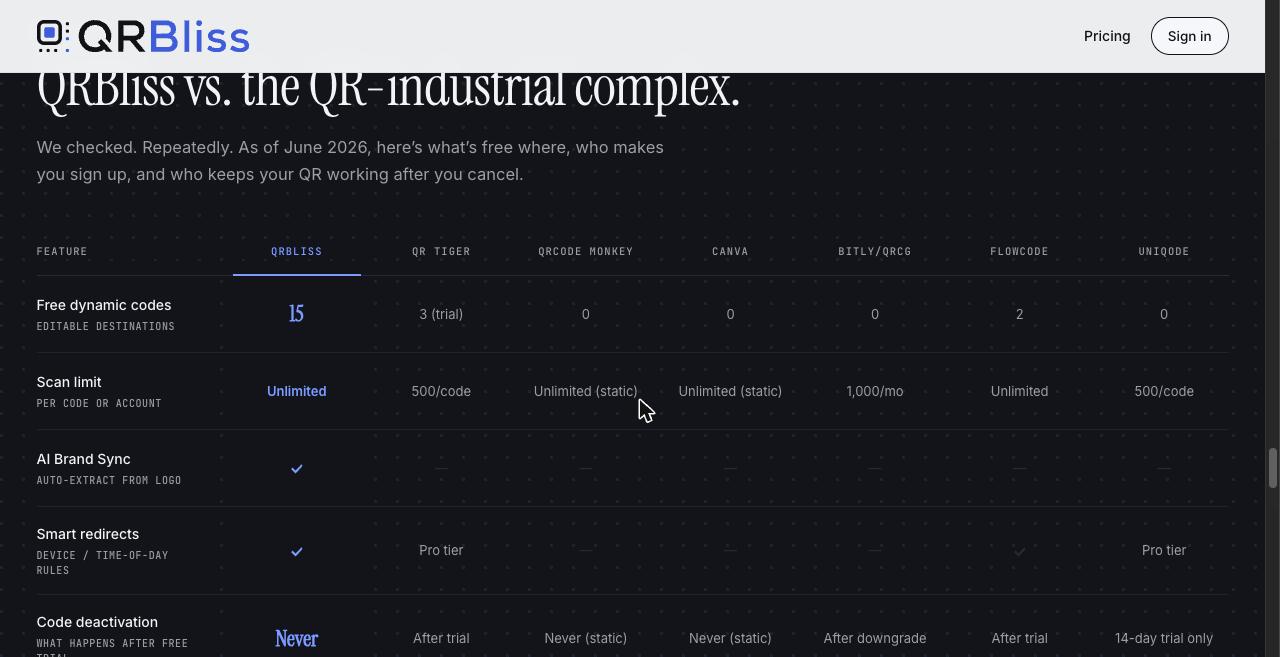
| Feature | QRBliss | QR Tiger | QRCode Monkey | Canva | Bitly/QRCG | Flowcode | Uniqode |
|---|---|---|---|---|---|---|---|
| Free dynamic codes | 15 | 3 (trial) | 0 | 0 | 0 | 2 | 0 |
| Scan limit | Unlimited | 500/code | Unlimited (static) | Unlimited (static) | 1,000/mo | Unlimited | 500/code |
| AI Brand Sync | Yes | No | No | No | No | No | No |
| Smart redirects | Yes | Pro tier | No | No | No | Yes | Pro tier |
| Code deactivation | Never | After trial | Never (static) | Never (static) | After downgrade | After trial | 14-day trial only |
| Exports | PNG, SVG, PDF | PNG; SVG/PDF on Pro | PNG, SVG | PNG, PDF | PNG, SVG | PNG; vector on Pro | PNG; SVG on Pro |
| Cheapest paid plan, year one | $0 | $84 | $0 (static only) | $144 | $120 | $300 | $108 |
Source: qrbliss.com, "as of June 2026." QRCode Monkey's free tier is static only, so destinations cannot be edited after generation.
Read honestly: QRCode Monkey and Canva are fine for static-only work with hand-done branding. QR Tiger and Uniqode have bigger enterprise feature sets. QRBliss wins on the combination small businesses need: usable free dynamic codes, no scan cap, brand-matched design with a scan check, print-ready vector export, and a code that keeps working after you cancel. Nobody else in the table offers all five free.
Where it fits: five real use cases
Real estate yard signs and open houses. The site's marquee testimonial is Taylor Foster of the TAYLORed Realty Team, who puts branded codes on yard signs so a buyer scans and gets photos, details and showing times. A dynamic code means the same sign can point at a new listing next month.
Restaurant menus and shop windows. The Menu type plus a time-of-day redirect solves lunch-versus-dinner with one printed code. Brand Sync keeps the window sticker matching the awning.
Agencies and multi-client work. The founder's own case. Each client gets codes in their own palette in seconds, and Pro's unlimited dynamic codes and saved assets keep every client's styles in one place. The AgentSequence testimonial is a real-estate marketer using printed codes to pull leads into nurture sequences.
Events and conferences. The Event type makes a calendar-friendly code, Badge and Banner frames carry the "Scan me" callout, and the SVG goes on the lanyard and the stage screen alike.
Packaging and product tags. The Product Tag template, the 3mm-bleed PDF and the low-light scan test are the three things a packaging designer will care about.
If you build for local businesses yourself, our SaaS marketing guide and our list of boring SaaS ideas that quietly print revenue cover the wider playbook. QRBliss is a good case study for both: a narrow tool, a real free tier, built for paying clients first.
Things to know before you rely on it
A sponsored review especially needs this section. None are dealbreakers, but they are the honest edges.
- It is a web studio, not a scanner app. If you searched "QR code app" wanting something to scan codes with, this is not that. It runs in the browser on desktop and mobile.
- Free has real limits. 15 dynamic codes, 5 saved assets, and 30 days of analytics history. Those are generous next to the competition but they are limits.
- Bulk, custom domain, API and A/B testing are Business only. There is no middle option for a Pro user who wants just the custom domain.
- "AI" means palette and scannability logic. Not generative art. Set expectations accordingly.
- It is a young brand. QRBliss has far fewer third-party reviews than QR Tiger or Bitly at the time of writing. The three testimonials on the site are real names with real businesses, but they are testimonials, not audited case studies.
- Dynamic codes depend on the service. True of every provider. For something permanent, generate a static code, which is free and unlimited here.
- One name confusion. QRBliss (qrbliss.com) is not BlissQR (blissqr.com), a restaurant-menu company. Different products.
Verdict
QRBliss does three things well: makes a code look like your brand, proves it still scans, and gives you a real allowance of editable codes without a card, a watermark, a scan cap or an expiry date. Print exports are shop-ready, the privacy posture is unusually clear, and the pricing is plain.
Best for local businesses, real-estate teams, restaurants, event organizers and agencies who want on-brand, print-safe codes and would rather not pay $15 a month for one editable link. Upgrade to Pro when you pass 15 dynamic codes or need more than a month of scan data. Skip it only if you need generative QR art or a mobile scanning app.
The fastest way to judge it is the way we did: open the generator, drop in a logo, watch the palette land, run the scan test, and export. It takes about a minute and no account.
FAQ
Is QRBliss really free?
Yes. The free plan costs $0 with no card and no expiry. It includes unlimited static QR codes, 15 dynamic codes with unlimited scans, all 14 QR types, all 36 templates, AI Brand Sync, PNG, JPG, SVG and print-ready PDF exports, smart redirects, 5 saved assets and 30 days of analytics. There is no watermark on any tier, and you can generate and download your first code without creating an account.
What is the difference between a static and a dynamic QR code in QRBliss?
A static code has the destination encoded in the pattern itself, so it never expires and never depends on QRBliss, but it cannot be changed after printing. A dynamic code encodes a short link that QRBliss controls, so you can change the destination, add device or time-of-day redirects and see scan analytics after the code is already on a sign or menu. Static codes are unlimited on every plan. Dynamic codes are 15 on Free and unlimited on Pro and Business.
Do QRBliss dynamic codes stop working if I never upgrade?
No. The 15 free dynamic codes never expire and have no scan limit. The company's own comparison table lists code deactivation as "Never" for QRBliss, against "after trial" or "after downgrade" for several competitors. Static exports are yours regardless, because the destination lives inside the image.
What does AI Brand Sync actually do?
You upload a logo, and Vibrant.js extracts its color palette in the browser in under two seconds. QRBliss applies those colors to the code, checks the foreground-to-background contrast against a 3:1 minimum, and auto-tunes the dot style and eye shapes so the result still scans. If the contrast fails, it adjusts to a safe version. It is color and shape intelligence, not generative AI art.
Does my logo get uploaded to QRBliss servers?
Not unless you sign in and choose to save it. Palette extraction runs client-side in your browser. The site states the file never leaves the browser unless you save it to an account, and the studio can be used without signing in.
Which file formats can I export from QRBliss?
PNG, JPG, SVG and PDF on every plan, with no watermark. SVG is true vector, so it scales to a billboard. The PDF export is print-ready with a quiet zone, crop marks and 3mm bleed. The site lists raster output at up to 4096px.
How much do QRBliss Pro and Business cost?
As of September 10, 2026, Pro is $7 per month billed annually ($84 per year, $24 less than paying monthly) and Business is $24 per month billed annually ($290 per year, $58 less than monthly). That works out to $9 and $29 per month on monthly billing, which matches the "$29 starting" figure on the homepage. There is a 30-day money-back guarantee and pro-rated refunds on annual plans after that.
What QR code types does QRBliss support?
Fourteen types, as shown in the live generator: URL, Text, Email, Phone, SMS, WiFi, vCard, Location, PDF, YouTube, WhatsApp, LinkedIn, Menu and Event. All 14 are available on the free plan.
Who is QRBliss best for?
Real estate agents printing yard signs and open-house flyers, restaurants and shops putting codes on menus and windows, agencies making branded codes for several clients, event organizers, and anyone who wants an editable code without paying a monthly fee for a single link. Teams that need bulk CSV generation, a custom short domain, an API or webhooks are the Business tier's audience.
Is QRBliss the same as BlissQR?
No. QRBliss lives at qrbliss.com and is a branded QR code studio founded by Scott Foster of VeloRank. BlissQR at blissqr.com is a different company focused on restaurant menus. QRBlend, QRBloom and Qrblox are also unrelated.
Summary
- QRBliss is a browser-based QR studio from VeloRank founder Scott Foster, built for his own local-business clients before it became a product.
- The free plan is unusual: unlimited static codes, 15 dynamic codes with unlimited scans and no expiry, all 14 types, all 36 templates, four export formats, no watermark, no card, no account needed for the first code.
- AI Brand Sync extracts your logo's palette in the browser, applies it, checks contrast at 3:1 or better, and the scan test reports pass or fail for iPhone, Pixel and low light before you export.
- Exports are print-shop ready: true vector SVG and a PDF with quiet zone, crop marks and 3mm bleed.
- Privacy is a feature: no cookies on a fresh visit, hashed IPs, no persistent IDs, opt-in analytics per code, and no data selling.
- Pro is $84 a year for unlimited dynamic codes and full analytics. Business is $290 a year and adds bulk CSV, A/B redirects, a custom domain, a 10k-request API, webhooks and a five-seat workspace. Thirty-day refund on both.
- Best for real estate, restaurants, local shops, events, packaging and agencies. Not for people who want generative QR art or a scanning app.
If you have built a tool in this space, SaaSCity lists SaaS startups on a free, human-reviewed directory with a live city map, and submitting a listing takes a few minutes.
Get your SaaS in front of founders
List your product on the SaaSCity live city map - a permanent listing, real discovery, and a backlink from a high-DR directory. Free to start; upgrade for a dofollow link and a building on the map.