Reviews
Open Atelier Review 2026: A Writing Teacher for Fiction, With AI Only If You Want It
Open Atelier (openatelier.co) is a browser-based writing app for novelists: a free rule-based chapter check, 14 craft lessons, practice on your own pages and an authorship record, with AI off unless you turn it on.

Contents (15)
- Open Atelier in short
- Who makes Open Atelier, and why it exists
- How the loop works: diagnose, learn, practice, check again
- What the chapter check looks for, and what it found in our test
- The lessons: short, practical and open to exceptions
- Three AI modes, set per manuscript
- The authorship record: useful, and clear about what it is not
- The rest of the writing room
- Privacy and your manuscript
- Open Atelier pricing
- How Open Atelier compares
- Who Open Atelier suits best
- Getting the most from your first week
- The verdict
- Frequently asked questions
Disclosure: this is a sponsored review. The test and opinions are ours.
Product details and prices were checked against openatelier.co on November 21, 2026.
Most writing software for novelists falls into one of two camps. Some tools fix your sentences for you, flagging grammar and style inside whatever editor you already use. Others write the sentences for you, drafting scenes from an outline with a large language model. Both can be useful. Neither is built to make you a better writer, and a growing number of fiction writers do not want a model anywhere near their pages.
Open Atelier starts from a different question: what would a good writing teacher do with your chapter? It reads the chapter, marks what is holding it back, opens a short lesson on that exact habit, lets you practise the fix on your own passage and then checks again so you can see whether the fix held. AI is a setting you choose per manuscript, and the default is off. This review covers how the product works, what the free check found in a passage we wrote for it, what it costs, how it compares with Sudowrite, AutoCrit and ProWritingAid, and who it suits best.
Open Atelier in short
Open Atelier is a browser-based writing app and craft feedback tool for fiction writers. Its core is a rule-based chapter check that looks for common fiction habits (showy dialogue tags, adverbs on tags, filter words, named feelings, echoes, stock phrases, backstory dumps and names spelled two ways) and links each finding to one of 14 short craft lessons. Every manuscript runs in one of three modes: Human only, where no AI model is ever called; Coach, where Claude Sonnet 5.5 from Anthropic leaves margin notes but never writes into the text; and Co-write, where the model can suggest passages that go in only when you accept them. Every passage keeps a record of how it arrived: typed, pasted, imported or AI-generated. The editor, the check, the lessons and the record are free with no limit. The paid plan, Atelier, costs $21 a month or $189 a year.
| Quick facts | |
|---|---|
| What it is | A fiction manuscript editor with a rule-based craft check, lessons and optional AI |
| Made by | Jean-Philippe (JP) LeBlanc, in Quebec, Canada |
| Live since | November 14, 2026 |
| AI modes | Human only, Coach, Co-write, set per manuscript and enforced on the server |
| AI model | Claude Sonnet 5.5 (Anthropic), included in the plan, no API keys |
| Free plan | Editor, unlimited checks, all lessons, authorship record, import and export, plus 3 Coach reads, 20 Co-write requests and 10 questions to your book a month |
| Paid plan | Atelier: $21 a month or $189 a year |
| Trial | 7 days of Atelier for new accounts, no card |
| Imports | Word, Scrivener, Novelcrafter, Sudowrite exports, PDF, RTF, Markdown, text |
| Exports | Word in standard manuscript format, EPUB, PDF, Markdown, text, full backup |
| Platforms | Any modern browser, on a computer or a phone |
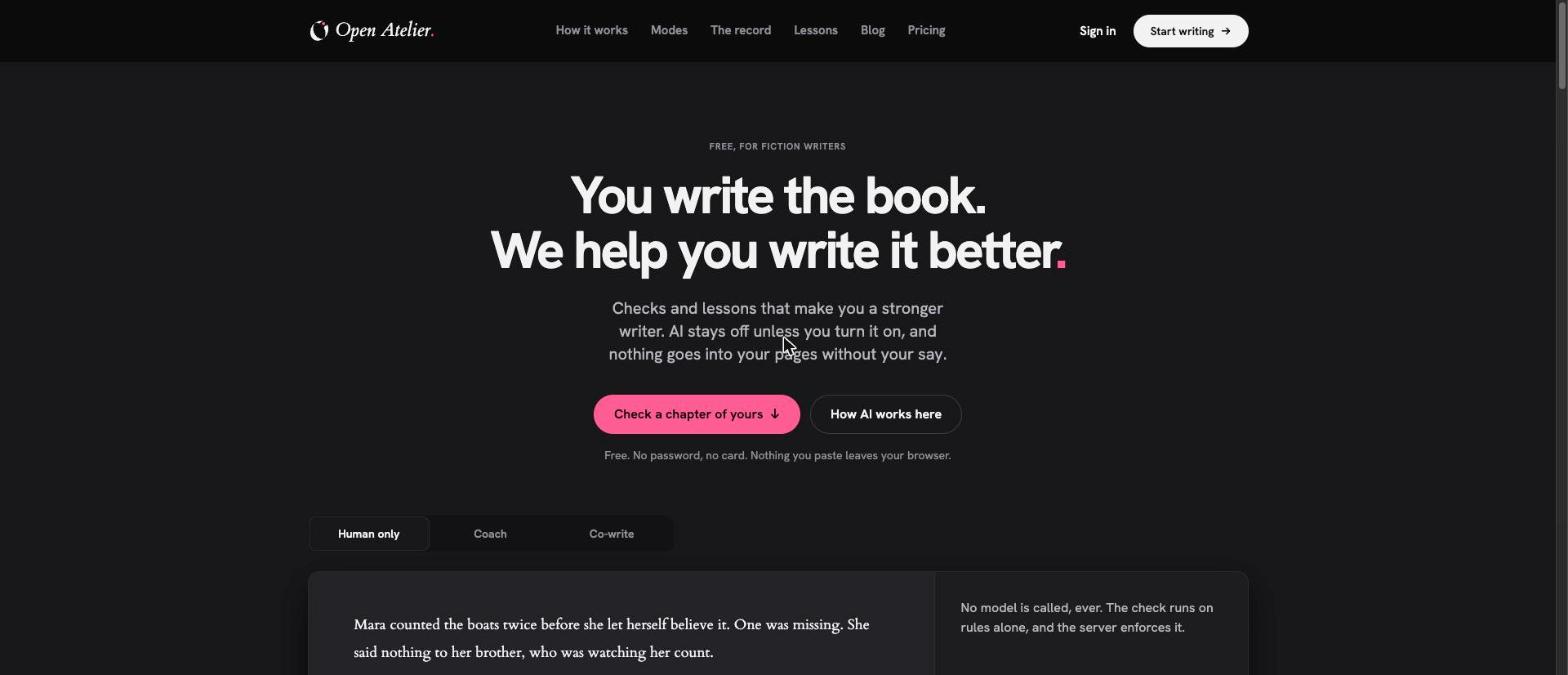
The Open Atelier homepage. The mode switch under the headline previews what each AI setting does to the same passage. Screenshot: openatelier.co, November 2026.
Who makes Open Atelier, and why it exists
Open Atelier is the work of one person. The terms and privacy pages name Jean-Philippe LeBlanc, based in Quebec, as the operator, and his personal site lists him as a builder and engineering leader in Montréal. Before Open Atelier he built AIStoryHub, an AI writing studio for storytellers that is still online. Open Atelier is, in his words, "the next version" of it, but with the opposite default: the rule-based check is the heart of the product and AI is something you invite in.
The launch post, Open Atelier is open, is worth reading before you sign up. It explains the single loop the product is built around, which he wrote at the top of the project brief before any code existed: diagnose, learn, practice, re-check. It also lists what went wrong in the first week. Share cards that showed findings dropping from twelve to four were removed the same day, because they were about the product and not the book. The rules were too eager at first, so he ran them against public-domain novels and raised the thresholds until professional prose drew few findings. And Ask the book, which answers questions about your manuscript, could cost more in model calls than a subscriber paid, so the price changed.
The colophon is equally direct about how the software is made. The code and much of the copy are written with Claude, under LeBlanc's direction, and he reviews what ships. For a product whose whole stance is "write however you write, and be truthful about how", that line matters. It also explains how a first commit on November 8 became a public product on November 14.
What this means for you as a writer: Open Atelier is young and small. The upside is a product with a clear point of view and a founder who answers support requests himself. The risk is the usual one for any new tool, and the terms address it. If the service ever closes, writers get at least 30 days' notice by email and a refund of the unused part of their plan, and every manuscript can be exported or downloaded as a full backup at any time.
How the loop works: diagnose, learn, practice, check again
Every part of Open Atelier hangs off one four-step loop, and it is the main reason to choose it over a style checker.
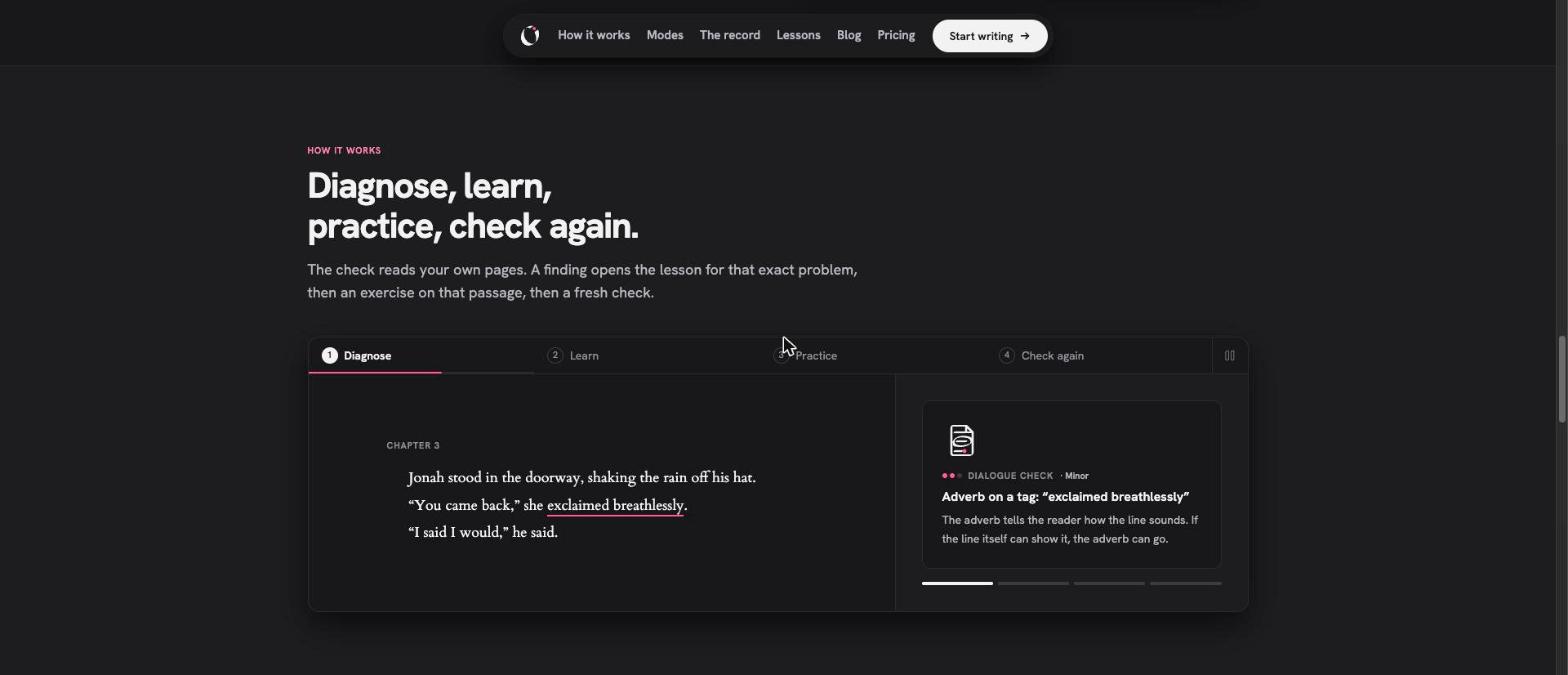
The four-step loop on the homepage. Here, the Diagnose step flags "exclaimed breathlessly" as an adverb on a speech tag. Screenshot: openatelier.co, November 2026.
1. Diagnose
You paste a chapter or write in the editor, and the rule-based check reads it. Findings are marked in the text and listed beside it with a severity (Note or Minor) and a one-line reason. The check runs in the browser and calls no model, which is why it works in Human only mode and why it is free and unlimited.
2. Learn
Each finding has a "Read the lesson" link that opens the lesson section for that exact problem, next to the chapter rather than in a new tab. You get the principle, worked before-and-after examples and, importantly, a note on when to keep the habit.
3. Practice
Practice dims the rest of the chapter and puts the flagged passage in focus. As you revise, the rules re-read the passage each time you pause, so you see the finding clear (or not) while you work.
4. Check again
When you are done, a fresh check shows your words then and now. The founder's launch post points out a detail we like: if you swap one showy tag for another, the comparison still counts the problem as there, on purpose. And if you break a rule deliberately, you can keep the finding with a reason (voice, character, genre or period). It stays kept in every later check, so the tool stops nagging you about choices you made on purpose.
What the chapter check looks for, and what it found in our test
According to Open Atelier, the rules read your lines for:
- dialogue tags and adverbs attached to them, and speeches that run long without a break
- filter words ("she saw", "he felt") and feelings named outright rather than shown
- slips in tense or person
- clutter, echoes and sentences that open the same way
- stock phrasing, such as a heart that pounds
- backstory dumps
- names spelled two ways
A separate book check reads across chapters for characters who vanish (or are named after they leave or die), tense that breaks and chapters much longer or shorter than the rest.
To see how this behaves on real prose, we wrote a deliberately flawed 92-word passage of our own: a lighthouse scene with an adverb on every tag, a pounding heart, three sentences in a row opening with the same name and a character called Tomas in one line and Thomas in another. We pasted it into the free check on the homepage, with no account.
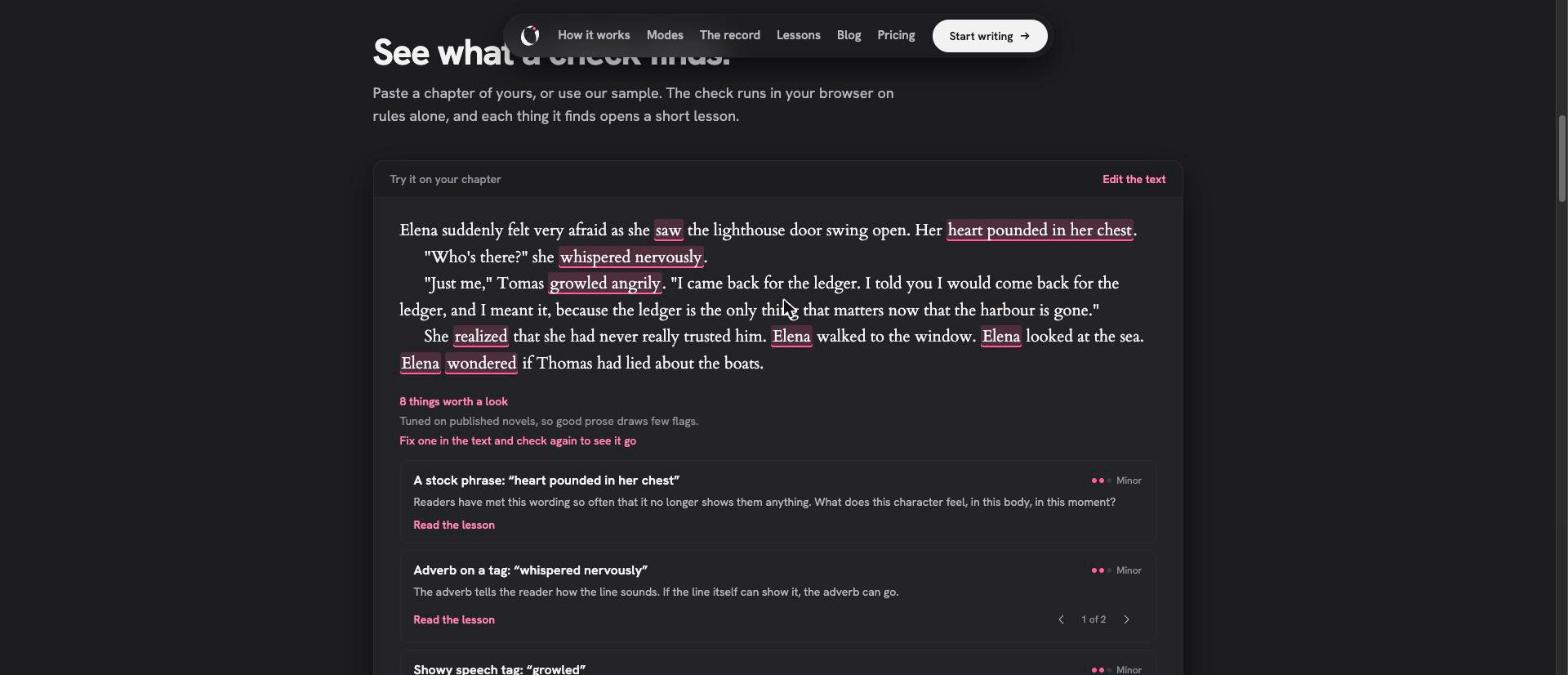
Our test passage in the free check. Eight findings came back instantly, each with a link to its lesson. Screenshot: openatelier.co, November 21, 2026.
The check returned eight findings in five groups:
| Finding | Severity | Example from our passage |
|---|---|---|
| Stock phrase | Minor | "heart pounded in her chest" |
| Adverb on a tag (2) | Minor | "whispered nervously", "growled angrily" |
| Showy speech tag | Minor | "growled" |
| Filtered through the character (3) | Note | "saw", "realized", "wondered" |
| Sentences opening the same way | Note | 3 sentences in a row open with "Elena" |
Each card explains the problem in a sentence and asks a useful question. The stock phrase card, for example, asks what the character feels "in this body, in this moment". That is the kind of prompt a good workshop leader gives.
The check was also restrained. It left "suddenly" and "felt very afraid" alone, and it did not comment on the word "ledger" appearing three times in one speech. In a single pasted passage it also did not catch the Tomas and Thomas spelling, because name continuity in Open Atelier works against the story bible inside the app, where your characters and their other names are defined. This restraint is a design choice: the thresholds were tuned against published novels so that good prose draws few flags. If you want a tool that marks every adverb, this is not it. If you have ever ignored a checker because it buried three real problems under forty trivial ones, you will appreciate the quieter approach.
The lessons: short, practical and open to exceptions
There are 14 lessons, and all of them are public. You can read them in the Open Atelier lessons library without an account. They cover:
| Area | Lessons |
|---|---|
| Dialogue | Tags and beats; Rhythm and voice |
| Continuity | Names and continuity |
| Point of view | Point of view and filtering; Tense and person |
| Prose | Clutter; Echoes and repetition; Stock phrasing; Clear sentences |
| Scene | Backstory; Scene and summary; What a scene does; Tension and stakes |
| Character | Building a character |
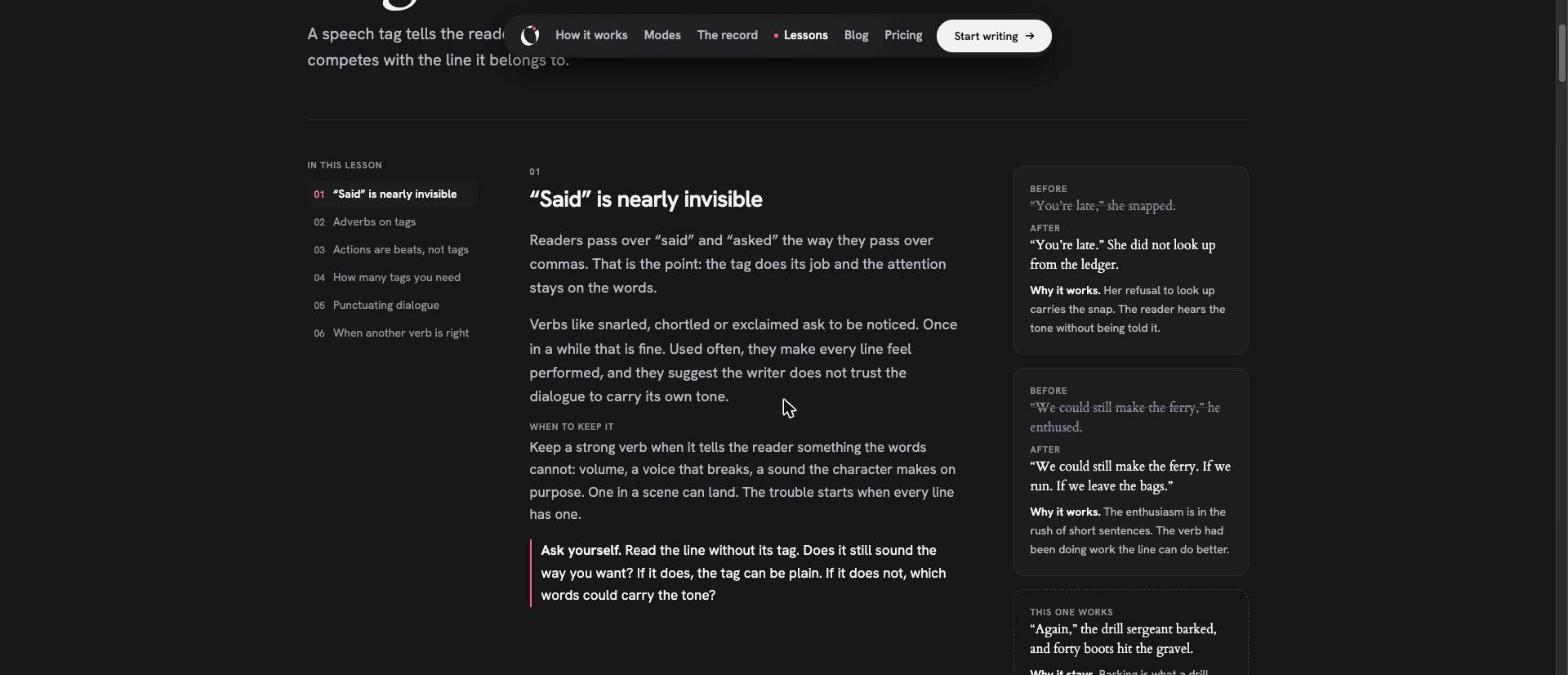
The "Tags and beats" lesson. Each section pairs the principle with before-and-after examples and a "When to keep it" note. Screenshot: openatelier.co, November 2026.
We read the "Tags and beats" lesson in full. It has six sections, from why "said" is nearly invisible to when another verb is right, with punctuation in between. Most sections follow the same pattern: a short principle, a "When to keep it" paragraph, an "Ask yourself" question, before-and-after examples with a line on why the change works, and a "This one works" example where the usual advice is set aside for a good reason. A drill sergeant who "barked" stays, because the reader needs the volume. The lesson explains a habit and when it serves the story, which is more useful than a rule.
The examples are written for the site rather than quoted from published novels, which keeps them clean of copyright questions and makes them easy to apply to your own work.
Three AI modes, set per manuscript
Open Atelier's stance on AI fits on one line from its colophon: write however you write, and be truthful about how. In practice, each manuscript has a mode, and the server enforces it, not only the interface.
| Mode | What the model does | What it never does |
|---|---|---|
| Human only | Nothing. No model is called for that manuscript by any route. | Send your text to an AI provider |
| Coach | Reads a chapter and leaves margin notes on pacing, tension, what a scene is for, how a character comes across, point of view and clarity | Write into your manuscript |
| Co-write | Suggests versions of a passage you select (Rewrite, Tighten), continues from the cursor, drafts a beat from your scene card, drafts a dialogue line you left empty, summarises a scene | Put anything in your text that you did not accept |
The boundaries are specific. In Coach, if a note puts words in quotation marks that your chapter does not contain, the note is thrown away, because at that point it would be rewriting your text. In Co-write, accepted text is marked as AI-generated for good, and editing it later does not wash the mark off. Under each Co-write request, a "What Co-write read" panel lists what was sent to the model, by count and name, and lets you leave parts out.
Coach and Co-write also add Ask the book: you ask a question about your own manuscript ("When does Mara first mention the missing boat?") and get an answer drawn from your pages, with links to the paragraphs it rests on.
Behind both modes sits one model, Claude Sonnet 5.5, which Open Atelier pays for and chooses. There are no API keys to bring and no tokens to count. If you want to pick between many models, Sudowrite or Novelcrafter will suit you better. If you would rather not think about models at all, one well-chosen default is a relief.
The authorship record: useful, and clear about what it is not
Some publishers, agents and writing contests now ask writers how they used AI. Open Atelier's answer is a record of how every stretch of text arrived in the editor.
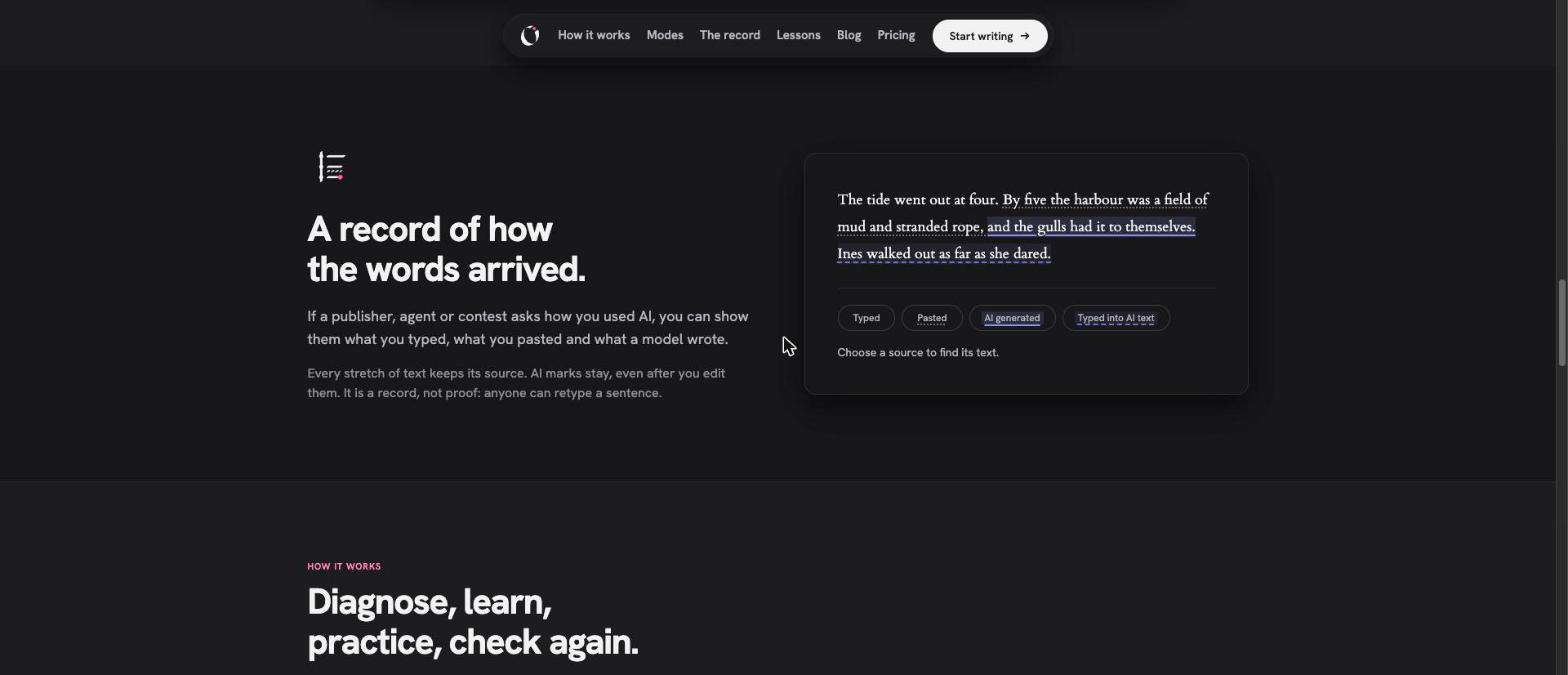
The authorship record on the homepage demo. Choosing a source highlights the text that came from it. Screenshot: openatelier.co, November 2026.
Each span is tagged as typed, pasted, imported, AI-generated or AI-modified (typed into AI text). Mode changes are logged too. The record shows each source's share for the book and for each chapter, and it can travel with a Word export as an appendix.
Open Atelier is clear about what the record can show. The homepage, the terms and the launch post all say the same thing: it is a record, not proof. It cannot see what happened outside the editor, and anyone can retype a sentence. The terms ask writers not to present it as proof of authorship. A tool that claimed to certify human writing would be making a promise no software can keep. A tool that helps you describe your own process accurately, when someone asks, is something a writer can actually use.
The rest of the writing room
Open Atelier is a full manuscript editor, not only a checker. Based on its support and comparison pages, it includes:
- Structure: parts, chapters and scenes, with a plan board, an outline and scene cards (place, time, point of view, beats).
- Story bible: characters, places and things, with other names, summaries, relationships, facts that change over time and private notes. Books in a series share one bible, and names are marked on the page as you write.
- Style sheet per book: spellings, words always spelled one way, things to keep out and notes on voice. The chapter check uses your word list in every mode.
- Version history on every chapter, and a deleted-chapters bin.
- Word targets with progress counts.
- Private reading links for beta readers: read-only, with an optional password. If you turn it on, readers can react to a paragraph (loved this, lost me, slowed down, didn't believe it) and say at the end of each chapter whether they would keep reading. No model reads those responses.
- Import from Word, Scrivener (zipped or as a folder), Novelcrafter, a Sudowrite project export, PDF, RTF, Markdown and text, with a review step before anything is saved.
- Export to Word in standard manuscript format, EPUB, PDF (manuscript layout or a 6 by 9 inch book page), Markdown and text, plus a single zip backup. Findings export as CSV.
- Connected assistants over MCP and an API, with access granted per manuscript and private notes never shared.
- Offline-friendly saving: every edit is stored in the browser first and synced in the background, so a dropped connection does not cost you a paragraph.
There is no grammar checker of its own; the browser's spell check works in the editor. Open Atelier suggests a workflow that many writers will recognise: revise for craft in Open Atelier, then export to Word and run a final grammar pass in the checker you already use.
Privacy and your manuscript
For many fiction writers, privacy is the deciding question. The Open Atelier privacy page is long and unusually concrete. The points that matter most:
- Manuscripts are never public, never indexed and never used to train models, by Open Atelier or anyone it works with.
- In Human only, no text is sent to a model at all.
- In Coach and Co-write, text goes to Anthropic through Cloudflare's AI Gateway with logging and caching turned off, under zero data retention: Anthropic does not keep the request once it has replied, outside narrow legal and safety exceptions.
- Questions to your book and their answers are not stored on the server; they stay in your browser tab.
- Manuscript text is never written to logs. The operator's admin view shows account details and usage counts, never manuscript titles or text.
- The public pages use cookieless Cloudflare Web Analytics only when you are signed out. There are no advertising trackers.
- Sign-in is by email link, passkey or Google, with no passwords stored.
The privacy page also lists every company that handles data (Cloudflare, Anthropic, Stripe, Google for optional sign-in and Klibon for the affiliate program) and what each one receives. Writers who need to answer a publisher's or employer's data questions will find the answers there.
Open Atelier pricing
Open Atelier's pricing follows a simple principle: anything that calls no model is free and unlimited, and only Coach, Co-write and Ask the book are counted. The figures below are from the Open Atelier pricing page on November 21, 2026, in US dollars, with tax added where it applies.
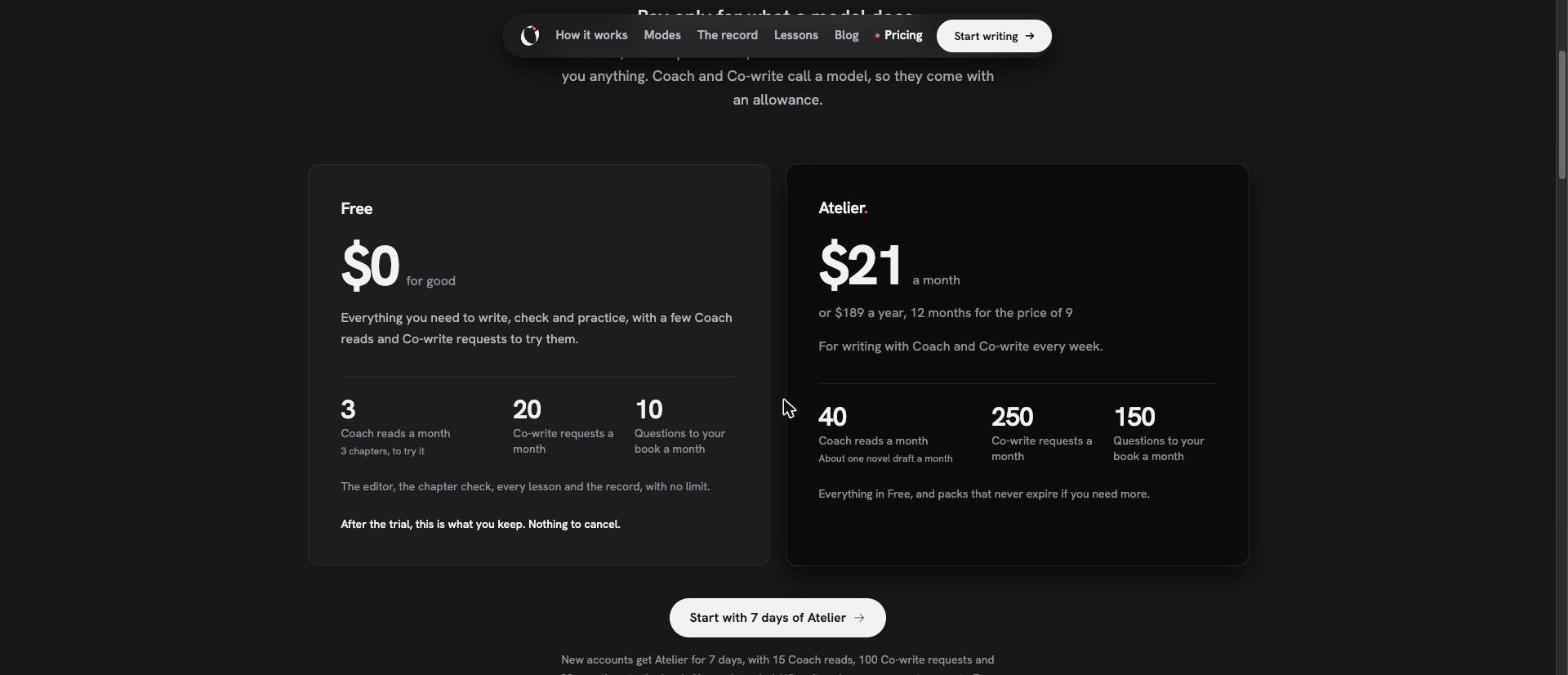
The two plans side by side. Everything outside the model allowances is the same on both. Screenshot: openatelier.co/pricing, November 2026.
| Free | Atelier | |
|---|---|---|
| Price | $0 | $21 a month, or $189 a year (12 months for the price of 9) |
| Coach reads a month | 3 | 40 |
| Co-write requests a month | 20 | 250 |
| Questions to your book a month | 10 | 150 |
| Editor, unlimited chapter checks, all lessons, practice, authorship record, import and export, MCP and API | Included | Included |
A few details make the pricing easier to live with:
- What counts. A Coach read is Coach reading one chapter and leaving notes. A Co-write request is one ask for versions of a passage. Failed calls are not counted.
- Packs. 20 extra Coach reads or 150 extra Co-write requests cost $5 each, once. Packs never expire and are used after your monthly allowance.
- Trial. New accounts get 7 days of Atelier with 15 Coach reads, 100 Co-write requests and 30 questions, with no card. When it ends, the account moves to Free on its own.
- Price lock. If a price goes up, subscribers keep the price they signed up at for as long as they stay subscribed.
- Running out never stops you writing or checking. The rule-based check and the lessons keep working.
How far does 40 Coach reads go? Open Atelier describes it as about one novel draft a month. A 30-chapter manuscript would take 30 reads for a full Coach pass, leaving ten for chapters you revise and want read again. Writers who use Human only mode will never need the paid plan at all, and that is by design.
How Open Atelier compares
Open Atelier publishes its own comparison pages, and each one starts with a list of reasons to choose the other tool. Facts about competitors below are as Open Atelier prints them; Open Atelier says it checked them against each maker's pages on November 14, 2026.
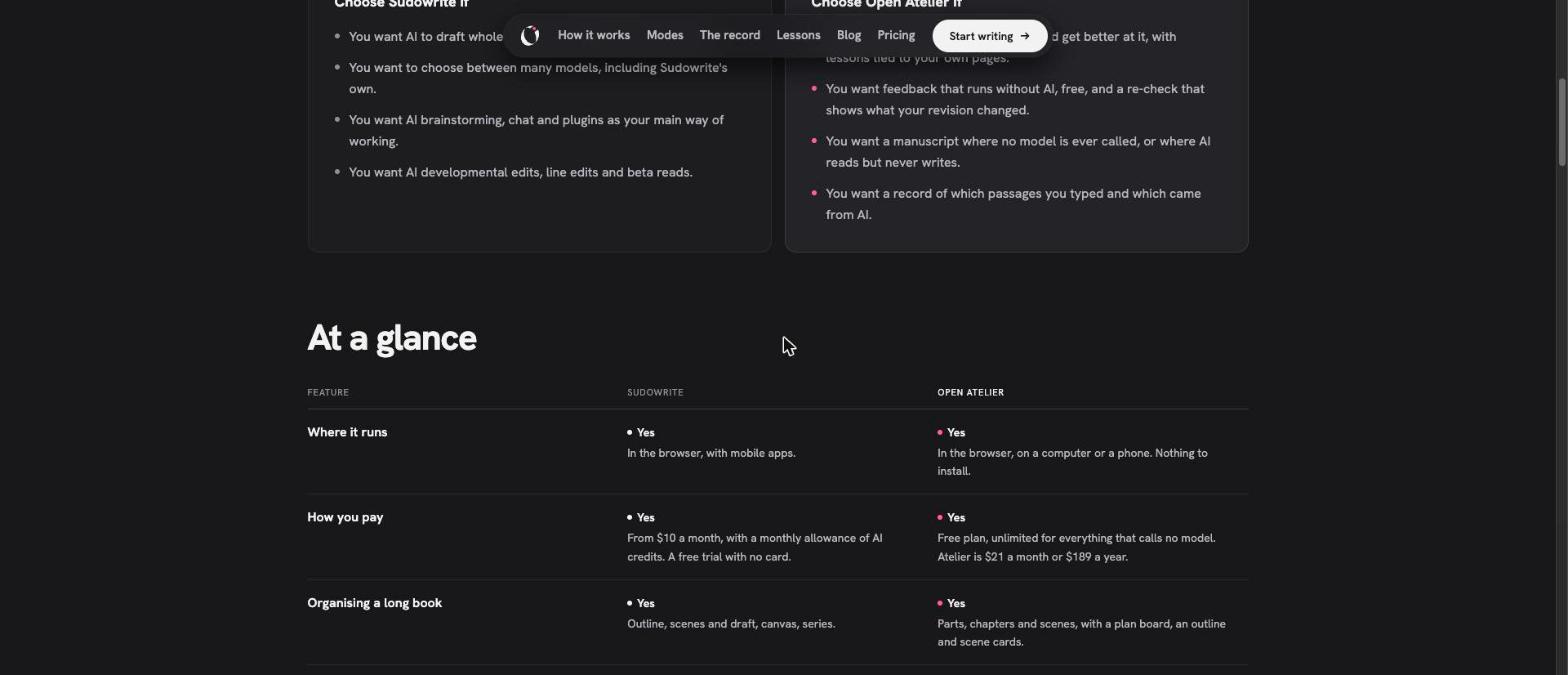
Part of Open Atelier's comparison with Sudowrite. Each comparison page opens with when to pick the other tool. Screenshot: openatelier.co, November 2026.
| Tool | Best for | Where Open Atelier differs |
|---|---|---|
| Sudowrite | Drafting scenes and chapters with AI, with a choice of models | A no-AI mode, lessons tied to your pages, an authorship record |
| AutoCrit | 20+ fiction editing reports, genre comparisons, AI beta readers | Each finding leads to a lesson, an exercise and a re-check; continuity against your story bible |
| ProWritingAid | Grammar and style checks inside Word, Google Docs and Scrivener | A full novel editor with a story bible; fiction craft lessons; unlimited free checks |
| Novelcrafter | A strong codex with AI you connect yourself | Model included, a craft check and lessons, and it can run with no AI |
| Scrivener | Organising a very long or complex book | Reads your chapters and teaches the fix |
Our reading of the field: if you want AI to do substantial drafting, Sudowrite is the more complete tool. If you want grammar and spelling inside the editor you already use, ProWritingAid remains the practical choice. If you want genre benchmarks against published books, AutoCrit has them and Open Atelier does not. Open Atelier is stronger where the others are thin: teaching on your own pages, a re-check that shows whether a fix held, a mode with no AI at all and a record of how the book was written. Many writers will use it alongside one of the others rather than instead of them.
On price, Open Atelier's comparison pages list Sudowrite from $10 a month with a monthly allowance of AI credits, ProWritingAid as free up to 500 words a check with Premium from $120 a year, and AutoCrit as a free plan with a few reports plus a Pro subscription. Open Atelier's own free plan has no word limit on checks.
Who Open Atelier suits best
Open Atelier is a strong fit for:
- Novelists in revision who want to know what holds each chapter back, and want to understand why rather than accept a list of fixes.
- Writers who do not use AI and still want rule-based feedback, with a guarantee that no model touches the manuscript.
- Writers who do use AI and want to keep it in a defined role, with a record they can point to if an agent, publisher or contest asks.
- Writers preparing a manuscript for an editor or agent, who want the obvious habits cleaned up first so a paid editor can focus on story.
- Series writers who need names, facts and relationships to stay consistent across books.
- Writing teachers and students, since every lesson is public and the check runs without an account.
It is a weaker fit if you need a grammar checker built in, real-time co-authoring, native desktop or mobile apps, a choice of AI models, or a tool that drafts whole chapters for you. It is also built for fiction; non-fiction writers will find the checks and lessons aimed elsewhere.
Getting the most from your first week
If you try Open Atelier, a short plan helps you see its value inside the 7-day trial:
- Start without an account. Paste the opening page of your current draft into the check on the homepage. Read every finding and open at least two lessons.
- Import one manuscript, not five. Bring in the book you are actively revising. Check the chapter list and story bible entries in the import review before saving.
- Set the mode first. Choose Human only, Coach or Co-write for that manuscript before you do anything else, so the authorship record reflects your intent from the start.
- Fill in the story bible. Add your main characters with their other names (nicknames, titles, married names). This is what lets the continuity check catch a name that drifts.
- Work one finding at a time. Pick the finding that appears most often, open its lesson, practise on one passage and run the check again. One habit fixed across a book is worth more than twenty single edits.
- Spend Coach reads where they count. Use the trial's 15 reads on chapters you already suspect are weak, such as the opening and the midpoint.
- Send one reading link. Share a chapter with a trusted reader and turn on reactions. "Lost me" on a specific paragraph is the most useful note a beta reader can give.
- Export before the trial ends. Download a Word file or a full backup so you know exactly how your work comes out.
The verdict
Open Atelier answers a question most writing tools skip: how do you help a writer improve, rather than correct or replace their prose? The loop of diagnose, learn, practise and check again is simple and well built. The free check is fast and restrained, the lessons are clear and practical, and the three AI modes give writers on every side of the AI debate a place to work. The authorship record is useful, and the product states plainly what it can and cannot show.
It is also a new, one-person product, live since November 14, 2026, so it lacks some things larger tools have: a built-in grammar check, native apps, genre comparisons and a long public track record. The terms handle the obvious risk well, with export at any time and 30 days' notice if the service ever closes.
For fiction writers who want to get better at the craft on their own pages, Open Atelier is worth a serious look. The free check takes a minute, needs no account and sends nothing, so the easiest way to judge it is to paste in a page of your own.
Frequently asked questions
What is Open Atelier?
Open Atelier is a browser-based writing app for fiction writers. A rule-based chapter check finds craft problems such as showy dialogue tags, filter words and stock phrases, each finding opens a short lesson, and you practise the fix on your own passage before checking again. AI is optional and set per manuscript.
Is Open Atelier free?
Yes, for most of what it does. The editor, the rule-based chapter check, every lesson, practice, the authorship record and import and export are free with no limit. The Free plan also includes 3 Coach reads, 20 Co-write requests and 10 questions to your book each month.
How much does Open Atelier cost?
The paid plan, Atelier, costs $21 a month or $189 a year in US dollars, plus tax where it applies. It includes 40 Coach reads, 250 Co-write requests and 150 questions to your book a month. One-time packs of 20 Coach reads or 150 Co-write requests cost $5 each and never expire.
Is there a free trial?
Yes. New accounts get 7 days of Atelier with 15 Coach reads, 100 Co-write requests and 30 questions to the book, with no card required. When the trial ends, the account moves to the Free plan automatically and nothing is charged.
Does Open Atelier use AI?
Only if you choose. In Human only mode, no AI model is ever called, and the server enforces it. Coach mode uses Claude Sonnet 5.5 to leave notes without writing into your text. Co-write mode can suggest passages that enter the manuscript only when you accept them, marked as AI-generated.
Which AI model does Open Atelier use?
Claude Sonnet 5.5, made by Anthropic, for every Coach read, Co-write request and question to your book. The model is included in the plan, so there are no API keys to bring and no tokens to count.
Is my writing used to train AI models?
No. Open Atelier says manuscripts are never public, never indexed and never used to train models. Model requests in Coach and Co-write are sent under zero data retention, and Human only manuscripts are never sent to a model at all.
What is the authorship record?
It is a record of how each passage arrived in the editor: typed, pasted, imported, AI-generated or AI-modified. AI marks stay even after you edit the text. Open Atelier describes it as a record, not proof, because it cannot see what happened outside the editor.
Can I import my manuscript from Scrivener or Word?
Yes. Open Atelier imports Word files, Scrivener projects (zipped or as a folder), Novelcrafter exports, Sudowrite project exports, PDF, RTF, Markdown and plain text. Files are read in your browser, and you review the chapters and story bible entries before anything is saved.
Can I export my book?
Yes. You can export to Word in standard manuscript format, EPUB, PDF (manuscript layout or a 6 by 9 inch book page), Markdown and plain text, or download a full zip backup that keeps authorship marks, parts and scene cards. Chapter check findings export as CSV.
Does Open Atelier check grammar and spelling?
No. Open Atelier focuses on fiction craft and has no grammar checker of its own. Your browser's spell check works in the editor, and a common workflow is to revise in Open Atelier, export to Word and run a final grammar pass in a separate checker.
Is Open Atelier a good alternative to Sudowrite or AutoCrit?
It depends on what you want. Sudowrite is stronger for drafting with AI, and AutoCrit offers more reports and genre comparisons. Open Atelier is the better choice if you want lessons tied to your own pages, a re-check that shows whether a fix worked, a mode with no AI at all and a record of how the book was written.
Does Open Atelier work on a phone?
Yes. Open Atelier runs in the browser on a computer or a phone, with nothing to install. It is a web app; Open Atelier does not list native apps for desktop or mobile.
Who makes Open Atelier?
Open Atelier is built and run by Jean-Philippe LeBlanc in Quebec, Canada. He previously built AIStoryHub, an AI writing studio, and describes Open Atelier as its next version, with the craft check at the centre and AI off unless the writer turns it on.
Get your SaaS in front of founders
List your product on SaaSCity for $19.99, one-time: a permanent listing and a building on the live city map.