Reviews
UploadTheFile Review 2026: Drop a File, Get a Live Link, No Account Required
UploadTheFile (uploadthefile.com) turns any file, ZIP or AI-generated website into a live HTTPS link on upload.tf in seconds, with no account, no Git and no build step. We checked the live product, the pricing page, the use-case pages and the legal documents, and lay out what it does well, what the limits are, and who should pay for it.

Contents (15)
- What UploadTheFile is, in one paragraph
- Who it is for
- The workflow, step by step
- Hosting an AI-generated website
- ZIP to website: the rules you need to know
- PDF as a link, with OCR and a chat button
- Video and large files
- Pricing, verified against the live page
- Security, privacy and the stack they name
- Content policy: read this before you upload
- What we liked
- What to keep in mind
- How to test it in five minutes
- Verdict
- FAQ
Disclosure: this is a sponsored review.
Product details checked against uploadthefile.com, its pricing page, the use-case pages for AI-generated sites, ZIP hosting, PDF links, video links and large files, and the terms, privacy policy and data processing addendum on September 16, 2026. Screenshots are from the live site.
Quick answer: UploadTheFile is a "drop the file, get a live URL" host built for the moment right after an AI tool hands you a finished page. You drag an HTML file, a ZIP, a PDF or a video onto the box, and a few seconds later you have an HTTPS link on its own upload.tf subdomain plus a QR code. No account, no Git, no CLI, no build step. The recipient does not need an account either, and the file renders in the browser instead of arriving as an attachment. Free anonymous links live 48 hours at up to 30 MB, a free account stretches that to 30 days and 50 MB, and paid plans from $7 a month make links permanent and add passwords, email capture, analytics, custom names and an API. It is a disposable publisher with rich previews rather than a cloud drive, and for that job it is one of the least fussy tools we have used this year.
What UploadTheFile is, in one paragraph
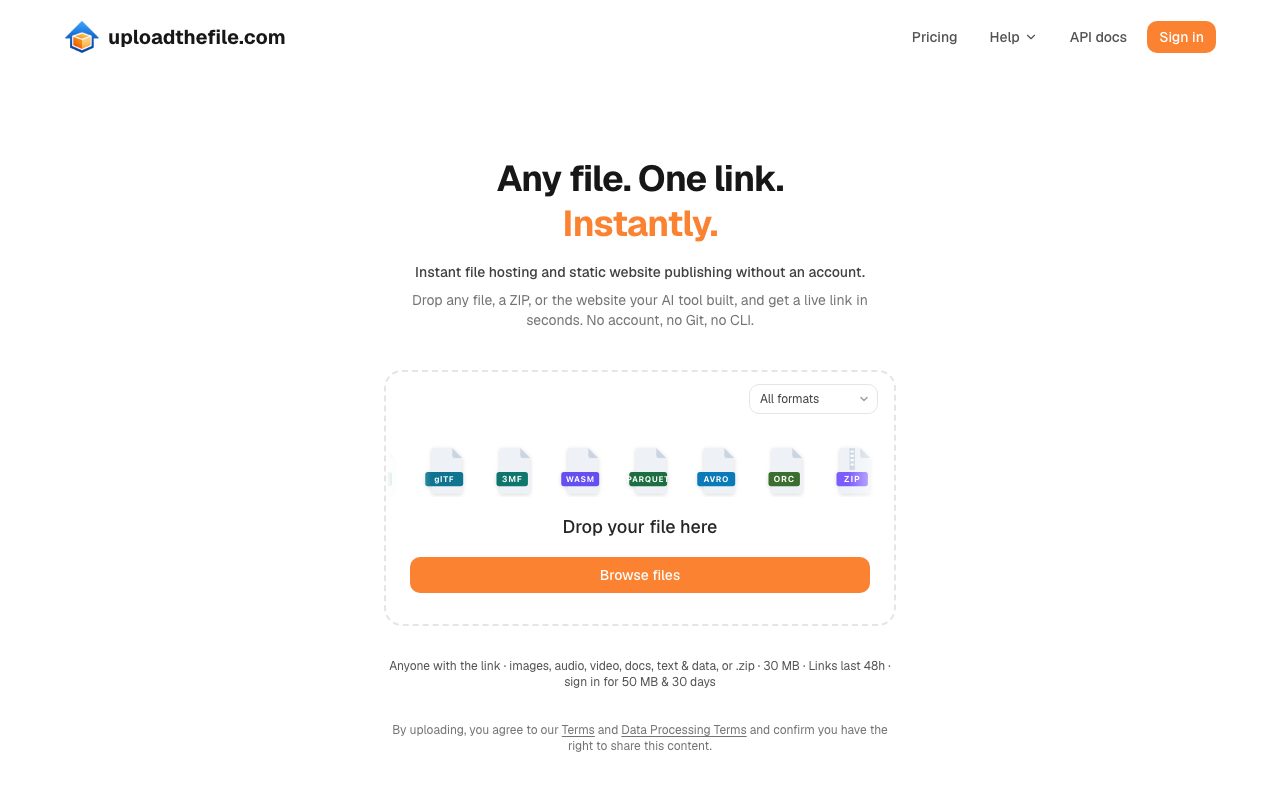
UploadTheFile is a hosted service at uploadthefile.com that publishes a single file or a ZIP archive at a random, unlisted something.upload.tf address. The site describes itself as "instant file hosting and static website publishing without an account." Files pass through a validation and quarantine pipeline, then get served over HTTPS from a global edge network. HTML and ZIP uploads become live static websites, PDFs open in the browser's PDF viewer with an OCR text layer, MP4, WebM and MOV videos play in the native player, and images, audio, Office documents, 3D models, datasets and archives get a preview page where the browser can render one. The company says more than 85 formats are supported and sums it up as "if it has a common file type, it most likely works."
The homepage tagline is "From file to live link in seconds," and that is an accurate description of the entire product. Everything else on the site, from the pricing tiers to the API, is a layer on top of that one motion.
Who it is for
The copy on the site is unusually specific about its audience, and that helps a reviewer. There is a page titled "Host an AI-generated website" that opens with "You vibe-coded a site with Claude or ChatGPT." There is a "Made for vibe coders" section. The footer lists pages for hosting a Claude Design export, an OpenDesign export, a web app demo, and uploading from n8n, Zapier, Make and Pipedream. There are comparison pages against WeTransfer, file.io, Tiiny Host, Vercel Drop, Netlify Drop and Cloudflare Drop.
Read together, that maps to four groups:
- People who just generated a page in an AI chat and want to show it to someone in the next thirty seconds without opening a terminal.
- Freelancers and agencies sending a client a landing page, a microsite, a proposal PDF or a cut of a video for sign-off.
- Anyone who has hit the 25 MB email wall and wants a link instead of an attachment, with a viewer on the other end that needs nothing installed.
- Teams and platforms that need a simple, unlisted file and site drop with passwords, analytics and an upload API, without standing up a full static-hosting pipeline.
If you are already comfortable with git push and a Vercel project, UploadTheFile will not replace that for production. It is aimed at the step before, and around, production: the preview, the handoff, the demo, the document you need to open on a phone in a meeting.
The workflow, step by step
The homepage shows the flow in three numbered steps, and the product does exactly what the steps say.
- Drop your file. Drag it onto the box or click Browse. A format picker on the drop zone lets you check whether your extension is supported before you commit.
- Get an instant link. The file is validated and published at its own short URL. A QR code is generated alongside it so you can hand the link to a phone in the same room.
- Share it. Copy the link or scan the QR. On a paid plan you can add a password or track opens.
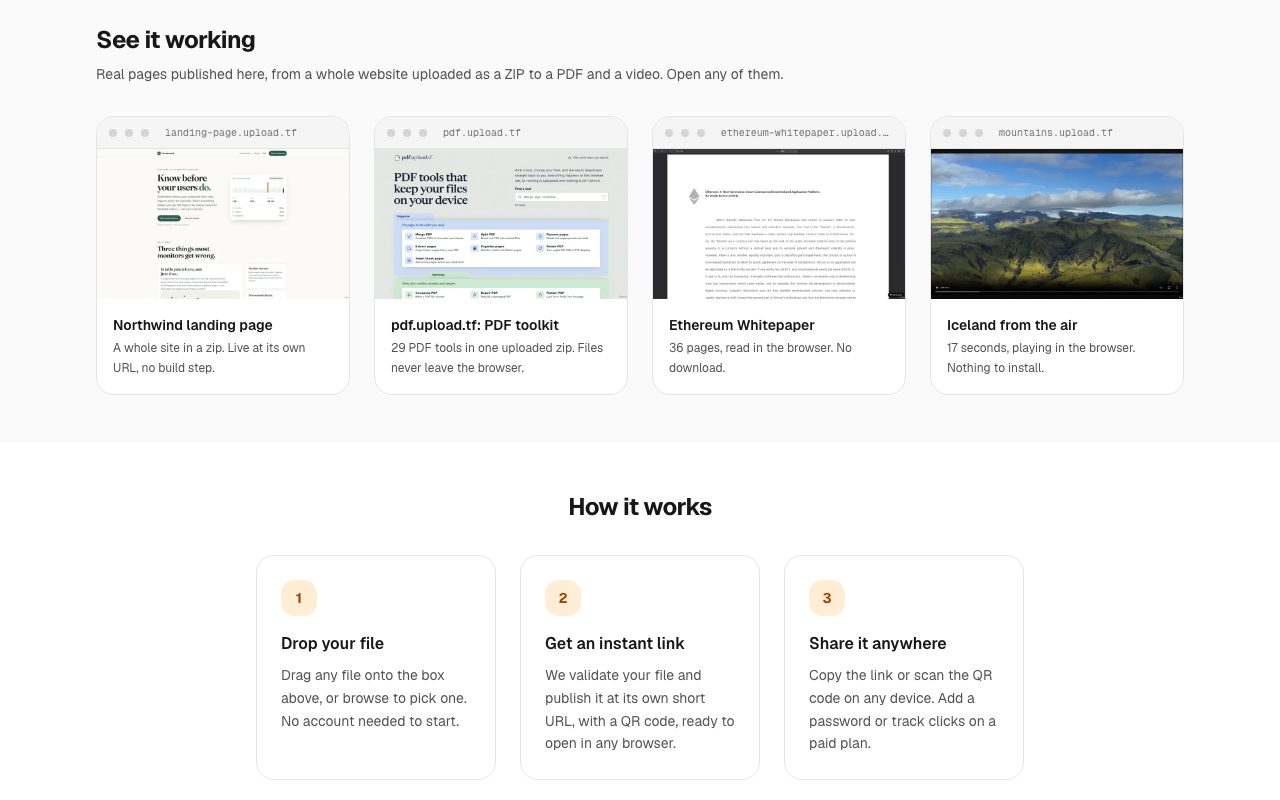
The homepage backs this up with four live demos you can open yourself: landing-page.upload.tf (a whole site from a ZIP), pdf.upload.tf (a bundle of client-side PDF tools uploaded as one ZIP), ethereum-whitepaper.upload.tf (a 36-page PDF) and mountains.upload.tf (a short video). We opened all four. They load fast and behave the way the captions promise.
One nuance worth flagging so nobody misreads it: the caption on the PDF toolkit demo says "Files never leave the browser." That line describes the tools inside that particular demo ZIP, which do their PDF processing client-side. It is not a description of UploadTheFile's hosting. Core uploads do go to the company's storage, which the privacy policy and DPA describe plainly. The distinction matters if you are evaluating this for anything sensitive.
Hosting an AI-generated website
This is the sharpest wedge on the site and the reason most readers here will care. The dedicated page is blunt: "Upload the HTML or ZIP your AI tool made and get a live URL, without Git, CLI or signup."
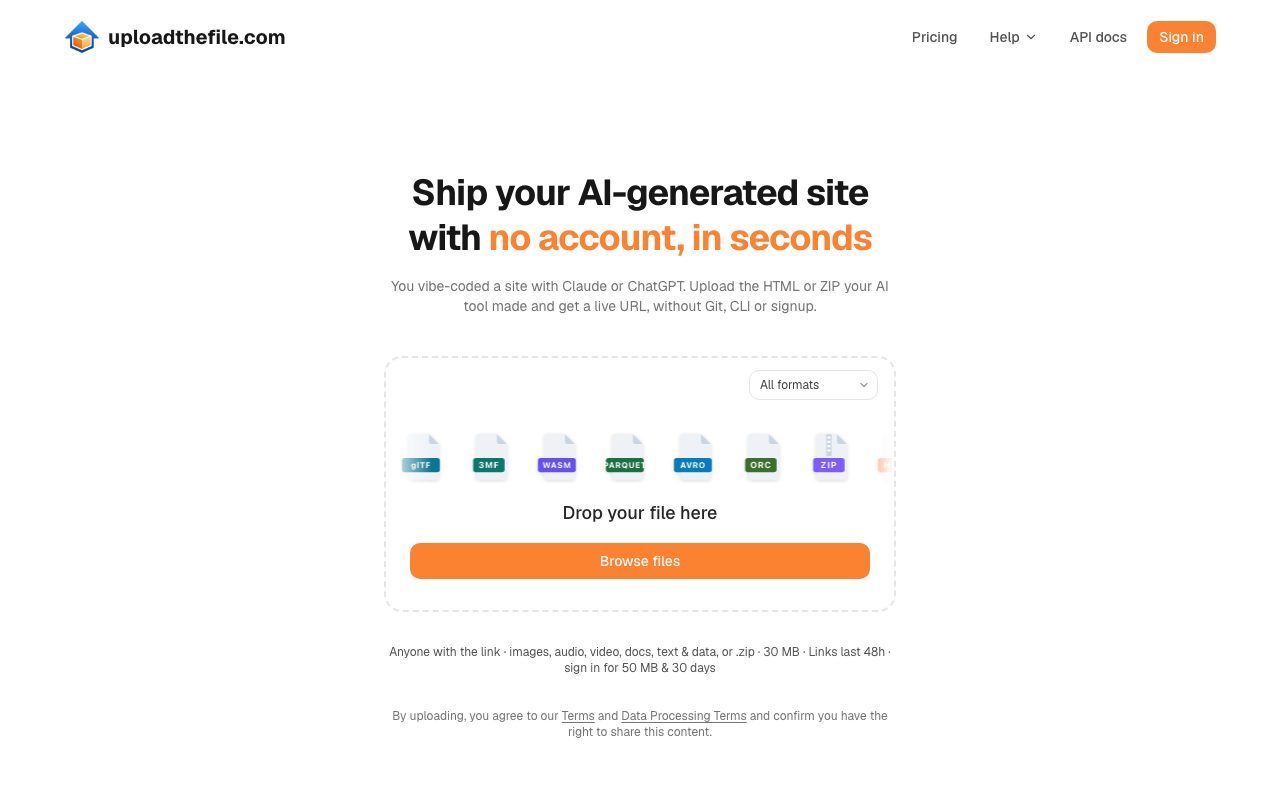
Two details on the AI-generated website page show the team has watched real users struggle:
They give you the prompt. Under the heading "Don't have the code yet? Start with this," the page provides a copy-ready prompt that asks the model for one self-contained HTML file with all CSS in a single <style> tag and all JavaScript in a single <script> tag, wrapped in one code block. That is exactly the shape a chat interface can hand you cleanly, and exactly the shape that hosts without a build step. Small thing. Saves a lot of first-time failures.
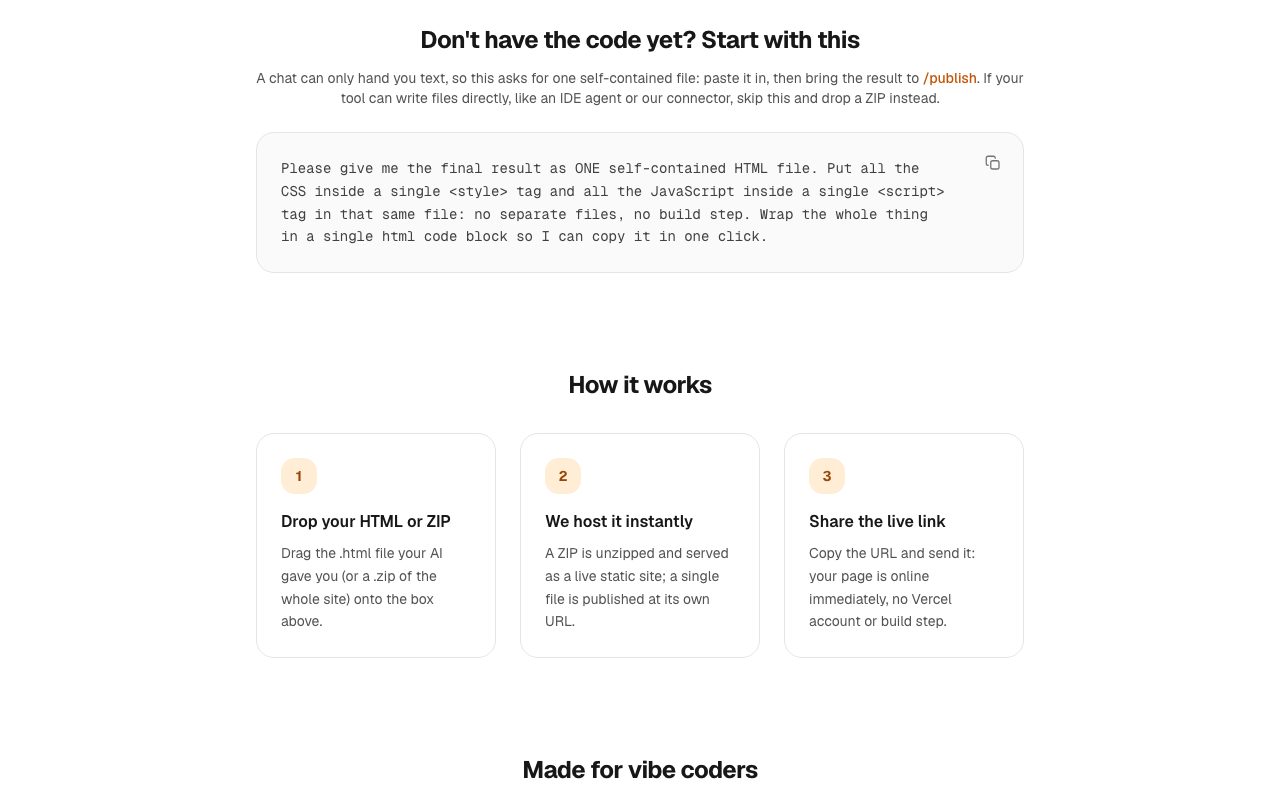
They say what will not work. The FAQ answers "Can I host a site I vibe-coded with Lovable, Bolt, v0 or Cursor?" with a yes, if you upload the built static output: a ZIP with index.html at the top level and relative asset paths, and for a Vite project, set base to ./ before building. Then the honest line: "A project that still needs npm install, a build step or a server cannot run here, so build it first, or deploy it with Vercel or Netlify." That is the right advice and it is refreshing to see a host say it instead of letting people find out from a broken page.
The pricing FAQ adds one more piece that is easy to miss: the Claude and ChatGPT connector works on every plan, including Free. Connect the assistant to your account once and you can ask it to publish a site for you, with no API key. The REST API is separate and starts on Business. The privacy policy's language about "AI-agent and connector activity" being retained for 13 months tells you the company expects agents, not only humans, to be pushing files through accounts.
If you are new to this whole way of building, our ultimate guide to vibe coding in 2026 covers the tools that generate the pages UploadTheFile is designed to host.
ZIP to website: the rules you need to know
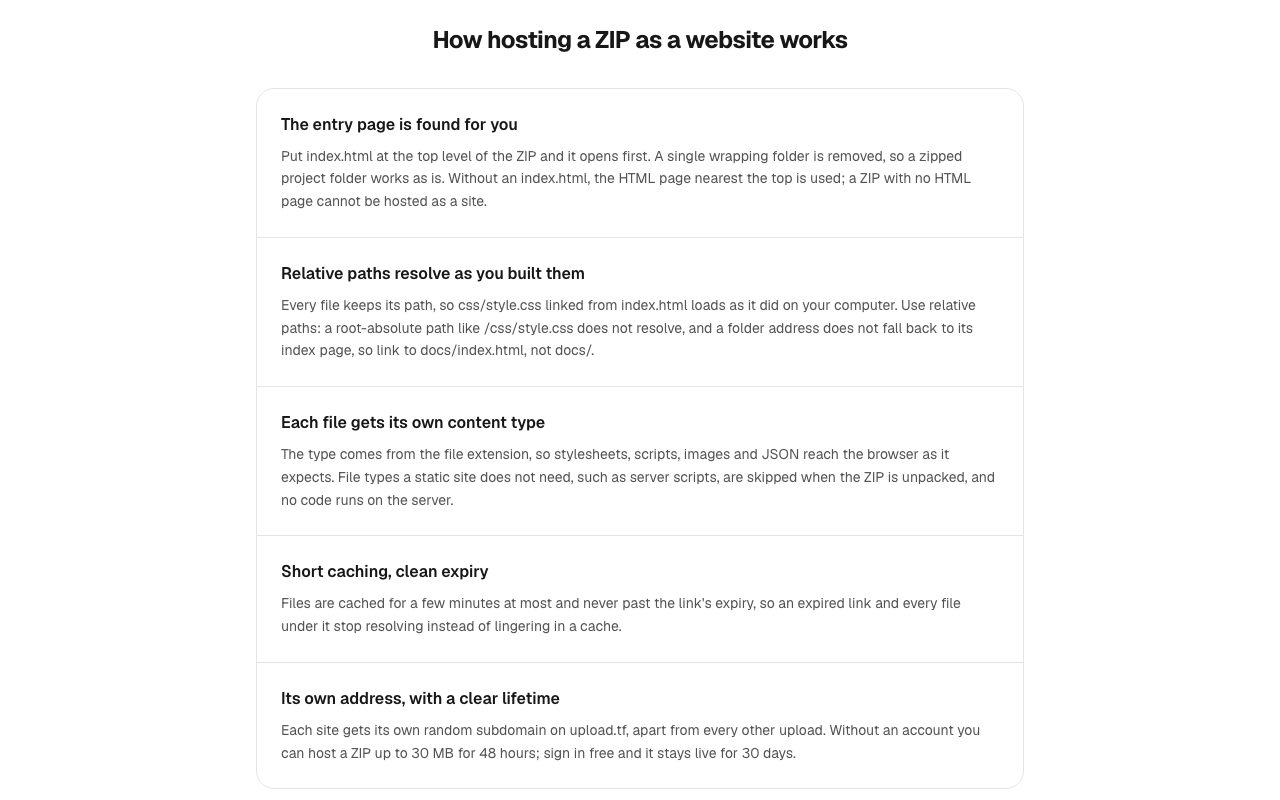
The ZIP to link page is the most technical page on the site and the one to read before you upload anything with more than one file. The rules are consistent across the page and the pricing page's "Archives" section.
| Rule | What the site says |
|---|---|
| Entry page | index.html at the top level opens first. A single wrapping folder is stripped, so a zipped project folder works as is. Without index.html, the HTML page nearest the top is used. |
| No HTML at all | The ZIP cannot be hosted as a site and is rejected with a clear message. |
| Paths | Relative paths resolve as built. Root-absolute paths such as /css/style.css do not resolve. A folder URL does not fall back to its index page, so link to docs/index.html, not docs/. |
| Server code | Static only. PHP, Python and Node are not executed. Server scripts are skipped at unpack time. |
| Limits | Up to 500 files, 40 MB unpacked, 20 MB for any single file inside, 50 MB compressed upload. Same on every plan. |
| Anonymous ZIP | 30 MB, 48 hours. Free account: 30 days. |
| Cache | A few minutes at most, and never past the link's expiry. |
| Updates | Each upload is immutable. Ship a revision as a new upload, or use the file manager on your page when signed in. |
| Unlinked files | Anything in the archive is served at its path, even if no page links to it. Prune drafts before zipping. |
Two of those rows will bite an AI-generated project if you do not check them. Generated sites love absolute paths, and generated navigation loves href="about/". Both break here. The fix is a find-and-replace before you zip, or simply asking the model for relative paths and explicit filenames. The site tells you this in plain language, which is more than most drag-and-drop hosts do.
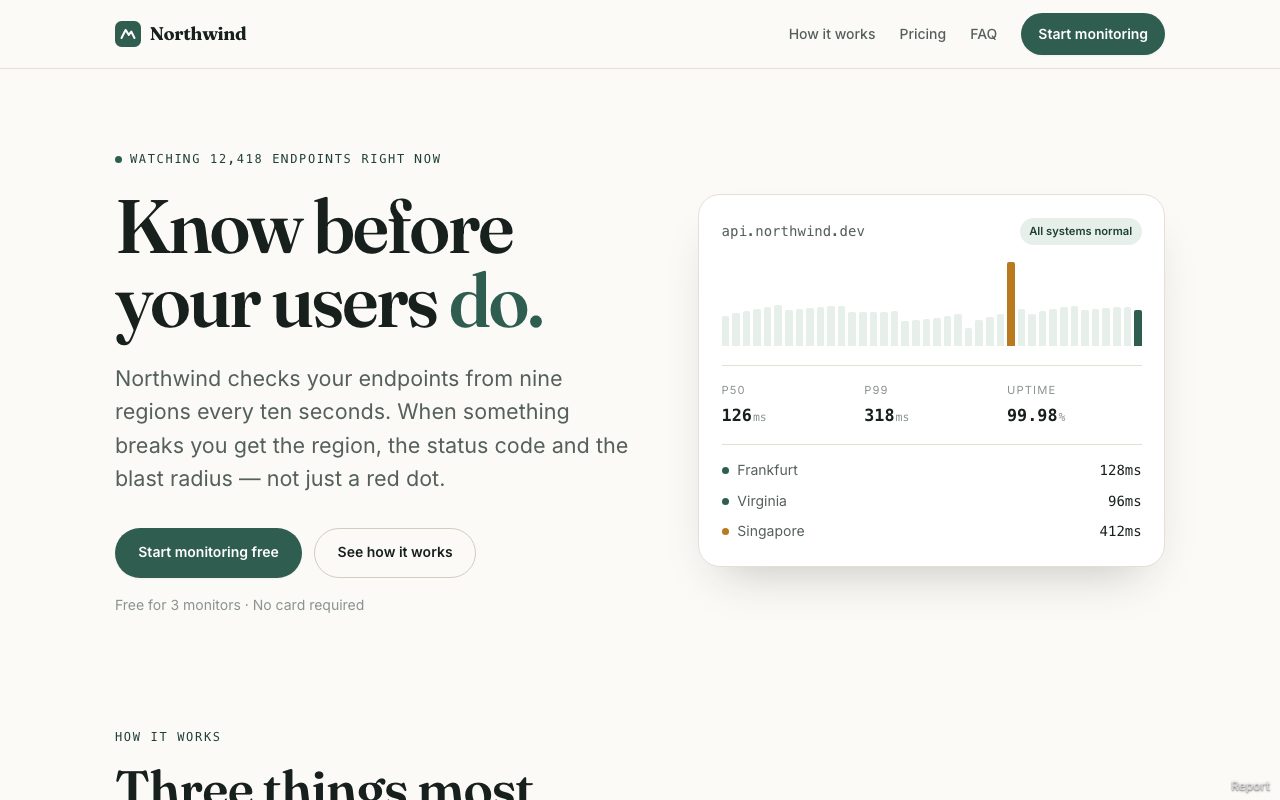
The Northwind demo above is what a correctly packaged ZIP looks like once it is live: a full multi-section site with its own styles, chart and fonts, indistinguishable from something deployed through a build pipeline.
The "unlinked files are still served" row is the one we would print on the upload box. It is a correct and honest description of how static hosting works everywhere, but the reminder is welcome because a stray .env or notes.md inside an AI-generated project folder is a real thing that happens.
PDF as a link, with OCR and a chat button
The PDF page is titled "Give your PDF a URL that opens right in the viewer," and the Ethereum whitepaper demo shows what that looks like in practice.
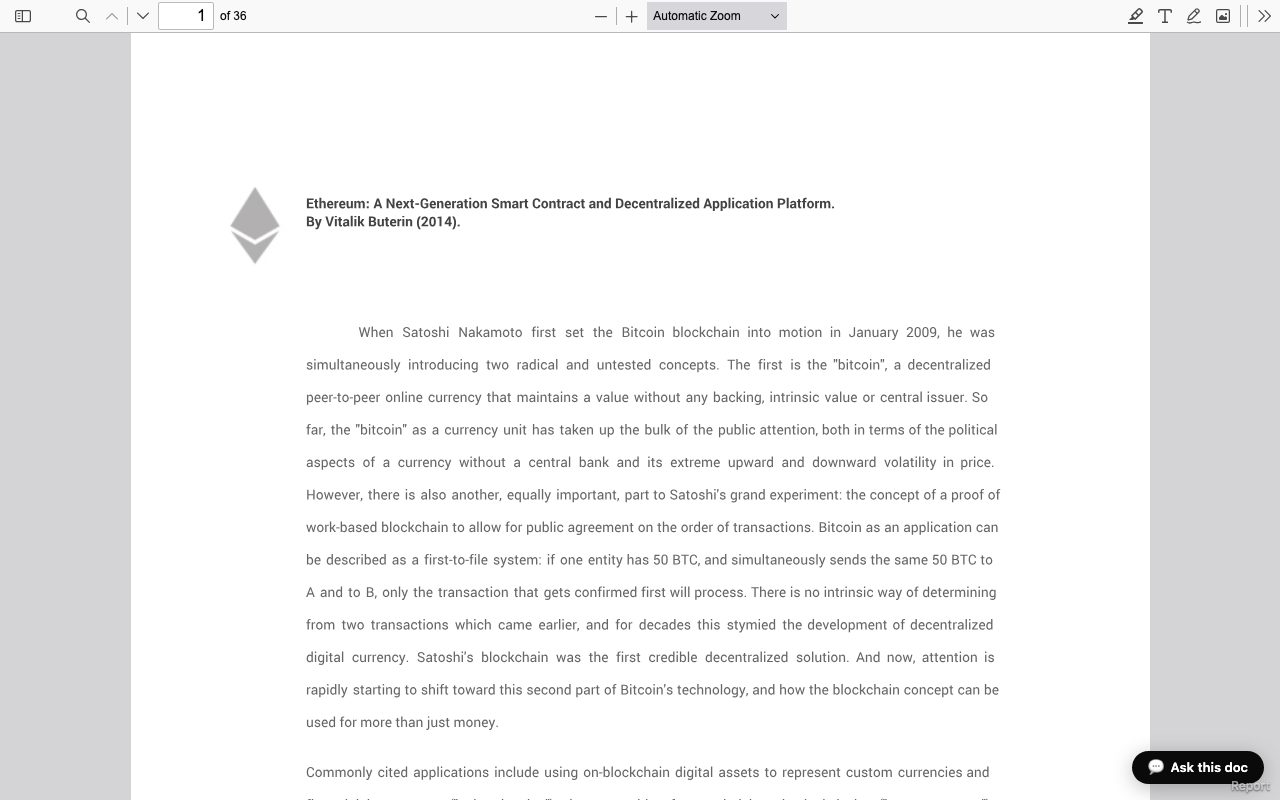
What the company promises for PDFs, all from its own page:
- Original bytes, not a conversion. "What we serve is your original PDF, byte for byte." Printing from the browser uses your exact page sizes, margins and fonts. Nothing is reflowed to HTML.
- OCR on every upload. A scanned contract or a photographed page gains a real text layer, so readers can select, copy and search, and screen readers get something to work with.
- Inline on phones. The link is served with headers that ask mobile Safari and Chrome to render in the tab with pinch-zoom, and saving a copy stays optional.
- Validated as a genuine PDF. A disguised executable does not get published.
- Chat with the document. The pricing page lists "Chat with your PDFs" on Free (2 PDFs, 3 pages each), scaling to 10 PDFs at 15 pages on Pro, unlimited PDFs at 30 pages on Business and 50 pages on Corporate. The DPA says the feature runs on Cloudflare Workers AI, and the pricing FAQ says each visitor conversation is stateless with no visitor data stored. The demo above shows the "Ask this doc" button live. The PDF landing page still describes chat as API-only with a one-click UI "coming," so that copy is a step behind the product.
The use cases the page lists are the obvious ones done well: proposals and reports sent as a one-click address, restaurant menus and brochures reached from a printed QR code, and portfolios or one-page CVs where typography survives and recruiters can still search the text. Free anonymous PDFs go up to 30 MB, and a free sign-in raises that to 50 MB, with no watermark and no paywall in front of the reader.
Video and large files
The video page keeps it simple: drop an MP4, WebM or MOV, get a link and a QR, and it plays in the browser's native player on iPhone, Android and desktop. No re-encoding, so quality stays intact. MKV and AVI are accepted too but shared as a download link rather than an inline player. The size caps are 30 MB anonymous, 50 MB on the free account, and up to 1 GB on paid plans.
The "send large files" page is the one place where the marketing gets a little ahead of the plan table. One sentence says uploads "stream straight to storage, so even multi-gigabyte transfers move as fast as your connection allows." The actual per-file ceilings are 30 MB anonymous, 50 MB free, 250 MB Pro, 1 GB Business and 5 GB Corporate. So a multi-gigabyte transfer is a Corporate-plan feature, and the free tier is a tool for the 25 MB email wall, not for raw 4K footage. Quote the table, not the sentence, and the product is exactly as good as it says.
What the recipient sees is worth a line, because it is where a lot of file hosts go wrong: "A clean page with the file name, its size, and a download control, plus an inline preview when the format supports one. No ad wall, no countdown timer, no mismatched buttons engineered to be clicked by mistake." That matches what we saw on the demo links.
Pricing, verified against the live page
Prices below are the annual-billing rate shown on the pricing page on September 16, 2026. A monthly toggle exists and the site says annual saves about 22 percent, roughly two months free.
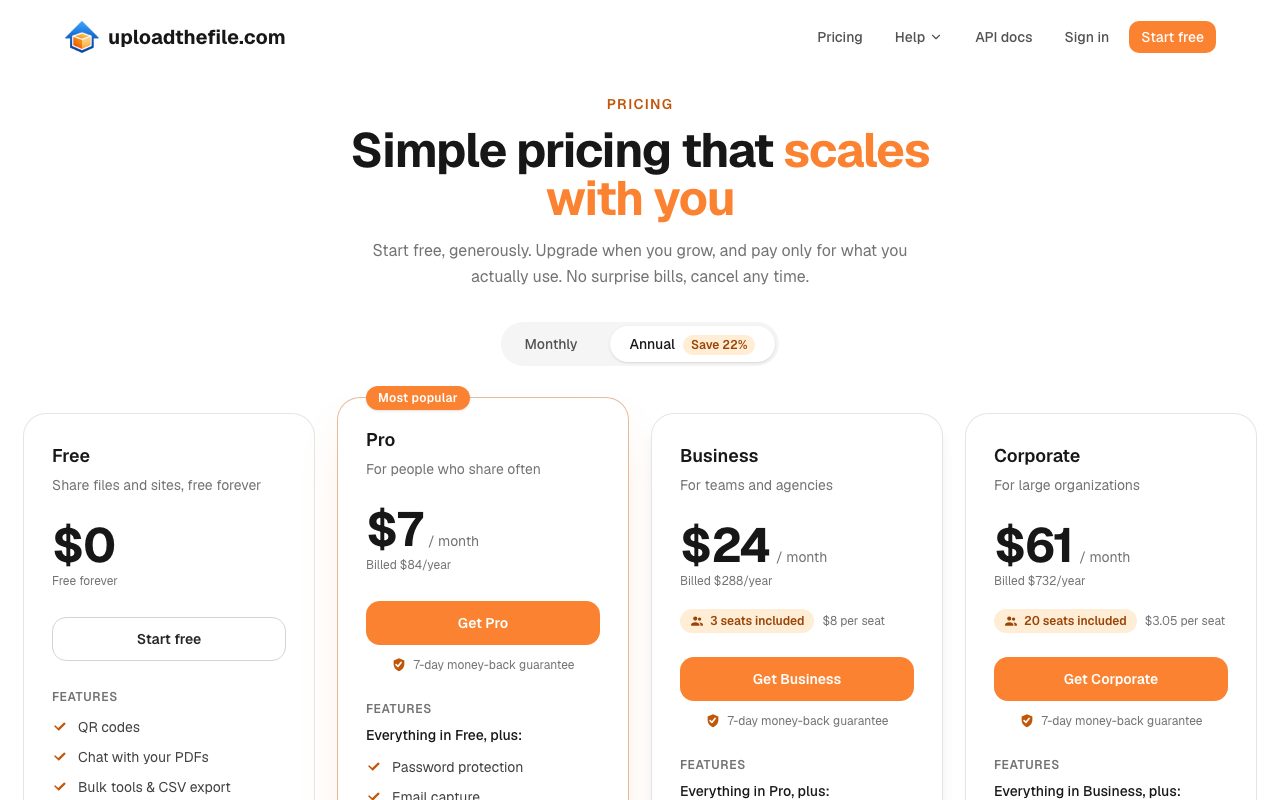
| Free | Pro | Business | Corporate | |
|---|---|---|---|---|
| Price | $0 | $7/mo ($84/yr) | $24/mo ($288/yr) | $61/mo ($732/yr) |
| Max file size | 50 MB | 250 MB | 1 GB | 5 GB |
| Account storage | 50 MB | 500 MB | 15 GB | 2 TB |
Custom links (name.upload.tf) | 3 | 10 | 30 | Unlimited |
| Short links | 3 | 10 | 50 | Unlimited |
| PDF chat | 2 PDFs, 3 pages | 10 PDFs, 15 pages | Unlimited, 30 pages | Unlimited, 50 pages |
| Views per month | 15,000 | 150,000 | 300,000 | 100,000,000 |
| Link lifetime | 30 days | Never expires | Never expires | Never expires |
| Analytics history | 7 days | 1 year | 2 years | 5 years |
| Seats | 1 | 1 | 3 (+$8 each) | 20 (+$3.05 each) |
| Password protection | No | Yes | Yes | Yes |
| Email capture | No | Yes | Yes | Yes |
| Remove upload.tf branding | No | Yes | Yes | Yes |
| REST API | No | No | Yes | Yes |
| Host your customers' sites | No | No | No | Yes (100,000 customers) |
| Support | Community | Priority | Dedicated, with SLA |
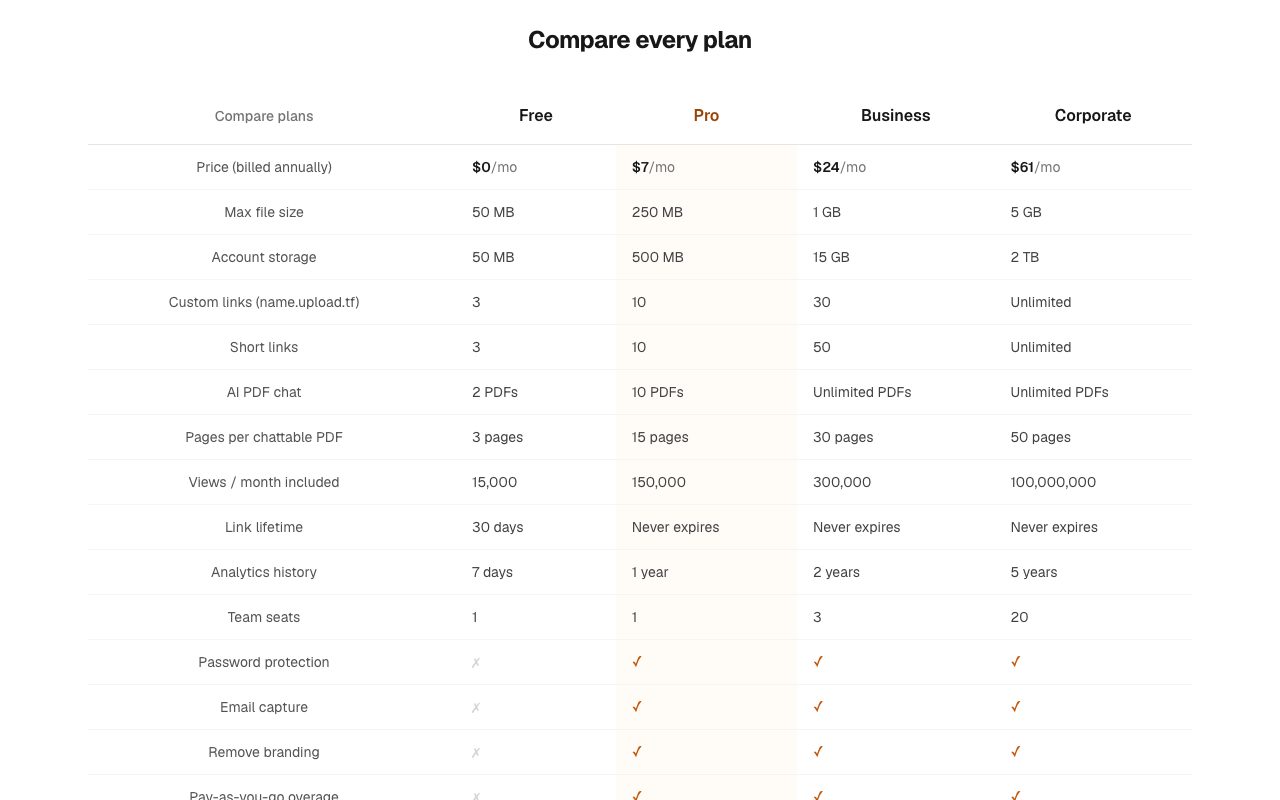
A few things about this ladder stand out:
The free tier is a real free tier. QR codes, PDF chat, bulk tools with CSV export and click analytics are all listed on Free. Three custom name.upload.tf links on Free is generous. The homepage FAQ still says click analytics is a paid feature, so the pricing page is the more current source and the one to trust.
Pro at $7 is the plan most readers will want. Permanent links, passwords, email capture, no branding and a year of analytics history covers the freelancer and solo-builder case completely.
Business is where the API lives. If you want to push builds from a script or a pipeline, that is $24 a month with three seats.
Corporate is a white-label-ish platform tier. "Host your customers' sites," a customer dashboard with reports, SSO, audit logs, an account manager and an SLA, at $61 a month for 20 seats, is priced far below what that feature set usually costs.
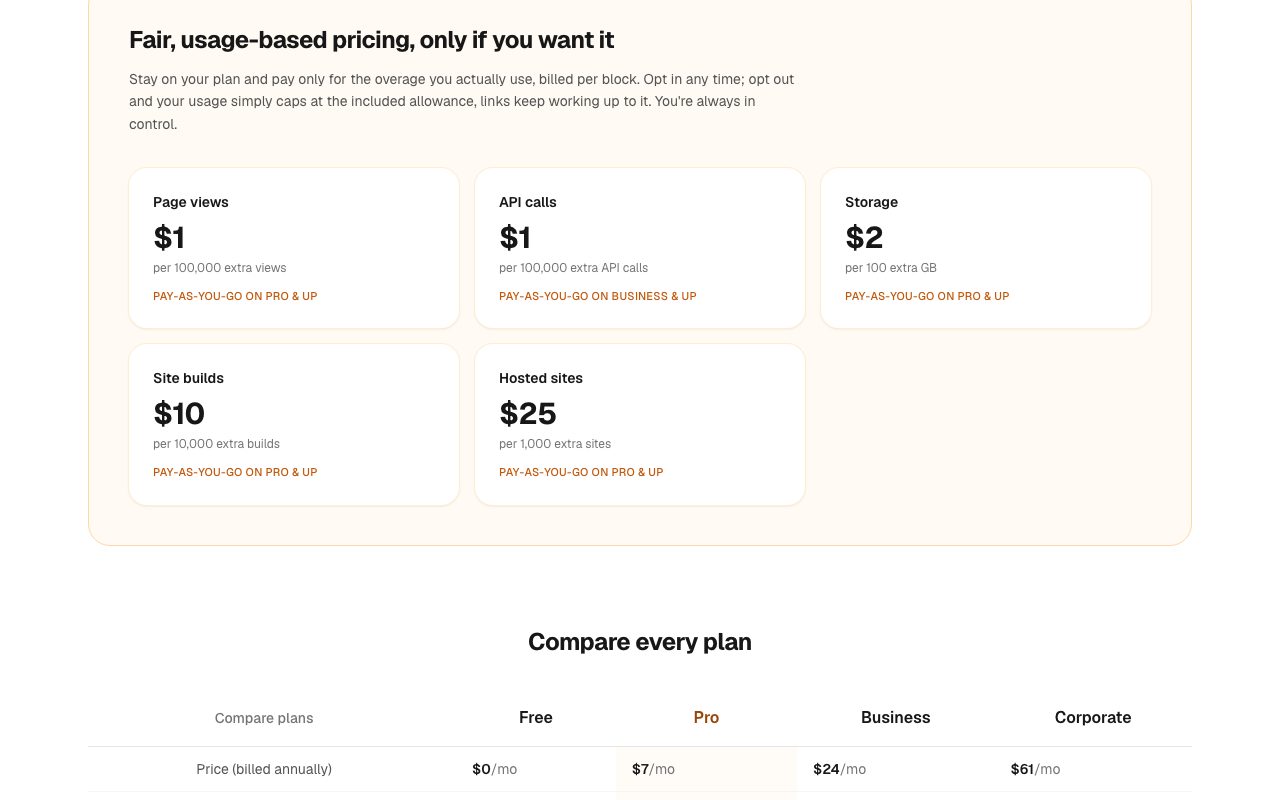
Overage is optional and cheap. Pay-as-you-go is off by default. Turn it on and extra views cost $1 per 100,000, extra API calls $1 per 100,000 (Business and up), extra storage $2 per 100 GB, extra site builds $10 per 10,000 and extra hosted sites $25 per 1,000. Leave it off and, per the FAQ, "nothing stops working": links keep serving, you are simply never billed beyond the plan price.
Refunds are personal. Every paid plan carries a 7-day money-back guarantee. There is no self-service refund button. You email [email protected] within seven days and the team handles it. Domain registrations are excluded because a domain is bought on your behalf at order time. Payments run through Polar, which the privacy policy names as the processor, and the company says it does not store full card numbers.
Security, privacy and the stack they name
Most small file hosts publish a two-paragraph privacy policy. UploadTheFile publishes a DPA (dated September 8, 2026) with a subprocessor table, and a privacy policy (August 26, 2026) that names its vendors. That transparency is a point in its favor and it also lets you make an informed decision.
Subprocessors listed in the DPA
| Vendor | Role |
|---|---|
| Supabase | Database, file storage, authentication (US / EU) |
| Cloudflare | Hosting, CDN, Workers compute, Workers AI for PDF chat, image downscaling and video frame extraction for moderation, headless-browser thumbnails, CSAM scanning, DNS and registrar (global edge) |
| Google Safe Browsing | URL threat screening |
| urlscan.io | URL analysis |
| VirusTotal | File-hash reputation, admin-triggered |
The privacy policy adds Polar for payments, Resend for transactional email, Google, GitHub and Microsoft for sign-in, Google Analytics only if you accept the cookie banner, and Ahrefs Web Analytics as a cookieless measurement on marketing pages.
Security measures the company states
- HTTPS and TLS in transit, automatic certificates on every link, always-on DDoS mitigation on every plan including Free.
- IP addresses stored only as hashes.
- HttpOnly and Secure session cookies.
- A validation pipeline that quarantines files before publish, with automated and manual safety checks, malware and reputation scanning, and CSAM scanning with reporting to authorities.
- Audit logging of admin actions.
What it does not offer, in its own words
- End-to-end encryption. The homepage FAQ says "Files are not end-to-end encrypted, so add a password for anything sensitive."
- A public directory or search listing. Links are random and marked not to be indexed, but the URL is the credential and is forwardable by design.
- Server-side code, databases or build pipelines.
- In-place editing of a live page. Uploads are immutable.
For the "unlisted but not private" model this is the correct posture, and the site says it out loud rather than hiding it. Sign-in is by email and password, magic link, or Google, GitHub or Microsoft. The company acts as a processor for your uploaded content and as an independent controller for account, billing, support and safety data. Rights requests go through account settings or [email protected].
If you are shipping something an AI wrote, our pre-launch security checklist for vibe-coded startups is a useful companion before you hand a client the link.
Content policy: read this before you upload
The operator is established in the United Arab Emirates, and the terms are governed by UAE law as applied in Dubai. The terms say some prohibited categories exist because of UAE law and apply wherever the user is located. Beyond the universal list (malware, phishing, IP infringement, harassment, spam, sexual exploitation of minors), the platform prohibits pornographic or obscene content and content that violates public decency or morality, promotion of gambling, defamation and insults to religions, nations or governments, and distributing circumvention, proxy or VPN configurations to bypass access controls or censorship.
That is stricter than a typical Western file host on three fronts: adult content, gambling and anti-censorship tooling. For the overwhelming majority of landing pages, PDFs, demo videos and client deliverables it changes nothing. If your project touches those categories, this is not the host for it, and the terms tell you so up front. Abuse handling is notice-and-takedown via a report form or email, accounts inactive for about 12 months may be closed after a contact attempt, and the liability cap is the greater of the prior 12 months' payments or $100.
What we liked
The first link takes fewer clicks than any host we have tested. There is no onboarding screen. The drop zone is the homepage. The product and the marketing site are the same page.
Render, not just store. PDFs, videos, HTML pages and ZIP sites are first-class. The recipient gets the thing, in a browser, on a phone, with nothing to install. That is the difference between a link that gets opened and a link that gets ignored.
It is shaped for AI output. The prompt on the AI page, the honest note about build steps, the Vite base tip, and a connector that works on the Free plan all show the team has watched how people actually get a page out of Claude or ChatGPT.
The numbers are published and consistent. The pricing page, the compare table, the archive limits and the use-case FAQs agree with each other, down to the 500-file and 40 MB ZIP rules. One marketing sentence about multi-gigabyte transfers is the only outlier we found.
The legal and privacy documents are better than the category average. A named subprocessor list, hashed IPs, a quarantine pipeline and a plain "not end-to-end encrypted" statement is more than most tools at this price disclose.
Unlisted by default, with a QR on every link. For in-person handoff, conference demos and printed menus, the QR is the feature you did not know you wanted.
A soft price ladder. $7 for permanent links and passwords, $24 for the API and seats, $61 for SSO, audit logs and hosting your own customers' sites. There is no cliff.
What to keep in mind
Free links are short-lived. 48 hours anonymous and 30 days with an account is ideal for a preview and wrong for a portfolio you plan to link from a résumé. Pay $7 if the link needs to last.
Free sizes are modest. 30 to 50 MB covers a PDF, a landing page or a short clip. It does not cover a feature-length export. Paid plans go to 250 MB, 1 GB and 5 GB.
Static only. No server, no database, no build. Root-absolute asset paths and folder URLs without a filename do not work. Build first, then upload the output.
Immutable uploads. A revision is a new upload, or a named slot managed from the file manager when signed in. That is a feature for review links and a small habit change for everyone else.
A new product with a small public footprint. The legal pages are dated August and September 2026, there is no official social account we could find, and there is no body of third-party reviews yet. What we can vouch for is what the site documents and what the demo links do. Your own test will tell you the rest in about a minute.
Do not confuse it with the old upload.tf. A 2021 image host used the same short domain for 2 MB images. That is a previous use of the domain, not this product.
How to test it in five minutes
- Ask Claude or ChatGPT for a landing page using the exact prompt from the AI site page: one self-contained HTML file, CSS in one
<style>tag, JavaScript in one<script>tag. - Save it as
index.htmland drop it on the homepage without signing in. Note the time from drop to live link. - Open the link on your phone by scanning the QR code. Check that fonts, images and buttons behave.
- Zip a small multi-page site with a
css/folder. Check that every stylesheet link is relative and every page link ends in.html. Upload the ZIP and click through every page. - Drop a scanned PDF. Open the link, press Ctrl+F, and confirm the OCR text layer finds a word from the scan.
- Sign in free, claim one of your three custom
name.upload.tflinks, and re-upload the site there. - If any of those links needs to outlive 30 days, or needs a password, take the 7-day guarantee on Pro.
If steps one through three work the way they worked for us, you have found the tool for the "can you just send me the link" moment. If you need a backend, our guide to self-hosting alternatives to Vercel and Supabase covers the next step up.
Verdict
UploadTheFile does one thing, and it does it with less friction than anything else we have used for it. Drop a file, get a live link, hand it to someone. The AI-generated-site angle is not a bolt-on; the prompt, the build-step honesty and the connector show it is the center of the product. PDFs and videos get real in-browser rendering rather than a download page. The free tier is genuinely useful for previews, the $7 Pro plan is priced right for anyone who shares often, and the Business and Corporate tiers turn the same simple motion into something a team or a platform can build on.
The trade-offs are the ones you would expect from a disposable publisher: short free lifetimes, modest free sizes, static-only hosting and no end-to-end encryption. The company states every one of those limits on its own pages, alongside a subprocessor list and a content policy that is stricter than average on adult, gambling and circumvention content. That candor is why we are comfortable recommending it for what it is built for.
Best for vibe coders, freelancers, agencies and anyone who needs a page, a PDF or a video to open in a browser on the other end. Less suited to permanent free hosting, multi-gigabyte free transfers or anything that needs a server.
The fastest way to find out is to drop a file on UploadTheFile and time how long it takes to get the link. It took us seconds, which is the whole point.
If you are building the kind of project UploadTheFile hosts, SaaSCity lists SaaS startups on a free, human-reviewed directory with a live city map, and submitting a listing takes a few minutes. Our roundup of the best directories for vibe-coded apps in 2026 covers where else to put the link once it is live.
FAQ
What is UploadTheFile (uploadthefile.com)?
UploadTheFile is a no-account file host and static-site publisher. You drop a file, a ZIP or the HTML your AI tool generated, and it comes back as a live HTTPS link on its own upload.tf subdomain, with a QR code, in a few seconds. PDFs open in the browser viewer, videos play in the native player, and a ZIP that contains HTML is unpacked and served as a static website.
Is UploadTheFile free?
Yes. Anonymous uploads are free, up to 30 MB per file, and the link lives for 48 hours. A free account raises that to 50 MB per file, 50 MB of storage, 3 custom links and 30-day links. Paid plans start at $7 a month billed annually and make links permanent.
How long do UploadTheFile links stay live?
Anonymous links last 48 hours. Free-account links last 30 days. On Pro, Business and Corporate plans links never expire. When a link expires it stops resolving completely, with no degraded preview page left behind.
Can I host a website built by Claude or ChatGPT on UploadTheFile?
Yes, that is the product's main pitch. Upload a single self-contained HTML file or a ZIP with index.html at the root and relative asset paths, and it is served as a live static site. Anything that still needs npm install, a build step or a server has to be built first, because only static HTML, CSS and client-side JavaScript run.
How much does UploadTheFile cost?
As of September 16, 2026, Free is $0, Pro is $7 a month ($84 a year), Business is $24 a month ($288 a year, 3 seats) and Corporate is $61 a month ($732 a year, 20 seats). Prices are the annual-billing rate. Every paid plan has a 7-day money-back guarantee handled by email. Optional pay-as-you-go overage is $1 per 100,000 extra views.
Are files on UploadTheFile private?
Links are random, unlisted and marked not to be indexed by search engines, but files are not end-to-end encrypted and anyone with the exact URL can open them. Password protection and email capture are paid features. The company names its subprocessors (Supabase, Cloudflare, Google Safe Browsing, urlscan.io, VirusTotal) in its DPA and stores IP addresses only hashed.
What are the ZIP hosting limits on UploadTheFile?
A hosted ZIP can contain up to 500 files, up to 40 MB unpacked and up to 20 MB for any single file inside, with the compressed upload up to 50 MB. These checks are the same on every plan. The ZIP must contain at least one HTML page, root-absolute paths like /css/style.css do not resolve, and folder URLs do not fall back to index.html.
Get your SaaS in front of founders
List your product on SaaSCity - a permanent listing, real discovery, and a dofollow backlink from a high-DR directory. Free with a badge; upgrade for a building on the live city map.
Founder resources
Related articles

How to Debloat Android TV and Google TV with Claude Code: The Clean Your TV (tv-vibehack) Guide

Replit Makes ChatGPT the Default Over Anthropic: What the Model Switch Means for Everything You've Built (2026)