Reviews
Inkwell Review 2026: An AI-Native IDE for Screenwriters and Long-Form Teams
Inkwell (inkwell.software) is a browser-based writing IDE for screenplays and long-form docs: all 16 screenplay elements in Plot, named save points, parallel draft lines, 28 reviewable AI skills, WGA colored revisions and a block editor in Canvas, with a permanent $0 Free plan.

Contents (14)
- Inkwell in short
- Why Inkwell treats a screenplay like structured source code
- Inside Plot: from prose treatment to formatted screenplay
- Save points, draft lines, and scene-aware diffs
- Five AI modes and 28 specialist skills that leave you in charge
- Production lock, WGA revision colors, and writers' room collaboration
- Canvas: Inkwell's block editor for novels, research, and technical docs
- Data ownership, zero-training privacy, and Bring Your Own Key (BYOK)
- Inkwell pricing, plans, and monthly quotas
- How Inkwell compares with Final Draft, WriterDuet, and other writing tools
- Who Inkwell suits best (and when to wait)
- Getting the most from your first week in Inkwell
- Inkwell review verdict
- Frequently asked questions
Disclosure: this is a sponsored review. The test and opinions are ours.
Product details and prices were checked against inkwell.software on November 22, 2026.
Software developers solved the problem of parallel drafts twenty years ago. An engineer can freeze a working build, open a side branch to test a risky idea, compare changes by function, and ask an editor-aware assistant to check a module while keeping full control over what merges. Screenwriters and long-form authors have spent those same decades emailing files named pilot_v6_FINAL_table_read_REAL.fdx, keeping beat sheets in Word, formatting pages in Final Draft, and pasting scenes into a separate browser tab whenever they want a second set of eyes from a language model.
Inkwell (inkwell.software) starts from a practical premise: give writers the structural calm that programmers expect from a good code editor, while preserving industry screenplay rules down to the margin asterisk. Inkwell parses every scene heading, character cue, parenthetical, action beat, and note as structured data from your first keystroke. That single design decision makes named save points, parallel draft lines, scene-aware diffs, WGA colored production revisions, and reviewable in-page AI work together as one coherent workspace.
This Inkwell review covers how the platform works day to day, what happened when we tested its live ghost-text sandbox in Google Chrome, how Plot and Canvas split screenwriting and general long-form documents, how the 28 built-in craft passes behave, what each tier includes from $0 upward, and how Inkwell compares with Final Draft, WriterDuet, Arc Studio Pro, Fade In, and Highland.
Inkwell in short
Inkwell (inkwell.software), built by Inkwell Software, is a browser-based writing platform designed as an IDE for writers. Two editors share one version-control and AI engine: Plot, a complete screenplay, TV, and stage script editor that is live today, and Canvas, a 24-block Markdown-native editor for novels, research papers, and technical documents, currently in early access on Pro and Team plans. Writers get all 16 standard screenplay element types, native Fountain files, two-way Final Draft (.fdx) and Word (.docx) round-tripping on paid plans, named save points, parallel draft lines, nine WGA production revision colors, and five progressive AI modes backed by 28 specialist craft skills. A permanent Free plan ($0) includes the full screenplay editor, while paid plans start at $19 a month for Writer and $39 a month for Pro, with optional Bring Your Own Key (BYOK) connections for Anthropic and OpenAI.
| Quick facts | Details (checked November 22, 2026) |
|---|---|
| Product and domain | Inkwell (inkwell.software, web app at app.inkwell.software) |
| Developer | Inkwell Software |
| Editors on the platform | Plot (live screenplay IDE) and Canvas (block-based long-form editor, Pro and Team early access) |
| Screenplay formatting | All 16 screenplay element types, native Fountain, WGA pagination, automatic A-pages, 9 revision colors |
| Version control | Immutable named Save Points (Cmd+S), parallel Draft Lines, scene-aware semantic diffs |
| AI modes | 5 modes: Complete (ghost text), Ask, Edit selection (Cmd+K), 28 Specialist Skills, Agent Mode |
| AI models and BYOK | Standard (Free), Sonnet-tier (Writer), Opus-tier (Pro and Team), plus optional Anthropic or OpenAI API keys |
| Privacy stance | Encrypted in transit and at rest; scripts and documents are never used to train foundation models |
| File compatibility | Native Fountain and PDF on all tiers; 2-way .fdx and .docx on Writer+; imports WriterDuet, Highland, Celtx |
| Free tier | $0 forever: full Plot editor, 2 projects, 2 draft lines/project, 50 save points/project, 20 skill runs/month |
| Paid plans | Writer $19/mo, Pro $39/mo (50% off for eligible students and educators), Team $39/seat/mo, Enterprise custom |
| Platforms and languages | Modern browsers on Mac, Windows, Linux, and Chromebook; UI and writing in EN, DE, ES, FR, JA, KO |
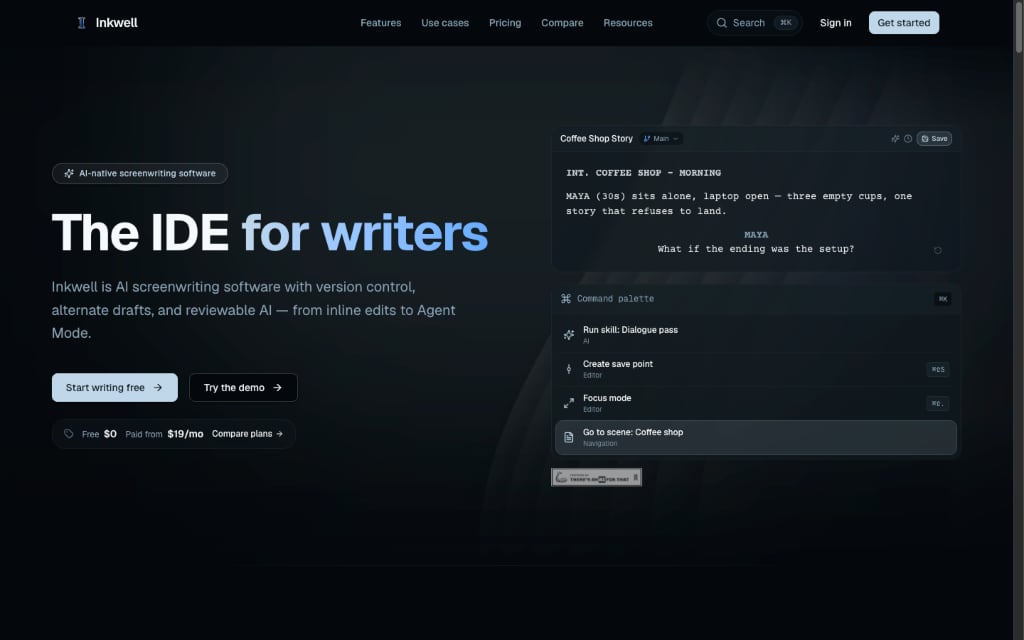
Inkwell's homepage pairs the screenplay editor preview with the Cmd+K command palette. Captured in Google Chrome on inkwell.software, November 22, 2026.
Why Inkwell treats a screenplay like structured source code
Most word processors only know what a paragraph looks like on paper. A character cue is uppercase text indented toward the middle of the page; a scene heading is a capitalized line that starts with INT. or EXT.. That visual shortcut holds up while you type a clean first draft from page one to page ninety. It breaks down the week you cut three scenes out of Act Two, try an alternate ending for a producer, or ask a co-writer what moved since Tuesday's table read. Traditional track-changes views turn structural movement into pages of crossed-out paragraphs.
Inkwell begins with a parser. Because the editor treats scenes, characters, dialogue turns, action blocks, parentheticals, notes, and outlines as typed objects, every tool around the page gains real context. Moving Scene 14 ahead of Scene 9 registers as a scene reorder, not fifty deleted lines and fifty pasted ones. Cast breakdowns, scene counts, per-character word balance, and day-out-of-days schedules calculate themselves straight from your script. When you run an editorial pass or ask a question about Act Three, the assistant reads the scene graph of your project directly.
That data-minded approach shows up across Inkwell Software's public output too. As of November 22, 2026, the public changelog records 173 shipped updates across Plot (118 entries), the shared platform (53), and Canvas (2). On its blog and Screenplay Anatomy research pages, the team also publishes quantitative studies of working scripts. Across 994 parsed screenplays, Inkwell measured a median dialogue turn of 7 words (with a 90th-percentile turn of 24 words) and found that while a median feature names 47 speaking characters, dialogue share concentrates around 6.3 effective speakers. Across 2,077 MovieSum records, the team mapped a median feature length of roughly 21,579 story words across 130 scenes. Seeing that kind of empirical craft research makes it clear why Plot's sidebar tracks dialogue balance and scene rhythm so cleanly.
Inside Plot: from prose treatment to formatted screenplay
For working screenwriters, Inkwell Plot is the center of the platform today. One of its smartest workflow choices is ending the split between outlining apps and scripting apps. Most writers sketch a series bible, pitch deck text, or twenty-page treatment in Google Docs or Word because strict screenplay margins feel cramped while you are still finding the story. Once the outline works, you open a second program and retype everything into scenes.
In Plot, treatments, outlines, series bibles, and scripts share one project. You can draft prose beats freely (or import an existing .docx outline), select any paragraph or beat when it is ready for dialogue, and choose "Turn into script" to convert that beat into formatted screenplay scenes in place. Your early story notes stay right next to the draft they grew into.
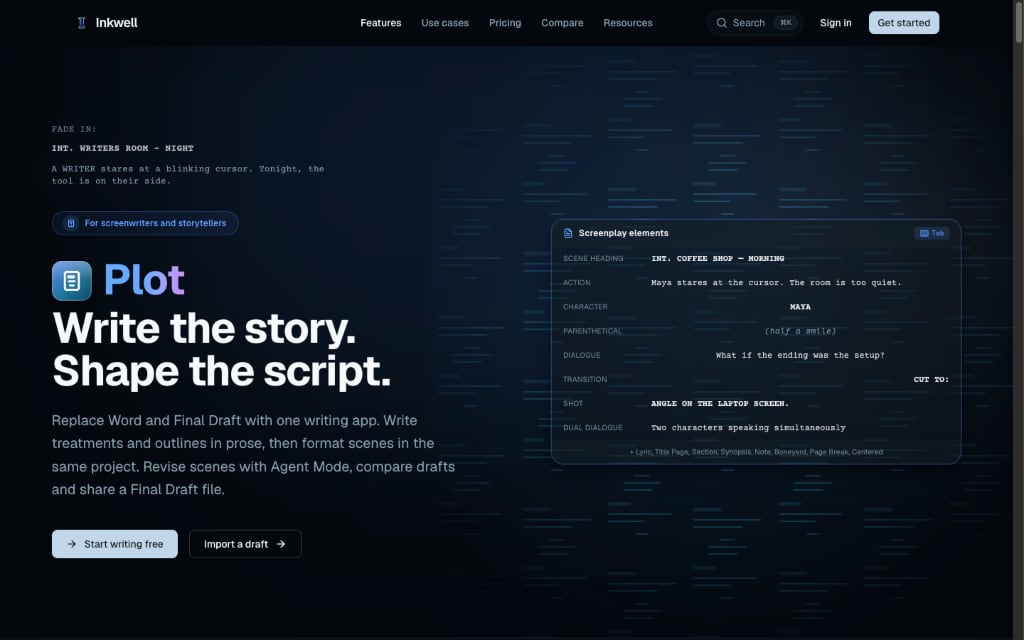
Plot handles prose outlines and all 16 standard screenplay elements inside one project, keeping Tab dedicated to element cycling. Captured in Google Chrome on inkwell.software/plot, November 22, 2026.
Inside script pages, Plot covers all 16 standard screenplay element types. Core scene work uses Scene Heading, Action, Character, Parenthetical, Dialogue, Transition, Shot, and Dual Dialogue for simultaneous speech. Structure, music, and off-page notes use Lyric, Title Page, Section, Synopsis, Note, Boneyard (for parking cut scenes you might want back later), Page Break, and Centered text.
Keyboard habits carry over straight from Final Draft and Fountain editors. Typing INT. or EXT. formats a line as a Scene Heading immediately. Pressing Tab cycles along the familiar loop (action -> character -> parenthetical -> dialogue -> transition), while Smart Type recalls character names and recurring locations so you rarely type a full slugline twice. Pressing Cmd+K opens a command palette to jump to any scene, run a craft skill, freeze a save point, or enter Focus mode. Along the status bar, live counters track WGA pagination, scene numbering, total page count, and dialogue distribution by character.
Two non-AI tools inside the editor also remove small daily annoyances. First, a side-by-side dictionary and thesaurus opens definitions, synonyms, antonyms, related words, rhymes, and usage-frequency cues right next to your scene, so you do not lose twenty minutes to an open browser tab; clicking a replacement drops the word into your sentence while keeping your capitalization and italics intact. Second, the Writing Activity Calendar measures net typing per save from your own keyboard only. Pasted imports, collaborator edits, and AI passes are left out of your word count, and days spent cutting ten loose pages down to seven tight ones earn a lit ring on the calendar so hard editing days still register.
What we saw in the live Chrome ghost-text demo
Inkwell runs a zero-signup sandbox at inkwell.software/demo titled "Type. Pause. Accept." so writers can test inline completions before creating an account. We opened it in Google Chrome to check its timing and keyboard behavior firsthand.
The sandbox sets up a short coffee shop scene (INT. COFFEE SHOP - MORNING) where Maya sits with an open laptop and three empty cups. Under the MAYA cue sits an active dialogue input. We typed a new opening clause of our own, "The server room stays dark until someone", and took our hands off the keyboard.
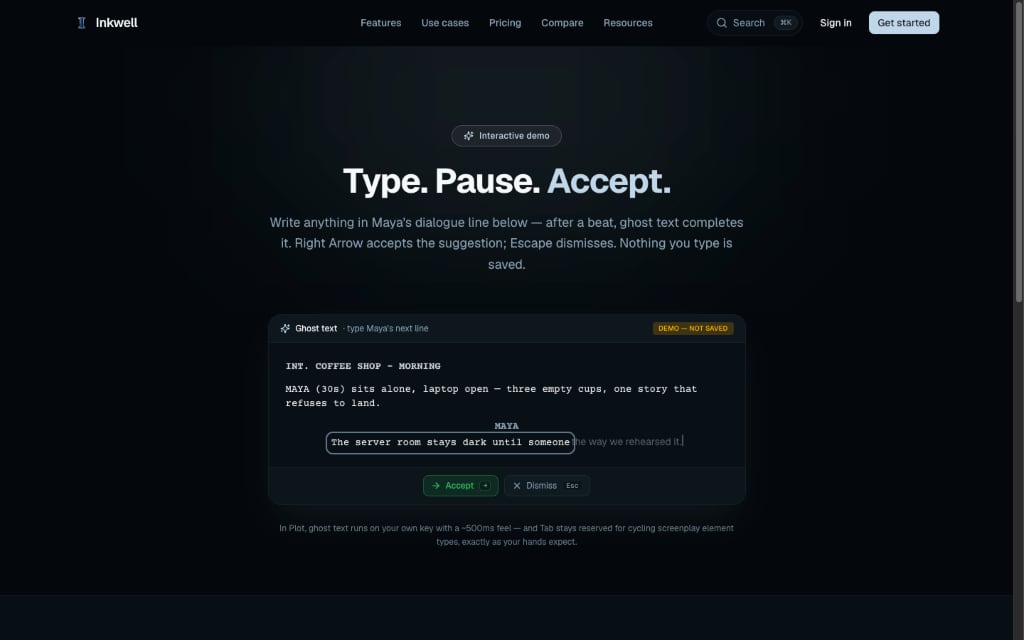
Testing Inkwell's public /demo sandbox in Chrome: pausing briefly brings up a dimmed inline phrase completion that accepts with Right Arrow or clears with Esc. Captured on inkwell.software/demo, November 22, 2026.
Within a beat of pausing, dimmed ghost text appeared at the cursor: "the way we rehearsed it.", accompanied by two quiet pill controls underneath (Accept -> and Dismiss Esc). Pressing Right Arrow accepted the phrase into Maya's line, and pausing again brought up a short follow-up continuation ("Some endings start like this.").
One keyboard detail stood out right away. In code editors like Cursor or VS Code, Tab accepts ghost text. If a screenplay editor bound Tab to AI completions, writers would accept unwanted sentences ten times an hour while trying to move from an action line to a character cue. Inside Plot, ghost text triggers after roughly a 500-millisecond pause and binds acceptance strictly to Right Arrow (with Esc to dismiss), leaving Tab reserved for cycling screenplay element types. That single choice shows genuine respect for how screenwriters type.
Save points, draft lines, and scene-aware diffs
Open a working writer's project folder during notes season and you will usually find a stack of duplicated files: ep104_producers_pass.fdx, ep104_producers_pass_jakes_cuts.fdx, ep104_network_draft_v3_USE_THIS_ONE.fdx. People duplicate files when their writing app only remembers a linear undo stack. Inkwell replaces file duplication with three connected version-control tools.
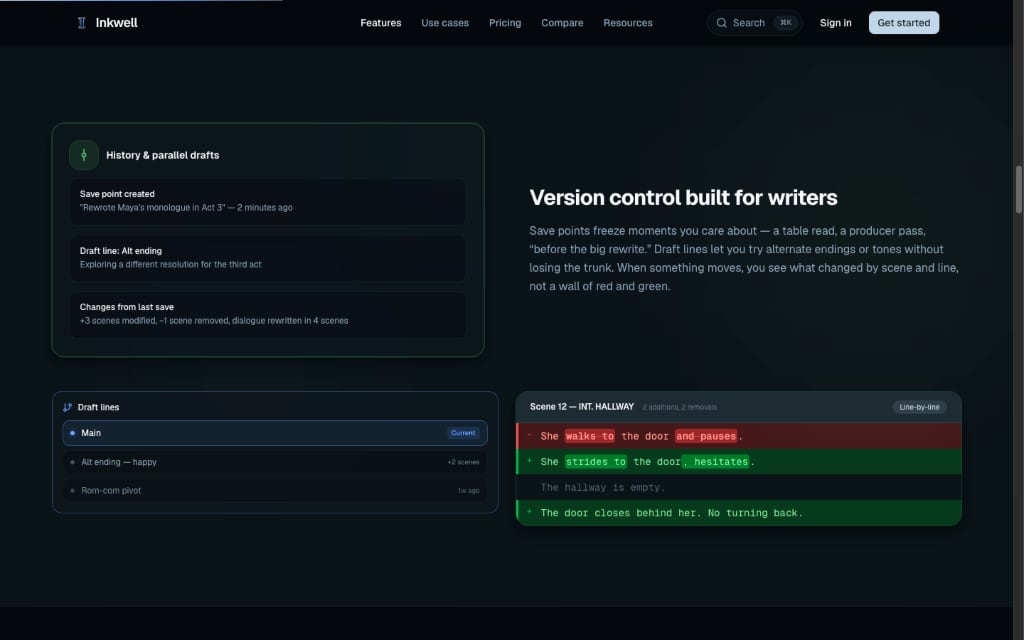
Save points freeze named milestones, Draft lines hold parallel takes inside one project, and semantic comparison summarizes scene-level changes before showing line diffs. Captured in Google Chrome on inkwell.software/features, November 22, 2026.
Named Save Points (Cmd+S)
Whenever you press Cmd+S, you can freeze an immutable, named snapshot of the script at a moment that carries real meaning: "Table read draft", "Before cutting the warehouse chase", or "Showrunner notes Friday". You can read or compare back to any save point in seconds. Snapshot retention on smaller plans is thoughtful too: if a project reaches its plan's snapshot cap (50 on Free, 500 on Writer, 2,000 on Pro, 5,000 on Team), only the oldest unlabeled auto-snapshots thin out first. Every save point you named or marked as a milestone stays safe unless you delete it yourself.
Parallel Draft Lines
Draft Lines give storytellers lightweight branches inside a single file. Say your third act lands well, yet your producer wonders what happens if the detective is complicit, or you want to audition two cold opens for Monday's room. You open a new Draft Line (Alt ending - happy, Darker cold open, or a room pass) inside the same project while Main stays clean. If the experiment works, you preview the differences on the page and click "Incorporate" to bring over chosen scene edits or the entire draft line into Main.
Semantic scene comparison
On the Writer plan and up, comparing two drafts generates a semantic summary above the line diff. Before you read red and green word changes, Inkwell tells you what moved structurally, such as +3 scenes modified, -1 scene removed, dialogue rewritten in 4 scenes. Clicking into any changed scene (such as Scene 12 - INT. HALLWAY) opens a clean line-by-line diff showing exact word replacements and new beats.
Five AI modes and 28 specialist skills that leave you in charge
Writers have good reasons to be skeptical of generic AI tools. Chatbots flatten distinct character voices into polite mush, invent props that contradict page twelve, and step on rhythm that took three drafts to earn. Inkwell sets two firm boundaries: every AI mode reads the structured screenplay directly, and nothing enters your pages without your approval.
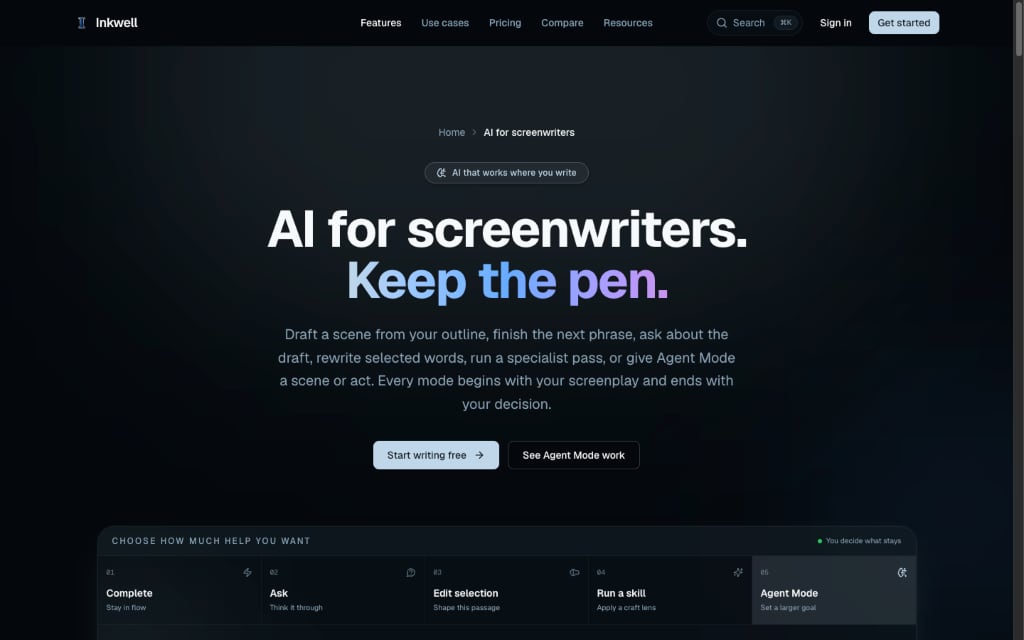
Inkwell separates AI into five modes so you choose the exact degree of involvement, from quiet phrase completion to scoped multi-step Agent runs. Captured in Google Chrome on inkwell.software/ai, November 22, 2026.
Splitting assistance into five separate modes lets you pick how much help enters the room on any given day:
| Mode | How you trigger it | What it does | How you stay in control |
|---|---|---|---|
| 01 Complete | Pause ~500ms while typing | Offers a quiet ghost-text continuation of the current phrase in your character's voice | Right Arrow accepts; Esc or continuing to type ignores it; can be switched off anytime |
| 02 Ask | Open the dramaturg sidebar | Answers story, structure, and character questions grounded in your script | Conversational by default; includes an optional "Make these changes" button to stage edits |
| 03 Edit selection | Select text + Cmd+K | Generates up to 3 alternative rewrites of a line or exchange from your prompt | Displays word-level diffs inline so you pick option 1, 2, or 3, or discard all three |
| 04 Run a skill | Command palette or /skill-name | Runs one of 28 focused craft or diagnostic passes across a scene, act, or full script | Analysis skills never alter text; change-proposing skills return reviewable inline diffs |
| 05 Agent Mode | Scope to a scene or act + goal | Plans a multi-step pass, creates a save point, runs skills, and checks its own output | Pauses to ask you on creative choices and stages output on a markup rail and draft line |
Inside the 28 built-in specialist skills
The standout piece of that five-part design is Inkwell's catalog of 28 built-in specialist skills. Rather than leaving you to write prompts from scratch, Inkwell packages practical script-doctor and script-coordinator tasks into named passes. Nineteen of those 28 skills are read-only analysis passes: they read your script and deliver a focused diagnostic report without changing a word on your page.
| Skill category | Count | Included passes on inkwell.software/skills |
|---|---|---|
| Change-proposing passes | 7 | Dialogue Pass (/dialogue-pass), Save Lines (/save-lines), Draft Scenes (/draft-scenes), Ad-Hoc Pass, Subtext Check, Exposition Audit, Period Language & Cultural Accuracy |
| Read and analysis passes | 19 | Continuity Check (/continuity-check), Script Coverage (/coverage), Tone Pass (/tone-pass), Mystery Fair Play, Suspense Pass, Horror Pass, Romance Arc, World Rules, Act Structure & Story Threading, Pacing Analysis, Scene Necessity (/scene-necessity), Cold Open (/cold-open), Character Runner (/character-runner), Voice Match, Runners & Callbacks Tracker, Hang a Lantern (/hang-a-lantern), Bechdel Plus, Medical Check (/medical-check), Compare Takes |
| Notes and custom skill tools | 2 | Organize Notes (/organize), Custom Skill Builder (/build-skill, Pro and up) |
A few passes in that catalog show how closely Inkwell pays attention to working screenwriters' real headaches:
- Save Lines (
/save-lines). Every competition entrant and TV staff writer knows the pain of a 123-page script that needs to hit 120 pages by midnight without losing a scene. Save Lines scans specifically for orphan spill lines where two words wrap onto an extra line, proposing tight micro-trims that win back full pages across a feature while keeping every joke and story turn intact. - Genre and logic checks. Mystery Fair Play checks whether clues planted for the audience allow a fair deduction before the reveal. Hang a Lantern (
/hang-a-lantern) spots coincidences or logic bumps where letting a character acknowledge the oddness in dialogue can defuse audience pushback. Medical Check (/medical-check) catches clinical clichés before a consultant flags them, and Period Language & Cultural Accuracy spots modern slang slipping into a period piece. - Continuity and room tracking. Continuity Check (
/continuity-check) watches props, timelines, injuries, and what each character knows from scene to scene. Runners & Callbacks Tracker follows recurring gags or motifs across an episode, and Compare Takes weighs two draft lines side by side when you are torn between two endings. - Custom Skill Builder (
/build-skill). On Pro, Team, and Enterprise plans, writers and showrunners can turn their own show-bible rules or personal revision habits into repeatable custom skills (much like reusable skill libraries in coding agents), and Team workspaces share those custom passes across the room.
When you step up to Agent Mode for broader revision work (scoped intentionally to a scene or an act), the agent stamps a pre-run save point first, chains relevant specialist skills together, re-reads its output for consistency, pauses to ask you whenever a call is creative, and stages proposed edits on a markup rail and separate result draft line. Live Pause and Stop controls stay visible the whole time.
Production lock, WGA revision colors, and writers' room collaboration
Many modern cloud writing apps feel great during a solo first draft and get dropped the morning a script enters pre-production, because line producers, script supervisors, and department heads run on strict WGA production rules. Inkwell builds that production pipeline directly into Plot on Pro and Team plans.
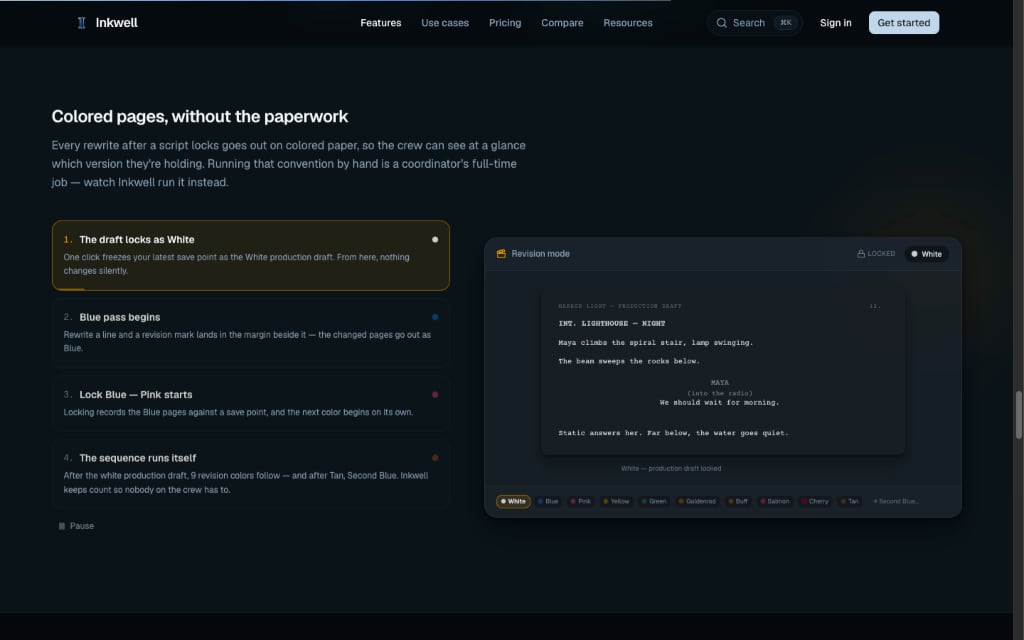
Once a script locks as White, Inkwell manages WGA revision colors, A-page numbering, and margin asterisks automatically against save points. Captured in Google Chrome on inkwell.software/features, November 22, 2026.
When a script is ready for departments, one click locks your latest save point as the White production draft:
- Locked pagination and A-pages. Page numbers freeze so page 42 on the call sheet stays page 42. If a rewrite pushes Scene 38 past its original page break, Inkwell creates frozen A-pages (
42A,42B) automatically so later pages stay aligned. Deleting a scene marks it as Omitted so scene numbers downstream stay fixed for the crew. - Automatic 9-color WGA sequence. Every edit after locking White drops a revision mark in the margin and flags changed pages for Blue distribution. Locking Blue records those pages against a save point and opens Pink on its own, stepping through all nine standard WGA revision colors (Blue, Pink, Yellow, Green, Goldenrod, Buff, Salmon, Cherry, Tan, and then Second Blue onward) without manual bookkeeping.
- Production reports and Submission Preflight. Because Plot parses characters, locations, and time-of-day cues structurally, it builds cast lists, scene breakdowns, and day-out-of-days reports straight from your script. Before you send a spec script to fellowships, contests, or reps, Screenplay Submission Preflight checks printable margins, flags stray blank elements, and strips author metadata from title pages and PDF properties for blind-read submissions.
For collaborative rooms, Inkwell includes real-time co-writing with live cursors and presence indicators, threaded margin comments, shared draft lines, and role-based permissions. Pro lets an individual writer invite up to 5 collaborators across their projects. Team scales up to 25 editor seats, workspace audit logs, shared AI credit pools, and free viewer and commenter seats so producers, directors, and executives can read locked pages and leave notes at no extra per-seat cost.
Canvas: Inkwell's block editor for novels, research, and technical docs
Screenplays are half of Inkwell's design. Alongside Plot sits Canvas, pitched on the site as "a document editor for everything else." As of November 22, 2026, Canvas is in early access for Pro and Team subscribers, with a public waitlist open for everyone else.
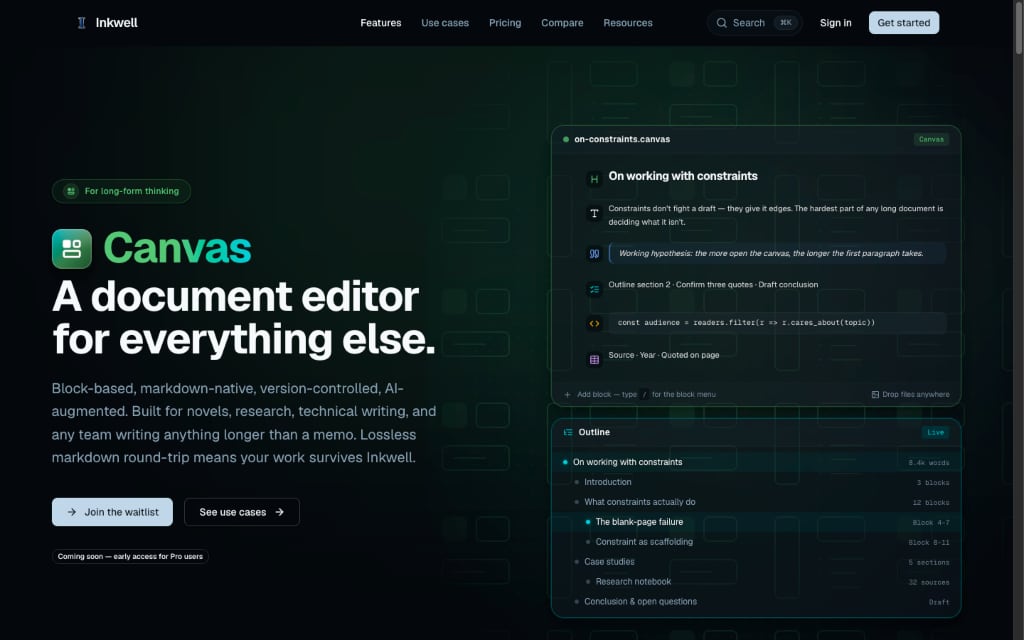
Canvas brings Inkwell's save points, draft lines, and AI review model to block-based Markdown documents, complete with citations and a Live Outline pane. Captured in Google Chrome on inkwell.software/canvas, November 22, 2026.
Canvas applies the version-control and reviewable-AI foundation underneath Plot to long-form prose and structured workplace documents: novels, academic papers, engineering RFCs, design docs, internal wikis, and runbooks. Typing / opens a menu of more than 24 block types, including headings, paragraphs, tables, callouts, syntax-colored code blocks, quotes, footnotes, academic citations, and task lists. Blocks reorder via drag and drop, nest with Tab and Shift+Tab, show block-level live cursors, and compare block by block across draft lines. A Live Outline pane on the side tracks section hierarchy, word counts, block numbers, and cited source counts as you write.
The detail that developers, researchers, and Markdown regulars will appreciate most is 100% lossless Markdown round-tripping alongside six native export formats. Many block editors mangle footnotes, citations, callout boxes, or tables when you copy text out as Markdown. In Canvas, you paste raw Markdown in to get structured blocks, work with save points and parallel draft lines, and copy or export back out to clean Markdown with footnotes, citations, task lists, callouts, tables, and fenced code preserved for Pandoc, Hugo, MDX, or Git repositories.
Data ownership, zero-training privacy, and Bring Your Own Key (BYOK)
No working writer or production company wants an unproduced pilot, studio rewrite, or novel manuscript sitting in a cloud app with fuzzy data rules. The Inkwell security page and help docs state four concrete commitments:
- Full writer ownership and open export. You keep 100% ownership of your scripts, notes, save points, and version history. Native Fountain and PDF exports on every tier (plus two-way
.fdxand.docxfrom Writer upward, and lossless Markdown in Canvas) ensure your work never gets trapped in a closed format. - Zero foundation-model training. Inkwell states explicitly that customer scripts and documents are never used to train foundation AI models.
- Encryption in transit and at rest. Drafts, snapshots, and user-supplied API keys are encrypted over the network and in storage. Account deletion requests go straight to
[email protected], and studio security inquiries go to[email protected](Inkwell notes that formal SOC documentation follows as studio deployments scale). - Bring Your Own Key (BYOK) for Anthropic and OpenAI. Writers who already hold an Anthropic or OpenAI API account can enter their own key in Inkwell. Running with BYOK opens that provider's full model list and bypasses Inkwell's daily ghost-text, daily inline-edit, and monthly skill-run quotas, while your plan's workspace caps (projects, draft lines, collaborators, and storage) stay the same.
Inkwell pricing, plans, and monthly quotas
Inkwell skips expiring seven-day trial timers by giving every account the full Plot screenplay editor on its $0 Free plan with no time cutoff. Paid plans expand your project count, version history ceilings, .fdx and .docx round-tripping, WGA production locking, collaboration seats, and included AI model tiers. All figures below were checked against the Inkwell pricing page and quota documentation on November 22, 2026.
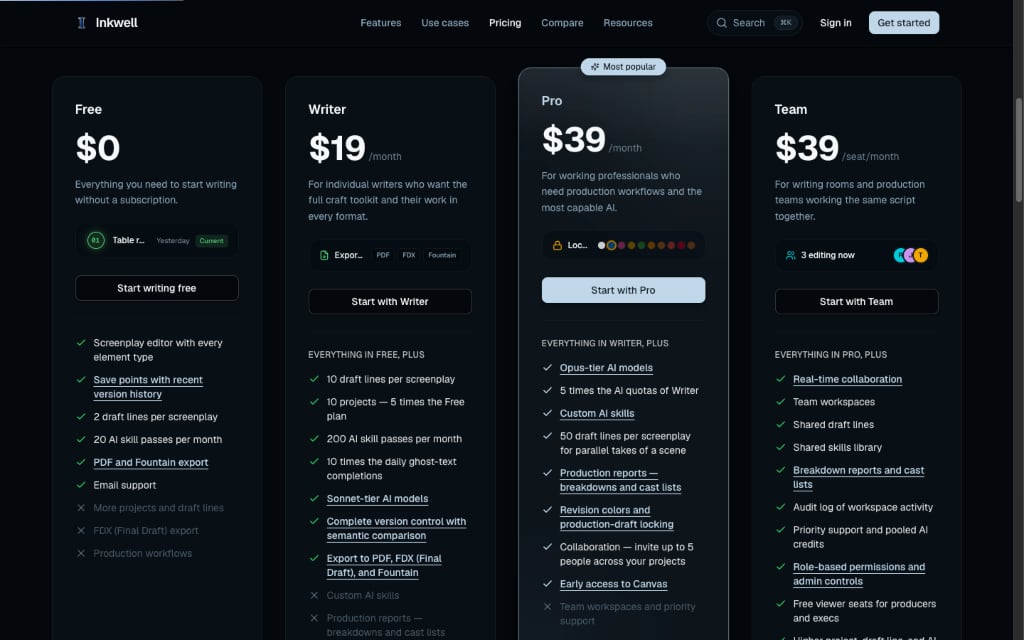
Inkwell's four self-serve plans on /pricing, with custom Enterprise deployments underneath and a 50% Pro discount for eligible students and educators. Captured in Google Chrome on inkwell.software/pricing, November 22, 2026.
| Feature or allowance | Free | Writer | Pro (Most popular) | Team | Enterprise |
|---|---|---|---|---|---|
| Monthly price | $0 | $19 / month | $39 / month | $39 / seat / month | Custom |
| Projects | 2 | 10 | 50 | 200 | Unlimited |
| Draft lines per project | 2 | 10 | 50 | 100 | Unlimited |
| Save points per project | 50 | 500 | 2,000 | 5,000 | Unlimited |
| Specialist skill runs / month | 20 | 200 | 1,000 | 5,000 | Unlimited |
| Ghost-text completions / day | 100 | 1,000 | 5,000 | 10,000 | Unlimited |
Inline Cmd+K edits / day | 20 | 200 | 1,000 | 5,000 | Unlimited |
| Included AI model tier | Standard | Sonnet-tier | Opus-tier | Opus-tier | Custom model config |
| Collaborators | Solo (0) | Solo (0) | Up to 5 across projects | Up to 25 editor seats + free viewers and commenters | Unlimited |
| Share links per project | 3 | 20 | 100 | 500 | Unlimited |
| Cloud storage | 1 GB | 10 GB | 50 GB | 50 GB | Unlimited |
| Exports and imports | Fountain & PDF export; imports FDX, DOCX, Fountain, others | 2-way Final Draft .fdx & Word .docx, Fountain, PDF | Everything in Writer + WGA production PDFs | Everything in Pro | Everything in Team + API access |
| Standout workflow extras | Full 16-element Plot editor, email support | Semantic comparison across versions | Custom AI skills, WGA 9-color lock, breakdowns & cast lists, Canvas early access | Real-time room workspaces, shared draft lines & skills, pooled credits, audit log, RBAC, priority support | SSO, custom deployment, dedicated support, SLA |
A few practical billing rules make it easy to pick the right tier:
- Sizing the allowances. On the $19/month Writer tier, 200 monthly skill passes and 200 daily inline edits cover heavy daily revision across several scripts, and 10 projects with 10 draft lines each fits a full slate of specs and pilots. Moving to Pro ($39/month) steps up to Opus-tier models, adds custom skill building, turns on locked WGA colored production drafts and cast breakdowns, lets you invite up to 5 collaborators without setting up a team org, and includes early access to Canvas.
- Half-price education rate. Eligible film students, screenwriting students, and teachers receive 50% off Pro ($19.50/month) through
[email protected]. - Quota resets and top-ups. Using all of your monthly AI runs never stops you from writing, formatting, saving snapshots, or exporting scripts. Daily ghost-text and inline-edit allowances reset at midnight UTC, and monthly skill passes reset on the first of each month UTC. During a deadline push, you can buy a prepaid credit pack, turn on overage billing, or connect an Anthropic or OpenAI key via BYOK.
- Team credit pools and free executive access. On Team ($39/seat/month), AI credits pool across the workspace with optional per-member caps so one heavy Agent Mode session never drains the rest of the room, and non-writing producers or executives join on free viewer and commenter seats.
How Inkwell compares with Final Draft, WriterDuet, and other writing tools
Screenwriting software has deep studio habits behind it. Inkwell publishes side-by-side comparison guides on inkwell.software/compare (checked by Inkwell against each vendor's public pages on November 18, 2026), covering eleven screenwriting programs plus Notion, Google Docs, and Scrivener on the Canvas side.
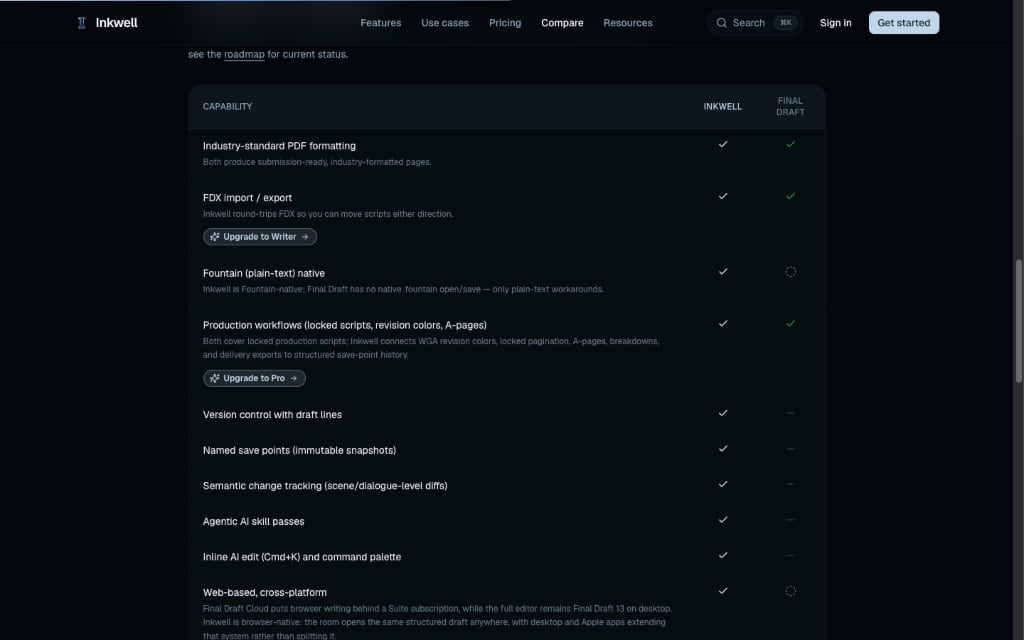
Part of Inkwell's published capability comparison with Final Draft 13 on /compare/final-draft. Captured in Google Chrome on inkwell.software/compare/final-draft, November 22, 2026.
| Software | Pricing model (checked Nov 2026) | Where that tool shines | Where Inkwell pulls ahead |
|---|---|---|---|
| Final Draft 13 | $249.99 one-time license (or Suite from $8.33/mo); free trial only | Universal studio familiarity; mature offline desktop apps on Mac and Windows | Browser-native on any OS, permanent $0 Free editor, native Fountain, named save points, parallel draft lines, semantic scene diffs, and 28 reviewable AI skills (plus 2-way .fdx on Writer+ for producer handoffs) |
| WriterDuet / WriterSolo | Free (3 scripts) / $9.99 to $13.99/mo; WriterSolo free local app | Affordable browser collaboration and offline desktop apps on paid plans | Branch-style draft lines with selective Incorporate, prose-to-script conversion, semantic diffs, and structured craft and continuity AI passes |
| Arc Studio Pro | Free (2 scripts, watermarked PDF) / $69 to $99/yr | Clean minimalist interface, beat board, native desktop and iOS apps on paid tiers | Unwatermarked PDF and Fountain exports on the $0 Free plan, deeper Git-style version history, 28 specialist skills, and Canvas for non-script docs |
| Fade In | Free demo / $79.95 one-time license | One-time purchase across Mac, Windows, and Linux; fast, lightweight native app | Cloud-synced save points and parallel draft lines, zero-install browser access on any computer, real-time room workspaces, and integrated AI passes |
| Highland Pro | 30-day trial / $59.99/yr or $9.99/mo | Clean plain-text Fountain feel for solo Mac, iPad, and iPhone writers | Works on Windows, Linux, and Chromebook alongside Mac; adds real-time co-writing, full two-way .fdx, WGA locked color sequences, and reviewable AI |
| Sudowrite | Free trial / from $10/mo yearly or $19/mo monthly | Generative prose brainstorming and chapter drafting for fiction authors | Dedicated screenplay formatting, WGA production pipelines, read-only script coverage and continuity skills, and lossless Markdown blocks in Canvas |
For working screenwriters, the most reassuring detail is .fdx compatibility. Moving your drafting workflow into Inkwell never forces an argument with a producer who expects Final Draft files. Because both the $19/month Writer tier and the $39/month Pro tier round-trip Final Draft .fdx and Word .docx cleanly (and import existing files from Final Draft, Fountain, WriterDuet, Highland, and Celtx), you can write, branch, and run continuity or page-trimming passes in Inkwell and still hand over a clean .fdx file whenever a showrunner, script coordinator, or rep asks for one.
Where older competitors still hold an advantage today is native offline apps and one-time licensing. If you write half your pages on long flights with Wi-Fi off, or prefer paying once with no cloud account, Fade In ($79.95 one-time) or Final Draft 13 on desktop covers offline travel right now while Inkwell's native offline desktop app and iPhone/iPad apps are still in progress on its roadmap. Novelists who want rule-based prose lessons with an optional zero-AI mode can also compare our Open Atelier review. For connected screenplay drafting and heavy rewrite seasons where parallel takes, scene-level history, and restrained craft diagnostics save hours every week, Inkwell feels markedly fresher.
Who Inkwell suits best (and when to wait)
Inkwell is a strong fit for:
- Feature and television screenwriters in active revision who want to retire folders of duplicate
.fdxfiles in favor of named save points, parallel draft lines, and scene-level diffs inside one project. - Writers who want AI to behave like a sharp script coordinator, running read-only passes such as Continuity Check, Mystery Fair Play, Pacing Analysis, Medical Check, or Save Lines while keeping authorship of every line on the page.
- Showrunners, executive producers, and writers' rooms that need real-time co-writing, shared draft lines, automated nine-color WGA locked revisions, frozen A-pages, cast breakdowns, and free viewer or commenter seats for studio executives.
- Writers who outline in prose before scripting, since Plot turns prose beat sheets and imported
.docxtreatments straight into formatted screenplay scenes inside the same workspace. - Fountain and cross-platform writers working across Mac, Windows, Linux, or Chromebook who want native plain-text Fountain portability paired with industry pagination.
- Novelists, academic researchers, and engineering teams on Pro or Team who want early access to Canvas for version-controlled, citation-ready block writing with lossless Markdown round-tripping.
- Film school students and educators, who can get the Opus-powered Pro production tier at half price ($19.50/month).
When does it make sense to wait or stick with Inkwell's Free tier first? If your routine depends on native offline drafting on an iPad or a laptop away from Wi-Fi, Inkwell's offline desktop app and iOS apps are listed as in progress on /about rather than shipping today. Similarly, if your work centers on novels or technical documentation in Canvas rather than screenplays in Plot, keep in mind that Canvas currently requires Pro or Team for early access (or joining the public waitlist), whereas Plot is open to everyone right away for $0.
Getting the most from your first week in Inkwell
Because the Free plan has no expiration date, you can test Inkwell on real pages at your own pace. Eight short steps will show you how the pieces fit together inside your first hour:
- Take a thirty-second spin on
/demofirst. Openinkwell.software/demoin Chrome, type half a line of dialogue under Maya's cue, pause briefly, and try accepting (Right Arrow) and dismissing (Esc) ghost text so your hands feel howTabstays free for screenplay elements. - Create a free account and bring in one active script. Import a current
.fdx,.fountain, WriterDuet, Highland, or.docxdraft into Plot, or write a three-beat prose outline and click "Turn into script" on one beat to see prose convert into formatted scenes. - Drop a named baseline Save Point (
Cmd+S). Before editing a single line, save a snapshot named"Imported baseline"so you have a clean reference point for comparison later. - Open a second Draft Line for an experiment. Create a new draft line for a scene you have been debating how to cut or reshape, write a bolder take, and see how Plot keeps
Mainuntouched until you choose "Incorporate". - Run two read-only analysis skills. Open
Cmd+Kand run/continuity-checkalongside eitherPacing Analysisor/tone-pass. Notice how diagnostic passes return concrete craft notes without rewriting your pages. - Test
Cmd+Kinline editing and/save-lineson one tight scene. Select a stiff exchange, pressCmd+Kto compare three word-diff alternatives side by side, and run/save-linesto see how Inkwell trims orphan two-word spill lines to win back page space. - Run Screenplay Submission Preflight. Open the preflight tool before exporting a reading PDF to confirm clean printable structure, review character word balance, and check anonymous title-page metadata settings.
- Check your round-trip export. Download a Fountain file and a formatted PDF on Free (or test a two-way
.fdxround-trip on Writer or Pro, or connect an Anthropic or OpenAI key under BYOK) so you know how cleanly your script moves into the rest of your workflow.
Inkwell review verdict
Screenwriting software has spent years asking writers to pick between two incomplete setups: veteran desktop programs that handle Hollywood production locks well while treating version control like 1998, or lightweight cloud editors that stall out the day a line producer asks for .fdx round-tripping, frozen A-pages, and Pink revisions.
Inkwell brings both halves under one roof with real craft care. Parsing a script as structured data makes named save points, parallel draft lines, prose-to-script conversion, cast breakdowns, and nine-color WGA locks behave like parts of a single calm instrument. Just as welcome, its five-mode AI design leaves the writer in the chair: nineteen of its twenty-eight specialist skills read and diagnose without touching your prose, ghost text never hijacks the Tab key, scripts are never used to train foundation models, and every suggested change waits for your click. With a permanent $0 Free tier covering the full Plot editor and paid plans starting at $19 a month, bringing over one scene you are actively revising is the fastest way to see whether Inkwell earns a permanent tab in your browser.
Frequently asked questions
What is Inkwell?
Inkwell (inkwell.software) is a browser-based, AI-native writing platform built by Inkwell Software and designed as an IDE for writers. It combines structured drafting, immutable named save points, parallel draft lines, semantic version diffs, and reviewable AI passes across two editors: Plot for screenplays, TV, and stage scripts (live now) and Canvas for block-based Markdown documents, novels, research, and technical specs (in early access on Pro and Team plans).
Is Inkwell free to use?
Yes. Inkwell provides a permanent $0 Free plan with no trial timer. It includes the complete Plot screenplay editor with all 16 element types, Fountain and PDF export, 2 projects, 2 draft lines per project, 50 save points per project, 1 GB of storage, 20 specialist AI skill runs per month, 100 ghost-text completions per day, and 20 inline edits per day.
How much does Inkwell cost?
Checked against inkwell.software/pricing on November 22, 2026, Inkwell has five tiers: Free at $0, Writer at $19 per month, Pro at $39 per month, Team at $39 per seat per month (up to 25 editor seats plus free viewer and commenter seats), and custom Enterprise pricing. Eligible students and educators receive 50% off the Pro plan ($19.50 per month) through [email protected].
What is the difference between Inkwell Plot and Inkwell Canvas?
Plot is Inkwell's screenwriting IDE for feature films, television, stage plays, treatments, outlines, and series bibles, complete with WGA pagination, .fdx and Fountain support, and production locking. Canvas is Inkwell's general-purpose block editor (24+ block types with 100% lossless Markdown round-tripping and a Live Outline sidebar) built for novels, academic papers, RFCs, wikis, and technical docs; both run on the same version-control and AI engine.
How does Inkwell's AI work without overwriting my writing?
Inkwell splits AI into five optional modes: Complete (inline ghost text accepted with Right Arrow), Ask (script-grounded dramaturg chat), Edit selection (Cmd+K showing up to three inline word-diff options), 28 Specialist Skills (19 of which are read-only diagnostic passes that never alter prose), and scoped Agent Mode (which creates a save point first and stages proposed edits on a markup rail and result draft line). Nothing enters your script unless you accept it.
Does Inkwell train AI models on my screenplay or manuscript?
No. According to Inkwell's security policy, writers retain 100% ownership of their scripts, notes, save points, and version history, all documents are encrypted in transit and at rest, and customer scripts are never used to train foundation AI models.
Can I bring my own Anthropic or OpenAI API key (BYOK)?
Yes. Inkwell supports Bring Your Own Key (BYOK) for both Anthropic and OpenAI, storing your key encrypted at rest. When you run AI features on your own API key, you get access to that provider's full model list and bypass Inkwell's daily ghost-text, daily inline-edit, and monthly skill-run quotas, while your plan's workspace project and draft-line caps still apply.
Is Inkwell compatible with Final Draft (.fdx), Fountain, and Word?
Yes. Inkwell is Fountain-native and exports standard screenplay PDFs on every plan, including Free. Starting on the $19/month Writer plan, Inkwell supports two-way import and export for both Final Draft (.fdx) and Microsoft Word (.docx) files, and it also imports scripts from WriterDuet, Highland, and Celtx.
How do Save Points and Draft Lines work in Inkwell?
Save Points (Cmd+S) freeze named, immutable snapshots of your script at moments like a table read or before a major rewrite; if a project reaches its plan cap, only oldest unlabeled snapshots thin out while named milestones stay preserved. Draft Lines let you explore parallel takes (such as an alternate Act 3 ending or a room pass) inside the same project without duplicating files, then selectively Incorporate chosen changes back to Main.
Does Inkwell support WGA revision colors and locked production pages?
Yes, on Pro, Team, and Enterprise plans. Locking a draft freezes it as White with locked pagination, automatic frozen A-page labels (12A, 12B) when scenes expand, omitted scene placeholders, and margin revision marks, then steps automatically through all nine standard WGA revision colors (Blue, Pink, Yellow, Green, Goldenrod, Buff, Salmon, Cherry, and Tan, followed by Second Blue onward).
Can multiple writers collaborate in real time in Inkwell?
Yes. The Pro plan ($39/month) allows you to invite up to 5 collaborators across your projects, while the Team plan ($39/seat/month) supports real-time co-writing workspaces for up to 25 editor seats with live cursors, threaded comments, shared draft lines, shared custom skills, audit logs, role-based permissions, and free viewer and commenter seats for producers and executives.
What platforms, browsers, and languages does Inkwell support?
Inkwell runs in any modern desktop web browser across Mac, Windows, Linux, and Chromebook with nothing to install; native offline desktop apps and iPhone and iPad apps are currently listed on Inkwell's active roadmap. Both the interface and writing or AI tools support English (US, UK, Australian, and Canadian conventions), German, Spanish, French, Japanese, and Korean.
What happens if I run out of monthly AI skill passes?
Running out of AI allowances never blocks you from writing, editing, saving snapshots, or exporting your scripts. Daily ghost-text and inline-edit quotas reset at midnight UTC, and monthly skill passes reset on the first of each month UTC. If you need extra runs right away, you can purchase prepaid credit packs, enable overage billing, or connect an Anthropic or OpenAI key via BYOK.
How does Inkwell compare with Final Draft 13?
Final Draft 13 ($249.99 one-time desktop license) remains the traditional offline desktop standard on Mac and Windows, whereas Inkwell runs cross-platform in the browser, offers a permanent $0 Free editor, treats Fountain as a native format, and adds immutable save points, parallel draft lines, semantic scene diffs, and 28 reviewable craft skills. Because Writer and Pro round-trip .fdx files cleanly, writers can work in Inkwell while still delivering Final Draft files to producers.
Get your SaaS in front of founders
List your product on SaaSCity for $19.99, one-time: a permanent listing and a building on the live city map.