Reviews
VPS Snaps Review 2026: Automated Server Backups That Land in Storage You Own
VPS Snaps (vpssnaps.com) schedules provider snapshots, database dumps, Docker volumes, files and Kubernetes manifests across eight clouds and writes every backup to storage you own. Here is how it works, what it costs, how restores and failover work and who it suits.

Contents (18)
- VPS Snaps at a glance
- What is VPS Snaps?
- How does VPS Snaps work?
- Which cloud providers can VPS Snaps snapshot?
- What else can VPS Snaps back up?
- Where do your backups go?
- How do restores and test restores work?
- What happens when a server goes down?
- Can an AI assistant set up your backups?
- Does VPS Snaps work for WordPress on shared hosting?
- How much does VPS Snaps cost?
- How does VPS Snaps compare with SnapShooter and cron scripts?
- How safe is it to hand VPS Snaps your keys?
- How to back up your first server with VPS Snaps
- Who is VPS Snaps for?
- Who is behind VPS Snaps?
- Is VPS Snaps worth it?
- FAQ
Sponsored post. Product details checked against vpssnaps.com, its pricing, features, FAQ, security, trust, comparison and changelog pages, its llms.txt and the VPS Snaps listing on WordPress.org on October 14, 2026. Screenshots taken from the live sites in Google Chrome.
Quick answer: VPS Snaps is a backup scheduler for developers and agencies running roughly 5 to 40 servers. It takes provider-native snapshots on DigitalOcean, Hetzner Cloud, Vultr, Linode, AWS EC2, AWS Lightsail, Google Compute Engine and Microsoft Azure, runs database, Docker, file and Kubernetes backups over SSH or a small outbound agent, and writes every backup to storage you own: an S3-compatible bucket, Google Drive, Box or Dropbox. One server is free forever with no card. Paid plans cost $10 to $117 a month billed annually ($15 to $175 monthly), and the higher tiers add recovery servers, warm standby and automatic failover.
Most small infrastructure gets backed up the same way. Someone writes a pg_dump line into crontab, pipes it through gzip, pushes the file to a bucket with the AWS CLI and moves on. It works the day it's written. A year later there are nine servers on three clouds, a folder of scripts nobody has opened since, and the only way to know whether last night's dump ran is to SSH in and look.
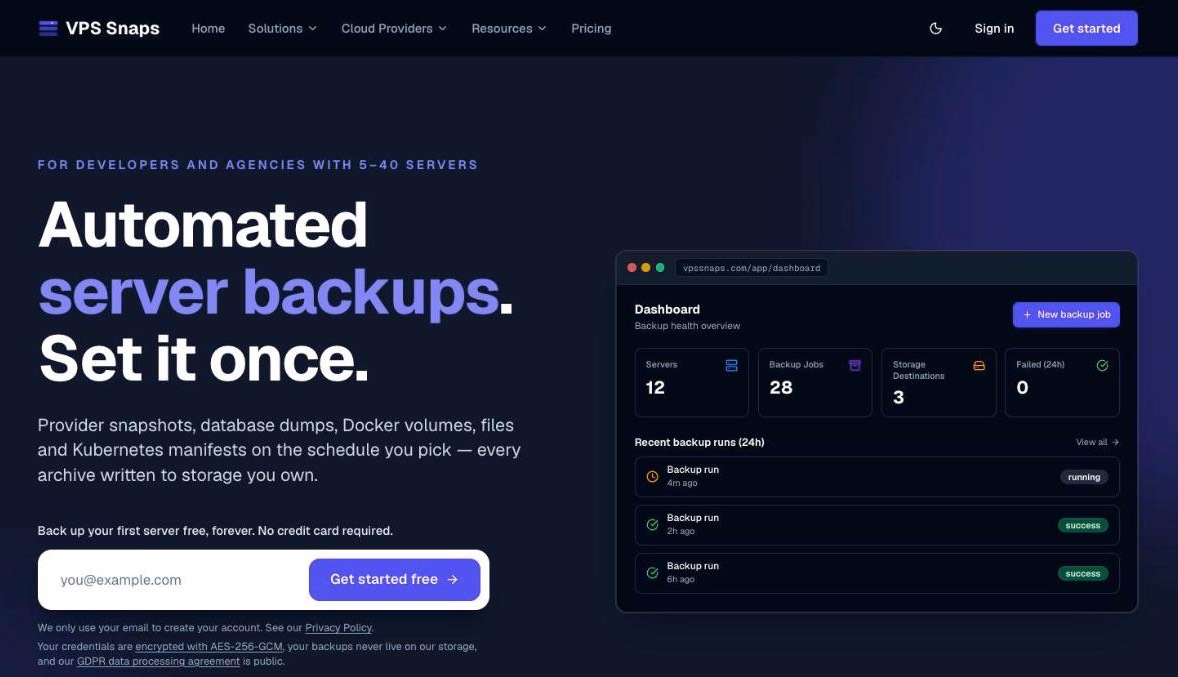
VPS Snaps is built for the day you'd rather not go and look. Its homepage puts it in six words: "Automated server backups. Set it once." You connect your clouds and servers, pick a schedule, point the jobs at your own bucket, and every run comes back with a log, a byte size and a checksum. When a run fails, the alert carries the real error text from the provider or the shell, and it lands wherever your team already reads things.
This review covers how VPS Snaps works, what it backs up, how restores and failover work, what it costs, how it compares with SnapShooter and who it suits best.
VPS Snaps at a glance
- Snapshots on eight clouds, created through each provider's own API, so the images sit in your account and restore from your provider's console with or without VPS Snaps.
- Database dumps for PostgreSQL, MySQL, MariaDB and MongoDB over SSH, plus managed Postgres on Railway, Render and Coolify.
- Docker named volumes, any file path, Kubernetes namespaces and Cloudflare DNS zones, with a scan that finds WordPress, Laravel, Craft CMS, Ghost and Nextcloud and sets up their jobs for you.
- Bring-your-own storage only: Amazon S3, Cloudflare R2, Backblaze B2, DigitalOcean Spaces, Wasabi, UpCloud, any S3-compatible endpoint, Google Drive, Box or Dropbox.
- Restores from the dashboard onto any server in your workspace, opt-in scheduled test restores on a throwaway server, and recovery servers with warm standby and automatic failover on higher plans.
- Uptime monitors, heartbeats for cron jobs and public status pages on every paid plan.
- A free plan for one server with no card and no trial clock, paid plans from $10 a month billed annually, and a 14-day money-back guarantee on the first payment.
What is VPS Snaps?
VPS Snaps is a hosted backup orchestrator. It holds the credentials it needs to reach your servers and cloud accounts, runs your jobs on schedule and keeps a record of each run: status, duration, byte size, MD5 checksum, storage path and a timestamped log of every step. It doesn't keep your data. There's no hosted storage tier at any price, so the backups always live in your cloud account or your own bucket.
The team ships quickly. Its changelog dates the first version to June 2026, and October alone brought Box and Dropbox destinations, S3 Object Lock support, continuity plans and setup from AI coding assistants. The pricing page counts 111 teams using it. The homepage names its customer plainly: developers and agencies with 5 to 40 servers, the size where one provider's built-in backup checkbox stops covering everything and home-made scripts start eating real hours.
How does VPS Snaps work?
A worker wakes at the scheduled time, runs the job, logs every step and applies your retention rules. Where your data goes depends on the job type, and VPS Snaps is unusually clear about it:
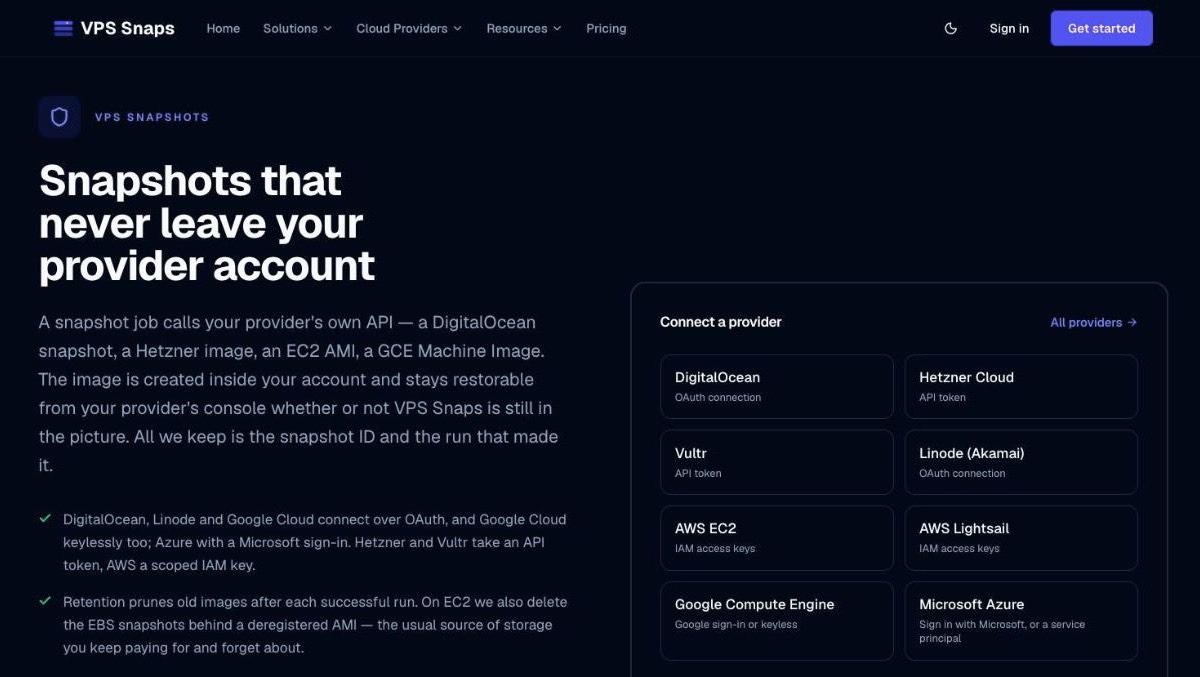
- Provider snapshots never leave your provider. VPS Snaps calls the provider's API to create a DigitalOcean snapshot, a Hetzner image, an EC2 AMI or a Google machine image, and keeps only the snapshot ID.
- SSH jobs (databases, files and Docker volumes) run on your server with the tools it already has, and your server uploads the compressed output straight to your storage through short-lived signed links. If a server can't upload for itself, that run streams through the VPS Snaps worker in memory, never touching its disk, and the log says so.
- Agent jobs run inside your network. The Agent is a Docker container that opens an outbound connection and waits for work, so a machine behind NAT, a VPN or a private VPC gets the same database, file and Docker jobs with no inbound port and no public IP.
Schedules run from every 5 minutes to monthly, and daily, weekly and monthly jobs are anchored to your timezone, so a 02:00 job stays at 02:00 across a daylight saving change. Any job can also be run by hand before a risky deploy without touching its schedule.
Each backup is checked as it uploads: the archive has to decompress, a database dump has to reach its completion marker, and the file is read back from the bucket to confirm its size. A failed run alerts you with the underlying error, and a job more than 15 minutes late sends a missed-run alert. A third alert fires when a job has gone three times its normal interval without a successful backup, which catches the quiet failures that never produce an error of their own. We liked seeing that one handled.
Which cloud providers can VPS Snaps snapshot?
Eight, and every one of them is available on the Free plan.
| Provider | How you connect | What one snapshot captures |
|---|---|---|
| DigitalOcean | OAuth or API token | The whole Droplet |
| Hetzner Cloud | API token scoped to one project | The server as an image |
| Vultr | API key, with the IP to allowlist shown at setup | The instance |
| Linode (Akamai) | OAuth or personal access token | One selected disk, usually the boot disk |
| AWS EC2 | Scoped IAM keys, one region per connection | A full AMI with every attached volume |
| AWS Lightsail | IAM keys, one region per connection | The whole instance, attached disks included |
| Google Compute Engine | Google sign-in, keyless, or a service account | A machine image of every attached disk |
| Microsoft Azure | Microsoft sign-in or your own service principal | One snapshot per managed disk, made and pruned as a set |
A few provider details show real care. On EC2, retention also deletes the EBS snapshots behind an AMI it deregisters, the classic source of storage you keep paying for long after you've forgotten it. On Azure, VPS Snaps fails the run if any one disk's snapshot fails, because a backup of only the OS disk would restore as a machine with its data missing.
Beyond these eight, database, file and Docker jobs work over SSH on any Linux server at any host, Cloudways, SSD Nodes, InterServer and cPanel boxes included.
What else can VPS Snaps back up?
Snapshots get the headline, but most of the day-to-day value sits in the logical backups that run alongside them.
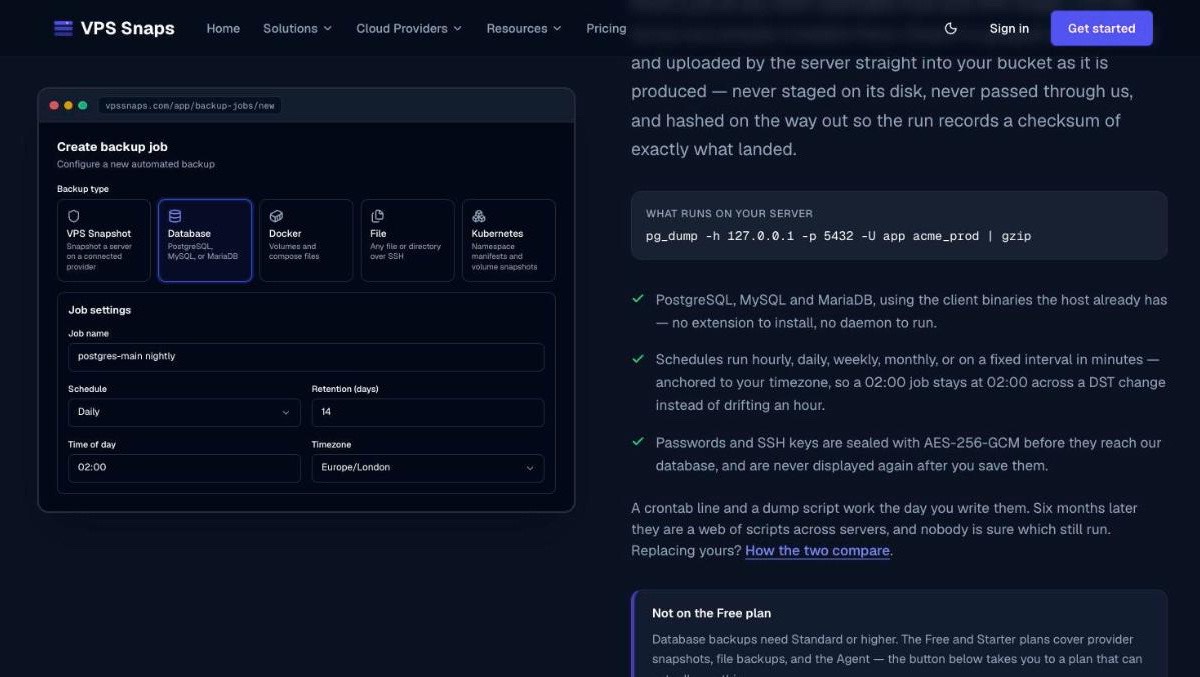
- Databases. VPS Snaps runs
pg_dump,mysqldumpormongodumpover SSH with the client binaries your host already has. SQL dumps land as<database>-<timestamp>.sql.gzwith DROP statements included, so a plaingunzip -c dump.sql.gz | psql mydbworks by hand too. - Managed Postgres. Railway, Render and Coolify databases are covered too, with Railway and Render dumps running inside your own project or workspace where the platform allows it.
- Docker. Each named volume is archived through a throwaway helper container without stopping anything, with the compose files saved alongside. SQLite databases inside volumes are copied with SQLite's own backup API, so apps like Uptime Kuma and Vaultwarden keep every committed write.
- Files. One
.tar.gzper run for the paths you list, with exclude patterns to keepnode_modulesand caches out. A missing path is skipped with a warning instead of failing the run. - Applications. "Detect applications" scans a server for WordPress, Laravel, Craft CMS, Ghost and Nextcloud, reads the database credentials from each app's own config and creates a linked file and database job pair in one click.
- Kubernetes. Namespace manifests plus CSI snapshots of persistent volumes where the cluster supports them, or a fuller backup through Velero if it's already installed.
- DNS. Every record in a Cloudflare zone, kept as a BIND file. A restore previews what changed and writes back only the differences.
Snapshots, files, Kubernetes and the Agent are on every plan, Free included, and database and Docker jobs come with Standard and up.
Where do your backups go?
Into storage you already own, and nowhere else.
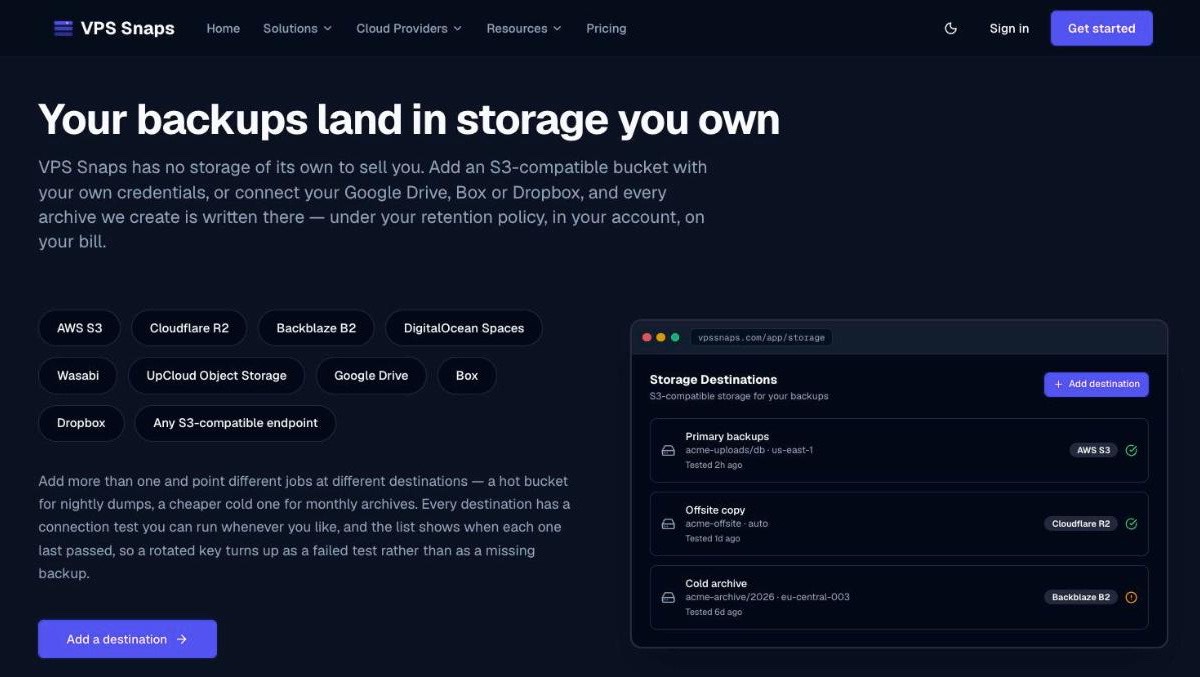
That means an S3-compatible bucket on Amazon S3, Cloudflare R2, Backblaze B2, DigitalOcean Spaces, Wasabi, UpCloud or any custom endpoint, or your own Google Drive, Box or Dropbox. On Google Drive VPS Snaps only sees the files it creates, and on Dropbox only its own app folder, which keeps the rest of your files private.
Higher plans let you send different jobs to different places, say a hot bucket for nightly dumps and a cheaper cold one for monthly archives. Each destination shows when its connection test last passed, so a rotated key turns up as a failed test before it turns up as a missing backup.
Retention never deletes a job's newest backup, and it only deletes objects VPS Snaps wrote, by the exact key recorded at upload. If you turn on S3 Object Lock in your bucket, VPS Snaps supports it, so nobody, VPS Snaps included, can delete or change a backup before the lock expires. That's a strong answer to ransomware for very little effort.
Setup takes a few minutes: create the bucket and an access key that can write and delete, so retention can expire old archives for you. From then on you pay your storage provider's per-GB rate directly with no markup, and every archive is a plain .sql.gz or .tar.gz you can open anywhere.
How do restores and test restores work?
Restores happen in the dashboard: open a successful run, choose a target server and confirm by typing its name. Database, file and Docker runs, WordPress sites and whole detected applications restore onto any server in your workspace, including a brand-new one, where the restore never overwrites an existing file.
A full restore first backs up whatever it's about to overwrite and stops if that safety copy fails, and every restored file is compared with the backup byte for byte afterwards. A check-only mode verifies the archive against its recorded checksum without changing anything, a good habit before a real emergency. Provider snapshots restore straight from your provider's own console, so they're always within reach.
Then there are scheduled test restores, the feature we'd show a skeptical sysadmin first.
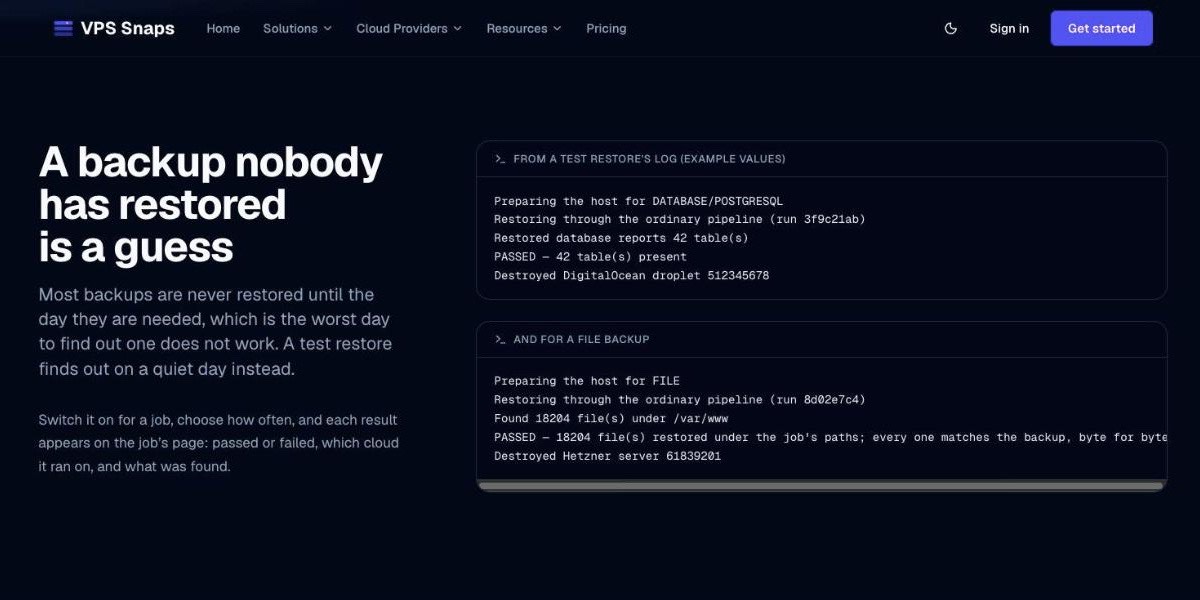
You switch a test on per job and pick how often it runs: every 30, 90 or 180 days. When it comes due, VPS Snaps builds a fresh server on your own cloud account, restores the newest backup through the same pipeline a real restore uses, checks that the tables or files arrived, destroys the server and alerts you if the data didn't come back.
Tests are opt-in, so you choose which jobs get one and how often, and the test server only lives on your cloud bill for a few minutes. They cover file and Docker volume backups and PostgreSQL, MySQL, MariaDB and MongoDB, and they confirm your data comes back, the part most teams never check until the day they need it.
What happens when a server goes down?
Getting a working machine back is the other half of recovery, and VPS Snaps has more here than we expected at this price.
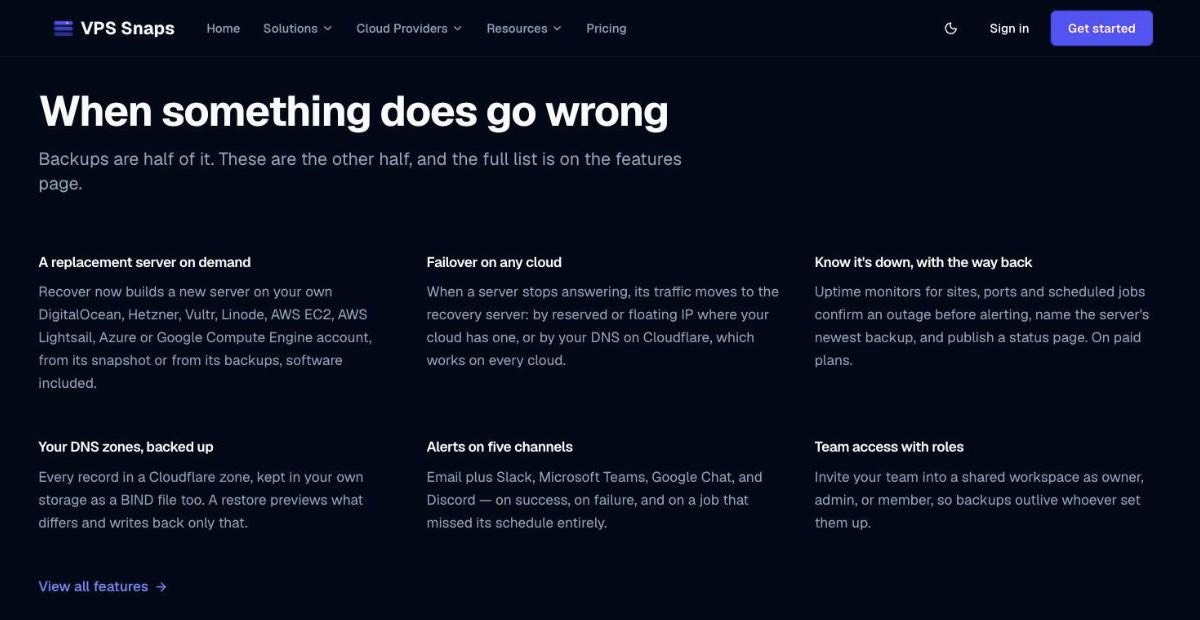
Recovery servers start on the Standard plan. "Recover now" builds a replacement on your own cloud account, from the newest snapshot when there is one. Without a snapshot, VPS Snaps starts a fresh Ubuntu server, restores the databases (same names, users and passwords), files and Docker volumes, and reinstalls the software it recorded from the original: packages, web server, PHP, TLS certificate, cron and systemd configuration. The page shows the age of the newest backup before anything gets built, so you know exactly what you're restoring.
Pro and Agency add a warm standby, kept built and refreshed from newer backups, and automatic failover. Failover checks the server every minute from VPS Snaps and, when that fails, again from inside your own account. Only when both agree does it move the server's reserved, floating, Elastic or static IP to the recovery server, or repoint your Cloudflare DNS records, which works on any of the eight clouds. You stay in control afterwards: it never switches back on its own, and you re-arm it when you're ready, the careful behavior you want from something that moves production traffic.
Every paid plan includes uptime monitors for web pages, TCP ports and cron jobs (through heartbeats). An outage is confirmed by three failed checks 20 seconds apart before anyone gets paged, and the alert names the server's newest backup with a Recover now button. You also get certificate expiry warnings and public status pages, on your own domain with Agency. For teams that answer to auditors, Pro and Agency include continuity plans with recovery targets checked against your real backups and evidence mapped to SOC 2, ISO 27001 and HIPAA controls, ready to hand to your auditor.
Can an AI assistant set up your backups?
Yes, and it's one of the more interesting parts of the product if you already live in Claude Code or Cursor.
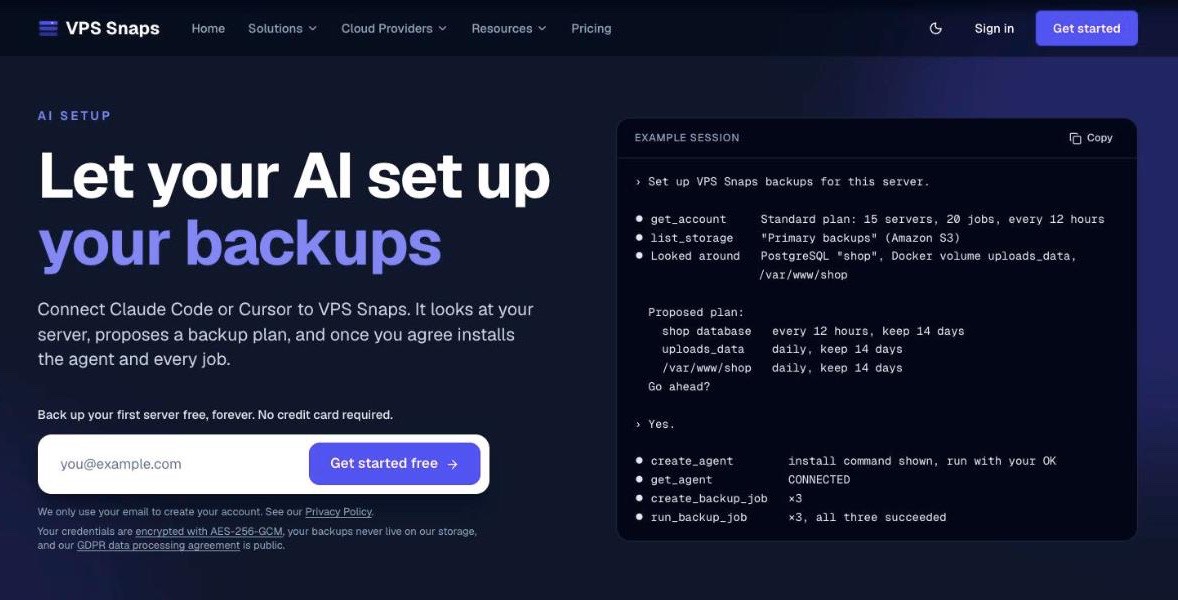
On Standard and up, you create an API key and add VPS Snaps as an MCP server in any client that sends an Authorization header. The assistant reads your plan and storage, looks around the machine, and proposes which databases, volumes and paths to back up and how often. Once you agree, it installs the Agent, creates the jobs, runs them and reads their logs.
The guardrails are sensible. No MCP tool accepts a storage key, cloud token or SSH key, so the assistant never sees those secrets, and everything a key creates shows up in the audit log. If you've been shipping projects with Claude Code, handing it the boring backup setup on a new box is a natural next step. VPS Snaps even publishes step-by-step instructions written for the assistant.
Does VPS Snaps work for WordPress on shared hosting?
It does, through an official plugin that brings the same storage-you-own backups to sites on shared hosting.
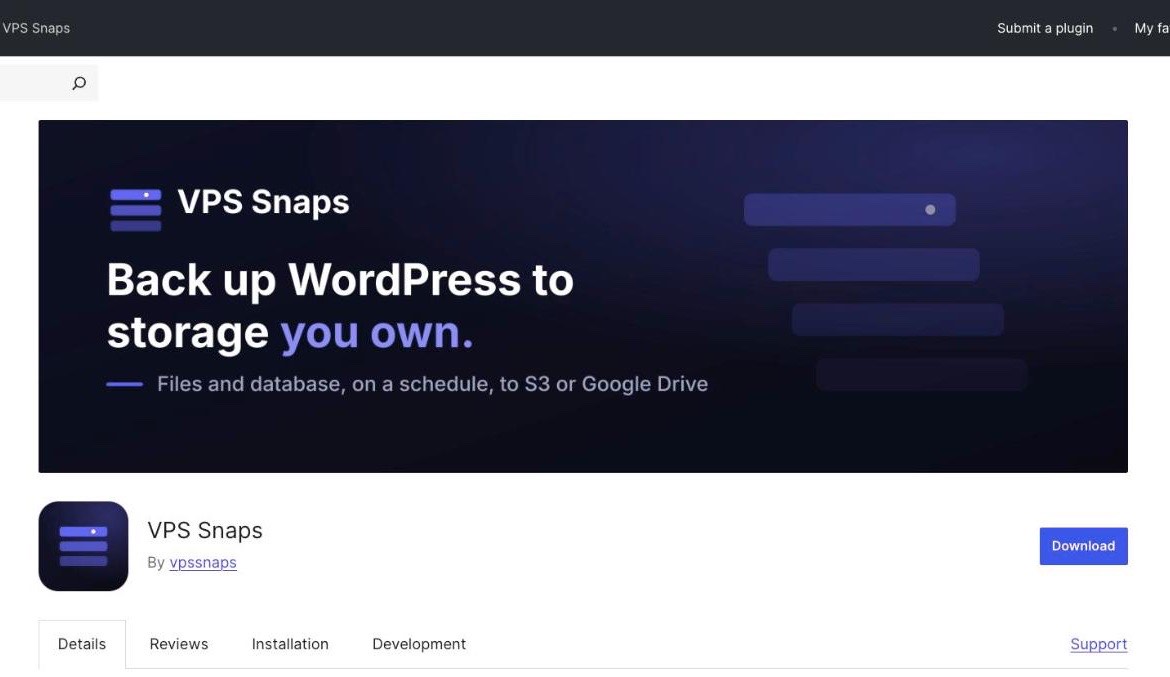
The VPS Snaps plugin on WordPress.org (version 1.1.0, updated October 12, 2026) runs from inside WordPress, so it works on shared hosting with no SSH access. You paste a site token from your account, and backups of the files and database, multisite networks included, go straight to your own storage through short-lived signed links. Restores and moves to a new host run from the dashboard, and nothing in the plugin is locked to a paid plan, so a single site fits in the Free tier.
How much does VPS Snaps cost?
VPS Snaps prices on what you back up: servers, jobs, how often jobs may run and which backup types you can use. It never prices on gigabytes, because the gigabytes sit in your bucket and VPS Snaps never sees that bill.
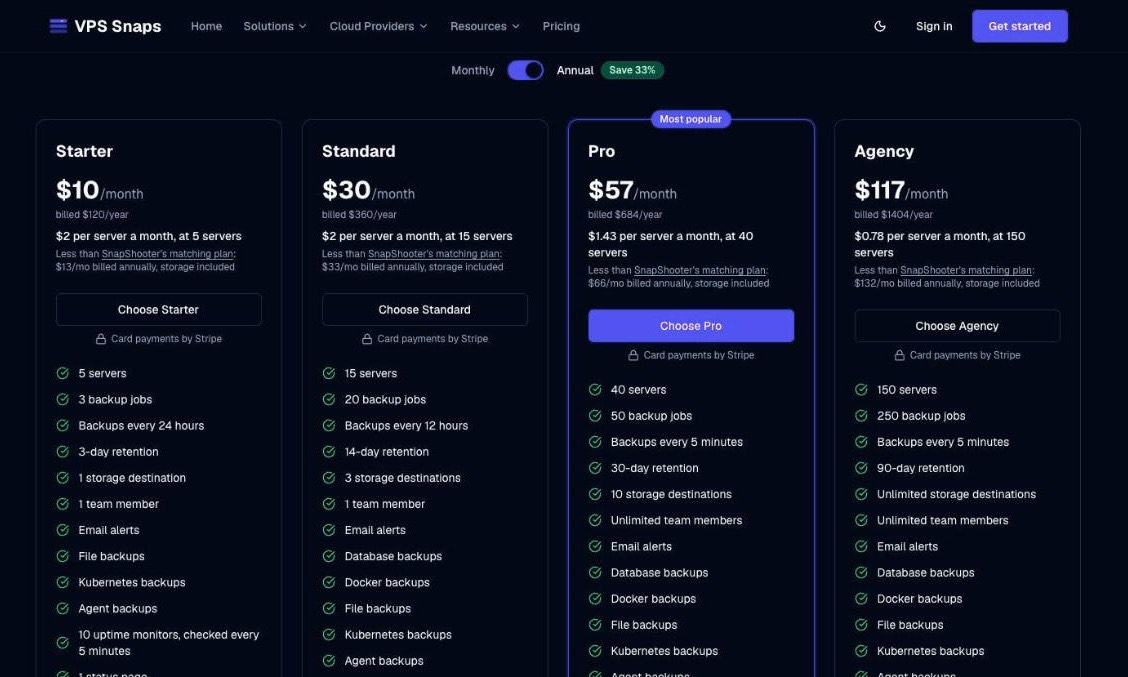
| Plan | Monthly | Billed annually | Servers | Jobs | Fastest backups | Retention | Destinations | Team |
|---|---|---|---|---|---|---|---|---|
| Free | $0 | $0 | 1 | 1 | Every 24 hours | 1 day | 1 | 1 |
| Starter | $15 | $10/mo ($120/yr) | 5 | 3 | Every 24 hours | 3 days | 1 | 1 |
| Standard | $45 | $30/mo ($360/yr) | 15 | 20 | Every 12 hours | 14 days | 3 | 1 |
| Pro | $85 | $57/mo ($684/yr) | 40 | 50 | Every 5 minutes | 30 days | 10 | Unlimited |
| Agency | $175 | $117/mo ($1,404/yr) | 150 | 250 | Every 5 minutes | 90 days | Unlimited | Unlimited |
What each step up adds:
- Free already includes snapshots on all eight clouds, file, Kubernetes and Agent backups, alerts by email, Slack, Microsoft Teams, Google Chat and Discord, full run history and two-factor sign-in.
- Starter adds 10 uptime monitors checked every 5 minutes and one status page.
- Standard adds database and Docker backups, recovery servers, moving sites to a new server, the API and AI setup, 30 monitors checked every minute and three status pages.
- Pro adds warm standby, automatic failover, unlimited team members with roles, one continuity plan, 100 monitors and 10 status pages.
- Agency adds custom webhook alerts, a continuity plan per client, 300 monitors and 50 status pages on your own domain.
Billed annually, that works out to $2 per server a month on Starter and Standard, $1.43 on Pro and $0.78 on Agency at full capacity. Payment runs through Stripe, upgrades are prorated to the day, you can cancel any time, and the first payment has a 14-day money-back guarantee.
The Free plan needs no card and has no expiry while you use it.
If databases are the main thing you need protected, Standard is the plan to start on: it's where database and Docker backups, recovery servers and the API come in.
How does VPS Snaps compare with SnapShooter and cron scripts?
The obvious comparison is SnapShooter, which is part of DigitalOcean, and VPS Snaps publishes a detailed side-by-side with prices it says it checked against SnapShooter's live pricing in both billing modes.
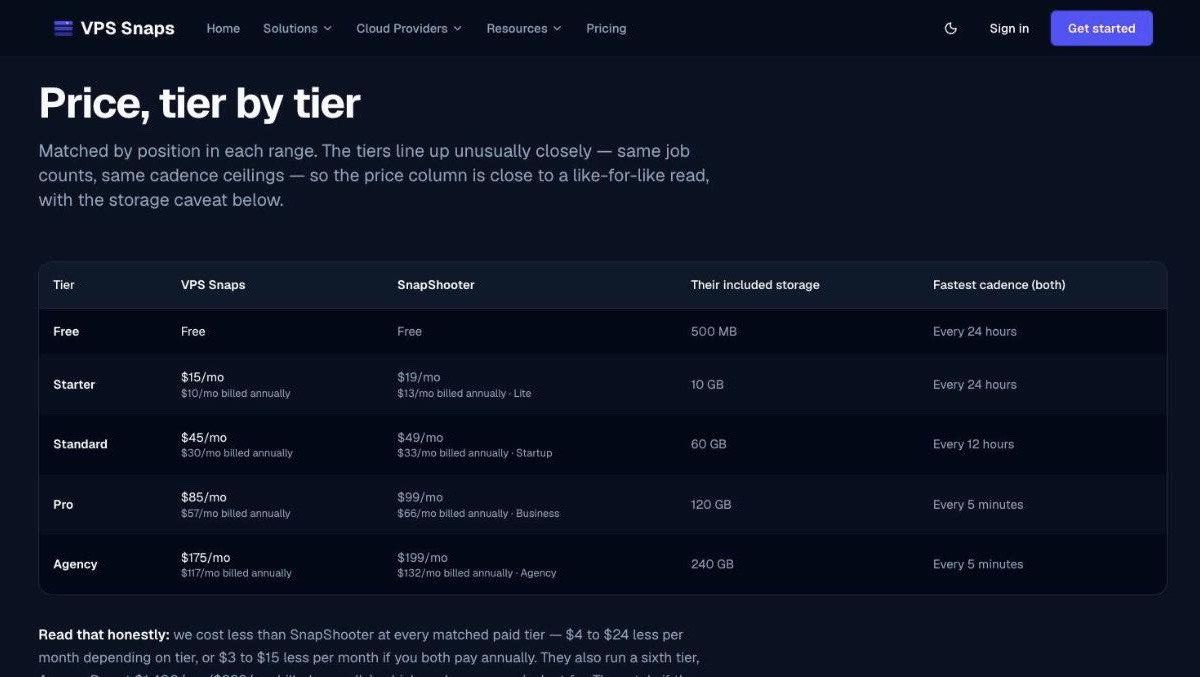
| Tier | VPS Snaps, monthly (annual) | SnapShooter, monthly (annual) | SnapShooter storage included |
|---|---|---|---|
| Entry | $15 ($10) | $19 ($13), Lite | 10 GB |
| Mid | $45 ($30) | $49 ($33), Startup | 60 GB |
| Pro | $85 ($57) | $99 ($66), Business | 120 GB |
| Agency | $175 ($117) | $199 ($132), Agency | 240 GB |
Job counts and backup frequency line up tier for tier, so the difference comes down to price and what surrounds the backup. VPS Snaps is cheaper at every matched tier, keeps every backup in storage you own with no per-GB markup, and adds test restores, recovery servers, failover, uptime monitoring and independence from any one cloud. The comparison page is detailed and even-handed, which made the rest of the site easier to trust.
There are also comparisons with SimpleBackups, Ottomatik, Weap.io and plain cron scripts. The cron page is worth reading even if you never sign up: it lists the ways a crontab backup can fail without telling anyone, and how to move off one. If you're weighing self-hosting against managed platforms, backups are the first chore you inherit.
How safe is it to hand VPS Snaps your keys?
To take a backup, VPS Snaps has to hold your provider tokens and SSH keys, so this section deserves a careful read.
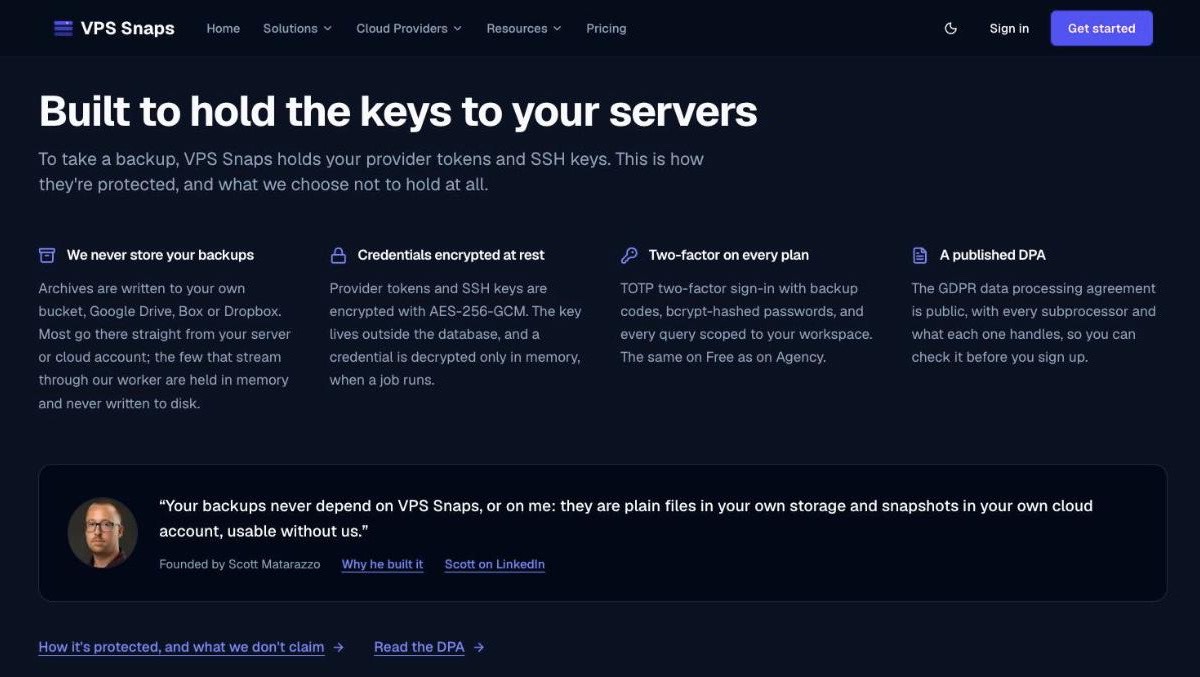
Provider tokens, SSH keys and database passwords are encrypted at rest with AES-256-GCM, the encryption key lives outside the database, and a credential is decrypted only in memory while a job runs. TOTP two-factor sign-in is on every plan, passwords are bcrypt-hashed, SSH connections pin host keys, and the service runs on its own dedicated server. The GDPR data processing agreement is public and names every subprocessor, and no analytics run inside the app.
The trust center puts every security commitment in one place: subprocessors, system status, progress toward SOC 2 and ISO 27001, and how to report a vulnerability. Its information security management system is built to ISO 27001, and outside tools scanned the site and code in September 2026, with every finding addressed.
Two habits make any backup tool safer: give it a dedicated bucket with a key scoped to that bucket, and turn on Object Lock if your provider supports it. Then run one real restore, the same step our pre-launch security checklist asks every founder to take before launch.
How to back up your first server with VPS Snaps
Setup takes about 20 minutes, most of it creating the bucket.
- Create a free account at vpssnaps.com. No card is needed.
- Add a storage destination: an S3-compatible bucket with an access key that can write and delete, or a sign-in to Google Drive, Box or Dropbox. Run the connection test.
- Connect a cloud provider with OAuth, an API token, IAM keys or a Microsoft sign-in, or add a server over SSH. For a machine with no inbound access, run the Agent container instead.
- Create a job: a snapshot, file, Kubernetes or Agent job, or run Detect applications on the server to get paired file and database jobs. Database and Docker jobs are available on Standard and up.
- Choose the cadence, time of day, timezone and retention, and where failure alerts go: email, Slack, Microsoft Teams, Google Chat or Discord.
- Run the job once by hand and read its log, byte size and checksum.
- Restore that run in check-only mode, which verifies the archive without changing anything, or switch on a scheduled test restore for the job.
Who is VPS Snaps for?
It fits best if you recognise yourself in one of these:
- An agency or freelancer looking after client sites across DigitalOcean, Hetzner, AWS and a couple of odd hosts, who wants one dashboard, per-client continuity plans and status pages on your own domain.
- A SaaS founder on a handful of VPSes who wants the production database dumped to R2 or B2 every night, checked and tested, without maintaining cron. That's a growing group as teams move off rising cloud bills onto cheaper servers.
- A team with private infrastructure behind NAT or a VPN, where the outbound Agent avoids opening any inbound port.
- WordPress site owners on shared hosting who still want off-site backups in storage they control.
- Anyone who wants to be able to restore without the backup vendor in the picture.
Who is behind VPS Snaps?
VPS Snaps was founded by Scott Matarazzo, whose background is in IT, ecommerce operations, automation and cloud infrastructure, most of it hands-on with hosting provider APIs. He served in the U.S. Navy Reserve as an Aviation Machinist's Mate and credits Royal Rangers, a church scouting program, and the Navy's core values for how he works: saying plainly what the product does and doesn't do, and owning it when something breaks.
The about page explains the reasoning. When people can't see what their infrastructure software did, they're left guessing whether a backup ran and whether a restore is safe, so every run keeps its log, size and checksum, and the backups go to your storage instead of his. Support and billing questions go to [email protected], where a person answers.
Is VPS Snaps worth it?
For a developer or agency running somewhere between a handful and a few dozen servers, yes, and the free plan makes it easy to find out without risk. Plenty of tools schedule snapshots. VPS Snaps stands out for everything around the backup: your data stays in your own accounts, every run is logged and checksummed, test restores prove the data comes back, and recovery servers and failover give you a way back when a machine is gone. The pricing undercuts its closest rival at every matched tier, and the documentation is detailed and plain-spoken in a way that makes setup easy.
The best way to start is the way VPS Snaps suggests: put one server on the free plan, point it at a bucket you own and run a restore. That's good practice with any backup tool, and VPS Snaps makes it unusually easy. Find it at vpssnaps.com.
FAQ
What is VPS Snaps?
VPS Snaps is a hosted backup scheduler for developers and agencies running roughly 5 to 40 servers. It takes provider-native snapshots on DigitalOcean, Hetzner Cloud, Vultr, Linode, AWS EC2, AWS Lightsail, Google Compute Engine and Microsoft Azure, runs database, Docker, file, Kubernetes and Cloudflare DNS backups, and writes every backup to storage you own. It never stores the backup files itself.
Is VPS Snaps free?
Yes, for one server. The Free plan covers 1 server and 1 backup job, run daily with 1-day retention, with no credit card and no trial clock. It includes snapshots on all eight clouds, file, Kubernetes and Agent backups, and email, Slack, Teams, Google Chat and Discord alerts.
How much does VPS Snaps cost?
Billed annually, Starter is $10 a month, Standard $30, Pro $57 and Agency $117. Billed monthly they are $15, $45, $85 and $175. Plans differ by servers (5, 15, 40 or 150), jobs, backup frequency and features, never by gigabytes. Storage is paid to your own provider, and the first payment carries a 14-day money-back guarantee.
Does VPS Snaps store my backups?
No. Provider snapshots stay in your own cloud account, and dumps and archives go to your own S3-compatible bucket, Google Drive, Box or Dropbox, usually uploaded straight from your server with short-lived signed links. VPS Snaps keeps only metadata such as status, size, checksum and logs. If you cancel or delete your account, the backups stay where they are.
Which plans include database and Docker backups?
Database backups (PostgreSQL, MySQL, MariaDB and MongoDB) and Docker volume backups come with the Standard plan and up, together with recovery servers, moving sites to a new server, and API and AI setup. Every plan, Free included, covers provider snapshots, file backups, Kubernetes backups and the Agent.
Can VPS Snaps test that my backups actually restore?
Yes. Scheduled test restores are opt-in per job, every 30, 90 or 180 days. VPS Snaps builds a throwaway server on your own cloud account, restores the newest backup through the normal restore pipeline, checks the data arrived, destroys the server and alerts you if the test failed. It covers file and Docker volume backups and PostgreSQL, MySQL, MariaDB and MongoDB.
Does VPS Snaps support automatic failover?
On the Pro and Agency plans. When a server stops answering, VPS Snaps confirms the outage from two places and then moves a reserved, floating, Elastic or static IP to a recovery server, or repoints Cloudflare DNS records, which works on any cloud. You stay in control: it never switches back on its own, and you re-arm it when you're ready.
Is VPS Snaps secure?
Provider tokens, SSH keys and database passwords are encrypted with AES-256-GCM, with the key kept outside the database, and decrypted only in memory during a run. TOTP two-factor sign-in is on every plan, the GDPR data processing agreement is public, and the trust center tracks VPS Snaps' progress toward SOC 2 and ISO 27001.
How does VPS Snaps compare with SnapShooter?
The tiers line up closely in job counts and backup frequency, and VPS Snaps lists lower prices at every matched paid tier: $10 against $13 a month on the entry tier billed annually, up to $117 against $132 on Agency. VPS Snaps keeps every backup in storage you own, with no per-GB markup, and adds test restores, recovery servers, failover and uptime monitoring.
Can I set up VPS Snaps with Claude Code or Cursor?
Yes, on Standard and higher. An API key connects any MCP client that sends an Authorization header to the VPS Snaps MCP server. The assistant can read your plan and storage, look at the server, propose a backup plan and, once you agree, install the Agent and create and run the jobs. Storage keys and cloud tokens are only entered by a person in the dashboard.
Does VPS Snaps work for WordPress on shared hosting?
Yes. The free VPS Snaps plugin on wordpress.org backs up a WordPress site's files and database from inside WordPress, multisite networks included, on hosts with no SSH or mysqldump. It uploads straight to your own storage with short-lived signed links, and the site restores or moves from the VPS Snaps dashboard. It works on every plan, Free included.
If you're building developer tools or any other SaaS yourself, SaaSCity is a free, human-reviewed startup directory with a live city map, where your listing is a permanent page that other founders browse. We also keep a list of the best directories for developer tools and DevOps software. Submitting takes about ten minutes.
Get your SaaS in front of founders
List your product on the SaaSCity live city map - a permanent listing, real discovery, and a backlink from a high-DR directory. Free to start; upgrade for a dofollow link and a building on the map.