MCP server directories: where to list your server in 2026
We published SaaSCity's own MCP server to the official registry on September 23, 2026. On October 7 we checked 16 MCP server directories and registries for their rules, prices and links, then searched each one for ours.

SaaSCity Team
Updated · Checked by hand. DR from Ahrefs.
- 40,528 servers in the official MCP Registry on October 7, 2026, by our count of its API
- 375 servers in GitHub's curated registry, the source of VS Code's @mcp gallery
- 3 of 16 places listing our own server 14 days after we published it
- 11,657 of the 28,130 remote servers on Glama marked unhealthy on October 7
Contents
The short answer
As of October 2026, publish to the official MCP Registry first: it is free, Glama imports from it and PulseMCP says it will pull from it when submissions reopen. If your server is remote, submit it to Anthropic's Claude directory and OpenAI's plugin directory, where Claude, ChatGPT and Codex users install from. Then check that Glama lists your GitHub repo cleanly, because the biggest MCP list on GitHub and its remote-server sibling only merge entries with a Glama badge.
At a glance
Publish once, show up everywhere
The registry is a feed: Glama imports from it and PulseMCP says it will.
1.Official MCP Registry
Official metadata registry, in preview · Free · No link
This is the MCP project's own index of server metadata, and its docs name Anthropic, GitHub, PulseMCP and Microsoft as backers. It is built for aggregators, which the docs expect to pull new entries about once an hour. Glama imported ours, and PulseMCP says this is how it will find you, so publish here first.
The registry stores a server.json that points at your package or remote URL, and it hosts no code. It is still in preview. Once a version is published, you cannot edit or delete it.
- How to get in
- Install mcp-publisher, run init, log in with GitHub or verify your domain, then publish (steps below). Start here
- The link
- It serves JSON to other catalogs and has no listing pages.
- Best for
- Every public server.
- Watch out
- A package has to be published first and carry an ownership marker, such as mcpName in package.json.
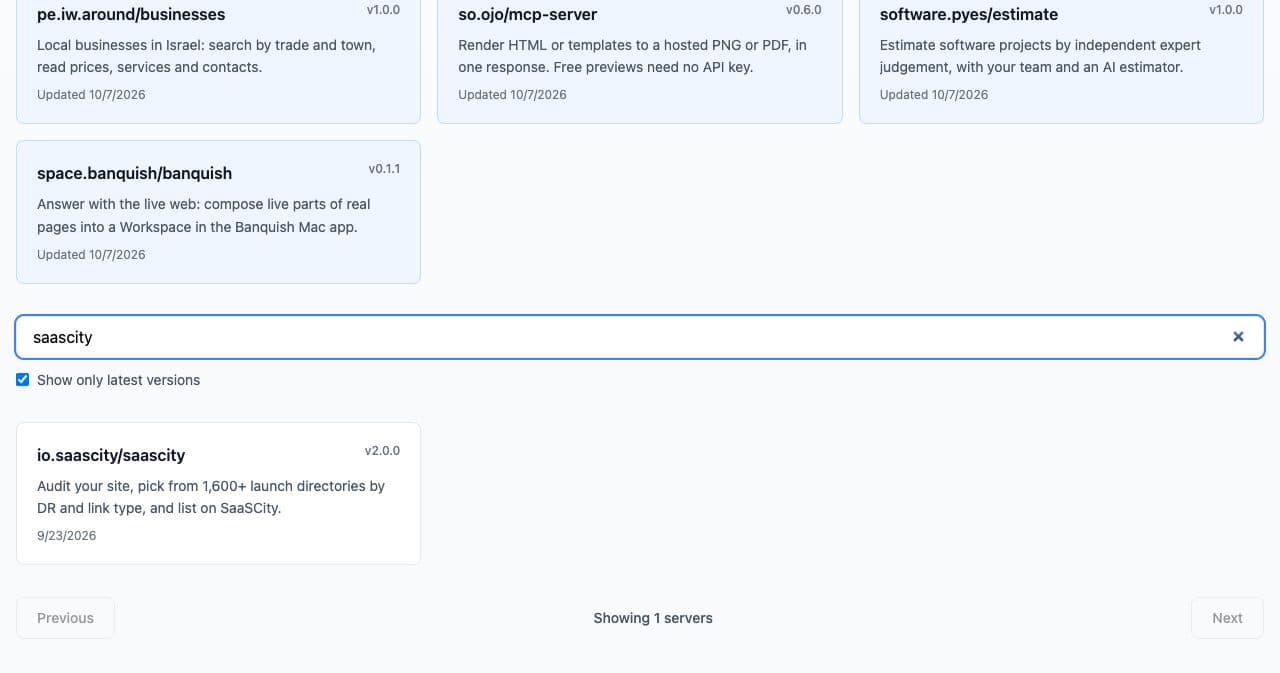
Our registry entry, October 7, 2026. 2.Glama
DR 77 · Index built from GitHub and the registry · Free · Sometimes followed
Glama crawls GitHub and grades each server on license, quality and maintenance, and remote servers also get health checks. On October 7, 2026 it listed 97,393 servers by its own count, plus 28,130 remote servers it calls connectors.
It picked ours up twice without being asked. One is an unclaimed page from the GitHub crawl, since a glama.json file does not claim a page by itself. The other is a connector page from the registry, which tested Healthy on October 6 and scored A, 4.1 out of 5, on our tool definitions.
- How to get in
- Wait for the crawl or use Add MCP Server with a GitHub URL; a remote server goes in as a connector with its HTTPS URL.
- The link
- The repo link is followed, but README links to your site carry ugc nofollow.
- Best for
- Open-source and remote servers.
- Watch out
- Only 6,700 Glama listings were marked claimed on October 7; claim yours if you want to control the copy.
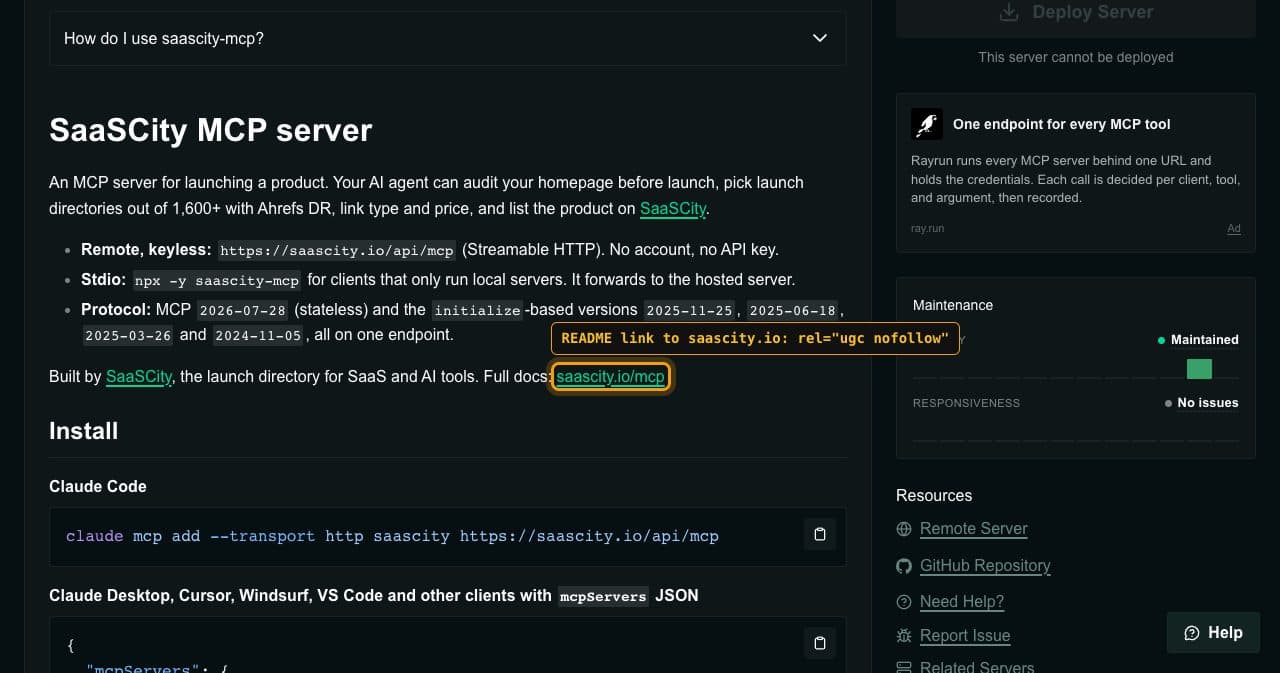
Our Glama page: README links are ugc nofollow. 3.PulseMCP
MCP server directory · Not taking submissions · Link unchecked
PulseMCP lists 21,730+ servers by its own count. It tells authors to publish to the official registry and says it will pick those servers up automatically when submissions reopen.
New servers and listing changes are paused while it reworks ingestion, its submit page said on October 7, 2026. That page was last updated September 3, 2026 and gives no reopening date.
- How to get in
- Publish to the official registry and wait. Start here
- The link
- Cloudflare blocked our link checker.
- Best for
- Servers already in the registry.
Your server fronts a product? List the product too
SaaSCity is a SaaS directory that lists AI tools and agents next to SaaS, which is a different job from the MCP catalogs above. The product behind your server can get a permanent listing page. A Basic listing ($19.99, one time) is reviewed by hand, goes live within 24 hours and carries a followed link, a building on the city map and community upvotes. Your agent can submit it through the SaaSCity MCP server at https://saascity.io/api/mcp, which creates a draft and a claim link, and nothing goes live until you open it.
Client marketplaces
Catalogs inside the apps people install from. Most are reviewed, and some queues are long.
4.Claude directory (Anthropic)
In-app directory of connectors and plugins · No fee stated; paid Claude plan · Sometimes followed
This is the catalog inside Claude where users install connectors and plugins. Its mirror on claude.com showed 914 connectors and 341 plugins on October 7, 2026. Anyone on a Pro, Max, Team or Enterprise plan can submit (on Team and Enterprise, an Owner by default), but free accounts cannot.
A connector has to be a remote HTTPS server with OAuth 2.0, or no auth for public data. Local servers need a plugin bundle, and MCPB desktop extensions are no longer accepted. Submissions are scanned and listed as Community connectors by default, and there is no fixed review time.
- How to get in
- At claude.ai/directory/manage, choose Submit new, pick MCP connector and paste your https URL. Start here
- The link
- Followed on a Verified page; we did not check a Community page, the default for new submissions.
- Best for
- Remote servers for products people use with Claude.
- Watch out
- It refuses anything that transfers money or generates AI images, video or audio.
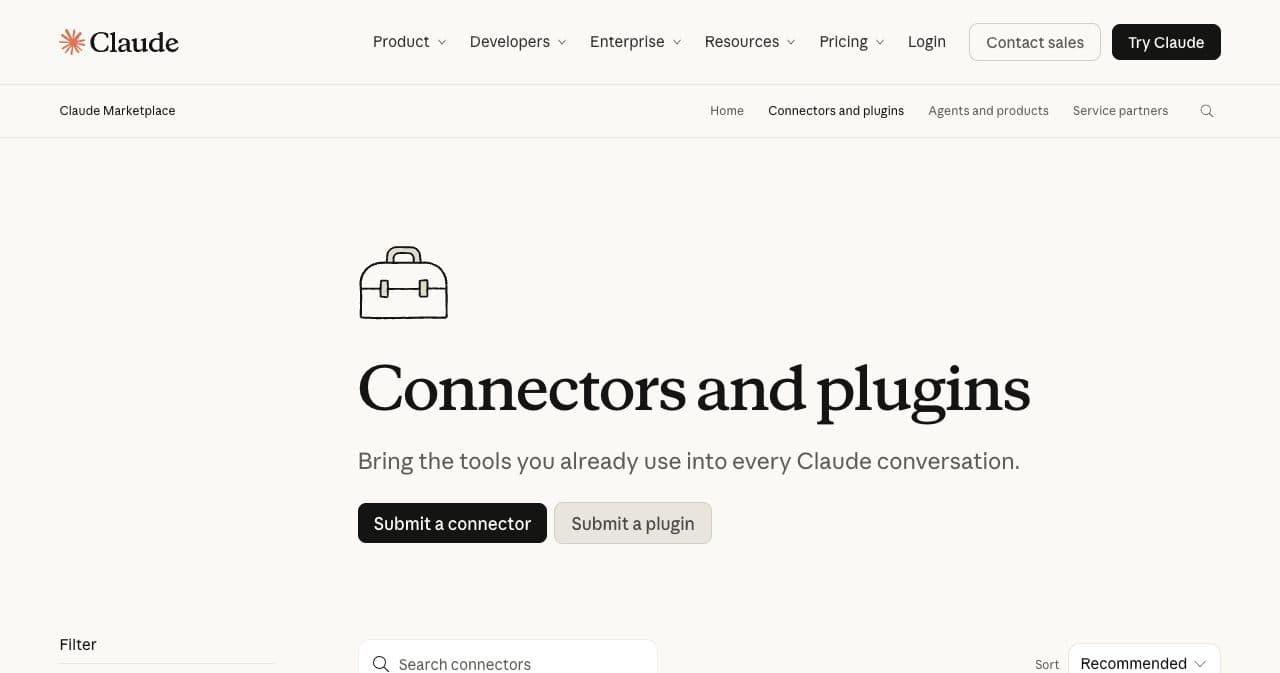
Claude's marketplace, October 7, 2026. 5.OpenAI plugin directory
In-app directory for ChatGPT and Codex · No fee in its docs · Link unchecked
OpenAI's directory serves both ChatGPT and Codex, and the Apps SDK docs now sit under Plugins. A plugin bundles skills, one MCP server or both.
To get in you need a verified identity, a domain check, five positive and three negative test cases, a video walkthrough and release notes. Plugins may sell only physical goods and must not show subscription plans or promote upgrades. Our get_offers tool returns SaaSCity's prices, so it would need rethinking first.
- How to get in
- Upload a plugin ZIP at platform.openai.com/plugins, connect the server and submit it for review. Start here
- The link
- The directory lives inside ChatGPT, which blocked our checker.
- Best for
- Remote servers with a reason to live in ChatGPT.
- Watch out
- Set readOnlyHint, destructiveHint and openWorldHint explicitly on every tool.
6.GitHub MCP Registry
DR 97 · Curated registry behind VS Code's @mcp gallery · No fee stated · Nofollow
GitHub calls this registry curated, and its docs present VS Code's @mcp gallery as the way to install from it, so a listing puts your server in that gallery. It held 375 servers on October 7, 2026, against 40,528 in the official registry.
GitHub's October 2025 guide says to publish to the official registry and then email [email protected]. Two weeks after we published, ours had not been added.
- How to get in
- Publish to the official registry, then email [email protected].
- The link
- Server pages link out with nofollow.
- Best for
- Developer tools used in VS Code.
- Watch out
- It is in public preview, and we found no published criteria for what gets in.
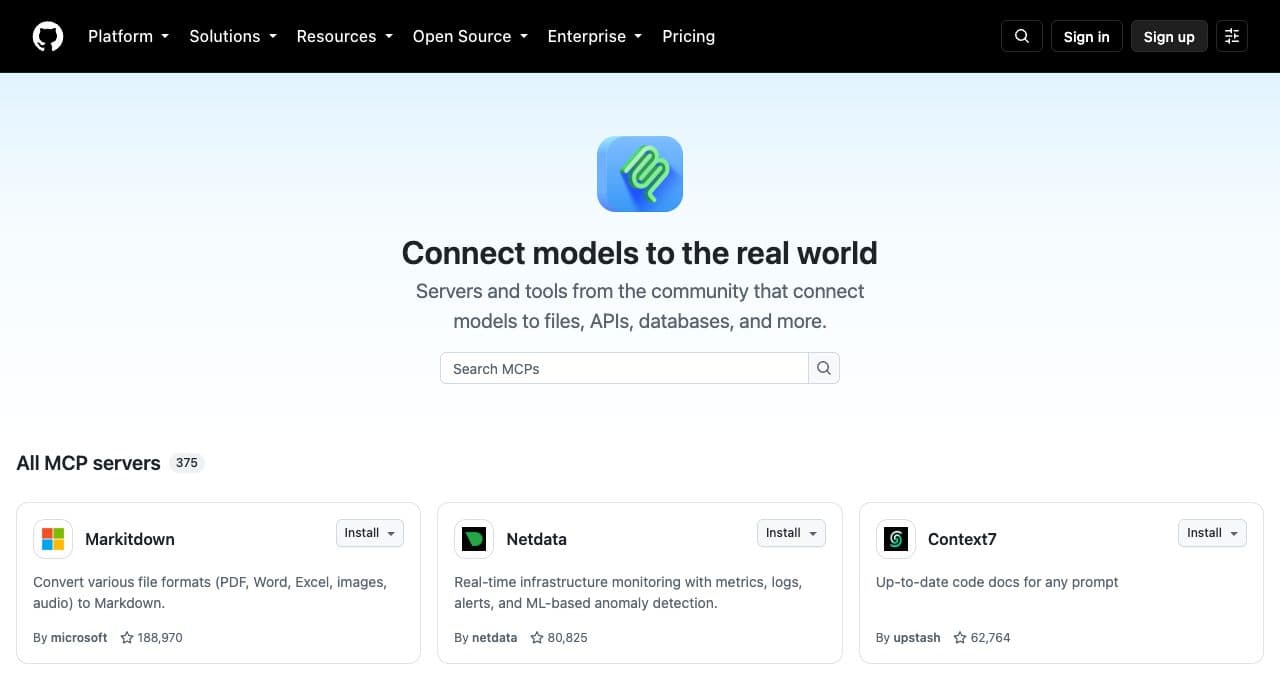
375 servers on October 7, 2026. 7.LobeHub MCP Marketplace
Marketplace inside an AI chat app · No fee stated · Dofollow
LobeHub runs an MCP marketplace inside its AI chat app, and it showed 106,056 MCP servers on October 7, 2026. It crawls repos too, but a crawled version stays marked Unvalidated until the owner publishes an update.
Publishing goes through the lhm CLI. You log in and connect GitHub in a browser, write an lhm.plugin.json with identifier, name and version, then run lhm plugin publish with the repo URL.
- How to get in
- Point your agent at lobehub.com/publish-mcp/skill.md, or run the CLI yourself. Start here
- The link
- Repo and README links had no rel attribute.
- Best for
- Servers whose README links to the product.
- Watch out
- You need push access to the repo, and a person has to finish the browser steps.
8.cursor.directory
DR 73 · Community plugin directory for Cursor · No fee stated · Dofollow
cursor.directory lists plugins that can hold rules, skills and MCP servers, and its /mcp page redirects home. Cursor's docs send people here for community servers, while Cursor's own Marketplace is curated.
You sign in with GitHub or Google and paste a repo URL. The site finds MCP servers through a .mcp.json file, and a Cursor agent scans each plugin for safety.
- How to get in
- Add a .mcp.json to the repo, sign in at cursor.directory/plugins/new and paste the repo URL. Start here
- The link
- The source link to GitHub has no rel attribute and is added by JavaScript.
- Best for
- Servers for Cursor users.
9.Cline MCP Marketplace
In-app marketplace for Cline · No fee stated · Dofollow
Cline installs marketplace servers in one click by following your README or llms-install.md. To apply, you open a GitHub issue with the repo URL, a 400x400 PNG logo and a reason.
Its FAQ says the team aims to review within a couple of days. On October 7, 2026, though, the repo had 2,533 open issues, with 377 opened and 38 closed in the past 30 days. Our repo has the logo and llms-install.md, but no SaaSCity issue has been filed.
- How to get in
- Open a submission issue in cline/mcp-marketplace. Start here
- The link
- Its public page links each repo on GitHub, and those links are followed.
- Best for
- Servers an agent can install from the README.
10.Docker MCP Catalog
Catalog in Docker Hub and Docker Desktop · No fee stated · Sometimes followed
An approved entry goes live within 24 hours on hub.docker.com/mcp and in Docker Desktop's MCP Toolkit. Local servers need a Dockerfile, and remote ones need a server.yaml, an empty tools.json and a readme.md. Docker's guide calls MIT or Apache 2 great and says GPL is not.
Approval is slow: our PR #5214 has had no review since September 23, and on October 7, 2026 the repo had 1,587 open pull requests. Its last ten merges, back to July 8, only updated existing entries.
- How to get in
- Fork docker/mcp-registry, run task wizard or task remote-wizard and open a pull request. Start here
- The link
- The Repository button is followed, but links in the description are nofollow.
- Best for
- Containerized servers.
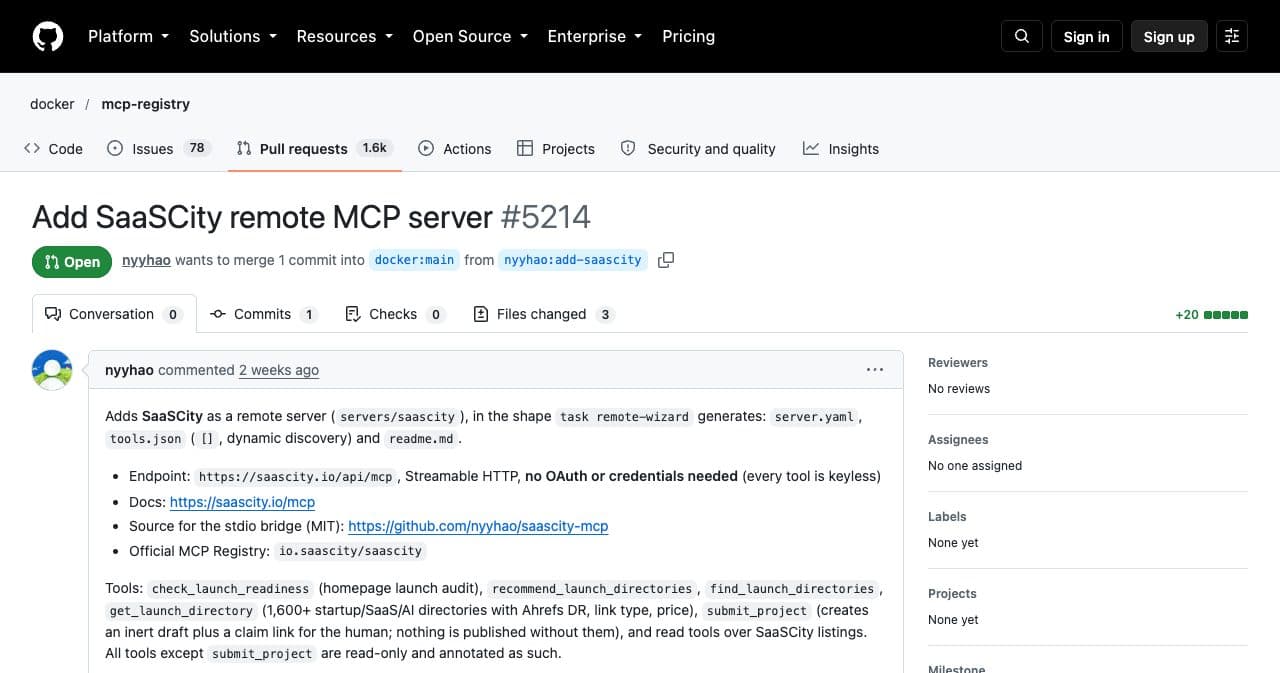
Our Docker pull request, October 7, 2026.
MCP server directories you submit to
Web forms. Smithery is free; mcp.so and mcpservers.org sell speed and a dofollow link.
11.Smithery
Registry and hosted MCP gateway · Free to list · Dofollow
Smithery pairs a registry with a hosted gateway that handles OAuth and sessions for agents, and its pricing FAQ says listing is completely free. Its API reported 18,942 servers on October 7, 2026.
Arcade.dev announced on August 5, 2026 that it had acquired Smithery. You publish a public URL and Smithery scans it; if it cannot, you serve a static card at /.well-known/mcp/server-card.json instead.
- How to get in
- Enter a Streamable HTTP URL at smithery.ai/new, or upload an MCPB bundle for a local server. Start here
- The link
- Homepage links carried only noopener noreferrer.
- Best for
- Remote servers that want a free, followed link.
- Watch out
- If your bot protection blocks SmitheryBot, the scan fails.
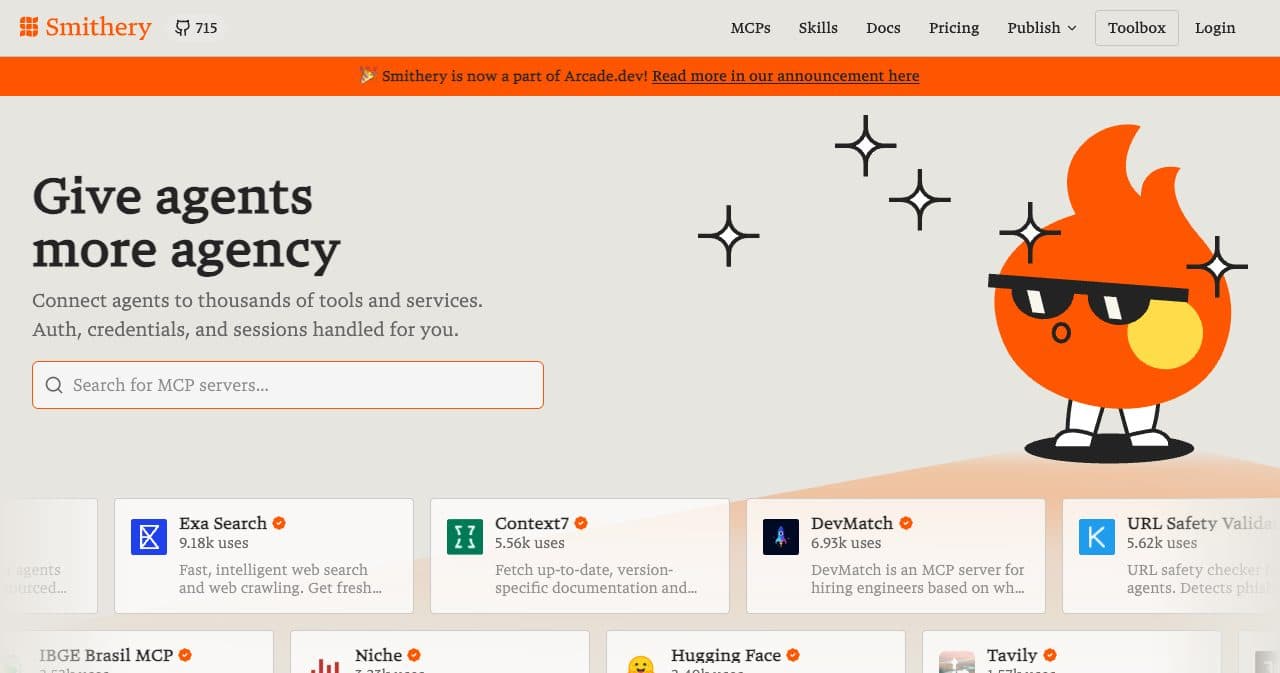
Smithery after the Arcade.dev deal. 12.mcp.so
DR 74 · Community MCP directory · $39 one-time · Sometimes followed
mcp.so is a large community directory. Its submit page claims 2.2 million unique visitors over 12 months.
When you are signed out, the form shows one route: $39 one-time to publish without review. That fee also gets you a verified badge, featured placement and a dofollow link.
- How to get in
- Open mcp.so/submit, paste the repo URL and pay. Start here
- The link
- Free listings carry nofollow ugc, while a Verified and Featured one was followed.
- Best for
- A listing today with a followed link.
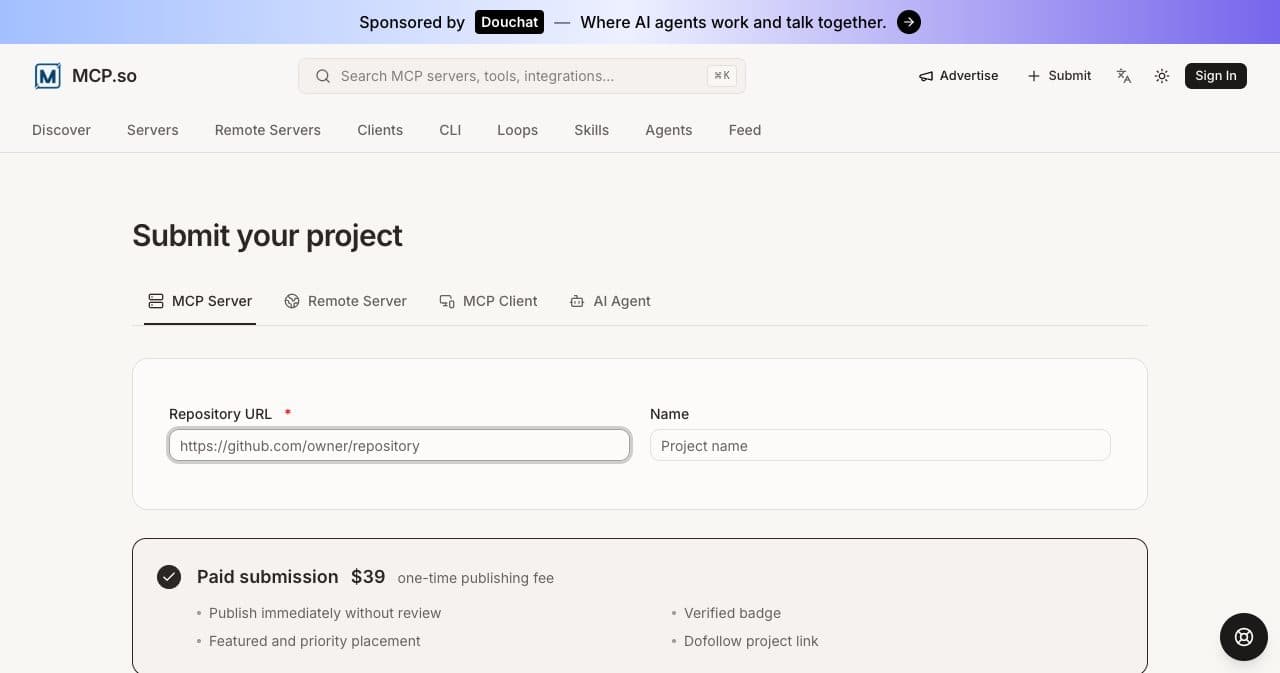
One paid route, October 7, 2026. 13.MCP Market
DR 61 · MCP server and agent skills directory · Free, or $29 one-time · No link
MCP Market lists MCP servers and agent skills, and claims 1M+ monthly visitors and 35K+ servers. A free listing has no link to your site and waits in a queue that averages 4 to 6 weeks. For $29 one-time it lists you within 24 hours, with an Official badge and a Try Now link.
It already lists us, on an unclaimed page built from our repo. The AI-written summary there counts 0 GitHub stars as a main feature, and the NPM button opens a 404.
- How to get in
- Submit a repo or remote URL at mcpmarket.com/submit, or claim an existing page. Start here
- The link
- Free pages link only GitHub and npm; paying $29 adds a Try Now link we could not check.
- Best for
- A free extra listing.
- Watch out
- Check the copy it generates from your README.
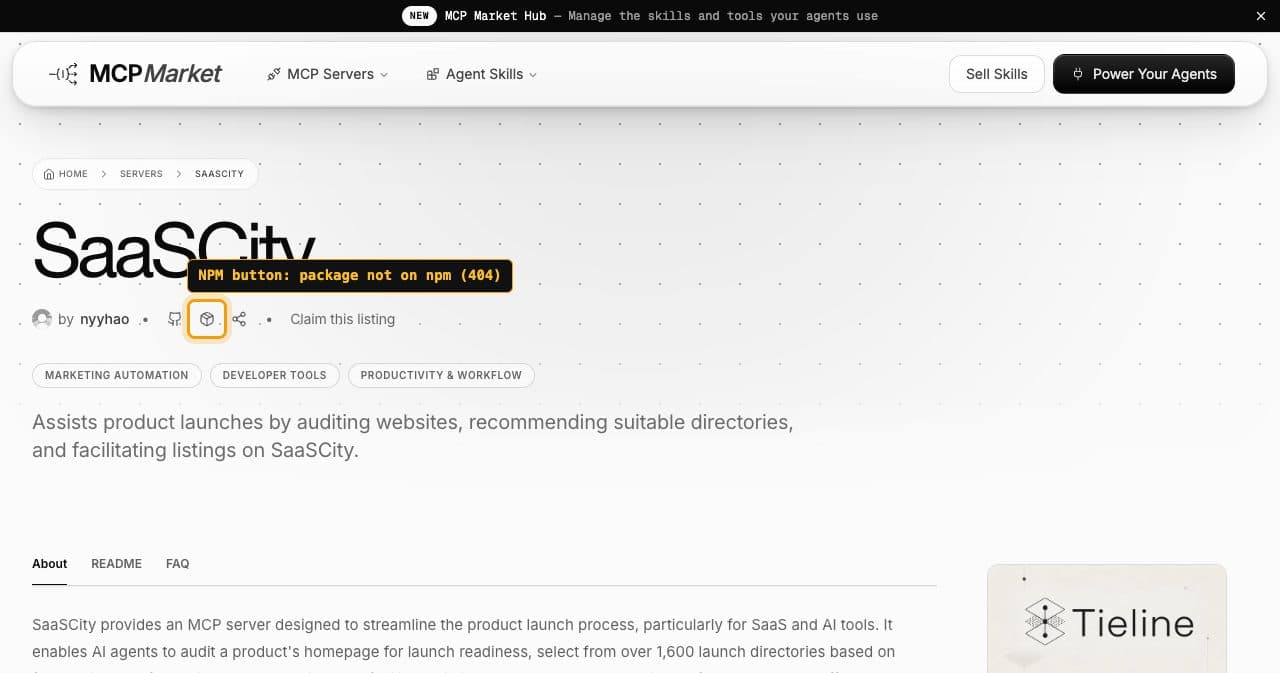
Our MCP Market page: the NPM button leads to a 404. 14.mcpservers.org
Site of the wong2 awesome list · Free, or $39 one-time · Nofollow
mcpservers.org is the site behind wong2/awesome-mcp-servers, a GitHub list that takes no pull requests. Free listings are reviewed within 2 weeks.
Premium costs $39 one-time and buys review within 24 hours, an Official badge, search priority and a dofollow link the site calls DR 71. We found no Premium listing to confirm that link.
- How to get in
- Fill in the form at mcpservers.org/submit. Start here
- The link
- Free listings are nofollow, and Premium promises a dofollow link we could not confirm.
- Best for
- A free listing with a stated review time.
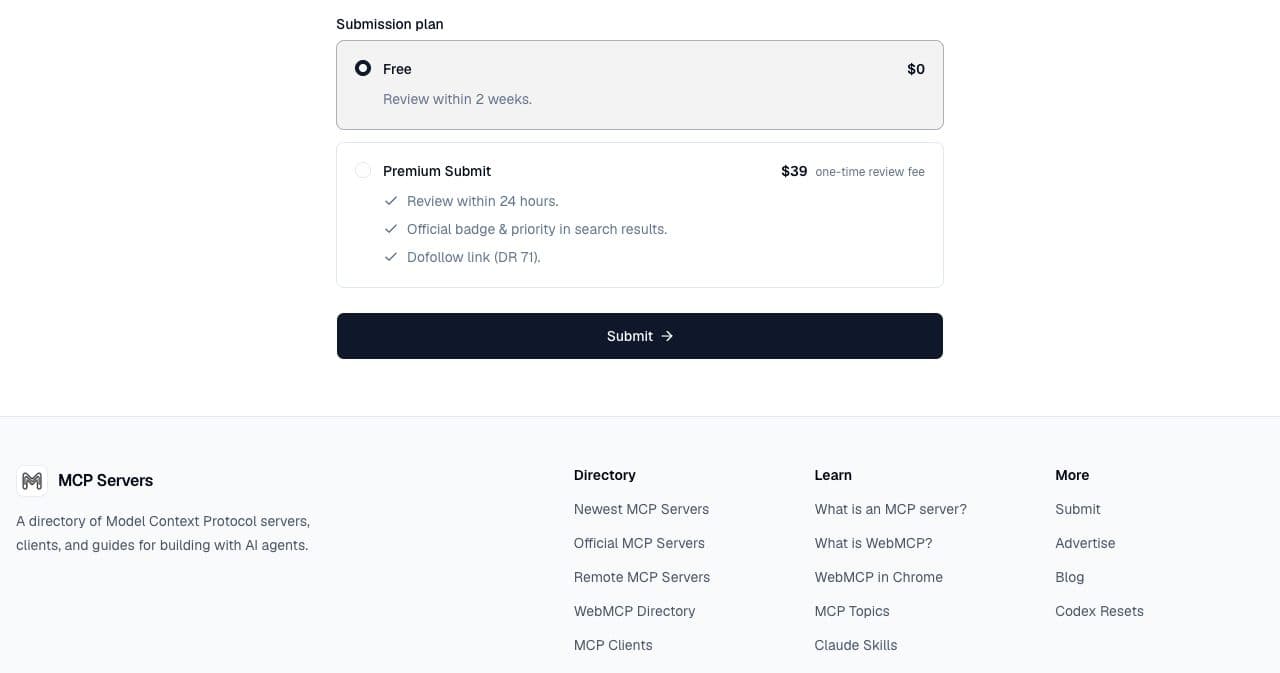
Free and Premium, October 7, 2026.
Lists on GitHub
Pull requests into an awesome list README: nofollow links, but 95,902 stars on the main list. Our open-source promotion guide covers the other lists.
15.punkpeye/awesome-mcp-servers
Curated list on GitHub · Free · Nofollow
This is the best-known MCP list on GitHub, with 95,902 stars on October 7, 2026. It takes servers with a public repo that you install and run yourself.
A workflow checks every pull request. The server must pass Glama's checks, and the entry needs a Glama score badge, an owner/repo name, an allowed language emoji and a GitHub link. Agents get a fast lane if they end the PR title with three robot emoji.
- How to get in
- Get listed on Glama first, then add one line with the badge under the right category.
- The link
- GitHub marks README links nofollow.
- Best for
- Open-source local servers.
16.punkpeye/awesome-remote-mcp-servers
Curated list of remote servers on GitHub · Free · Nofollow
The remote-server companion to punkpeye/awesome-mcp-servers had 871 stars on October 7, 2026. Each entry links your homepage or docs and shows the endpoint and auth type.
CI checks that the endpoint answers an MCP initialize handshake and that a Glama connector badge resolves. Pull requests are not merged unless the person who opened them has starred the repo. Our keyless server fits, but we have not opened a pull request.
- How to get in
- Star the repo, then add your endpoint, the badge and a description of up to 120 characters.
- The link
- Nofollow, but it goes to your homepage instead of a repo.
- Best for
- Hosted servers anyone can sign up for.
What we did with our own server
Our MCP server audits a homepage, picks launch directories from our dataset and can submit a product to SaaSCity as a draft. It runs keyless at https://saascity.io/api/mcp over Streamable HTTP, with a stdio bridge in the MIT-licensed repo nyyhao/saascity-mcp. On September 23, 2026 we published it to the official registry as io.saascity/saascity.
A name on our own domain needs a domain check, so we host a one-line file at /.well-known/mcp-registry-auth: v=MCPv1; k=ed25519; p= plus the public key. Our first description was 102 characters, over the cap of 100. What showed up where on October 7:
- Official registry: listed, one streamable-http remote and no package. Our server.json names an npm package, saascity-mcp, that npm answers with a 404.
- Glama: an unclaimed page from the GitHub crawl and a connector page imported from the registry.
- MCP Market: an unclaimed page built from our repo, with an NPM button that leads to the same 404.
- Docker: our pull request has no review after 14 days.
- Not listed: GitHub's registry, Smithery, PulseMCP, mcp.so, mcpservers.org, LobeHub, cursor.directory, Cline, both awesome lists and Claude's directory. OpenAI's directory cannot be searched from outside ChatGPT.
The lesson
Crawlers copy your files as they are. Our unpublished npm line now sits on two sites, so fix the README and server.json before you submit anywhere.
Publish to the official registry in 6 steps
These steps follow the registry's quickstart and authentication docs as of October 2026. Check server.json twice: a published version cannot be deleted.
Choose a namespace
A GitHub login means every name starts with io.github.<your-username>/ or your org. A name on your domain, such as com.example/weather, needs a DNS TXT record or an HTTP file.
Publish the package first
The registry checks ownership: mcpName in package.json for npm, an mcp-name: line in the README for PyPI or NuGet, an io.modelcontextprotocol.server.name label on Docker images. Remote-only servers skip this.
Install mcp-publisher
Run brew install mcp-publisher, or download a binary from the modelcontextprotocol/registry releases on GitHub.
Write server.json
mcp-publisher init writes a template. The required fields are name, description and version; the description stops at 100 characters and each publish needs a new version string. Add remotes, packages or both.
Log in
mcp-publisher login github runs a device-code flow. For a domain, generate an Ed25519 key pair with openssl, host v=MCPv1; k=ed25519; p=<public key> at /.well-known/mcp-registry-auth, then run mcp-publisher login http --domain <domain> --private-key <key>.
Publish and check
Run mcp-publisher publish, then open https://registry.modelcontextprotocol.io/v0.1/servers?search=<your name>. In CI, the docs use mcp-publisher login github-oidc in a GitHub Action.
Minimal server.json for a remote server
{
  "$schema": "https://static.modelcontextprotocol.io/schemas/2025-12-11/server.schema.json",
  "name": "com.example/weather",
  "description": "Forecasts and severe weather alerts for any city.",
  "version": "1.0.0",
  "remotes": [
    {
      "type": "streamable-http",
      "url": "https://mcp.example.com/mcp"
    }
  ]
}
Get the listing to convert
Most of these sites copy your README, server.json and tool list. That copy is what an agent builder reads before installing.
- Open the README with one line on what the server does, the remote URL and installs to paste: claude mcp add --transport http <name> <url> for Claude Code and an mcpServers JSON block for Cursor, Claude Desktop and VS Code.
- Mention only packages that exist.
- Write tool descriptions for a reviewer. Glama gave ours 4 of 5 on disambiguation because three directory tools read alike. Anthropic wants a title and a read or destructive hint per tool; OpenAI wants all three hints as explicit booleans, and our 12 read-only tools leave out destructiveHint.
- Ship a square logo: Cline asks for a 400x400 PNG, and server.json takes an icons array.
- Use a permissive license. Docker's guide calls MIT or Apache 2 great and GPL not.
- Add llms-install.md when setup takes more than a URL; Cline installs from it.
- Claim what was listed for you on Glama, MCP Market and LobeHub, or the auto-written copy stays.
What these listings are worth for SEO
The domains are strong, from DR 61 for mcpmarket.com to DR 97 for github.com on Ahrefs on October 7, 2026, but most links to you carry nofollow or ugc, or point at your GitHub repo instead of your site.
Followed links to your own site turned up on Smithery, in LobeHub's rendered READMEs and on the Verified Canva page of Claude's marketplace; mcp.so and mcpservers.org sell one for $39, and AI tool catalogs such as There's An AI For That take MCP servers from $49 with a followed link, and DevHunt lists them in its weekly launches, followed on paid launches. The return is discovery: people find servers inside Claude, ChatGPT, VS Code, Cursor and Cline. Put the effort into the README and tool descriptions, and get backlinks for the product from directories built for that. Our dofollow vs nofollow guide shows how to check a listing yourself.
FAQ
- How do I submit my MCP server to the official registry?
- Install mcp-publisher, run mcp-publisher init, log in and run mcp-publisher publish. A GitHub login gives you io.github.<your-username>/ names; your own domain needs a DNS TXT record or a file at /.well-known/mcp-registry-auth. As of October 2026 publishing is free and the registry is in preview.
- Is Smithery free?
- For server authors, yes. As of October 2026 its pricing FAQ says listing is completely free; RPC calls are billed to whoever uses the servers, with 50K a month free on the Hobby plan.
- Do I need a remote server for the Claude directory?
- For an MCP connector, yes. As of October 2026 Anthropic asks for an https URL with OAuth 2.0, or no auth for public data. Local servers only get in inside a plugin bundle, and you need a paid Claude plan to submit.
- How do I get my MCP server into ChatGPT?
- Package it as a plugin and submit it at platform.openai.com/plugins. As of October 2026 OpenAI requires a verified identity, a domain check, eight test cases and a video walkthrough. For your own use, add the server as a custom connection instead.
- What are Smithery alternatives?
- Glama is closest: it lists remote servers as connectors, health-checks them and offers hosting and a gateway. mcp.so, MCP Market and mcpservers.org take a repo or URL, and LobeHub publishes from your repo. Publish to the official registry either way.
- How do I get into the VS Code MCP gallery?
- The @mcp gallery installs from GitHub's MCP Registry, which held 375 servers on October 7, 2026. GitHub's October 2025 guide says to publish to the official registry, then email [email protected]. Publishing alone did not get ours in.
- Do MCP directories give dofollow backlinks?
- Mostly no. On listings checked October 7, 2026, Glama, GitHub and free listings on mcp.so and mcpservers.org used nofollow or ugc, and several sites link only your repo. Smithery and LobeHub links were followed; mcp.so and mcpservers.org sell one for $39.
How we checked
Every fact on this page was read on the site it describes. Last checked on . Prices and rules change, so check the site before you pay.
- Official MCP Registry
- MCP Registry: about
- MCP Registry: quickstart
- MCP Registry: authentication
- MCP Registry: package types
- MCP Registry: remote servers
- MCP Registry: FAQ
- MCP Registry: versioning
- MCP Registry: moderation policy
- MCP Registry: aggregators
- MCP Registry: GitHub Actions
- MCP Registry API: server list
Show all 57 sources
- server.json schema 2025-12-11
- GitHub MCP Registry
- GitHub blog: the GitHub MCP Registry how-to
- GitHub Docs: extend Copilot Chat with MCP
- VS Code docs: MCP servers
- Glama MCP servers
- Glama MCP connectors
- Glama MCP FAQ
- Glama blog: what is glama.json
- Glama listing: saascity-mcp
- Glama connector: io.saascity/saascity
- Claude docs: publish to the directory
- Claude docs: submit a connector
- Claude docs: connector pre-submission checklist
- Claude docs: connector verification
- Claude Marketplace: connectors and plugins
- Claude Marketplace: Canva connector
- OpenAI: upload and submit your plugin
- OpenAI: plugin guidelines
- OpenAI: remote MCP server review requirements
- Smithery docs: publish
- Smithery pricing
- Arcade.dev: Smithery is now part of Arcade.dev
- PulseMCP submit page
- mcp.so submit page
- MCP Market submit page
- MCP Market listing: SaaSCity
- mcpservers.org submit page
- wong2/awesome-mcp-servers
- punkpeye/awesome-mcp-servers contributing guide
- punkpeye/awesome-mcp-servers Glama check workflow
- punkpeye/awesome-remote-mcp-servers contributing guide
- LobeHub MCP marketplace
- LobeHub: publish MCP skill
- cursor/community-plugins
- Cursor docs: plugins
- Cursor: marketplace security
- Cline MCP marketplace repo
- Cline MCP marketplace page
- Docker MCP registry repo
- Docker MCP registry contributing guide
- Docker MCP Catalog
- Our Docker pull request #5214
- SaaSCity MCP server repo
- npm: saascity-mcp (404)
List your product on SaaSCity
Free with the SaaSCity badge on your site, or $19.99 to go live within 24 hours.