Reviews
DPS Airem Review 2026: Cloud Security Guard and Field Workforce Management
DPS Airem (dpsairem.com) is a cloud workforce and security guard management platform pairing a manager web dashboard, guard and client portals, mobile apps, GPS geofencing, SOS alerts, and modular add-ons from $5 per user a month with a 30-day risk-free trial.

Contents (15)
- DPS Airem in short
- Who is behind DPS Airem and what problem it solves
- Inside the Back-Office Dashboard: command center for managers
- Guard Mobile App and Guard Web Portal: daily life on patrol
- SOS panic alerts, dispatch, and field safety
- Client Web Portal and Client Mobile App: turning transparency into retention
- Timesheets, payroll exports, estimates, and invoicing
- Industries and deployment environments
- Data security, privacy, and role isolation
- DPS Airem pricing, plans, and add-on cost math
- How DPS Airem compares with TrackTik, Silvertrac, GuardsPro, and Belfry
- Who DPS Airem fits best (and what to check before rolling out)
- How to test DPS Airem during your 30-day trial
- DPS Airem review verdict
- Frequently asked questions
Disclosure: this is a sponsored review. The evaluation and opinions are ours.
Product details and prices were checked against dpsairem.com on November 26, 2026.
Running a private security company or a multi-site field crew looks calm on a proposal deck and chaotic at 2:15 a.m. A guard texts a supervisor that relief never arrived. A property manager calls at breakfast asking whether anyone checked the south loading dock overnight, and the only evidence is a crumpled clipboard log still sitting in a patrol car. Friday afternoon turns into four hours of comparing handwritten timesheets against client billing totals before payroll closes.
DPS Airem (dpsairem.com) is built to pull those scattered pieces into one cloud workspace. Designed around physical security operations and distributed field teams, the platform pairs a browser-based Back-Office Dashboard for managers with dedicated web and mobile portals for guards, supervisors, and clients. Attendance runs through GPS and geofenced time clocks, daily field work lives in structured Daily Activity Reports (DARs) and QR/NFC site tours, emergencies run through a one-tap SOS alert system, and approved hours carry forward into payroll exports and client invoicing.
This review walks through how DPS Airem splits responsibilities across its five interfaces, what stands out in its field reporting and offline sync design, how the base plans ($5 to $10 per user a month) combine with its seven modular add-ons, what real monthly costs look like for teams of 5, 15, and 40 users, and how DPS Airem stacks up against TrackTik, Silvertrac, GuardsPro, and Belfry.
DPS Airem in short
DPS Airem (dpsairem.com) is a cloud-based security guard and field workforce management platform operated by DPS Airem LLC / DPS Armored LLC, with offices listed in Seattle, Washington and a privacy and compliance address in Denver, Colorado. It replaces paper timesheets, group-chat shift changes, and manual client emails with five connected interfaces: a Back-Office Dashboard for managers, a Guard Web Portal and Guard Mobile App for officers and supervisors, and a Client Web Portal and Client Mobile App for site stakeholders. Base subscriptions start at $5 per user per month (Essential), $8 per user per month (Advanced), and $10 per user per month (Professional) with a 3-user minimum and annual discounts down to $4.25, $6.80, and $8.50. Seven optional add-on modules (Scheduler at $5 per user, plus Payroll, Dispatcher, Vehicle Patrol, Visitor Manager, Invoicer, and Parking Manager at $1 per user each) let companies turn features on as operations expand, backed by a 30-day risk-free trial.
| Quick facts | Details (checked November 26, 2026) |
|---|---|
| Product and domain | DPS Airem (dpsairem.com) |
| Operator and contact | DPS Airem LLC / DPS Armored LLC; Seattle office (9030 35th Ave SW, Ste 100, Seattle, WA 98126), [email protected], (+1) 206 696 2281 |
| Platform interfaces | Back-Office Dashboard (web), Guard Web Portal, Guard Mobile App, Client Web Portal, Client Mobile App |
| Core attendance and tracking | GPS live tracking, GPS tracking history, geofenced clock-in/out (GPS, Wi-Fi, cell triangulation), QR/NFC/virtual checkpoints |
| Field reporting and safety | Up to 25+ report types (DARs, incident reports, custom templates), photo/audio/video media, autosave drafts, offline local caching, one-tap SOS alerts |
| Payroll and billing | Automated time cards, break tracking, overtime multipliers, exports to QuickBooks, Gusto, ADP Workforce, and Paychex; estimates and multi-currency invoicing |
| Security and access controls | 256-bit SSL/TLS, encryption at rest, multi-org and role-based data siloing, 2-step authentication, login audit logs, Face ID/Touch ID and Android Biometric Prompt |
| Base monthly pricing | Essential $5/user/mo, Advanced $8/user/mo, Professional $10/user/mo (starts at 3 users) |
| Base annual pricing | Essential $4.25/user/mo, Advanced $6.80/user/mo, Professional $8.50/user/mo (starts at 3 users) |
| Add-on modules | Scheduler ($5/user/mo); Payroll, Dispatcher, Vehicle Patrol, Visitor Manager, Invoicer, Parking Manager ($1/user/mo each) |
| Trial and support | 30-day risk-free trial; 24/7 multi-language support, live chat, built-in support tickets, support center guides |
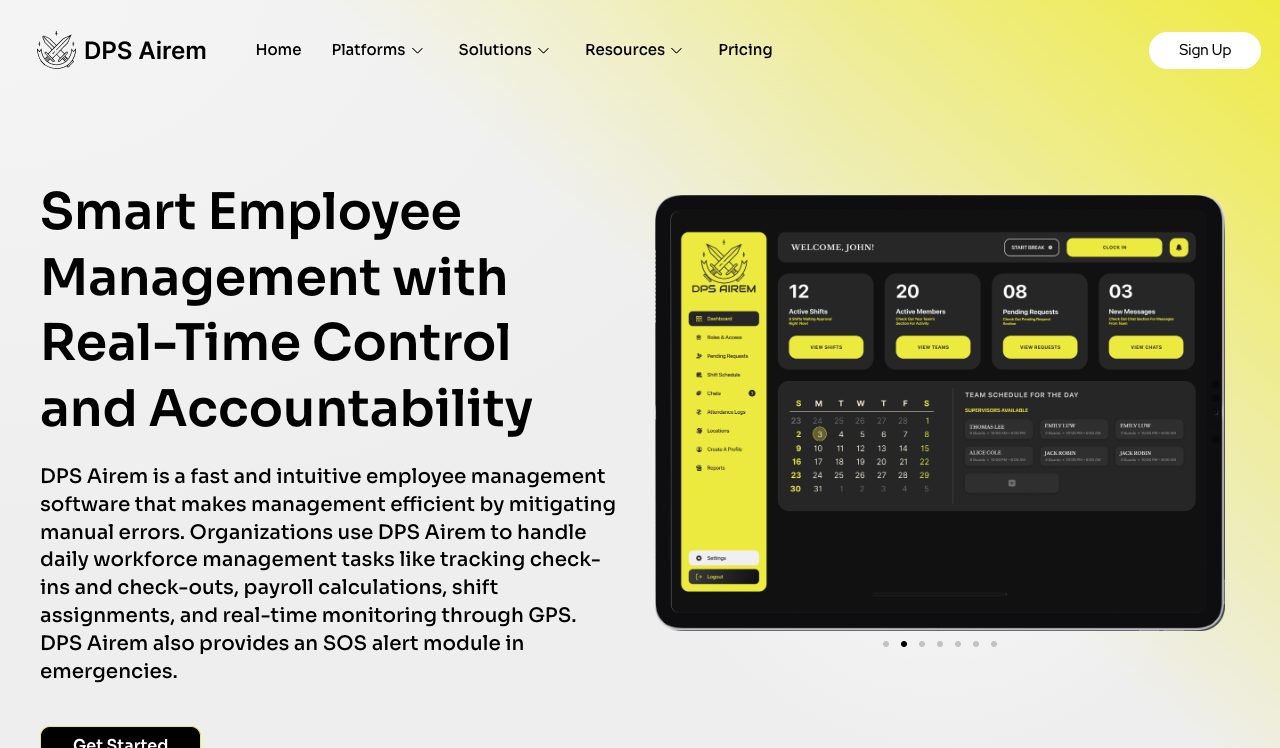
DPS Airem's homepage frames the platform around real-time shift visibility, verified attendance, payroll accuracy, and SOS response, paired with a preview of the manager dashboard. Captured on dpsairem.com, November 26, 2026.
Who is behind DPS Airem and what problem it solves
A lot of workforce software starts as a generic desk-worker time tracker and bolts on a "security" landing page later. DPS Airem comes from the other direction. Its Google Play publisher record lists DPS ARMORED LLC, tied to active physical security and armored asset-transport operations in the Seattle area, with its main support office at 9030 35th Ave SW in Seattle and a privacy and compliance office in Denver.
That physical-security lineage shows up in what the software prioritizes. Desk-oriented HR tools rarely worry about a lone officer patrolling a concrete basement parking garage with zero cellular bars, or a client asking for timestamped proof that four exterior doors were physically checked between 11:00 p.m. and 3:00 a.m. DPS Airem builds its workflow directly around those operational realities.
On its site, the team groups the daily headaches of managing distributed crews into three failure points:
- Unverified attendance and time leaks. Paper sign-in sheets and phone call-ins invite buddy punching, rounded start times, and time-card disputes that erode contract margins.
- Multi-site blind spots. Once a company grows past two or three properties, an operations manager cannot tell from text messages alone who is on post, who went idle, or which shift still sits uncovered.
- Fragmented communication and slow incident handoffs. When incident photos live in personal WhatsApp threads and shift passdowns live in sticky notes at a guard shack, critical details vanish at shift change and never reach the client cleanly.
DPS Airem addresses those three bottlenecks by splitting the platform into five role-specific surfaces that all write to the same cloud database: a Back-Office Dashboard for managers and dispatchers, a Guard Mobile App for roaming patrols and supervisors, a Guard Web Portal for stationary desk posts, a Client Web Portal for property managers and corporate security directors, and a Client Mobile App for clients who check site activity from their phones.
Inside the Back-Office Dashboard: command center for managers
Everything in DPS Airem orbits the browser-based DPS Airem Back-Office Dashboard. The web console keeps scheduling, GPS maps, reporting, and billing under one login across thirteen workspaces: Overview, Reporting, GPS Tracker, Time Clock, Messenger, Analytics, Parking Manager, Vehicle Patrol, Dispatcher, Payroll, Scheduler, Visitor Manager, and Invoicer.
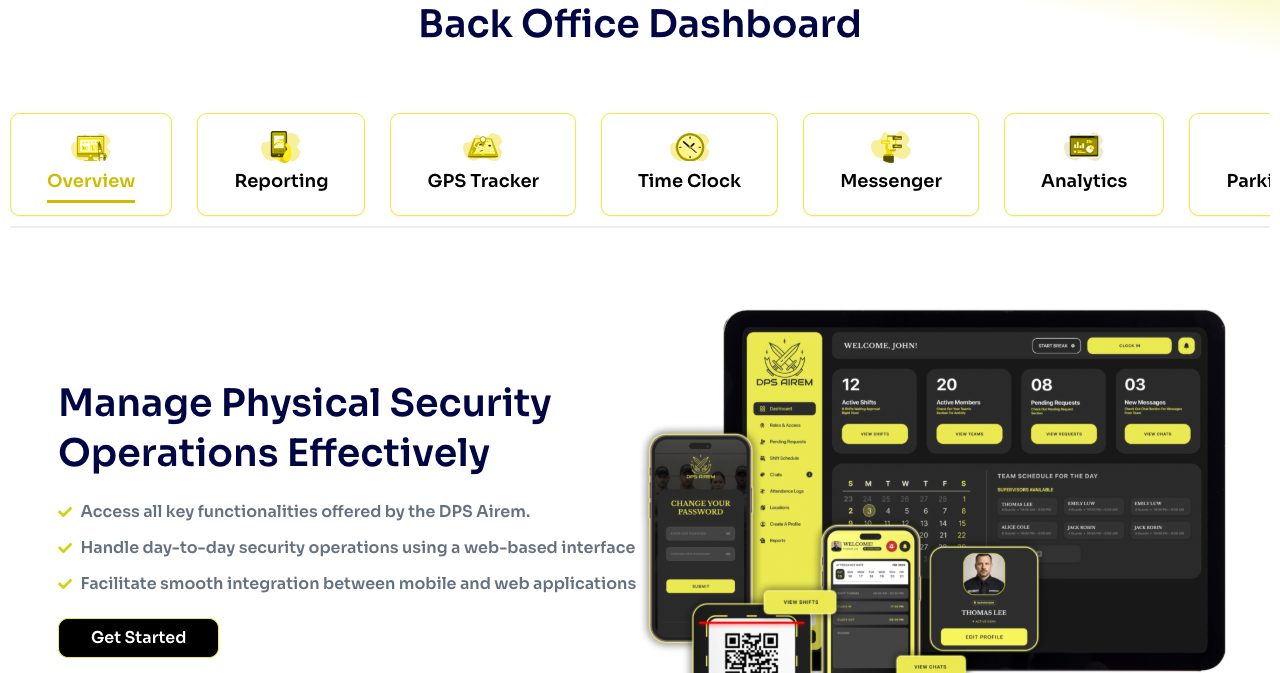
The Back-Office Dashboard organizes daily oversight into tabbed modules that sync directly with the guard and client apps. Captured on dpsairem.com/back-office-dashboard, November 26, 2026.
Opening the dashboard gives managers an immediate pulse across every active location: active shift counts, active team members, pending leave or shift-exchange requests, unread messages, and the daily team schedule mapped against available supervisors. From there, managers configure the operational backbone that keeps field teams consistent across sites:
- Client and post site profiles. Every site stores its own address, geofence perimeter, assigned department, required skill sets, custom profile fields (on Professional), cloud files, and written post orders. When a fill-in guard picks up an unfamiliar post at short notice, the exact site rules wait inside their phone.
- Granular role-based access and data siloing. Security firms rarely want a field supervisor viewing company payroll numbers, or a finance administrator accidentally altering patrol routes. DPS Airem's multi-organization and role-based architecture lets admins define custom user access levels across Super Admins, Managers, Supervisors, Reporting Leads, Finance Leads, and Guards so each person sees only their slice of the operation.
- License tracking and credential alerts. Guard cards, firearm permits, CPR certificates, and state security licenses expire on staggered dates, and putting an expired license on a regulated post creates immediate legal exposure. Both back-office admins and guards can upload license documents directly into profiles and receive advance expiry notifications before a renewal window closes.
- Live operational notifications and accountability alerts. The dashboard pushes live alerts when guards confirm shifts, check in or out, claim open shifts, breach a geofence, go idle past a threshold, or drop to low phone battery. Email notifications include deep linking so clicking an alert drops a manager straight onto the relevant incident or shift screen.
- Analytics, internal comments, and bulk data tools. Built-in graphical analytics visualize incident patterns and scheduling coverage so managers spot repeat problem hours early. Back-office teammates can leave threaded comments and tag each other on records, bulk import or export profile data when onboarding a large contract, switch to dark mode for overnight command centers, and audit detailed login history (username, timestamp, and browser) alongside mandatory 2-step authentication.
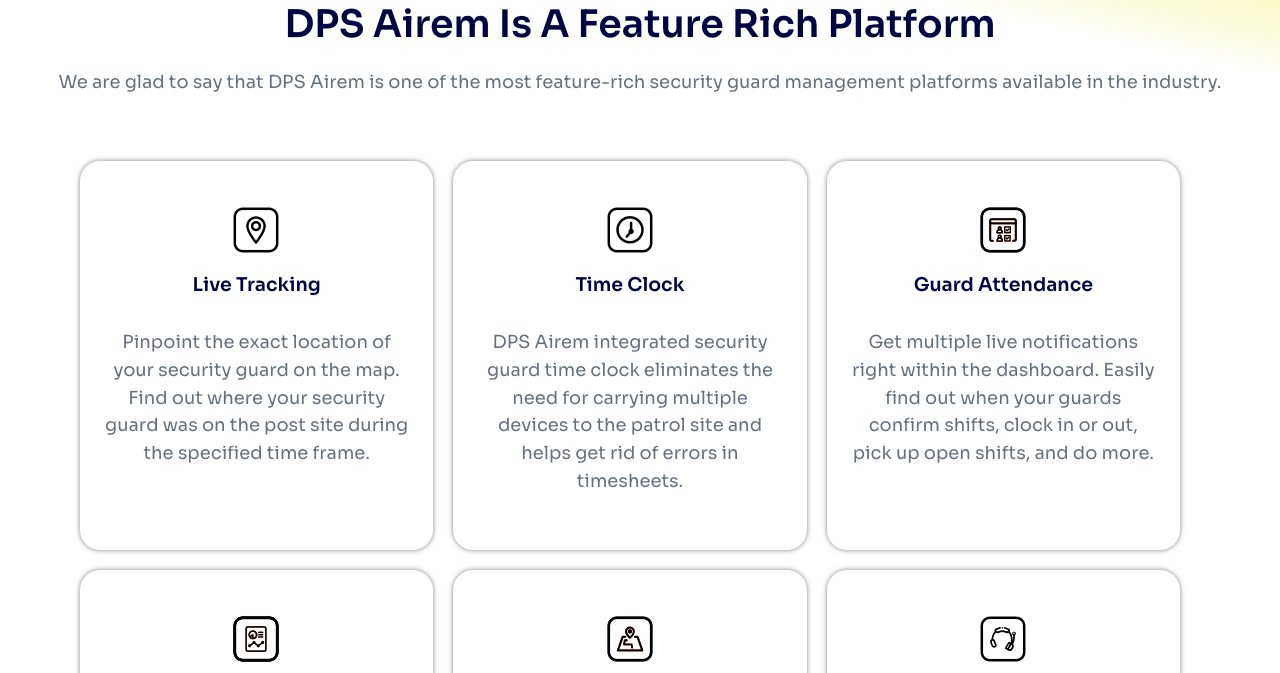
Core back-office capabilities pair real-time GPS visibility with integrated time-clock tracking and live attendance notifications. Captured on dpsairem.com/features, November 26, 2026.
Guard Mobile App and Guard Web Portal: daily life on patrol
Software for security guards lives or dies on field adoption. If an app feels sluggish, drains batteries, or forces officers through seven menus just to log a broken gate lock in the rain, guards revert to texting photos to a supervisor within a week. The DPS Airem Guard Mobile App is designed as a single-device mobile workspace for both field guards and roving supervisors, backed by a browser-based Guard Web Portal for concierge desks, gatehouses, and control rooms that run on desktop computers.
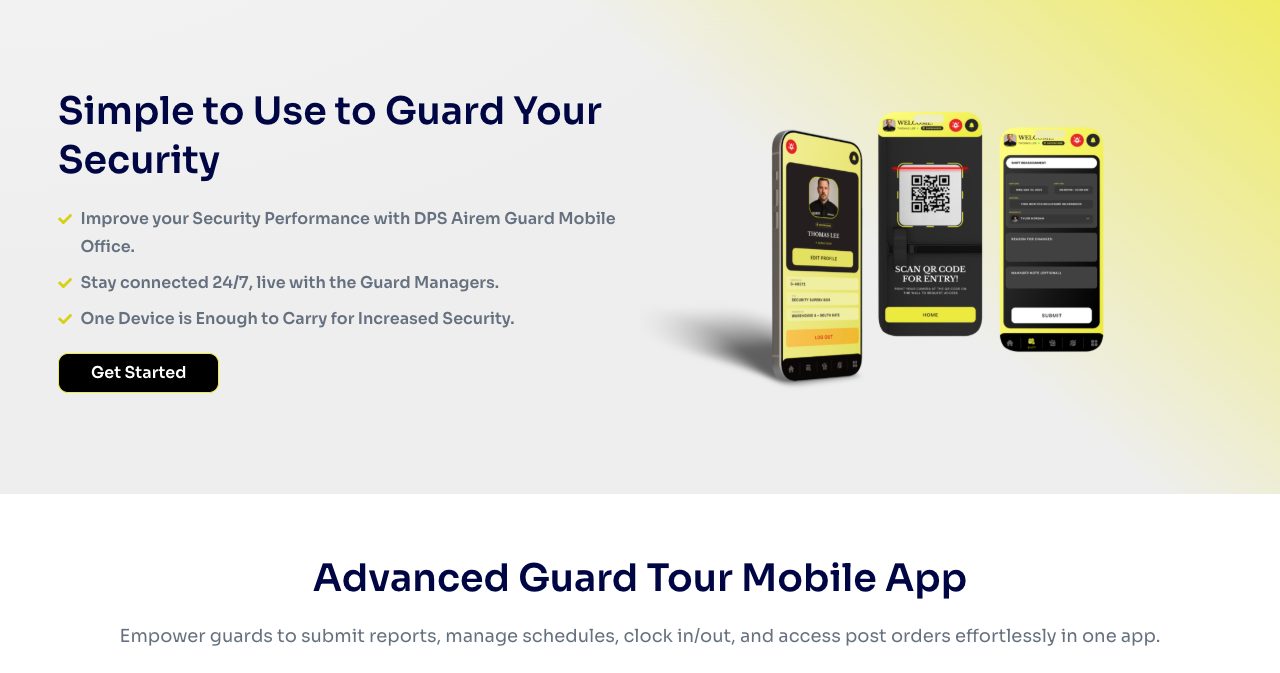
The Guard Mobile App consolidates guard profiles, QR checkpoint scanning, shift tracking, and structured reporting into one high-contrast black and yellow interface. Captured on dpsairem.com/guard-mobile-app, November 26, 2026.
Day to day, the guard workflow covers six core duties without switching apps:
| Field duty | How it works in DPS Airem | Operational payoff |
|---|---|---|
| Attendance and breaks | GPS, Wi-Fi, and cell-tower geofenced clock-in/out; structured meal and rest break logs; attendance reconciliation | Prevents off-site check-ins, tracks labor break compliance, and feeds clean hours straight to payroll |
| Site tours and checkpoints | Guided routes using NFC tags, QR codes, or virtual GPS checkpoints (Professional plan) | Proves guards physically walked high-priority zones on schedule without dedicated wand hardware |
| DARs and incident reports | Up to 25+ report types, reusable client-specific custom templates, autosave drafts, photo/audio/video attachments | Eliminates illegible paper logs and preserves time-stamped visual evidence for clients and insurers |
| Shift passdowns and post orders | Digital passdown logs per site, written post orders, and acknowledged company policies and docs | Incoming shifts read exactly what happened on the prior shift and acknowledge updated rules in writing |
| Scheduling self-service | View and confirm assigned shifts, set weekly work availability, claim open shifts, request time off or shift exchanges | Cuts phone tag with dispatchers while keeping manager approval over every swap or leave request |
| Offline dead-zone coverage | Encrypted local device caching during signal drops with automatic cloud sync on reconnection | Keeps reporting uninterrupted in basements, concrete garages, hospitals, and remote construction sites |
Two engineering details from DPS Airem's documentation deserve extra attention because they solve real field friction.
First is offline data synchronization with delayed-sync visibility. Many guard apps freeze or drop photos the moment an officer steps into a sub-basement mechanical room. DPS Airem encrypts and caches offline reports locally on the device and completes a secure automatic handshake sync as soon as reception returns. On the back end, Super Admins can also inspect delayed-sync logs to tell the difference between a dead cellular zone and someone filling out a shift's worth of logs right before clock-out.
Second is fast, low-friction authentication paired with autosave. Officers on patrol check their phone dozens of times a shift. The mobile app supports Apple Face ID/Touch ID and Android Biometric Prompt using device-native encrypted tokens (raw biometric templates never leave the handset), falling back to PIN or password when needed. While typing an incident report mid-patrol, autosave preserves the draft continuously so an incoming dispatch call or locked screen never wipes ten minutes of notes.
For posts that sit behind a lobby console or security gate PC, the Guard Web Portal mirrors the mobile workflow in any desktop browser using the same credentials. Concierge officers can clock in, read post orders, acknowledge policies, check schedules, submit time-off requests, and type detailed multi-paragraph incident reports on a full keyboard. That same mobile-plus-browser offline resilience is something we also look for in other field-service tools like InspectProHQ, because field teams rarely work in ideal Wi-Fi conditions.
SOS panic alerts, dispatch, and field safety
Lone-worker safety is where guard software stops being an administrative convenience and becomes a duty-of-care tool. DPS Airem builds a dedicated SOS emergency module into the field experience alongside real-time GPS monitoring and an optional Dispatcher add-on.
When a guard or field worker taps the one-tap SOS button during a confrontation, medical emergency, or site hazard, four things happen in sequence according to DPS Airem's technical addendum:
- The mobile app dispatches a high-priority data packet to the server immediately.
- Push notifications broadcast to all linked supervisors and managers on the account.
- On the Back-Office Dashboard, the officer's profile turns red and pulses with a high-frequency live GPS stream so command staff see live movement as the situation unfolds.
- Audio notes or photos can be captured alongside the alert so supervisors and external responders understand what is happening on the ground before arriving.
Outside emergencies, day-to-day alarm responses and ad-hoc client calls flow through the Dispatcher module ($1 per user per month add-on). Dispatchers log incoming calls from multiple client sources into one unified queue, assign the nearest available officer or patrol unit based on live GPS location, and monitor live status updates until the call closes.
For companies running mobile patrol fleets across retail plazas, warehouses, or industrial parks, the Vehicle Patrol module ($1 per user per month) extends oversight to company cars. Managers predefine patrol vehicles, routes, and scheduled site hits so back-office staff can confirm hit completion on the live map. On the driver side, the mobile workflow also captures vehicle health records, including fuel levels, odometer readings, and pre- and post-shift condition photos, which keeps fleet maintenance predictable and settles disputes over who scratched a bumper on the night shift.
Client Web Portal and Client Mobile App: turning transparency into retention
In contract security, clients rarely see the incidents you prevented; they only notice when something goes wrong or when a monthly invoice lands without proof of value. Giving property managers and corporate security directors clean, self-serve visibility into site activity is one of the fastest ways a small or mid-sized patrol firm can look as buttoned-up as a national guard agency.
The DPS Airem Client Web Portal and companion Client Mobile App are included right from the $5 Essential tier.
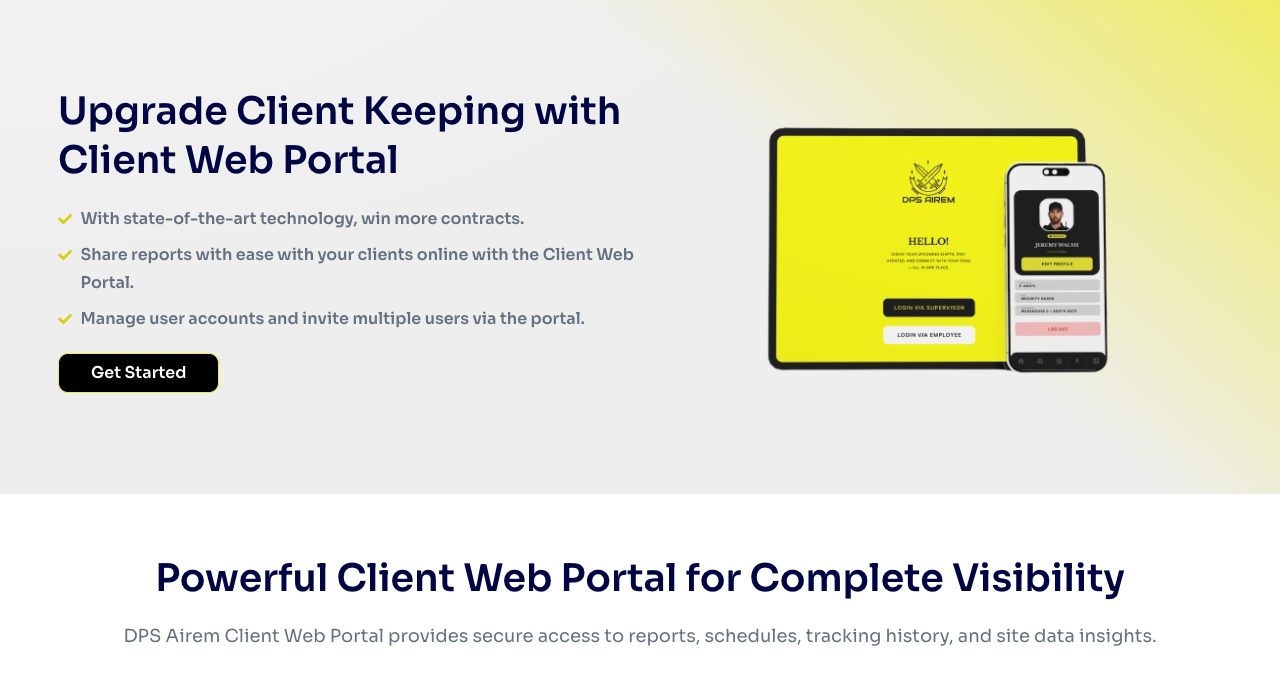
The Client Web Portal lets security firms share live site tracking, incident logs, and shift reports online while controlling exactly which records each client user can view. Captured on dpsairem.com/client-web-portal, November 26, 2026.
Through the web portal or mobile app (using the same login credentials across both), clients choose their company and specific post sites to view:
- Live GPS guard maps and historical tracking routes across their properties
- Daily Activity Reports (DARs), incident reports with attached photos, audio, and video, and custom client-formatted reports
- Completed site tour checkpoints and timestamped check-in and check-out logs
- Active post orders and shift schedules so site managers can confirm duties match the service agreement
Importantly, the security firm stays in control of visibility. Managers decide exactly which reports and operational views a client sees, while allowing client organizations to invite multiple internal users (for example, a regional property director plus individual building managers) with scoped access. Teams on the Professional plan ($10 per user per month) can also automate scheduled email report delivery so busy stakeholders receive a morning DAR digest without logging in. Just as unified portals reduce back-and-forth for service agencies using tools like AMW Suite, putting live proof of presence in front of security clients dramatically reduces "where was the guard last night?" emails and strengthens contract renewals.
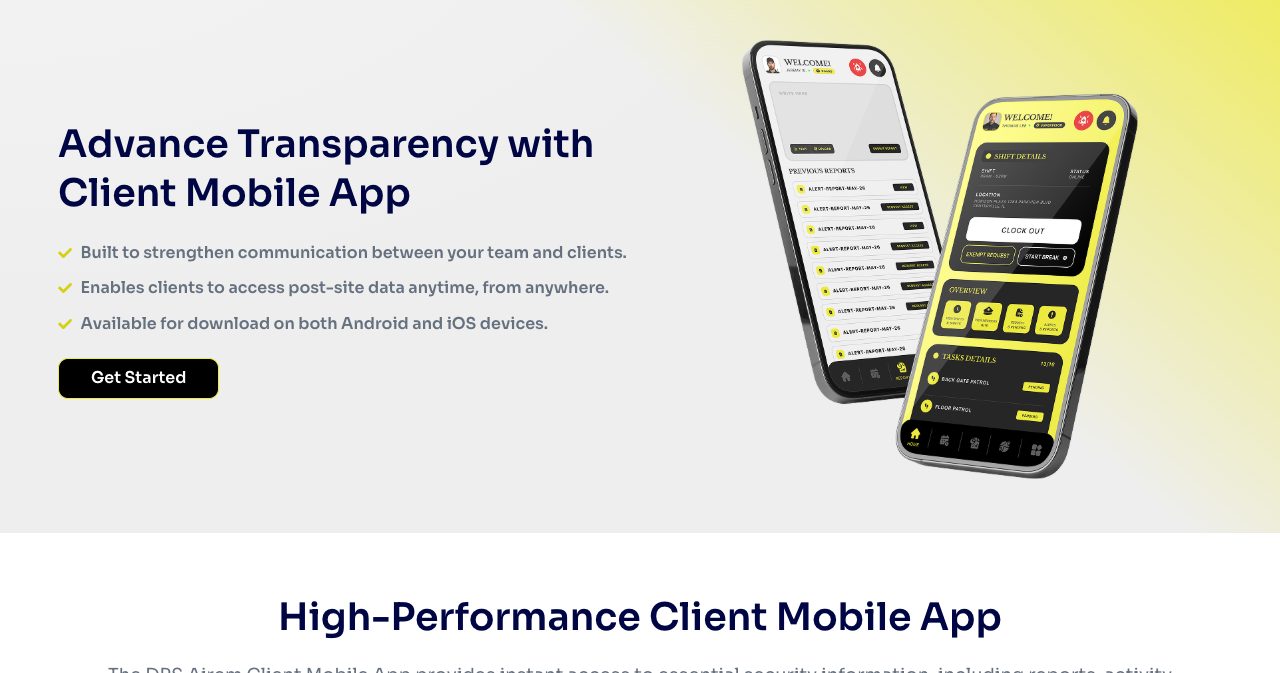
The Client Mobile App extends site reporting, activity history, and check-in visibility to Android and iOS devices for on-the-go property managers. Captured on dpsairem.com/client-mobile-app, November 26, 2026.
Timesheets, payroll exports, estimates, and invoicing
Field visibility solves half of a security firm's operating stress; the other half lives in the back office between verified shift hours, payroll processing, and client billing. When time logs live in one app, overtime calculations live in Excel, and invoices live in accounting software, a single missed holiday multiplier or unbilled coverage shift eats straight through net profit.
DPS Airem links verified time-clock entries directly to both payroll and client billing:
- Automated time cards and attendance reconciliation. Geofenced check-ins, check-outs, and meal breaks automatically assemble into digital time cards. Attendance Reconciliation flags early or late clock-ins so back-office staff do not spend Mondays manually auditing raw timestamps row by row.
- Overtime multipliers and filtered hours reporting. Managers set guard-specific pay rate multipliers and filter hours by client, post site, skill set, or department using Hours By Report. That granularity makes it easy to spot which contract is leaking overtime before margins turn red.
- Payroll integrations and employee payment transparency. With the Payroll module ($1 per user per month), managers generate and export clean payroll reports straight to QuickBooks, Gusto, ADP Workforce, and Paychex in minutes, removing double entry. On the employee side, DPS Airem's payment workflow also tracks historical pay slips, salary credits, and advance or loan requests, sending an instant notification to the employee the moment a Finance Lead marks a payment completed.
- Estimates, timesheet-backed invoices, and payment tracking. With the Invoicer module ($1 per user per month), patrol companies build detailed client estimates, email quotes with delivery-status tracking, convert accepted estimates directly into invoices, define taxable and non-taxable line items, support multi-currency billing, pull billable hours straight from recorded timesheets, and record partial or full payments in cash or by credit/debit card.
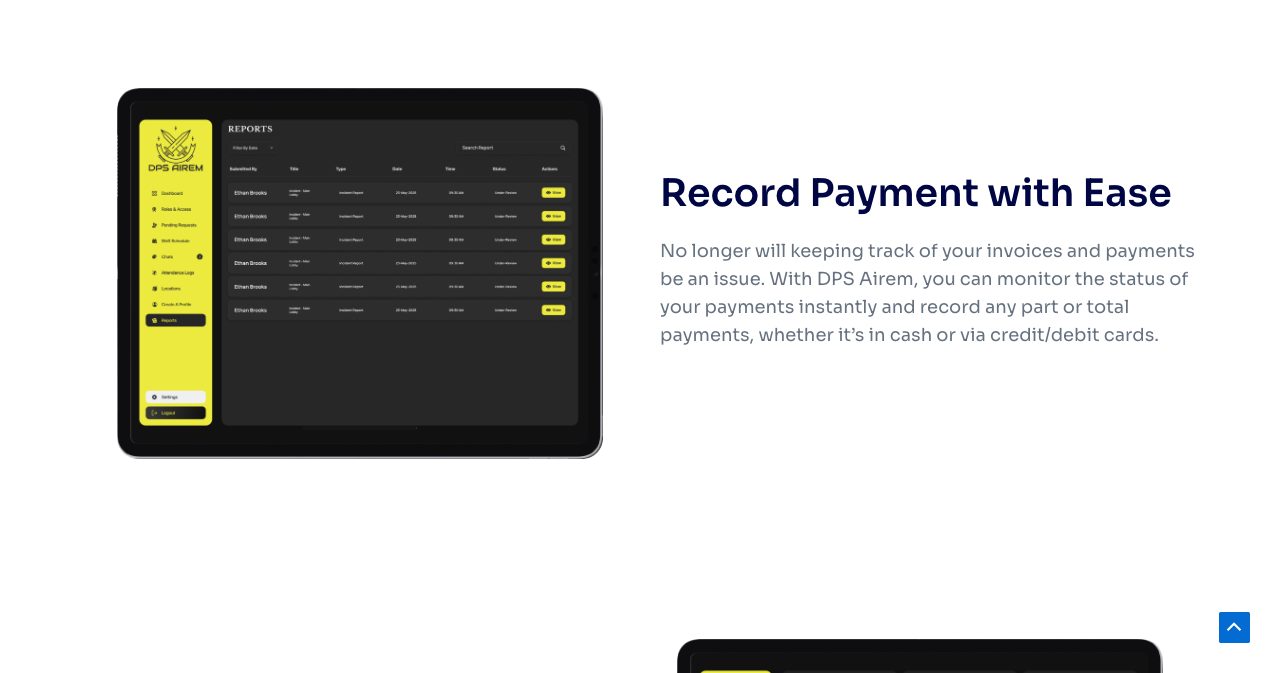
DPS Airem connects back-office reporting, timesheets, estimates, and payment recording inside the same web interface. Captured on dpsairem.com/back-office-dashboard, November 26, 2026.
Industries and deployment environments
Although private contract security firms represent DPS Airem's natural core, the site outlines dedicated deployment setups across six physical-security environments. Looking at which modules each vertical leans on makes it easier to map the platform to your own sites:
| Sector | Primary operational needs | Most relevant DPS Airem modules |
|---|---|---|
| Private security firms | Multi-client management, proof of presence, overtime control, fast billing | Back-Office Dashboard, Client Web/Mobile Portals, Site Tours, Scheduler, Payroll, Invoicer, Vehicle Patrol |
| Corporate security | Executive reporting, risk analytics, multi-office compliance, visitor logs | Analytics, Custom Reports, Visitor Manager, Post Orders, Policies & Docs, RBAC siloing |
| Healthcare security | 24/7 high-sensitivity rounds, fast emergency response, incident media | SOS Panic Alerts, Live GPS Tracking, Offline Caching (basements/wings), Incident Media, Dispatcher |
| Government offices | Controlled access logging, strict audit trails, accountability | Visitor Manager, Login History, 2-Step Authentication, Geofenced Time Clock, Detailed Reporting |
| Residential communities and HOAs | Gatehouse visitor/vehicle tracking, lot enforcement, neighbor transparency | Visitor Manager, Parking Manager, Vehicle Patrol, Client Portal for HOA boards, Incident Media |
| Educational campuses | Wide-area foot and vehicle patrols, quick incident triage, multi-guard tours | NFC/QR/Virtual Site Tours, Dispatcher, SOS Alerts, Guard Messenger, Centralized Analytics |
General multi-site field teams outside traditional uniformed security (such as facilities maintenance, mobile inspection crews, or logistics yard staff) can also use the core time clock, geofencing, task checklists, messenger, and payroll export layers without paying for guard-specific add-ons like Parking Manager or Vehicle Patrol.
Data security, privacy, and role isolation
Security companies handle sensitive operational data every hour: live employee coordinates, client floor plans, visitor ID records, incident photos, and employee pay records. DPS Airem's published Privacy Policy and feature documentation outline a clear set of technical and administrative safeguards:
- Encryption and cloud infrastructure. Data travels over 256-bit SSL/TLS encryption and is stored encrypted at rest inside Tier-III and Tier-IV cloud data centers (AWS or Google Cloud) with physical biometric access controls.
- Multi-tenant and role-based siloing. Organizations are strictly isolated from one another so no manager at Company A can view records, chat logs, or staff from Company B. Inside a company, role-based access keeps payroll details separated from field patrol logs, and only designated Reporting Leads or Managers can export sensitive incident media for insurers or law enforcement.
- Account security and auditing. Back-office users get 2-step authentication and full login audit trails (username, timestamp, and browser). Mobile users get Face ID, Touch ID, and Android Biometric Prompt verified locally on the handset so raw biometric templates are never transmitted or stored on company servers.
- Compliance retention and zero data brokering. DPS Airem states explicitly that it does not operate as a data broker and does not sell personal information to third-party marketing firms. For visitor logs, the security firm remains the Data Controller while DPS Airem acts as Data Processor, and operational incident and attendance records follow a typical seven-year archival retention standard suited to labor and insurance compliance.
One privacy detail worth reviewing transparently with employees during onboarding: DPS Airem's privacy policy notes that active shift monitoring can require "Always Allow" background location permissions for safety breadcrumbs and SOS tracking, that in-app chat transcripts are archived and auditable by admins, and that session replay tools may be used for technical troubleshooting and geofence-bypass detection. Communicating those shift-only monitoring rules clearly in your staff handbook prevents surprises on day one.
DPS Airem pricing, plans, and add-on cost math
Pricing transparency is rare in physical security software, where many legacy vendors hide rates behind multi-call sales demos. All rates below were checked directly on the DPS Airem pricing page and add-on modules page on November 26, 2026.
Every plan starts with a 30-day risk-free trial and requires a minimum of 3 users. Annual billing discounts all three base tiers by 15%.
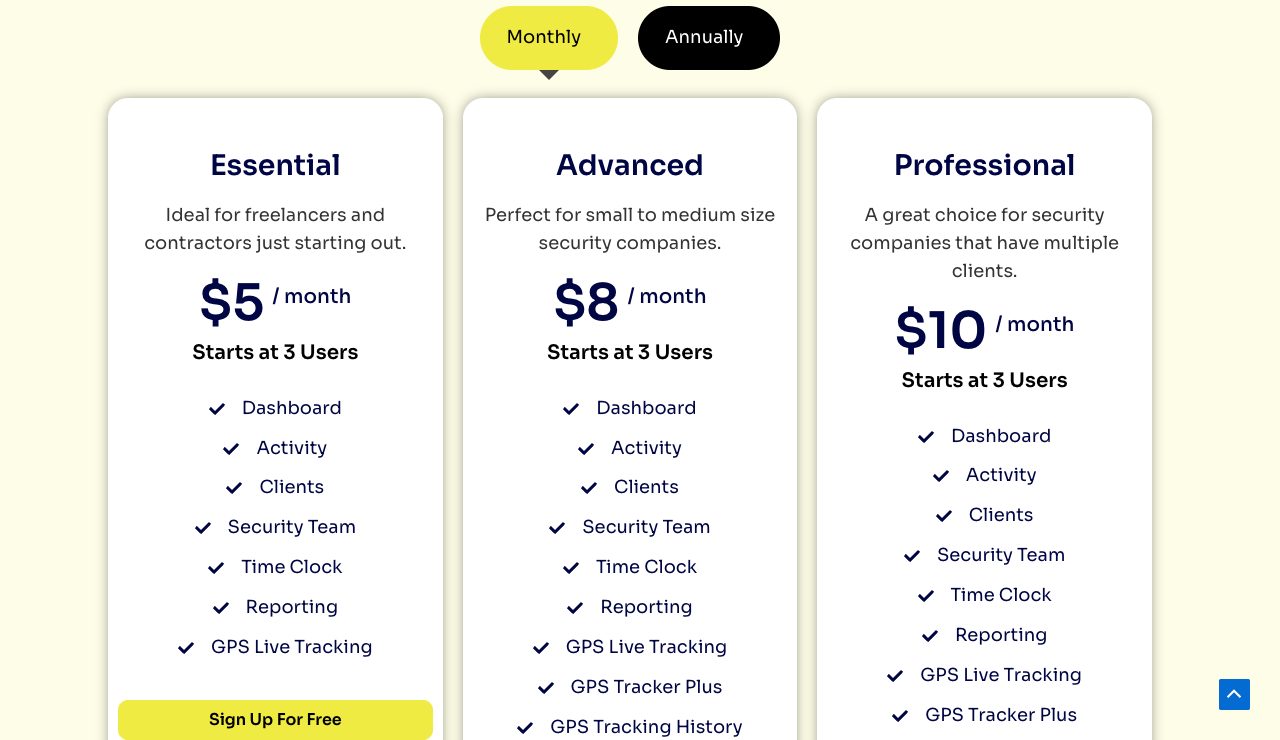
DPS Airem publishes three per-user base tiers with a 3-user minimum and a 15% discount on annual billing. Captured on dpsairem.com/pricing, November 26, 2026.
Base plans and feature tiers
| Feature or capability | Essential ($5/mo or $4.25/yr) | Advanced ($8/mo or $6.80/yr) | Professional ($10/mo or $8.50/yr) |
|---|---|---|---|
| Minimum seats | 3 users ($15/mo or $12.75/mo annual) | 3 users ($24/mo or $20.40/mo annual) | 3 users ($30/mo or $25.50/mo annual) |
| Client, post site, guard, and back-office profiles | Included | Included | Included |
| Time logs, time cards, break tracking, time clock reports | Included | Included | Included |
| General, incident, standard, and custom reports + export | Included | Included | Included |
| Post orders, policies & docs, cloud files & notes | Included | Included | Included |
| Client Web Portal and Client Mobile App | Included | Included | Included |
| GPS Live Tracking (dashboard) and Analytics | Included | Included | Included |
| Idle alerts, low battery alerts, email & SMS alerts | Included | Included | Included |
| Bulk import/export, license tracking, skills, departments | Included | Included | Included |
| System logs, login history, custom user access levels | Included | Included | Included |
| 24/7 multi-language support | Included | Included | Included |
| GPS Tracker Plus and GPS Tracking History | Not included | Included | Included |
| Geofence and Geofence-Based Time Clock | Not included | Included | Included |
| In-app Messenger | Not included | Included | Included |
| Site Tours (NFC, QR, Virtual checkpoints) | Not included | Not included | Included |
| Tasks, Reminders, and Checklists | Not included | Not included | Included |
| Profile Custom Fields | Not included | Not included | Included |
| Automatically Email Reports | Not included | Not included | Included |
| Integrations | Not included | Not included | Included |
Look closely at where the tier boundaries fall: Essential is surprisingly generous on client portals, custom reports, live GPS, post orders, license tracking, and SMS/email alerts, while Advanced is the real operational baseline for most security teams because it unlocks geofenced clock-ins, GPS route history, and Messenger. Professional makes immediate sense once you run checkpoint Site Tours, task checklists, or automated client report emails.
Modular add-on pricing
Alongside the three core plans, DPS Airem sells seven specialized modules a la carte per user per month so teams pay only for operational workflows they run:
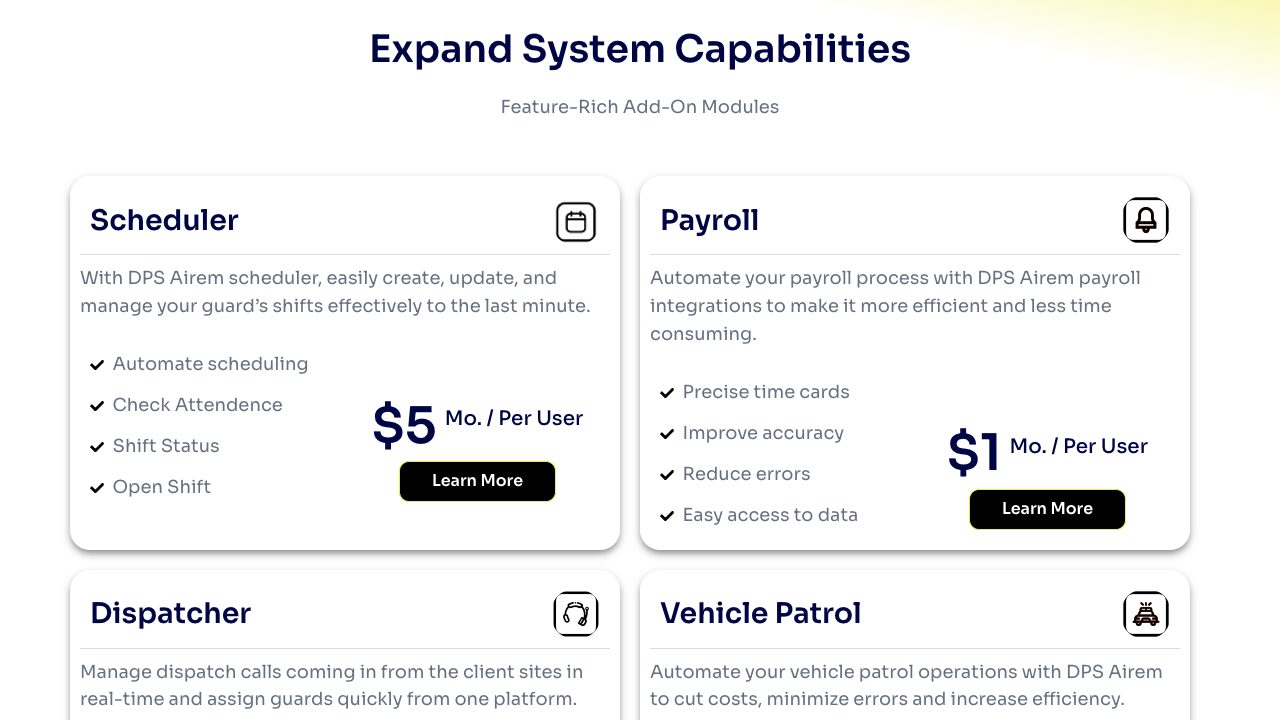
Add-on modules are priced per user per month so companies can bolt on scheduling, payroll exports, dispatch, vehicle patrols, visitor tracking, invoicing, or parking enforcement selectively. Captured on dpsairem.com/add-on-modules, November 26, 2026.
| Add-on module | Price per user / month | What it adds |
|---|---|---|
| Scheduler | $5 | Shift templates, automated scheduling, open shifts, vacant shifts, live shift status, shift exchanges, attendance view |
| Payroll | $1 | Automated payroll calculations, precise time cards, overtime multipliers, exports to QuickBooks, Gusto, ADP Workforce, and Paychex |
| Dispatcher | $1 | Multi-source dispatch call intake, real-time guard assignment, live response updates |
| Vehicle Patrol | $1 | Patrol vehicle assignments, predefined routes, hit tracking, GPS monitoring, vehicle condition logs |
| Visitor Manager | $1 | Mobile visitor and vehicle check-in/check-out profiles, confidential logs, emergency evacuation lists |
| Invoicer | $1 | Client estimates, one-click estimate-to-invoice conversion, timesheet-backed billing, multi-currency, payment recording |
| Parking Manager | $1 | Parking zones and lots, vehicle profiles, custom parking incident types, lot enforcement |
Real-world monthly cost examples
Because Scheduler ($5/user) and the six $1/user modules stack onto the base plan, calculating your full per-user total up front avoids sticker shock later. Here is what three realistic security company setups cost on monthly list rates (before applying the 15% annual discount on base plans):
| Team scenario | Plan + add-on stack | Per-user total (monthly list) | Estimated monthly bill |
|---|---|---|---|
| 5-guard startup on static sites | Essential ($5) + no add-ons (basic GPS, DARs, client portal, time clock) | $5 / user | $25 / month |
| 10-guard growing guard firm | Advanced ($8) + Scheduler ($5) + Payroll ($1) + Invoicer ($1) | $15 / user | $150 / month |
| 25-guard multi-site patrol agency | Professional ($10) + Scheduler ($5) + Payroll ($1) + Dispatcher ($1) + Vehicle Patrol ($1) + Invoicer ($1) | $19 / user | $475 / month |
| 40-guard full-stack commercial + residential firm | Professional ($10) + all 7 add-on modules ($11 total) | $21 / user | $840 / month |
Even at the full-stack ceiling ($21 per user per month with every single add-on enabled), a 25- to 40-guard firm pays predictable per-seat SaaS pricing with no hidden per-site surcharges or mandatory multi-year hardware leases. If you only need base tracking plus one or two modules, total spend stays well under $15 per user.
How DPS Airem compares with TrackTik, Silvertrac, GuardsPro, and Belfry
Physical security software has consolidated heavily over the last few years, most notably with Trackforce bringing TrackTik, GuardTek, and Silvertrac under one corporate umbrella. Comparing DPS Airem against the four competitors security buyers shortlist most often clarifies where each tool fits.
| Platform | Pricing model (checked Nov 2026) | Trial or demo | Where that tool fits best | Where DPS Airem stands out |
|---|---|---|---|---|
| DPS Airem | Published $5, $8, or $10/user/mo (3-user min) + $1 to $5 add-ons | 30-day risk-free trial + live demo | Small to mid-sized security firms, corporate/campus teams, and multi-site field crews wanting modular pricing | Published transparent pricing, Client Web and Mobile Portals included from $5 Essential, offline local caching, one-tap SOS alerting, and modular $1 add-ons |
| TrackTik (by Trackforce) | Custom quote-based by sites and modules; multi-year commitments common | Sales demo only | Large enterprise guard firms (50+ to 500+ guards) needing deep business intelligence and multi-branch ERP workflows | Fast self-paced 30-day trial, no custom quote wall, far lower entry cost for 3- to 50-guard companies |
| Silvertrac (by Trackforce) | Tiered device packages (commonly starting around $249/mo for up to 10 devices) | Sales demo only | Mid-sized patrol operations centered heavily on issue tracking and parking enforcement | Per-user pricing starting at $15/mo for 3 users compared with $249+ base packages, plus integrated timesheet-to-invoicing and payroll export modules |
| GuardsPro | Published $5, $8, or $10/user/mo (3-user min) + modular per-user add-ons | 30-day trial | Small and scaling patrol companies wanting self-serve modular guard management | Directly comparable modular pricing structure; DPS Airem emphasizes unified employee payment transparency, offline delayed-sync auditing, and one-tap SOS pulsing alerts |
| Belfry | Custom quote-based per active employee | Sales demo only | US security firms prioritizing native embedded in-house payroll processing inside one platform | Transparent entry pricing and 30-day trial for teams already happy exporting clean hours to QuickBooks, Gusto, ADP Workforce, or Paychex |
Notice the practical divide here. If you operate a 200-guard regional agency requiring custom ERP integrations and dedicated enterprise BI analysts, TrackTik earns its custom pricing and implementation timeline. If your primary goal is replacing an external US payroll provider entirely with embedded payroll processing, Belfry deserves a look. For small and mid-sized patrol firms (roughly 3 to 75 guards) that want transparent published numbers, fast onboarding, client portals from day one, and the freedom to add dispatch, vehicle patrol, visitor management, or invoicing only when contracts call for them, DPS Airem hits a very approachable sweet spot.
Who DPS Airem fits best (and what to check before rolling out)
DPS Airem is a particularly good match for:
- Small and growing private security firms moving off paper DARs, spreadsheets, and group texts that want a clear per-user price and a 30-day trial before asking clients to adopt a portal.
- Multi-site patrol companies that win or retain contracts by giving property managers live maps, incident photos, and automated morning reports through a dedicated Client Web Portal and Client Mobile App.
- Security teams working in tough signal environments such as hospital sub-basements, underground parking structures, or rural construction perimeters where encrypted offline report caching and automatic sync prevent lost documentation.
- Operations managers trying to cut payroll errors and billing leakage by linking geofenced time cards directly to overtime multipliers, QuickBooks/Gusto/ADP/Paychex exports, and timesheet-driven client invoices.
- Facilities, HOA, campus, and corporate security teams that want optional Parking Manager, Visitor Manager, and Vehicle Patrol modules inside the same dashboard without juggling four separate subscriptions.
Before committing to an annual plan, take advantage of the 30-day risk-free trial to check four practical details for your specific setup:
- Confirm your full per-user bundle price. Add your chosen base tier (Essential, Advanced, or Professional) plus every add-on module you expect to run (especially Scheduler at $5 per user) so your real monthly budget is crystal clear before rollout.
- Test the exact mobile devices your guards carry. DPS Airem lists Android and iOS mobile apps across its site and maintains a live Android listing under DPS ARMORED LLC on Google Play; confirm current iOS App Store installation instructions and test background GPS battery draw across a full 8- or 12-hour shift on both platforms your officers use.
- Walk your worst cellular dead zone. File a photo-heavy incident report with airplane mode toggled on (or inside your deepest basement stairwell), reconnect, and check how quickly the entry appears in the Back-Office Dashboard and delayed-sync log.
- Run one full payroll export test. Export a week of trial time cards with overtime rules into QuickBooks, Gusto, ADP Workforce, or Paychex so your bookkeeper signs off on the column mapping before live payday.
How to test DPS Airem during your 30-day trial
A full 30-day risk-free trial gives you enough runway to test DPS Airem under real shift pressure. Seven structured steps over your first week will tell you whether it fits your operation:
- Start the 30-day trial and map your exact module list. Register through the 30-day risk-free trial form on
dpsairem.comand write down which capabilities you need from day one: base tier (Essential, Advanced, or Professional) plus any required add-ons such as Scheduler, Payroll, Dispatcher, Vehicle Patrol, Visitor Manager, Invoicer, or Parking Manager. - Configure two representative post sites and geofence boundaries. Pick one straightforward static post and one trickier multi-building or low-signal location, enter post orders and company policies, and draw tight geofence perimeters so you can test clock-in precision in real conditions.
- Set up role-based access for managers, supervisors, and guards. Create distinct role profiles with 2-step authentication for back-office staff so finance leads, dispatchers, field supervisors, and guards see only the tools and records relevant to their duties.
- Run live mobile shifts, QR/NFC tours, and an offline signal test. Have three to five guards install the mobile app, clock in inside the geofence, scan sample QR or NFC checkpoints, submit a Daily Activity Report with photos, and file one test incident report from a basement or garage to watch offline caching and automatic sync.
- Trigger a controlled SOS drill and test passdown logs. Run a scheduled SOS panic-button drill during a quiet shift to measure notification speed to supervisors and live GPS pulsing on the manager dashboard, then have incoming and outgoing guards exchange a shift passdown log.
- Invite one friendly client into the Client Web Portal. Grant a trusted property manager or site contact view-only portal access to live activity, DARs, and incident logs, and gather feedback on whether the layout cuts down on routine status emails.
- Run a mock payroll export and client invoice cycle. At the end of week one, reconcile attendance logs, apply overtime multipliers, export a sample payroll file for QuickBooks, Gusto, ADP Workforce, or Paychex, and generate one timesheet-backed client invoice to confirm the back-office numbers match your accounting rules.
DPS Airem review verdict
Security guard management software works best when it solves two stubborn problems at the same time: making field shifts easy enough that guards log every tour and incident on time, and turning those verified logs directly into client proof, payroll records, and accurate invoices without weekend spreadsheet cleanup.
DPS Airem covers that full loop cleanly. Putting the Client Web Portal and Client Mobile App in the $5 Essential tier lowers the barrier for smaller patrol companies to present professional, real-time reporting to property managers. Stepping up to Advanced ($8 per user) adds geofenced clock-ins, GPS tracking history, and in-app Messenger, while Professional ($10 per user) unlocks NFC/QR/virtual site tours, task checklists, and automated client report emails. Keeping Scheduler ($5 per user) and six operational add-ons ($1 per user each) modular lets growing teams build the exact stack they need without paying enterprise overhead up front.
Pair that transparent pricing with encrypted offline report caching, biometric mobile login, one-tap SOS alerts with live pulsing GPS, and payroll exports for QuickBooks, Gusto, ADP Workforce, and Paychex, and DPS Airem earns a spot on any small or mid-sized security operator's shortlist. Running two active post sites through the 30-day risk-free trial is the quickest way to see how smoothly your guards, supervisors, and clients take to it.
Frequently asked questions
What is DPS Airem?
DPS Airem (dpsairem.com) is a cloud-based workforce and security guard management platform for private patrol firms, in-house corporate security teams, and multi-site field operations. It connects a web Back-Office Dashboard for managers, a Guard Web Portal and mobile app for guards and supervisors, and a Client Web Portal and mobile app for site clients, covering GPS tracking, geofenced attendance, site tours, incident reports, SOS panic alerts, payroll exports, and invoicing.
How much does DPS Airem cost?
Checked against dpsairem.com/pricing on November 26, 2026, DPS Airem offers three core tiers with a 3-user minimum: Essential at $5 per user per month ($4.25 billed annually), Advanced at $8 per user per month ($6.80 billed annually), and Professional at $10 per user per month ($8.50 billed annually). Seven optional add-on modules are priced separately per user per month: Scheduler ($5), Payroll ($1), Dispatcher ($1), Vehicle Patrol ($1), Visitor Manager ($1), Invoicer ($1), and Parking Manager ($1).
Does DPS Airem offer a free trial?
Yes. DPS Airem offers a 30-day risk-free trial so security companies and operations managers can set up post sites, add guards, test geofenced clock-ins, and review client reporting before committing to a paid subscription.
How does DPS Airem prevent time theft and off-site clock-ins?
DPS Airem pairs GPS coordinates with Wi-Fi triangulation and cellular tower signals to confirm that a guard is physically inside the manager-defined site boundary before allowing a clock-in or clock-out. Geofence-based time clocks are included starting on the Advanced tier ($8 per user per month monthly, or $6.80 annually), while Essential includes standard GPS live tracking and in-app check-ins.
Does DPS Airem work offline in basements or low-signal sites?
Yes. According to DPS Airem's technical and privacy documentation, the mobile app encrypts and caches field reports locally on the device when cellular signal drops, then automatically completes a handshake sync to the cloud once connectivity returns. Super Admins can also review delayed-sync logs to distinguish dead-zone interruptions from late reporting.
What happens when a guard triggers an SOS alert in DPS Airem?
Pressing the one-tap SOS panic button sends a high-priority data packet to the server, pushes immediate alerts to linked supervisors and managers, and marks the guard's profile red with a pulsing live high-frequency GPS stream on the Back-Office Dashboard. Guards can also attach audio notes or photos so dispatchers and responders have immediate context.
Which payroll platforms integrate with DPS Airem?
DPS Airem's Payroll module ($1 per user per month add-on) converts approved time logs, break rules, and overtime multipliers into export-ready payroll reports for QuickBooks, Gusto, ADP Workforce, and Paychex, eliminating manual double entry.
What is included in the DPS Airem Client Web Portal and Client Mobile App?
Both the Client Web Portal and Client Mobile App are included starting on the Essential tier ($5 per user per month). Clients log in with granular permissions controlled by the security firm to view live guard maps, tracking history, Daily Activity Reports (DARs), incident reports with photos and video, site tours, check-in logs, and post orders, and can add multiple users from their own organization.
How do DPS Airem site tours and checkpoints work?
Site Tours, included on the Professional plan ($10 per user per month monthly, or $8.50 annually), support NFC tags, QR codes, and virtual GPS checkpoints. Managers assign tours to one or multiple guards on a post site, and every scanned checkpoint timestamps the route for internal oversight and client reporting.
Which plan do I need for scheduling, geofencing, and site tours?
Geofencing, geofence-based time clocks, GPS tracking history, and in-app Messenger start on the Advanced plan ($8 per user per month). Site Tours, Tasks, Checklists, Automated Email Reports, and Integrations start on the Professional plan ($10 per user per month). Scheduling is offered as an add-on module at $5 per user per month that adds shift templates, open shifts, vacant shifts, shift status, and shift exchanges.
How does DPS Airem protect employee, client, and visitor data?
DPS Airem states that it uses 256-bit SSL/TLS encryption in transit, encryption at rest on Tier-III and Tier-IV cloud infrastructure, strict multi-organization and role-based data siloing, 2-step authentication for back-office accounts, detailed login history, and device-native biometrics (Face ID, Touch ID, and Android Biometric Prompt) where raw biometric templates never leave the user's phone. The company also states it does not sell personal data to third-party marketing firms.
Can DPS Airem handle industries beyond private security guard companies?
Yes. While private patrol and contract security firms are its core audience, DPS Airem maintains dedicated workflows for corporate security departments, hospitals and healthcare facilities, government offices, residential communities and HOAs, educational campuses, and general multi-site field teams that need GPS attendance, checklists, and payroll accuracy.
How does DPS Airem compare with TrackTik, Silvertrac, GuardsPro, and Belfry?
DPS Airem publishes straightforward per-user pricing starting at $5 a month (3-user minimum) plus $1 to $5 modular add-ons and a 30-day trial. That makes budgeting much simpler for small and mid-sized teams than quote-only enterprise suites like TrackTik or Belfry, or device-pack tiers like Silvertrac. Its modular pricing structure closely resembles GuardsPro, so buyers choosing between them should compare total per-user cost with their exact add-on mix, live onboarding support, and hands-on testing during the 30-day trial.
Ready to put your product on the map?
Claim a permanent building on SaaSCity so founders and software buyers can discover your product on the live map. Pay once from $19.99, live within 24 hours.