Launch & Growth
How to Write a Directory Listing That Gets Clicked and Cited by AI
A directory listing gets clicked when its first line says what the product does and who it is for, and it gets cited when it states facts an AI answer can repeat. We went through all 2,002 live listings on SaaSCity to see where the copy goes wrong, then wrote down how to fix each field: the tagline, the description, the category, the screenshots and the schema.

Contents (12)
- Who reads a directory listing
- What 2,002 live listings on SaaSCity get wrong
- Step 1: Write a facts sheet before you write copy
- Step 2: Write a tagline that survives the cut
- Step 3: Write the description in three lengths
- Step 4: Pick the narrowest category that is true
- Step 5: Lead with a screenshot of the result
- Step 6: Know what schema the listing page carries
- Step 7: Keep the facts the same everywhere
- The listing checklist
- When there are fifty forms to fill
- FAQ
A directory listing gets clicked when its first line tells a stranger what the product does and who it is for, before the card cuts it off. It gets cited in AI answers when the text holds facts a machine can repeat as they are: what it is, who it serves, what it costs, where it runs and one number that proves it. So write a tagline under 60 characters, a description whose first sentence works alone, the narrowest category that is true and a screenshot of the result, and keep those facts the same on every site.
We read listings all day. SaaSCity is a directory, a person reviews every product submitted to it, and we also write submissions to other directories for founders who hand that work off. On November 4, 2026 we went through all 2,002 live listings on SaaSCity to see where the copy goes wrong. Very little of it is bad writing. Most of it is length, missing facts and missing pictures.
This guide goes field by field: the tagline, the description, the category, the screenshots and the schema, with the limits each platform sets and examples from real listings. The rest of the process (choosing directories, tracking submissions, checking the links) is in our guide on how to submit your SaaS to directories.
The seven steps:
- Write a facts sheet before you write copy.
- Write a tagline that survives the cut.
- Write the description in three lengths.
- Pick the narrowest category that is true.
- Lead with a screenshot of the result.
- Know what schema the listing page carries.
- Keep the facts the same everywhere.
Who reads a directory listing
A listing has two readers, and they read it differently.
The first is a person scanning a grid of cards. They take in the product name and a few words of the tagline, then click or move on. Nielsen Norman Group's eyetracking research found that "people mostly look at the first 2 words of a link", which is why NN/g tells writers to put the important words first. A tagline sits in the same place on a card. If it opens with "Revolutionizing the way", the reader has learned nothing in the two words they gave you, and the next card gets the click.
The second reader is a machine: a search engine working out what the page is about, or an AI assistant putting together an answer about tools in your category. It reads the whole page but keeps only what it can state as a fact. "Turns Stripe payouts into bookkeeping for freelancers" hands it a category, an input, an output and an audience. "The future of finance" hands it nothing it could repeat.
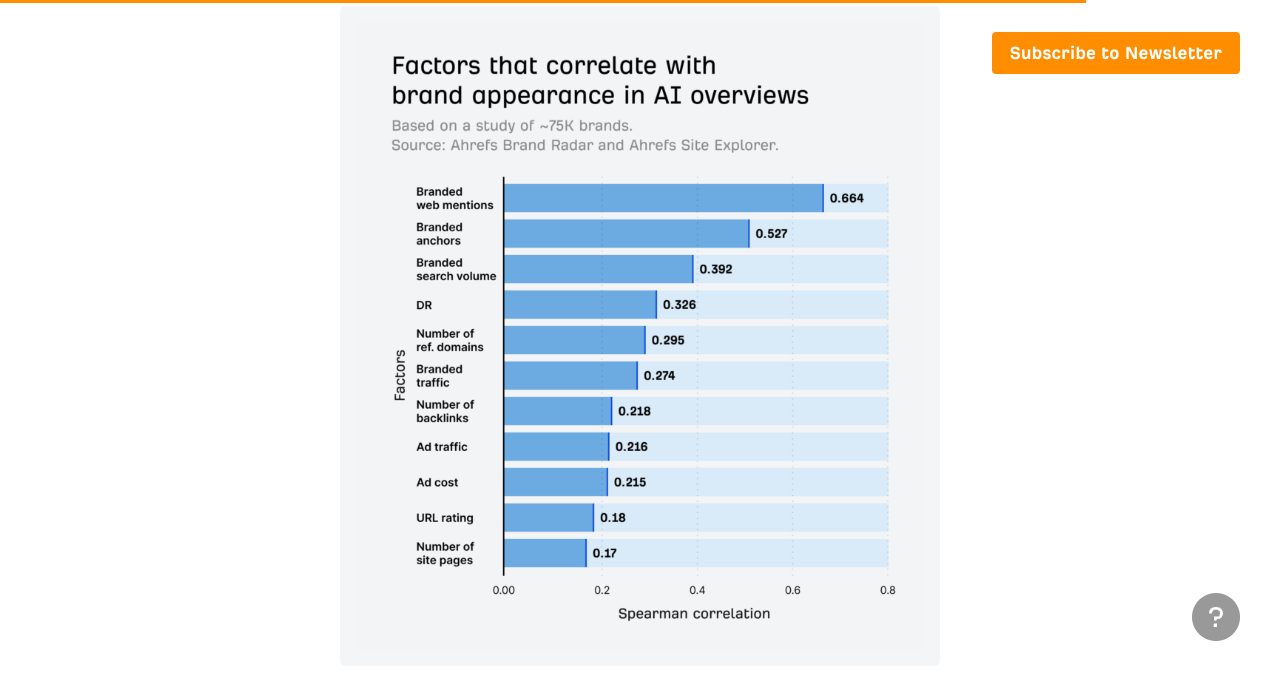
That second reader is why listings matter more than their links. A listing is a mention of your brand on a site you don't own. When Ahrefs studied 75,000 brands, branded web mentions had the strongest correlation with appearing in Google's AI Overviews, at 0.664, against 0.218 for the number of backlinks. Ahrefs is careful to say a correlation is not proof of cause. It does match what we see: what other sites say about a product shapes what AI answers say about it.
Google's own position helps here. Its guide to AI features says there are "no additional requirements to appear in AI Overviews or AI Mode, nor other special optimizations necessary" (Google Search Central). What makes a listing clear to a person (a plain first sentence, specific facts, the right category) is also what an AI system needs to describe you correctly. You don't write two versions.
What 2,002 live listings on SaaSCity get wrong
We counted every approved listing on SaaSCity on November 4, 2026, using the same word-count rule our site uses to decide which listings Google may index:
| What we checked | Listings | Share |
|---|---|---|
| Tagline longer than 60 characters, Product Hunt's limit | 743 of 2,002 | 37.1% |
| Tagline longer than 80 characters | 368 of 2,002 | 18.4% |
| Free listing with fewer than 80 words written by the maker | 672 of 1,301 | 51.7% |
| No screenshots in the listing's gallery | 1,357 of 2,002 | 67.8% |
| No pricing model given | 286 of 2,002 | 14.3% |
| Filed under the "Other" category | 134 of 2,002 | 6.7% |
The median tagline is 53 characters, which is fine. The problem is the long tail. More than a third of these taglines would be cut or refused by a 60-character field, and the cut tends to fall on the most useful words, because founders usually put the audience and the difference at the end.
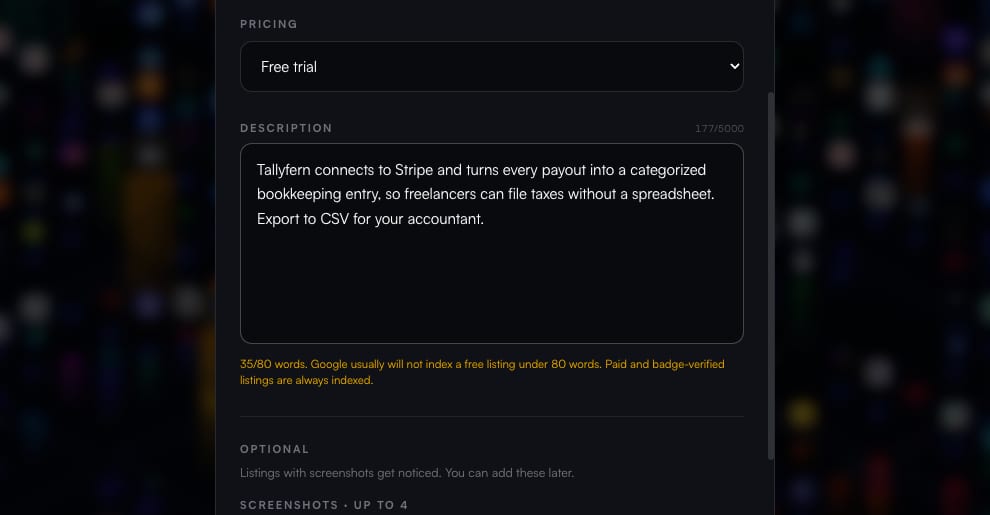
The 80-word line has a real cost on our site. A free SaaSCity listing with fewer than 80 words of the maker's own writing carries a noindex tag, which asks Google not to show it. Paid and badge-verified listings are always indexed, but half of the free listings give Google too little text to justify a page. Other directories make their own call on thin pages, and few of them tell you they did.
Two in three listings also have nothing in their gallery. That leaves a logo and a paragraph to do the work one picture does in a second.
Step 1: Write a facts sheet before you write copy
Before the tagline, write the facts as a plain list. Every field on every form draws from it, and it is also what an AI answer will try to piece together about you.
- What it is, in the words a buyer would type into a search box: "AI virtual staging app", "in-app support chat", "GLP-1 tracker".
- Who it is for, as narrowly as is true: "US real estate agents and photographers", not "businesses".
- The input and the output: "upload a photo of an empty room, get a staged photo".
- Where it runs: web, iOS, Android, a Chrome extension, self-hosted, an API.
- The pricing model and the lowest price: free, freemium, free trial or paid, from $X a month.
- One number you can prove: a time ("in about a minute"), a count ("3,700 practice questions"), a limit ("files up to 5 MB").
- What makes it different from the usual way of doing the job, in one sentence.
- The founding year, the country and the founder's name, for the directories that ask and the readers who check.
Then read the list as a stranger. If any fact would surprise a customer, fix your own site first. Reviewers compare the listing with the site, and an AI assistant that finds two prices for the same plan will pick one of them, and not always the right one.
Think about how a good answer to a software question is put together. Ask an assistant for a free tool that splits a song into stems in the browser, and a useful answer names a tool, says it is free, says it runs in the browser and says whether your files leave your device. Every clause in that answer is a fact lifted from somebody's page. A listing that states its price, platform and privacy model in plain sentences is easy to quote. "Experience the magic of music" gives the assistant nothing to quote.
Step 2: Write a tagline that survives the cut
A tagline should say what the product does and for whom, in a buyer's words, short enough that no card or form cuts it. Aim for 40 to 60 characters. That fits Product Hunt's 60-character field and most directory cards, and it leaves room for the product name in a search result title.
Three patterns cover most products:
- What it does, for whom: "AI virtual staging for real estate listing photos."
- Input into output, for whom: "Turns Stripe payouts into bookkeeping for freelancers."
- Category plus one difference: "A native support chat for iOS and Android apps."
These taglines from live SaaSCity listings do the job:
| Product | Tagline | Characters | What it gets right |
|---|---|---|---|
| TINTY | AI virtual staging for real estate listing photos | 49 | Category and audience, nothing else |
| Chatslane | A native support chat for iOS and Android apps. | 47 | Names the platforms buyers filter by |
| Jabwise | Free GLP-1 tracker: see your progress beside every dose | 55 | Price and category first, then the one view that sets it apart |
| Kamero | Guests take a selfie to instantly find their event photos | 57 | Describes the moment the product gets used |
| Extractune | Split songs into vocals, drums and music. Free, in your browser. | 64 | Output, price and platform in one line |
Extractune's line is four characters over Product Hunt's limit, so it needs a trimmed version there ("Split songs into vocals, drums and music, free" fits). That is the normal case: write the line you want, then the short one, before a form decides where to cut.
Here is what loses the click. These are composites, so no one's product is singled out:
- "Revolutionizing the way teams work together." It names no category, so a reader can't tell a chat app from a CRM.
- "AI-powered platform for modern businesses." On SaaSCity, 61 live taglines contain "AI-powered" and 36 open with it. In a catalogue where so many products use AI, the word sorts nothing. Say what the AI does.
- "Your all-in-one productivity companion." "All-in-one" asks the reader to guess which parts are in it.
- "Acme: the smarter Acme for everyone." 163 live taglines on SaaSCity start with the product's own name, which the card already shows. Those characters belong to the audience.
A few rules hold on every directory:
- Put the category or the outcome in the first three words. That is the part people read.
- Use numbers only when they are true and someone could check them. "Fixed in under 2 hours" works for a plumber who tracks it. "10x faster" with no baseline reads as filler.
- Skip puns. A pun asks the reader to work for you, and a machine reads it literally.
- Write a 30-character version now. App Store subtitles allow 30, and some cards show about that much. Shortening by hand beats a form cutting you off mid-word.
The limits you will meet
The fields a listing fills have hard limits. These come from each platform's own documentation, as of November 2026:
| Platform | Field | Limit |
|---|---|---|
| Product Hunt | Tagline | 60 characters |
| Product Hunt | Description | 260 characters |
| Chrome Web Store | Summary | 132 characters |
| App Store | Subtitle | 30 characters |
| Google Play | Short description | 80 characters |
| Google Business Profile | Business description | 750 characters |
| SaaSCity | Tagline | 10 to 100 characters |
| SaaSCity | Description | 50 to 5,000 characters, and 80 words of the maker's writing for a free listing to be indexed |
Our free character counter checks a line against these and other limits, and links each one to the page it comes from.
Step 3: Write the description in three lengths
Directories ask for descriptions of very different lengths. Write three versions once instead of cutting one down on every form:
- Short, about 160 characters: one or two sentences. This often becomes the snippet under your name in a list and the meta description of the listing page.
- Medium, 400 to 600 characters: for forms with a cap, such as Product Hunt's 260-character description or Google Business Profile's 750.
- Long, 150 to 300 words: for directories that give you a full page.
All three follow the same order, so the first sentence still works wherever a field gets cut:
- What it is and who it is for.
- What the user gets: the outcome, with a number if you have one.
- One proof point or difference: an integration, a privacy model, a credential, a volume.
- In the long version only: how it works in two or three sentences, the main features written as sentences, the pricing, and who it is not for.
TINTY's listing on SaaSCity follows that order almost exactly. The first sentence says what and who: "TINTY is an AI virtual staging web app for US real estate agents, photographers and homeowners." The second gives the input, the output and a time: "Upload a photo of an empty room, choose the room type, style, furniture and colors, and get a 2K staged photo in about a minute." Further down comes the price fact that a buyer and an AI assistant both look for: "Try it free: 6 staged photos with a light watermark, no card." Quote any one of those sentences alone and it is still true and still useful.
Feature lists are where long descriptions go flat. "Powerful analytics, seamless integrations, robust security" could describe a thousand products. Write each feature as something the user does or sees. Jabwise's listing says "Progress draws your weight beside every dose change, so you can see what each step is doing," and that tells a reader far more than "advanced progress tracking" would.
Close the long version with who the product is not for, when that is useful. "Built for teams of 5 to 50; larger companies will want SSO, which we don't offer yet" saves a reviewer's time and saves you a signup that would have churned in a week.
Local business listings use the same order
Google's guidance for a Business Profile description asks for the same things in plainer words: what you offer, what makes you special, how long you've been in business, and anything else customers should know. It also sets the rules. No URLs or HTML, no more than 750 characters, and a focus on the business "instead of details about promotions, prices, or sales."
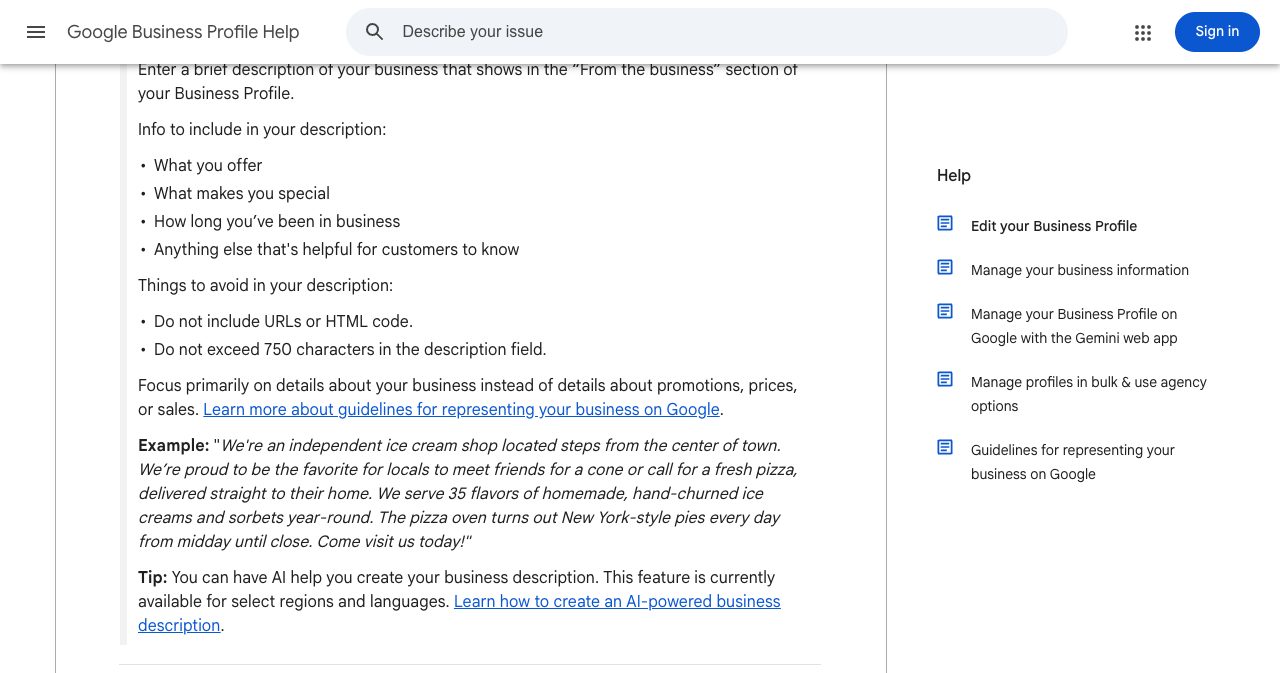
Only the opening of a Business Profile description shows before a reader expands it. Google doesn't publish the cutoff, and third-party tests put it near 250 characters. Put what you do, where and since when inside that stretch.
Write enough words, then write variants
On SaaSCity the form counts your words as you type, because a free listing with fewer than 80 words of the maker's writing is kept out of Google's index. A description that only repeats the tagline doesn't count toward it.
Once the long version exists, write two or three variants before you submit widely. Keep the facts identical and change the sentences. Fifty copies of one paragraph give Google fifty near-duplicate pages, and it tends to show one of them and filter out the rest. Variants give more of your listings a reason to stay in the results, and every one of them still tells an AI assistant the same thing about your price, platform and audience.
Step 4: Pick the narrowest category that is true
The category is a relevance signal on every directory, and the cheapest one to get right. Google's Business Profile guidelines put the test in one line: choose categories that complete the statement "This business IS a" rather than "this business HAS a."
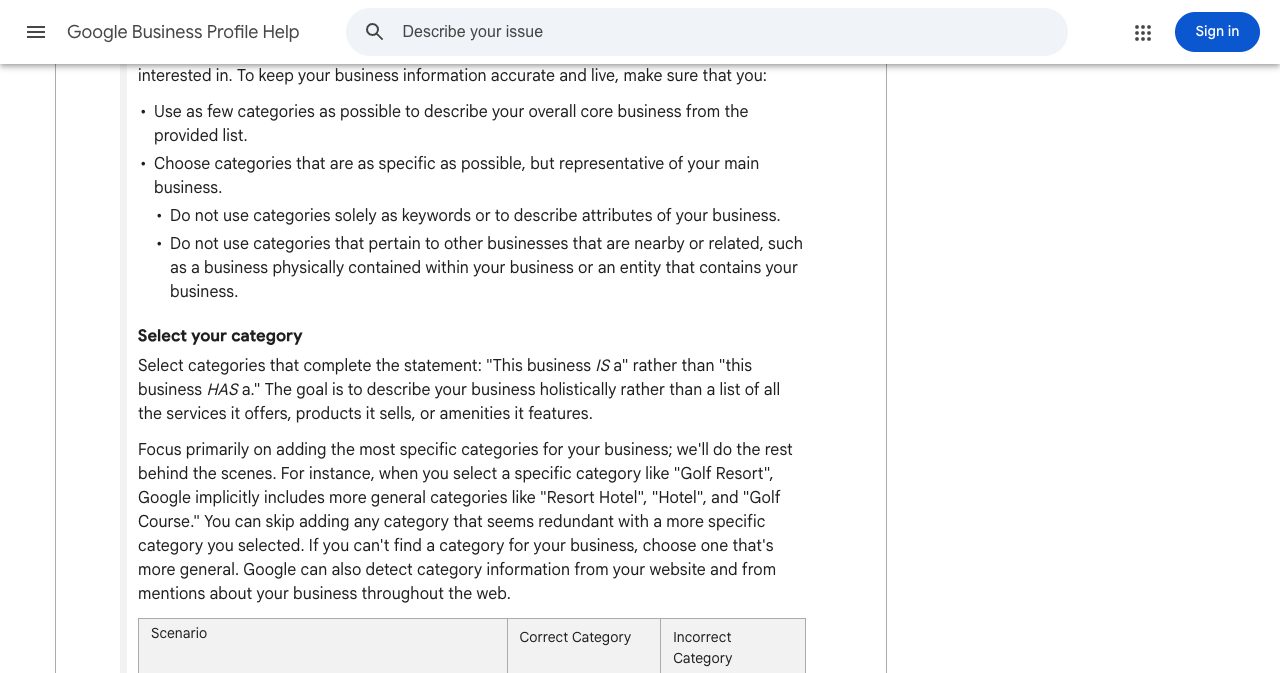
The same page explains why the narrow choice wins. Pick "Golf Resort" and Google includes "Resort Hotel", "Hotel" and "Golf Course" behind the scenes; pick "Hotel" and the golf searches are gone. It also says Google "can also detect category information from your website and from mentions about your business throughout the web." Every listing that files you the same way adds to that picture.
Software directories rarely go as deep as Google's category list, but the logic carries over:
- Choose the category your buyers browse when they want a tool like yours, not the one that sounds biggest. An invoicing tool for freelancers belongs under finance or invoicing, not under productivity.
- Avoid "Other" unless nothing fits. On SaaSCity, 134 live listings sit there, and almost nobody browses a category called Other.
- Add a second category only for a real second use.
- Write tags in the words people search with. "Invoice generator" beats "financial workflow automation".
- Use the same category words on your homepage, in your title tag and across directories. That consistency turns many small mentions into one clear statement of what you are.
Step 5: Lead with a screenshot of the result
A logo tells a reader you exist. A screenshot tells them what they get. Apple's guidance for App Store pages says that, depending on their orientation, "the first one to three images will appear in search results when no app preview is available, so make sure these highlight the essence of your app."
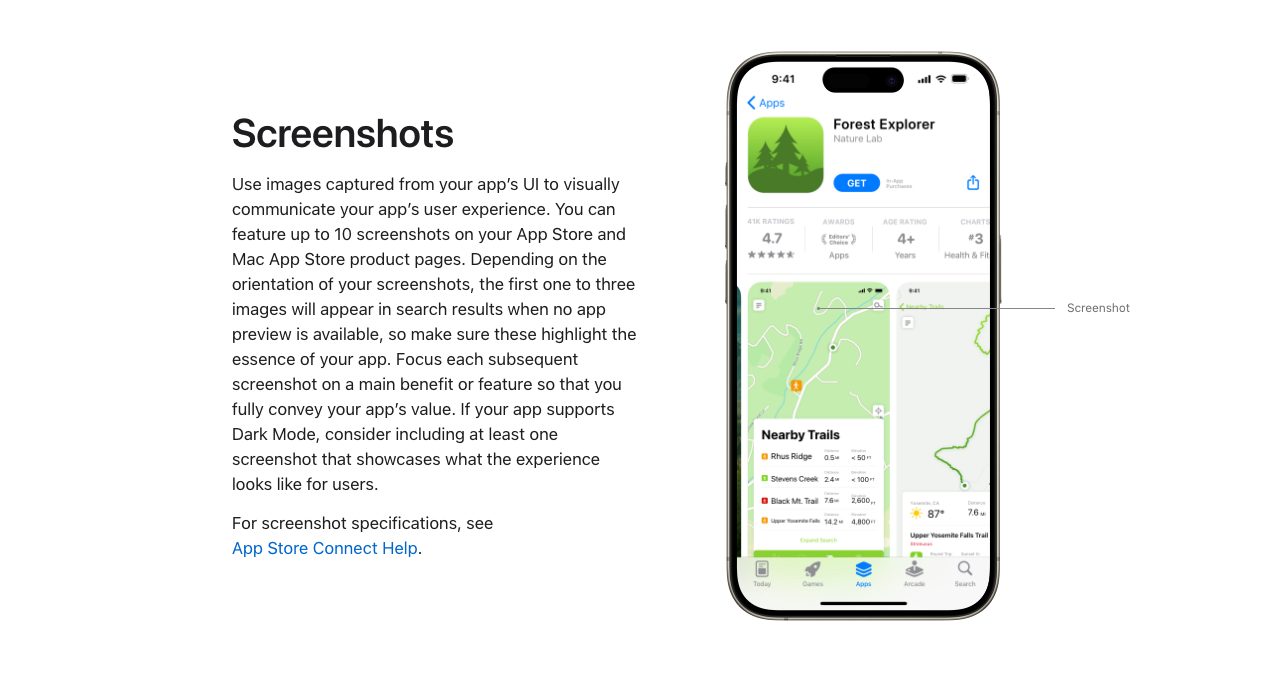
Many software directories work the same way and use the first image as the card thumbnail or the top of the gallery. Order your screenshots the way a good demo goes:
- The result: the staged room, the finished report, the invoice ready to send.
- The main workflow, on one screen.
- What makes you different: the integrations, the privacy setting, the comparison view.
- The pricing page, if your pricing is simple.
Use 16:9 images at 1920 × 1080 or 1280 × 720. Crop out the browser bars and your desktop, and fill the product with realistic data instead of empty states and "Lorem ipsum". If the directory supports captions, write one line per image that says what it shows, in the same plain words as the description.
File names and alt text are worth the extra minute. Google's image guidance says it "uses alt text along with computer vision algorithms and the contents of the page to understand the subject matter of the image", and that a filename gives "very light clues" as well.
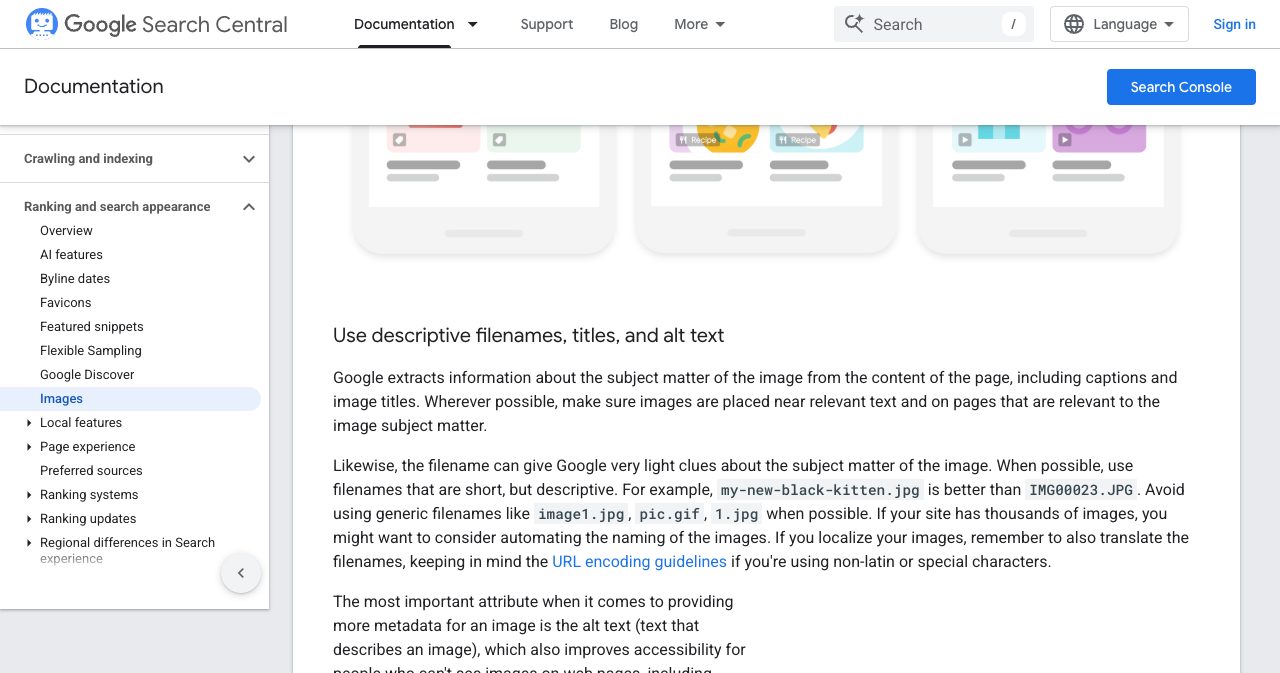
A file named tinty-staged-living-room.png says something before anyone opens it. Screenshot 2026-11-04 at 10.42.13.png says nothing, and some directories publish the file name as it is.
For a local business the same rule means real photos: the storefront, so people recognize it when they arrive, the inside, the team and the work itself. A lone logo and a stock photo say less than one sharp picture of the actual place.
Step 6: Know what schema the listing page carries
Most directories add structured data to their listing pages, usually as JSON-LD, and you don't control it. You do control the text it is built from. On SaaSCity, every live listing carries a SoftwareApplication node, and your tagline becomes its description. This is TINTY's listing in the Schema Markup Validator:
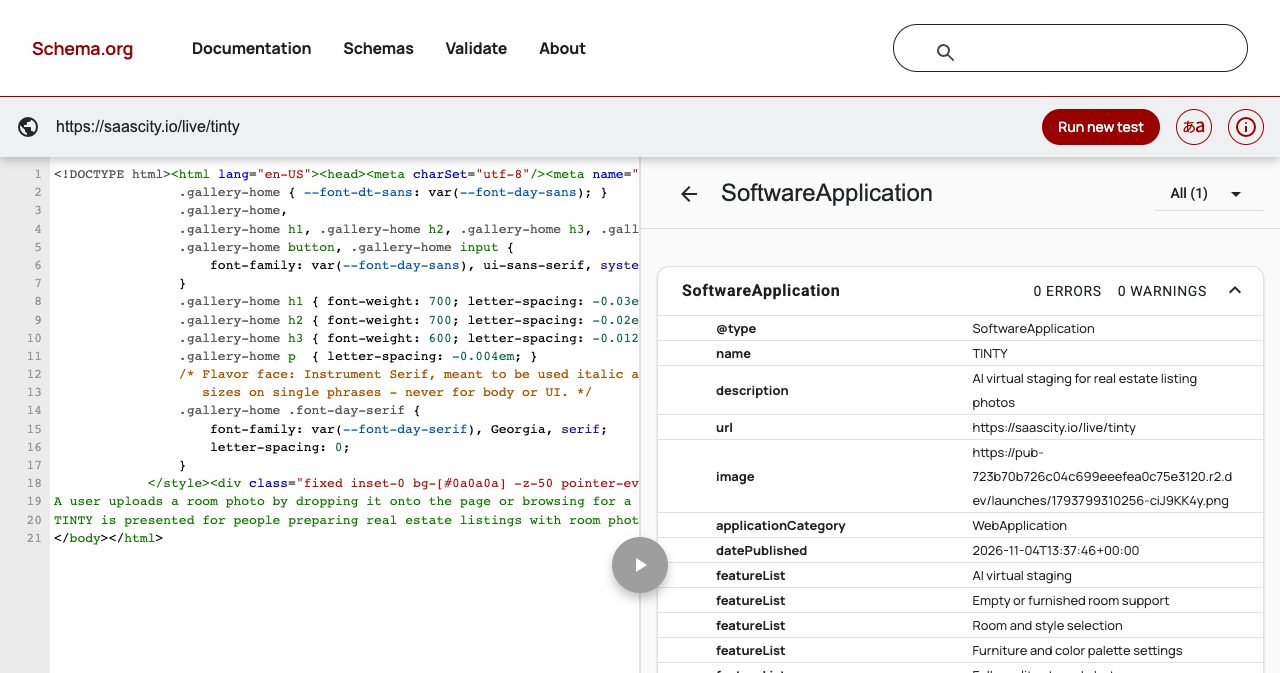
The listing's key features become the featureList, and a $0 offer is added only when the listing says there is a free way in (free, freemium or a free trial). So a vague tagline reaches search engines twice: once in the visible text and once in the markup that describes the product to machines.
Two of Google's rules apply to anyone marking up a product or a listing.
The first is what Google needs before it shows a software rich result. Its SoftwareApplication documentation requires name, offers.price and either an aggregateRating or a review.
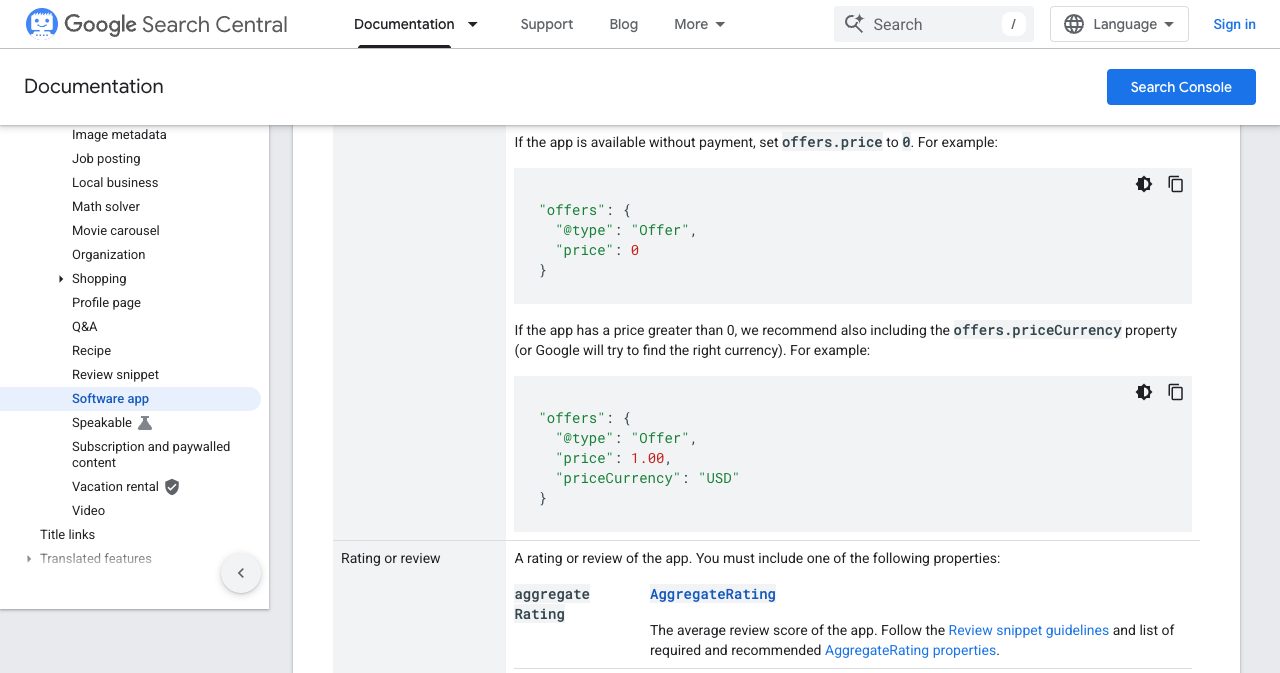
The second is where the ratings come from. Ratings "must be sourced directly from users," and when the entity being reviewed controls the reviews about itself, its pages that use LocalBusiness or Organization markup are "ineligible for star review feature."
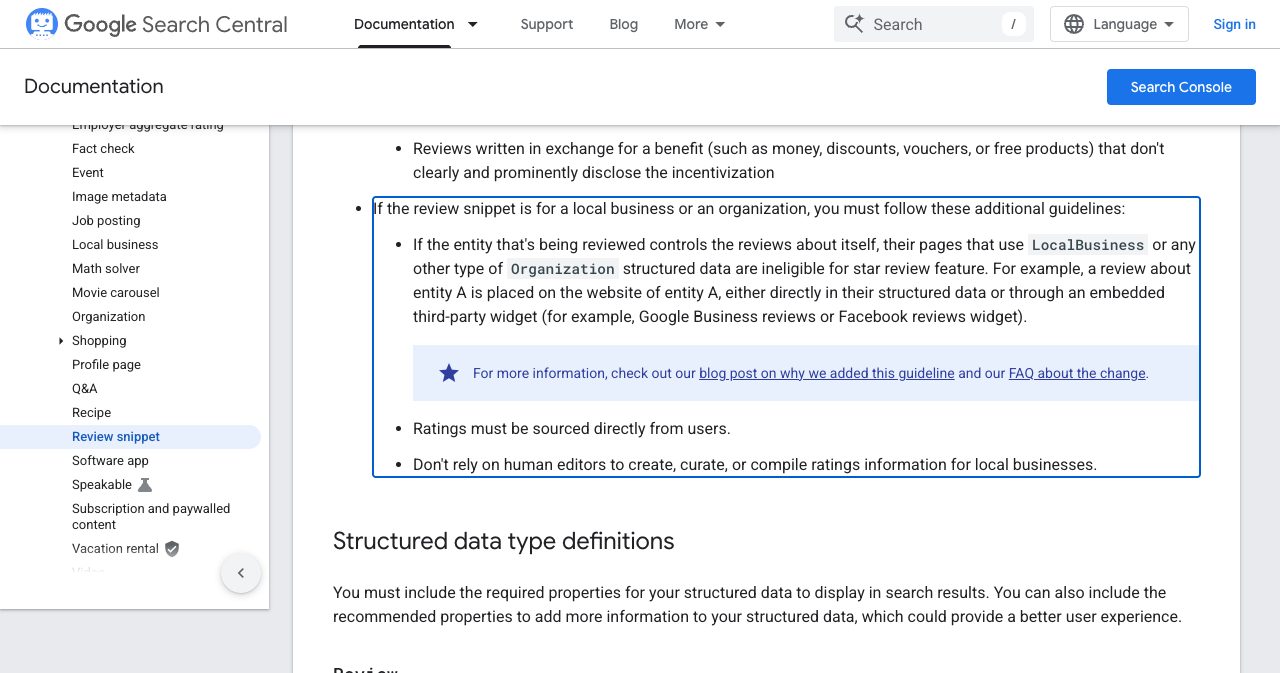
In practice: don't put star ratings on your own homepage from a review widget, and don't ask a directory to mark up ratings it never collected. Ratings belong on sites where real users leave them.
On your own site, make the structured data say what your listings say:
- A SoftwareApplication block (or WebApplication or MobileApplication) on the homepage or product page, with the same name, category words and price as your listings.
- An Organization block with your logo and
sameAslinks to the profiles you keep current: social accounts, Crunchbase, GitHub and your main review profiles. - For a local business, the most specific LocalBusiness subtype that matches your Google category, with the same name, address and phone number as your Business Profile.
A minimal SoftwareApplication block for an example product looks like this:
{
  "@context": "https://schema.org",
  "@type": "SoftwareApplication",
  "name": "Tallyfern",
  "applicationCategory": "FinanceApplication",
  "operatingSystem": "Web",
  "description": "Turns Stripe payouts into bookkeeping for freelancers.",
  "offers": { "@type": "Offer", "price": "0", "priceCurrency": "USD" }
}
Without a rating or review it won't earn a rich result, and that's fine: it still states the facts in a form machines read reliably. Keep every fact in it visible on the page as well, since Google's general guidelines say: "Don't mark up content that is not visible to readers of the page." Test it with Google's Rich Results Test and the Schema Markup Validator. Our JSON-LD guide for SaaS covers the other types worth adding.
Step 7: Keep the facts the same everywhere
Listings drift out of date. Your pricing changes, the homepage gets updated, and forty listings keep the old plan for a year. An AI assistant that reads three of those pages and your homepage now has two prices to choose from, and a buyer may get the old one.
Keep the facts sheet and the three descriptions in one document, and log every listing with its URL and the login you used. When the name, price, category or a main feature changes, update the listings people actually visit first, then the rest. For a local business, the name, address and phone number should match character for character, down to "Street" against "St."
Once a quarter, spend an hour on a check. Search your product's name, open the listings that rank, and ask two AI assistants what your product does and what it costs. Wherever an answer is wrong, find the page it came from and fix that page.
The listing checklist
- A tagline under 60 characters, with the category or outcome in the first three words, plus a 30-character version.
- A first sentence in every description that says what the product is and who it is for.
- One number you can prove, and the pricing model with the lowest price.
- A long description of 150 to 300 words, in two or three variants with identical facts.
- The narrowest true category, three to five tags in buyers' words, and "Other" only as a last resort.
- Three to five 16:9 screenshots, the result first, with descriptive file names and alt text.
- JSON-LD on your own site that matches the listings, with no self-served ratings.
- The same name, price and category on every listing, updated when they change.
When there are fifty forms to fill
One good listing takes an afternoon. Fitting it to fifty forms, each with its own limits, categories and image sizes, takes a lot longer. The easiest place to try your kit is SaaSCity itself: submit your product and a person reviews the listing before it goes live. The form drafts from your site, counts your words and tells you when a free listing is too thin to be indexed.
If you'd rather hand the rest off, our directory submission service submits your product to the directories in the package you choose, with one submission per directory written for its fields, and emails you a report of every submission with its status and a screenshot. Each package guarantees an increase in your site's Domain Rating as Ahrefs measures it. We don't promise rankings or traffic, and each directory still decides what it lists. Either way, the facts sheet from step 1 is the part only you can write, so start there.
FAQ
How do you write a directory listing that gets clicks?
Start with a tagline that says what the product does and for whom in under 60 characters, with the category or outcome in the first three words. Open the description with what it is and who it is for, add the outcome and one fact you can prove, pick the narrowest category that is true, and put a screenshot of the result first.
How long should a directory listing description be?
Match the field. Write a short version of about 160 characters, a medium one of 400 to 600 characters and a long one of 150 to 300 words, all in the same order so the first sentence works alone. Google Business Profile allows 750 characters and Product Hunt's description 260. On SaaSCity, a free listing needs 80 words of the maker's own writing to be indexed.
What makes a good tagline for a SaaS directory listing?
A good tagline names the category or outcome and the audience in 40 to 60 characters, for example "AI virtual staging for real estate listing photos". Avoid openers that tell a reader nothing, such as "AI-powered" or "all-in-one", don't repeat the product name the card already shows, and use a number only if it is true and checkable.
How many characters can a Google Business Profile description have?
750 characters. Google's help page says not to include URLs or HTML and to focus on the business itself rather than promotions, prices or sales. It suggests covering what you offer, what makes you special and how long you have been in business. Only the opening part shows before a reader expands it, so put the essentials first.
Should I use the same description on every directory?
Keep the facts the same and vary the wording. Write two or three versions of the long description that give the same name, price, audience and category in different sentences. Identical paragraphs on many sites tend to be filtered as duplicates, while inconsistent facts confuse search engines and AI assistants about what you sell.
Which category should I choose for a directory listing?
The most specific category that is true of the product as a whole. Google's test for Business Profiles is to complete the sentence "This business IS a" rather than "this business HAS a". On software directories, pick the category your buyers browse, avoid "Other", and use the same category words on your site and on every listing.
Do directory listings help you get cited by ChatGPT, Perplexity or Google AI Overviews?
They can. Listings are mentions of your brand on other sites, and Ahrefs' study of 75,000 brands found that branded web mentions correlated more strongly with appearing in AI Overviews (0.664) than the number of backlinks did (0.218), though a correlation is not proof. Listings get quoted when they state plain facts: what the product is, who it serves, its price and where it runs.
What schema markup does a directory listing need?
Directories add their own markup, often SoftwareApplication for software or LocalBusiness for local firms, and build it from what you write. On SaaSCity, your tagline becomes the SoftwareApplication description. On your own site, add SoftwareApplication and Organization JSON-LD that match your listings. Google's software rich result needs a name, a price and a real rating or review.
How many screenshots should a directory listing have?
Three to five, at 16:9, with the result first. Many directories use the first image as the thumbnail, and Apple says the first one to three App Store screenshots appear in search results when there is no preview video. Use realistic data, crop out the browser bars, and give each file a descriptive name and alt text.
Why is my directory listing not indexed by Google?
Usually because the page is thin, near-identical to other pages, or the directory chose to keep it out of the index. Check with a site: search for the directory's domain and your product name. On SaaSCity, a free listing needs 80 words of the maker's own writing to be indexed, while paid and badge-verified listings are always indexed.
Get your SaaS in front of founders
List your product on SaaSCity - a permanent listing, real discovery, and a dofollow backlink from a high-DR directory. Free with a badge; upgrade for a building on the live city map.